
Solved Windows Update: 2026-07 Security Update (KB5101650) (26100.8875)


Silkcat

Member
Local time
5:14 PM
Posts
20
OS
Windows 11 Home Version 24H2 OS build 26100.8875
Hello,

I started the download/installation yesterday about 1pm and now it has been almost 24 hours and the installation is at 99% which has been there for almost an hour, and it took quite sometime to download three updates to begin with. Why did it take so long this time? Normally I don't have any issues, the previous updates usually took about 5 hours but this time is one of the longest.

Any comments/suggestions are much appreciated.

Thank you.

PS: The download/installation for .NET Framework Security and Windows Malicious Software Removal Tool x64 were pretty fast though.
 
Windows Build/Version
Windows 11 Home / Version 24H2 / OS build: 26100.8655
Last edited:

My Computer My Computer

At a glance

Windows 11 Home Version 24H2 OS build 26100.8875Intel(R) Core(TM) i5-1035G1 CPU @ 1.00GHz (1....32.0 GBIntel(R) UHD Graphics (128 MB)
OS
Windows 11 Home Version 24H2 OS build 26100.8875
Computer type
Laptop
Manufacturer/Model
Dell Inspiron 3793
CPU
Intel(R) Core(TM) i5-1035G1 CPU @ 1.00GHz (1.19 GHz)
Memory
32.0 GB
Graphics Card(s)
Intel(R) UHD Graphics (128 MB)
Monitor(s) Displays
Internal Dell Display and Dell P2715Q
Screen Resolution
1920 x 1080, 60.13 Hz / 1920 x 1080, 60 Hz
Hard Drives
Seagate ST1000LM035-1RK172
Keyboard
Dell Laptop Keyboard
Mouse
Logitech M705
Browser
Google Chrome, Firefox
Antivirus
AVG, Malwarebytes, SuperAntispyware, CCleaner
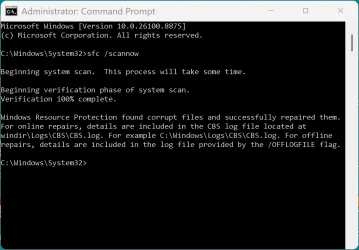
I had this nightmare update I think it tried to sneak into my computer, I don't have the auto update on... my computer did a ctd several times (not all ctd in a row). I checked events, had the FLTMGR fail. Then also ran after more updates, then came a fail a while later. I ran a scan. My computer version winver 24H2 (OS Build 26100.8875). These updates a huge PIA.
 

Attachments

  • 2026-07-15 12_42_11-Administrator_ Command Prompt.webp
    2026-07-15 12_42_11-Administrator_ Command Prompt.webp
    66.3 KB · Views: 1

My Computer My Computer

At a glance

Win11i9-1390064 GBNvidia RTX 5070 TI OC
OS
Win11
Computer type
PC/Desktop
Manufacturer/Model
Asus Home built
CPU
i9-13900
Motherboard
ASUS Strix Z790-H
Memory
64 GB
Graphics Card(s)
Nvidia RTX 5070 TI OC
Monitor(s) Displays
Sony 55"
Hard Drives
SSD
PSU
850 watt EVGA
Case
Cooler Master Haf 932
Cooling
CoolerMaster
Keyboard
RedDragon
Mouse
CoolerMaster
Internet Speed
300/300
Antivirus
Defender
Other Info
VR, Virtual Reality
Update: As of now, the Security update is still at 99%, I didn't get any error messages, guess it's still installing as I understand there are 570 security flaws to be patched. I don't want to do a forced restart yet even though sometimes the update will be finished during restarting, guess I will wait little bit longer.
 

My Computer My Computer

At a glance

Windows 11 Home Version 24H2 OS build 26100.8875Intel(R) Core(TM) i5-1035G1 CPU @ 1.00GHz (1....32.0 GBIntel(R) UHD Graphics (128 MB)
OS
Windows 11 Home Version 24H2 OS build 26100.8875
Computer type
Laptop
Manufacturer/Model
Dell Inspiron 3793
CPU
Intel(R) Core(TM) i5-1035G1 CPU @ 1.00GHz (1.19 GHz)
Memory
32.0 GB
Graphics Card(s)
Intel(R) UHD Graphics (128 MB)
Monitor(s) Displays
Internal Dell Display and Dell P2715Q
Screen Resolution
1920 x 1080, 60.13 Hz / 1920 x 1080, 60 Hz
Hard Drives
Seagate ST1000LM035-1RK172
Keyboard
Dell Laptop Keyboard
Mouse
Logitech M705
Browser
Google Chrome, Firefox
Antivirus
AVG, Malwarebytes, SuperAntispyware, CCleaner
2nd Update : I gave up waiting since it has been more than 24 hours, I did a hard restart and it installed the .Net Framework and then went to my desktop. I checked the update and it started downloading the Security update all over again, will see how long will it take this time . Sometimes these updates are a pain .
 

My Computer My Computer

At a glance

Windows 11 Home Version 24H2 OS build 26100.8875Intel(R) Core(TM) i5-1035G1 CPU @ 1.00GHz (1....32.0 GBIntel(R) UHD Graphics (128 MB)
OS
Windows 11 Home Version 24H2 OS build 26100.8875
Computer type
Laptop
Manufacturer/Model
Dell Inspiron 3793
CPU
Intel(R) Core(TM) i5-1035G1 CPU @ 1.00GHz (1.19 GHz)
Memory
32.0 GB
Graphics Card(s)
Intel(R) UHD Graphics (128 MB)
Monitor(s) Displays
Internal Dell Display and Dell P2715Q
Screen Resolution
1920 x 1080, 60.13 Hz / 1920 x 1080, 60 Hz
Hard Drives
Seagate ST1000LM035-1RK172
Keyboard
Dell Laptop Keyboard
Mouse
Logitech M705
Browser
Google Chrome, Firefox
Antivirus
AVG, Malwarebytes, SuperAntispyware, CCleaner
Final Update :

This time it only took 1-1/2 hours to download and install, then I restarted my laptop and it started the updating process. After almost 2 hours and several reboots, the update finally finished.

I don't know whats the problem with the first try, but for the 2nd try, I did disable my AVG Anti-virus as well as Malwarebytes, don't know if that has anything to do with it. I'm glad it's all over.
 

My Computer My Computer

At a glance

Windows 11 Home Version 24H2 OS build 26100.8875Intel(R) Core(TM) i5-1035G1 CPU @ 1.00GHz (1....32.0 GBIntel(R) UHD Graphics (128 MB)
OS
Windows 11 Home Version 24H2 OS build 26100.8875
Computer type
Laptop
Manufacturer/Model
Dell Inspiron 3793
CPU
Intel(R) Core(TM) i5-1035G1 CPU @ 1.00GHz (1.19 GHz)
Memory
32.0 GB
Graphics Card(s)
Intel(R) UHD Graphics (128 MB)
Monitor(s) Displays
Internal Dell Display and Dell P2715Q
Screen Resolution
1920 x 1080, 60.13 Hz / 1920 x 1080, 60 Hz
Hard Drives
Seagate ST1000LM035-1RK172
Keyboard
Dell Laptop Keyboard
Mouse
Logitech M705
Browser
Google Chrome, Firefox
Antivirus
AVG, Malwarebytes, SuperAntispyware, CCleaner

I found when things like that start happening, I go directly to the MUC, enter the KB# and start downloading it directly (as a standalone exe or cab file) can help speed things up a bit.


My Computers My Computers

  • At a glance

    Windows 11 Pro 25H2 build: (26200.7623)32GB
    OS
    Windows 11 Pro 25H2 build: (26200.7623)
    Computer type
    Laptop
    Manufacturer/Model
    Microsoft Surface Pro
    Memory
    32GB
  • At a glance

    Microsoft 25H2 ProIntel Core Ultra 764GBIntel Integrated Graphics
    Operating System
    Microsoft 25H2 Pro
    Computer type
    Laptop
    Manufacturer/Model
    Dell Pro 14 - PC14250
    CPU
    Intel Core Ultra 7
    Memory
    64GB
    Graphics card(s)
    Intel Integrated Graphics
    Hard Drives
    Micron 1TB SSD
I don't know whats the problem with the first try, but for the 2nd try, I did disable my AVG Anti-virus as well as Malwarebytes, don't know if that has anything to do with it. I'm glad it's all over.
Doubtless, the AV running didn't help things! That's the nice thing about Windows Defender, Windows knows when to get out of the way.
 

My Computers My Computers

  • At a glance

    Win 11 Pro 25H2, Build 26200.8875Intel Core i5 1450064GB DDR4GeForce RTX 4060
    OS
    Win 11 Pro 25H2, Build 26200.8875
    Computer type
    PC/Desktop
    Manufacturer/Model
    Home Brew
    CPU
    Intel Core i5 14500
    Motherboard
    Gigabyte B760M G P WIFI
    Memory
    64GB DDR4
    Graphics Card(s)
    GeForce RTX 4060
    Sound Card
    Chipset Realtek
    Monitor(s) Displays
    LG 45" Ultragear, Acer 24" 1080p
    Screen Resolution
    5120x1440, 1920x1080
    Hard Drives
    Crucial P310 2TB 2280 PCIe Gen4 3D NAND NVMe M.2 SSD (O/S)
    Silicon Power 2TB US75 NVMe PCIe Gen4 M.2 2280 SSD (backup)
    Crucial BX500 2TB 3D NAND (2nd backup)
    Seagate 4TB Ironwolf, rotating HDD archive files
    External off-line backup Drives: 2 NVMe 4TB drives in external enclosures
    PSU
    Thermaltake Toughpower GF3 750W
    Case
    LIAN LI LANCOOL 216 E-ATX PC Case
    Cooling
    Lots of fans!
    Keyboard
    Microsoft Comfort Curve 2000
    Mouse
    Logitech G305
    Internet Speed
    Verizon FiOS 1GB
    Browser
    Firefox
    Antivirus
    Malware Bytes & Windows Defender Security
  • At a glance

    Win 11 Pro 25H2, Build 26200.8875Intel Core i5 1440032GB DDR5Intel 700 Embedded GPU
    Operating System
    Win 11 Pro 25H2, Build 26200.8875
    Computer type
    PC/Desktop
    Manufacturer/Model
    Home Brew
    CPU
    Intel Core i5 14400
    Motherboard
    Gigabyte B760M DS3H AX
    Memory
    32GB DDR5
    Graphics card(s)
    Intel 700 Embedded GPU
    Sound Card
    Realtek Embedded
    Monitor(s) Displays
    27" HP 1080p
    Screen Resolution
    1920x1080
    Hard Drives
    Crucial P310 2TB 2280 PCIe Gen4 eD NAND PCIe SSD
    Samsung EVO 990 2TB NVMe Gen4 SSD
    Samsung 2TB SATA SSD
    PSU
    Thermaltake Smart BM3 650W
    Case
    Okinos Micro ATX Case
    Cooling
    Fans
    Keyboard
    Microsoft Comfort Curve 2000
    Mouse
    Logitech G305
    Internet Speed
    Verizon FiOS 1GB
    Browser
    Firefox
    Antivirus
    Malware Bytes & Windows Defender Security
  • Nimo N171 17" Laptop, (Intel i3-1215U, 16GB RAM, 2TB NVMe, Win11 Pro)
    Acemagic Vista Mini PC V1 (Intel N150, 16GB RAM, 1TB NVMe, Win11 Pro)
    HP ENVY h8-1540t, (24GB RAM, 2TB SSD, 2TB HDD, Win11 Pro)
Probably the antivirus were interfering. I installed that update in a reasonable time, didn't take long. I see no issues so far, knock on wood.
 

My Computers My Computers

  • At a glance

    Windows 11 Pro 23H2 (5699), 25H2 (8875)Mobile DualCore Intel Core 2 Duo T7250, 2000 MHz4GBMobile Intel(R) GMA 4500M (Mobile 4 series)
    OS
    Windows 11 Pro 23H2 (5699), 25H2 (8875)
    Computer type
    Laptop
    Manufacturer/Model
    Acer Extensa 5630EZ
    CPU
    Mobile DualCore Intel Core 2 Duo T7250, 2000 MHz
    Motherboard
    Acer Extensa 5630
    Memory
    4GB
    Graphics Card(s)
    Mobile Intel(R) GMA 4500M (Mobile 4 series)
    Sound Card
    Realtek ALC268 @ Intel 82801IB ICH9 - High Definition Audio Controller
    Monitor(s) Displays
    1
    Screen Resolution
    1280x800
    Hard Drives
    Samsung SSD 850 EVO 250GB SATA Device (250 GB, SATA-III)
    Internet Speed
    VDSL 50 Mbps
    Browser
    MICROSOFT EDGE
    Antivirus
    WINDOWS DEFENDER
    Other Info
    Legacy MBR installation, no TPM, no Secure Boot, no WDDM 2.0 graphics drivers, no SSE4.2, cannot get more unsupported ;) This is only my test laptop. I had installed Windows 11 here before upgrading my main PC. For my main PC I use everyday see my 2nd system specs.
  • At a glance

    Windows 11 Pro v25H2 (build 26200.8875)Intel Core-i7 3770 3.40GHz s1155 (3rd generat...2x Kingston Hyper-X Blu 8GB DDR3-1600GIGABYTE GeForce RTX 3050 WINDFORCE OC V2 6GB...
    Operating System
    Windows 11 Pro v25H2 (build 26200.8875)
    Computer type
    PC/Desktop
    Manufacturer/Model
    Custom-built PC
    CPU
    Intel Core-i7 3770 3.40GHz s1155 (3rd generation)
    Motherboard
    Asus P8H61 s1155 ATX
    Memory
    2x Kingston Hyper-X Blu 8GB DDR3-1600
    Graphics card(s)
    GIGABYTE GeForce RTX 3050 WINDFORCE OC V2 6GB (GV-N3050WF2OCV2-6GD)
    Sound Card
    Realtek HD audio (ALC887)
    Monitor(s) Displays
    Sony Bravia KDL-19L4000 19" LCD TV via VGA
    Screen Resolution
    1440x900 32-bit 60Hz
    Hard Drives
    WD Blue SA510 2.5 1000GB SSD as system disk, Western Digital Caviar Purple 4TB SATA III (WD40PURZ) as second
    PSU
    Thermaltake Litepower RGB 550W Full Wired
    Case
    SUPERCASE MIDI-TOWER
    Cooling
    Deepcool Gamma Archer CPU cooler, 1x 8cm fan at the back
    Keyboard
    Mitsumi 101-key PS/2
    Mouse
    Sunnyline OptiEye PS/2
    Internet Speed
    100Mbps
    Browser
    Microsoft Edge, Mozilla Firefox
    Antivirus
    Microsoft Windows Defender
    Other Info
    Legacy BIOS (MBR) installation, no TPM, no Secure Boot, WDDM 3.0 graphics drivers, WEI score 7.4
Back
Top Bottom




