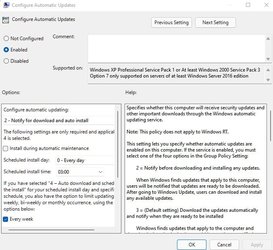
windows update ignored group policy. installed update and restarted automatically anyway


link626

Well-known member
Local time
10:09 PM
Posts
36
OS
11
win11 pro

KB5010386 was just installed and my pc auto rebooted overnight

even though my group policy was set to "do not restart while user is logged in," which I was.
Also, my group policy is set to notify updates only. No auto downloading.
Yet, this update was somehow downloaded. I did not approve any downloads.

Does windows update now ignore group policy?
or how do I have to set it in order to disable windows update?

q.jpgqq.jpg
 

My Computer My Computer

At a glance

11
OS
11
Several years ago there was a statement from Microsoft about updates that there would be some that bypassed a user's settings about delaying or avoiding, things they determined were more important that the usual second Tuesday Build updates or twice-yearly Version Upgrades.
 

My Computers My Computers

  • At a glance

    Win11 Pro RTM Version 24H2 Build 26100.4202Intel Core i5 11th Gen. 2.40GHz12GB
    OS
    Win11 Pro RTM Version 24H2 Build 26100.4202
    Computer type
    Laptop
    Manufacturer/Model
    Dell Vostro 3400
    CPU
    Intel Core i5 11th Gen. 2.40GHz
    Memory
    12GB
    Hard Drives
    256GB SSD NVMe M.2
  • At a glance

    Win11 Pro RTM Version 24H2 Build 26100.4202Intel Core i5 10th Gen. 2.90GHz16GBOnboard, no VGA, using a DisplayPort-to-VGA a...
    Operating System
    Win11 Pro RTM Version 24H2 Build 26100.4202
    Computer type
    PC/Desktop
    Manufacturer/Model
    Dell Vostro 5890
    CPU
    Intel Core i5 10th Gen. 2.90GHz
    Memory
    16GB
    Graphics card(s)
    Onboard, no VGA, using a DisplayPort-to-VGA adapter
    Monitor(s) Displays
    24" Dell
    Hard Drives
    512GB SSD NVMe, 4TB Seagate HDD
    Browser
    Firefox, Edge
    Antivirus
    Windows Defender/Microsoft Security
Last edited:

My Computers My Computers

  • At a glance

    Windows 11 ProIntel Core i9 9900XGSkill Trident Z RGB 32GB 3600 16-16-16-36 (F...EVGA RTX 3080 12GB FTW3 Ultra Gaming (12G-P5-...
    OS
    Windows 11 Pro
    Computer type
    PC/Desktop
    Manufacturer/Model
    Skylake Special X299
    CPU
    Intel Core i9 9900X
    Motherboard
    Asus ROG Strix X299-E Gaming II
    Memory
    GSkill Trident Z RGB 32GB 3600 16-16-16-36 (F4-3600C16Q-32GTZR)
    Graphics Card(s)
    EVGA RTX 3080 12GB FTW3 Ultra Gaming (12G-P5-4877-KL)
    Sound Card
    Supreme FX
    Monitor(s) Displays
    Asus PG279Q
    Screen Resolution
    2560 x 1440 165Hz
    Hard Drives
    Samsung 980 Pro 500GB x2, Seagate Barracuda 4TB x2, Western Digital Black 4TB x1
    PSU
    EVGA 1200 P2, EVGA Black Custom Braided Cables
    Case
    Thermaltake View 31 Tempered Glass Limited Edition
    Cooling
    Corsair H115i, Thermal Grizzly Kryonaut
    Keyboard
    Logitech G910 Orion Spark
    Mouse
    Logitech G700s, Asus ROG GX860 Buzzard
    Internet Speed
    Verizon Fios Quantum Gateway 75/75
    Browser
    Edge
    Antivirus
    Windows Defender, Malwarebytes 4.5.2
    Other Info
    Thermaltake Riing Duo 14 x3, Thermaltake Riing Plus 14 x2, Corsair HS70 Pro Wireless Headset
  • At a glance

    Windows 10 ProIntel Core i7 6700KGSkill Trident Z RGB 16GB 3600 16-16-16-36 (F...EVGA GTX 980 Ti SC x2, EVGA Pro SLI Bridge
    Operating System
    Windows 10 Pro
    Computer type
    PC/Desktop
    Manufacturer/Model
    Skylake Special Z170
    CPU
    Intel Core i7 6700K
    Motherboard
    Asus Sabertooth Z170 Mark 1
    Memory
    GSkill Trident Z RGB 16GB 3600 16-16-16-36 (F4-3600C16D-16GTZR)
    Graphics card(s)
    EVGA GTX 980 Ti SC x2, EVGA Pro SLI Bridge
    Sound Card
    Realtek High Definition
    Monitor(s) Displays
    AOC G2460PG
    Screen Resolution
    1920 x 1080 144Hz
    Hard Drives
    Samsung 870 Evo 500GB, Seagate Barracuda 4TB x2
    PSU
    EVGA 1000 P2, EVGA White Custom Braided Cables
    Case
    Corsair Vengeance C70 Gunmetal Black
    Cooling
    Corsair H100i v2, Corsair ML120 x2, Thermal Grizzly Kryonaut
    Keyboard
    Logitech G910 Orion Spectrum
    Mouse
    Logitech G500s
    Internet Speed
    Verizon Fios Quantum Gateway 75/75
    Browser
    Edge
    Antivirus
    Windows Defender, Malwarebytes 4.5.2
    Other Info
    Corsair SP120 x4, LG Blu-ray Drive, Durabrand HT-395 100 Watt Dolby Digital Amp
@link626


Hello, and welcome to ElevenForum.

Although I cannot say with exact certainty, as it is Win11 (which I am not currently running). This same question was asked just yesterday on TenForums.

I can verify, that if it is deemed a serious security update by MS. It will be forced through. (At least on Win 10 OS)


Take care, best of luck.
 

My Computer My Computer

At a glance

Windows 10 Pro 64-bit 22H2 19045.4046Intel i7-3770 @ 3.40GHz8 GBAMD 7500 Radeon HD Series
OS
Windows 10 Pro 64-bit 22H2 19045.4046
Computer type
PC/Desktop
Manufacturer/Model
Dell/Vostro 470 (Year 2012)
CPU
Intel i7-3770 @ 3.40GHz
Memory
8 GB
Graphics Card(s)
AMD 7500 Radeon HD Series
Sound Card
Realtek Hi-Def Audio
Monitor(s) Displays
Dell U2412M
Hard Drives
1 TB 7200 HDD
Keyboard
Dell/USB
Mouse
Dell/USB
Internet Speed
100/10
Browser
Edge
Antivirus
Windows Security/MalwareBytes Premium
I had this happen this morning. It restarted at 3:15 AM despite NoAutoRebootWithLoggedOnUsers being present and set to 1 in the registry and AUOptions set. Is there really no way of preventing Windows 11 auto restarting without completely disabling Windows built-in auto updates and using 3rd party software?
 

My Computer My Computer

At a glance

Windows 11 ProIntel Celeron N51058GBIntel UHD Graphics (integrated)
OS
Windows 11 Pro
Computer type
PC/Desktop
CPU
Intel Celeron N5105
Memory
8GB
Graphics Card(s)
Intel UHD Graphics (integrated)
So I wake up to find that Microsoft have restarted my PC yet again without my consent. I am fed up with this now and have now disabled automatic updates. I don't care if that means my PC gets out of date. I don't want it restarting all the time without my permission. It's absurd it still auto restarts despite the policy being set to to NOT auto restart. The no auto restart policy should NOT be ignored yet Windows 11 completely ignores it.
 

My Computer My Computer

At a glance

Windows 11 ProIntel Celeron N51058GBIntel UHD Graphics (integrated)
OS
Windows 11 Pro
Computer type
PC/Desktop
CPU
Intel Celeron N5105
Memory
8GB
Graphics Card(s)
Intel UHD Graphics (integrated)

Latest Support Threads

Back
Top Bottom