
Windows update installing same monthly update after I i have installed it manually


haluk

New member
Local time
12:45 PM
Posts
1
OS
Windows 11
Hi all

I have been experiencing this problem for a few months- I dont know why but windows update update package very slow, really slow ( my internet connection is not so bad) - so I download monthly updates from windows update catalog and double click and install manually - then when I check updates on windows setting after I download and install update manually something strange happens: , windows starts to donwload exact same update - I cancel windows update and double click update setup file to check If it was installed correctly- windows warns me : this update has already beem installed on your computer - how can I fix it? Windows 11 prp 25H2 - OS buid number 26200.7462 Thanks in advance - (images added there writes this update has already been installed and windows update installing same update)
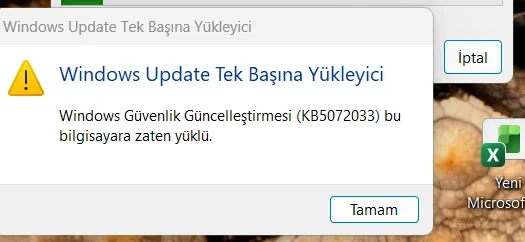
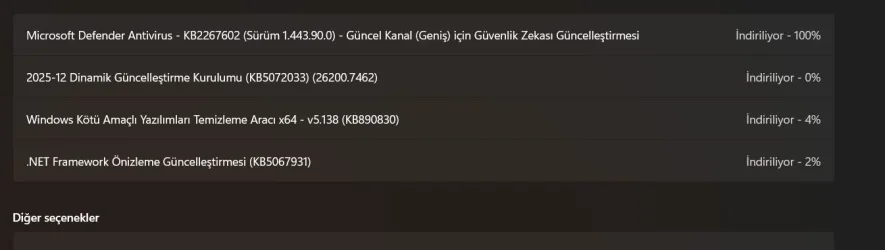
Ekran görüntüsü 2025-12-13 191218.webpEkran görüntüsü 2025-12-13 190129.webp
 

My Computer

System One

  • OS
    Windows 11
    Computer type
    Laptop
    Manufacturer/Model
    hp 15-fc0
    CPU
    amd ryzen7 7730u withnradeon graphics
    Memory
    16GB
    Other Info
    Edisyon Windows 11 Pro
    Sürüm 25H2
    Yüklenme tarihi ‎7.‎10.‎2025
    İS derlemesi 26200.7462
    Özellik Windows Özellik Deneyimi Paketi 1000.26100.275.0
Hi all

I have been experiencing this problem for a few months- I dont know why but windows update update package very slow, really slow ( my internet connection is not so bad) - so I download monthly updates from windows update catalog and double click and install manually - then when I check updates on windows setting after I download and install update manually something strange happens: , windows starts to donwload exact same update - I cancel windows update and double click update setup file to check If it was installed correctly- windows warns me : this update has already beem installed on your computer - how can I fix it? Windows 11 prp 25H2 - OS buid number 26200.7462 Thanks in advance - (images added there writes this update has already been installed and windows update installing same update)
Hi & welcome,
You need to use the script to reset the windows update components.


My Computers

System One System Two

  • OS
    All Branches but Release
    Computer type
    Laptop
    Manufacturer/Model
    Acer Nitro ANV15-51
    CPU
    AMD Ryzen 7 7735HS 3200-4500 Mhz 8 cores x 2
    Motherboard
    Sportage_RBH
    Memory
    32 GB DDR5
    Graphics Card(s)
    Radeon Graphic / NVIDIA GeForce RTX 4060 8 GB GDDR6
    Sound Card
    AMD/Realtek(R) Audio
    Monitor(s) Displays
    Integrated Monitor (15.3"vis)
    Screen Resolution
    FHD 1920X1080 16:9 144Hz
    Hard Drives
    KINGSTON OM8SEP4512Q-AA 1TB
    Western Digital 256GB
    PSU
    19V DC 6.32 A 120 W
    Cooling
    Dual Fans
    Mouse
    MS Bluetooth
    Internet Speed
    Fiber 1GB Cox -us & 1GB Orange-fr
    Browser
    Edge Canary- Firefox Nightly-Chrome Dev-Chrome Dev
    Antivirus
    Windows Defender
  • Operating System
    Windows 11 Beta
    Computer type
    Laptop
    Manufacturer/Model
    Asus X751BP
    CPU
    AMD A9-9420
    Memory
    8 GB of DDR4
    Graphics card(s)
    AMD Radeon R5
    Screen Resolution
    1600x900
    Hard Drives
    Seagate 1 TB
In case a reset of the Windows update components does not fix the underlying problems:


1) Open administrative command prompt and copy and paste:

msdt.exe -id WindowsUpdateDiagnostic

Post a share link.

(Some of the Windows troubleshooters were deprecated.)


2) Run get windows update list:


Post a share link.


My Computer

System One

  • OS
    Windows 10
    Computer type
    Laptop
    Manufacturer/Model
    HP
    CPU
    Intel(R) Core(TM) i7-4800MQ CPU @ 2.70GHz
    Motherboard
    Product : 190A Version : KBC Version 94.56
    Memory
    16 GB Total: Manufacturer : Samsung MemoryType : DDR3 FormFactor : SODIMM Capacity : 8GB Speed : 1600
    Graphics Card(s)
    NVIDIA Quadro K3100M; Intel(R) HD Graphics 4600
    Sound Card
    IDT High Definition Audio CODEC; PNP Device ID HDAUDIO\FUNC_01&VEN_111D&DEV_76E0
    Hard Drives
    Model Hitachi HTS727575A9E364
    Antivirus
    Microsoft Defender
    Other Info
    Mobile Workstation
I always have the same symptoms with my Windows 10 after I've used MSUpdateCatalog to download my cumulative updates.
I keep my network connections metered so WU does not get as far as trying to re-download the CU I've already installed.
I have never found an explanation or a solution. I just put up with this situation.


All the best,
Denis


Welcome to ElevenForum.

It's really worth making time to browse through the ElevenForum Tutorial index - there's a shortcut to it at the top of every ElevenForum page [within the Tutorials dropdown list].
- At the foot of the ElevenForum Tutorial index is a shortcut to download it as a spreadsheet.
- I download a new copy each month.
- By downloading it as a spreadsheet I can benefit from Excel's excellent filtering capabilities when I search for topics of interest.
- ElevenForum tutorials are also listed at Tutorials and there's a shortcut to that at the top of every page.

You can search ElevenForum using the search box in the top-right corner of all ElevenForum webpages or using Advanced Search - ElevenForum
- You can also search ElevenForum threads in many general search engines, such as Google, by adding site:elevenforum.com after your search term. For example,
Taskbar setup site:elevenforum.com
- [This is what the search box in the top-right corner of ElevenForum webpages does automatically]
 

My Computer

System One

  • OS
    Windows 11 Home x64 Version 25H2 Build 26200.8037
Back
Top Bottom




