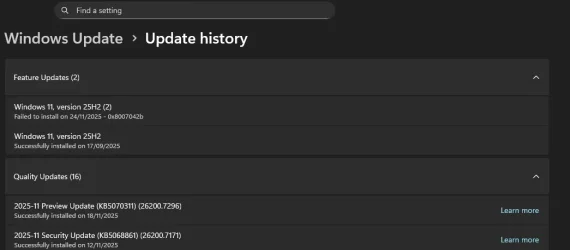
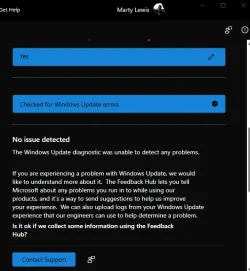
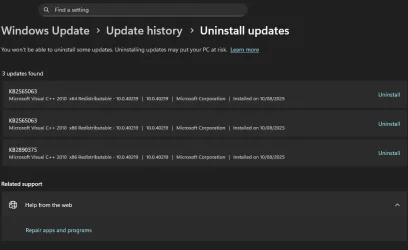
Windows update to 25H2 in WU is appearing while 25H2 is installed


Attachments

  • bandicam 2025-11-24 22-26-14-849.webp
    bandicam 2025-11-24 22-26-14-849.webp
    18.8 KB · Views: 2
  • bandicam 2025-11-24 22-32-37-774.webp
    bandicam 2025-11-24 22-32-37-774.webp
    34.7 KB · Views: 4

My Computers My Computers

  • At a glance

    Windows 11 Pro 25H2 26200.7627Ryzen 7 9800X3DG.Skill Trident Z5 RGB DDR5-6000 32GB (2×16GB...RTX 5080 Palit Gaming Pro
    OS
    Windows 11 Pro 25H2 26200.7627
    Computer type
    PC/Desktop
    Manufacturer/Model
    Gigababyte X870E Aorus Pro Rev 1.1
    CPU
    Ryzen 7 9800X3D
    Motherboard
    Gigababyte X870E Aorus Pro Rev 1.1
    Memory
    G.Skill Trident Z5 RGB DDR5-6000 32GB (2×16GB) CL30 2 x 16gb
    Graphics Card(s)
    RTX 5080 Palit Gaming Pro
    Sound Card
    Steel Series Arctis 1 Gaming Head phones
    Monitor(s) Displays
    Asus ROG Strix 27″ QHD OLED XG27AQDMG & Phillips 272V8
    Screen Resolution
    2560 X1440 27 Inch 240 HZ Asus
    PSU
    Corsair RM1000X
    Case
    Corsair CC750D (CC-9011078) Obsidian 750D Airflow Edition Black Full Tower ATX Case
    Cooling
    Corsair iCUE LINK TITAN 360 RX RGB
    Keyboard
    Razer BlackWidow V4 X Razer™ Yellow Mechanical Switches
    Mouse
    Logitech G502X Plus
    Internet Speed
    HFC 2000/100
    Browser
    Opera GX
    Antivirus
    Kaspersky Plus
  • At a glance

    Windows 11 23H2 22631.2715Intel i5-1135G78 GBIntel Iris Xe Graphics
    Operating System
    Windows 11 23H2 22631.2715
    Computer type
    Laptop
    Manufacturer/Model
    Dell XPS EVO 13.3" RNX9305C01AUSB
    CPU
    Intel i5-1135G7
    Motherboard
    Dell
    Memory
    8 GB
    Graphics card(s)
    Intel Iris Xe Graphics
    Monitor(s) Displays
    LED
    Screen Resolution
    1920 x 1080
    Hard Drives
    256GB SSD
    Other Info
    https://www.thegoodguys.com.au/dell-xps-evo-133-inches-win-11-laptop-rnx9305c01ausb

My Computers My Computers

  • At a glance

    Windows 10 HomeIntel Core 2 Duo [email protected] GHz2 GB
    OS
    Windows 10 Home
    Computer type
    Laptop
    Manufacturer/Model
    HP Elitebook 2530p
    CPU
    Intel Core 2 Duo [email protected] GHz
    Memory
    2 GB
  • At a glance

    Windows 11 HomeIntel Core 2 Duo E75004 GB
    Operating System
    Windows 11 Home
    Computer type
    PC/Desktop
    Manufacturer/Model
    Dell Optiplex 330
    CPU
    Intel Core 2 Duo E7500
    Memory
    4 GB
Hello. I too have fallen victim to this issue of repeating requests to install 2H25 only to have it fail. I had cured it once with an in place reinstall of Windows, but it's back again. I'm about ready to nuke the device with a factory reset, as I've tried all the suggested manual interventions and seem to be spinning my wheels in place.

This situation was likely triggered by using the Insider Program as none of my other devices exhibit the problem.
 

My Computer My Computer

At a glance

Windows 11 Home
OS
Windows 11 Home
Computer type
PC/Desktop
Manufacturer/Model
Asus ROG Ally-X
Other Info
There is only one standard configuration of the original Ally-X
Hello. I too have fallen victim to this issue of repeating requests to install 2H25 only to have it fail. I had cured it once with an in place reinstall of Windows, but it's back again. I'm about ready to nuke the device with a factory reset, as I've tried all the suggested manual interventions and seem to be spinning my wheels in place.

This situation was likely triggered by using the Insider Program as none of my other devices exhibit the problem.
I am on the Insider Preview builds though have unenrolled. I am thinking that the update may be for Beta testers and Microsoft has screwed up.
 

My Computer My Computer

At a glance

Windows 11 ProIntel i9-10980XEGskill DDR4 4x8Gb 3200Mhz CL 14.14.14.34Nvidia FE 3800
OS
Windows 11 Pro
Computer type
PC/Desktop
Manufacturer/Model
Self built
CPU
Intel i9-10980XE
Motherboard
MSI X299 XPOWER GAMING AC BIOS 1.F0. Updated Network Card Intel Wi-fi 6E AX210
Memory
Gskill DDR4 4x8Gb 3200Mhz CL 14.14.14.34
Graphics Card(s)
Nvidia FE 3800
Sound Card
See other info.
Monitor(s) Displays
Dell 30" 3017
Screen Resolution
2560x1600
Hard Drives
C: WD_BLACK SN750 500GB M.2 2280 NVMe Gen 3
6 x SATA Kingston/WD
Back up Drives: Toshiba Mechanical/Intel SSD
PSU
Seasonic Prime TX-1000
Case
Silverstone Fortress FT02. Updates: Top USB ports to 3.1, AP183 PWM bottom fans, NF-A12x25 PWM chromax top fan. Mods: cut out bus slots for improved Graphics card air flow.
Cooling
CPU: Noctua D15S Chromax
Keyboard
Filco Majestouch 2 (10Keyless)
Mouse
Logitech MX Master 3
Internet Speed
275Mbps
Browser
Chrome, Firefox
Antivirus
MS Defender
Other Info
Sound: Matrix Audio Element H/USB cable/ SPDIF 2, Mogami 110 Ohm AES-EBU XLR, Adam Audio S3V Monitors.
Front Panel Bays: EZDIY-FAB 5.25in 10Gbps USB 3.1 Gen2 Hub and Type-C Port USB Hub with QC 3.0 Quick Charging. Dual Bay 3.5" + 2.5" Inch SATA III Hard Drive HDD & SSD Tray Caddy Internal Mobile Rack Enclosure Docking Station with USB 3.0 Port Hot Swap.
Logitech BRIO 4k Ultra HD USB-C Webcam
I'm at a loss here. Thia issue may (presumably) block all other required security updates, and I don't like leaving my machine in this condition.
 

My Computer My Computer

At a glance

Windows 11 Home
OS
Windows 11 Home
Computer type
PC/Desktop
Manufacturer/Model
Asus ROG Ally-X
Other Info
There is only one standard configuration of the original Ally-X
Be sure to include the "#end" line. Otherwise, you will have to press "Enter" to get the last line to execute.

$Session = New-Object -ComObject Microsoft.Update.Session
$Searcher = $Session.CreateUpdateSearcher()
$Criteria = "IsInstalled=0 or IsInstalled=0 and deploymentaction='OptionalInstallation'"
$SearchResult = $Searcher.Search($Criteria)
$SearchResult.Updates | Out-GridView -passthru -title "Hide Updates" | ForEach-Object -Process {$_.ishidden=$true}
#end

Ben


My Computers My Computers

  • At a glance

    Windows 10 HomeIntel Core 2 Duo [email protected] GHz2 GB
    OS
    Windows 10 Home
    Computer type
    Laptop
    Manufacturer/Model
    HP Elitebook 2530p
    CPU
    Intel Core 2 Duo [email protected] GHz
    Memory
    2 GB
  • At a glance

    Windows 11 HomeIntel Core 2 Duo E75004 GB
    Operating System
    Windows 11 Home
    Computer type
    PC/Desktop
    Manufacturer/Model
    Dell Optiplex 330
    CPU
    Intel Core 2 Duo E7500
    Memory
    4 GB
Be sure to include the "#end" line. Otherwise, you will have to press "Enter" to get the last line to execute.

$Session = New-Object -ComObject Microsoft.Update.Session
$Searcher = $Session.CreateUpdateSearcher()
$Criteria = "IsInstalled=0 or IsInstalled=0 and deploymentaction='OptionalInstallation'"
$SearchResult = $Searcher.Search($Criteria)
$SearchResult.Updates | Out-GridView -passthru -title "Hide Updates" | ForEach-Object -Process {$_.ishidden=$true}
#end

Ben

thanks for all the prompt answers. unfortunately i've done all that, it's still empty.
 

My Computer My Computer

At a glance

Windows 11
OS
Windows 11
hI,
I had the same problem all people in this tread seem to have...
I had an insider account, and got the 25h2 upgrade early...
Now that 25h2 is officially out, windows keeps trying to install 25h2 again, and errors out during install.

My solution was,

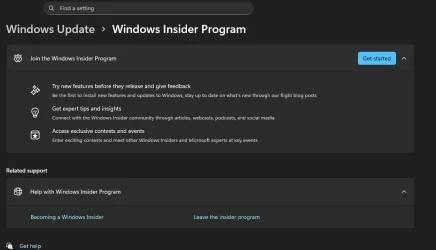
Become an insider member again, and choose the ''release preview'' channel.
After a reboot, windows checks for new updates and finds nothing, BUT, also stops trying to download and install 25h2 again...

For now at least a good solution for me.


hYp
 

My Computer My Computer

At a glance

windows 11 25h2
OS
windows 11 25h2
Computer type
PC/Desktop
I decided to be done with it and factory reset the device.
 

My Computer My Computer

At a glance

Windows 11 Home
OS
Windows 11 Home
Computer type
PC/Desktop
Manufacturer/Model
Asus ROG Ally-X
Other Info
There is only one standard configuration of the original Ally-X
hI,
I had the same problem all people in this tread seem to have...
I had an insider account, and got the 25h2 upgrade early...
Now that 25h2 is officially out, windows keeps trying to install 25h2 again, and errors out during install.

My solution was,

Become an insider member again, and choose the ''release preview'' channel.
After a reboot, windows checks for new updates and finds nothing, BUT, also stops trying to download and install 25h2 again...

For now at least a good solution for me.


hYp
Nope I am not in the Windows Insider Program
 

Attachments

  • bandicam 2025-11-25 16-49-15-024.webp
    bandicam 2025-11-25 16-49-15-024.webp
    29.1 KB · Views: 2

My Computers My Computers

  • At a glance

    Windows 11 Pro 25H2 26200.7627Ryzen 7 9800X3DG.Skill Trident Z5 RGB DDR5-6000 32GB (2×16GB...RTX 5080 Palit Gaming Pro
    OS
    Windows 11 Pro 25H2 26200.7627
    Computer type
    PC/Desktop
    Manufacturer/Model
    Gigababyte X870E Aorus Pro Rev 1.1
    CPU
    Ryzen 7 9800X3D
    Motherboard
    Gigababyte X870E Aorus Pro Rev 1.1
    Memory
    G.Skill Trident Z5 RGB DDR5-6000 32GB (2×16GB) CL30 2 x 16gb
    Graphics Card(s)
    RTX 5080 Palit Gaming Pro
    Sound Card
    Steel Series Arctis 1 Gaming Head phones
    Monitor(s) Displays
    Asus ROG Strix 27″ QHD OLED XG27AQDMG & Phillips 272V8
    Screen Resolution
    2560 X1440 27 Inch 240 HZ Asus
    PSU
    Corsair RM1000X
    Case
    Corsair CC750D (CC-9011078) Obsidian 750D Airflow Edition Black Full Tower ATX Case
    Cooling
    Corsair iCUE LINK TITAN 360 RX RGB
    Keyboard
    Razer BlackWidow V4 X Razer™ Yellow Mechanical Switches
    Mouse
    Logitech G502X Plus
    Internet Speed
    HFC 2000/100
    Browser
    Opera GX
    Antivirus
    Kaspersky Plus
  • At a glance

    Windows 11 23H2 22631.2715Intel i5-1135G78 GBIntel Iris Xe Graphics
    Operating System
    Windows 11 23H2 22631.2715
    Computer type
    Laptop
    Manufacturer/Model
    Dell XPS EVO 13.3" RNX9305C01AUSB
    CPU
    Intel i5-1135G7
    Motherboard
    Dell
    Memory
    8 GB
    Graphics card(s)
    Intel Iris Xe Graphics
    Monitor(s) Displays
    LED
    Screen Resolution
    1920 x 1080
    Hard Drives
    256GB SSD
    Other Info
    https://www.thegoodguys.com.au/dell-xps-evo-133-inches-win-11-laptop-rnx9305c01ausb
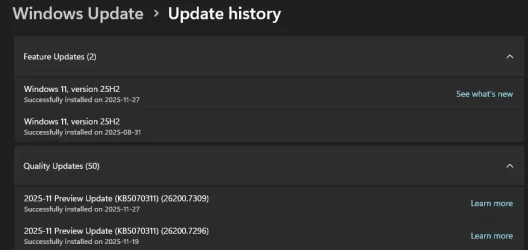
mine 'seems' to have installed successfully. i had a preview update installed on 19 Nov (i believe it was KB5070311). i uninstalled it from Windows Update, then it rebooted, and i left it overnight. when I came this morning Windows Update said it wanted to restart to install 25H2, but this time it said '35 min', whereas previously it always said '20min - 1 hour'. it restarted and says it's installed 25H2 successfully (it's now listed in feature updates twice, once from back in Sep and once today). 5070311 hasn't come back though.
 

My Computer My Computer

At a glance

Windows 11
OS
Windows 11
I have gone down the route of rejoining "Preview Release" and this has wiped out the rogue install of 25H2. I have just checked for updates and it has not returned. I have sent feedback of this problem to Microsoft FWIW.
1764106649854.webp1764106727022.webp
 

My Computer My Computer

At a glance

Windows 11 ProIntel i9-10980XEGskill DDR4 4x8Gb 3200Mhz CL 14.14.14.34Nvidia FE 3800
OS
Windows 11 Pro
Computer type
PC/Desktop
Manufacturer/Model
Self built
CPU
Intel i9-10980XE
Motherboard
MSI X299 XPOWER GAMING AC BIOS 1.F0. Updated Network Card Intel Wi-fi 6E AX210
Memory
Gskill DDR4 4x8Gb 3200Mhz CL 14.14.14.34
Graphics Card(s)
Nvidia FE 3800
Sound Card
See other info.
Monitor(s) Displays
Dell 30" 3017
Screen Resolution
2560x1600
Hard Drives
C: WD_BLACK SN750 500GB M.2 2280 NVMe Gen 3
6 x SATA Kingston/WD
Back up Drives: Toshiba Mechanical/Intel SSD
PSU
Seasonic Prime TX-1000
Case
Silverstone Fortress FT02. Updates: Top USB ports to 3.1, AP183 PWM bottom fans, NF-A12x25 PWM chromax top fan. Mods: cut out bus slots for improved Graphics card air flow.
Cooling
CPU: Noctua D15S Chromax
Keyboard
Filco Majestouch 2 (10Keyless)
Mouse
Logitech MX Master 3
Internet Speed
275Mbps
Browser
Chrome, Firefox
Antivirus
MS Defender
Other Info
Sound: Matrix Audio Element H/USB cable/ SPDIF 2, Mogami 110 Ohm AES-EBU XLR, Adam Audio S3V Monitors.
Front Panel Bays: EZDIY-FAB 5.25in 10Gbps USB 3.1 Gen2 Hub and Type-C Port USB Hub with QC 3.0 Quick Charging. Dual Bay 3.5" + 2.5" Inch SATA III Hard Drive HDD & SSD Tray Caddy Internal Mobile Rack Enclosure Docking Station with USB 3.0 Port Hot Swap.
Logitech BRIO 4k Ultra HD USB-C Webcam
i was reluctant to rejoin the insider channel because i've been trying to get off it since 24H2!
 

My Computer My Computer

At a glance

Windows 11
OS
Windows 11
hI,
I had the same problem all people in this tread seem to have...
I had an insider account, and got the 25h2 upgrade early...
Now that 25h2 is officially out, windows keeps trying to install 25h2 again, and errors out during install.

My solution was,

Become an insider member again, and choose the ''release preview'' channel.
After a reboot, windows checks for new updates and finds nothing, BUT, also stops trying to download and install 25h2 again...

For now at least a good solution for me.


hYp

mine 'seems' to have installed successfully. i had a preview update installed on 19 Nov (i believe it was KB5070311). i uninstalled it from Windows Update, then it rebooted, and i left it overnight. when I came this morning Windows Update said it wanted to restart to install 25H2, but this time it said '35 min', whereas previously it always said '20min - 1 hour'. it restarted and says it's installed 25H2 successfully (it's now listed in feature updates twice, once from back in Sep and once today). 5070311 hasn't come back though.
Thanks for these posts as it helped me figure out what was going on. I didn't even notice that the unenrollment finally kicked in properly which in turn seems to have had it set to do an in-place upgrade. They implemented this mechanism last year starting with the beta channel (KB5034218 Windows 11 Insider Beta Build 22635.3130 (23H2) - Jan. 25 for more details). So what we thought we were seeing as the 25H2 being installed again was actually Windows Update trying to do an in-place upgrade to properly put us back outside of the insider builds. The problem it seems is that KB5070311 seems to be not compatible with the in-place upgrade and so until you remove it, the 25H2 in-place upgrade will continue to fail. Once you do remove it and have yourself set to unenroll, then the in-place upgrade would succeed and you should notice you'll be brought back down to build 26200.7171. KB5070311 didn't come back cause that was a release preview insider update which is what you want if you wanted to get out of the insider builds.
 

My Computer My Computer

At a glance

Windows 11
OS
Windows 11
Thanks for these posts as it helped me figure out what was going on. I didn't even notice that the unenrollment finally kicked in properly which in turn seems to have had it set to do an in-place upgrade. They implemented this mechanism last year starting with the beta channel (KB5034218 Windows 11 Insider Beta Build 22635.3130 (23H2) - Jan. 25 for more details). So what we thought we were seeing as the 25H2 being installed again was actually Windows Update trying to do an in-place upgrade to properly put us back outside of the insider builds. The problem it seems is that KB5070311 seems to be not compatible with the in-place upgrade and so until you remove it, the 25H2 in-place upgrade will continue to fail. Once you do remove it and have yourself set to unenroll, then the in-place upgrade would succeed and you should notice you'll be brought back down to build 26200.7171. KB5070311 didn't come back cause that was a release preview insider update which is what you want if you wanted to get out of the insider builds.
I don't have that option to uninstall KB5070311
 

Attachments

  • bandicam 2025-11-26 23-04-09-301.webp
    bandicam 2025-11-26 23-04-09-301.webp
    27.6 KB · Views: 1

My Computers My Computers

  • At a glance

    Windows 11 Pro 25H2 26200.7627Ryzen 7 9800X3DG.Skill Trident Z5 RGB DDR5-6000 32GB (2×16GB...RTX 5080 Palit Gaming Pro
    OS
    Windows 11 Pro 25H2 26200.7627
    Computer type
    PC/Desktop
    Manufacturer/Model
    Gigababyte X870E Aorus Pro Rev 1.1
    CPU
    Ryzen 7 9800X3D
    Motherboard
    Gigababyte X870E Aorus Pro Rev 1.1
    Memory
    G.Skill Trident Z5 RGB DDR5-6000 32GB (2×16GB) CL30 2 x 16gb
    Graphics Card(s)
    RTX 5080 Palit Gaming Pro
    Sound Card
    Steel Series Arctis 1 Gaming Head phones
    Monitor(s) Displays
    Asus ROG Strix 27″ QHD OLED XG27AQDMG & Phillips 272V8
    Screen Resolution
    2560 X1440 27 Inch 240 HZ Asus
    PSU
    Corsair RM1000X
    Case
    Corsair CC750D (CC-9011078) Obsidian 750D Airflow Edition Black Full Tower ATX Case
    Cooling
    Corsair iCUE LINK TITAN 360 RX RGB
    Keyboard
    Razer BlackWidow V4 X Razer™ Yellow Mechanical Switches
    Mouse
    Logitech G502X Plus
    Internet Speed
    HFC 2000/100
    Browser
    Opera GX
    Antivirus
    Kaspersky Plus
  • At a glance

    Windows 11 23H2 22631.2715Intel i5-1135G78 GBIntel Iris Xe Graphics
    Operating System
    Windows 11 23H2 22631.2715
    Computer type
    Laptop
    Manufacturer/Model
    Dell XPS EVO 13.3" RNX9305C01AUSB
    CPU
    Intel i5-1135G7
    Motherboard
    Dell
    Memory
    8 GB
    Graphics card(s)
    Intel Iris Xe Graphics
    Monitor(s) Displays
    LED
    Screen Resolution
    1920 x 1080
    Hard Drives
    256GB SSD
    Other Info
    https://www.thegoodguys.com.au/dell-xps-evo-133-inches-win-11-laptop-rnx9305c01ausb
mine 'seems' to have installed successfully. i had a preview update installed on 19 Nov (i believe it was KB5070311). i uninstalled it from Windows Update, then it rebooted, and i left it overnight. when I came this morning Windows Update said it wanted to restart to install 25H2, but this time it said '35 min', whereas previously it always said '20min - 1 hour'. it restarted and says it's installed 25H2 successfully (it's now listed in feature updates twice, once from back in Sep and once today). 5070311 hasn't come back though.
I have the same issue. But when I tried to uninstall KB5070311, got error 0x800f0825. I was an insider release preview channel user.
I've tried to run sfc,dism,clean updates download folder,and perform an in-place upgrade via windows 11 ISO. It works well at the beginning,but all changes at 28% or above... the installation rolls back with error 0x8007042b
 

My Computer My Computer

At a glance

windows 11 25H2
OS
windows 11 25H2
Computer type
Laptop
Manufacturer/Model
Dell
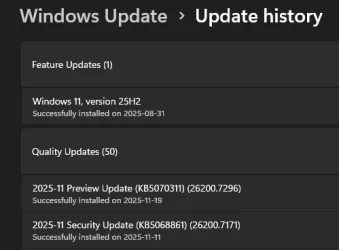
Well I retried reinstalling the rogue 25H2 update after requesting to come out of the Insider Programme again and had all the same issues with it failing to install and then rolling back. I will also add that there is a horrendous amount of CPU power being used during this process. I then went back to the Insider programme for Release Preview and this morning was presented with a different update 2025-11 Preview Update (KB5070311) (26200.7309) which I installed successfully. I now notice that my older installation of 25H2 (08/31) has disappeared and in its place is a new date of ‎2025-‎11-‎27. I need another coffee.

1764234953114.webp
 

My Computer My Computer

At a glance

Windows 11 ProIntel i9-10980XEGskill DDR4 4x8Gb 3200Mhz CL 14.14.14.34Nvidia FE 3800
OS
Windows 11 Pro
Computer type
PC/Desktop
Manufacturer/Model
Self built
CPU
Intel i9-10980XE
Motherboard
MSI X299 XPOWER GAMING AC BIOS 1.F0. Updated Network Card Intel Wi-fi 6E AX210
Memory
Gskill DDR4 4x8Gb 3200Mhz CL 14.14.14.34
Graphics Card(s)
Nvidia FE 3800
Sound Card
See other info.
Monitor(s) Displays
Dell 30" 3017
Screen Resolution
2560x1600
Hard Drives
C: WD_BLACK SN750 500GB M.2 2280 NVMe Gen 3
6 x SATA Kingston/WD
Back up Drives: Toshiba Mechanical/Intel SSD
PSU
Seasonic Prime TX-1000
Case
Silverstone Fortress FT02. Updates: Top USB ports to 3.1, AP183 PWM bottom fans, NF-A12x25 PWM chromax top fan. Mods: cut out bus slots for improved Graphics card air flow.
Cooling
CPU: Noctua D15S Chromax
Keyboard
Filco Majestouch 2 (10Keyless)
Mouse
Logitech MX Master 3
Internet Speed
275Mbps
Browser
Chrome, Firefox
Antivirus
MS Defender
Other Info
Sound: Matrix Audio Element H/USB cable/ SPDIF 2, Mogami 110 Ohm AES-EBU XLR, Adam Audio S3V Monitors.
Front Panel Bays: EZDIY-FAB 5.25in 10Gbps USB 3.1 Gen2 Hub and Type-C Port USB Hub with QC 3.0 Quick Charging. Dual Bay 3.5" + 2.5" Inch SATA III Hard Drive HDD & SSD Tray Caddy Internal Mobile Rack Enclosure Docking Station with USB 3.0 Port Hot Swap.
Logitech BRIO 4k Ultra HD USB-C Webcam

My Computer My Computer

At a glance

Windows 11
OS
Windows 11
Computer type
Laptop
Manufacturer/Model
Microsoft Surface Laptop 7

My Computer My Computer

At a glance

Windows 11 ProIntel i9-10980XEGskill DDR4 4x8Gb 3200Mhz CL 14.14.14.34Nvidia FE 3800
OS
Windows 11 Pro
Computer type
PC/Desktop
Manufacturer/Model
Self built
CPU
Intel i9-10980XE
Motherboard
MSI X299 XPOWER GAMING AC BIOS 1.F0. Updated Network Card Intel Wi-fi 6E AX210
Memory
Gskill DDR4 4x8Gb 3200Mhz CL 14.14.14.34
Graphics Card(s)
Nvidia FE 3800
Sound Card
See other info.
Monitor(s) Displays
Dell 30" 3017
Screen Resolution
2560x1600
Hard Drives
C: WD_BLACK SN750 500GB M.2 2280 NVMe Gen 3
6 x SATA Kingston/WD
Back up Drives: Toshiba Mechanical/Intel SSD
PSU
Seasonic Prime TX-1000
Case
Silverstone Fortress FT02. Updates: Top USB ports to 3.1, AP183 PWM bottom fans, NF-A12x25 PWM chromax top fan. Mods: cut out bus slots for improved Graphics card air flow.
Cooling
CPU: Noctua D15S Chromax
Keyboard
Filco Majestouch 2 (10Keyless)
Mouse
Logitech MX Master 3
Internet Speed
275Mbps
Browser
Chrome, Firefox
Antivirus
MS Defender
Other Info
Sound: Matrix Audio Element H/USB cable/ SPDIF 2, Mogami 110 Ohm AES-EBU XLR, Adam Audio S3V Monitors.
Front Panel Bays: EZDIY-FAB 5.25in 10Gbps USB 3.1 Gen2 Hub and Type-C Port USB Hub with QC 3.0 Quick Charging. Dual Bay 3.5" + 2.5" Inch SATA III Hard Drive HDD & SSD Tray Caddy Internal Mobile Rack Enclosure Docking Station with USB 3.0 Port Hot Swap.
Logitech BRIO 4k Ultra HD USB-C Webcam
Back
Top Bottom