
ricardomax
Member
- Local time
- 6:06 PM
- Posts
- 7
- OS
- Windows 11 Home 25H2
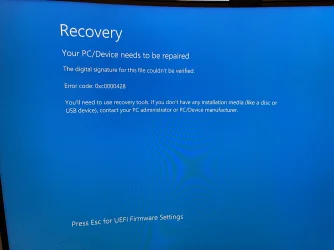
Hi - so I'm out of ideas on this one! New build PC, moved m.2 drive over from old PC and basically running fine, but looks like a few minor display driver issues so decided to do a clean install of Windows. Created the installation media USB via the Windows tool and I get this when booting from the USB:
Recovery
Your PC/Device needs to be repaired
The digital signature for this file couldn't be verified.
Error code: 0xc0000428
Never had this before! Here's what I've tried, all with exactly the same result:
Recovery
Your PC/Device needs to be repaired
The digital signature for this file couldn't be verified.
Error code: 0xc0000428
Never had this before! Here's what I've tried, all with exactly the same result:
- Checked UEFI bios is on. CMS and secure boot are disabled.
- Used USB directly in back of motherboard. Recreated the Windows installation media. (USB stick is 64gb and Windows partitions to 32GB. I used this same stick to clean install Windows a couple of months ago on the old system (same m.2 drive) and it worked fine. Hasn't been used for anything since so doubt the stick is to blame.)
- Disabled EXPO and put ram to JEDEC settings.
- Removed one stick of RAM (to leave single stick of 16GB in slot B2).
- Windows Build/Version
- 25H2
Attachments
My Computer
At a glance
Windows 11 Home 25H2AMD Ryzen 5 9600XKingston FURY Beast EXPO 32GB (2x16GB) DDR5 P...sapphire technology Pure AMD Radeon RX 9060 X...
- OS
- Windows 11 Home 25H2
- Computer type
- PC/Desktop
- CPU
- AMD Ryzen 5 9600X
- Motherboard
- ASRock B650 Steel Legend WiFi
- Memory
- Kingston FURY Beast EXPO 32GB (2x16GB) DDR5 PC5-48000C36 6000MHz
- Graphics Card(s)
- sapphire technology Pure AMD Radeon RX 9060 XT Gaming OC, 16GB
- Monitor(s) Displays
- Samsung Odyssey G7 LC32G75TQSRXXU 32"
- PSU
- Corsair RM750e






