Winload.efi file is not playing nice with me.


suatcini54

Well-known member
Power User
VIP
Local time
8:56 PM
Posts
628
OS
Windows 11 Pro build 26200.8524
I have a dual-boot system. Windows 11 Pro on SATA drive and Windows 11 Pro on PCIe M.2 drive. SATA drive has the common boot files.

When I left home two months ago, they were on the same build and on the same level of Secure boot CA 2023 certificates updates. Both Windows installations were fully updated certificate-wise in January 2026.

I missed January Tuesday patch and February Tuesday patch because I didn't take my heavy desktop PC with me.

When I returned home, I updated Windows 11 Pro on SATA drive to March Tuesday patch. Then I wanted to update Windows 11 Pro on PCIe M.2 drive, too.

When I changed boot priority to PCIe M.2 drive, Windows couldn't boot and I got this error: The digital signature for this file couldn't be verified.

File: \Windows\system32\winload.efi

Error code: 0xc0000428
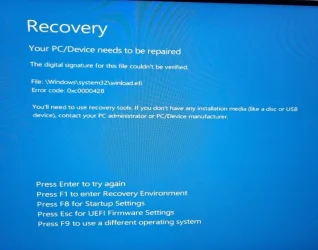
Recovery.webp

I am trying to recover bootability of Windows on PCIe M.2 drive. I don't know what changes March Tuesday patch has made in boot files and why winload.efi's digital signature couldn't be verified.
 

My Computers

System One System Two

  • OS
    Windows 11 Pro build 26200.8524
    Computer type
    PC/Desktop
    Manufacturer/Model
    Home Built
    CPU
    Intel i7-4790
    Motherboard
    Asus H97 Pro Gamer with add-on TPM1.2 module
    Memory
    Teams DDR3-1600 4x4 GB
    Graphics Card(s)
    MSI Nvidia GeForce GTX 1050Ti
    Sound Card
    Realtek ALC1150
    Monitor(s) Displays
    Dell P2425D
    Screen Resolution
    2560 by 1440 pixels
    Hard Drives
    Corsair NVMe M.2 Core XT 1000 GB (Windows 11 v.25H2); Samsung SATA Evo 870 500 GB (Windows 11 v.25H2);
    PSU
    Corsair HX850
    Case
    Gigabyte Solo 210
    Cooling
    Zalman CNPS7X Tower
    Keyboard
    Microsoft AIO Wireless (includes touchpad)
    Mouse
    HP S1000 Plus Wireless
    Internet Speed
    500 Mb fiber optic
    Browser
    Chrome; MS Edge
    Antivirus
    Windows Defender
  • Operating System
    MacOS 12 Monterey
    Computer type
    Laptop
    Manufacturer/Model
    Apple Macbook Air
    CPU
    Intel Core i5
    Memory
    8 GB
    Graphics card(s)
    Intel integrated
    Screen Resolution
    1440 by 900 pixels
    Hard Drives
    128 GB
    Keyboard
    Built-in
    Mouse
    Microsoft Wireless
    Internet Speed
    802.11 ac
    Browser
    Chrome; Safari
    Antivirus
    N/A
I don't have a standard UEFI installation, but from what I read in other threads, it must be a certificate compliance issue. The solution is to temporarily disable Secure Boot in UEFI firmware (aka BIOS), Security section, boot into the M.2 drive, install all Windows updates and then enable Secure Boot again.
 

My Computers

System One System Two

  • OS
    Windows 11 Pro 23H2 (5699), 25H2 (8655)
    Computer type
    Laptop
    Manufacturer/Model
    Acer Extensa 5630EZ
    CPU
    Mobile DualCore Intel Core 2 Duo T7250, 2000 MHz
    Motherboard
    Acer Extensa 5630
    Memory
    4GB
    Graphics Card(s)
    Mobile Intel(R) GMA 4500M (Mobile 4 series)
    Sound Card
    Realtek ALC268 @ Intel 82801IB ICH9 - High Definition Audio Controller
    Monitor(s) Displays
    1
    Screen Resolution
    1280x800
    Hard Drives
    Samsung SSD 850 EVO 250GB SATA Device (250 GB, SATA-III)
    Internet Speed
    VDSL 50 Mbps
    Browser
    MICROSOFT EDGE
    Antivirus
    WINDOWS DEFENDER
    Other Info
    Legacy MBR installation, no TPM, no Secure Boot, no WDDM 2.0 graphics drivers, no SSE4.2, cannot get more unsupported ;) This is only my test laptop. I had installed Windows 11 here before upgrading my main PC. For my main PC I use everyday see my 2nd system specs.
  • Operating System
    Windows 11 Pro v25H2 (build 26200.8655)
    Computer type
    PC/Desktop
    Manufacturer/Model
    Custom-built PC
    CPU
    Intel Core-i7 3770 3.40GHz s1155 (3rd generation)
    Motherboard
    Asus P8H61 s1155 ATX
    Memory
    2x Kingston Hyper-X Blu 8GB DDR3-1600
    Graphics card(s)
    GIGABYTE GeForce RTX 3050 WINDFORCE OC V2 6GB (GV-N3050WF2OCV2-6GD)
    Sound Card
    Realtek HD audio (ALC887)
    Monitor(s) Displays
    Sony Bravia KDL-19L4000 19" LCD TV via VGA
    Screen Resolution
    1440x900 32-bit 60Hz
    Hard Drives
    WD Blue SA510 2.5 1000GB SSD as system disk, Western Digital Caviar Purple 4TB SATA III (WD40PURZ) as second
    PSU
    Thermaltake Litepower RGB 550W Full Wired
    Case
    SUPERCASE MIDI-TOWER
    Cooling
    Deepcool Gamma Archer CPU cooler, 1x 8cm fan at the back
    Keyboard
    Mitsumi 101-key PS/2
    Mouse
    Sunnyline OptiEye PS/2
    Internet Speed
    100Mbps
    Browser
    Microsoft Edge, Mozilla Firefox
    Antivirus
    Microsoft Windows Defender
    Other Info
    Legacy BIOS (MBR) installation, no TPM, no Secure Boot, WDDM 3.0 graphics drivers, WEI score 7.4
If temporary disabling Secure Boot works to boot the 2nd Windows, then you need to confirm the other system has the right boot file.

AFAIK they didn't push any new boot files or SkuSiPolicy/p7b in the March 2026 update.
 

My Computer

System One

  • OS
    Windows 7
@spapakons Thanks for your prompt response. I checked Winload.efi file digital signatures and certificates on both installations. They seem to be the same but apparently, there are differences which I cannot see.
 

My Computers

System One System Two

  • OS
    Windows 11 Pro build 26200.8524
    Computer type
    PC/Desktop
    Manufacturer/Model
    Home Built
    CPU
    Intel i7-4790
    Motherboard
    Asus H97 Pro Gamer with add-on TPM1.2 module
    Memory
    Teams DDR3-1600 4x4 GB
    Graphics Card(s)
    MSI Nvidia GeForce GTX 1050Ti
    Sound Card
    Realtek ALC1150
    Monitor(s) Displays
    Dell P2425D
    Screen Resolution
    2560 by 1440 pixels
    Hard Drives
    Corsair NVMe M.2 Core XT 1000 GB (Windows 11 v.25H2); Samsung SATA Evo 870 500 GB (Windows 11 v.25H2);
    PSU
    Corsair HX850
    Case
    Gigabyte Solo 210
    Cooling
    Zalman CNPS7X Tower
    Keyboard
    Microsoft AIO Wireless (includes touchpad)
    Mouse
    HP S1000 Plus Wireless
    Internet Speed
    500 Mb fiber optic
    Browser
    Chrome; MS Edge
    Antivirus
    Windows Defender
  • Operating System
    MacOS 12 Monterey
    Computer type
    Laptop
    Manufacturer/Model
    Apple Macbook Air
    CPU
    Intel Core i5
    Memory
    8 GB
    Graphics card(s)
    Intel integrated
    Screen Resolution
    1440 by 900 pixels
    Hard Drives
    128 GB
    Keyboard
    Built-in
    Mouse
    Microsoft Wireless
    Internet Speed
    802.11 ac
    Browser
    Chrome; Safari
    Antivirus
    N/A
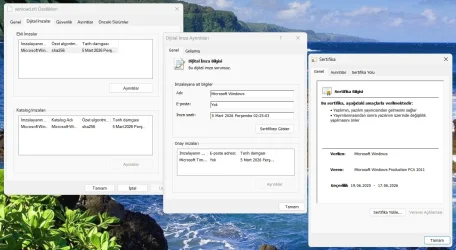
@garlin Thanks. Now I took a screenshot of winload.efi's digital signature and its certificate on booting Windows 11 on SATA drive.

Sorry for the language of the secreenshot. But the pictures should be self-explanatory.

winload.efi.webp

The non-booting Windows 11 has the same digital signature for Winload.efi file. I have disabled the M.2 drive for now because it was causing boot issues for SATA drive as well. Disabling Secure Boot will be my last resort until I am sure I cannot resolve the issue.
 

My Computers

System One System Two

  • OS
    Windows 11 Pro build 26200.8524
    Computer type
    PC/Desktop
    Manufacturer/Model
    Home Built
    CPU
    Intel i7-4790
    Motherboard
    Asus H97 Pro Gamer with add-on TPM1.2 module
    Memory
    Teams DDR3-1600 4x4 GB
    Graphics Card(s)
    MSI Nvidia GeForce GTX 1050Ti
    Sound Card
    Realtek ALC1150
    Monitor(s) Displays
    Dell P2425D
    Screen Resolution
    2560 by 1440 pixels
    Hard Drives
    Corsair NVMe M.2 Core XT 1000 GB (Windows 11 v.25H2); Samsung SATA Evo 870 500 GB (Windows 11 v.25H2);
    PSU
    Corsair HX850
    Case
    Gigabyte Solo 210
    Cooling
    Zalman CNPS7X Tower
    Keyboard
    Microsoft AIO Wireless (includes touchpad)
    Mouse
    HP S1000 Plus Wireless
    Internet Speed
    500 Mb fiber optic
    Browser
    Chrome; MS Edge
    Antivirus
    Windows Defender
  • Operating System
    MacOS 12 Monterey
    Computer type
    Laptop
    Manufacturer/Model
    Apple Macbook Air
    CPU
    Intel Core i5
    Memory
    8 GB
    Graphics card(s)
    Intel integrated
    Screen Resolution
    1440 by 900 pixels
    Hard Drives
    128 GB
    Keyboard
    Built-in
    Mouse
    Microsoft Wireless
    Internet Speed
    802.11 ac
    Browser
    Chrome; Safari
    Antivirus
    N/A
Please boot to a Windows 11 MCT/iso > troubleshooting > command prompt > type:

notepad
notepad
bcdedit
bcdedit | find "osdevice"
diskpart
lis dis
lis vol
sel dis 0
det dis
lis par
sel dis 1
det dis
lis par
sel dis 2
det dis
lis par

Copy and paste commands with results to notepad > save to a flash drive > post a share link


Last edited:

My Computer

System One

  • OS
    Windows 10
    Computer type
    Laptop
    Manufacturer/Model
    HP
    CPU
    Intel(R) Core(TM) i7-4800MQ CPU @ 2.70GHz
    Motherboard
    Product : 190A Version : KBC Version 94.56
    Memory
    16 GB Total: Manufacturer : Samsung MemoryType : DDR3 FormFactor : SODIMM Capacity : 8GB Speed : 1600
    Graphics Card(s)
    NVIDIA Quadro K3100M; Intel(R) HD Graphics 4600
    Sound Card
    IDT High Definition Audio CODEC; PNP Device ID HDAUDIO\FUNC_01&VEN_111D&DEV_76E0
    Hard Drives
    Model Hitachi HTS727575A9E364
    Antivirus
    Microsoft Defender
    Other Info
    Mobile Workstation
Please boot your computer with Windows Setup Media and from Windows Recovery Environment start the Command Prompt.

Please type below command into Command Prompt and press Enter key.

The following command scans integrity of all protected Windows system files and repairs files with problems when possible.

Code:
Sfc  /Scannow   /OFFBOOTDIR=C:\   /OFFWINDIR=C:\Windows


Please replace partition letter C: with Windows installed partition letter. When the computer boots into Windows Recovery Environment (WinRE) environment, the drive letter assign to Windows partition may not be C: drive letter because Windows 7, 8 , 8.1 and 10 creates a separate system partition when it's installed from scratch. The system partition contains boot files WinRE assigns the system partition the C: drive letter and the Windows installed partition will be assigned any other drive letter, usually D: drive letter is assign to Windows installed partition. The Bcdedit | find "osdevice" command can be used to find out the drive letter of the Windows installed partition, the output of the Bcdedit command is similar to this osdevice partition=D:. The drive letter after partition= is the drive letter of the Windows partition.
 

My Computer

System One

  • OS
    Windows 11
    Computer type
    PC/Desktop
    Manufacturer/Model
    HP Pavilion
    CPU
    AMD Ryzen 7 5700G
    Motherboard
    Erica6
    Memory
    Micron Technology DDR4-3200 16GB
    Graphics Card(s)
    NVIDIA GeForce RTX 3060
    Sound Card
    Realtek ALC671
    Monitor(s) Displays
    Samsung SyncMaster U28E590
    Screen Resolution
    3840 x 2160
    Hard Drives
    SAMSUNG MZVLQ1T0HALB-000H1
I have a dual-boot system. Windows 11 Pro on SATA drive and Windows 11 Pro on PCIe M.2 drive. SATA drive has the common boot files.

When I left home two months ago, they were on the same build and on the same level of Secure boot CA 2023 certificates updates. Both Windows installations were fully updated certificate-wise in January 2026.

I missed January Tuesday patch and February Tuesday patch because I didn't take my heavy desktop PC with me.

When I returned home, I updated Windows 11 Pro on SATA drive to March Tuesday patch. Then I wanted to update Windows 11 Pro on PCIe M.2 drive, too.

When I changed boot priority to PCIe M.2 drive, Windows couldn't boot and I got this error: The digital signature for this file couldn't be verified.

File: \Windows\system32\winload.efi

Error code: 0xc0000428

View attachment 166158

I am trying to recover bootability of Windows on PCIe M.2 drive. I don't know what changes March Tuesday patch has made in boot files and why winload.efi's digital signature couldn't be verified.
same thing has been happening to me! what causes it?! i'm dual-booting 10/11
 

My Computers

System One System Two

  • OS
    Windows 11 Pro x64 26H1 29531.1000
    Computer type
    Laptop
    Manufacturer/Model
    HP ProBook 650 G1
    CPU
    Intel(R) Core(TM) i5-4300M CPU @ 2.60GHz, 2 Core(s) 4T
    Motherboard
    Hewlett-Packard 1993
    Memory
    16GB DDR3
    Graphics Card(s)
    Intel(R) HD Graphics 4600
    Sound Card
    IDT High Definition Audio
    Screen Resolution
    1366x768
    Hard Drives
    Lexar 512GB SSD SATA III
    PSU
    HP 90W Adapter
    Case
    Magnesium
    Keyboard
    Spill-Resistant
    Mouse
    Microsoft Wireless Mobile Mouse 1850
    Browser
    Edge Canary
    Antivirus
    Windows Security
    Other Info
    BIOS Version/Date Hewlett-Packard L77 Ver. 01.50, 2/24/2020
  • Operating System
    Windows 11 Home
    Computer type
    Laptop
    Manufacturer/Model
    HP Laptop 15-dy000x
    CPU
    Intel(R) Core(TM) i5-8265U CPU @ 1.60GHz, 1800 Mhz, 4 Core(s), 8 Logical Processor(s)
    Memory
    12GB DDR4
    Graphics card(s)
    Intel UHD Graphics 620
    Sound Card
    Realtek High Definition Audio
    Screen Resolution
    1366x768
    Hard Drives
    INTEL HBRPEKNX0101AH
    Mouse
    Microsoft Wireless Mobile Mouse 1850
    Browser
    Edge
    Antivirus
    Windows Security
same thing has been happening to me! what causes it?!
I am sorry to hear that you are experiencing the same issue as mine.

There are very knowledgeable people here on this forum. I am sure they will be able to tell what is going on with Secure Boot digital certificates.

If I find a solution or learn something about the issue, I will post here. The other members will do the same, I believe.
 

My Computers

System One System Two

  • OS
    Windows 11 Pro build 26200.8524
    Computer type
    PC/Desktop
    Manufacturer/Model
    Home Built
    CPU
    Intel i7-4790
    Motherboard
    Asus H97 Pro Gamer with add-on TPM1.2 module
    Memory
    Teams DDR3-1600 4x4 GB
    Graphics Card(s)
    MSI Nvidia GeForce GTX 1050Ti
    Sound Card
    Realtek ALC1150
    Monitor(s) Displays
    Dell P2425D
    Screen Resolution
    2560 by 1440 pixels
    Hard Drives
    Corsair NVMe M.2 Core XT 1000 GB (Windows 11 v.25H2); Samsung SATA Evo 870 500 GB (Windows 11 v.25H2);
    PSU
    Corsair HX850
    Case
    Gigabyte Solo 210
    Cooling
    Zalman CNPS7X Tower
    Keyboard
    Microsoft AIO Wireless (includes touchpad)
    Mouse
    HP S1000 Plus Wireless
    Internet Speed
    500 Mb fiber optic
    Browser
    Chrome; MS Edge
    Antivirus
    Windows Defender
  • Operating System
    MacOS 12 Monterey
    Computer type
    Laptop
    Manufacturer/Model
    Apple Macbook Air
    CPU
    Intel Core i5
    Memory
    8 GB
    Graphics card(s)
    Intel integrated
    Screen Resolution
    1440 by 900 pixels
    Hard Drives
    128 GB
    Keyboard
    Built-in
    Mouse
    Microsoft Wireless
    Internet Speed
    802.11 ac
    Browser
    Chrome; Safari
    Antivirus
    N/A
@FreeBooter I tried your command yesterday when I experienced the issue except that I booted to Windows 11 on SATA drive and assigned W: drive letter to the non-booting Windows 11 and ran your command changing drive letter from C: to W:. No problems found yet Windows is still not booting, giving the same winlod.efi error. Thanks for the suggestion anyway.

I will create a bootable Windows install disk and try the command from there, thinking and hoping it may make a difference.
 

My Computers

System One System Two

  • OS
    Windows 11 Pro build 26200.8524
    Computer type
    PC/Desktop
    Manufacturer/Model
    Home Built
    CPU
    Intel i7-4790
    Motherboard
    Asus H97 Pro Gamer with add-on TPM1.2 module
    Memory
    Teams DDR3-1600 4x4 GB
    Graphics Card(s)
    MSI Nvidia GeForce GTX 1050Ti
    Sound Card
    Realtek ALC1150
    Monitor(s) Displays
    Dell P2425D
    Screen Resolution
    2560 by 1440 pixels
    Hard Drives
    Corsair NVMe M.2 Core XT 1000 GB (Windows 11 v.25H2); Samsung SATA Evo 870 500 GB (Windows 11 v.25H2);
    PSU
    Corsair HX850
    Case
    Gigabyte Solo 210
    Cooling
    Zalman CNPS7X Tower
    Keyboard
    Microsoft AIO Wireless (includes touchpad)
    Mouse
    HP S1000 Plus Wireless
    Internet Speed
    500 Mb fiber optic
    Browser
    Chrome; MS Edge
    Antivirus
    Windows Defender
  • Operating System
    MacOS 12 Monterey
    Computer type
    Laptop
    Manufacturer/Model
    Apple Macbook Air
    CPU
    Intel Core i5
    Memory
    8 GB
    Graphics card(s)
    Intel integrated
    Screen Resolution
    1440 by 900 pixels
    Hard Drives
    128 GB
    Keyboard
    Built-in
    Mouse
    Microsoft Wireless
    Internet Speed
    802.11 ac
    Browser
    Chrome; Safari
    Antivirus
    N/A
@zbook Thanks for your advice. Currently I disabled M.2 drive in BIOS because it was somehow causing boot issue on the SATA drive as well when SATA drive was booting properly on its own. When I enable the M.2 drive, I will implement your advice and post results.
 

My Computers

System One System Two

  • OS
    Windows 11 Pro build 26200.8524
    Computer type
    PC/Desktop
    Manufacturer/Model
    Home Built
    CPU
    Intel i7-4790
    Motherboard
    Asus H97 Pro Gamer with add-on TPM1.2 module
    Memory
    Teams DDR3-1600 4x4 GB
    Graphics Card(s)
    MSI Nvidia GeForce GTX 1050Ti
    Sound Card
    Realtek ALC1150
    Monitor(s) Displays
    Dell P2425D
    Screen Resolution
    2560 by 1440 pixels
    Hard Drives
    Corsair NVMe M.2 Core XT 1000 GB (Windows 11 v.25H2); Samsung SATA Evo 870 500 GB (Windows 11 v.25H2);
    PSU
    Corsair HX850
    Case
    Gigabyte Solo 210
    Cooling
    Zalman CNPS7X Tower
    Keyboard
    Microsoft AIO Wireless (includes touchpad)
    Mouse
    HP S1000 Plus Wireless
    Internet Speed
    500 Mb fiber optic
    Browser
    Chrome; MS Edge
    Antivirus
    Windows Defender
  • Operating System
    MacOS 12 Monterey
    Computer type
    Laptop
    Manufacturer/Model
    Apple Macbook Air
    CPU
    Intel Core i5
    Memory
    8 GB
    Graphics card(s)
    Intel integrated
    Screen Resolution
    1440 by 900 pixels
    Hard Drives
    128 GB
    Keyboard
    Built-in
    Mouse
    Microsoft Wireless
    Internet Speed
    802.11 ac
    Browser
    Chrome; Safari
    Antivirus
    N/A
Please boot your computer with Windows Setup Media and from Windows Recovery Environment start the Command Prompt.

Please type below command into Command Prompt and press Enter key.

Following command will fixes errors on the disk and locates bad sectors and recovers readable information.


Code:
Chkdsk C: /r


Please replace partition letter C: with Windows installed partition letter. When the computer boots into Windows Recovery Environment (WinRE) environment, the drive letter assign to Windows partition may not be C: drive letter because Windows 7, 8 , 8.1, 10 and Windows11 creates a separate system partition when it's installed from scratch. The system partition contains boot files WinRE assigns the system partition the C: drive letter and the Windows installed partition will be assigned any other drive letter, usually D: drive letter is assigned to Windows installed partition. The Bcdedit | find "osdevice" command can be used to find out the drive letter of the Windows installed partition, the output of the Bcdedit command is similar to this osdevice partition=D:. The drive letter after partition= is the drive letter of the Windows partition.


Please boot your computer with Windows Setup Media and from Windows Recovery Environment start the Command Prompt.

Please type below commands into Command Prompt and press Enter key.

Following commands will repair Master Boot Record (MBR), Boot Sector and BCD Store.


Code:
Bootrec /FixMbr

Bootrec  /FixBoot

Bootrec /scanos

Bootrec  /RebuildBcd
 

My Computer

System One

  • OS
    Windows 11
    Computer type
    PC/Desktop
    Manufacturer/Model
    HP Pavilion
    CPU
    AMD Ryzen 7 5700G
    Motherboard
    Erica6
    Memory
    Micron Technology DDR4-3200 16GB
    Graphics Card(s)
    NVIDIA GeForce RTX 3060
    Sound Card
    Realtek ALC671
    Monitor(s) Displays
    Samsung SyncMaster U28E590
    Screen Resolution
    3840 x 2160
    Hard Drives
    SAMSUNG MZVLQ1T0HALB-000H1
If I understand correctly both systems use the same EFI partition? In this case

- Disable secure boot
- boot into the working windows
- launch a command line or powershell as admin
- type mountvol s: /S [press enter]
- type dir s:\EFI\Microsoft\Boot\SKUSiPolicy.P7b [press enter]
if there's file SKUSiPolicy.P7b found rename this file:
- type ren s:\EFI\Microsoft\Boot\SKUSiPolicy.P7b s:\EFI\Microsoft\Boot\SKUSiPolicy.P7b.bak [press enter]
- reboot to the working windows system once again
- reboot again this time to the non working windows
- update the non working windows installation to latest cumulative update
- let the system reboot until the update is fully applied
- enable secure boot again, both systems should work now.
if there's no \EFI\Microsoft\Boot\SKUSiPolicy.P7b this wont work / isn't the reason.

if you want to protect the secure boot chain 'one step further' by checking the the validity of winload.efi / winresume.efi:
- secure boot is enabled
- launch a command line or powershell as admin
- type mountvol s: /S [press enter]
rename SKUSiPolicy.P7b.bak to the 'active' filename again:
- type ren s:\EFI\Microsoft\Boot\SKUSiPolicy.P7b.bak s:\EFI\Microsoft\Boot\SKUSiPolicy.P7b [press enter]

The version and the presence of a SKUSiPolicy.P7b file will be written into the UEFI firmware. If SKUSiPolicy.P7b is present it checks for outdated versions of winload.efi and winresume.efi.
 

My Computer

System One

  • OS
    W10
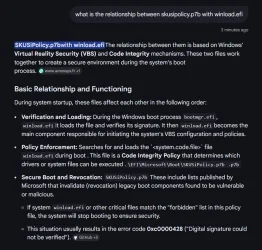
@t2s50 Thanks for your reply.

I asked AI the question "What is the relationship between SKUSiPolicy.p7b with winload.efi ? The answer I got is:

winload-2.webp

So later I will try to apply your solution and the info from the AI to my non-booting Windows 11. I will see what happens.
 

My Computers

System One System Two

  • OS
    Windows 11 Pro build 26200.8524
    Computer type
    PC/Desktop
    Manufacturer/Model
    Home Built
    CPU
    Intel i7-4790
    Motherboard
    Asus H97 Pro Gamer with add-on TPM1.2 module
    Memory
    Teams DDR3-1600 4x4 GB
    Graphics Card(s)
    MSI Nvidia GeForce GTX 1050Ti
    Sound Card
    Realtek ALC1150
    Monitor(s) Displays
    Dell P2425D
    Screen Resolution
    2560 by 1440 pixels
    Hard Drives
    Corsair NVMe M.2 Core XT 1000 GB (Windows 11 v.25H2); Samsung SATA Evo 870 500 GB (Windows 11 v.25H2);
    PSU
    Corsair HX850
    Case
    Gigabyte Solo 210
    Cooling
    Zalman CNPS7X Tower
    Keyboard
    Microsoft AIO Wireless (includes touchpad)
    Mouse
    HP S1000 Plus Wireless
    Internet Speed
    500 Mb fiber optic
    Browser
    Chrome; MS Edge
    Antivirus
    Windows Defender
  • Operating System
    MacOS 12 Monterey
    Computer type
    Laptop
    Manufacturer/Model
    Apple Macbook Air
    CPU
    Intel Core i5
    Memory
    8 GB
    Graphics card(s)
    Intel integrated
    Screen Resolution
    1440 by 900 pixels
    Hard Drives
    128 GB
    Keyboard
    Built-in
    Mouse
    Microsoft Wireless
    Internet Speed
    802.11 ac
    Browser
    Chrome; Safari
    Antivirus
    N/A
Resolved.

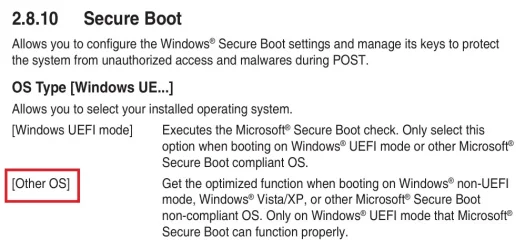
I disabled Secure Boot. To turn Secure Boot off in my old Asus M/B (late 2014), I changed UEFI driver to Other OS type. This time non-booting Windows 11 booted fine. Then I applied March Tuesday update and turned Secure Boot on. Checked Windows 11 again and it booted fine with Secure Boot on.

It seems March Tuesday update caused the problem.
 

My Computers

System One System Two

  • OS
    Windows 11 Pro build 26200.8524
    Computer type
    PC/Desktop
    Manufacturer/Model
    Home Built
    CPU
    Intel i7-4790
    Motherboard
    Asus H97 Pro Gamer with add-on TPM1.2 module
    Memory
    Teams DDR3-1600 4x4 GB
    Graphics Card(s)
    MSI Nvidia GeForce GTX 1050Ti
    Sound Card
    Realtek ALC1150
    Monitor(s) Displays
    Dell P2425D
    Screen Resolution
    2560 by 1440 pixels
    Hard Drives
    Corsair NVMe M.2 Core XT 1000 GB (Windows 11 v.25H2); Samsung SATA Evo 870 500 GB (Windows 11 v.25H2);
    PSU
    Corsair HX850
    Case
    Gigabyte Solo 210
    Cooling
    Zalman CNPS7X Tower
    Keyboard
    Microsoft AIO Wireless (includes touchpad)
    Mouse
    HP S1000 Plus Wireless
    Internet Speed
    500 Mb fiber optic
    Browser
    Chrome; MS Edge
    Antivirus
    Windows Defender
  • Operating System
    MacOS 12 Monterey
    Computer type
    Laptop
    Manufacturer/Model
    Apple Macbook Air
    CPU
    Intel Core i5
    Memory
    8 GB
    Graphics card(s)
    Intel integrated
    Screen Resolution
    1440 by 900 pixels
    Hard Drives
    128 GB
    Keyboard
    Built-in
    Mouse
    Microsoft Wireless
    Internet Speed
    802.11 ac
    Browser
    Chrome; Safari
    Antivirus
    N/A
Resolved.

I disabled Secure Boot. To turn Secure Boot off in my old Asus M/B (late 2014), I changed UEFI driver to Other OS type. This time non-booting Windows 11 booted fine. Then I applied March Tuesday update and turned Secure Boot on. Checked Windows 11 again and it booted fine with Secure Boot on.

It seems March Tuesday update caused the problem.

What was: I changed UEFI driver to Other OS type
 

My Computer

System One

  • OS
    Windows 10
    Computer type
    Laptop
    Manufacturer/Model
    HP
    CPU
    Intel(R) Core(TM) i7-4800MQ CPU @ 2.70GHz
    Motherboard
    Product : 190A Version : KBC Version 94.56
    Memory
    16 GB Total: Manufacturer : Samsung MemoryType : DDR3 FormFactor : SODIMM Capacity : 8GB Speed : 1600
    Graphics Card(s)
    NVIDIA Quadro K3100M; Intel(R) HD Graphics 4600
    Sound Card
    IDT High Definition Audio CODEC; PNP Device ID HDAUDIO\FUNC_01&VEN_111D&DEV_76E0
    Hard Drives
    Model Hitachi HTS727575A9E364
    Antivirus
    Microsoft Defender
    Other Info
    Mobile Workstation
What was: I changed UEFI driver to Other OS type
This is the way to turn Secure Boot off in my Asus H97 Pro Gamer (model year 2014) motherboard.

OtherOS.webp
 

My Computers

System One System Two

  • OS
    Windows 11 Pro build 26200.8524
    Computer type
    PC/Desktop
    Manufacturer/Model
    Home Built
    CPU
    Intel i7-4790
    Motherboard
    Asus H97 Pro Gamer with add-on TPM1.2 module
    Memory
    Teams DDR3-1600 4x4 GB
    Graphics Card(s)
    MSI Nvidia GeForce GTX 1050Ti
    Sound Card
    Realtek ALC1150
    Monitor(s) Displays
    Dell P2425D
    Screen Resolution
    2560 by 1440 pixels
    Hard Drives
    Corsair NVMe M.2 Core XT 1000 GB (Windows 11 v.25H2); Samsung SATA Evo 870 500 GB (Windows 11 v.25H2);
    PSU
    Corsair HX850
    Case
    Gigabyte Solo 210
    Cooling
    Zalman CNPS7X Tower
    Keyboard
    Microsoft AIO Wireless (includes touchpad)
    Mouse
    HP S1000 Plus Wireless
    Internet Speed
    500 Mb fiber optic
    Browser
    Chrome; MS Edge
    Antivirus
    Windows Defender
  • Operating System
    MacOS 12 Monterey
    Computer type
    Laptop
    Manufacturer/Model
    Apple Macbook Air
    CPU
    Intel Core i5
    Memory
    8 GB
    Graphics card(s)
    Intel integrated
    Screen Resolution
    1440 by 900 pixels
    Hard Drives
    128 GB
    Keyboard
    Built-in
    Mouse
    Microsoft Wireless
    Internet Speed
    802.11 ac
    Browser
    Chrome; Safari
    Antivirus
    N/A
MS pushed a new boot manager (from 26H1!) and winload.efi:

Feb 2026
Code:
5077181.csv:"bootmgfw.efi","10.0.26100.30227","06-Feb-2026","19:08","2,698,184"
5077181.csv:"winload.efi","10.0.26100.7824","06-Feb-2026","19:08","3,111,480"
5077181.csv:"bootmgfw.efi","10.0.26100.30227","06-Feb-2026","19:16","2,855,368"
5077181.csv:"winload.efi","10.0.26100.7705","06-Feb-2026","19:16","3,305,608"

March 2026
Code:
5079473.csv:"bootmgfw.efi","10.0.28000.317","06-Mar-2026","14:59","3,030,944"
5079473.csv:"winload.efi","10.0.26100.8036","06-Mar-2026","14:59","3,156,408"
5079473.csv:"bootmgfw.efi","10.0.28000.317","06-Mar-2026","15:04","3,008,968"
5079473.csv:"winload.efi","10.0.26100.8036","06-Mar-2026","15:04","3,344,880"
 

My Computer

System One

  • OS
    Windows 7
I'm glad you solved it.
 

My Computers

System One System Two

  • OS
    Windows 11 Pro 23H2 (5699), 25H2 (8655)
    Computer type
    Laptop
    Manufacturer/Model
    Acer Extensa 5630EZ
    CPU
    Mobile DualCore Intel Core 2 Duo T7250, 2000 MHz
    Motherboard
    Acer Extensa 5630
    Memory
    4GB
    Graphics Card(s)
    Mobile Intel(R) GMA 4500M (Mobile 4 series)
    Sound Card
    Realtek ALC268 @ Intel 82801IB ICH9 - High Definition Audio Controller
    Monitor(s) Displays
    1
    Screen Resolution
    1280x800
    Hard Drives
    Samsung SSD 850 EVO 250GB SATA Device (250 GB, SATA-III)
    Internet Speed
    VDSL 50 Mbps
    Browser
    MICROSOFT EDGE
    Antivirus
    WINDOWS DEFENDER
    Other Info
    Legacy MBR installation, no TPM, no Secure Boot, no WDDM 2.0 graphics drivers, no SSE4.2, cannot get more unsupported ;) This is only my test laptop. I had installed Windows 11 here before upgrading my main PC. For my main PC I use everyday see my 2nd system specs.
  • Operating System
    Windows 11 Pro v25H2 (build 26200.8655)
    Computer type
    PC/Desktop
    Manufacturer/Model
    Custom-built PC
    CPU
    Intel Core-i7 3770 3.40GHz s1155 (3rd generation)
    Motherboard
    Asus P8H61 s1155 ATX
    Memory
    2x Kingston Hyper-X Blu 8GB DDR3-1600
    Graphics card(s)
    GIGABYTE GeForce RTX 3050 WINDFORCE OC V2 6GB (GV-N3050WF2OCV2-6GD)
    Sound Card
    Realtek HD audio (ALC887)
    Monitor(s) Displays
    Sony Bravia KDL-19L4000 19" LCD TV via VGA
    Screen Resolution
    1440x900 32-bit 60Hz
    Hard Drives
    WD Blue SA510 2.5 1000GB SSD as system disk, Western Digital Caviar Purple 4TB SATA III (WD40PURZ) as second
    PSU
    Thermaltake Litepower RGB 550W Full Wired
    Case
    SUPERCASE MIDI-TOWER
    Cooling
    Deepcool Gamma Archer CPU cooler, 1x 8cm fan at the back
    Keyboard
    Mitsumi 101-key PS/2
    Mouse
    Sunnyline OptiEye PS/2
    Internet Speed
    100Mbps
    Browser
    Microsoft Edge, Mozilla Firefox
    Antivirus
    Microsoft Windows Defender
    Other Info
    Legacy BIOS (MBR) installation, no TPM, no Secure Boot, WDDM 3.0 graphics drivers, WEI score 7.4
MS pushed a new boot manager (from 26H1!) and winload.efi:

Feb 2026
Code:
5077181.csv:"bootmgfw.efi","10.0.26100.30227","06-Feb-2026","19:08","2,698,184"
5077181.csv:"winload.efi","10.0.26100.7824","06-Feb-2026","19:08","3,111,480"
5077181.csv:"bootmgfw.efi","10.0.26100.30227","06-Feb-2026","19:16","2,855,368"
5077181.csv:"winload.efi","10.0.26100.7705","06-Feb-2026","19:16","3,305,608"

March 2026
Code:
5079473.csv:"bootmgfw.efi","10.0.28000.317","06-Mar-2026","14:59","3,030,944"
5079473.csv:"winload.efi","10.0.26100.8036","06-Mar-2026","14:59","3,156,408"
5079473.csv:"bootmgfw.efi","10.0.28000.317","06-Mar-2026","15:04","3,008,968"
5079473.csv:"winload.efi","10.0.26100.8036","06-Mar-2026","15:04","3,344,880"
Thanks for the info. This was my problem, I guess. Right ?
 

My Computers

System One System Two

  • OS
    Windows 11 Pro build 26200.8524
    Computer type
    PC/Desktop
    Manufacturer/Model
    Home Built
    CPU
    Intel i7-4790
    Motherboard
    Asus H97 Pro Gamer with add-on TPM1.2 module
    Memory
    Teams DDR3-1600 4x4 GB
    Graphics Card(s)
    MSI Nvidia GeForce GTX 1050Ti
    Sound Card
    Realtek ALC1150
    Monitor(s) Displays
    Dell P2425D
    Screen Resolution
    2560 by 1440 pixels
    Hard Drives
    Corsair NVMe M.2 Core XT 1000 GB (Windows 11 v.25H2); Samsung SATA Evo 870 500 GB (Windows 11 v.25H2);
    PSU
    Corsair HX850
    Case
    Gigabyte Solo 210
    Cooling
    Zalman CNPS7X Tower
    Keyboard
    Microsoft AIO Wireless (includes touchpad)
    Mouse
    HP S1000 Plus Wireless
    Internet Speed
    500 Mb fiber optic
    Browser
    Chrome; MS Edge
    Antivirus
    Windows Defender
  • Operating System
    MacOS 12 Monterey
    Computer type
    Laptop
    Manufacturer/Model
    Apple Macbook Air
    CPU
    Intel Core i5
    Memory
    8 GB
    Graphics card(s)
    Intel integrated
    Screen Resolution
    1440 by 900 pixels
    Hard Drives
    128 GB
    Keyboard
    Built-in
    Mouse
    Microsoft Wireless
    Internet Speed
    802.11 ac
    Browser
    Chrome; Safari
    Antivirus
    N/A

Latest Support Threads

Back
Top Bottom