Solved WinRE boot loop


Coresus

Member
Local time
8:34 PM
Posts
29
OS
Windows 11
Hello, I am on Windows Pro 11, version 23H2 and am stuck in a boot loop in Win RE.

I have tried going to safe mode.
I have tried to go back to a previous restore point.
I can open a command prompt and I have tried the various command prompt solutions offered in this video.

None of the above work.
Can someone help? Thanks.
Coresus
 

My Computer My Computer

At a glance

Windows 11
OS
Windows 11
Computer type
PC/Desktop
1) Please perform hard reboots > post images or share links displaying error codes or messages


2) Boot to Windows RE > perform a startup repair

Search for c:/windows/system32/logfiles/srt/srttrail.txt > post a share link


3) Boot to Windows RE > perform system restore to the oldest system restore point


4) Boot to Windows RE > command prompt > type:

notepad
bcdedit
bcdedit | find "osdevice"
diskpart
lis dis
lis vol
sel dis 0
det dis
lis par
sel dis 1
det dis
lis par

Post a share link displaying commands with results.
 

My Computer My Computer

At a glance

Windows 10Intel(R) Core(TM) i7-4800MQ CPU @ 2.70GHz16 GB Total: Manufacturer : Samsung MemoryTyp...NVIDIA Quadro K3100M; Intel(R) HD Graphics 4600
OS
Windows 10
Computer type
Laptop
Manufacturer/Model
HP
CPU
Intel(R) Core(TM) i7-4800MQ CPU @ 2.70GHz
Motherboard
Product : 190A Version : KBC Version 94.56
Memory
16 GB Total: Manufacturer : Samsung MemoryType : DDR3 FormFactor : SODIMM Capacity : 8GB Speed : 1600
Graphics Card(s)
NVIDIA Quadro K3100M; Intel(R) HD Graphics 4600
Sound Card
IDT High Definition Audio CODEC; PNP Device ID HDAUDIO\FUNC_01&VEN_111D&DEV_76E0
Hard Drives
Model Hitachi HTS727575A9E364
Antivirus
Microsoft Defender
Other Info
Mobile Workstation
Thank you very much for helping.
I set out results below. Messages are sometimes in Italian because this machine was purchased in Italy, I guess they can be understood anyway,

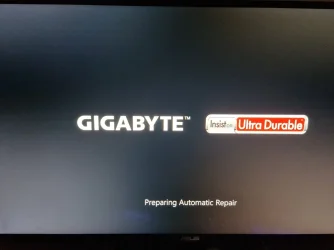
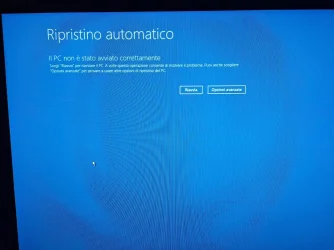
1) Hard reboots: When booting it either goes straight into WinRE as follows:

autorepair1.webp

autorepair2.webp

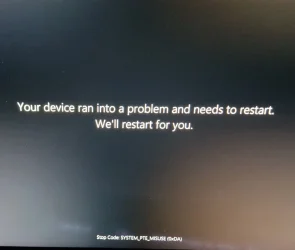
OR it gets stuck saying "Your device ran into a problem etc." In this case the only way out seems to the the physical on/off switch, after which it will either reboot to WinRE as above or get stuck again.

stuck.webp

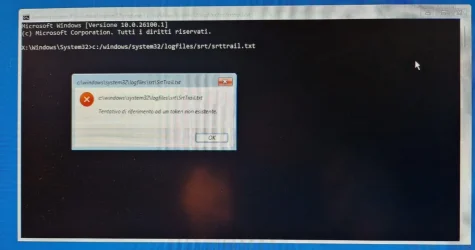
2) Startup repair. I have done startup repair from WinRE but I am not able to view the log:

srt trail.webp

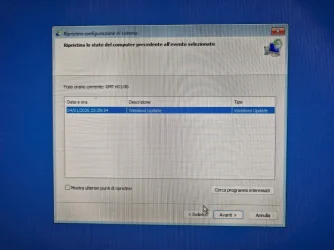
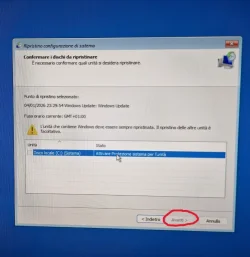
3) System restore: I had already done this to a previous restoration point when the problem started a couple of days ago. Now it will not let me proceed to restore (button is grayed out). See below:

restorepoint1.webp

restorepoint2.webp

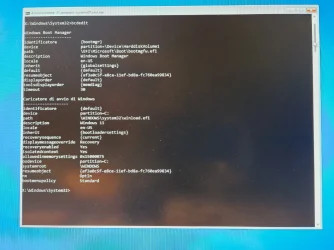
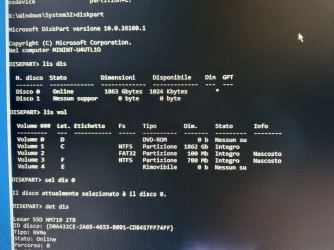
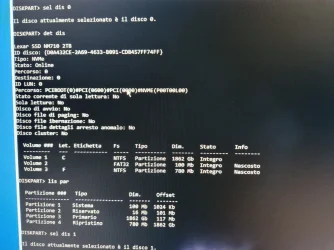
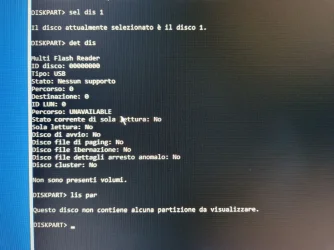
4) Command prompt results. See below:

commandprompt (1).webp

commandprompt (2).webp

commandprompt (3).webp

commandprompt (4).webp

Thanks again.
Coresus
 

My Computer My Computer

At a glance

Windows 11
OS
Windows 11
Computer type
PC/Desktop
On another pc, download Macrium Reflect free from majorgeeks, install it and create usb rescue drive.

Boot from it on your pc and select "fix windows boot problems"
 

My Computer My Computer

At a glance

Windows 11 Pro + Win11 Canary VM.I9 13th gen i9-13900H 2.60 GHZ16 GB solderedIntegrated Intel Iris XE
OS
Windows 11 Pro + Win11 Canary VM.
Computer type
Laptop
Manufacturer/Model
ASUS Zenbook 14
CPU
I9 13th gen i9-13900H 2.60 GHZ
Motherboard
Yep, Laptop has one.
Memory
16 GB soldered
Graphics Card(s)
Integrated Intel Iris XE
Sound Card
Realtek built in
Monitor(s) Displays
laptop OLED screen
Screen Resolution
2880x1800 touchscreen
Hard Drives
1 TB NVME SSD (only weakness is only one slot)
PSU
Internal + 65W thunderbolt USB4 charger
Case
Yep, got one
Cooling
Stella Artois (UK pint cans - 568 ml) - extra cost.
Keyboard
Built in UK keybd
Mouse
Bluetooth , wireless dongled, wired
Internet Speed
900 mbs (ethernet), wifi 6 typical 350-450 mb/s both up and down
Browser
Edge
Antivirus
Defender
Other Info
TPM 2.0, 2xUSB4 thunderbolt, 1xUsb3 (usb a), 1xUsb-c, hdmi out, 3.5 mm audio out/in combo, ASUS backlit trackpad (inc. switchable number pad)

Macrium Reflect Home V8
Office 365 Family (6 users each 1TB onedrive space)
Hyper-V (a vm runs almost as fast as my older laptop)
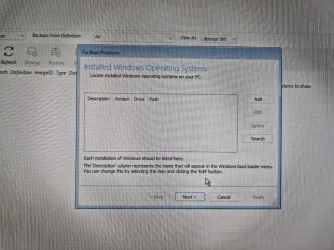
OK so I created a rescue drive with Macrium Reflect Free and booted from it.
When using the "Fix Windows Boot Problems" option, it could not find any installed operating system (see below), so I added Windows 11 as suggested here. I hope that wasn't the wrong thing to do.

Macrium0.webp

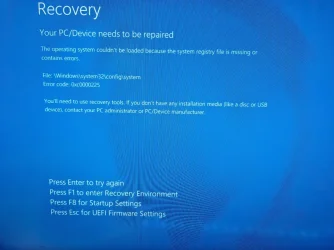
Unfortunately, now after completing the Boot Fix I get this (see below) and none of the available options take me anywhere meaningful (as far as I can see):

Macrium1.webp

Thanks for any help.
 

My Computer My Computer

At a glance

Windows 11
OS
Windows 11
Computer type
PC/Desktop
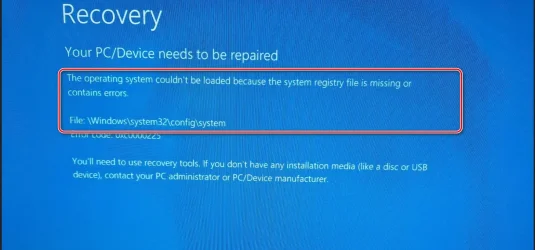
Unfortunately, now after completing the Boot Fix I get this (see below) and none of the available options take me anywhere meaningful (as far as I can see):

Your PC/Device needs to be repaired
The operating system couldn't be loaded because the system registry file is missing or contains errors.
File: \Windows\system32\config\system
Error code: 0xc0000225

ChatGPT:

File: \Windows\System32\config\SYSTEM

Cause:
This is not a bootloader problem. This file is the SYSTEM registry hive, which Windows must load to even start the kernel.

If this file is:
  • Missing
  • Corrupted
  • Unreadable (disk errors)
Windows cannot initialize the OS at all — even if the boot configuration is perfect.

bcdboot does nothing here, because:
  • The bootloader is already running
  • Windows fails after bootloader handoff
  • The problem is inside the OS itself
 

My Computers My Computers

  • At a glance

    Windows 11 ProAMD Ryzen 9 9950X3DKingston FURY Beast 64GB (2x32GB) DDR5 6000MT/sASUS TUF Gaming Radeon RX 9070 OC Edition 16G...
    OS
    Windows 11 Pro
    Computer type
    PC/Desktop
    CPU
    AMD Ryzen 9 9950X3D
    Motherboard
    ASRock B650E Taichi Lite
    Memory
    Kingston FURY Beast 64GB (2x32GB) DDR5 6000MT/s
    Graphics Card(s)
    ASUS TUF Gaming Radeon RX 9070 OC Edition 16GB GDDR6
    Hard Drives
    Solidigm P44 Pro 2TB M.2 NVMe SSD
  • At a glance

    Windows 11 HomeIntel Core Ultra 9 275HX64GB (2x 32GB) DDR5-6400NVIDIA GeForce RTX 5080 16GB GDDR7 Laptop GPU
    Operating System
    Windows 11 Home
    Computer type
    Laptop
    Manufacturer/Model
    Lenovo Legion Pro 7i Gen 10 16"
    CPU
    Intel Core Ultra 9 275HX
    Memory
    64GB (2x 32GB) DDR5-6400
    Graphics card(s)
    NVIDIA GeForce RTX 5080 16GB GDDR7 Laptop GPU
    Hard Drives
    2x 1TB M.2 NVMe SSD (SK Hynix)
If you have a bootable usb Windows 11 installation drive on which Windows 11 is the same build, you can boot to it and try to repair your system. You can create the usb drive on another PC.

Edit: Windows language should be the same.
 

My Computers My Computers

  • At a glance

    Windows 11 Pro build 26200.8524Intel i7-4790Teams DDR3-1600 4x4 GBMSI Nvidia GeForce GTX 1050Ti
    OS
    Windows 11 Pro build 26200.8524
    Computer type
    PC/Desktop
    Manufacturer/Model
    Home Built
    CPU
    Intel i7-4790
    Motherboard
    Asus H97 Pro Gamer with add-on TPM1.2 module
    Memory
    Teams DDR3-1600 4x4 GB
    Graphics Card(s)
    MSI Nvidia GeForce GTX 1050Ti
    Sound Card
    Realtek ALC1150
    Monitor(s) Displays
    Dell P2425D
    Screen Resolution
    2560 by 1440 pixels
    Hard Drives
    Corsair NVMe M.2 Core XT 1000 GB (Windows 11 v.25H2); Samsung SATA Evo 870 500 GB (Windows 11 v.25H2);
    PSU
    Corsair HX850
    Case
    Gigabyte Solo 210
    Cooling
    Zalman CNPS7X Tower
    Keyboard
    Microsoft AIO Wireless (includes touchpad)
    Mouse
    HP S1000 Plus Wireless
    Internet Speed
    500 Mb fiber optic
    Browser
    Chrome; MS Edge
    Antivirus
    Windows Defender
  • At a glance

    MacOS 12 MontereyIntel Core i58 GBIntel integrated
    Operating System
    MacOS 12 Monterey
    Computer type
    Laptop
    Manufacturer/Model
    Apple Macbook Air
    CPU
    Intel Core i5
    Memory
    8 GB
    Graphics card(s)
    Intel integrated
    Screen Resolution
    1440 by 900 pixels
    Hard Drives
    128 GB
    Keyboard
    Built-in
    Mouse
    Microsoft Wireless
    Internet Speed
    802.11 ac
    Browser
    Chrome; Safari
    Antivirus
    N/A
I hope you have a backup of the important stuff. This is why I have multiple operating systems on my computer AND backups, in case I need to git in and save stuff before something catastrophic happens (which has never happened thankfully) but sometimes I do dumb stuff that scares me :eek1:

If a "repair" install does not work and if you have a lot to save maybe take that drive out and put a new drive in and start over(?) This is easier with a desktop computer which you seem to have.
 

My Computers My Computers

  • At a glance

    Windows 11 (up to date)Intel i5 12400Corsair Vengeance LPX 16GBOn Board the Z690
    OS
    Windows 11 (up to date)
    Computer type
    PC/Desktop

    Manufacturer/Model
    Custom
    CPU
    Intel i5 12400
    Motherboard
    Gigabyte Z690 UA
    Memory
    Corsair Vengeance LPX 16GB
    Graphics Card(s)
    On Board the Z690
    Sound Card
    On Board
    Monitor(s) Displays
    43" Samsung tu7000
    Screen Resolution
    2560 x 1440
    Hard Drives
    SAMSUNG SSD 1TB NVMe M.2
    PSU
    Thermaltake smart 500w 80+
    Case
    LIAN LANCOOL_205M
    Cooling
    Bunch of fans . . . :o) (lights dont work)
    Keyboard
    Unicomp: Ultra Classic White Buckling Spring USB
    Mouse
    M510
    Internet Speed
    50mbps on Ethernet
    Browser
    Fire Fox
    Antivirus
    Windows
    Other Info
    Love this computer but I still prefer Win-7 like I love my old Lazy Boy Recliner . . . it just feels better.
  • At a glance

    WIN-7-64BIT and Win-11 pro for testing on uns...i5-3570K CPU @ 3.40GHz, 3801 Mhz, 4 Core(s), ...16 GB - Crucial Ballistick 4GB PC3-14900 DDR3...NVIDIA GeForce GTX 1050
    Operating System
    WIN-7-64BIT and Win-11 pro for testing on unsupported hardware
    Computer type
    PC/Desktop

    Manufacturer/Model
    Home built
    CPU
    i5-3570K CPU @ 3.40GHz, 3801 Mhz, 4 Core(s), 4 Logical Processor(s)
    Motherboard
    GA-Z77-HD3
    Memory
    16 GB - Crucial Ballistick 4GB PC3-14900 DDR3-1333 MHz
    Graphics card(s)
    NVIDIA GeForce GTX 1050
    Sound Card
    On Board
    Monitor(s) Displays
    ASUS VP278
    Screen Resolution
    1920 x 1080
    Hard Drives
    4 - internal Samsung 2.5" SSD, 1 WD HDD 7200 and some external drives
    PSU
    EVGA 550w
    Case
    Old Gygabyte Tower
    Cooling
    Yes
    Keyboard
    Unicomp - UNIOP4A USB (like the old IBM Model H that I started with)
    Mouse
    M510
    Internet Speed
    50mbps
    Browser
    Firefox
    Antivirus
    Windows
    Other Info
    The only thing it lack is USB-3.2 on the front face but it has 3.0 on the back
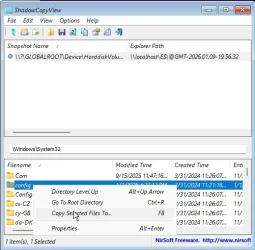
Try copying the hives from the restore point

couple of ways to do it


put shadowcopyview on a usb stick.

plug in the usb stick

boot to winre

use notepad to navigate to shadowcopyviewx64.exe on the usb stick

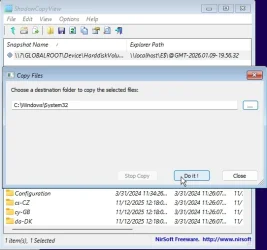
then you can copy the hives from the shadowcopy into your windows\system32\config folder

using bog standard winre.wim you will have to type in the destination to copy to e.g. c:\windows\system32\config

there is another way using cmd prompt but it is more complicated.

regbak is typically disabled so a shadowcopy can be a lifesaver if you havent been making regular images
 

My Computers My Computers

  • At a glance

    Win7,Win11i7-97002x16gb 3600mhz
    OS
    Win7,Win11
    Computer type
    PC/Desktop

    CPU
    i7-9700
    Motherboard
    gigabyte b365m ds3h
    Memory
    2x16gb 3600mhz
    Monitor(s) Displays
    benq gw2480
    PSU
    bequiet pure power 11 400CM
    Cooling
    cryorig m9i
  • At a glance

    win7,win11i5-84002x8gb 3200
    Operating System
    win7,win11
    Computer type
    PC/Desktop

    CPU
    i5-8400
    Motherboard
    gigabyte b365m ds3h
    Memory
    2x8gb 3200
    PSU
    xfx pro 450
If you have a bootable usb Windows 11 installation drive on which Windows 11 is the same build, you can boot to it and try to repair your system. You can create the usb drive on another PC.

Edit: Windows language should be the same.

Thanks for this suggestion. Can you or someone provide a few more details about how to create this bootable drive?
 

My Computer My Computer

At a glance

Windows 11
OS
Windows 11
Computer type
PC/Desktop

Try copying the hives from the restore point

couple of ways to do it

ShadowCopyView - Shadow copy viewer for Windows 10/8/7/Vista

Simple tool for Windows 10/8/7/Vista that lists the snapshots of your hard drive created by the Volume Shadow Copy service of Windows
www.nirsoft.net

put shadowcopyview on a usb stick.

plug in the usb stick

boot to winre

Thanks for this. However at this point I cannot even get into WinRE any more (unless I'm missing something).
 

My Computer My Computer

At a glance

Windows 11
OS
Windows 11
Computer type
PC/Desktop
You can use any win11 winpe that has cmd prompt , type notepad, when it pops up click it and use File>save dailog to browse around ( you need to select ALL Files in the dropdown )

win11 installation media will do - you can get to cmd prompt from boot.wim by pressing shift+f10 or select repair my computer to get to cmd prompt
 

My Computers My Computers

  • At a glance

    Win7,Win11i7-97002x16gb 3600mhz
    OS
    Win7,Win11
    Computer type
    PC/Desktop
    CPU
    i7-9700
    Motherboard
    gigabyte b365m ds3h
    Memory
    2x16gb 3600mhz
    Monitor(s) Displays
    benq gw2480
    PSU
    bequiet pure power 11 400CM
    Cooling
    cryorig m9i
  • At a glance

    win7,win11i5-84002x8gb 3200
    Operating System
    win7,win11
    Computer type
    PC/Desktop
    CPU
    i5-8400
    Motherboard
    gigabyte b365m ds3h
    Memory
    2x8gb 3200
    PSU
    xfx pro 450
OK so I created a rescue drive with Macrium Reflect Free and booted from it.
When using the "Fix Windows Boot Problems" option, it could not find any installed operating system (see below), so I added Windows 11 as suggested here. I hope that wasn't the wrong thing to do.
May I ask when you boot up the Macrium Rescue Disk, Did you select the correct boot entry ?
There are 2 entries on the Rescue disk, one is UEFI-USB (for GPT disk type)and the other is just plain USB (For MBR disk type).
UEFI-USB is the correct one to boot from since your Windows OS is on a GPT disk. If you select the wrong one then
"Fix Windows Boot Problems" might not find it.
If indeed you selected the correct one and Macriun could not find it then your EFI System Partition might be corrupted.
I would fix the Boot file first before proceeding...
 

My Computers My Computers

  • At a glance

    Windows 11 Pro 25H2, Linux Mint 21.3Intel Core i9-14900K @5.8GHZ64GB (2XG Skill F5-6400J3239G32G) @6800Radeon (TM) RX 480 Graphics (8 GB)
    OS
    Windows 11 Pro 25H2, Linux Mint 21.3
    Computer type
    PC/Desktop
    Manufacturer/Model
    Self Build Feb.2024
    CPU
    Intel Core i9-14900K @5.8GHZ
    Motherboard
    MSI MAG Z790 Tomahawk Max WiFi 7
    Memory
    64GB (2XG Skill F5-6400J3239G32G) @6800
    Graphics Card(s)
    Radeon (TM) RX 480 Graphics (8 GB)
    Sound Card
    Intergrated Realtek
    Monitor(s) Displays
    Samsung
    Screen Resolution
    3840x2160
    Hard Drives
    1 - Crucial 705 1TB GEN5
    1 - Crucial 705 2TB GEN5
    2 - Crucial T500 2TB Gen4
    PSU
    750W EVGA-G3
    Case
    Antec NX410
    Cooling
    H2O Thermalright
    Keyboard
    Logitech K800
    Mouse
    Logitech Master 2S
    Internet Speed
    600 Mbps
    Browser
    Chrome
    Antivirus
    WD
  • At a glance

    Windows 11 Pro & Linux Mint X64Intel(R) Core(TM) i7-3770K CPU @ 4.20 GHz32.0GB Dual-Channel CMY16GX3M2A1600C9NVIDIA GeForce GT 740
    Operating System
    Windows 11 Pro & Linux Mint X64
    Computer type
    PC/Desktop
    Manufacturer/Model
    MSI Z77 MPower (MS-7751)
    CPU
    Intel(R) Core(TM) i7-3770K CPU @ 4.20 GHz
    Motherboard
    Z77 MPower (MS-7751)
    Memory
    32.0GB Dual-Channel CMY16GX3M2A1600C9
    Graphics card(s)
    NVIDIA GeForce GT 740
    Monitor(s) Displays
    40" Samsung
    Screen Resolution
    1920X1080
    Hard Drives
    WIN10 - 111GB Samsung SSD 840 Series
    WIN11 - 223GB Crucial CT240BX500SSD
    2X931GB Crucial CT1000BX500SSD1
    PSU
    Antec 850W
    Case
    Antec 900
    Cooling
    H20
    Keyboard
    Logitech K800 Wireless
    Mouse
    Logitech MX Master 2S
    Internet Speed
    100 Mbps
    Browser
    Chrome
    Antivirus
    Windows Defender
The OP screenshot from post#5.

If it gets as far as trying to load the system hive there is nothing wrong with the esp or the bcd entry

systemhive-corrupt.webp


You could rename the windows\system32\config folder to config-old before copying the config folder from the shadowcopy to avoid overwriting if you like

shadowcopyview1.webp

shadowcopyview2.webp
 
Last edited:

My Computers My Computers

  • At a glance

    Win7,Win11i7-97002x16gb 3600mhz
    OS
    Win7,Win11
    Computer type
    PC/Desktop
    CPU
    i7-9700
    Motherboard
    gigabyte b365m ds3h
    Memory
    2x16gb 3600mhz
    Monitor(s) Displays
    benq gw2480
    PSU
    bequiet pure power 11 400CM
    Cooling
    cryorig m9i
  • At a glance

    win7,win11i5-84002x8gb 3200
    Operating System
    win7,win11
    Computer type
    PC/Desktop
    CPU
    i5-8400
    Motherboard
    gigabyte b365m ds3h
    Memory
    2x8gb 3200
    PSU
    xfx pro 450
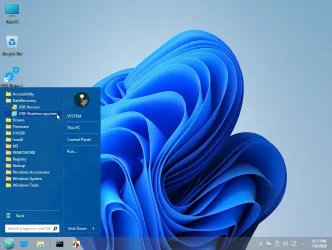
I have made win11 pe iso which you can borrow if you need. It should be extracted to usb stick because it links to the included programs on the usb stick

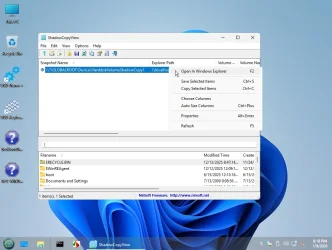
it is quite a fancy pe build so instead of scrolling through the bootom pane of shadowcopyview you should be able to open the shadow in explorer

7171-iso.webp

7171-iso-open-in-explorer.webp
 

My Computers My Computers

  • At a glance

    Win7,Win11i7-97002x16gb 3600mhz
    OS
    Win7,Win11
    Computer type
    PC/Desktop
    CPU
    i7-9700
    Motherboard
    gigabyte b365m ds3h
    Memory
    2x16gb 3600mhz
    Monitor(s) Displays
    benq gw2480
    PSU
    bequiet pure power 11 400CM
    Cooling
    cryorig m9i
  • At a glance

    win7,win11i5-84002x8gb 3200
    Operating System
    win7,win11
    Computer type
    PC/Desktop
    CPU
    i5-8400
    Motherboard
    gigabyte b365m ds3h
    Memory
    2x8gb 3200
    PSU
    xfx pro 450
Please search for any of these files > post share links

Minidump
memory.dmp
LiveKernelReports
CBS.log
srttrail.txt


%systemroot%\Minidump
C:\Windows\Minidump
%systemroot%\memory.dmp
C:\Windows\memory.dmp
%systemroot%\LiveKernelReports
C:\Windows\LiveKernelReports
%windir%\Logs\CBS\CBS.log
C:\WINDOWS\Logs\CBS\CBS.log
C:/windows/system32/logfiles/srt/srttrail.txt
 

My Computer My Computer

At a glance

Windows 10Intel(R) Core(TM) i7-4800MQ CPU @ 2.70GHz16 GB Total: Manufacturer : Samsung MemoryTyp...NVIDIA Quadro K3100M; Intel(R) HD Graphics 4600
OS
Windows 10
Computer type
Laptop
Manufacturer/Model
HP
CPU
Intel(R) Core(TM) i7-4800MQ CPU @ 2.70GHz
Motherboard
Product : 190A Version : KBC Version 94.56
Memory
16 GB Total: Manufacturer : Samsung MemoryType : DDR3 FormFactor : SODIMM Capacity : 8GB Speed : 1600
Graphics Card(s)
NVIDIA Quadro K3100M; Intel(R) HD Graphics 4600
Sound Card
IDT High Definition Audio CODEC; PNP Device ID HDAUDIO\FUNC_01&VEN_111D&DEV_76E0
Hard Drives
Model Hitachi HTS727575A9E364
Antivirus
Microsoft Defender
Other Info
Mobile Workstation
I have made win11 pe iso which you can borrow if you need. It should be extracted to usb stick because it links to the included programs on the usb stick

it is quite a fancy pe build so instead of scrolling through the bootom pane of shadowcopyview you should be able to open the shadow in explorer

I need to learn how to do this. I did something like it a LONG time ago with BartPE but my brain has a memory leak
 

My Computers My Computers

  • At a glance

    Windows 11 (up to date)Intel i5 12400Corsair Vengeance LPX 16GBOn Board the Z690
    OS
    Windows 11 (up to date)
    Computer type
    PC/Desktop
    Manufacturer/Model
    Custom
    CPU
    Intel i5 12400
    Motherboard
    Gigabyte Z690 UA
    Memory
    Corsair Vengeance LPX 16GB
    Graphics Card(s)
    On Board the Z690
    Sound Card
    On Board
    Monitor(s) Displays
    43" Samsung tu7000
    Screen Resolution
    2560 x 1440
    Hard Drives
    SAMSUNG SSD 1TB NVMe M.2
    PSU
    Thermaltake smart 500w 80+
    Case
    LIAN LANCOOL_205M
    Cooling
    Bunch of fans . . . :o) (lights dont work)
    Keyboard
    Unicomp: Ultra Classic White Buckling Spring USB
    Mouse
    M510
    Internet Speed
    50mbps on Ethernet
    Browser
    Fire Fox
    Antivirus
    Windows
    Other Info
    Love this computer but I still prefer Win-7 like I love my old Lazy Boy Recliner . . . it just feels better.
  • At a glance

    WIN-7-64BIT and Win-11 pro for testing on uns...i5-3570K CPU @ 3.40GHz, 3801 Mhz, 4 Core(s), ...16 GB - Crucial Ballistick 4GB PC3-14900 DDR3...NVIDIA GeForce GTX 1050
    Operating System
    WIN-7-64BIT and Win-11 pro for testing on unsupported hardware
    Computer type
    PC/Desktop
    Manufacturer/Model
    Home built
    CPU
    i5-3570K CPU @ 3.40GHz, 3801 Mhz, 4 Core(s), 4 Logical Processor(s)
    Motherboard
    GA-Z77-HD3
    Memory
    16 GB - Crucial Ballistick 4GB PC3-14900 DDR3-1333 MHz
    Graphics card(s)
    NVIDIA GeForce GTX 1050
    Sound Card
    On Board
    Monitor(s) Displays
    ASUS VP278
    Screen Resolution
    1920 x 1080
    Hard Drives
    4 - internal Samsung 2.5" SSD, 1 WD HDD 7200 and some external drives
    PSU
    EVGA 550w
    Case
    Old Gygabyte Tower
    Cooling
    Yes
    Keyboard
    Unicomp - UNIOP4A USB (like the old IBM Model H that I started with)
    Mouse
    M510
    Internet Speed
    50mbps
    Browser
    Firefox
    Antivirus
    Windows
    Other Info
    The only thing it lack is USB-3.2 on the front face but it has 3.0 on the back
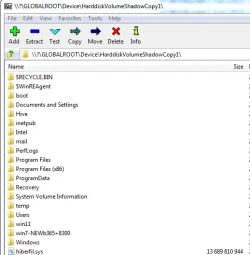
Could also be done with 7-zip if you have it in your pe

enter the snapshot name with an added backslash at the end

like this

\\?\GLOBALROOT\Device\HarddiskVolumeShadowCopy1\

if you dont know the name try HarddiskVolumeShadowCopy1
then HarddiskVolumeShadowCopy2 etc till you find what you want


then press enter and scroll down to whatever you want to copy out

7-zip-shadowcopy.webp
 

My Computers My Computers

  • At a glance

    Win7,Win11i7-97002x16gb 3600mhz
    OS
    Win7,Win11
    Computer type
    PC/Desktop
    CPU
    i7-9700
    Motherboard
    gigabyte b365m ds3h
    Memory
    2x16gb 3600mhz
    Monitor(s) Displays
    benq gw2480
    PSU
    bequiet pure power 11 400CM
    Cooling
    cryorig m9i
  • At a glance

    win7,win11i5-84002x8gb 3200
    Operating System
    win7,win11
    Computer type
    PC/Desktop
    CPU
    i5-8400
    Motherboard
    gigabyte b365m ds3h
    Memory
    2x8gb 3200
    PSU
    xfx pro 450
I need to learn how to do this. I did something like it a LONG time ago with BartPE but my brain has a memory leak
You could take a look and find out. A lot of practice and trial and error is needed

I have been using pecmd for so long I wouldnt know how to do it without. That is not a simple build it uses winxshell and classic shell as well as relying on pecmd shel support and other functions. Many people have contributed over the years, Slore for winxshell, Mdyblog ( Davies) for pecmd and others.

There is a project called win10xpe if you don't want to build it yourself. I think that project only works for some earlier win11 media.
 
Last edited:

My Computers My Computers

  • At a glance

    Win7,Win11i7-97002x16gb 3600mhz
    OS
    Win7,Win11
    Computer type
    PC/Desktop
    CPU
    i7-9700
    Motherboard
    gigabyte b365m ds3h
    Memory
    2x16gb 3600mhz
    Monitor(s) Displays
    benq gw2480
    PSU
    bequiet pure power 11 400CM
    Cooling
    cryorig m9i
  • At a glance

    win7,win11i5-84002x8gb 3200
    Operating System
    win7,win11
    Computer type
    PC/Desktop
    CPU
    i5-8400
    Motherboard
    gigabyte b365m ds3h
    Memory
    2x8gb 3200
    PSU
    xfx pro 450
OK so thanks to SIW2's WIN 11 pe iso I was able to access the files.
Big thanks for that (y)(y)(y)
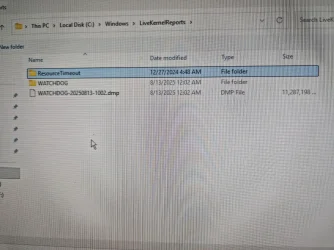
Further to Zbook's request I attach the files I found. I could not find memory.dmp at the location indicated, and the live kernel report was too large to get out using the bootable USB stick. The other files should be there.
Here's a picture of the LiveKernelReports directory. The two subdirectories are empty, there's just the too large Watchdog file.

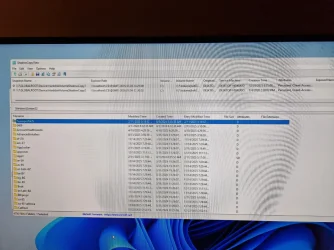
Kernel.webp

Now should I go ahead and replace the config folder from the shadow copy? I'm not sure which of the two available restore points to use (probably the one from 29 December is safer?)

shadow.webp

Thanks to all for helping.
 

Attachments

My Computer My Computer

At a glance

Windows 11
OS
Windows 11
Computer type
PC/Desktop
Back
Top Bottom