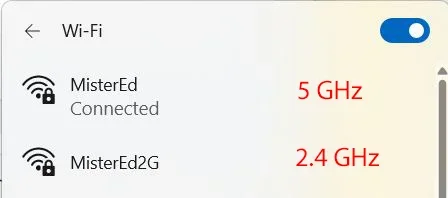
I need 2.4ghz for a device, my router only 5ghz name (A)
can I use another router connect via wireless and use another name (B)? so I can connect the 2.4 ghz device to 2.4
Why do you want to use 2 routers? Doesn't each one have 2.4 and 5 GHz?
My router supports WiFi 6E. By default it has one SSID. When that is selected the computer selects which band is used. I changed that so each band has its own SSID name. That allows me to manually select which band to connect to in the WiFi settings.
AMD Ryzen 7 6800H with Radeon 680M GPU (486MB RAM)
Memory
Crucial DDR5-4800 (2400MHz) 32GB (2 x 16GB)
Graphics Card(s)
NVIDIA RTX 3060 Laptop (6GB RAM)
Sound Card
n/a
Monitor(s) Displays
15.6-inch
Screen Resolution
1920x1080 300Hz
Hard Drives
2 x Samsung 990 Evo Plus (2TB M.2 NVME SSD)
PSU
n/a
Mouse
Wireless Mouse M510
Internet Speed
2100Mbps/300Mbps
Browser
Firefox
Antivirus
Malwarebytes
Operating System
Windows 11 Pro 25H2 (26200.8246)
Computer type
PC/Desktop
Manufacturer/Model
Custom build
CPU
AMD Ryzen 7 5700X3D
Motherboard
ASUS ROG Strix B550-F Gaming WiFi II
Memory
G.SKILL Flare X 32GB (2x16GB) DDR4
Graphics card(s)
ASUS ROG-STRIX-RTX3060TI-08G-V2-GAMING (RTX 3060-Ti, 8GB RAM)
Monitor(s) Displays
Samsung G50D IPS 27"
Screen Resolution
1440p/180Hz
Hard Drives
SAMSUNG 990 EVO Plus (2TB] M.2 NVME SSD
SAMSUNG 990 EVO Plus (4TB) M.2 NVME SSD
PSU
Corsair RM750x (750 watts)
Case
Cooler Master MasterCase 5
Cooling
Scythe Mugen 6
Keyboard
Logitech K520 (MK540 keyboard/mouse combo)
Mouse
Logitech M310 (MK540 keyboard/mouse combo)
Internet Speed
2100 Mbps down / 300 Mbps up
Browser
Firefox, Edge, Chrome
Antivirus
Malwarebytes (Premium)
Other Info
ASUS Blu-ray Burner BW-16D1HT (SATA) || Western Digital Easystore 20TB USB 3.0 external hard drive used with Acronis True Image 2025 backup software || HP OfficeJet Pro 6975 Printer/Scanner