Floating window appeared


Memnon

Member
Local time
11:37 PM
Posts
10
OS
W11
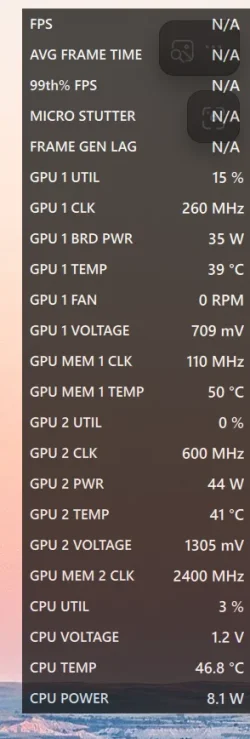
Not by choice (maybe accident) a transparent window has appeared on top right of screen
I can't move it or resize it

It show GPU temp, voltage etc.
Picture is attached.

How do I get rid of this ?
Screenshot 2026-06-14 193215.webp
 
Windows Build/Version
25H2

My Computer

System One

  • OS
    W11
    Computer type
    PC/Desktop
    Manufacturer/Model
    Home Build
    CPU
    AMD Ryzen 9 7900X 4.7 GHz 12-Core
    Motherboard
    Gigabyte Aorus Master X670e
    Memory
    CORSAIR VENGEANCE DDR5 64GB (2x32GB) DDR5 6000MHz
    Graphics Card(s)
    Gigabyte Radeon RX 7800 XT GAMING OC 16GB
    Monitor(s) Displays
    1 x Alienware AW2725QF 27" 1 x Dell P2422HD 23"
    Screen Resolution
    4K
    Hard Drives
    2 x 2TB Crucial T700 2TB SSD PCIe Gen5 NVMe M.2 I
    PSU
    Thermaltake TOUGHPOWER GF A3 1050W Modular
    Case
    Fractal Define 7 Mid Tower Gaming Case
    Cooling
    Thermalright Phantom Spirit 1230 EVO
    Internet Speed
    8GB full fibre
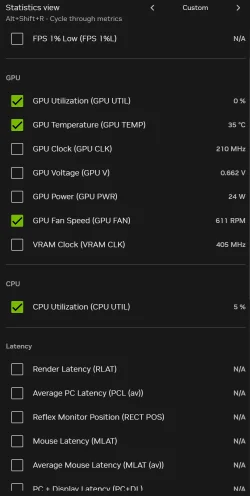
Have you tried doing a shutdown restart ? They look like Nvidia App - options here's some of mine
 

Attachments

  • Screenshot 2026-06-14 130038.webp
    Screenshot 2026-06-14 130038.webp
    60.3 KB · Views: 1
Last edited:

My Computer

System One

  • OS
    Win 11 Pro 25H2 26200 8655
    Computer type
    PC/Desktop
    Manufacturer/Model
    HP Omen45L
    CPU
    Intel Core I9 12900K
    Motherboard
    HP 8917
    Memory
    32 GB
    Graphics Card(s)
    Nvidia GeForce RTX 3060 24GB
    Sound Card
    HP
    Monitor(s) Displays
    2 HP 27 & 23
    Screen Resolution
    3840x2160
    Hard Drives
    2 TB Samsung 990 EVO 2 TB Samsung 1 TB SATA ST1000
    PSU
    HP 800 Watt
    Case
    HP
    Cooling
    Water
    Keyboard
    Logo Tech G 213
    Mouse
    Logi Tech 502
    Browser
    FireFox
    Antivirus
    MS Defender / Malwarebytes Prem.
    Other Info
    Omen 45SL purchased from HP 12 2022 - Brother Printer MFC-L2700DW APC 500 Back UPS Macrium Reflect Home 8.1 25H2 Oct 2025 KEK CA 2023 cert April 2026
WIN + ALT + R in case it is Windows Gamebar
CTRL + SHIFT + O for AMD Adrenaline overlay
ALT + R for nVidia performance overlay

Since your computer is AMD only, I bet it is the Adrenaline Overlay
 

My Computers

System One System Two

  • OS
    Win 11 Pro 25H2 26200.8457 / Linux Mint 22.3
    Computer type
    Laptop
    Manufacturer/Model
    Lenovo A485
    CPU
    Ryzen 7 2700U Pro
    Motherboard
    Lenovo (WiFi/BT module upgraded to Intel Wireless-AC-9260)
    Memory
    32GB
    Graphics Card(s)
    iGPU Vega 10
    Sound Card
    Realtek
    Monitor(s) Displays
    14" FHD (built-in) + 14" Lenovo Thinkvision M14t (touch+pen) + 32" Asus PB328
    Screen Resolution
    FHD + FHD + 1440p
    Hard Drives
    Intel 660p m.2 nVME PCIe3.0 x2 512GB
    PSU
    125W(Dock)/65W(Travel Adapter)
    Keyboard
    Thinkpad / Logitech MX Keys
    Mouse
    Logitech MX Master 2S
    Internet Speed
    1/1Gbit
    Browser
    Firefox
    Antivirus
    Windows Defender
    Other Info
    SecureBoot: Enabled
    TPM2.0: Enabled
    AMD-V: Enabled
  • Operating System
    Win 11 Pro 25H2 26200.8521(RP)
    Computer type
    PC/Desktop
    Manufacturer/Model
    Custom
    CPU
    i7-7700k @4.8GHz
    Motherboard
    Asus PRIME Z270-A
    Memory
    32GB 2x16GB 2133MHz CL15
    Graphics card(s)
    EVGA GTX1080Ti FTW 11GB
    Sound Card
    Integrated
    Monitor(s) Displays
    32" 10-bit Asus PB328Q
    Screen Resolution
    WQHD 2560x1440
    Hard Drives
    512GB ADATA SX8000NP NVMe PCIe Gen 3 x4
    PSU
    850W
    Case
    Fractal Design Define 7
    Cooling
    Noctua NH-D15 chromax.black
    Keyboard
    Logitech MX Keys
    Mouse
    Logitech MX Master 2S
    Internet Speed
    1/1Gbit
    Browser
    Firefox
    Antivirus
    Windows Defender
    Other Info
    AC WiFi Card
Have you tried doing a shutdown restart ? They look like Nvidia App - options here's some of mine
I hqave shutdown PC and restarted it - it appears each time.
 

My Computer

System One

  • OS
    W11
    Computer type
    PC/Desktop
    Manufacturer/Model
    Home Build
    CPU
    AMD Ryzen 9 7900X 4.7 GHz 12-Core
    Motherboard
    Gigabyte Aorus Master X670e
    Memory
    CORSAIR VENGEANCE DDR5 64GB (2x32GB) DDR5 6000MHz
    Graphics Card(s)
    Gigabyte Radeon RX 7800 XT GAMING OC 16GB
    Monitor(s) Displays
    1 x Alienware AW2725QF 27" 1 x Dell P2422HD 23"
    Screen Resolution
    4K
    Hard Drives
    2 x 2TB Crucial T700 2TB SSD PCIe Gen5 NVMe M.2 I
    PSU
    Thermaltake TOUGHPOWER GF A3 1050W Modular
    Case
    Fractal Define 7 Mid Tower Gaming Case
    Cooling
    Thermalright Phantom Spirit 1230 EVO
    Internet Speed
    8GB full fibre
WIN + ALT + R in case it is Windows Gamebar
CTRL + SHIFT + O for AMD Adrenaline overlay
ALT + R for nVidia performance overlay

Since your computer is AMD only, I bet it is the Adrenaline Overlay
Ctl + Shift +O got rid of it.
Never heard of Adrenaline Overlay

Well done Sir :-)
 

My Computer

System One

  • OS
    W11
    Computer type
    PC/Desktop
    Manufacturer/Model
    Home Build
    CPU
    AMD Ryzen 9 7900X 4.7 GHz 12-Core
    Motherboard
    Gigabyte Aorus Master X670e
    Memory
    CORSAIR VENGEANCE DDR5 64GB (2x32GB) DDR5 6000MHz
    Graphics Card(s)
    Gigabyte Radeon RX 7800 XT GAMING OC 16GB
    Monitor(s) Displays
    1 x Alienware AW2725QF 27" 1 x Dell P2422HD 23"
    Screen Resolution
    4K
    Hard Drives
    2 x 2TB Crucial T700 2TB SSD PCIe Gen5 NVMe M.2 I
    PSU
    Thermaltake TOUGHPOWER GF A3 1050W Modular
    Case
    Fractal Define 7 Mid Tower Gaming Case
    Cooling
    Thermalright Phantom Spirit 1230 EVO
    Internet Speed
    8GB full fibre

Latest Support Threads

Back
Top Bottom