With KB5063878, Windows is now showing two name accts at startup


I know what DM means but it wasn’t expecting iy out of the blue in this context, all the more when the phrase is DM log or DM log collector tool. Or how to DM a log collector that isn’t running correctly.
 

My Computers My Computers

  • At a glance

    Windows 11 Proi516.0 GB
    OS
    Windows 11 Pro
    Computer type
    PC/Desktop
    CPU
    i5
    Motherboard
    Asus
    Memory
    16.0 GB
    Monitor(s) Displays
    Samsung T45F
    Screen Resolution
    1920x1200
    Hard Drives
    Samsung Evo SSDs and Western HDDs
    Keyboard
    IBM Model M
    Mouse
    Bornd
    Antivirus
    Windows and MBAM Premium
  • At a glance

    Win 11 Pro
    Operating System
    Win 11 Pro
    Computer type
    Laptop
    Manufacturer/Model
    Lenovo Thinkpad
For my Memory Integrity thread, I ran https://www.elevenforum.com/attachments/dm_log_collector-exe.34994/ if that's of use here. Since it's got my first name in it, should I post it on OneDrive or send it to someone? There is also a folder called TFdebugFiles that showed up at the same time. That is on OneDrive: TFdebugFiles

Btw, this morning I ran System Restore back 24 hours. Then on a second reboot it updated to KB5063878. With another reboot, it only showed one name, however it wanted a pw or PIN, even though it's set to not ask. At the end, it said there was an app that it couldn't handle, but wasn't named. There was one icon that was blank and Chrome wouldn't start until I updated it, so I'm not sure if one of them was it.

Continuing issues:
- There still is my first name (instead of both) that shows when asked for a Windows login by a program, such as for Task Scheduler. The password I have doesn't work on it, but so far I've been able to bypass it or enter a PIN.

- (one more I can't think of at the moment but will add later).

- There's the Memory Integrity issue being address on another thread.
 
Last edited:

My Computers My Computers

  • At a glance

    Windows 11 Proi516.0 GB
    OS
    Windows 11 Pro
    Computer type
    PC/Desktop
    CPU
    i5
    Motherboard
    Asus
    Memory
    16.0 GB
    Monitor(s) Displays
    Samsung T45F
    Screen Resolution
    1920x1200
    Hard Drives
    Samsung Evo SSDs and Western HDDs
    Keyboard
    IBM Model M
    Mouse
    Bornd
    Antivirus
    Windows and MBAM Premium
  • At a glance

    Win 11 Pro
    Operating System
    Win 11 Pro
    Computer type
    Laptop
    Manufacturer/Model
    Lenovo Thinkpad
If they are relevant here, the files referred in the previous post are in Dropbox:


My Computers My Computers

  • At a glance

    Windows 11 Proi516.0 GB
    OS
    Windows 11 Pro
    Computer type
    PC/Desktop
    CPU
    i5
    Motherboard
    Asus
    Memory
    16.0 GB
    Monitor(s) Displays
    Samsung T45F
    Screen Resolution
    1920x1200
    Hard Drives
    Samsung Evo SSDs and Western HDDs
    Keyboard
    IBM Model M
    Mouse
    Bornd
    Antivirus
    Windows and MBAM Premium
  • At a glance

    Win 11 Pro
    Operating System
    Win 11 Pro
    Computer type
    Laptop
    Manufacturer/Model
    Lenovo Thinkpad
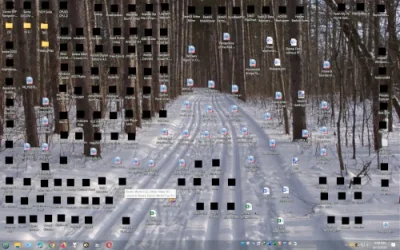
(this is a duplicate post) In my Memory Integrity and Kernal-mode Stack Protection thread, I was encouraged to update the BIOS, which I just did. The result is on startup Windows now shows it has the wrong username or pw, and shows two of my full name (only one before the BIOS update). Choosing either one and using a PIN, I end up with the desktop below, with all program icons in black. What now?

I found a YT video that suggested a couple of fixes, the second having a DISM command sequence ending with /RestoreHealth. Didn't fix it (rebooted).

Attachments​

  • Desktop after BIOS update 8-13-25.webp
    Desktop after BIOS update 8-13-25.webp
    46 KB · Views: 0

 
Last edited:

My Computers My Computers

  • At a glance

    Windows 11 Proi516.0 GB
    OS
    Windows 11 Pro
    Computer type
    PC/Desktop
    CPU
    i5
    Motherboard
    Asus
    Memory
    16.0 GB
    Monitor(s) Displays
    Samsung T45F
    Screen Resolution
    1920x1200
    Hard Drives
    Samsung Evo SSDs and Western HDDs
    Keyboard
    IBM Model M
    Mouse
    Bornd
    Antivirus
    Windows and MBAM Premium
  • At a glance

    Win 11 Pro
    Operating System
    Win 11 Pro
    Computer type
    Laptop
    Manufacturer/Model
    Lenovo Thinkpad
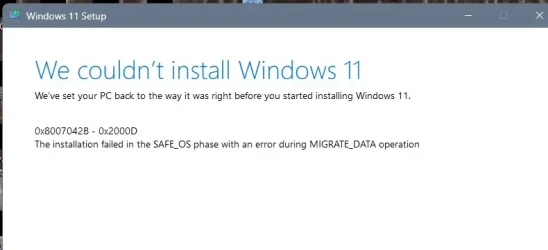
I tried an in-place repair install and in the end it failed, per the screenshot. Now what?
 

Attachments

  • Windows in-place repair install failed.webp
    Windows in-place repair install failed.webp
    17.4 KB · Views: 1

My Computers My Computers

  • At a glance

    Windows 11 Proi516.0 GB
    OS
    Windows 11 Pro
    Computer type
    PC/Desktop
    CPU
    i5
    Motherboard
    Asus
    Memory
    16.0 GB
    Monitor(s) Displays
    Samsung T45F
    Screen Resolution
    1920x1200
    Hard Drives
    Samsung Evo SSDs and Western HDDs
    Keyboard
    IBM Model M
    Mouse
    Bornd
    Antivirus
    Windows and MBAM Premium
  • At a glance

    Win 11 Pro
    Operating System
    Win 11 Pro
    Computer type
    Laptop
    Manufacturer/Model
    Lenovo Thinkpad
Back
Top Bottom