Word opens up when the computer comes out of sleep.


Greshoff1

Well-known member
Member
Local time
1:59 PM
Posts
32
OS
Windows11
Hello,
I have just upgraded Windows 10 to Windows 11. There is one irritating thing that has started happening since the upgrade - Word opens up when the computer comes out of sleep. This never happened on my Windows 10. Any ideas on hoe to prevent this happening?
Many thanks
 

My Computer My Computer

At a glance

Windows11Intel Core i7 8700 @ 3.20GHz 28 °C Coffee Lak...16.0GB Dual-Channel DDR4 @ 1196MHz (16-16-16-39)2047MB NVIDIA GeForce GT 1030 (ASUStek Comput...
OS
Windows11
Computer type
PC/Desktop
CPU
Intel Core i7 8700 @ 3.20GHz 28 °C Coffee Lake 14nm Tec
Motherboard
Gigabyte Technology Co. Ltd. H370 HD3-CF (U3E1)
Memory
16.0GB Dual-Channel DDR4 @ 1196MHz (16-16-16-39)
Graphics Card(s)
2047MB NVIDIA GeForce GT 1030 (ASUStek Computer Inc)
Sound Card
Sound Blaster Z
Monitor(s) Displays
DELL P2214H
Screen Resolution
(1920x1080@60Hz)
Hard Drives
465GB Crucial CT500MX500SSD1 (SATA (SSD))
3726GB Crucial CT4000MX500SSD1 (SATA (SSD))
Other Info
Windows 11 23H2 Build 22631.3447
Try going to settings-accounts-sign-in options- toggle "automatically save my restartable apps and restart them when I sign back in" to OFF
 

My Computers My Computers

  • At a glance

    Windows 11 Pro 25H2 26200.9168i9-10900 10 core 20 threads32 gbnone-Intel UHD Graphics 630
    OS
    Windows 11 Pro 25H2 26200.9168
    Computer type
    PC/Desktop
    Manufacturer/Model
    Dell Optiplex 7080
    CPU
    i9-10900 10 core 20 threads
    Motherboard
    DELL 0J37VM
    Memory
    32 gb
    Graphics Card(s)
    none-Intel UHD Graphics 630
    Sound Card
    Integrated Realtek
    Monitor(s) Displays
    Benq 27
    Screen Resolution
    2560x1440
    Hard Drives
    2x1tb Solidigm m.2 nvme /External drives 512gb Samsung m.2 sata+2tb Kingston m2.nvme
    PSU
    500w
    Case
    MT
    Cooling
    Dell Premium
    Keyboard
    Logitech wired
    Mouse
    Logitech wireless
    Internet Speed
    so slow I'm too embarrassed to tell
    Browser
    #1 Edge #2 Firefox
    Antivirus
    Defender+MWB Premium
  • At a glance

    Windows 11 Pro 24H2 26200.9168AMD Ryzen 7 6800U32 gbintegrated
    Operating System
    Windows 11 Pro 24H2 26200.9168
    Computer type
    PC/Desktop
    Manufacturer/Model
    Beelink Mini PC SER5
    CPU
    AMD Ryzen 7 6800U
    Memory
    32 gb
    Graphics card(s)
    integrated
    Sound Card
    integrated
    Monitor(s) Displays
    Benq 27
    Screen Resolution
    2560x1440
    Hard Drives
    1TB Crucial nvme
    Keyboard
    Logitech wired
    Mouse
    Logitech wireless
    Internet Speed
    still too embarrassed to tell
    Browser
    Firefox
    Antivirus
    Defender
  • System 3 is non compliant Dell 9020 i7-4770/24gb ram Win11 PRO 26200.9168
Try going to settings-accounts-sign-in options- toggle "automatically save my restartable apps and restart them when I sign back in" to OFF
Thanks - It is already set to off
 

My Computer My Computer

At a glance

Windows11Intel Core i7 8700 @ 3.20GHz 28 °C Coffee Lak...16.0GB Dual-Channel DDR4 @ 1196MHz (16-16-16-39)2047MB NVIDIA GeForce GT 1030 (ASUStek Comput...
OS
Windows11
Computer type
PC/Desktop
CPU
Intel Core i7 8700 @ 3.20GHz 28 °C Coffee Lake 14nm Tec
Motherboard
Gigabyte Technology Co. Ltd. H370 HD3-CF (U3E1)
Memory
16.0GB Dual-Channel DDR4 @ 1196MHz (16-16-16-39)
Graphics Card(s)
2047MB NVIDIA GeForce GT 1030 (ASUStek Computer Inc)
Sound Card
Sound Blaster Z
Monitor(s) Displays
DELL P2214H
Screen Resolution
(1920x1080@60Hz)
Hard Drives
465GB Crucial CT500MX500SSD1 (SATA (SSD))
3726GB Crucial CT4000MX500SSD1 (SATA (SSD))
Other Info
Windows 11 23H2 Build 22631.3447
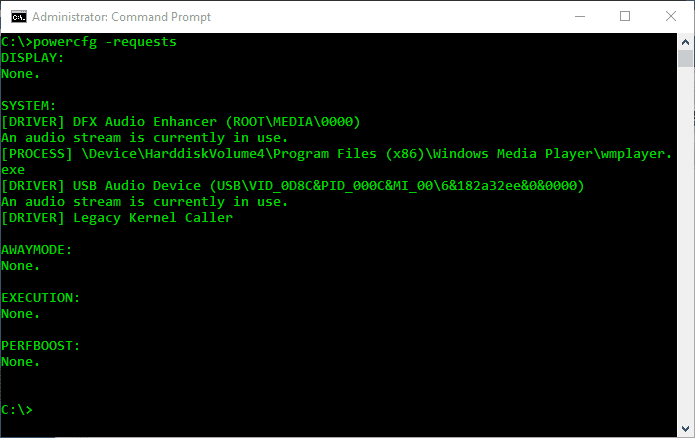
A lot of things can keep your computer from going to sleep, like downloading a file, opening a file on the network, or even a disconnected printer with an open job. Windows O/S have an easy method for finding out what the problem is.

Open the Command Prompt by typing cmd.exe into Start Menu, right-click on Cmd.exe, and open it as an administrator.


Within the Command Prompt type:

Code:
Powercfg  -requests

4VhXDQJ.png


It'll let you know if anything is keeping the computer awake.


Execute below command to identify the event or device that is responsible for the last waking process. Once the results are shown, check the “Instance Path:” to see where it originated from (the USB or PCI port for instance) and look under “Type:” for the nature of the cause, typically a device or a wake timer.

Code:
powercfg   /lastwake
 

My Computer My Computer

At a glance

Windows 11AMD Ryzen 7 5700GMicron Technology DDR4-3200 16GBNVIDIA GeForce RTX 3060
OS
Windows 11
Computer type
PC/Desktop
Manufacturer/Model
HP Pavilion
CPU
AMD Ryzen 7 5700G
Motherboard
Erica6
Memory
Micron Technology DDR4-3200 16GB
Graphics Card(s)
NVIDIA GeForce RTX 3060
Sound Card
Realtek ALC671
Monitor(s) Displays
Samsung SyncMaster U28E590
Screen Resolution
3840 x 2160
Hard Drives
SAMSUNG MZVLQ1T0HALB-000H1
A lot of things can keep your computer from going to sleep, like downloading a file, opening a file on the network, or even a disconnected printer with an open job. Windows O/S have an easy method for finding out what the problem is.

Open the Command Prompt by typing cmd.exe into Start Menu, right-click on Cmd.exe, and open it as an administrator.


Within the Command Prompt type:

Code:
Powercfg  -requests

4VhXDQJ.png


It'll let you know if anything is keeping the computer awake.


Execute below command to identify the event or device that is responsible for the last waking process. Once the results are shown, check the “Instance Path:” to see where it originated from (the USB or PCI port for instance) and look under “Type:” for the nature of the cause, typically a device or a wake timer.

Code:
powercfg   /lastwake
THanks but I dont think you have read my post correctly. My computer goes to sleep without any issues
 

My Computer My Computer

At a glance

Windows11Intel Core i7 8700 @ 3.20GHz 28 °C Coffee Lak...16.0GB Dual-Channel DDR4 @ 1196MHz (16-16-16-39)2047MB NVIDIA GeForce GT 1030 (ASUStek Comput...
OS
Windows11
Computer type
PC/Desktop
CPU
Intel Core i7 8700 @ 3.20GHz 28 °C Coffee Lake 14nm Tec
Motherboard
Gigabyte Technology Co. Ltd. H370 HD3-CF (U3E1)
Memory
16.0GB Dual-Channel DDR4 @ 1196MHz (16-16-16-39)
Graphics Card(s)
2047MB NVIDIA GeForce GT 1030 (ASUStek Computer Inc)
Sound Card
Sound Blaster Z
Monitor(s) Displays
DELL P2214H
Screen Resolution
(1920x1080@60Hz)
Hard Drives
465GB Crucial CT500MX500SSD1 (SATA (SSD))
3726GB Crucial CT4000MX500SSD1 (SATA (SSD))
Other Info
Windows 11 23H2 Build 22631.3447
You didn't mention what version of Office you use. Try repairing your office installation. Go to control panel (in upper right corner make sure 'view by' is set to small icons.)-programs & features- select your office installation. When asked whether to uninstall or repair, select repair.
If a repair does not work, you may have to completely remove Office, restart, and reinstall.
 

My Computers My Computers

  • At a glance

    Windows 11 Pro 25H2 26200.9168i9-10900 10 core 20 threads32 gbnone-Intel UHD Graphics 630
    OS
    Windows 11 Pro 25H2 26200.9168
    Computer type
    PC/Desktop
    Manufacturer/Model
    Dell Optiplex 7080
    CPU
    i9-10900 10 core 20 threads
    Motherboard
    DELL 0J37VM
    Memory
    32 gb
    Graphics Card(s)
    none-Intel UHD Graphics 630
    Sound Card
    Integrated Realtek
    Monitor(s) Displays
    Benq 27
    Screen Resolution
    2560x1440
    Hard Drives
    2x1tb Solidigm m.2 nvme /External drives 512gb Samsung m.2 sata+2tb Kingston m2.nvme
    PSU
    500w
    Case
    MT
    Cooling
    Dell Premium
    Keyboard
    Logitech wired
    Mouse
    Logitech wireless
    Internet Speed
    so slow I'm too embarrassed to tell
    Browser
    #1 Edge #2 Firefox
    Antivirus
    Defender+MWB Premium
  • At a glance

    Windows 11 Pro 24H2 26200.9168AMD Ryzen 7 6800U32 gbintegrated
    Operating System
    Windows 11 Pro 24H2 26200.9168
    Computer type
    PC/Desktop
    Manufacturer/Model
    Beelink Mini PC SER5
    CPU
    AMD Ryzen 7 6800U
    Memory
    32 gb
    Graphics card(s)
    integrated
    Sound Card
    integrated
    Monitor(s) Displays
    Benq 27
    Screen Resolution
    2560x1440
    Hard Drives
    1TB Crucial nvme
    Keyboard
    Logitech wired
    Mouse
    Logitech wireless
    Internet Speed
    still too embarrassed to tell
    Browser
    Firefox
    Antivirus
    Defender
  • System 3 is non compliant Dell 9020 i7-4770/24gb ram Win11 PRO 26200.9168
Office 2019 - Seems like a drastic step, lets wait and see if there are any other suggestions
 

My Computer My Computer

At a glance

Windows11Intel Core i7 8700 @ 3.20GHz 28 °C Coffee Lak...16.0GB Dual-Channel DDR4 @ 1196MHz (16-16-16-39)2047MB NVIDIA GeForce GT 1030 (ASUStek Comput...
OS
Windows11
Computer type
PC/Desktop
CPU
Intel Core i7 8700 @ 3.20GHz 28 °C Coffee Lake 14nm Tec
Motherboard
Gigabyte Technology Co. Ltd. H370 HD3-CF (U3E1)
Memory
16.0GB Dual-Channel DDR4 @ 1196MHz (16-16-16-39)
Graphics Card(s)
2047MB NVIDIA GeForce GT 1030 (ASUStek Computer Inc)
Sound Card
Sound Blaster Z
Monitor(s) Displays
DELL P2214H
Screen Resolution
(1920x1080@60Hz)
Hard Drives
465GB Crucial CT500MX500SSD1 (SATA (SSD))
3726GB Crucial CT4000MX500SSD1 (SATA (SSD))
Other Info
Windows 11 23H2 Build 22631.3447
THanks but I dont think you have read my post correctly. My computer goes to sleep without any issues
Oh computer does not come out of sleep by itself.
 

My Computer My Computer

At a glance

Windows 11AMD Ryzen 7 5700GMicron Technology DDR4-3200 16GBNVIDIA GeForce RTX 3060
OS
Windows 11
Computer type
PC/Desktop
Manufacturer/Model
HP Pavilion
CPU
AMD Ryzen 7 5700G
Motherboard
Erica6
Memory
Micron Technology DDR4-3200 16GB
Graphics Card(s)
NVIDIA GeForce RTX 3060
Sound Card
Realtek ALC671
Monitor(s) Displays
Samsung SyncMaster U28E590
Screen Resolution
3840 x 2160
Hard Drives
SAMSUNG MZVLQ1T0HALB-000H1

My Computer My Computer

At a glance

Windows11Intel Core i7 8700 @ 3.20GHz 28 °C Coffee Lak...16.0GB Dual-Channel DDR4 @ 1196MHz (16-16-16-39)2047MB NVIDIA GeForce GT 1030 (ASUStek Comput...
OS
Windows11
Computer type
PC/Desktop
CPU
Intel Core i7 8700 @ 3.20GHz 28 °C Coffee Lake 14nm Tec
Motherboard
Gigabyte Technology Co. Ltd. H370 HD3-CF (U3E1)
Memory
16.0GB Dual-Channel DDR4 @ 1196MHz (16-16-16-39)
Graphics Card(s)
2047MB NVIDIA GeForce GT 1030 (ASUStek Computer Inc)
Sound Card
Sound Blaster Z
Monitor(s) Displays
DELL P2214H
Screen Resolution
(1920x1080@60Hz)
Hard Drives
465GB Crucial CT500MX500SSD1 (SATA (SSD))
3726GB Crucial CT4000MX500SSD1 (SATA (SSD))
Other Info
Windows 11 23H2 Build 22631.3447
Well, you might look here to see if word is an app in the startup: 1638045310605.png
If so, just turn it off. You can get to this via settings, apps, then startup apps.
 

My Computer My Computer

At a glance

Windows 11 ProAMD Ryzen 7 5800X32GBNvidea??
OS
Windows 11 Pro
Computer type
PC/Desktop
Manufacturer/Model
Home Built
CPU
AMD Ryzen 7 5800X
Motherboard
GIGABYTE B550 AORUS ELITE AX V2
Memory
32GB
Graphics Card(s)
Nvidea??
Sound Card
MB Sound only
Hard Drives
m2.nvme
PSU
Seasonic Focus
Case
Cougar
Cooling
Enermax Liquid CPU
Keyboard
Logitech K800
Mouse
Logitech MX Master 3
Internet Speed
2.5 GB
Browser
BRAVE
Antivirus
Windows Defender
Well, you might look here to see if word is an app in the startup: View attachment 14674
If so, just turn it off. You can get to this via settings, apps, then startup apps.
Word doesn't open when the computer starts up only when it wakes up from being in sleep mode. Word isn't in start up list anyway.
 

My Computer My Computer

At a glance

Windows11Intel Core i7 8700 @ 3.20GHz 28 °C Coffee Lak...16.0GB Dual-Channel DDR4 @ 1196MHz (16-16-16-39)2047MB NVIDIA GeForce GT 1030 (ASUStek Comput...
OS
Windows11
Computer type
PC/Desktop
CPU
Intel Core i7 8700 @ 3.20GHz 28 °C Coffee Lake 14nm Tec
Motherboard
Gigabyte Technology Co. Ltd. H370 HD3-CF (U3E1)
Memory
16.0GB Dual-Channel DDR4 @ 1196MHz (16-16-16-39)
Graphics Card(s)
2047MB NVIDIA GeForce GT 1030 (ASUStek Computer Inc)
Sound Card
Sound Blaster Z
Monitor(s) Displays
DELL P2214H
Screen Resolution
(1920x1080@60Hz)
Hard Drives
465GB Crucial CT500MX500SSD1 (SATA (SSD))
3726GB Crucial CT4000MX500SSD1 (SATA (SSD))
Other Info
Windows 11 23H2 Build 22631.3447

Hello,
I have just upgraded Windows 10 to Windows 11. There is one irritating thing that has started happening since the upgrade - Word opens up when the computer comes out of sleep. This never happened on my Windows 10. Any ideas on hoe to prevent this happening?
Many thanks
A few people have reported this problem with earlier versions of Windows 10 as well. The fix that worked for them was this:

Go to Settings => Accounts => Sign-In Options
Under Privacy, turn OFF the setting "Use my sign-in info to automatically finish setting up my device after an update or restart"

Try it. Maybe it will work for Windows 11 too.
 

My Computer My Computer

At a glance

Windows 11Ryzen 9 7900X64 GBNvidia GeForce GTX 1650
OS
Windows 11
Computer type
PC/Desktop
Manufacturer/Model
Custom
CPU
Ryzen 9 7900X
Motherboard
ASUS ROG STRIX B-650 E-F
Memory
64 GB
Graphics Card(s)
Nvidia GeForce GTX 1650
Hard Drives
C: SSD, 500 GB
D: HDD, 1 TB
J: HDD, 1 TB
Antivirus
Norton
A few people have reported this problem with earlier versions of Windows 10 as well. The fix that worked for them was this:

Go to Settings => Accounts => Sign-In Options
Under Privacy, turn OFF the setting "Use my sign-in info to automatically finish setting up my device after an update or restart"

Try it. Maybe it will work for Windows 11 too.
Thanks, tried this but issue still persists
 

My Computer My Computer

At a glance

Windows11Intel Core i7 8700 @ 3.20GHz 28 °C Coffee Lak...16.0GB Dual-Channel DDR4 @ 1196MHz (16-16-16-39)2047MB NVIDIA GeForce GT 1030 (ASUStek Comput...
OS
Windows11
Computer type
PC/Desktop
CPU
Intel Core i7 8700 @ 3.20GHz 28 °C Coffee Lake 14nm Tec
Motherboard
Gigabyte Technology Co. Ltd. H370 HD3-CF (U3E1)
Memory
16.0GB Dual-Channel DDR4 @ 1196MHz (16-16-16-39)
Graphics Card(s)
2047MB NVIDIA GeForce GT 1030 (ASUStek Computer Inc)
Sound Card
Sound Blaster Z
Monitor(s) Displays
DELL P2214H
Screen Resolution
(1920x1080@60Hz)
Hard Drives
465GB Crucial CT500MX500SSD1 (SATA (SSD))
3726GB Crucial CT4000MX500SSD1 (SATA (SSD))
Other Info
Windows 11 23H2 Build 22631.3447

New Windows 11 computer here. I have the same problem but noticed the following: If I put the computer to sleep myself, upon waking, the first program in the pinned start menu is opened. If the computer goes to sleep by itself, upon waking the computer opens to the desktop. I even moved the first pinned program, and the new one opens upon waking from sleep that I initiate.
 

My Computer My Computer

At a glance

Windows 11
OS
Windows 11

Latest Support Threads

Back
Top Bottom