
Solved wosc.dll constant errors


BrianInEngland

Well-known member
Pro User
VIP
Local time
3:59 AM
Posts
3,104
OS
Windows 11 Pro 25H2 (RP channel)
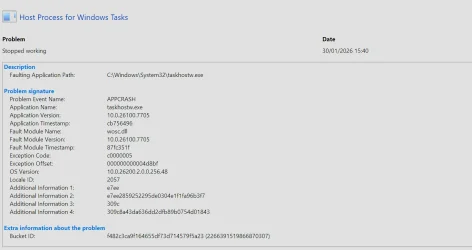
I noticed today that I'm getting lots of errors 'Host process for Windows tasks has stopped working', it's the same faulting module every time (wosc.dll)

I thought it was due to the update earlier (.7705) but it's also happening on .7701

Another PC here on .7701/.7705 also getting the error.
 

Attachments
  • Screenshot 2026-01-30 160203.webp
    Screenshot 2026-01-30 160203.webp
    63.8 KB · Views: 1
  • Screenshot 2026-01-30 160216.webp
    Screenshot 2026-01-30 160216.webp
    53.6 KB · Views: 1

My Computer

System One

  • OS
    Windows 11 Pro 25H2 (RP channel)
    Computer type
    PC/Desktop
    Manufacturer/Model
    MSI
    CPU
    AMD Ryzen 7 9800X3D 8-core
    Motherboard
    MEG X870E Godlike
    Memory
    64GB Corsair Titanium 6000/CL30
    Graphics Card(s)
    MSI Suprim 5080 SOC
    Sound Card
    Soundblaster AE-9
    Monitor(s) Displays
    ASUS TUF Gaming VG289Q
    Screen Resolution
    3840x2160
    Hard Drives
    Samsung 9100 Pro 4TB (gen 5 x4, system drive/games)
    Samsung 990 Pro 2TB
    Samsung 980 Pro 2TB
    Samsung 870 Evo 4TB
    Samsung 870 Evo 2TB
    Samsung T9 4TB
    PSU
    Seasonic PX-2200
    Case
    Bequiet! Dark Base Pro 901
    Cooling
    Noctua NH-D15S Chromax black
    Keyboard
    Logitech G915 X (wired)
    Mouse
    Logitech G903 with PowerPlay charger
    Internet Speed
    900Mb/sec
    Browser
    Microsoft Edge
    Antivirus
    Windows Defender
If you are not having any issues with your system, STAY OUT OF EVENT MANAGER. It serves no purpose other than to drive you up a wall.

This has been a recording LOL
 

My Computer

System One

  • OS
    W11
    Computer type
    PC/Desktop
    Manufacturer/Model
    2 HP Desktops, 1 Dell Desktop, 2 Dell XPS Laptops, 1 HP Laptop
    Keyboard
    Logitech
    Mouse
    Logitech MX Master 4 & 3
    Internet Speed
    500 mps
    Browser
    Firefox
    Antivirus
    Bitdefender
Yep, It's WindowsOneSettingsClient.dll, leave it alone and it's almost normal as you are on RP.
OneSettings is an MS service used to push settings, experiments (like A/B features) in the background.
If that setting does not apply to your version, error(s) will occur.
Please leave that alone and stay away from Event Viewer.
 

My Computers

System One System Two

  • OS
    All Branches but Release
    Computer type
    Laptop
    Manufacturer/Model
    Acer Nitro ANV15-51
    CPU
    AMD Ryzen 7 7735HS 3200-4500 Mhz 8 cores x 2
    Motherboard
    Sportage_RBH
    Memory
    32 GB DDR5
    Graphics Card(s)
    Radeon Graphic / NVIDIA GeForce RTX 4060 8 GB GDDR6
    Sound Card
    AMD/Realtek(R) Audio
    Monitor(s) Displays
    Integrated Monitor (15.3"vis)
    Screen Resolution
    FHD 1920X1080 16:9 144Hz
    Hard Drives
    KINGSTON OM8SEP4512Q-AA 1TB
    Western Digital 256GB
    PSU
    19V DC 6.32 A 120 W
    Cooling
    Dual Fans
    Mouse
    MS Bluetooth
    Internet Speed
    Fiber 1GB Cox -us & 1GB Orange-fr
    Browser
    Edge Canary- Firefox Nightly-Chrome Dev-Chrome Dev
    Antivirus
    Windows Defender
  • Operating System
    Windows 11 Beta
    Computer type
    Laptop
    Manufacturer/Model
    Asus X751BP
    CPU
    AMD A9-9420
    Memory
    8 GB of DDR4
    Graphics card(s)
    AMD Radeon R5
    Screen Resolution
    1600x900
    Hard Drives
    Seagate 1 TB
Yep, It's wOneSettingsc.dll, leave it alone and it's almost normal as you are on RP.
OneSettings is used to push settings, experiments (like A/B features) in the background.
If that setting does not apply to your version, error(s) will occur.
Please leave that alone and stay away from Event Viewer.
Yes both PCs are on Release preview, this has only started happening since the recent updates - yesterday's was a Public preview not Insider
I've never once had errors with this, now I'm getting them constantly

It will always happen if I go to Settings > Windows update, it happens at other times as well
 

My Computer

System One

  • OS
    Windows 11 Pro 25H2 (RP channel)
    Computer type
    PC/Desktop
    Manufacturer/Model
    MSI
    CPU
    AMD Ryzen 7 9800X3D 8-core
    Motherboard
    MEG X870E Godlike
    Memory
    64GB Corsair Titanium 6000/CL30
    Graphics Card(s)
    MSI Suprim 5080 SOC
    Sound Card
    Soundblaster AE-9
    Monitor(s) Displays
    ASUS TUF Gaming VG289Q
    Screen Resolution
    3840x2160
    Hard Drives
    Samsung 9100 Pro 4TB (gen 5 x4, system drive/games)
    Samsung 990 Pro 2TB
    Samsung 980 Pro 2TB
    Samsung 870 Evo 4TB
    Samsung 870 Evo 2TB
    Samsung T9 4TB
    PSU
    Seasonic PX-2200
    Case
    Bequiet! Dark Base Pro 901
    Cooling
    Noctua NH-D15S Chromax black
    Keyboard
    Logitech G915 X (wired)
    Mouse
    Logitech G903 with PowerPlay charger
    Internet Speed
    900Mb/sec
    Browser
    Microsoft Edge
    Antivirus
    Windows Defender
I've never once had errors with this, now I'm getting them constantly
Again, this is normal as the polling comes from MS so if the settings or features do not apply to your system, it fails.
I am sure that once it has gone thru all the flags, settings and velocity keys and others, the errors will go away.
Relax Brian. It's not like you are getting BSODs.

If you do not want those errors, you can do this at your own risk:

Add a REG_DWORD value named DisableOneSettingsDownloads to

HKEY_LOCAL_MACHINE\Software\Policies\Microsoft\Windows\DataCollection
and set the value to 1.


My Computers

System One System Two

  • OS
    All Branches but Release
    Computer type
    Laptop
    Manufacturer/Model
    Acer Nitro ANV15-51
    CPU
    AMD Ryzen 7 7735HS 3200-4500 Mhz 8 cores x 2
    Motherboard
    Sportage_RBH
    Memory
    32 GB DDR5
    Graphics Card(s)
    Radeon Graphic / NVIDIA GeForce RTX 4060 8 GB GDDR6
    Sound Card
    AMD/Realtek(R) Audio
    Monitor(s) Displays
    Integrated Monitor (15.3"vis)
    Screen Resolution
    FHD 1920X1080 16:9 144Hz
    Hard Drives
    KINGSTON OM8SEP4512Q-AA 1TB
    Western Digital 256GB
    PSU
    19V DC 6.32 A 120 W
    Cooling
    Dual Fans
    Mouse
    MS Bluetooth
    Internet Speed
    Fiber 1GB Cox -us & 1GB Orange-fr
    Browser
    Edge Canary- Firefox Nightly-Chrome Dev-Chrome Dev
    Antivirus
    Windows Defender
  • Operating System
    Windows 11 Beta
    Computer type
    Laptop
    Manufacturer/Model
    Asus X751BP
    CPU
    AMD A9-9420
    Memory
    8 GB of DDR4
    Graphics card(s)
    AMD Radeon R5
    Screen Resolution
    1600x900
    Hard Drives
    Seagate 1 TB
Again, this is normal as the polling comes from MS so if the settings or features do not apply to your system, it fails.
I am sure that once it has gone thru all the flags, settings and velocity keys and others, the errors will go away.
Relax Brian. It's not like you are getting BSODs.
True. I do keep an eye on the error logs, I always have done.
At least it's not just one PC here doing it or I'd be stressed!
 

My Computer

System One

  • OS
    Windows 11 Pro 25H2 (RP channel)
    Computer type
    PC/Desktop
    Manufacturer/Model
    MSI
    CPU
    AMD Ryzen 7 9800X3D 8-core
    Motherboard
    MEG X870E Godlike
    Memory
    64GB Corsair Titanium 6000/CL30
    Graphics Card(s)
    MSI Suprim 5080 SOC
    Sound Card
    Soundblaster AE-9
    Monitor(s) Displays
    ASUS TUF Gaming VG289Q
    Screen Resolution
    3840x2160
    Hard Drives
    Samsung 9100 Pro 4TB (gen 5 x4, system drive/games)
    Samsung 990 Pro 2TB
    Samsung 980 Pro 2TB
    Samsung 870 Evo 4TB
    Samsung 870 Evo 2TB
    Samsung T9 4TB
    PSU
    Seasonic PX-2200
    Case
    Bequiet! Dark Base Pro 901
    Cooling
    Noctua NH-D15S Chromax black
    Keyboard
    Logitech G915 X (wired)
    Mouse
    Logitech G903 with PowerPlay charger
    Internet Speed
    900Mb/sec
    Browser
    Microsoft Edge
    Antivirus
    Windows Defender
  • Love
Reactions: OAT
It happens whenever Windows checks for updates, either automatically or if I do it.

Two PCs exactly the same problem since earlier this week (.7701 update)
 

My Computer

System One

  • OS
    Windows 11 Pro 25H2 (RP channel)
    Computer type
    PC/Desktop
    Manufacturer/Model
    MSI
    CPU
    AMD Ryzen 7 9800X3D 8-core
    Motherboard
    MEG X870E Godlike
    Memory
    64GB Corsair Titanium 6000/CL30
    Graphics Card(s)
    MSI Suprim 5080 SOC
    Sound Card
    Soundblaster AE-9
    Monitor(s) Displays
    ASUS TUF Gaming VG289Q
    Screen Resolution
    3840x2160
    Hard Drives
    Samsung 9100 Pro 4TB (gen 5 x4, system drive/games)
    Samsung 990 Pro 2TB
    Samsung 980 Pro 2TB
    Samsung 870 Evo 4TB
    Samsung 870 Evo 2TB
    Samsung T9 4TB
    PSU
    Seasonic PX-2200
    Case
    Bequiet! Dark Base Pro 901
    Cooling
    Noctua NH-D15S Chromax black
    Keyboard
    Logitech G915 X (wired)
    Mouse
    Logitech G903 with PowerPlay charger
    Internet Speed
    900Mb/sec
    Browser
    Microsoft Edge
    Antivirus
    Windows Defender
Again, if your system doesn't exhibit any issues you're trying to solve an problem which doesn't exist.
 

My Computer

System One

  • OS
    W11
    Computer type
    PC/Desktop
    Manufacturer/Model
    2 HP Desktops, 1 Dell Desktop, 2 Dell XPS Laptops, 1 HP Laptop
    Keyboard
    Logitech
    Mouse
    Logitech MX Master 4 & 3
    Internet Speed
    500 mps
    Browser
    Firefox
    Antivirus
    Bitdefender
Exception error 0xc0000005 is Access Violation. Basically it's a bad memory pointer bug that MS has to fix.
 

My Computer

System One

  • OS
    Windows 7
  • Helpful
Reactions: OAT
Well this morning I was getting the error after a Windows update check but now (3.45pm UK) I'm not getting the error 🤔
The problem went away as quickly as it appeared!

Other PC here is still getting the error

UPDATE: After a restart this morning the other PC is fine as well, errors gone.

Very strange. Marked as Solved
 
Last edited:

My Computer

System One

  • OS
    Windows 11 Pro 25H2 (RP channel)
    Computer type
    PC/Desktop
    Manufacturer/Model
    MSI
    CPU
    AMD Ryzen 7 9800X3D 8-core
    Motherboard
    MEG X870E Godlike
    Memory
    64GB Corsair Titanium 6000/CL30
    Graphics Card(s)
    MSI Suprim 5080 SOC
    Sound Card
    Soundblaster AE-9
    Monitor(s) Displays
    ASUS TUF Gaming VG289Q
    Screen Resolution
    3840x2160
    Hard Drives
    Samsung 9100 Pro 4TB (gen 5 x4, system drive/games)
    Samsung 990 Pro 2TB
    Samsung 980 Pro 2TB
    Samsung 870 Evo 4TB
    Samsung 870 Evo 2TB
    Samsung T9 4TB
    PSU
    Seasonic PX-2200
    Case
    Bequiet! Dark Base Pro 901
    Cooling
    Noctua NH-D15S Chromax black
    Keyboard
    Logitech G915 X (wired)
    Mouse
    Logitech G903 with PowerPlay charger
    Internet Speed
    900Mb/sec
    Browser
    Microsoft Edge
    Antivirus
    Windows Defender

Latest Support Threads

Back
Top Bottom




