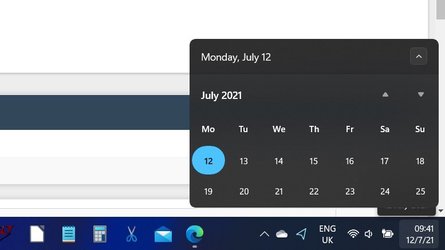
Wrong date highlighted on calendar


Bill4321

Well-known member
Local time
7:03 PM
Posts
33
Location
South Coast, UK
OS
Windows 11 Pro
Hello everyone

When I click on the date/time in the bottom right the date that is highlighted is the previous day, not the current day. Is this a bug or am I going slightly mad? My time zone settings are (UTC+00.00) Dublin, Edinburgh, Lisbon etc.
 

Attachments

  • Capture.JPG
    Capture.JPG
    21.1 KB · Views: 5
Last edited:

My Computer My Computer

At a glance

Windows 11 ProI7-10750H16GBNVIDIA RTX2070
OS
Windows 11 Pro
Computer type
Laptop
Manufacturer/Model
HP Omen
CPU
I7-10750H
Memory
16GB
Graphics Card(s)
NVIDIA RTX2070
Must be a bug as mine does it as well, though the calendar is currently pretty useless as it doesn't even tell you about any appointments etc.
 

My Computers My Computers

  • At a glance

    Windows 11 build 26200.8973 / WSL 2 running U...Intel i7-1355U16GBIntel Iris XE
    OS
    Windows 11 build 26200.8973 / WSL 2 running Ubuntu
    Computer type
    Laptop
    Manufacturer/Model
    Dell Inspiron 14 5430
    CPU
    Intel i7-1355U
    Motherboard
    Dell 0GMW80
    Memory
    16GB
    Graphics Card(s)
    Intel Iris XE
    Sound Card
    Realtek
    Monitor(s) Displays
    Dell 14", LG 32" Curved Wide screen monitor and LG Ultrawide 26"
    Screen Resolution
    1920 x 1200 @ 60Hz, 1920 x 1080 @ 100Hz and 2560 x 1080 @ 60Hz
    Hard Drives
    Samsung 990 Pro 1TB NVME Gen 4 M.2 SSD
    PSU
    Dell
    Case
    Dell
    Cooling
    Dell
    Keyboard
    Dell KM3322W
    Mouse
    Dell Trackpad or Dell KM3322W
    Internet Speed
    900mb down / 400mb up FTTP
    Browser
    Edge 151.0.4129.59
    Antivirus
    Windows Defender
    Other Info
    Windows 365
    1Password
    1TB OneDrive
    Outlook Classic
    Visual Studio Code running in WSL
    Python 3.14
    Samsung Magician
    Garmin Express
    Dell TB16 Thunderbolt dock
    WSL
    WEI Score: 8.3
  • At a glance

    Windows 11Core i5 - 1035G48GBIntel Iris Plus
    Operating System
    Windows 11
    Computer type
    Tablet
    Manufacturer/Model
    Microsoft Surface Pro 7
    CPU
    Core i5 - 1035G4
    Motherboard
    Microsoft
    Memory
    8GB
    Graphics card(s)
    Intel Iris Plus
    Monitor(s) Displays
    Surface touch
    Screen Resolution
    2736 x 1824
    Hard Drives
    128GB
    PSU
    Microsoft
    Case
    Microsoft Keyboard
    Cooling
    None
    Keyboard
    Microsoft Surface Keyboard
    Mouse
    Microsoft Arc Intellimouse
    Internet Speed
    900mb / 400mb FTTP
    Browser
    Edge
    Antivirus
    Windows Defender
No issues here. Maybe check the time/date setting on the taskbar clock itself.
 

Attachments

  • Screenshot 2021-07-12 094215.jpg
    Screenshot 2021-07-12 094215.jpg
    30.6 KB · Views: 3

My Computer My Computer

At a glance

W11 Pro x64 ongoing Canary 29500 latest buildsIntel i58GbIntel HD Graphics
OS
W11 Pro x64 ongoing Canary 29500 latest builds
Computer type
Laptop
Manufacturer/Model
Dell 7760 Mobile Precision 17"
CPU
Intel i5
Motherboard
Unknown
Memory
8Gb
Graphics Card(s)
Intel HD Graphics
Sound Card
Realtek
Monitor(s) Displays
Internal
Hard Drives
2 x 256Gb SSD
PSU
Dell 240 watt
Mouse
Dell Premier Bluetooth
Internet Speed
50Mbps
Browser
Edge
Antivirus
Default Microsoft Security
Must be a bug as mine does it as well, though the calendar is currently pretty useless as it doesn't even tell you about any appointments etc.
Ah OK, thanks Mark, I'm glad that it isn't just me. I will report it as a bug in the feedback thingy.
 

My Computer My Computer

At a glance

Windows 11 ProI7-10750H16GBNVIDIA RTX2070
OS
Windows 11 Pro
Computer type
Laptop
Manufacturer/Model
HP Omen
CPU
I7-10750H
Memory
16GB
Graphics Card(s)
NVIDIA RTX2070
No issues here. Maybe check the time/date setting on the taskbar clock itself.
Hi Mooly. Yeah I checked that and all is good. Thanks for the suggestion though (y)
 

Attachments

  • Capture2.JPG
    Capture2.JPG
    45.7 KB · Views: 4

My Computer My Computer

At a glance

Windows 11 ProI7-10750H16GBNVIDIA RTX2070
OS
Windows 11 Pro
Computer type
Laptop
Manufacturer/Model
HP Omen
CPU
I7-10750H
Memory
16GB
Graphics Card(s)
NVIDIA RTX2070
Must be a bug as mine does it as well, though the calendar is currently pretty useless as it doesn't even tell you about any appointments etc.
The calendar does the same on my desktop. I use One Calendar for my appointments. I have it on my computers and my Samsung Galaxy S9+ phone. The syncing works great.
 

My Computers My Computers

  • At a glance

    Windows 11 Pro 25H2Intel Core i7-10700K16GB (8GB PC4-19200 DDR4 SDRAM x2)NVIDIA GeForce GTX 1050 TI
    OS
    Windows 11 Pro 25H2
    Computer type
    PC/Desktop
    Manufacturer/Model
    PowerSpec B746
    CPU
    Intel Core i7-10700K
    Motherboard
    ASRock Z490 Phantom Gaming 4/ax
    Memory
    16GB (8GB PC4-19200 DDR4 SDRAM x2)
    Graphics Card(s)
    NVIDIA GeForce GTX 1050 TI
    Sound Card
    Realtek Audio
    Monitor(s) Displays
    #1. LG ULTRAWIDE 34" #2. AOC Q32G2WG3 32"
    Screen Resolution
    #1. 3440 X 1440 #2. 1920 x 1080
    Hard Drives
    NVMe WDC WDS100T2B0C-00PXH0 1TB
    Samsung SSD 860 EVO 1TB
    PSU
    750 Watts (62.5A)
    Case
    PowerSpec/Lian Li ATX 205
    Keyboard
    Logitech K270
    Mouse
    Logitech M185
    Browser
    Microsoft Edge and Firefox
    Antivirus
    Webroot SecureAnywhere CE 26.1
  • At a glance

    Windows 11 Canary ChannelIntel Core i5-8400 CPU @ 2.80GHz16 MB DDR 4-2666
    Operating System
    Windows 11 Canary Channel
    Computer type
    PC/Desktop
    Manufacturer/Model
    PowerSpec G156
    CPU
    Intel Core i5-8400 CPU @ 2.80GHz
    Motherboard
    AsusTeK Prime B360M-A
    Memory
    16 MB DDR 4-2666
    Monitor(s) Displays
    23" Speptre HDMI 75Hz
    Screen Resolution
    1920x1080
    Hard Drives
    Samsung 970 EVO 500GB NVMe
    Keyboard
    Logitek K270
    Mouse
    Logitek M185
    Browser
    Firefox, Edge and Edge Canary
    Antivirus
    Windows Defender
Mine is working fine.. here are the settings I have set up and as you can see the date is correct.

1626123144588.png
 

My Computer My Computer

At a glance

Windows 11 Home(Beta) - 25H2 -26220.9223AMD Ryzen 5 5600GG.SKILL Ripjaws V Series 64GB 4x16Nvidia geforce gtx titan x
OS
Windows 11 Home(Beta) - 25H2 -26220.9223
Computer type
PC/Desktop
Manufacturer/Model
Banana Junior 5600-G Series
CPU
AMD Ryzen 5 5600G
Motherboard
Asus ROG Strix B550-F
Memory
G.SKILL Ripjaws V Series 64GB 4x16
Graphics Card(s)
Nvidia geforce gtx titan x
Monitor(s) Displays
28" ASUS VP28U 4k
Screen Resolution
4K
Hard Drives
Primary SAMSUNG 970 EVO Plus
PSU
EVGA BQ 700w 80+ Bronze
Case
Zalman i3 NEO
Cooling
ARCTIC Freezer 7 X
Keyboard
Corsair
Mouse
Amazon Generic with Cord
Internet Speed
Download: 295.11 mbps Upload: 65.35 mbps T-Mobile Internet
Browser
Firefox and Edge
Antivirus
MS - Defender
Other Info
Speakers: Klipsch ProMedia 2.1
I didn't do or try anything but now the calendar is working correctly. It must have been something on their end.
 

My Computers My Computers

  • At a glance

    Windows 11 Pro 25H2Intel Core i7-10700K16GB (8GB PC4-19200 DDR4 SDRAM x2)NVIDIA GeForce GTX 1050 TI
    OS
    Windows 11 Pro 25H2
    Computer type
    PC/Desktop
    Manufacturer/Model
    PowerSpec B746
    CPU
    Intel Core i7-10700K
    Motherboard
    ASRock Z490 Phantom Gaming 4/ax
    Memory
    16GB (8GB PC4-19200 DDR4 SDRAM x2)
    Graphics Card(s)
    NVIDIA GeForce GTX 1050 TI
    Sound Card
    Realtek Audio
    Monitor(s) Displays
    #1. LG ULTRAWIDE 34" #2. AOC Q32G2WG3 32"
    Screen Resolution
    #1. 3440 X 1440 #2. 1920 x 1080
    Hard Drives
    NVMe WDC WDS100T2B0C-00PXH0 1TB
    Samsung SSD 860 EVO 1TB
    PSU
    750 Watts (62.5A)
    Case
    PowerSpec/Lian Li ATX 205
    Keyboard
    Logitech K270
    Mouse
    Logitech M185
    Browser
    Microsoft Edge and Firefox
    Antivirus
    Webroot SecureAnywhere CE 26.1
  • At a glance

    Windows 11 Canary ChannelIntel Core i5-8400 CPU @ 2.80GHz16 MB DDR 4-2666
    Operating System
    Windows 11 Canary Channel
    Computer type
    PC/Desktop
    Manufacturer/Model
    PowerSpec G156
    CPU
    Intel Core i5-8400 CPU @ 2.80GHz
    Motherboard
    AsusTeK Prime B360M-A
    Memory
    16 MB DDR 4-2666
    Monitor(s) Displays
    23" Speptre HDMI 75Hz
    Screen Resolution
    1920x1080
    Hard Drives
    Samsung 970 EVO 500GB NVMe
    Keyboard
    Logitek K270
    Mouse
    Logitek M185
    Browser
    Firefox, Edge and Edge Canary
    Antivirus
    Windows Defender

Latest Support Threads

Back
Top Bottom