
Today on my laptop I was working, and all of a sudden the screen went black and the display looked like it would during a standard Windows update (though no relevant updates were pushed to my computer today, and I'd not done anything to launch this), until the screen showed this:
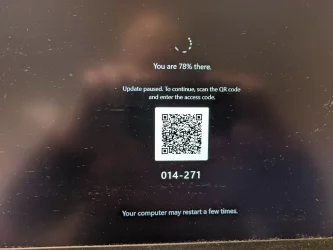
The QR code took me to a link for https://enterthecode.msupdateservice.info/qr/[deleted] and instructions that I needed the Microsoft Authenticator app - which I have, and I could tell that link looked suspicious.
Tried restarting the computer, and I could log into my local user account, but in less than a minute, the "updating ... you are 78% there" nonsense resumed.
I have a different local user account on the computer, that is just for servicing and I rarely use, and logging into that, I could do whatever I wanted to.
Ran malwarebytes from that account, and it found six issues and quarantined them.
Restarted the computer, logged into my "real" account, and the same "78%" thing was there in less than a minute.
I finally fixed things by starting in safe mode, logging into the affected account, and from task manager, disabling all the programs that automatically start. Ran malwarebytes again, it found more things and quarantined them, and the computer has been fine since.
But my questions are:
The QR code took me to a link for https://enterthecode.msupdateservice.info/qr/[deleted] and instructions that I needed the Microsoft Authenticator app - which I have, and I could tell that link looked suspicious.
Tried restarting the computer, and I could log into my local user account, but in less than a minute, the "updating ... you are 78% there" nonsense resumed.
I have a different local user account on the computer, that is just for servicing and I rarely use, and logging into that, I could do whatever I wanted to.
Ran malwarebytes from that account, and it found six issues and quarantined them.
Restarted the computer, logged into my "real" account, and the same "78%" thing was there in less than a minute.
I finally fixed things by starting in safe mode, logging into the affected account, and from task manager, disabling all the programs that automatically start. Ran malwarebytes again, it found more things and quarantined them, and the computer has been fine since.
But my questions are:
- What was the specific piece of malware causing this
- From where did it come (I am a stickler for safe computing, and it's been many years since I've had any malware on any computer of mine)
- Could stuff I did in Browser tab, then computer, crash, from EXCEPTION_ACCESS_VIOLATION_READ have introduced the malware? Everything I tried was from a respected authority, who was helping me in that thread
My Computer
At a glance
Windows 11Intel® CoreTM i5-10400 Processor 12M Cache16GB - Kingston DDR4 SODIMM, 2666
- OS
- Windows 11
- Computer type
- PC/Desktop
- Manufacturer/Model
- LOOP AIO LP-270206
- CPU
- Intel® CoreTM i5-10400 Processor 12M Cache
- Motherboard
- Asus Pro H410T/CSM
- Memory
- 16GB - Kingston DDR4 SODIMM, 2666
- Screen Resolution
- 1920x1080
- Hard Drives
- Samsung MZ-V8V500B/AM 500 GB SSD (OS and apps)
WD 1TB SSD (data)
- Antivirus
- Defender



 What are you on about. Either get a better monitor or buy glasses, it’s an obvious reflection of the OP holding a camera at the monitor.





