Microsoft 365 Insider Blog:
Hi, Insiders! I am Daniel Beade, a Product Manager on the OneNote Notebooks team. I’m excited to share with you a new capability in OneNote for Windows and Mac that gives you more flexibility in how Word, Excel, PowerPoint, and OneNote file links open.
Get more control over how links open in OneNote
Whether you’re reviewing a report, jumping into a presentation, or revisiting linked content, moving seamlessly between files when you’re working in OneNote is key to staying in flow.That’s why we’re introducing a new capability that gives you more control over how you open links from OneNote. You now have a choice: links can open either in your browser or in the desktop app.
The default setting is for files to open in your browser, but it’s easy to change your preference in your OneNote settings.
How to use
You can update your preference directly in OneNote settings.How to update your link open preference in OneNote for Windows:
- Go to File, then Options.
- Navigate to Advanced.
- From the menu in Link open preference, choose desktop or browser.
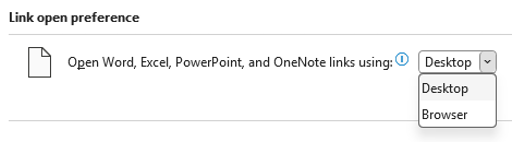
How to update your link open preference in
- On the top menu bar, go to OneNote, then Preferences.
- In the OneNote Preferences dialog box that opens, select Navigation.
- Under Link open preference, choose Desktop or Browser.

Browser vs desktop scenarios
This new setting allows you to tailor your experience based on how you prefer to work because different tasks call for different workflows:- If you’re quickly scanning content or referencing material, opening in the browser can be fast and lightweight.
- If you’re editing, reviewing in depth, or working across multiple files, opening in the desktop app can provide a rich experience without leaving the app.
Availability
This feature is available to OneNote users running:- Windows: Version 2603 (Build 19820.20000) or later.
- Mac: Version 16.110 (Build 26050124) or later.
Feedback
We want to hear from you! Please submit your comments and feedback by selecting Help > Feedback in OneNote. Source:
Choose how OneNote opens Microsoft 365 file links | Microsoft Community Hub
You now have a choice how links open in OneNote. They can open either in your browser or in the desktop app.
 techcommunity.microsoft.com