Solved 1 Gbps Internet speeds


acer54

Well-known member
Local time
4:41 PM
Posts
38
OS
Windows 11
I have recently upgraded my internet connection with Virgin Media to 1Gbps or 1,000 Mbps I have the latest Hub 5 as part of the package, I connect to the internet via ethernet cable on all of my computers.

I have a Linux laptop which when using the speedtest app I get 980 Mbps download and 100 Mbps upload speeds which is what I expected, I also have a Windows desktop and Laptop and when I used Speedtest on them I only received 500 Mbps download and 50 Mbps upload speeds.

I Googled the problem and an app called TCP Optimizer was recommended, I used it on the Laptop and set it to Windows default and saved the settings and rebooted, when I ran speedtest again I'm now getting 950 Mbps download and 95 Mbps upload speeds, I ran TCP Optimizer on the Desktop and ran Speedtest and I expected the same result on the Desktop as I got on the Laptop, on the contrary the speeds remained the same as I got previously.

Both Windows machines are Acer Predators running Windows 11 Pro and the Linux machine is a Lenovo ThinkPad running Zorin OS 18.1 Pro, they are all using an ethernet connection with identical cables.

So now I'm wondering what is causing the slow speeds on the Desktop?
 
Windows Build/Version
Build 26200.8457 Version 25H2

My Computer My Computer

At a glance

Windows 11
OS
Windows 11
I have recently upgraded my internet connection with Virgin Media to 1Gbps or 1,000 Mbps I have the latest Hub 5 as part of the package, I connect to the internet via ethernet cable on all of my computers.

I have a Linux laptop which when using the speedtest app I get 980 Mbps download and 100 Mbps upload speeds which is what I expected, I also have a Windows desktop and Laptop and when I used Speedtest on them I only received 500 Mbps download and 50 Mbps upload speeds.

I Googled the problem and an app called TCP Optimizer was recommended, I used it on the Laptop and set it to Windows default and saved the settings and rebooted, when I ran speedtest again I'm now getting 950 Mbps download and 95 Mbps upload speeds, I ran TCP Optimizer on the Desktop and ran Speedtest and I expected the same result on the Desktop as I got on the Laptop, on the contrary the speeds remained the same as I got previously.

Both Windows machines are Acer Predators running Windows 11 Pro and the Linux machine is a Lenovo ThinkPad running Zorin OS 18.1 Pro, they are all using an ethernet connection with identical cables.

So now I'm wondering what is causing the slow speeds on the Desktop?
Could be that the Windows settings for network adapter / router aren't using full duplex mode -- even on modern wireless systems (latest hardware) you should be able to get around 950 Mbps -with LAN that will depend on tha LAN cable using but typically speeds of 1 - 10 Gbps are usual - my LAN hardware shows orange if using lower speeds than 1Gbps or Green for speeds > 1Gbps.

You need to go into all the myriad of windows settings for your LAN adapter -- I'm sure there's people out there far more experienced than me who are good art this stuff.

(Linux has always been far superior for any sort of networking than Windows where getting any success with networking seems totally random and varies with release to release).

Note also on Linux you can set up a network bridge really easily using cockpit. This makes runningdecent networking in Windows VM's a real doddle and with fast networking.

Cheers
jimbo
 

My Computer My Computer

At a glance

Windows XP,11 Linux Fedora Rawhide pre-releas...2 X Intel i7
OS
Windows XP,11 Linux Fedora Rawhide pre-release 45
Computer type
PC/Desktop
CPU
2 X Intel i7
Screen Resolution
4KUHD X 2
Could be that the Windows settings for network adapter / router aren't using full duplex mode -- even on modern wireless systems (latest hardware) you should be able to get around 950 Mbps -with LAN that will depend on tha LAN cable using but typically speeds of 1 - 10 Gbps are usual - my LAN hardware shows orange if using lower speeds than 1Gbps or Green for speeds > 1Gbps.

You need to go into all the myriad of windows settings for your LAN adapter -- I'm sure there's people out there far more experienced than me who are good art this stuff.

(Linux has always been far superior for any sort of networking than Windows where getting any success with networking seems totally random and varies with release to release).

Note also on Linux you can set up a network bridge really easily using cockpit. This makes runningdecent networking in Windows VM's a real doddle and with fast networking.

Cheers
jimbo
What's thrown me is using TCP Optimizer on the Windows Laptop has sorted the problem but running it on the Windows Desktop made no difference, I'm tending to think its a hardware issue as opposed to a software one.
 

My Computer My Computer

At a glance

Windows 11
OS
Windows 11
What's thrown me is using TCP Optimizer on the Windows Laptop has sorted the problem but running it on the Windows Desktop made no difference, I'm tending to think its a hardware issue as opposed to a software one.
Could be the NIC in your desktop is much older with typically a maximum capability of 100 - 500 Mbps. Desktops if you still see any more these days are ususally pretty old !!! - It doesn't matter what the router / WLAN box can supply if your NIC hardware can't use the speed.

You might be better off for the desktop using a decent USB3>LAN adapter and then running the LAN cable into your router either via a cheap switchbox or directly. This would give you around 950 Mbps capability with the modern USB3 connector. Otherwise if your desktop can't use USB3 then use a wireless adapter -- modern wifi chips can easily give 950 Mbps throughput.

Cheers
jimbo
 

My Computer My Computer

At a glance

Windows XP,11 Linux Fedora Rawhide pre-releas...2 X Intel i7
OS
Windows XP,11 Linux Fedora Rawhide pre-release 45
Computer type
PC/Desktop
CPU
2 X Intel i7
Screen Resolution
4KUHD X 2
just a suggestion, change the ethernet cables around
ie. put the laptop one on the desktop and the desktop one on the laptop
and then check the speeds please.

the reason i say this i had two systems with, what looked like, the same cables
but when i swapped them about i found that one cable was allowing faster speeds then the other.

i purchased cat 6 cables for them both in the end.
just a suggestion
best of luck Steve ..
 

My Computers My Computers

  • At a glance

    Windows 11 HomeRyzen 7 5825u64GB DDR4 3200Ryzen 7 5825u
    OS
    Windows 11 Home
    Computer type
    PC/Desktop
    Manufacturer/Model
    HP 24" AiO
    CPU
    Ryzen 7 5825u
    Motherboard
    HP
    Memory
    64GB DDR4 3200
    Graphics Card(s)
    Ryzen 7 5825u
    Sound Card
    RealTek
    Monitor(s) Displays
    24" HP AiO
    Screen Resolution
    1920 x 1080 @60 Hz
    Hard Drives
    1TB WD Blue SN580 M2 SSD Partitioned.
    2x 1TB USB HDD External Backup/Storage.
    PSU
    90W external power brick
    Case
    24" All in One
    Cooling
    Default Air Cooling
    Keyboard
    HP WiFi UK extended
    Mouse
    HP WiFi 3 Button
    Internet Speed
    1GB full fibre
    Browser
    Edge & Firefox
    Antivirus
    AVG Internet Security/Windows Defender
    Other Info
    Mainly Open Source Software
  • At a glance

    Ubuntu 22.04.5 LTSi5 7200u16GB DDR4Intel
    Operating System
    Ubuntu 22.04.5 LTS
    Computer type
    Laptop
    Manufacturer/Model
    Dell 13" Latitude 2017
    CPU
    i5 7200u
    Motherboard
    Dell
    Memory
    16GB DDR4
    Graphics card(s)
    Intel
    Sound Card
    Intel
    Monitor(s) Displays
    13" Dell Laptop
    Hard Drives
    250GB Crucial 2.5" SSD
    Mouse
    Generic WiFi 3 button
    Internet Speed
    WiFi only
    Browser
    Firefox
    Antivirus
    ClamAV TK
    Other Info
    Mainly Open Source Software
just a suggestion, change the ethernet cables around
ie. put the laptop one on the desktop and the desktop one on the laptop
and then check the speeds please.

the reason i say this i had two systems with, what looked like, the same cables
but when i swapped them about i found that one cable was allowing faster speeds then the other.

i purchased cat 6 cables for them both in the end.
just a suggestion
best of luck Steve ..
Yeah I had similar issues until I replaced cat5 cables nominaly capable of handling 1gbps but after lots of messing around, I replaced with cat 6e cables and boom all was ok.

I would use cat 7 or even 8 nowadays.
 

My Computer My Computer

At a glance

Windows 11 Pro + Win11 Canary VM.I9 13th gen i9-13900H 2.60 GHZ16 GB solderedIntegrated Intel Iris XE
OS
Windows 11 Pro + Win11 Canary VM.
Computer type
Laptop
Manufacturer/Model
ASUS Zenbook 14
CPU
I9 13th gen i9-13900H 2.60 GHZ
Motherboard
Yep, Laptop has one.
Memory
16 GB soldered
Graphics Card(s)
Integrated Intel Iris XE
Sound Card
Realtek built in
Monitor(s) Displays
laptop OLED screen
Screen Resolution
2880x1800 touchscreen
Hard Drives
1 TB NVME SSD (only weakness is only one slot)
PSU
Internal + 65W thunderbolt USB4 charger
Case
Yep, got one
Cooling
Stella Artois (UK pint cans - 568 ml) - extra cost.
Keyboard
Built in UK keybd
Mouse
Bluetooth , wireless dongled, wired
Internet Speed
900 mbs (ethernet), wifi 6 typical 350-450 mb/s both up and down
Browser
Edge
Antivirus
Defender
Other Info
TPM 2.0, 2xUSB4 thunderbolt, 1xUsb3 (usb a), 1xUsb-c, hdmi out, 3.5 mm audio out/in combo, ASUS backlit trackpad (inc. switchable number pad)

Macrium Reflect Home V8
Office 365 Family (6 users each 1TB onedrive space)
Hyper-V (a vm runs almost as fast as my older laptop)
nah no need to go crazy with cables. 2.5gbps is nothing for cat5e going from my own home and have read it can even handle 10gbps in short runs (30m?). But this looks like its getting cut in half which is weird, like half duplex. I'd go in to device properties and manually set it to 1gbps full duplex.
 

My Computer My Computer

At a glance

11-25h2amd 9850x3d64gb 6000cl26pny 5090 oc
OS
11-25h2
CPU
amd 9850x3d
Motherboard
asus x870e apex
Memory
64gb 6000cl26
Graphics Card(s)
pny 5090 oc
Sound Card
creative x5
Monitor(s) Displays
dell aw3225qf
Hard Drives
4tb samsung 9100 pro
4tb samsung 990 pro
4tb wd black sn850x
2tb samsung 980 pro (usb)
PSU
phanteks 1600w
Case
phanteks nv9 mk2
Cooling
phanteks 420x2
nah no need to go crazy with cables. 2.5gbps is nothing for cat5e going from my own home and have read it can even handle 10gbps in short runs (30m?). But this looks like its getting cut in half which is weird, like half duplex. I'd go in to device properties and manually set it to 1gbps full duplex.
Nope - Cat5e cables are notoriously fickle. They work on some adaptors but not others.
 

My Computer My Computer

At a glance

Windows 11 Pro + Win11 Canary VM.I9 13th gen i9-13900H 2.60 GHZ16 GB solderedIntegrated Intel Iris XE
OS
Windows 11 Pro + Win11 Canary VM.
Computer type
Laptop
Manufacturer/Model
ASUS Zenbook 14
CPU
I9 13th gen i9-13900H 2.60 GHZ
Motherboard
Yep, Laptop has one.
Memory
16 GB soldered
Graphics Card(s)
Integrated Intel Iris XE
Sound Card
Realtek built in
Monitor(s) Displays
laptop OLED screen
Screen Resolution
2880x1800 touchscreen
Hard Drives
1 TB NVME SSD (only weakness is only one slot)
PSU
Internal + 65W thunderbolt USB4 charger
Case
Yep, got one
Cooling
Stella Artois (UK pint cans - 568 ml) - extra cost.
Keyboard
Built in UK keybd
Mouse
Bluetooth , wireless dongled, wired
Internet Speed
900 mbs (ethernet), wifi 6 typical 350-450 mb/s both up and down
Browser
Edge
Antivirus
Defender
Other Info
TPM 2.0, 2xUSB4 thunderbolt, 1xUsb3 (usb a), 1xUsb-c, hdmi out, 3.5 mm audio out/in combo, ASUS backlit trackpad (inc. switchable number pad)

Macrium Reflect Home V8
Office 365 Family (6 users each 1TB onedrive space)
Hyper-V (a vm runs almost as fast as my older laptop)
Could be the NIC in your desktop is much older with typically a maximum capability of 100 - 500 Mbps. Desktops if you still see any more these days are ususally pretty old !!! - It doesn't matter what the router / WLAN box can supply if your NIC hardware can't use the speed.

You might be better off for the desktop using a decent USB3>LAN adapter and then running the LAN cable into your router either via a cheap switchbox or directly. This would give you around 950 Mbps capability with the modern USB3 connector. Otherwise if your desktop can't use USB3 then use a wireless adapter -- modern wifi chips can easily give 950 Mbps throughput.

Cheers
jimbo
The desktop is 6 years old so I would tend to agree with you that the hardware is not upto delivering the faster speeds, I'm going to buy a USB3 to LAN adapter and hopefully that will do the trick.
 

My Computer My Computer

At a glance

Windows 11
OS
Windows 11
nah no need to go crazy with cables. 2.5gbps is nothing for cat5e going from my own home and have read it can even handle 10gbps in short runs (30m?). But this looks like its getting cut in half which is weird, like half duplex. I'd go in to device properties and manually set it to 1gbps full duplex.
The Duplex setting is on auto, I've looked at the speeds you can select manually and the 1 Gbps is not there to select, I'm starting to think the NIC hardware is the bottleneck, I'm going to by a USB3 to LAN adapter and hopefully this will work and give me full speed.
 

My Computer My Computer

At a glance

Windows 11
OS
Windows 11
Both Windows machines are Acer Predators running Windows 11 Pro

You do not need to use a network optimizer with Win 11 as Windows 11 dynamically manages your TCP/IP Receive Window (auto-tuning).
Running an optimizer would override what windows is trying to do and may make things worse.
 

My Computer My Computer

At a glance

Windows 11 Pro
OS
Windows 11 Pro
@acer54 My own MSI motherboard is now 5 years old and the onboard WiFI was I believe released in 2019. I’ve just added a MSI Herald BE9400 WiFI 7 card to my desktop PC and it’s a different ball game. Best 55 quid I’ve spent in ages.
 

My Computer My Computer

At a glance

Windows 11 Pro 25H2 26200.8894Intel i5 10400x2 8gb Corsair Vengeance LPX 3600Intel(R) UHD Graphics 630
OS
Windows 11 Pro 25H2 26200.8894
Computer type
PC/Desktop
Manufacturer/Model
MSI
CPU
Intel i5 10400
Motherboard
B560M PRO-VDH WiFi BIOS 1.A1
Memory
x2 8gb Corsair Vengeance LPX 3600
Graphics Card(s)
Intel(R) UHD Graphics 630
Sound Card
Realtek onboard AL897
Monitor(s) Displays
MSI MAG Artymis 242C
Screen Resolution
1920 x 1080
Hard Drives
Samsung 970 Evo Plus 500gb
PSU
EVGA SuperNova 650w G3
Case
Gaming case
Keyboard
MSI GK20
Mouse
MSI Versa 300
Internet Speed
500mbps
Browser
Brave
Antivirus
Bitdefender
Other Info
MSI Herald BE9400 WiFi PCIe
Printer - Brother MFC-L2750DW
The Duplex setting is on auto, I've looked at the speeds you can select manually and the 1 Gbps is not there to select, I'm starting to think the NIC hardware is the bottleneck, I'm going to by a USB3 to LAN adapter and hopefully this will work and give me full speed.
One final comment on this -- ensure the MOBO internal bus speed can handle this --it should be able to but it's not always a given. If it can only handle USB2 speeds (internally) then about 54 Mbps might be the best you can squeeze out of the hardware.

Anyway good luck with it.

Cheers
jimbo
 

My Computer My Computer

At a glance

Windows XP,11 Linux Fedora Rawhide pre-releas...2 X Intel i7
OS
Windows XP,11 Linux Fedora Rawhide pre-release 45
Computer type
PC/Desktop
CPU
2 X Intel i7
Screen Resolution
4KUHD X 2
I have recently upgraded my internet connection with Virgin Media to 1Gbps or 1,000 Mbps I have the latest Hub 5 as part of the package, I connect to the internet via ethernet cable on all of my computers.

I have a Linux laptop which when using the speedtest app I get 980 Mbps download and 100 Mbps upload speeds which is what I expected, I also have a Windows desktop and Laptop and when I used Speedtest on them I only received 500 Mbps download and 50 Mbps upload speeds.

I Googled the problem and an app called TCP Optimizer was recommended, I used it on the Laptop and set it to Windows default and saved the settings and rebooted, when I ran speedtest again I'm now getting 950 Mbps download and 95 Mbps upload speeds, I ran TCP Optimizer on the Desktop and ran Speedtest and I expected the same result on the Desktop as I got on the Laptop, on the contrary the speeds remained the same as I got previously.

Both Windows machines are Acer Predators running Windows 11 Pro and the Linux machine is a Lenovo ThinkPad running Zorin OS 18.1 Pro, they are all using an ethernet connection with identical cables.

So now I'm wondering what is causing the slow speeds on the Desktop?
I've bought one of these :- Tp-Link UE306 Wifi Adapter, USB 3.0 to RJ45 LAN Gigabit Ethernet Network Adapter and hopefully this will resolve the speed issues, I'll report back with the result.......
 

My Computer My Computer

At a glance

Windows 11
OS
Windows 11
(Linux has always been far superior for any sort of networking than Windows where getting any success with networking seems totally random and varies with release to release).
That hasn’t been my experience. I’ve had several Windows computers and have never had issues reaching full internet speeds. I use a Ubiquiti EdgeRouter ER-4 with a 1000/1000 fiber-optic connection.
 

My Computers My Computers

  • At a glance

    Windows 11 ProAMD Ryzen 9 9950X3DKingston FURY Beast 64GB (2x32GB) DDR5 6000MT/sASUS TUF Gaming Radeon RX 9070 OC Edition 16G...
    OS
    Windows 11 Pro
    Computer type
    PC/Desktop
    CPU
    AMD Ryzen 9 9950X3D
    Motherboard
    ASRock B650E Taichi Lite
    Memory
    Kingston FURY Beast 64GB (2x32GB) DDR5 6000MT/s
    Graphics Card(s)
    ASUS TUF Gaming Radeon RX 9070 OC Edition 16GB GDDR6
    Hard Drives
    Solidigm P44 Pro 2TB M.2 NVMe SSD
  • At a glance

    Windows 11 HomeIntel Core Ultra 9 275HX64GB (2x 32GB) DDR5-6400NVIDIA GeForce RTX 5080 16GB GDDR7 Laptop GPU
    Operating System
    Windows 11 Home
    Computer type
    Laptop
    Manufacturer/Model
    Lenovo Legion Pro 7i Gen 10 16"
    CPU
    Intel Core Ultra 9 275HX
    Memory
    64GB (2x 32GB) DDR5-6400
    Graphics card(s)
    NVIDIA GeForce RTX 5080 16GB GDDR7 Laptop GPU
    Hard Drives
    2x 1TB M.2 NVMe SSD (SK Hynix)
Yeah if you can’t manually select the speed you want then it doesn’t even support it.
 

My Computer My Computer

At a glance

11-25h2amd 9850x3d64gb 6000cl26pny 5090 oc
OS
11-25h2
CPU
amd 9850x3d
Motherboard
asus x870e apex
Memory
64gb 6000cl26
Graphics Card(s)
pny 5090 oc
Sound Card
creative x5
Monitor(s) Displays
dell aw3225qf
Hard Drives
4tb samsung 9100 pro
4tb samsung 990 pro
4tb wd black sn850x
2tb samsung 980 pro (usb)
PSU
phanteks 1600w
Case
phanteks nv9 mk2
Cooling
phanteks 420x2
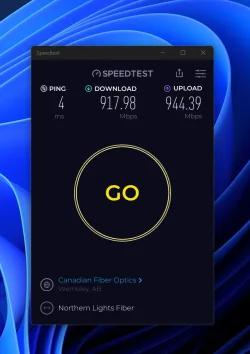
So last night we had an evil storm. Winds running at hurricane speeds. Trees bending to horizontal. Horizontal rain running in sheets. Yup. Internet died. Despite the fact that the fiber runs through the ground to my door internet was gone for a day. Just ran a speed test after it was restored and it's still not quite up to par. I might have to give them a call.


July  2026 speed test.webp
 

My Computer My Computer

At a glance

WIN 11, WIN 10, WIN 8.1, WIN 7 U, WIN 7 PRO, ...Intel i7 6900K and i9-7960X / AMD 3800X (8 core)128 GB CORSAIR DOMINATOR PLATINUM (B DIE)NVIDIA 1070 and RTX 3070
OS
WIN 11, WIN 10, WIN 8.1, WIN 7 U, WIN 7 PRO, WIN 7 HOME (32 Bit), LINUX MINT
Computer type
PC/Desktop
Manufacturer/Model
DIY, ASUS, and DELL
CPU
Intel i7 6900K and i9-7960X / AMD 3800X (8 core)
Motherboard
ASUS X99E-WS USB 3.1 and ASUS X299 SAGE
Memory
128 GB CORSAIR DOMINATOR PLATINUM (B DIE)
Graphics Card(s)
NVIDIA 1070 and RTX 3070
Sound Card
Crystal Sound (onboard)
Monitor(s) Displays
single Samsung 30" 4K and 8" aux monitor
Screen Resolution
4K and something equally attrocious. I'll be working on this.
Hard Drives
A, B, C, D, E, F, G, H, I, J, K, L, M, N, O, P, Q, R, S, T, U, V, W

Ports X, Y, and Z are reserved for USB access and removable drives.

Drive types consist of the following: Various mechanical hard drives bearing the brand names, Seagate, Toshiba, and Western Digital. Various NVMe drives bearing the brand names Kingston, Intel, Silicon Power, Crucial, Western Digital, and Team Group. Various SATA SSDs bearing various different brand names.

RAID arrays included:

LSI RAID 10 (WD Velociraptors) 1115.72 GB
LSI RAID 10 (WD SSDS) 463.80 GB

INTEL RAID 0 (KINGSTON HYPER X) System 447.14 GB
INTEL RAID 1 TOSHIBA ENTERPRIZE class Data 2794.52 GB
INTEL RAID 1 SEAGATE HYBRID 931.51 GB
PSU
SEVERAL. I prefer my Corsair Platinum HX1000i but I also like EVGA power supplies
Case
ThermalTake Level 10 GT (among others)
Cooling
Noctua is my favorite and I use it in my main. I also own various other coolers.
Keyboard
all kinds.
Mouse
all kinds
Internet Speed
360 mbps - 1 gbps (depending)
Browser
FIREFOX
Antivirus
KASPERSKY (no apologies)
Other Info
Gave Dell touch screen with Windows 11 to daughter and got me an OTVOC. Being a PC builder I own many desktop PCs as well. I am a father of five providing PCs, laptops, and tablets for all my family, most of which I have modified, rebuilt, or simply built from scratch. I do not own a cell phone, never have, never will.
Don’t waste time. Those are close enough imho. Too many factors to expect over 1000 every single test
 

My Computer My Computer

At a glance

11-25h2amd 9850x3d64gb 6000cl26pny 5090 oc
OS
11-25h2
CPU
amd 9850x3d
Motherboard
asus x870e apex
Memory
64gb 6000cl26
Graphics Card(s)
pny 5090 oc
Sound Card
creative x5
Monitor(s) Displays
dell aw3225qf
Hard Drives
4tb samsung 9100 pro
4tb samsung 990 pro
4tb wd black sn850x
2tb samsung 980 pro (usb)
PSU
phanteks 1600w
Case
phanteks nv9 mk2
Cooling
phanteks 420x2
If it is an old desktop, then your network adapter is probably bottlenecking your internet speed.
 

My Computers My Computers

  • At a glance

    Windows 11 ProAMD Ryzen 7 9800X3D32GB DDR5 CL30 Kingston FuryASUS Prime Radeon RX 9060 XT OC Edition 16GB
    OS
    Windows 11 Pro
    Computer type
    PC/Desktop
    CPU
    AMD Ryzen 7 9800X3D
    Motherboard
    MSI PRO B850-P Wifi
    Memory
    32GB DDR5 CL30 Kingston Fury
    Graphics Card(s)
    ASUS Prime Radeon RX 9060 XT OC Edition 16GB
    Monitor(s) Displays
    LG Ultrawide 34" 1440p+ MSI 27" 4K UHD
    Screen Resolution
    3440x1440
    Hard Drives
    Main Boot Drive : 512GB Adata XPG RGB Gen3x4 NVMe M.2 SSD
    PSU
    EVGA 750 Watts 80+ Gold
    Case
    Deepcool Genome II
    Cooling
    Thermalright Burst Assassin 120
    Internet Speed
    FTTH 3Gbps
    Browser
    Chrome
    Antivirus
    "Moderna"
  • At a glance

    Windows 11 Proi7-4790K16GB Corsair Vengeance ProMSI R9 290
    Operating System
    Windows 11 Pro
    Computer type
    PC/Desktop
    CPU
    i7-4790K
    Motherboard
    ASRock Xtreme6 Z97
    Memory
    16GB Corsair Vengeance Pro
    Graphics card(s)
    MSI R9 290
    Monitor(s) Displays
    LG Ultrawide 34"
    Screen Resolution
    3440x1440
    Hard Drives
    500GB Adata SSD (OS Only)
    PSU
    Thermaltake 475 Watts 80 Bronze
    Case
    Thermaltake Commander I Snow Edition
    Cooling
    Deep Cool Archer Air Cooler
    Keyboard
    Armageddon MKA-5R RGB-Hornet
    Mouse
    Logitech G402
    Internet Speed
    1Gbps
    Browser
    Chrome
    Antivirus
    Moderna :)
That's better than my gigabit fiber connection, I think you're tilting at windmills.
 

My Computers My Computers

  • At a glance

    Win 11 Pro 25H2, Build 26200.8894Intel Core i5 1450064GB DDR4GeForce RTX 4060
    OS
    Win 11 Pro 25H2, Build 26200.8894
    Computer type
    PC/Desktop
    Manufacturer/Model
    Home Brew
    CPU
    Intel Core i5 14500
    Motherboard
    Gigabyte B760M G P WIFI
    Memory
    64GB DDR4
    Graphics Card(s)
    GeForce RTX 4060
    Sound Card
    Chipset Realtek
    Monitor(s) Displays
    LG 45" Ultragear, Acer 24" 1080p
    Screen Resolution
    5120x1440, 1920x1080
    Hard Drives
    Crucial P310 2TB 2280 PCIe Gen4 3D NAND NVMe M.2 SSD (O/S)
    Silicon Power 2TB US75 NVMe PCIe Gen4 M.2 2280 SSD (backup)
    Crucial BX500 2TB 3D NAND (2nd backup)
    Seagate 4TB Ironwolf, rotating HDD archive files
    External off-line backup Drives: 2 NVMe 4TB drives in external enclosures
    PSU
    Thermaltake Toughpower GF3 750W
    Case
    LIAN LI LANCOOL 216 E-ATX PC Case
    Cooling
    Lots of fans!
    Keyboard
    Microsoft Comfort Curve 2000
    Mouse
    Logitech G305
    Internet Speed
    Verizon FiOS 1GB
    Browser
    Firefox
    Antivirus
    Malware Bytes & Windows Defender Security
  • At a glance

    Win 11 Pro 25H2, Build 26200.8894Intel Core i5 1440032GB DDR5Intel 700 Embedded GPU
    Operating System
    Win 11 Pro 25H2, Build 26200.8894
    Computer type
    PC/Desktop
    Manufacturer/Model
    Home Brew
    CPU
    Intel Core i5 14400
    Motherboard
    Gigabyte B760M DS3H AX
    Memory
    32GB DDR5
    Graphics card(s)
    Intel 700 Embedded GPU
    Sound Card
    Realtek Embedded
    Monitor(s) Displays
    27" HP 1080p
    Screen Resolution
    1920x1080
    Hard Drives
    Crucial P310 2TB 2280 PCIe Gen4 eD NAND PCIe SSD
    Samsung EVO 990 2TB NVMe Gen4 SSD
    Samsung 2TB SATA SSD
    PSU
    Thermaltake Smart BM3 650W
    Case
    Okinos Micro ATX Case
    Cooling
    Fans
    Keyboard
    Microsoft Comfort Curve 2000
    Mouse
    Logitech G305
    Internet Speed
    Verizon FiOS 1GB
    Browser
    Firefox
    Antivirus
    Malware Bytes & Windows Defender Security
  • Nimo N171 17" Laptop, (Intel i3-1215U, 16GB RAM, 2TB NVMe, Win11 Pro)
    Acemagic Vista Mini PC V1 (Intel N150, 16GB RAM, 1TB NVMe, Win11 Pro)
    HP ENVY h8-1540t, (24GB RAM, 2TB SSD, 2TB HDD, Win11 Pro)

Latest Support Threads

Back
Top Bottom