22567 + right context in start box


exlaval

Member
Local time
10:26 PM
Posts
6
OS
windows 11 22567
i have 2 issues hope someone has an idea

issue 1) on my acer laptop, out of the blue the start box right context does not work and i get a command box with an error message
THE SYSTEM CANNOT FIND THE PATH SPECIFIED
PROCESS EXITED WITH CODE 1 (0000000001)
i installed 22567 on other laptop and tablet and all ok

issue 2) on same acer predator i am not able to install 22567
if i use the system box, it stalls at 64% installing
if i use a usb drive with the iso downloaded from uupdump this time it stalls at 37%

please anyone any idea would be greatly appreciated

btw i used the wup app to clear up the update procedure between retries, to no avail

thanks
 

My Computer My Computer

At a glance

windows 11 22567intel i7 6700HQ64 gbnvidia 980 M
OS
windows 11 22567
Computer type
Laptop
Manufacturer/Model
acer predator
CPU
intel i7 6700HQ
Motherboard
Acer Challenger SLS
Memory
64 gb
Graphics Card(s)
nvidia 980 M
Sounds like you have some file corruption going on.
I would first run a sfc /scannow from an administrative command prompt. See if it finds and corrects any problem. If it finds corruption but cannot fix it, follow up by running dism /online /cleanup-image /restorehealth

Also from administrative command type taskkill /F /FI "SERVICES eq wuauserv"
Then go to C:\Windows\SoftwareDistribution and delete all files in the datastore and downloads folders (do not delete the folders themselves.)
Restart computer and try the update again.
 

My Computers My Computers

  • At a glance

    Windows 11 Pro 25H2 26200.9168i9-10900 10 core 20 threads32 gbnone-Intel UHD Graphics 630
    OS
    Windows 11 Pro 25H2 26200.9168
    Computer type
    PC/Desktop
    Manufacturer/Model
    Dell Optiplex 7080
    CPU
    i9-10900 10 core 20 threads
    Motherboard
    DELL 0J37VM
    Memory
    32 gb
    Graphics Card(s)
    none-Intel UHD Graphics 630
    Sound Card
    Integrated Realtek
    Monitor(s) Displays
    Benq 27
    Screen Resolution
    2560x1440
    Hard Drives
    2x1tb Solidigm m.2 nvme /External drives 512gb Samsung m.2 sata+2tb Kingston m2.nvme
    PSU
    500w
    Case
    MT
    Cooling
    Dell Premium
    Keyboard
    Logitech wired
    Mouse
    Logitech wireless
    Internet Speed
    so slow I'm too embarrassed to tell
    Browser
    #1 Edge #2 Firefox
    Antivirus
    Defender+MWB Premium
  • At a glance

    Windows 11 Pro 24H2 26200.9168AMD Ryzen 7 6800U32 gbintegrated
    Operating System
    Windows 11 Pro 24H2 26200.9168
    Computer type
    PC/Desktop
    Manufacturer/Model
    Beelink Mini PC SER5
    CPU
    AMD Ryzen 7 6800U
    Memory
    32 gb
    Graphics card(s)
    integrated
    Sound Card
    integrated
    Monitor(s) Displays
    Benq 27
    Screen Resolution
    2560x1440
    Hard Drives
    1TB Crucial nvme
    Keyboard
    Logitech wired
    Mouse
    Logitech wireless
    Internet Speed
    still too embarrassed to tell
    Browser
    Firefox
    Antivirus
    Defender
  • System 3 is non compliant Dell 9020 i7-4770/24gb ram Win11 PRO 26200.9168
i got 567 to update, but the issue with the start key is much worse
i looked the registry key in my pc and in another pc at home with same setup, except that my registry is missing a whole lot of keys, many
i tried the sfc and dism . all report everything is hunky dory, even the 22567 install did not correct the missing keys, dont know what could have deleted them and dont know how to get them back short of formating ans reinstall from zero
is there any way to fix the missing keys, i have the 22567 in a usb install so i can do a transfer but dont know how
thanks
 

My Computer My Computer

At a glance

windows 11 22567intel i7 6700HQ64 gbnvidia 980 M
OS
windows 11 22567
Computer type
Laptop
Manufacturer/Model
acer predator
CPU
intel i7 6700HQ
Motherboard
Acer Challenger SLS
Memory
64 gb
Graphics Card(s)
nvidia 980 M
The problem may be a corrupted user account. It would be worth making a new local user account to see if start button works. Be sure to assign admin privileges. If the start button works as expected in the new account, log back into defective account. Copy (not move) all your personal files to external media from your old account, Log back in to newly created account and then copy your files from external media into new account. Once everything's kosher, remove your old account. If your old account was a MS account change the local account to a MS account.
Note: Make sure the old account is deleted before you set up onedrive in the new account.

If you still have a start button issue after making a new account, you can do a repair install
 

My Computers My Computers

  • At a glance

    Windows 11 Pro 25H2 26200.9168i9-10900 10 core 20 threads32 gbnone-Intel UHD Graphics 630
    OS
    Windows 11 Pro 25H2 26200.9168
    Computer type
    PC/Desktop
    Manufacturer/Model
    Dell Optiplex 7080
    CPU
    i9-10900 10 core 20 threads
    Motherboard
    DELL 0J37VM
    Memory
    32 gb
    Graphics Card(s)
    none-Intel UHD Graphics 630
    Sound Card
    Integrated Realtek
    Monitor(s) Displays
    Benq 27
    Screen Resolution
    2560x1440
    Hard Drives
    2x1tb Solidigm m.2 nvme /External drives 512gb Samsung m.2 sata+2tb Kingston m2.nvme
    PSU
    500w
    Case
    MT
    Cooling
    Dell Premium
    Keyboard
    Logitech wired
    Mouse
    Logitech wireless
    Internet Speed
    so slow I'm too embarrassed to tell
    Browser
    #1 Edge #2 Firefox
    Antivirus
    Defender+MWB Premium
  • At a glance

    Windows 11 Pro 24H2 26200.9168AMD Ryzen 7 6800U32 gbintegrated
    Operating System
    Windows 11 Pro 24H2 26200.9168
    Computer type
    PC/Desktop
    Manufacturer/Model
    Beelink Mini PC SER5
    CPU
    AMD Ryzen 7 6800U
    Memory
    32 gb
    Graphics card(s)
    integrated
    Sound Card
    integrated
    Monitor(s) Displays
    Benq 27
    Screen Resolution
    2560x1440
    Hard Drives
    1TB Crucial nvme
    Keyboard
    Logitech wired
    Mouse
    Logitech wireless
    Internet Speed
    still too embarrassed to tell
    Browser
    Firefox
    Antivirus
    Defender
  • System 3 is non compliant Dell 9020 i7-4770/24gb ram Win11 PRO 26200.9168
sorry, i have 11 pro , i add an account make it admin. first time around it asked to put a pass, did signed ou tried to sign in , screen saaid sign in without options, logged with bad account, removed new account, created new one this time no passs, signed out tried to sign in, again same ble screen with the word sign in . no options.
this is the rythm of my whole life nothing workss out of first.
so unless you're merlin and know my pc from afar, btw i only have one option to add a new acct. which is add a new acct. no family friends or lovers. how do i log in if i did not create a pin or a needle.
i know how to follow directions if you give them, figure that im using 22567 developer version. i get to settings via the old control panel app
thanks
 

My Computer My Computer

At a glance

windows 11 22567intel i7 6700HQ64 gbnvidia 980 M
OS
windows 11 22567
Computer type
Laptop
Manufacturer/Model
acer predator
CPU
intel i7 6700HQ
Motherboard
Acer Challenger SLS
Memory
64 gb
Graphics Card(s)
nvidia 980 M
Yes I run Pro as well but use the release version. I'm not familiar with the developer version. From what you described, I can only assume the developer version adds all new accounts as administrators. I'm a little confused. If you made a new user without a password, you should be able to select the new user from the signin screen, click the sign-in button that appears underneath the username and it should log you in. Is that not the way it is?
 

My Computers My Computers

  • At a glance

    Windows 11 Pro 25H2 26200.9168i9-10900 10 core 20 threads32 gbnone-Intel UHD Graphics 630
    OS
    Windows 11 Pro 25H2 26200.9168
    Computer type
    PC/Desktop
    Manufacturer/Model
    Dell Optiplex 7080
    CPU
    i9-10900 10 core 20 threads
    Motherboard
    DELL 0J37VM
    Memory
    32 gb
    Graphics Card(s)
    none-Intel UHD Graphics 630
    Sound Card
    Integrated Realtek
    Monitor(s) Displays
    Benq 27
    Screen Resolution
    2560x1440
    Hard Drives
    2x1tb Solidigm m.2 nvme /External drives 512gb Samsung m.2 sata+2tb Kingston m2.nvme
    PSU
    500w
    Case
    MT
    Cooling
    Dell Premium
    Keyboard
    Logitech wired
    Mouse
    Logitech wireless
    Internet Speed
    so slow I'm too embarrassed to tell
    Browser
    #1 Edge #2 Firefox
    Antivirus
    Defender+MWB Premium
  • At a glance

    Windows 11 Pro 24H2 26200.9168AMD Ryzen 7 6800U32 gbintegrated
    Operating System
    Windows 11 Pro 24H2 26200.9168
    Computer type
    PC/Desktop
    Manufacturer/Model
    Beelink Mini PC SER5
    CPU
    AMD Ryzen 7 6800U
    Memory
    32 gb
    Graphics card(s)
    integrated
    Sound Card
    integrated
    Monitor(s) Displays
    Benq 27
    Screen Resolution
    2560x1440
    Hard Drives
    1TB Crucial nvme
    Keyboard
    Logitech wired
    Mouse
    Logitech wireless
    Internet Speed
    still too embarrassed to tell
    Browser
    Firefox
    Antivirus
    Defender
  • System 3 is non compliant Dell 9020 i7-4770/24gb ram Win11 PRO 26200.9168
am jinxed am jinxed
one option was create a new account that does not have a microsoft account,
so i gave it a try, entered , name. pass, security questions. bla bla bla
logged out , logged in with password, hurrah,
got desktop with all apps as before, put my hand over my eyes
right clicked on start, opened my index and middle fngr. saw nothing
took hand off, again right click, screen turned white like a flash and returned as before, without start menu . tada, screwed again and did not enjoy it sigh
 

My Computer My Computer

At a glance

windows 11 22567intel i7 6700HQ64 gbnvidia 980 M
OS
windows 11 22567
Computer type
Laptop
Manufacturer/Model
acer predator
CPU
intel i7 6700HQ
Motherboard
Acer Challenger SLS
Memory
64 gb
Graphics Card(s)
nvidia 980 M
Sorry, I was hoping a corrupted user account was all it was. If you are using any third party app that affects the GUI, uninstall it and see if it changes anything.

Since you are running 11 on unsupported hardware, a reset or repair install would probably fail which leaves only a clean install. You will find no tutorial on this forum on how to do it, but there are many posts and suggestions from folks who have done it. There are many tutorials on the web using methods that range from altering the registry, modifying the iso, to using the new verion of Rufus which has a special option for the purpose. Just do a search "how to install Windows 11 on unsupported hardware." Try to go with one from a reputable site.

I have never installed on unsupported hardware myself, and am certainly not suggesting that anyone do so because there can be unexpected results. Good luck.
 

My Computers My Computers

  • At a glance

    Windows 11 Pro 25H2 26200.9168i9-10900 10 core 20 threads32 gbnone-Intel UHD Graphics 630
    OS
    Windows 11 Pro 25H2 26200.9168
    Computer type
    PC/Desktop
    Manufacturer/Model
    Dell Optiplex 7080
    CPU
    i9-10900 10 core 20 threads
    Motherboard
    DELL 0J37VM
    Memory
    32 gb
    Graphics Card(s)
    none-Intel UHD Graphics 630
    Sound Card
    Integrated Realtek
    Monitor(s) Displays
    Benq 27
    Screen Resolution
    2560x1440
    Hard Drives
    2x1tb Solidigm m.2 nvme /External drives 512gb Samsung m.2 sata+2tb Kingston m2.nvme
    PSU
    500w
    Case
    MT
    Cooling
    Dell Premium
    Keyboard
    Logitech wired
    Mouse
    Logitech wireless
    Internet Speed
    so slow I'm too embarrassed to tell
    Browser
    #1 Edge #2 Firefox
    Antivirus
    Defender+MWB Premium
  • At a glance

    Windows 11 Pro 24H2 26200.9168AMD Ryzen 7 6800U32 gbintegrated
    Operating System
    Windows 11 Pro 24H2 26200.9168
    Computer type
    PC/Desktop
    Manufacturer/Model
    Beelink Mini PC SER5
    CPU
    AMD Ryzen 7 6800U
    Memory
    32 gb
    Graphics card(s)
    integrated
    Sound Card
    integrated
    Monitor(s) Displays
    Benq 27
    Screen Resolution
    2560x1440
    Hard Drives
    1TB Crucial nvme
    Keyboard
    Logitech wired
    Mouse
    Logitech wireless
    Internet Speed
    still too embarrassed to tell
    Browser
    Firefox
    Antivirus
    Defender
  • System 3 is non compliant Dell 9020 i7-4770/24gb ram Win11 PRO 26200.9168
No third party of any sort
Only windows
Unsupported? Ouch thats below belt
Wind. 11 is happy a purrs on all my pcs. Ive been on dev line since be4 win 11 with hitches here and there most times unrelated tothe os itself. Ill migrate my apps to other drive and reset the thing sigh😭
 

My Computer My Computer

At a glance

windows 11 22567intel i7 6700HQ64 gbnvidia 980 M
OS
windows 11 22567
Computer type
Laptop
Manufacturer/Model
acer predator
CPU
intel i7 6700HQ
Motherboard
Acer Challenger SLS
Memory
64 gb
Graphics Card(s)
nvidia 980 M

My Computer My Computer

At a glance

Windows 11 Pro Beta, 11 Dev, W11 CanaryAMD Ryzen™ 9 5900HX32GBNVIDIA® GeForce RTX™ 3070 8GB GDDR6
OS
Windows 11 Pro Beta, 11 Dev, W11 Canary
Computer type
Laptop
Manufacturer/Model
Dell Alienware M15 Ryzen Edition R6
CPU
AMD Ryzen™ 9 5900HX
Memory
32GB
Graphics Card(s)
NVIDIA® GeForce RTX™ 3070 8GB GDDR6
Hard Drives
1 x Samsung 980 Pro 1TB
1 x Samsung 970 Evo Plus 1TB
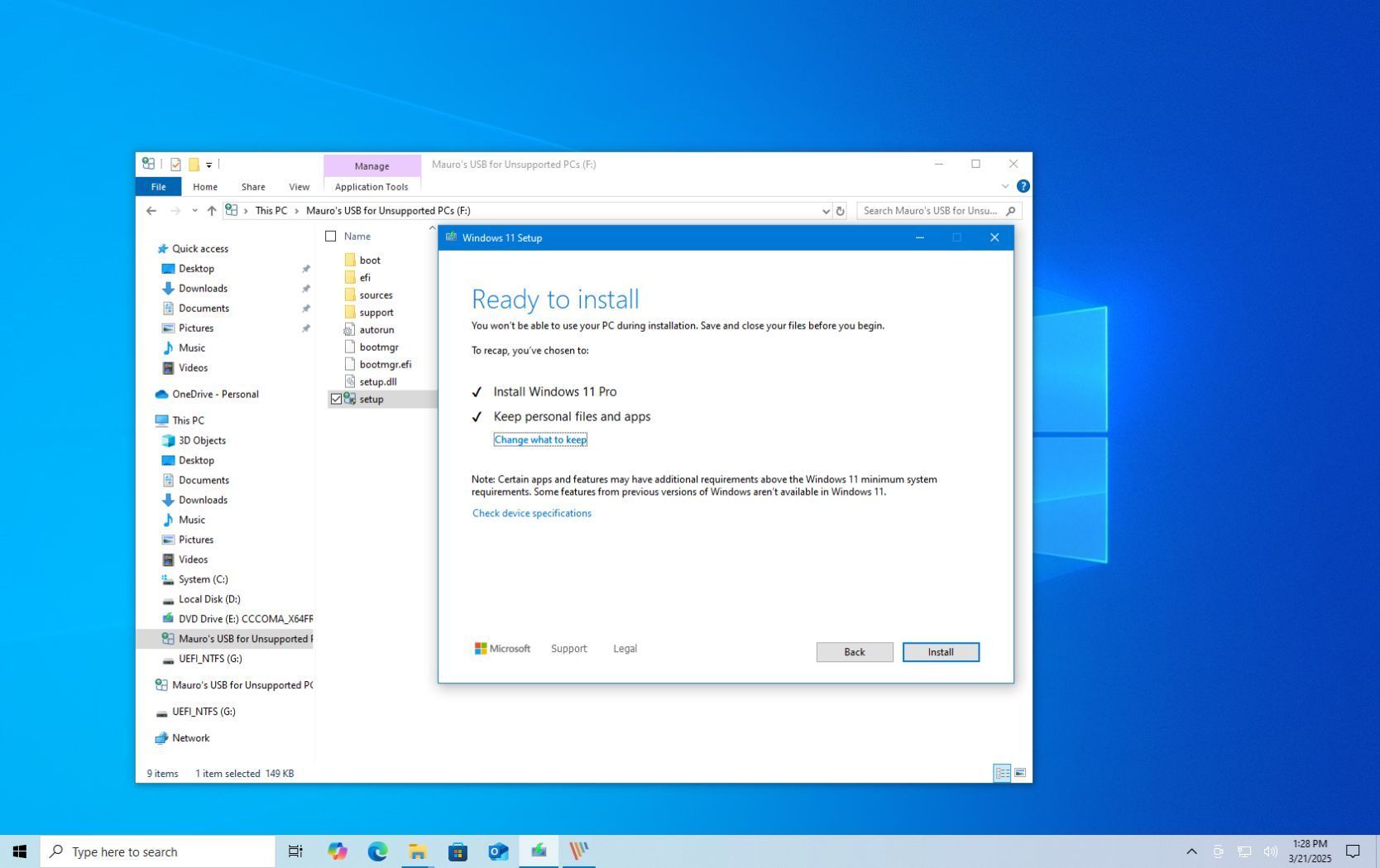
This would be how to do an in-place upgrade (ie repair install)


My Computers My Computers

  • At a glance

    Windows 11 Pro 25H2 26200.9168i9-10900 10 core 20 threads32 gbnone-Intel UHD Graphics 630
    OS
    Windows 11 Pro 25H2 26200.9168
    Computer type
    PC/Desktop
    Manufacturer/Model
    Dell Optiplex 7080
    CPU
    i9-10900 10 core 20 threads
    Motherboard
    DELL 0J37VM
    Memory
    32 gb
    Graphics Card(s)
    none-Intel UHD Graphics 630
    Sound Card
    Integrated Realtek
    Monitor(s) Displays
    Benq 27
    Screen Resolution
    2560x1440
    Hard Drives
    2x1tb Solidigm m.2 nvme /External drives 512gb Samsung m.2 sata+2tb Kingston m2.nvme
    PSU
    500w
    Case
    MT
    Cooling
    Dell Premium
    Keyboard
    Logitech wired
    Mouse
    Logitech wireless
    Internet Speed
    so slow I'm too embarrassed to tell
    Browser
    #1 Edge #2 Firefox
    Antivirus
    Defender+MWB Premium
  • At a glance

    Windows 11 Pro 24H2 26200.9168AMD Ryzen 7 6800U32 gbintegrated
    Operating System
    Windows 11 Pro 24H2 26200.9168
    Computer type
    PC/Desktop
    Manufacturer/Model
    Beelink Mini PC SER5
    CPU
    AMD Ryzen 7 6800U
    Memory
    32 gb
    Graphics card(s)
    integrated
    Sound Card
    integrated
    Monitor(s) Displays
    Benq 27
    Screen Resolution
    2560x1440
    Hard Drives
    1TB Crucial nvme
    Keyboard
    Logitech wired
    Mouse
    Logitech wireless
    Internet Speed
    still too embarrassed to tell
    Browser
    Firefox
    Antivirus
    Defender
  • System 3 is non compliant Dell 9020 i7-4770/24gb ram Win11 PRO 26200.9168
you know what i may not have been the only one with the start issue
i just installed the latest in dev. 22572 and lo and behold it just came back as a miracle
btw i have a couple of problems and i've wracked my teeny tiny hippocampus and nada , perhaps you may help
i am using a full hd as a large screen with the laptop at 1980x1080, now that doesnt translate well into the panel and the taskbar at best is like 1/2" frrom the bottom ,i've not found any solution to make this as high as it used to be in windows 10, i do not want windows 10 taskbar, i want windows 11 with the option to raise it half screen if i want to. do you have a tweak,
next, i live in a non english as native language, i managed to set the edge opening tab in other laptop to open straight into english and all is hunky dory, in my pc for the life of me when i start edge it starts with local language and i go into settings change it to us english yada yada every time i close and open edge, the main page is set to open msn/en=us and yet i get a razzzz every time, help??
btw you were right about the registry fix for win 11, i did so long ago that it slipped my mind, now not needed start is working
 

My Computer My Computer

At a glance

windows 11 22567intel i7 6700HQ64 gbnvidia 980 M
OS
windows 11 22567
Computer type
Laptop
Manufacturer/Model
acer predator
CPU
intel i7 6700HQ
Motherboard
Acer Challenger SLS
Memory
64 gb
Graphics Card(s)
nvidia 980 M
Back
Top Bottom