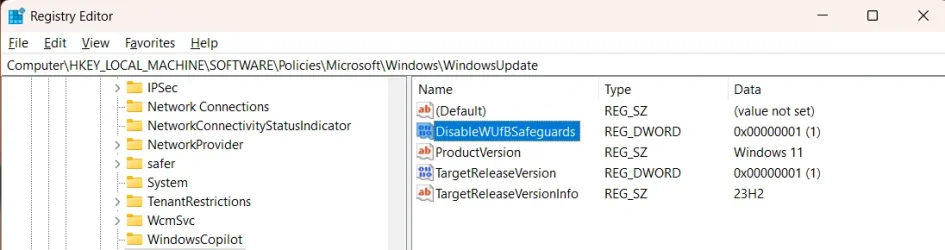
24H2 blocked, still installs?!?!?!?!?! GPO not working.


Take it up with the MS then. I must say I cannot recall MS ever forcing a new major update/new version onto Windows in any of my computers via Windows Update.
Disclaimer: I'm a Microsoft agnostic, I neither like nor dislike them, I just use their software.
I used to work closely with Microsoft for many years, and I cut ties back when Windows Vista was horrible.

Microsoft does not care about end-users, just major companies making them money.

I prefer Linux over Windows, however, my career for the past 30+ years make me support Windows. :)
 

My Computer

System One

  • OS
    Windows 11 Pro
    Computer type
    Laptop
    Manufacturer/Model
    Dell 16 Plus DB16255
    CPU
    AMD Ryzen AI 7 350 w/ Radeon 860M 50 TOPS
    Motherboard
    Dell 0PKMHG
    Memory
    32GB LPDDR5X 7500 MT/s
    Graphics Card(s)
    AMD Radeon 860M integrated (shared memory)
    Sound Card
    Stereo speakers (2.5 W x 2 = 5 W total peak)/Realtek SounzReal/Dolby Atmos
    Monitor(s) Displays
    Displays: 16" 1920 x 1200 (Full HD+/WUXGA) 300 nits 60Hz *** Samsung - 27” Odyssey FHD IPS 240Hz G-Sync Gaming Monitor
    Screen Resolution
    1920x1080 @ 60Hz
    Hard Drives
    EG6 KIOXIA 1TB NVME
    Case
    Ice Blue
    Cooling
    "dual-fan" or "enhanced" air-cooling system
    Mouse
    Logitech M650 Wireless/Bluetooth
    Internet Speed
    800/600 Fiber
Here are my 24H2 blocks for Windows 11:

1 - Group Policy:

Run: gpedit.msc

Computer Configuration > Administrative Templates > Windows Components > Windows Update > Manage updates offered from Windows Update
* Select the Enabled option to activate the policy.
* Type "Windows 11" in Windows product version field
* Type "23H2" in Target Version for Feature Updates field.

Then: gpupdate /force

2 - Regedit to block 24H2:

reg add HKLM\SOFTWARE\Policies\Microsoft\Windows\WindowsUpdate /f /v TargetReleaseVersion /t REG_DWORD /d 1
reg add HKLM\SOFTWARE\Policies\Microsoft\Windows\WindowsUpdate /f /v TargetReleaseVersionInfo /t REG_SZ /d 23H2
reg add HKLM\SOFTWARE\Policies\Microsoft\Windows\WindowsUpdate /f /v ProductVersion /t REG_SZ /d "Windows 11"


3 - Check GatedBlockId:

C:\>reg query "HKLM\SOFTWARE\Microsoft\Windows NT\CurrentVersion\AppCompatFlags\TargetVersionUpgradeExperienceIndicators\GE24H2" /v GatedBlockId

HKEY_LOCAL_MACHINE\SOFTWARE\Microsoft\Windows NT\CurrentVersion\AppCompatFlags\TargetVersionUpgradeExperienceIndicators\GE24H2
GatedBlockId REG_MULTI_SZ 54762729

I do not know of any others that I may have missed or just don't know about.
 

My Computer

System One

  • OS
    Windows 11 Pro
    Computer type
    Laptop
    Manufacturer/Model
    Dell 16 Plus DB16255
    CPU
    AMD Ryzen AI 7 350 w/ Radeon 860M 50 TOPS
    Motherboard
    Dell 0PKMHG
    Memory
    32GB LPDDR5X 7500 MT/s
    Graphics Card(s)
    AMD Radeon 860M integrated (shared memory)
    Sound Card
    Stereo speakers (2.5 W x 2 = 5 W total peak)/Realtek SounzReal/Dolby Atmos
    Monitor(s) Displays
    Displays: 16" 1920 x 1200 (Full HD+/WUXGA) 300 nits 60Hz *** Samsung - 27” Odyssey FHD IPS 240Hz G-Sync Gaming Monitor
    Screen Resolution
    1920x1080 @ 60Hz
    Hard Drives
    EG6 KIOXIA 1TB NVME
    Case
    Ice Blue
    Cooling
    "dual-fan" or "enhanced" air-cooling system
    Mouse
    Logitech M650 Wireless/Bluetooth
    Internet Speed
    800/600 Fiber
Hi @Nipdawg

Did you try this Group Policy as per this tutorial?


My Computers

System One System Two

  • OS
    Windows 11 Pro 25H2
    Computer type
    PC/Desktop
    Manufacturer/Model
    Homebuilt
    CPU
    Intel Core i9 13900K
    Motherboard
    Asus ProArt Z790 Creator WiFi - Bios 3107
    Memory
    Corsair Dominator Platinum 64gb 5600MT/s DDR5 Dual Channel
    Graphics Card(s)
    Sapphire NITRO+ AMD Radeon RX 7900 XTX Vapor-X 24GB
    Sound Card
    External DAC: Cambridge Audio DACMagic200M - Headphone Amp: Topping L50
    Monitor(s) Displays
    Panasonic MX950 Mini LED 55" TV 120hz
    Screen Resolution
    3840 x 2160 120hz
    Hard Drives
    Samsung 980 Pro 2TB (OS)
    Samsung 980 Pro 1TB (Files)
    Lexar NZ790 4TB
    LaCie d2 Professional 6TB external - USB 3.1
    Seagate Expansion 16TB external - USB 3.2
    Seagate One Touch 18TB external HD - USB 3.0
    PSU
    Corsair RM1200x Shift
    Case
    Corsair RGB Smart Case 5000x (white)
    Cooling
    Corsair iCue H150i Elite Capellix XT
    Keyboard
    Incase Ergonomic USB (Microsoft clone)
    Mouse
    Logitech MX Master 3S
    Internet Speed
    Fibre 900/500 Mbps
    Browser
    Microsoft Edge Chromium
    Antivirus
    Bitdefender Total Security
    Other Info
    AMD Radeon Software & Drivers 26.1.1
    Hasleo Backup Suite
    Dashlane password manager
    Kensington Verimark fingerprint reader
    Logitech Brio 4K webcam
    Orico 10-port powered USB 3.0 hub
  • Operating System
    Windows 11 Pro 25H2
    Computer type
    Laptop
    Manufacturer/Model
    Asus Vivobook X1605VA
    CPU
    Intel® Core™ i9-13900H
    Motherboard
    Asus X1605VA bios 309
    Memory
    32GB DDR4-3200 Dual channel
    Graphics card(s)
    *Intel Iris Xᵉ Graphics G7
    Sound Card
    Realtek | Intel SST Bluetooth & USB
    Monitor(s) Displays
    16.0-inch, WUXGA 16:10 aspect ratio, IPS-level Panel
    Screen Resolution
    1920 x 1200 60hz
    Hard Drives
    512GB M.2 NVMe™ PCIe® 3.0 SSD
    Mouse
    Logitech MX Ergo Trackball
    Antivirus
    Bitdefender Total Security
    Other Info
    720p Webcam
    WiFi & USB to ethernet

My Computer

System One

  • OS
    Windows 11 Pro
    Computer type
    Laptop
    Manufacturer/Model
    Dell 16 Plus DB16255
    CPU
    AMD Ryzen AI 7 350 w/ Radeon 860M 50 TOPS
    Motherboard
    Dell 0PKMHG
    Memory
    32GB LPDDR5X 7500 MT/s
    Graphics Card(s)
    AMD Radeon 860M integrated (shared memory)
    Sound Card
    Stereo speakers (2.5 W x 2 = 5 W total peak)/Realtek SounzReal/Dolby Atmos
    Monitor(s) Displays
    Displays: 16" 1920 x 1200 (Full HD+/WUXGA) 300 nits 60Hz *** Samsung - 27” Odyssey FHD IPS 240Hz G-Sync Gaming Monitor
    Screen Resolution
    1920x1080 @ 60Hz
    Hard Drives
    EG6 KIOXIA 1TB NVME
    Case
    Ice Blue
    Cooling
    "dual-fan" or "enhanced" air-cooling system
    Mouse
    Logitech M650 Wireless/Bluetooth
    Internet Speed
    800/600 Fiber
I have the lite version of GPEdit on Win 11 Home (more details here). At last check (yesterday) the policy I set for staying on 23H2 is still being honored. No optional downloads or other mentions of 24H2.
 

My Computers

System One System Two

  • OS
    Windows 11 LTSC 24H2 (26100.4484)
    Computer type
    Laptop
    Manufacturer/Model
    Lenovo Legion 5 (17ach6h)
    CPU
    Ryzen 7 5800H
    Memory
    32GB (RipJaws DDR4 3200)
    Graphics Card(s)
    GeForce RTX 3060
    Monitor(s) Displays
    Philips 34" Ultrawide (343e2e)
    Screen Resolution
    2560x1080
    Hard Drives
    1TB OEM Samsung NVMe M.2
    1TB Samsung 970 EVO NVMe M.2
    8TB WD Black HDD
    PSU
    300W brick
    Cooling
    Paste replaced with PTM7950
    Keyboard
    Cooler Master (SK-630)
    Mouse
    EVGA X20
    Internet Speed
    500 Mbps
    Browser
    Firefox
    Antivirus
    Windows Defender
  • Operating System
    Windows 11 LTSC 24H2 (26100.4484)
    Computer type
    Laptop
    Manufacturer/Model
    Asus ROG Strix (GL502VSK)
    CPU
    Core I7 7700HQ
    Memory
    16GB DDR4
    Graphics card(s)
    GeForce GTX 1070
    Monitor(s) Displays
    15.6" 60Hz IPS
    Screen Resolution
    1920x1080
    Hard Drives
    256GB OEM Samsung M.2 NVMe
    2TB Team Group EX2 SATA III
    Cooling
    Paste replaced with PTM7950
    Internet Speed
    500 Mbps
    Browser
    Firefox
    Antivirus
    Windows Defender
I noticed there are many other Windows 11 23H2 users finding the Microsoft's Safeguards are not preventing 24H2 from installing, like what I have been experiencing. I found this part on another post in another forums and this could explain why the Safeguards are not preventing 24H2 from installing when 24H2 should not be installing at all.

In regedit, go to HKEY_LOCAL_MACHINE\SOFTWARE\Policies\Microsoft\Windows\WindowsUpdate, and add DisableWUfBSageguards REG_DWORD with value of 1 OR through gpedit.msc (\Computer Configuration\Administrative Templates\Windows Components\Windows Update\Manage updates offered from Windows Update) to Enable/Disable the "Disable safeguards for Feature Updates" setting. I selected Disable on this setting.

I left the description below as it is a confusing setting if you think about too much. I hope I set this right.

regedit:
1733615281559.webp

gpedit.msc:
1733615913077.webp

Description:
Enable this setting when Feature Updates should be deployed to devices without blocking on any safeguard holds. Safeguard holds are known compatibility issues that block the upgrade from being deployed to affected devices until the issue is resolved. Enabling this policy can allow an organization to deploy the Feature Update to devices for testing, or to deploy the Feature Update without blocking on safeguard holds.
 

Attachments

  • 1733615527082.webp
    1733615527082.webp
    46.2 KB · Views: 1
  • 1733615570252.webp
    1733615570252.webp
    46.2 KB · Views: 1

My Computer

System One

  • OS
    Windows 11 Pro
    Computer type
    Laptop
    Manufacturer/Model
    Dell 16 Plus DB16255
    CPU
    AMD Ryzen AI 7 350 w/ Radeon 860M 50 TOPS
    Motherboard
    Dell 0PKMHG
    Memory
    32GB LPDDR5X 7500 MT/s
    Graphics Card(s)
    AMD Radeon 860M integrated (shared memory)
    Sound Card
    Stereo speakers (2.5 W x 2 = 5 W total peak)/Realtek SounzReal/Dolby Atmos
    Monitor(s) Displays
    Displays: 16" 1920 x 1200 (Full HD+/WUXGA) 300 nits 60Hz *** Samsung - 27” Odyssey FHD IPS 240Hz G-Sync Gaming Monitor
    Screen Resolution
    1920x1080 @ 60Hz
    Hard Drives
    EG6 KIOXIA 1TB NVME
    Case
    Ice Blue
    Cooling
    "dual-fan" or "enhanced" air-cooling system
    Mouse
    Logitech M650 Wireless/Bluetooth
    Internet Speed
    800/600 Fiber
I noticed there are many other Windows 11 23H2 users finding the Microsoft's Safeguards are not preventing 24H2 from installing, like what I have been experiencing.

Certainly not here, and I blocked the Update 2 months ago, after getting it before I blocked it. I also had the Get Updates as soon as possible box enabled. After discovering it was messing with my NAS, I reverted back to 23H2, turned off Get updates sooner, and applied the block through Group Edit Policy, and haven't seen 24H2 since.

I have two machines blocked - 2024 Lenovo laptop, custom built desktop. Neither has magically installed 24H2 after using the Policy editor to block it. And turning off Get updates sooner.
 

My Computers

System One System Two

  • OS
    Windows 11 Pro 24H2 (Build 26100.4770)
    Computer type
    PC/Desktop
    Manufacturer/Model
    Custom built
    CPU
    Intel Core 9 Ultra 285K
    Motherboard
    Gigabyte Aorus Z890 Xtreme AI Top
    Memory
    64G (4x16) DDR5 Corsair RGB Dominator Platinum (6400Mhz)
    Graphics Card(s)
    Radeon (XFX Mercury) RX 9070XT OC (with Magnetic Fans)
    Sound Card
    Onboard (DTS:X® Ultra Audio: ESS ES9280A DAC)
    Monitor(s) Displays
    27-inch Eizo Color Edge - CG2700X
    Screen Resolution
    3840 x 2160
    Hard Drives
    4 Samsung NVM 990 Pro drives: 1TB (OS), 2TB, 2 X 4TB.
    PSU
    Seasonic TX-1300 (1300 Watts)
    Case
    Cooler Master H500M
    Cooling
    Corsair Link Titan 280 RX RGB
    Keyboard
    Logitech Craft
    Mouse
    Logitech MX Master 3S
    Internet Speed
    1TB Download. 512mb Upload
    Browser
    Microsoft Edge Chromium
    Antivirus
    Windows Security
    Other Info
    System used for gaming, photography, music, school.
  • Operating System
    Windows 11 Pro 24H2 (Build 26100.4061)
    Computer type
    PC/Desktop
    Manufacturer/Model
    Custom built
    CPU
    Intel Core i9-9900K
    Motherboard
    Gigabyte Z390 Aorus Xtreme
    Memory
    32gig (4 x 8) Corsair Dominator Platinum DDR4 3600Mhz (B-Die)
    Graphics card(s)
    Radeon XFX Merc 7900XT (20gig)
    Sound Card
    Onboard
    Monitor(s) Displays
    24-Inch NEC PA242W
    Screen Resolution
    2880 x 1800
    Hard Drives
    2 X NVME, 1 X SATA SSD
    PSU
    EVGA Super Nova 1000 P2 (1000 Watt)
    Case
    Phantek Enthoo Luxe
    Cooling
    Corsair H115i Elite AIO Cooler
    Keyboard
    Logitech Keys
    Mouse
    Logitech MX Master 3
    Internet Speed
    1TB Download. 512mb Upload
    Browser
    Microsoft Edge Chromium
    Antivirus
    Windows Security
    Other Info
    Backup System
Certainly not here, and I blocked the Update 2 months ago, after getting it before I blocked it. I also had the Get Updates as soon as possible box enabled. After discovering it was messing with my NAS, I reverted back to 23H2, turned off Get updates sooner, and applied the block through Group Edit Policy, and haven't seen 24H2 since.

I have two machines blocked - 2024 Lenovo laptop, custom built desktop. Neither has magically installed 24H2 after using the Policy editor to block it. And turning off Get updates sooner.
I understand what you experiencing, as I was fine at first.

I wonder if any of the Tweaks applied broke something to allow 24H2 to install. I doubt it. Just been trying to make sure 24H2 does not install again.
 

My Computer

System One

  • OS
    Windows 11 Pro
    Computer type
    Laptop
    Manufacturer/Model
    Dell 16 Plus DB16255
    CPU
    AMD Ryzen AI 7 350 w/ Radeon 860M 50 TOPS
    Motherboard
    Dell 0PKMHG
    Memory
    32GB LPDDR5X 7500 MT/s
    Graphics Card(s)
    AMD Radeon 860M integrated (shared memory)
    Sound Card
    Stereo speakers (2.5 W x 2 = 5 W total peak)/Realtek SounzReal/Dolby Atmos
    Monitor(s) Displays
    Displays: 16" 1920 x 1200 (Full HD+/WUXGA) 300 nits 60Hz *** Samsung - 27” Odyssey FHD IPS 240Hz G-Sync Gaming Monitor
    Screen Resolution
    1920x1080 @ 60Hz
    Hard Drives
    EG6 KIOXIA 1TB NVME
    Case
    Ice Blue
    Cooling
    "dual-fan" or "enhanced" air-cooling system
    Mouse
    Logitech M650 Wireless/Bluetooth
    Internet Speed
    800/600 Fiber
I wonder if any of the Tweaks applied broke something to allow 24H2 to install. I doubt it. Just been trying to make sure 24H2 does not install again.
Yeah, I don't try to rewrite the OS with tons of tweaks. It's basically as is out the box. Probably why I don't run into tons of issues.
 

My Computers

System One System Two

  • OS
    Windows 11 Pro 24H2 (Build 26100.4770)
    Computer type
    PC/Desktop
    Manufacturer/Model
    Custom built
    CPU
    Intel Core 9 Ultra 285K
    Motherboard
    Gigabyte Aorus Z890 Xtreme AI Top
    Memory
    64G (4x16) DDR5 Corsair RGB Dominator Platinum (6400Mhz)
    Graphics Card(s)
    Radeon (XFX Mercury) RX 9070XT OC (with Magnetic Fans)
    Sound Card
    Onboard (DTS:X® Ultra Audio: ESS ES9280A DAC)
    Monitor(s) Displays
    27-inch Eizo Color Edge - CG2700X
    Screen Resolution
    3840 x 2160
    Hard Drives
    4 Samsung NVM 990 Pro drives: 1TB (OS), 2TB, 2 X 4TB.
    PSU
    Seasonic TX-1300 (1300 Watts)
    Case
    Cooler Master H500M
    Cooling
    Corsair Link Titan 280 RX RGB
    Keyboard
    Logitech Craft
    Mouse
    Logitech MX Master 3S
    Internet Speed
    1TB Download. 512mb Upload
    Browser
    Microsoft Edge Chromium
    Antivirus
    Windows Security
    Other Info
    System used for gaming, photography, music, school.
  • Operating System
    Windows 11 Pro 24H2 (Build 26100.4061)
    Computer type
    PC/Desktop
    Manufacturer/Model
    Custom built
    CPU
    Intel Core i9-9900K
    Motherboard
    Gigabyte Z390 Aorus Xtreme
    Memory
    32gig (4 x 8) Corsair Dominator Platinum DDR4 3600Mhz (B-Die)
    Graphics card(s)
    Radeon XFX Merc 7900XT (20gig)
    Sound Card
    Onboard
    Monitor(s) Displays
    24-Inch NEC PA242W
    Screen Resolution
    2880 x 1800
    Hard Drives
    2 X NVME, 1 X SATA SSD
    PSU
    EVGA Super Nova 1000 P2 (1000 Watt)
    Case
    Phantek Enthoo Luxe
    Cooling
    Corsair H115i Elite AIO Cooler
    Keyboard
    Logitech Keys
    Mouse
    Logitech MX Master 3
    Internet Speed
    1TB Download. 512mb Upload
    Browser
    Microsoft Edge Chromium
    Antivirus
    Windows Security
    Other Info
    Backup System
I noticed there are many other Windows 11 23H2 users finding the Microsoft's Safeguards are not preventing 24H2 from installing, like what I have been experiencing. I found this part on another post in another forums and this could explain why the Safeguards are not preventing 24H2 from installing when 24H2 should not be installing at all.

In regedit, go to HKEY_LOCAL_MACHINE\SOFTWARE\Policies\Microsoft\Windows\WindowsUpdate, and add DisableWUfBSageguards REG_DWORD with value of 1 OR through gpedit.msc (\Computer Configuration\Administrative Templates\Windows Components\Windows Update\Manage updates offered from Windows Update) to Enable/Disable the "Disable safeguards for Feature Updates" setting. I selected Disable on this setting.

I left the description below as it is a confusing setting if you think about too much. I hope I set this right.

regedit:
View attachment 118737

gpedit.msc:
View attachment 118740

Description:
Enable this setting when Feature Updates should be deployed to devices without blocking on any safeguard holds. Safeguard holds are known compatibility issues that block the upgrade from being deployed to affected devices until the issue is resolved. Enabling this policy can allow an organization to deploy the Feature Update to devices for testing, or to deploy the Feature Update without blocking on safeguard holds.
@Nipdawg Did this change fix the issue for you?
 

My Computers

System One System Two

  • OS
    Windows 11 Pro 23H2, Build: 22631.5335 (Retail)
    Computer type
    PC/Desktop
    CPU
    Intel Core i5-12600K
    Motherboard
    ASRock B760M PG Riptide
    Memory
    Crucial Classic DDR5-4800 16GB
    Monitor(s) Displays
    1 good old Benq model
    Hard Drives
    Kingston KC3000 SSD 512GB PCIe 4.0 M.2 2280 NVMe
    PSU
    Seasonic G12 GM 750Watt
    Case
    metal, 15+ years old, ATX/mATX
    Cooling
    Thermalright Peerless Assassin 120
    Keyboard
    Lenovo, wired
    Mouse
    Logitech, wired
    Browser
    Chrome
    Other Info
    First time DIY build.
  • Operating System
    Windows 11 Home 23H2, Build: 22631.4751 (OEM)
    Computer type
    PC/Desktop
    Manufacturer/Model
    Acer Aspire XC-1760
    CPU
    Intel Core i5-12400
    Motherboard
    Acer Andrew H610 (PCIe Gen 4)
    Memory
    8 GB DDR4
    Graphics card(s)
    Intel(R) UHD Graphics 730
    Sound Card
    Integrated, HD Audio
    Monitor(s) Displays
    old Samsung
    Screen Resolution
    1920x1080, 60 Hz
    Hard Drives
    M.2 PCIe NVMe SSD (WD or Kingston, not sure), 512GB, partitioned into C & D drives.
    PSU
    Brand unknown. 180W. (80 Plus Gold certification)
    Case
    Slim, DTX
    Cooling
    Brand unknown. Air cooling.
    Keyboard
    Lenovo (wired)
    Mouse
    Logitech (wired)
    Browser
    Chrome
    Other Info
    Extra CPU details:
    Intel UHD Graphics, 6 cores, 12 threads, 2.5 GHz, LGA1700, Intel H610 Chipset.
Back
Top Bottom