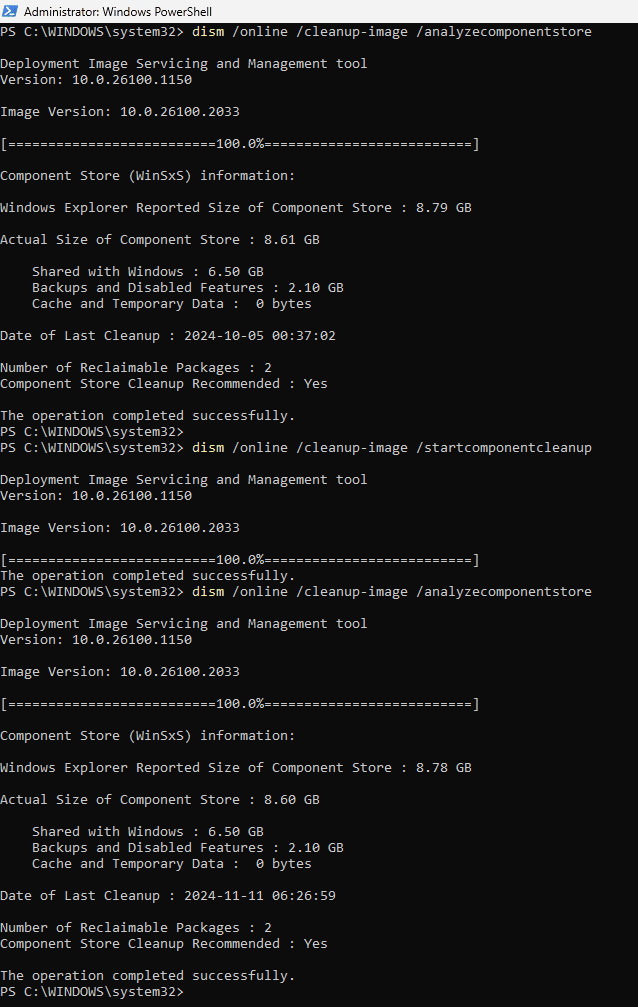
In 24H2 the command Dism /Online /Cleanup-Image /AnalyzeComponentStore always shows that there are 2 reclaimable packages, and that a cleanup is recommended.
But they remain there after the cleanup command Dism /Online /Cleanup-Image /StartComponentCleanup
As an experiment I did a clean install with a 26100.2033 USB made by the MCT. At no point did I let it connect to the internet. These two unreclaimable packages were already present. There is no possible way to avoid them, the fault is built into the install media!
2 Packages are responsible for that;
- [Microsoft-Windows-FodMetadataServicing-Desktop-Metadata-Package~31bf3856ad364e35~amd64~~10.0.26100.1742]
- [Package_for_RollupFix~31bf3856ad364e35~amd64~~26100.1742.1.10]
Both packages "is a top-level package and is deeply superseded".....
This info can be seen inside the C:\Windows\Logs\CBS\CBS.log file after a dism /online /cleanup-image /AnalyzeComponentStore command.
I have found that if I uninstall just the Package_for_RollupFix~31bf3856ad364e35~amd64~~26100.1742.1.10 package, in doing so the Microsoft-Windows-FodMetadataServicing-Desktop-Metadata-Package~31bf3856ad364e35~amd64~~10.0.26100.1742 package gets removed at the same time.
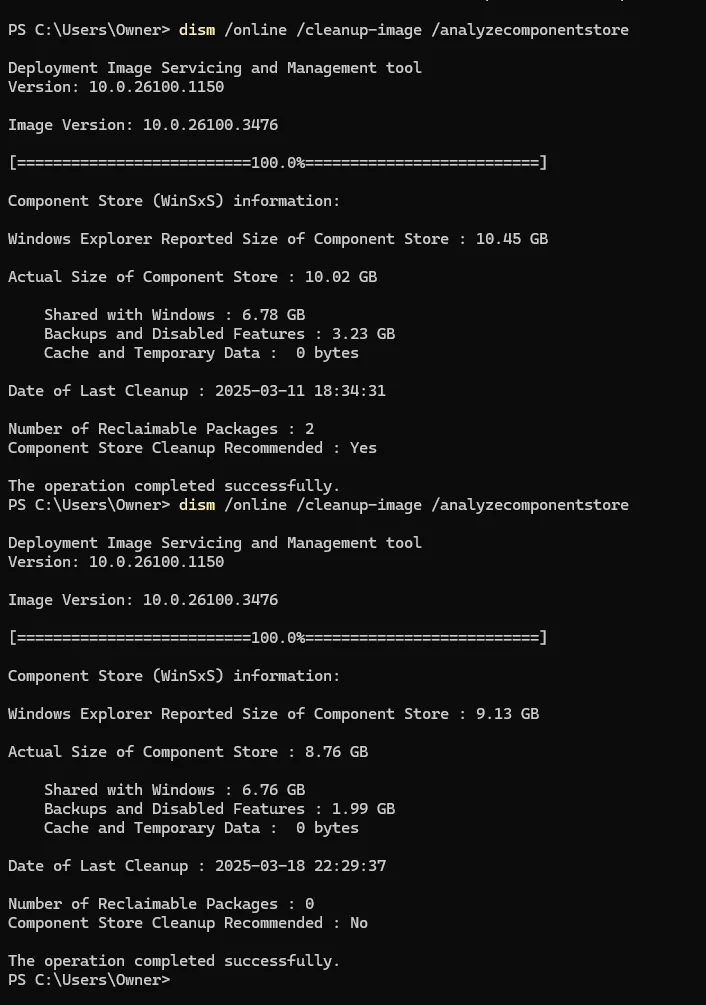
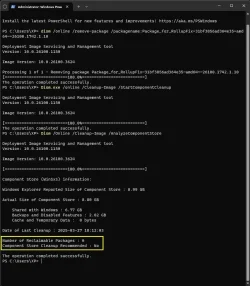
This one command removes both.... dism /online /remove-package /packagename:Package_for_RollupFix~31bf3856ad364e35~amd64~~26100.1742.1.10
A new cumulative update, KB5053656, gave me the opportunity to test that removing the packages did not interfere with further updates, and that the two (un)reclaimable packages did not return.
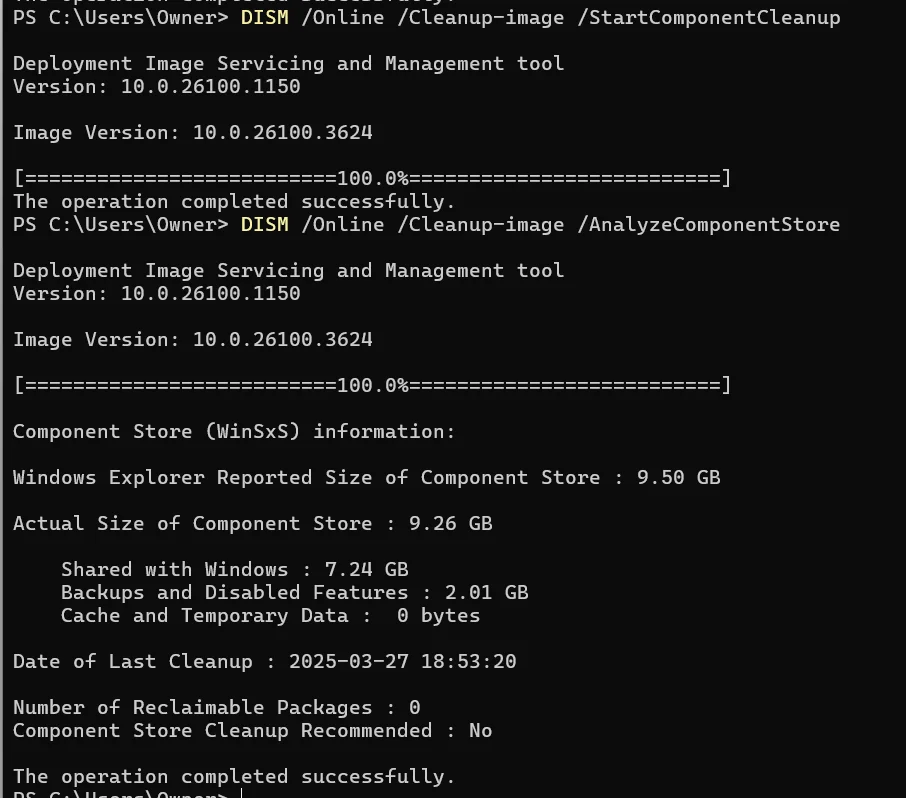
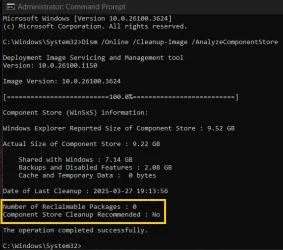
These packages date back to build 26100.1742, the initial release of 24H2. They have long been superseded, removing them should do no harm, and means that DISM now reports correctly whether or not a cleanup is recommended.
1366x768 native resolution, up to 2560x1440 with Radeon Virtual Super Resolution
Hard Drives
1TB Samsung EVO 870 SSD (from April 2026: 250GB EVO 850)
Internet Speed
150 Mbps
Browser
Edge, Firefox
Antivirus
Defender
Other Info
fully 'Windows 11 ready' laptop. Windows 10 C: partition migrated from my old unsupported 'main machine' then upgraded to 11. A test migration ran Insider builds for 2 months. When 11 was released on 5th October 2021 it was re-imaged back to 10 and was offered the upgrade in Windows Update on 20th October. Windows Update offered the 22H2 Feature Update on 20th September 2022. It got the 23H2 Feature Update on 4th November 2023 through Windows Update, 24H2 on 3rd October 2024 through Windows Update by setting the Target Release Version for 24H2, and 25H2 on 30th September 2025 through Windows Update by setting the Target Release Version for 25H2.
UPDATE - 11 April 2026: due to mechanical deterioration this PC has been retired from active duty. The OS with all software and files has been migrated to my System Seven below to carry on as my general purpose 'main machine'.
My SYSTEM THREE is a Dell Latitude 5410, i7-10610U, 32GB RAM, 512GB NVMe ssd, supported device running Windows 11 Pro.
My SYSTEM FOUR is a 2-in-1 convertible Lenovo Yoga 11e 20DA, Celeron N2930, 8GB RAM, 256GB ssd. Unsupported device: currently running Win10 Pro, plus Win11 Pro RTM and Insider Dev, Beta, and RP 24H2 as native boot vhdx.
My SYSTEM FIVE is a Dell Latitude 3190 2-in-1, Pentium Silver N5030, 8GB RAM, 1TB NVMe ssd, supported device running Windows 11 Pro, plus Insider Beta, Dev, and Canary builds (and a few others) as a native boot .vhdx.
My SYSTEM SIX is a Dell Latitude 5550, Core Ultra 7 165H, 64GB RAM, 1TB NVMe SSD, supported device, Windows 11 Pro 24H2, Hyper-V host machine. Updated to 25H2 on 30th September 2025.
My SYSTEM SEVEN is a Lenovo Thinkpad T580, Intel Core i7-8650U, 16GB RAM, 512GB NVMe SSD + 2nd 512GB NVMe SSD, a supported device for Windows 11. This is my current general purpose 'main machine'. The installed Windows 11 Home from my System One has been migrated to this machine.
Operating System
Windows 11 Pro
Computer type
Laptop
Manufacturer/Model
Dell Latitude E4310
CPU
Intel® Core™ i5-520M
Motherboard
0T6M8G
Memory
8GB
Graphics card(s)
(integrated graphics) Intel HD Graphics
Screen Resolution
1366x768
Hard Drives
500GB Crucial MX500 SSD
Browser
Firefox, Edge
Antivirus
Defender
Other Info
unsupported machine: Legacy bios, MBR, TPM 1.2, upgraded from W10 to W11 using W10/W11 hybrid install media workaround. In-place upgrade to 22H2 using ISO and a workaround. Feature Update to 23H2 by manually installing the Enablement Package. In-place upgrade to 24H2 using hybrid 23H2/24H2 install media. Upgraded to 25H2 by Enablement Package. Also running Insider Dev, and Canary builds and Windows 10 as native boot .vhdx.
My SYSTEM THREE is a Dell Latitude 5410, i7-10610U, 32GB RAM, 512GB NVMe ssd, supported device running Windows 11 Pro.
My SYSTEM FOUR is a 2-in-1 convertible Lenovo Yoga 11e 20DA, Celeron N2930, 8GB RAM, 256GB ssd. Unsupported device: currently running Win10 Pro, plus Win11 Pro RTM and Insider Dev, Beta, and RP 24H2 as native boot vhdx.
My SYSTEM FIVE is a Dell Latitude 3190 2-in-1, Pentium Silver N5030, 8GB RAM, 1TB NVMe ssd, supported device running Windows 11 Pro, plus Insider Beta, Dev, and Canary builds (and a few others) as a native boot .vhdx.
My SYSTEM SIX is a Dell Latitude 5550, Core Ultra 7 165H, 64GB RAM, 1TB NVMe SSD, supported device, Windows 11 Pro 24H2, Hyper-V host machine. Updated to 25H2 on 30th September 2025.
My SYSTEM SEVEN is a Lenovo Thinkpad T580, Intel Core i7-8650U, 16GB RAM, 512GB NVMe SSD + 2nd 512GB NVMe SSD, a supported device for Windows 11. This is my current general purpose 'main machine'. The installed Windows 11 Home from my System One has been migrated to this machine.
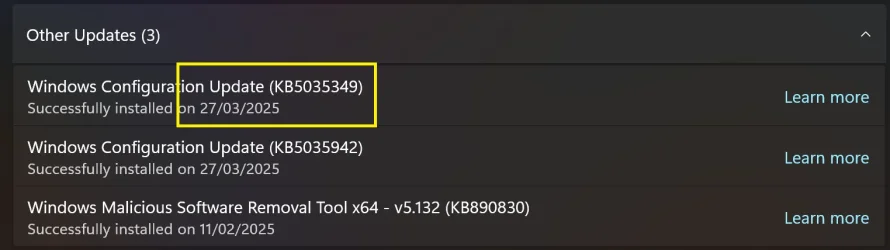
I think this has fixed another issue. The pesky Windows Configuration Update (KB5035349) that updates every day when you turn on your PC as seen in Update history/Other Updates. I've shutdown and restarted twice now and it hasn't updated to today's date. Still showing 27/03/2025.
1 x KINGSTON NVMe M.2 SSDSKC3000D2048G 2TB
1 x Samsung SSD 870 EVO 250GB
2 x Crucial CT4000MX500SSD1 4TB
2 x Crucial CT2000MX500SSD1 2TB
1 x Crucial CT250MX500SSD1 250.0 GB
PSU
Gigabyte 750w
Case
Fractal Torrent
Cooling
Stock Intel CPU, 2 x Fractal 180mm PWM (front), 3 x Fractal 140mm PWM (bottom)
Note that if you ever need to do an in-place repair install it will likely reinstate those two packages. If so, then you'll need to run the command again.
1366x768 native resolution, up to 2560x1440 with Radeon Virtual Super Resolution
Hard Drives
1TB Samsung EVO 870 SSD (from April 2026: 250GB EVO 850)
Internet Speed
150 Mbps
Browser
Edge, Firefox
Antivirus
Defender
Other Info
fully 'Windows 11 ready' laptop. Windows 10 C: partition migrated from my old unsupported 'main machine' then upgraded to 11. A test migration ran Insider builds for 2 months. When 11 was released on 5th October 2021 it was re-imaged back to 10 and was offered the upgrade in Windows Update on 20th October. Windows Update offered the 22H2 Feature Update on 20th September 2022. It got the 23H2 Feature Update on 4th November 2023 through Windows Update, 24H2 on 3rd October 2024 through Windows Update by setting the Target Release Version for 24H2, and 25H2 on 30th September 2025 through Windows Update by setting the Target Release Version for 25H2.
UPDATE - 11 April 2026: due to mechanical deterioration this PC has been retired from active duty. The OS with all software and files has been migrated to my System Seven below to carry on as my general purpose 'main machine'.
My SYSTEM THREE is a Dell Latitude 5410, i7-10610U, 32GB RAM, 512GB NVMe ssd, supported device running Windows 11 Pro.
My SYSTEM FOUR is a 2-in-1 convertible Lenovo Yoga 11e 20DA, Celeron N2930, 8GB RAM, 256GB ssd. Unsupported device: currently running Win10 Pro, plus Win11 Pro RTM and Insider Dev, Beta, and RP 24H2 as native boot vhdx.
My SYSTEM FIVE is a Dell Latitude 3190 2-in-1, Pentium Silver N5030, 8GB RAM, 1TB NVMe ssd, supported device running Windows 11 Pro, plus Insider Beta, Dev, and Canary builds (and a few others) as a native boot .vhdx.
My SYSTEM SIX is a Dell Latitude 5550, Core Ultra 7 165H, 64GB RAM, 1TB NVMe SSD, supported device, Windows 11 Pro 24H2, Hyper-V host machine. Updated to 25H2 on 30th September 2025.
My SYSTEM SEVEN is a Lenovo Thinkpad T580, Intel Core i7-8650U, 16GB RAM, 512GB NVMe SSD + 2nd 512GB NVMe SSD, a supported device for Windows 11. This is my current general purpose 'main machine'. The installed Windows 11 Home from my System One has been migrated to this machine.
Operating System
Windows 11 Pro
Computer type
Laptop
Manufacturer/Model
Dell Latitude E4310
CPU
Intel® Core™ i5-520M
Motherboard
0T6M8G
Memory
8GB
Graphics card(s)
(integrated graphics) Intel HD Graphics
Screen Resolution
1366x768
Hard Drives
500GB Crucial MX500 SSD
Browser
Firefox, Edge
Antivirus
Defender
Other Info
unsupported machine: Legacy bios, MBR, TPM 1.2, upgraded from W10 to W11 using W10/W11 hybrid install media workaround. In-place upgrade to 22H2 using ISO and a workaround. Feature Update to 23H2 by manually installing the Enablement Package. In-place upgrade to 24H2 using hybrid 23H2/24H2 install media. Upgraded to 25H2 by Enablement Package. Also running Insider Dev, and Canary builds and Windows 10 as native boot .vhdx.
My SYSTEM THREE is a Dell Latitude 5410, i7-10610U, 32GB RAM, 512GB NVMe ssd, supported device running Windows 11 Pro.
My SYSTEM FOUR is a 2-in-1 convertible Lenovo Yoga 11e 20DA, Celeron N2930, 8GB RAM, 256GB ssd. Unsupported device: currently running Win10 Pro, plus Win11 Pro RTM and Insider Dev, Beta, and RP 24H2 as native boot vhdx.

My SYSTEM FIVE is a Dell Latitude 3190 2-in-1, Pentium Silver N5030, 8GB RAM, 1TB NVMe ssd, supported device running Windows 11 Pro, plus Insider Beta, Dev, and Canary builds (and a few others) as a native boot .vhdx.
My SYSTEM SIX is a Dell Latitude 5550, Core Ultra 7 165H, 64GB RAM, 1TB NVMe SSD, supported device, Windows 11 Pro 24H2, Hyper-V host machine. Updated to 25H2 on 30th September 2025.
My SYSTEM SEVEN is a Lenovo Thinkpad T580, Intel Core i7-8650U, 16GB RAM, 512GB NVMe SSD + 2nd 512GB NVMe SSD, a supported device for Windows 11. This is my current general purpose 'main machine'. The installed Windows 11 Home from my System One has been migrated to this machine.
Samsung 990 Pro 1TB NVMe (Win 11 25H2)
SK hynix P41 500GB NVMe 25H2 DEV/Games
SK hynix P41 2TB NVMe (x3)
Crucial P3 Plus 4TB
PSU
Corsair RM850x Shift
Case
Antec Dark Phantom DP502 FLUX
Cooling
Corsair Nautilus 360 RS AIO
Keyboard
Logitech MK 320
Mouse
Razer Basilisk V3
Internet Speed
350Mbs
Browser
Firefox
Antivirus
Winows Security
Other Info
MR 8.1 Home
System 3 Specs
Win 11 Pro 25H2 26200.8524
ASUS PRIME Z370-P II BIOS 3004 7/12/21
Intel Core i7-8700 CPU @ 3.20GHz
32GB DDR4 RAM (4x8)
iGPU Intel UHD Graphics 630
Operating System
Win 11 Pro 25H2 26200.8524
Computer type
PC/Desktop
Manufacturer/Model
Self Built
CPU
Intel Core i7-11700F
Motherboard
Asus TUF Gaming Z590 Plus WiFi (BIOS 2803)
Memory
64 GB DDR4
Graphics card(s)
MSI GeForce RTX 3060 Ventus 2X 12GB
Sound Card
SoundBlaster Audigy Fx V2
Monitor(s) Displays
Samsung F27T350
Screen Resolution
1920x1080
Hard Drives
Samsung 980 Pro 1TB
Samsung 970 EVO Plus 2TB
Samsung 870 EVO 500GB SSD
Microsoft has created and installed the package.
The questions are:
- What does the Package_for_RollupFix~31bf3856ad364e35~amd64~~26100.1742.1.10 do?
- As 24h2 is almost 6 moths old, why Microsoft hasn't fix it?
(1) -1 SM951 – 128GB M.2 AHCI PCIe SSD drive for Win 11
(2) -1 WD SATA 3 - 1T for Data
(3) -1 WD SATA 3 - 1T for backup
(4) -1 BX500 SSD - 256G for Windows 7 and Lubuntu
PSU
Thermaltake 450W TR2 gold
Keyboard
Old and good Chicony mechanical keyboard
Mouse
Logitech mX performance - 9 buttons (had to disable some)
Internet Speed
500 Mb/s
Browser
Firefox 64
Operating System
Windows 11 Pro
Computer type
Laptop
Manufacturer/Model
Asus Q550LF
CPU
i7-4500U 800- 3000MHz
Motherboard
Asus Q550LF
Memory
(4+4)G DDR3 1600
Graphics card(s)
IG intel 4400 + NVIDIA GeForce GT 745M
Sound Card
Realtek
Monitor(s) Displays
LG Display LP156WF4-SPH1
Screen Resolution
1920 x 1080
Hard Drives
BX500 120G SSD for Windows and programs
& 1T HDD for data
ROG SupremeFX ALC4082 with ESS® ES9018Q2C DAC for pinpoint positioning and dynamics
Monitor(s) Displays
2 x Samsung 43" HDR Neo QLED Mini-LED Tizen Smart TV (QN43QN90DAFXZC) 2024
Screen Resolution
1920 x 1080 @ 150 DPI & 120Hz
Hard Drives
2 x Samsung 980 Series - 250GB PCIe Gen3. X4 NVMe 1.4 - M.2 Internal SSD (Windows 11 Pro Dual boot)
PSU
Corsair HX1000i 80+ Platinum Modular Power Supply 1000W
Case
Phanteks Enthoo Luxe Tempered Glass Full Tower Case - Black
Cooling
CORSAIR iCUE H150i RGB Elite 360mm Liquid CPU Cooler
Keyboard
Perixx PERIBOARD-732B Wireless Mini Backlit USB Keyboard with Low Profile Keys - US Layout
Mouse
Logitech MX Anywhere 2S Wireless Mouse
Internet Speed
1000 Mbps
Browser
Latest Version Of Firefox & Microsoft Edge Chromium Stable
Antivirus
ESET Internet Security
Other Info
LG Electronics 14x Sata Blu-ray Disk Rewriter - WH14NS4O
2 x OREI 4K 4x2 HDMI Matrix Switch With ARC Audio Extraction, HDR & Downscaling (UHD-402D) so I can send the output of my Cable Box, Roku, or any of my 4 computers to either of my TV's separately or simultaneously.
Operating System
Windows 11 Pro x 2
Computer type
PC/Desktop
Manufacturer/Model
My second abomination, I call it the Money Pit Two
CPU
Intel Core i9 12900K @ 5.2 GHz
Motherboard
ASUS ROG STRIX Z690-F GAMING WIFI
Memory
2 x Vengeance RGB 32GB DDR5 6400MHz CL32 Dual Channel Kit (4x16GB Total) Black
Graphics card(s)
ASUS TUF Gaming GeForce RTX 3070 Ti OC Edition 8 GB GDDR6X
Sound Card
ROG SupremeFX ALC4082 with ESS® ES9018Q2C DAC for pinpoint positioning and dynamics
Monitor(s) Displays
2 x Samsung 43" HDR Neo QLED Mini-LED Tizen Smart TV (QN43QN90DAFXZC) 2024
Screen Resolution
1920 x 1080 @ 150 DPI & 120Hz
Hard Drives
2 x Samsung 980 Series - 250GB PCIe Gen3. X4 NVMe 1.4 - M.2 Internal SSD (Windows 11 Pro Dual boot)
PSU
Corsair AX860 - 860W Modular Power Supply
Case
Phanteks Enthoo Pro Tempered Glass Full Tower Case - Black
Cooling
CORSAIR iCUE H150i RGB Elite 360mm Liquid CPU Cooler
Keyboard
Perixx PERIBOARD-326 Wired Mini Backlit USB Keyboard with Low Profile Keys - US Layout
Mouse
Logitech MX Anywhere 2S Wireless Mouse
Internet Speed
1000 Mbps
Browser
Latest Version Of Firefox & EDGE Chromium Stable
Antivirus
ESET Internet Security
Other Info
LG Electronics 14x Sata Blu-ray Disk Rewriter - WH14NS4O
2 x OREI 4K 4x2 HDMI Matrix Switch With ARC Audio Extraction, HDR & Downscaling (UHD-402D) so I can send the output of my Cable Box, Roku, or any of my 4 computers to either of my TV's separately or simultaneously.
Thanka very much @Bree, @hader, and @Ghot. Nice to know if I ever need to do a clean install or an in-place upgrade of 24H2, I can run this command after installation to fix the issue. I've already bookmarked this thread and added this to my tweaks toolbox.
ASUS PRIME X570-PRO (BIOS 5013 Installed 26/10/2024)
Memory
16GB
Graphics Card(s)
NVidia GeForce GT710
Sound Card
Onboard Realtek
Monitor(s) Displays
Samsung S24F350
Screen Resolution
1920 x 1080
Hard Drives
Samsung 980 PRO 250GB
Samsung 970 EVO Plus 250GB
Seagate ST500DM002-1BD142 500GB
2 x .Samsung 1TB T7 Portables--only one fitted at a time. Swapped weekly on a Thursday for backups using Macrium Reflect X.
PSU
Corsair TX650W
Case
Novatech
Cooling
Wraith
Keyboard
Novatech Combo
Mouse
Novatech Combo
Internet Speed
Currently 513.88 Mbps Down 69.48 Mbps Up
Browser
Firefox
Antivirus
Windows Defender: Malwarebytes Premium.
Other Info
Synology DS218J NAS.
Networked CanonPixie MG5750.
All Disks are running Bitlocker.
Operating System
Windows 11 Pro
Computer type
PC/Desktop
Manufacturer/Model
Home built
CPU
3.6 GHz AMD Ryzen 5 3600 6-core
Motherboard
ASUS PRIME X570-P (BIOS 5013 Installed 26/10/2024)
Memory
16GB
Graphics card(s)
NVidia GT710
Sound Card
Onboard Realtek
Monitor(s) Displays
Viewsonic VX2260WM
Screen Resolution
1920 x 1080
Hard Drives
Samsung 980 PRO 250GB, Kingston SA400S37120G 120GB, Kingston SA400S37240G 240GB,Seagate ST500DM009. External USB 3.1 Docking Station with Seagate ST1000DM0 for Macrium Reflect backups. All Disks running Bitlocker.
PSU
Corsair TX550M
Case
Corsair 110Q
Cooling
Wraith
Keyboard
As above.
Mouse
Logitech MK270 Combo
Internet Speed
Same as System 1.
Browser
Firefox
Antivirus
Windows Defender; Malwarebytes Premium
Other Info
Same as System #1 except this one is using a T4U Wi-Fi Adapter to connect to Router.
Also have an ASUS Vivobook M513UA Laptop running Windows 11 Pro.
I too have done this and all is okay now but a question re PowerShell
Same as @Ghot I see at the top of the PowerShell window a prompt to install the latest PowerShell. I don't use PS much and I am no expert so don't need advanced features. All I do is copy and paste text into it when needed, like I did for this thread. I don't write code.
Installed PowerShell is v5.1.26100.2161, Build 10.0.26100.2161.
The new PowerShell is v7 and I understand it runs alongside of the existing PowerShell. It does not delete the current version, but: -
a) Will it update via Windows update or can it only be done manually?
b) If it is manual update only then am I correct that I don't need to install it for security purposes?
@wiganken When you install PowerShell 7, there is an option to update it with WU. But you’re right, if you don’t use it, you don’t need it. Anyone who posts some code here that needs 7.x will tell you so.
This article summarizes the differences and breaking changes from Windows PowerShell 5.1 and the current version of PowerShell that's based on .NET Core.
I ran into an issue with trying to remove these 2 superseded packages:
When I did: dism /online /remove-package /packagename:Package_for_RollupFix~31bf3856ad364e35~amd64~~26100.1742.1.10
It returned:
Deployment Image Servicing and Management tool
Version: 10.0.26100.1
Image Version: 10.0.26120.3671
An error occurred trying to open - Package_for_RollupFix~31bf3856ad364e35~amd64~~26100.1742.1.10 Error: 0x800f0805 The specified package is not valid Windows package.
Error: 0x800f0805
The specified package is not valid Windows package.
EDIT: FIXED IT
I didn't think this would be the cause, I am running this in a Parallels VM on a Mac. I checked the CBS.LOG (more carefully - didn't notice the subtle change the first time I checked!), and my file is
Package_for_RollupFix~31bf3856ad364e35~arm64~~26100.1742.1.10