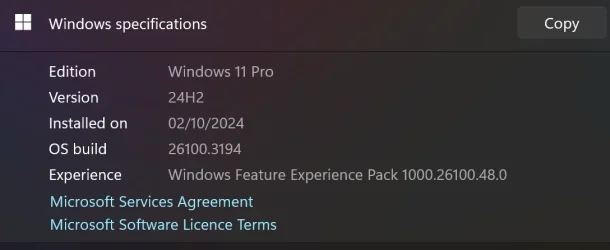
First off, my details.
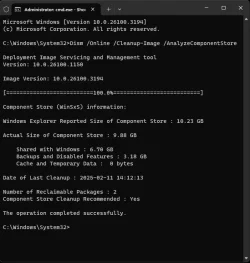
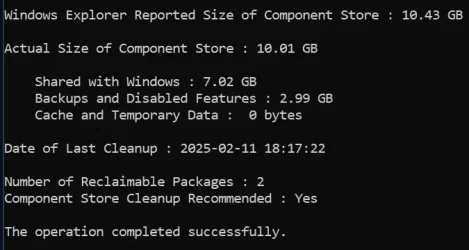
Issue 1. When checking dism /online /cleanup-image /analyzecomponentstore it reports that I have 2 reclaimable packages which I should remove using Component Store Cleanup. I have run (as admin)
sfc /scannow
dism.exe /Online /Cleanup-Image /CheckHealth
dism /online /cleanup-image /scanhealth
dism /online /cleanup-image /restorehealth
dism /online /cleanup-image /startcomponentcleanup
dism /online /cleanup-image /startcomponentcleanup /resetbase
I did an in-place install of Windows 11 and that did fix my problem, but I ended up with far more issues than I had in the first place, so I reverted back with Macrium Reflect. Any ideas how I can remove them?
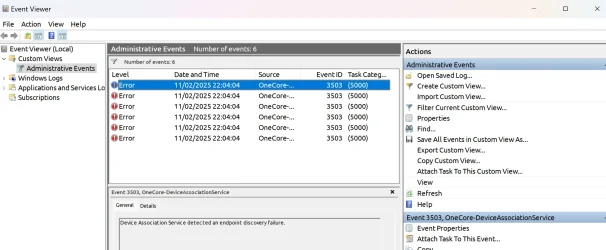
Issue 2. Since the January Windows update, I get many Event 3503 errors 'Device Association Service detected an endpoint discovery failure'. What is the secret to removing these errors?
Issue 3. I've got the dreaded Windows Configuration Update (KB5035942) in the Update History/Other Updates which changes the date every day I boot up. If I click on the Learn More link, it tells me it was an update on March 26, 2024. I have tried many attempts to remove it using Google/Microsoft and nobody seems to have found an answer. Any ideas?

If I could solve these 3 issues, I'd have a near perfectly running system. If you have managed to solve an y of these issues, please lead m e in the right direction. Thanks.
Issue 1. When checking dism /online /cleanup-image /analyzecomponentstore it reports that I have 2 reclaimable packages which I should remove using Component Store Cleanup. I have run (as admin)
sfc /scannow
dism.exe /Online /Cleanup-Image /CheckHealth
dism /online /cleanup-image /scanhealth
dism /online /cleanup-image /restorehealth
dism /online /cleanup-image /startcomponentcleanup
dism /online /cleanup-image /startcomponentcleanup /resetbase
I did an in-place install of Windows 11 and that did fix my problem, but I ended up with far more issues than I had in the first place, so I reverted back with Macrium Reflect. Any ideas how I can remove them?
Issue 2. Since the January Windows update, I get many Event 3503 errors 'Device Association Service detected an endpoint discovery failure'. What is the secret to removing these errors?
Issue 3. I've got the dreaded Windows Configuration Update (KB5035942) in the Update History/Other Updates which changes the date every day I boot up. If I click on the Learn More link, it tells me it was an update on March 26, 2024. I have tried many attempts to remove it using Google/Microsoft and nobody seems to have found an answer. Any ideas?
If I could solve these 3 issues, I'd have a near perfectly running system. If you have managed to solve an y of these issues, please lead m e in the right direction. Thanks.
My Computer
At a glance
Windows 11 Pro 25H2 26200.7922Intel Core i9 13900F2 x Kingston Fury 32gb DDR5 5600 BeastGigabyte Eagle (Nvidia) RTX 3060
- OS
- Windows 11 Pro 25H2 26200.7922
- Computer type
- PC/Desktop
- Manufacturer/Model
- Local shop built (KC Computers Ltd)
- CPU
- Intel Core i9 13900F
- Motherboard
- Gigabyte Z690 Gaming X (rev. 1.0/1.1) - (BIOS: F32 09 18 2025)
- Memory
- 2 x Kingston Fury 32gb DDR5 5600 Beast
- Graphics Card(s)
- Gigabyte Eagle (Nvidia) RTX 3060
- Sound Card
- Chord Async USB 44.1kHz - 384kHz 2Qute DAC
- Monitor(s) Displays
- Gigabyte AORUS FO32U2 32” OLED Flat Gaming Monitor, 0.03ms, KVM, 250 cd/m2, FreeSync Premium Pro, HDR True Black 400
- Screen Resolution
- 3840 x 2160 (UHD), 240Hz
- Hard Drives
- 1 x KINGSTON NVMe M.2 SSDSKC3000D2048G 2TB
1 x Samsung SSD 870 EVO 250GB
2 x Crucial CT4000MX500SSD1 4TB
2 x Crucial CT2000MX500SSD1 2TB
1 x Crucial CT250MX500SSD1 250.0 GB
- PSU
- Gigabyte 750w
- Case
- Fractal Torrent
- Cooling
- Stock Intel CPU, 2 x Fractal 180mm PWM (front), 3 x Fractal 140mm PWM (bottom)
- Keyboard
- Logitech MX Mechanical Wireless Illuminated Performance Keyboard
- Mouse
- Logitech MX Master 3S Wireless Performance Mouse
- Internet Speed
- 900 Mbps/900 Mbps Trooli FTTP
- Browser
- Firefox
- Antivirus
- Eset Nod32