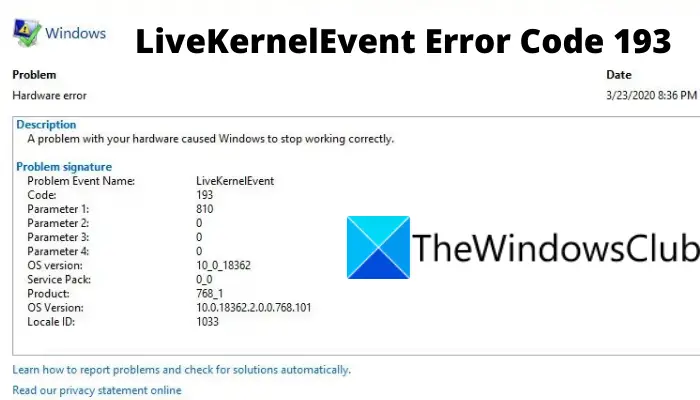
A very silent LiveKernelEvent 193


JohnnyGui

Well-known member
Member
VIP
Local time
12:42 AM
Posts
228
OS
Windows Pro 11 23H2 Build 22631.3737
Brand new system, not OC'ed
Zotac 4070Ti Trinity
CPU i5-12600K
500GB Kingston SSD
Transcend 16GB RAM
Windows 11 Pro 22H2 Build 22621.1265

I was closing and opening a few videos with WMP and looked afterwards in the Reliability Monitor which showed a LiveKernelEvent 193. I didn't notice any hang/freeze whatsoever.
The weird part is that nothing is shown in the Event Viewer about this particular crash, nor is there a minidump file even though I have enabled it in System Properties. The LiveKernelReports folder in C/Windows/ is empty. Temps of CPU and GPU are fine.

Schermafbeelding 2023-03-12 174836.png

What does it mean that such a critical error is not logged at all except in the Reliability Monitor? How can I obtain more info in this case?

UPDATE: There's only an "Information" log in Event Viewer (no error log) containing the paths to non-existent .dmp files. I was only able to find a .wer file. See attachment.
 
Windows Build/Version
22621.1265

Attachments

Last edited:

My Computer My Computer

At a glance

Windows Pro 11 23H2 Build 22631.3737i5-12600KTranscend 16GBZotac 4070Ti Trinity
OS
Windows Pro 11 23H2 Build 22631.3737
Computer type
PC/Desktop
Manufacturer/Model
Custom built
CPU
i5-12600K
Motherboard
Gigabyte Z690 UD DDR4
Memory
Transcend 16GB
Graphics Card(s)
Zotac 4070Ti Trinity
Sound Card
Internal: Realtek® ALC892 codec
Monitor(s) Displays
Asus VZ239-H
Screen Resolution
1080p
Hard Drives
Kingston 500GB nVME
Case
Fractal Focus 2 RGB White
Cooling
Xilence LQ240PRO Watercooling
Browser
Edge Chromium

My Computers My Computers

  • At a glance

    Windows 11 Pro 25H2 26200.8875i9-10900 10 core 20 threads32 gbnone-Intel UHD Graphics 630
    OS
    Windows 11 Pro 25H2 26200.8875
    Computer type
    PC/Desktop
    Manufacturer/Model
    Dell Optiplex 7080
    CPU
    i9-10900 10 core 20 threads
    Motherboard
    DELL 0J37VM
    Memory
    32 gb
    Graphics Card(s)
    none-Intel UHD Graphics 630
    Sound Card
    Integrated Realtek
    Monitor(s) Displays
    Benq 27
    Screen Resolution
    2560x1440
    Hard Drives
    2x1tb Solidigm m.2 nvme /External drives 512gb Samsung m.2 sata+2tb Kingston m2.nvme
    PSU
    500w
    Case
    MT
    Cooling
    Dell Premium
    Keyboard
    Logitech wired
    Mouse
    Logitech wireless
    Internet Speed
    so slow I'm too embarrassed to tell
    Browser
    #1 Edge #2 Firefox
    Antivirus
    Defender+MWB Premium
  • At a glance

    Windows 11 Pro 24H2 26200.8875AMD Ryzen 7 6800U32 gbintegrated
    Operating System
    Windows 11 Pro 24H2 26200.8875
    Computer type
    PC/Desktop
    Manufacturer/Model
    Beelink Mini PC SER5
    CPU
    AMD Ryzen 7 6800U
    Memory
    32 gb
    Graphics card(s)
    integrated
    Sound Card
    integrated
    Monitor(s) Displays
    Benq 27
    Screen Resolution
    2560x1440
    Hard Drives
    1TB Crucial nvme
    Keyboard
    Logitech wired
    Mouse
    Logitech wireless
    Internet Speed
    still too embarrassed to tell
    Browser
    Firefox
    Antivirus
    Defender
    Other Info
    System 3 is non compliant Dell 9020 i7-4770/24gb ram Win11 PRO 26200.8875

Thanks, all my (BIOS) drivers are already up to date and the system is working without problems. Not using NordVPN as stated. I was more curious about the event and how to obtain more info since there are no further details logged about it.
 
Last edited:

My Computer My Computer

At a glance

Windows Pro 11 23H2 Build 22631.3737i5-12600KTranscend 16GBZotac 4070Ti Trinity
OS
Windows Pro 11 23H2 Build 22631.3737
Computer type
PC/Desktop
Manufacturer/Model
Custom built
CPU
i5-12600K
Motherboard
Gigabyte Z690 UD DDR4
Memory
Transcend 16GB
Graphics Card(s)
Zotac 4070Ti Trinity
Sound Card
Internal: Realtek® ALC892 codec
Monitor(s) Displays
Asus VZ239-H
Screen Resolution
1080p
Hard Drives
Kingston 500GB nVME
Case
Fractal Focus 2 RGB White
Cooling
Xilence LQ240PRO Watercooling
Browser
Edge Chromium
I've had these, but I get an error in the reliability monitor when it happens, which isn't often thank God
 

My Computer My Computer

At a glance

Windows 11 Pro 25H2 (RP channel)AMD Ryzen 7 9800X3D 8-core64GB Corsair Titanium 6000/CL30MSI Suprim 5080 SOC
OS
Windows 11 Pro 25H2 (RP channel)
Computer type
PC/Desktop
Manufacturer/Model
MSI
CPU
AMD Ryzen 7 9800X3D 8-core
Motherboard
MEG X870E Godlike
Memory
64GB Corsair Titanium 6000/CL30
Graphics Card(s)
MSI Suprim 5080 SOC
Sound Card
Soundblaster AE-9
Monitor(s) Displays
ASUS TUF Gaming VG289Q
Screen Resolution
3840x2160
Hard Drives
Samsung 9100 Pro 4TB (gen 5 x4, system drive/games)
Samsung 990 Pro 2TB
Samsung 980 Pro 2TB
Samsung 870 Evo 4TB
Samsung 870 Evo 2TB
Samsung T9 4TB
PSU
Seasonic PX-2200
Case
Bequiet! Dark Base Pro 901
Cooling
Noctua NH-D15S Chromax black
Keyboard
Logitech G915 X (wired)
Mouse
Logitech G903 with PowerPlay charger
Internet Speed
900Mb/sec
Browser
Microsoft Edge
Antivirus
Windows Defender
I've had these, but I get an error in the reliability monitor when it happens, which isn't often thank God

So there aren't any logs nor minidumps or livekernelreports in C:/Windows/ in your case either?

Also what does it say at your end behind Parameter 1 in the Reliability Monitor log details?
 

My Computer My Computer

At a glance

Windows Pro 11 23H2 Build 22631.3737i5-12600KTranscend 16GBZotac 4070Ti Trinity
OS
Windows Pro 11 23H2 Build 22631.3737
Computer type
PC/Desktop
Manufacturer/Model
Custom built
CPU
i5-12600K
Motherboard
Gigabyte Z690 UD DDR4
Memory
Transcend 16GB
Graphics Card(s)
Zotac 4070Ti Trinity
Sound Card
Internal: Realtek® ALC892 codec
Monitor(s) Displays
Asus VZ239-H
Screen Resolution
1080p
Hard Drives
Kingston 500GB nVME
Case
Fractal Focus 2 RGB White
Cooling
Xilence LQ240PRO Watercooling
Browser
Edge Chromium
So there aren't any logs nor minidumps or livekernelreports in C:/Windows/ in your case either?

Also what does it say at your end behind Parameter 1 in the Reliability Monitor log details?
Can't remember, it's been some time and I deleted the logs.
 

My Computer My Computer

At a glance

Windows 11 Pro 25H2 (RP channel)AMD Ryzen 7 9800X3D 8-core64GB Corsair Titanium 6000/CL30MSI Suprim 5080 SOC
OS
Windows 11 Pro 25H2 (RP channel)
Computer type
PC/Desktop
Manufacturer/Model
MSI
CPU
AMD Ryzen 7 9800X3D 8-core
Motherboard
MEG X870E Godlike
Memory
64GB Corsair Titanium 6000/CL30
Graphics Card(s)
MSI Suprim 5080 SOC
Sound Card
Soundblaster AE-9
Monitor(s) Displays
ASUS TUF Gaming VG289Q
Screen Resolution
3840x2160
Hard Drives
Samsung 9100 Pro 4TB (gen 5 x4, system drive/games)
Samsung 990 Pro 2TB
Samsung 980 Pro 2TB
Samsung 870 Evo 4TB
Samsung 870 Evo 2TB
Samsung T9 4TB
PSU
Seasonic PX-2200
Case
Bequiet! Dark Base Pro 901
Cooling
Noctua NH-D15S Chromax black
Keyboard
Logitech G915 X (wired)
Mouse
Logitech G903 with PowerPlay charger
Internet Speed
900Mb/sec
Browser
Microsoft Edge
Antivirus
Windows Defender
Update:

Found a .wer file which can be opened with Notepad.

Also, I found an "Information" log in Event viewer containing the paths to log files and .dmp files but these don't exist. Only this .wer file is present.
 

Attachments

My Computer My Computer

At a glance

Windows Pro 11 23H2 Build 22631.3737i5-12600KTranscend 16GBZotac 4070Ti Trinity
OS
Windows Pro 11 23H2 Build 22631.3737
Computer type
PC/Desktop
Manufacturer/Model
Custom built
CPU
i5-12600K
Motherboard
Gigabyte Z690 UD DDR4
Memory
Transcend 16GB
Graphics Card(s)
Zotac 4070Ti Trinity
Sound Card
Internal: Realtek® ALC892 codec
Monitor(s) Displays
Asus VZ239-H
Screen Resolution
1080p
Hard Drives
Kingston 500GB nVME
Case
Fractal Focus 2 RGB White
Cooling
Xilence LQ240PRO Watercooling
Browser
Edge Chromium
N
my (BIOS) drivers are already up to date
Not just bios drivers, wifi, chipset, since it happened when playing video, maybe even graphics drivers. Ram. There is other required information listed in the posting instruction at the top of this page other than just the minidumps.
 

My Computers My Computers

  • At a glance

    Windows 11 Pro 25H2 26200.8875i9-10900 10 core 20 threads32 gbnone-Intel UHD Graphics 630
    OS
    Windows 11 Pro 25H2 26200.8875
    Computer type
    PC/Desktop
    Manufacturer/Model
    Dell Optiplex 7080
    CPU
    i9-10900 10 core 20 threads
    Motherboard
    DELL 0J37VM
    Memory
    32 gb
    Graphics Card(s)
    none-Intel UHD Graphics 630
    Sound Card
    Integrated Realtek
    Monitor(s) Displays
    Benq 27
    Screen Resolution
    2560x1440
    Hard Drives
    2x1tb Solidigm m.2 nvme /External drives 512gb Samsung m.2 sata+2tb Kingston m2.nvme
    PSU
    500w
    Case
    MT
    Cooling
    Dell Premium
    Keyboard
    Logitech wired
    Mouse
    Logitech wireless
    Internet Speed
    so slow I'm too embarrassed to tell
    Browser
    #1 Edge #2 Firefox
    Antivirus
    Defender+MWB Premium
  • At a glance

    Windows 11 Pro 24H2 26200.8875AMD Ryzen 7 6800U32 gbintegrated
    Operating System
    Windows 11 Pro 24H2 26200.8875
    Computer type
    PC/Desktop
    Manufacturer/Model
    Beelink Mini PC SER5
    CPU
    AMD Ryzen 7 6800U
    Memory
    32 gb
    Graphics card(s)
    integrated
    Sound Card
    integrated
    Monitor(s) Displays
    Benq 27
    Screen Resolution
    2560x1440
    Hard Drives
    1TB Crucial nvme
    Keyboard
    Logitech wired
    Mouse
    Logitech wireless
    Internet Speed
    still too embarrassed to tell
    Browser
    Firefox
    Antivirus
    Defender
    Other Info
    System 3 is non compliant Dell 9020 i7-4770/24gb ram Win11 PRO 26200.8875
Back
Top Bottom