About device security settings


Current plan (subject to change):


1) Complete chkdsk /b /v on all drives > post a new chkdskfromevent.bat into the newest post


2) Open administrative PS and copy and paste > post a share link

dism /online /get-drivers /format:table


3) Run Windows Driver Verifier (WDV) with multiple customized tests (post #17 steps #2 - #6)


4) Troubleshoot incompatible memory integrity drivers:
ssdudfu.sys
VIA_USB_ETS.sys
mbtusbser.sys


5) Perform an in place upgrade repair


6) Reassess the steps garlin requested
 
Last edited:

My Computer

System One

  • OS
    Windows 10
    Computer type
    Laptop
    Manufacturer/Model
    HP
    CPU
    Intel(R) Core(TM) i7-4800MQ CPU @ 2.70GHz
    Motherboard
    Product : 190A Version : KBC Version 94.56
    Memory
    16 GB Total: Manufacturer : Samsung MemoryType : DDR3 FormFactor : SODIMM Capacity : 8GB Speed : 1600
    Graphics Card(s)
    NVIDIA Quadro K3100M; Intel(R) HD Graphics 4600
    Sound Card
    IDT High Definition Audio CODEC; PNP Device ID HDAUDIO\FUNC_01&VEN_111D&DEV_76E0
    Hard Drives
    Model Hitachi HTS727575A9E364
    Antivirus
    Microsoft Defender
    Other Info
    Mobile Workstation
Current plan (subject to change):


1) Complete chkdsk /b /v on all drives > post a new chkdskfromevent.bat into the newest post

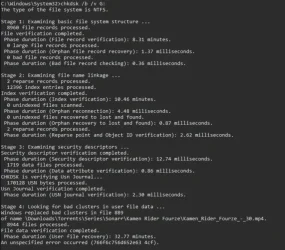
Ok, I redid the test but drives D and G still won't show up in the logs. Still, I took a screenshot of the results of the chkdsk on the G drive.1775075292531.webp
I know that this drive has issues though, I don't put important stuff on it.
 

Attachments

My Computer

System One

  • OS
    Windows 11
    Computer type
    PC/Desktop
    CPU
    i5-10400F
    Motherboard
    Gigabyte H510M H
    Memory
    16GB DDR4
    Graphics Card(s)
    GTX 1660 Super
    Hard Drives
    WD Green SN350 1TB
    KINGSTON SA400S37120G 120GB
    SAMSUNG HD502HJ 500GB
    ST2000DM008-2UB102 2TB
    Browser
    Firefox Developer Edition
    Antivirus
    Windows Defender
Current plan (subject to change):


1) Complete chkdsk /b /v on all drives > post a new chkdskfromevent.bat into the newest post


2) Open administrative PS and copy and paste > post a share link

dism /online /get-drivers /format:table


3) Run Windows Driver Verifier (WDV) with multiple customized tests (post #17 steps #2 - #6)


4) Troubleshoot incompatible memory integrity drivers:
ssdudfu.sys
VIA_USB_ETS.sys
mbtusbser.sys


5) Perform an in place upgrade repair


6) Reassess the steps garlin requested
2. Attached the results bellow.
4. I just removed the drivers using Driver Store Explorer since I don't really use them all that much.

All that's left to do is run the WDV.
 

Attachments

My Computer

System One

  • OS
    Windows 11
    Computer type
    PC/Desktop
    CPU
    i5-10400F
    Motherboard
    Gigabyte H510M H
    Memory
    16GB DDR4
    Graphics Card(s)
    GTX 1660 Super
    Hard Drives
    WD Green SN350 1TB
    KINGSTON SA400S37120G 120GB
    SAMSUNG HD502HJ 500GB
    ST2000DM008-2UB102 2TB
    Browser
    Firefox Developer Edition
    Antivirus
    Windows Defender
Current plan (subject to change):

3) Run Windows Driver Verifier (WDV) with multiple customized tests (post #17 steps #2 - #6)
Ran the WDV with the preset provided by Ten Forums, my PC booted as usual, so I ran the verifier /querysettings, the results are attached bellow.
By multiple customized tests you meant testing different drivers with I/O Verification, Force pending I/O requests and IRP logging enabled, or doing different tests with the same drivers?
 

Attachments

My Computer

System One

  • OS
    Windows 11
    Computer type
    PC/Desktop
    CPU
    i5-10400F
    Motherboard
    Gigabyte H510M H
    Memory
    16GB DDR4
    Graphics Card(s)
    GTX 1660 Super
    Hard Drives
    WD Green SN350 1TB
    KINGSTON SA400S37120G 120GB
    SAMSUNG HD502HJ 500GB
    ST2000DM008-2UB102 2TB
    Browser
    Firefox Developer Edition
    Antivirus
    Windows Defender
Ok, so I did an in place upgrade of Windows 11, and while it did fix my issue with not being able to turn on the Credential Guard, I'm still unable to turn on the Firmware Protection, and the Kernel DMA Protection is also off.
 

My Computer

System One

  • OS
    Windows 11
    Computer type
    PC/Desktop
    CPU
    i5-10400F
    Motherboard
    Gigabyte H510M H
    Memory
    16GB DDR4
    Graphics Card(s)
    GTX 1660 Super
    Hard Drives
    WD Green SN350 1TB
    KINGSTON SA400S37120G 120GB
    SAMSUNG HD502HJ 500GB
    ST2000DM008-2UB102 2TB
    Browser
    Firefox Developer Edition
    Antivirus
    Windows Defender
Do you have the June 2025 BIOS update? That should have caught you up with Secure Boot certs.
 

My Computer

System One

  • OS
    Windows 7
Do you have the June 2025 BIOS update? That should have caught you up with Secure Boot certs.
Yeah, I updated it a few months ago.
 

My Computer

System One

  • OS
    Windows 11
    Computer type
    PC/Desktop
    CPU
    i5-10400F
    Motherboard
    Gigabyte H510M H
    Memory
    16GB DDR4
    Graphics Card(s)
    GTX 1660 Super
    Hard Drives
    WD Green SN350 1TB
    KINGSTON SA400S37120G 120GB
    SAMSUNG HD502HJ 500GB
    ST2000DM008-2UB102 2TB
    Browser
    Firefox Developer Edition
    Antivirus
    Windows Defender
1) There are two drives that over time need monitoring with HDS:

WDC WD10EZEX

Kingston SA400S37120G


2) Please run chkdsk /b/v G: (WDC WD10EZEX)

3) Rerun:


4) Microsoft has decided to deprecate the GUI menu for WDV.

The day that the deprecation will occur has not been announced.


5) Please run these groups of tests using administrative command prompt commands:


Group A:

Open administrative command prompt and copy and paste:

verifier /flags 0x020A6610 /allnonmicrosoft

shutdown /r /t 0


Code:
    [ ] 0x00000010 I/O verification.
    [ ] 0x00000200 Force pending I/O requests.
    [ ] 0x00000400 IRP logging.
    [ ] 0x00002000 Invariant MDL checking for stack.
    [ ] 0x00004000 Invariant MDL checking for driver.
    [ ] 0x02000000 Code integrity checks.
    [ ] 0x00020000 DDI compliance checking.
    [ ] 0x00080000 DDI compliance checking (additional).


Group B:

Open administrative command prompt and copy and paste:

verifier /flags 0x01058003 /allnonmicrosoft

shutdown /r /t 0


Code:
    [ ] 0x00008000 Power framework delay fuzzing.
    [ ] 0x00010000 Port/miniport interface checking.
    [ ] 0x00000001 Special pool.
    [ ] 0x00000002 Force IRQL checking.
    [ ] 0x01000000 VM switch verification.
    [ ] 0x00040000 Systematic low resources simulation.


Group C:

Open administrative command prompt and copy and paste:

verifier /flags 0x00A009A8 /allnonmicrosoft

shutdown /r /t 0


Code:
    [ ] 0x00200000 NDIS/WIFI verification.
    [ ] 0x00800000 Kernel synchronization delay fuzzing.
    [ ] 0x00000008 Pool tracking.
    [ ] 0x00000020 Deadlock detection.
    [ ] 0x00000080 DMA checking.
    [ ] 0x00000100 Security checks.
    [ ] 0x00000800 Miscellaneous checks.


(option nine and seven)


For each group if there is no immediate BSOD then open administrative command prompt and copy and paste:

verifier /querysettings

Post a share link.


For any BSOD post a new V2 share link into the newest post.


ST2000DM006-2DM164
Code:
Checking file system on Y:
 Cleaning up 5 unused index entries from index $SII of file 0x9.
 Cleaning up 5 unused index entries from index $SDH of file 0x9.
 Cleaning up 5 unused security descriptors.
 Windows has scanned the file system and found no problems.


WD Green SN350 1TB
Code:
Checking file system on C:
Windows has scanned the file system and found no problems.


ST2000DM008-2UB102
Code:
Checking file system on F:
Cleaning up 308 unused index entries from index $SII of file 0x9.
Cleaning up 308 unused index entries from index $SDH of file 0x9.
Cleaning up 308 unused security descriptors.
 Windows has scanned the file system and found no problems.


KINGSTON SA400S37120G
Code:
              Checking file system on D:
Cleaning up 190 unused index entries from index $SII of file 0x9.
Cleaning up 190 unused index entries from index $SDH of file 0x9.
Cleaning up 190 unused security descriptors.
Windows has scanned the file system and found no problems.


WDC WD10EZEX:
Code:
HDS:  2 Bad sectors 5 weak sectors

Kingston SA400S37120G:
Code:
HDS:  Health 32%
 
Last edited:

My Computer

System One

  • OS
    Windows 10
    Computer type
    Laptop
    Manufacturer/Model
    HP
    CPU
    Intel(R) Core(TM) i7-4800MQ CPU @ 2.70GHz
    Motherboard
    Product : 190A Version : KBC Version 94.56
    Memory
    16 GB Total: Manufacturer : Samsung MemoryType : DDR3 FormFactor : SODIMM Capacity : 8GB Speed : 1600
    Graphics Card(s)
    NVIDIA Quadro K3100M; Intel(R) HD Graphics 4600
    Sound Card
    IDT High Definition Audio CODEC; PNP Device ID HDAUDIO\FUNC_01&VEN_111D&DEV_76E0
    Hard Drives
    Model Hitachi HTS727575A9E364
    Antivirus
    Microsoft Defender
    Other Info
    Mobile Workstation
@Bonzo

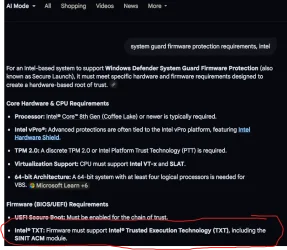
I believe this is your problem: Your CPU doesn't meet the requirements for Firmware Protection (aka Secure Launch):

This is taken from the Intel spec sheet for your i5-10400F processor:

Screenshot 2026-04-02 032023.webp

So it doesn't support Trusted Execution policy (TXT).

Here are the requirements for Firmware Protection:

Screenshot 2026-04-02 031839.webp
 

My Computers

System One System Two

  • OS
    Windows 11 Pro x64
    Computer type
    PC/Desktop
    Manufacturer/Model
    📷🔈🎧 🪛 DIY Photoshop/Audio/Game/tinker
    CPU
    i9 14900K P/E 5.8/4.5 GHz, cache 5.0 GHz
    Motherboard
    Asus ROG Maximus Z790 Dark Hero
    Memory
    🐏 96GB (2x48) G.skill Ripjaws 6800 MT/s
    Graphics Card(s)
    Asus ROG Strix 4070 Ti OC
    Sound Card
    🔊Bowers & Wilkins 606 S3 speakers; Audiolabs 7000a integrated amp; RSL 10S Mk2 sub; Creative Pebble Pro Minimilist
    Monitor(s) Displays
    🖥️🖥️ Eizo CG2730 ColorEdge, ViewSonic VP2768
    Screen Resolution
    🖥️🖥️ 2560 x 1440p x 2
    Hard Drives
    💾 WDC SN850X 4TB nvme, SN850 1TB nvme, SK-Hynix 2 TB P41 nvme,. Sabrent USB-C DS-SC5B 5-bay docking station: 6TB WDC Black, 6TB Ironwolf Pro; 2x 2TB WDC Black HDD
    PSU
    ⚡️ 850W Seasonic Vertex PX-850 ATX 3.0/PCI-E 5.0
    Case
    Fractal Design North XL Mesh, Black Walnut
    Cooling
    ❄️ EK Nucleus black 360 AIO w/Phanteks T30-120 fans, 2 Noctua NF-A14 Chromax case fan, 1 T30-120 fan cooling memory
    Keyboard
    ⌨️ Keychron Q3 Max TKL with custom GMK Redsuns Red Samuri keycaps, TX Stabs
    Mouse
    🖱️ Logitech G305 wireless gaming
    Internet Speed
    ⬇️ 500 Mb/s ⬆️ 12 Mb/s
    Browser
    🔥🦊 Firefox
    Antivirus
    🦺 Defender, Macrium Reflect X 🏆
    Other Info
    Phangkey Amaterasu V2 Desk Mat
  • Computer type
    Laptop
    Manufacturer/Model
    💻 Apple 13" Macbook Pro 2020 (m1)
    CPU
    Apple M1
    Screen Resolution
    2560x1600
    Browser
    Firefox
1) There are two drives that over time need monitoring with HDS:

WDC WD10EZEX

Kingston SA400S37120G


2) Please run chkdsk /b/v G: (WDC WD10EZEX)

3) Rerun:


4) Microsoft has decided to deprecate the GUI menu for WDV.

The day that the deprecation will occur has not been announced.


5) Please run these groups of tests using administrative command prompt commands:


Group A:

Open administrative command prompt and copy and paste:

verifier /flags 0x020A6610 /allnonmicrosoft

shutdown /r /t 0


Code:
    [ ] 0x00000010 I/O verification.
    [ ] 0x00000200 Force pending I/O requests.
    [ ] 0x00000400 IRP logging.
    [ ] 0x00002000 Invariant MDL checking for stack.
    [ ] 0x00004000 Invariant MDL checking for driver.
    [ ] 0x02000000 Code integrity checks.
    [ ] 0x00020000 DDI compliance checking.
    [ ] 0x00080000 DDI compliance checking (additional).


Group B:

Open administrative command prompt and copy and paste:

verifier /flags 0x01058003 /allnonmicrosoft

shutdown /r /t 0


Code:
    [ ] 0x00008000 Power framework delay fuzzing.
    [ ] 0x00010000 Port/miniport interface checking.
    [ ] 0x00000001 Special pool.
    [ ] 0x00000002 Force IRQL checking.
    [ ] 0x01000000 VM switch verification.
    [ ] 0x00040000 Systematic low resources simulation.


Group C:

Open administrative command prompt and copy and paste:

verifier /flags 0x00A009A8 /allnonmicrosoft

shutdown /r /t 0


Code:
    [ ] 0x00200000 NDIS/WIFI verification.
    [ ] 0x00800000 Kernel synchronization delay fuzzing.
    [ ] 0x00000008 Pool tracking.
    [ ] 0x00000020 Deadlock detection.
    [ ] 0x00000080 DMA checking.
    [ ] 0x00000100 Security checks.
    [ ] 0x00000800 Miscellaneous checks.


(option nine and seven)


For each group if there is no immediate BSOD then open administrative command prompt and copy and paste:

verifier /querysettings

Post a share link.


For any BSOD post a new V2 share link into the newest post.


ST2000DM006-2DM164
Code:
Checking file system on Y:
 Cleaning up 5 unused index entries from index $SII of file 0x9.
 Cleaning up 5 unused index entries from index $SDH of file 0x9.
 Cleaning up 5 unused security descriptors.
 Windows has scanned the file system and found no problems.


WD Green SN350 1TB
Code:
Checking file system on C:
Windows has scanned the file system and found no problems.


ST2000DM008-2UB102
Code:
Checking file system on F:
Cleaning up 308 unused index entries from index $SII of file 0x9.
Cleaning up 308 unused index entries from index $SDH of file 0x9.
Cleaning up 308 unused security descriptors.
 Windows has scanned the file system and found no problems.


KINGSTON SA400S37120G
Code:
              Checking file system on D:
Cleaning up 190 unused index entries from index $SII of file 0x9.
Cleaning up 190 unused index entries from index $SDH of file 0x9.
Cleaning up 190 unused security descriptors.
Windows has scanned the file system and found no problems.


WDC WD10EZEX:
Code:
HDS:  2 Bad sectors 5 weak sectors

Kingston SA400S37120G:
Code:
HDS:  Health 32%
Yeah, the G drive is faulty, it's been like this for a while, so I don't store any sensitive data on it. Do you think it's impacting anything? As for the D drive, it's an old SATA SSD that I'm using it as the TEMP folder location. I'm always keeping an eye on it, and while it's health is low, it stayed on 34 for a good few years, only now dropping to 32. I'll probably transfer the TEMP folder back to the NVMe SSD, as I heard that it won't degrade it's health that much as it as more modern SSD (or something like that).

As for the rest, it seems like it's not possible to actually enable Firmware Protection on my PC. I apologize for not noticing it sooner, and having you all go into a goose chase with me. I did some research on my CPU and MOBO beforehand, but I clearly wasn't thorough enough. Well, even the official Microsoft script said it was possible to enable it on my PC, so I ended up not researching about the requirements again. Thank you all for helping me, specially @zbook and @garlin, you guys were the best.
@Bonzo

I believe this is your problem: Your CPU doesn't meet the requirements for Firmware Protection (aka Secure Launch):

This is taken from the Intel spec sheet for your i5-10400F processor:

View attachment 167544

So it doesn't support Trusted Execution policy (TXT).

Here are the requirements for Firmware Protection:

View attachment 167545
Oh, thank you very, very much for this. As I mentioned before, I did some research on my CPU and MOBO, but I somehow missed this. The official Microsoft article about Firmware protection mentions 8th and 9th gen Intel CPUs and above as a requirement, but I shouldn't have assumed that every processor Intel put out since then has this feature. But well, even the official Microsoft script said that my PC was compatible with this feature, so I don't know what's up with that.

Anyway, at least I was able to enable the Credential Guard (thanks again @zbook for suggesting an in place upgrade). I don't know why the Kernel DMA Protection won't work, though. But I guess I'll have to live with it until I do a clean install eventually.
 

My Computer

System One

  • OS
    Windows 11
    Computer type
    PC/Desktop
    CPU
    i5-10400F
    Motherboard
    Gigabyte H510M H
    Memory
    16GB DDR4
    Graphics Card(s)
    GTX 1660 Super
    Hard Drives
    WD Green SN350 1TB
    KINGSTON SA400S37120G 120GB
    SAMSUNG HD502HJ 500GB
    ST2000DM008-2UB102 2TB
    Browser
    Firefox Developer Edition
    Antivirus
    Windows Defender
The drives have not failed long generic testing.

The drive file system is another method of failure (recurrent corruption).

The HDS rating is proprietary.

It attempts to predict drive failure.

The absolute number and trend can be used.

Its accuracy/inaccuracy is not known.


Please complete WDV testing.

We may see if there is or is not a misbehaving driver.
 

My Computer

System One

  • OS
    Windows 10
    Computer type
    Laptop
    Manufacturer/Model
    HP
    CPU
    Intel(R) Core(TM) i7-4800MQ CPU @ 2.70GHz
    Motherboard
    Product : 190A Version : KBC Version 94.56
    Memory
    16 GB Total: Manufacturer : Samsung MemoryType : DDR3 FormFactor : SODIMM Capacity : 8GB Speed : 1600
    Graphics Card(s)
    NVIDIA Quadro K3100M; Intel(R) HD Graphics 4600
    Sound Card
    IDT High Definition Audio CODEC; PNP Device ID HDAUDIO\FUNC_01&VEN_111D&DEV_76E0
    Hard Drives
    Model Hitachi HTS727575A9E364
    Antivirus
    Microsoft Defender
    Other Info
    Mobile Workstation
The drives have not failed long generic testing.

The drive file system is another method of failure (recurrent corruption).

The HDS rating is proprietary.

It attempts to predict drive failure.

The absolute number and trend can be used.

Its accuracy/inaccuracy is not known.


Please complete WDV testing.

We may see if there is or is not a misbehaving driver.
Well, the commands are not running:
Code:
C:\Windows\System32>verifier /flags 0x020A6610 /allnonmicrosoft
The specified command line parameter '/flags' doesn't follow required format.
Run "verifier /?" for command line assistance.

C:\Windows\System32>verifier /flags 0x01058003 /allnonmicrosoft
The specified command line parameter '/flags' doesn't follow required format.
Run "verifier /?" for command line assistance.

C:\Windows\System32>verifier /flags 0x00A009A8 /allnonmicrosoft
The specified command line parameter '/flags' doesn't follow required format.
Run "verifier /?" for command line assistance.
[/SPOILER]
 

My Computer

System One

  • OS
    Windows 11
    Computer type
    PC/Desktop
    CPU
    i5-10400F
    Motherboard
    Gigabyte H510M H
    Memory
    16GB DDR4
    Graphics Card(s)
    GTX 1660 Super
    Hard Drives
    WD Green SN350 1TB
    KINGSTON SA400S37120G 120GB
    SAMSUNG HD502HJ 500GB
    ST2000DM008-2UB102 2TB
    Browser
    Firefox Developer Edition
    Antivirus
    Windows Defender
Ok, seems like I'm locked out of my PC, I can't enter safe mode because Bitlocker is enabled (I didn't enable Bitlocker, it explicitly said that I was enabling the standard device encryption) and Microsoft refuses to send me the code via phone.

EDIT: Was able to enter minimal safe mode by going to the console, skipping my drives and running "bcdedit {default} safeboot minimal", rebooting, disabling the Verifier and disabling the bootmode option.
 
Last edited:

My Computer

System One

  • OS
    Windows 11
    Computer type
    PC/Desktop
    CPU
    i5-10400F
    Motherboard
    Gigabyte H510M H
    Memory
    16GB DDR4
    Graphics Card(s)
    GTX 1660 Super
    Hard Drives
    WD Green SN350 1TB
    KINGSTON SA400S37120G 120GB
    SAMSUNG HD502HJ 500GB
    ST2000DM008-2UB102 2TB
    Browser
    Firefox Developer Edition
    Antivirus
    Windows Defender
The log for the BSOD I got while using the first method, and the output of verifier /querysettings I got from the second one.
I'm disabling Bitlocker, and will try the third method after the decryption finishes.
 

Attachments

My Computer

System One

  • OS
    Windows 11
    Computer type
    PC/Desktop
    CPU
    i5-10400F
    Motherboard
    Gigabyte H510M H
    Memory
    16GB DDR4
    Graphics Card(s)
    GTX 1660 Super
    Hard Drives
    WD Green SN350 1TB
    KINGSTON SA400S37120G 120GB
    SAMSUNG HD502HJ 500GB
    ST2000DM008-2UB102 2TB
    Browser
    Firefox Developer Edition
    Antivirus
    Windows Defender
Here are the results of the verifier /querysettings from option B and C (the one I uploaded before thinking was the B version was an older one).
 

Attachments

My Computer

System One

  • OS
    Windows 11
    Computer type
    PC/Desktop
    CPU
    i5-10400F
    Motherboard
    Gigabyte H510M H
    Memory
    16GB DDR4
    Graphics Card(s)
    GTX 1660 Super
    Hard Drives
    WD Green SN350 1TB
    KINGSTON SA400S37120G 120GB
    SAMSUNG HD502HJ 500GB
    ST2000DM008-2UB102 2TB
    Browser
    Firefox Developer Edition
    Antivirus
    Windows Defender
1) Please open administrative command prompt and copy and paste:

verifier /flags 0x020A0000 /allnonmicrosoft

shutdown /r /t 0


Group D:

Code:
    [ ] 0x02000000 Code integrity checks.
    [ ] 0x00020000 DDI compliance checking.
    [ ] 0x00080000 DDI compliance checking (additional).


2) Open administrative command prompt and copy and paste:

verifier /flags 0x00004010 /allnonmicrosoft

shutdown /r /t 0


Group E:
Code:
[ ] 0x00000010 I/O verification.
    [ ] 0x00002000 Invariant MDL checking for stack.
    [ ] 0x00004000 Invariant MDL checking for driver.


3) Run administrative command prompt: > post share links

wevtutil epl Application %userprofile%\Desktop\application.evtx

wevtutil epl System %userprofile%\Desktop\system.evtx
 
Last edited:

My Computer

System One

  • OS
    Windows 10
    Computer type
    Laptop
    Manufacturer/Model
    HP
    CPU
    Intel(R) Core(TM) i7-4800MQ CPU @ 2.70GHz
    Motherboard
    Product : 190A Version : KBC Version 94.56
    Memory
    16 GB Total: Manufacturer : Samsung MemoryType : DDR3 FormFactor : SODIMM Capacity : 8GB Speed : 1600
    Graphics Card(s)
    NVIDIA Quadro K3100M; Intel(R) HD Graphics 4600
    Sound Card
    IDT High Definition Audio CODEC; PNP Device ID HDAUDIO\FUNC_01&VEN_111D&DEV_76E0
    Hard Drives
    Model Hitachi HTS727575A9E364
    Antivirus
    Microsoft Defender
    Other Info
    Mobile Workstation
Back
Top Bottom