Act now: Secure Boot certificates expire in June 2026


UPDATE:


 Windows IT Pro Blog:

Prepare for the first global large-scale certificate update to Secure Boot.

The Microsoft certificates used in Secure Boot are the basis of trust for operating system security, and all will be expiring beginning June 2026. The way to automatically get timely updates to new certificates for supported Windows systems is to let Microsoft manage your Windows updates, which include Secure Boot. A close collaboration with original equipment manufacturers (OEMs) who provide Secure Boot firmware updates is also essential.

If you haven't yet, begin evaluating options and start preparing for the rollout of updated certificates across your organization in the coming months. Learn about this effort, its impact, and what you as an IT admin should do to help ensure that your Windows devices can receive updates after June 2026 without compromising system security.

Important: While platforms beyond Windows are affected, this article focuses on the solution for Windows systems. Be sure to monitor the Secure Boot certificate rollout landing page for status and guidance updates.

Recap: Why Secure Boot requires updating​

Secure Boot helps to prevent malware from running early in the startup sequence of a Windows device. Coupled with the Unified Extensible Firmware Interface (UEFI) firmware signing process, Secure Boot uses cryptographic keys, known as certificate authorities (CAs), to validate that firmware modules come from a trusted source.

After 15 years, the Secure Boot certificates that are part of Windows systems will start expiring in June 2026. Windows devices will need new certificates to maintain continuity and protection.
  • Affected: Physical and virtual machines (VMs) on supported versions of Windows 10, Windows 11, Windows Server 2025, Windows Server 2022, Windows Server 2019, Windows Server 2016, Windows Server 2012, Windows Server 2012 R2—the systems released since 2012, including the long-term servicing channel (LTSC)
  • Not affected: Copilot+ PCs released in 2025
Note: Affected third-party OS includes MacOS. However, it's outside the scope of Microsoft support. For Linux systems dual booting with Windows, Windows will update the certificates that Linux relies on.

Secure Boot uses certificate-based trust hierarchy to ensure that only authorized software runs during system startup. At the top of this hierarchy is the Platform Key (PK), typically managed by the OEM or a delegate, which acts as the root of trust. The PK authorizes updates to the Key Enrollment Key (KEK) database, which in turn authorizes updates to two critical signature databases: the Allowed Signature Database (DB) and the Forbidden Signature Database (DBX). This layered structure ensures that only validated updates can modify the system's boot policy, maintaining a secure boot environment. See how it works in Updating Secure Boot keys.

The change: Expiring certificates​

Windows systems released since 2012 might have expiring versions of the certificates listed below. The UEFI Secure Boot DB and KEK need to be updated with the corresponding new certificate versions.

See what new certificates will be available in the coming months to maintain UEFI Secure Boot continuity.

Expiration dateExpiring certificateUpdated certificateWhat it doesStoring location
June 2026Microsoft Corporation KEK CA 2011Microsoft Corporation KEK 2K CA 2023Signs updates to DB and DBXKEK
June 2026Microsoft Corporation UEFI CA 2011 (or third-party UEFI CA)*a) Microsoft Corporation UEFI CA 2023
b) Microsoft Option ROM UEFI CA 2023
a) Signs third-party OS and hardware driver components
b) Signs third-party option ROMs
DB
Oct 2026Microsoft Windows Production PCA 2011Windows UEFI CA 2023Signs the Windows bootloader and boot componentsDB
*You need two new certificates for Microsoft Corporation UEFI CA 2011, which together allow for more granular control.

Microsoft and partner OEMs will be rolling out certificates to add trust for the new DB and KEK certificates in the coming months.

The impact and implications​

The CAs ensure the integrity of the device startup sequence. When these CAs expire, the systems will stop receiving security fixes for the Windows Boot Manager and the Secure Boot components. Compromised security at startup threatens the overall security of affected Windows devices, especially due to bootkit malware. Bootkit malware can be difficult or impossible to detect with standard antivirus software. For example, even today, the unsecured boot path can be used as a cyberattack vector by the BlackLotus UEFI bootkit (CVE-2023-24932).

Every Windows system with Secure Boot enabled includes the same three certificates in support of third-party hardware and Windows ecosystem. Unless prepared, physical devices and VMs will:
  • Lose the ability to install Secure Boot security updates after June 2026.
  • Not trust third-party software signed with new certificates after June 2026.
  • Not receive security fixes for Windows Boot Manager by October 2026.
To prevent this, you'll need to update your organization's entire Windows ecosystem with certificates dated 2023 or newer. This will also help you apply mitigations needed to help secure your systems against the BlackLotus and similar boot-level cyberattacks today.

Take action today​

To begin, bookmark the Secure Boot certificate rollout landing page and take our readiness survey!

Important: Check with your OEMs on the latest available OEM firmware. Apply any available firmware updates to your Windows systems before applying the new certificates. In the Secure Boot flow, firmware updates from OEMs are the foundation for Windows Secure Boot updates to apply correctly.

Microsoft support is only available for supported client versions of Windows 11 and Windows 10. Once Windows 10 reaches end of support in October 2025, consider getting Extended Security Updates (ESU) for Windows 10, version 22H2 if you're not ready to upgrade.

In the coming months, we expect to update the Secure Boot certificates as part of our latest cumulative update cycle.

The solution that requires the least effort is letting Microsoft manage your Windows device updates, including Secure Boot updates. However, you might need to adopt multiple solutions. Your specific next step depends on the Windows systems and how you manage them.

Enterprise IT-managed systems that send diagnostic data​

No action is required if Windows systems at your organization receive Windows updates from Microsoft and send diagnostic data back to Microsoft. This includes devices that receive updates through Windows Autopatch, Microsoft Configuration Manager, or third-party solutions.

Note: Check that your firewall doesn't block diagnostic data. If it does, please take action to help diagnostic data reach Microsoft.

Windows diagnostic data and OEM feedback will help us group devices with similar hardware and firmware profiles to gradually release Secure Boot updates to you. This allows us to intelligently monitor the rollout process, proactively pausing, addressing any issues, and continuing as needed. Just keep your devices updated with the latest Windows updates!

Enterprise IT-managed systems that don't send diagnostic data​

Enable Windows diagnostic data and let Microsoft manage your updates by taking the following steps:
  1. Configure your organizational policies to allow at least the “required” level of diagnostic data. You can use Group Policy or mobile device management (MDM) to do this. See how to do this in Group Policy Management Editor for Windows 11 and Windows 10.
  2. Allow Microsoft to manage Secure Boot-related updates for your devices by setting the following registry key:
  • o Registry path: HKEY_LOCAL_MACHINE\SYSTEM\CurrentControlSet\Control\Secureboot
  • o Key name: MicrosoftUpdateManagedOptIn
  • o Type: DWORD
  • o DWORD value: 0x5944 (opt in to Windows Secure Boot updates)
We recommend setting this key to 0x5944. It indicates that all certificates should be updated in a manner that preserves the security profile of the existing device. It also updates the boot manager to the one signed by the Windows UEFI CA 2023 certificate. Note: If the DWORD value is 0 or the key doesn't exist, Windows diagnostic data is disabled.

If you prefer not to enable diagnostic data, please take this anonymous readiness survey. Help us assess the needs of environments like yours to create future guidance on managing the update process independently. You'll remain fully in control and responsible to execute and monitor these updates.

Air-gapped devices, such as in government scenarios or manufacturing, are a special case. Because Microsoft cannot manage these updates, we can only offer the following limited support:
  • Recommend known steps or methods for deploying these updates
  • Share data gathered from our rollout stream
When available, look for these resources on the Secure Boot certificate rollout landing page.

Systems with Secure Boot disabled​

Windows cannot update the active variables of the Secure Boot certificates if Secure Boot is disabled.

Important: Toggling Secure Boot on or off might erase the updated certificates. If Secure Boot is on, leave it enabled. Turning it off can reset the settings with defaults, which is not desirable.

Share these recommendations with individual users:

  1. Press Windows key + R, type msinfo32, and then press Enter.
  2. In the System Information window, look for Secure Boot State.
  3. If it says On, you're good to go!
If Secure Boot is off or unsupported, the device may not receive the new CAs. For these devices, you may choose to enable Secure Boot with this guidance: Windows 11 and Secure Boot.


Change management considerations​

Don't wait until June 2026! Updating DB and KEK with new 2023 certificates will help prevent your systems from boot-level security vulnerabilities today.

Get the latest OEM firmware updates and let Microsoft manage your Windows updates to receive Secure Boot updates automatically. Otherwise, help us understand your special case by completing this anonymous readiness survey.

Watch the release notes for Windows 11, version 24H2, version 23H2, and Windows 10 in the coming months to know when these updates are available to you. Stay tuned for additional guidance for the LTSC as needed.

Bookmark these additional resources:


 Source:


See also:
 
Last edited:
When SVN mechanism is active. Even after replacing the bootmgr.efi with the new certificate, it still fails to pass the verification. In my test, in addition to checking ".\efi\boot\bootx64.efi", there is also the ".\bootmgr.efi" file in the root directory. And you need the correct bootmgr.efi to boot. This is why my WinPE always has security violations. I hate SVN!:mad:
 

My Computer My Computer

At a glance

Windows 11, version 25H2 (26200)AMD Ryzen 9 9950X 16-Core ProcessorDDR5-6000 (CL36) 64.0 GBNVIDIA GeForce RTX 4090
OS
Windows 11, version 25H2 (26200)
Computer type
PC/Desktop
CPU
AMD Ryzen 9 9950X 16-Core Processor
Motherboard
ASRock B650M PG Riptide
Memory
DDR5-6000 (CL36) 64.0 GB
Graphics Card(s)
NVIDIA GeForce RTX 4090
PSU
1200W
Case
Phanteks Enthoo Pro 2
Cooling
Noctua NH-D12L
This is very strange. If I create an autounattend.xml file and put it in the ISO, will this be a security violation? Is there some hidden mechanism to verify this?

If SVN is disabled, it can be installed normally. Very weird.:unsure:
 

My Computer My Computer

At a glance

Windows 11, version 25H2 (26200)AMD Ryzen 9 9950X 16-Core ProcessorDDR5-6000 (CL36) 64.0 GBNVIDIA GeForce RTX 4090
OS
Windows 11, version 25H2 (26200)
Computer type
PC/Desktop
CPU
AMD Ryzen 9 9950X 16-Core Processor
Motherboard
ASRock B650M PG Riptide
Memory
DDR5-6000 (CL36) 64.0 GB
Graphics Card(s)
NVIDIA GeForce RTX 4090
PSU
1200W
Case
Phanteks Enthoo Pro 2
Cooling
Noctua NH-D12L
This is very strange. If I create an autounattend.xml file and put it in the ISO, will this be a security violation? Is there some hidden mechanism to verify this?

If SVN is disabled, it can be installed normally. Very weird.:unsure:
I can't shake the feeling that this is still an unfinished story from Microsoft. :LOL:
 

My Computers My Computers

  • At a glance

    Win 11 Pro 25H2, Build 26200.8894Intel Core i5 1450064GB DDR4GeForce RTX 4060
    OS
    Win 11 Pro 25H2, Build 26200.8894
    Computer type
    PC/Desktop
    Manufacturer/Model
    Home Brew
    CPU
    Intel Core i5 14500
    Motherboard
    Gigabyte B760M G P WIFI
    Memory
    64GB DDR4
    Graphics Card(s)
    GeForce RTX 4060
    Sound Card
    Chipset Realtek
    Monitor(s) Displays
    LG 45" Ultragear, Acer 24" 1080p
    Screen Resolution
    5120x1440, 1920x1080
    Hard Drives
    Crucial P310 2TB 2280 PCIe Gen4 3D NAND NVMe M.2 SSD (O/S)
    Silicon Power 2TB US75 NVMe PCIe Gen4 M.2 2280 SSD (backup)
    Crucial BX500 2TB 3D NAND (2nd backup)
    Seagate 4TB Ironwolf, rotating HDD archive files
    External off-line backup Drives: 2 NVMe 4TB drives in external enclosures
    PSU
    Thermaltake Toughpower GF3 750W
    Case
    LIAN LI LANCOOL 216 E-ATX PC Case
    Cooling
    Lots of fans!
    Keyboard
    Microsoft Comfort Curve 2000
    Mouse
    Logitech G305
    Internet Speed
    Verizon FiOS 1GB
    Browser
    Firefox
    Antivirus
    Malware Bytes & Windows Defender Security
  • At a glance

    Win 11 Pro 25H2, Build 26200.8894Intel Core i5 1440032GB DDR5Intel 700 Embedded GPU
    Operating System
    Win 11 Pro 25H2, Build 26200.8894
    Computer type
    PC/Desktop
    Manufacturer/Model
    Home Brew
    CPU
    Intel Core i5 14400
    Motherboard
    Gigabyte B760M DS3H AX
    Memory
    32GB DDR5
    Graphics card(s)
    Intel 700 Embedded GPU
    Sound Card
    Realtek Embedded
    Monitor(s) Displays
    27" HP 1080p
    Screen Resolution
    1920x1080
    Hard Drives
    Crucial P310 2TB 2280 PCIe Gen4 eD NAND PCIe SSD
    Samsung EVO 990 2TB NVMe Gen4 SSD
    Samsung 2TB SATA SSD
    PSU
    Thermaltake Smart BM3 650W
    Case
    Okinos Micro ATX Case
    Cooling
    Fans
    Keyboard
    Microsoft Comfort Curve 2000
    Mouse
    Logitech G305
    Internet Speed
    Verizon FiOS 1GB
    Browser
    Firefox
    Antivirus
    Malware Bytes & Windows Defender Security
  • Nimo N171 17" Laptop, (Intel i3-1215U, 16GB RAM, 2TB NVMe, Win11 Pro)
    Acemagic Vista Mini PC V1 (Intel N150, 16GB RAM, 1TB NVMe, Win11 Pro)
    HP ENVY h8-1540t, (24GB RAM, 2TB SSD, 2TB HDD, Win11 Pro)
I have been testing what is causing Windows to still install the old Boot Manager during installation. I think I have found the likely cause of this problem. Microsoft needs to update and improve the Windows Setup program to install the correct Boot Manager file according to the system certificate.

There is an issue with Windows Setup in Windows 11 24H2. If you use Modern Windows 11 Setup, Setup will incorrectly installing the old Boot Manager to causing a security violation.


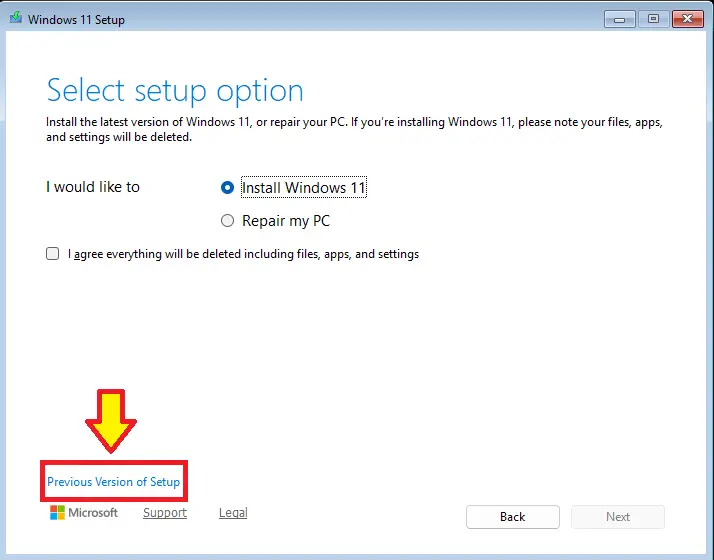
Switching to Previous Windows 11 Setup works fine, and Setup can correctly install the new Boot Manager.
UqR1SIT.png


I used Windows Setup (Windows Installation Media) from Windows 10 22H2 19045.6159 to install the previous Windows 11 23H2, and it was able to correctly install the new Boot Manager. Because installing a previous Windows using Windows Setup of Windows 11 24H2 will cause an error.
 

My Computer My Computer

At a glance

Windows 11, version 25H2 (26200)AMD Ryzen 9 9950X 16-Core ProcessorDDR5-6000 (CL36) 64.0 GBNVIDIA GeForce RTX 4090
OS
Windows 11, version 25H2 (26200)
Computer type
PC/Desktop
CPU
AMD Ryzen 9 9950X 16-Core Processor
Motherboard
ASRock B650M PG Riptide
Memory
DDR5-6000 (CL36) 64.0 GB
Graphics Card(s)
NVIDIA GeForce RTX 4090
PSU
1200W
Case
Phanteks Enthoo Pro 2
Cooling
Noctua NH-D12L
If I revoke the CA 2011 certificate. I don't need to disable Secure Boot during the installation process. Older versions of Windows 10 Setup can correctly install the new Boot Manager.

Useing Windows Setup (From the Installation Media with Windows 10 22H2 19045.6159) + Windows 11 23H2 22631.5699 install.wim
Vdl7dLF.png
 

My Computer My Computer

At a glance

Windows 11, version 25H2 (26200)AMD Ryzen 9 9950X 16-Core ProcessorDDR5-6000 (CL36) 64.0 GBNVIDIA GeForce RTX 4090
OS
Windows 11, version 25H2 (26200)
Computer type
PC/Desktop
CPU
AMD Ryzen 9 9950X 16-Core Processor
Motherboard
ASRock B650M PG Riptide
Memory
DDR5-6000 (CL36) 64.0 GB
Graphics Card(s)
NVIDIA GeForce RTX 4090
PSU
1200W
Case
Phanteks Enthoo Pro 2
Cooling
Noctua NH-D12L
If you revoke the CA 2011 certificate. And want to create an Installation Media that can correctly install the new Boot Manager. You can try the following steps:

1. Download Feature update to Windows 10, version 22H2 (19045.6159) amd64
2. Open ConvertConfig.ini and change UpdtBootFiles=0 to 1.
3. Start uup_download_windows.cmd.
4. Use ISO Edit tool to open ISO, And replace the install.wim(ISO:\sources\install.wim) file of Windows 11 you want to install.
 

My Computer My Computer

At a glance

Windows 11, version 25H2 (26200)AMD Ryzen 9 9950X 16-Core ProcessorDDR5-6000 (CL36) 64.0 GBNVIDIA GeForce RTX 4090
OS
Windows 11, version 25H2 (26200)
Computer type
PC/Desktop
CPU
AMD Ryzen 9 9950X 16-Core Processor
Motherboard
ASRock B650M PG Riptide
Memory
DDR5-6000 (CL36) 64.0 GB
Graphics Card(s)
NVIDIA GeForce RTX 4090
PSU
1200W
Case
Phanteks Enthoo Pro 2
Cooling
Noctua NH-D12L
I recommend that users who have revoked CA 2011 certificates should use Previous Windows 11 Setup. Because Modern Windows 11 Setup has many bugs.

hIo1xsD.png


This is the Modern Windows 11 Setup installation log:
Code:
2025-08-02 05:46:06, Error                 MOUPG  CUnattendManager::Initialize(90): Result = 0x80070490[gle=0x00000002]
2025-08-02 05:46:06, Error                 MOUPG  CMoSetupOneSettingsHelperT<class CEmptyType>::InitializeSettings(324): Result = 0x80072EE7
2025-08-02 05:46:06, Error                 MOUPG  CSetupHost::InitializeOneSettings(1551): Result = 0x80072EE7
2025-08-02 05:46:06, Error                 MOUPG  SetupHost: OneSettings initialization failed: [0x80072EE7]
2025-08-02 05:46:06, Error                 MOUPG  CSetupManager::GetWuIdFromRegistry(12498): Result = 0x80070002
2025-08-02 05:46:12, Error                 MOUPG  CDlpActionProductKeyValidate::ReportDownlevelInstallChannel(3648): Result = 0x80070490
2025-08-02 05:46:12, Error                 MOUPG  ProductKey: Failed to report Host OS channel to telemetry.
2025-08-02 05:46:20, Error                 CONX   hwreqchk: ERROR,Windows::Compat::HardwareRequirements::HardwareRequirementSettings::IsMeteredConnection,29,Failed to get NetworkCostType assuming metered network [0x80040154].

2025-08-02 05:46:20, Error                 CONX   hwreqchk: ERROR,Windows::Compat::HardwareRequirements::HardwareRequirementSettings::GetSettingsFromEndpoint,244,Failed to retrieve Sqm DeviceId: [0x80070002].

2025-08-02 05:46:20, Error                 CONX   hwreqchk: ERROR,Windows::Compat::HardwareRequirements::HardwareRequirementSettings::GetSettings,94,Failed to get settings from endpoint [0x80070002].

2025-08-02 05:46:20, Error                 CONX   hwreqchk: ERROR,ProcessJson,606,Unable to GetSettings [0x80070002]

2025-08-02 05:46:20, Error                 CONX   hwreqchk: ERROR,Windows::Compat::HardwareRequirements::HardwareRequirementSettings::IsMeteredConnection,29,Failed to get NetworkCostType assuming metered network [0x80040154].

2025-08-02 05:46:20, Error                 CONX   hwreqchk: ERROR,Windows::Compat::HardwareRequirements::HardwareRequirementSettings::GetSettingsFromEndpoint,244,Failed to retrieve Sqm DeviceId: [0x80070002].

2025-08-02 05:46:20, Error                 CONX   hwreqchk: ERROR,Windows::Compat::HardwareRequirements::HardwareRequirementSettings::GetSettings,94,Failed to get settings from endpoint [0x80070002].

2025-08-02 05:46:20, Error                 CONX   hwreqchk: ERROR,ProcessJson,606,Unable to GetSettings [0x80070002]

2025-08-02 05:46:33, Error                 SP     CNewSystem::PreInitialize: FveCheckSuspendBitLockerOnUpgrade failed: 0x8031004a, assuming auto-unlock is not supported
2025-08-02 05:51:01, Error                 IBSLIB     BCD: Failed to add system store from file. File: \Device\HarddiskVolume1\EFI\Microsoft\Boot\BCD Status: c000000f[gle=0x00000002]
2025-08-02 05:51:01, Error                 SP         BFSVC: AddBootmgrLast and PreserveBootOrder options are ignored when custom volume is specified

A critical error "BCD failed" occurs, which is also a security violation when using Modern Windows 11 Setup. This is because it cannot correctly apply the new Boot Manager.
Code:
2025-08-02 05:51:01, Info                  SP         The entry to add already exists with GUID {B8EB9745-6FA7-11F0-A2EA-F598F8CD221D}. We will recreate it keeping the same GUID.
2025-08-02 05:51:01, Info                  SP         CAddBootEntry::DoExecute: Default entry GUID: {B8EB9745-6FA7-11F0-A2EA-F598F8CD221D}
2025-08-02 05:51:01, Warning               SP         CAddBootEntry::DoExecute: BCD failed to retrieve current boot entry. Error: 0x00000002
2025-08-02 05:51:01, Info                  SP         CAddBootEntry::DoExecute: BCD will not be synced with firmware because this is not a new store.
2025-08-02 05:51:01, Info                  SP         Boot flags used: 0x00021148

Previous Windows 11 Setup worked fine without any issues. In the Previous Windows 11 Setup log, you can find a message indicating that the Boot Manager was successfully updated:
Code:
2025-08-02 05:58:17, Info       [0x060228] IBS    Callback_UpdateBootFiles:Successfully updated Windows boot files.
2025-08-02 05:58:17, Info                  IBSLIB ModifyBootEntriesLegacy: Not in first boot. No actions to perform. SetupPhase[2]
2025-08-02 05:58:17, Info                  IBSLIB ModifyBootEntriesBCD:Setup phase is [2]
2025-08-02 05:58:17, Info                  IBSLIB BFSVC: BfsInitializeBcdStore flags(0x00000008) RetainElementData:n DelExistinObject:n
2025-08-02 05:58:17, Info                  IBSLIB BFSVC: VolumePathName for F:\Windows is F:\
2025-08-02 05:58:17, Info                  IBSLIB BFSVC: SystemRoot is \Windows
2025-08-02 05:58:17, Info                  IBSLIB BFSVC: Opening template from \Device\HarddiskVolume7\Windows\System32\config\BCD-Template.
2025-08-02 05:58:17, Info                  IBSLIB BFSVC: Reopening system store.
2025-08-02 05:58:17, Info                  IBSLIB BFSVC: Creating General objects.
2025-08-02 05:58:17, Info                  IBSLIB BFSVC: Creating Resume object.
2025-08-02 05:58:17, Info                  IBSLIB BFSVC: Creating MemTest object.
2025-08-02 05:58:17, Info                  IBSLIB BFSVC: Creating OsLoader object.
2025-08-02 05:58:17, Info                  IBSLIB BFSVC: OsLoader identifier: {4df36efd-6fa8-11f0-ab3a-a0d474eab694}
2025-08-02 05:58:17, Info                  IBSLIB BFSVC: Create BOOTMGR object RetainBootDefault:n
2025-08-02 05:58:17, Info                  IBSLIB BFSVC: Setting {default} to {4df36efd-6fa8-11f0-ab3a-a0d474eab694}
2025-08-02 05:58:17, Info                  IBSLIB BFSVC: Cleaning up debugger settings.
2025-08-02 05:58:17, Info                  IBSLIB BFSVC: Cleaning up hypervisor settings.
2025-08-02 05:58:17, Info                  IBSLIB BFSVC: Opening recovery store from \Device\HarddiskVolume5\EFI\Microsoft\Recovery\BCD
2025-08-02 05:58:17, Info                  IBSLIB BFSVC: Creating new recovery store \Device\HarddiskVolume5\EFI\Microsoft\Recovery\BCD
2025-08-02 05:58:17, Info                  IBSLIB BFSVC: Creating General objects.
2025-08-02 05:58:17, Info                  IBSLIB BFSVC: Create BOOTMGR object RetainBootDefault:y
2025-08-02 05:58:17, Info       [0x060215] IBS    CallBack_MungeBootEntries:Successfully modified boot entries
2025-08-02 05:58:17, Info       [0x06021f] IBS    Callback_UpdateBootCode: Current Setup phase 2
2025-08-02 05:58:17, Info       [0x060222] IBS    Callback_UpdateBootCode: Preparing drive 'D:\' to boot Windows (updating disk's MBR, volume's boot sector)
2025-08-02 05:58:17, Info       [0x060245] IBS    PrepareSystemToBootWindows: There's no need to update the boot record on this architecture.
2025-08-02 05:58:17, Info       [0x06412c] IBSLIB SetCheckpoint: Checkpoint("WinPEBootSectorRestoreCheckpoint") in progress...
2025-08-02 05:58:17, Info       [0x06412e] IBSLIB SetCheckpoint: Checkpoint "WinPEBootSectorRestoreCheckpoint" successfully set.
2025-08-02 05:58:17, Info                  IBS    Callback_UpdateBootCode:Successfully updated boot code.
2025-08-02 05:58:17, Info       [0x064226] IBSLIB RecordCurrentDrivePath: Recording drive path [F:] for well-known volume (ID = 5f117537-1560-4e1e-84ac-1031b9ab80cb)
2025-08-02 05:58:17, Info       [0x064226] IBSLIB RecordCurrentDrivePath: Recording drive path [D:] for well-known volume (ID = aca8262a-801b-49de-9346-9ede500344dc)
2025-08-02 05:58:17, Info       [0x060001] IBS    Callback_RecordDrivePaths:Successfully stamped the requested logical drives.
2025-08-02 05:58:17, Info       [0x090093] PANTHR WdsEnableExit called!  When group #82 is empty, execution will stop, and the queue will be saved.
 

My Computer My Computer

At a glance

Windows 11, version 25H2 (26200)AMD Ryzen 9 9950X 16-Core ProcessorDDR5-6000 (CL36) 64.0 GBNVIDIA GeForce RTX 4090
OS
Windows 11, version 25H2 (26200)
Computer type
PC/Desktop
CPU
AMD Ryzen 9 9950X 16-Core Processor
Motherboard
ASRock B650M PG Riptide
Memory
DDR5-6000 (CL36) 64.0 GB
Graphics Card(s)
NVIDIA GeForce RTX 4090
PSU
1200W
Case
Phanteks Enthoo Pro 2
Cooling
Noctua NH-D12L
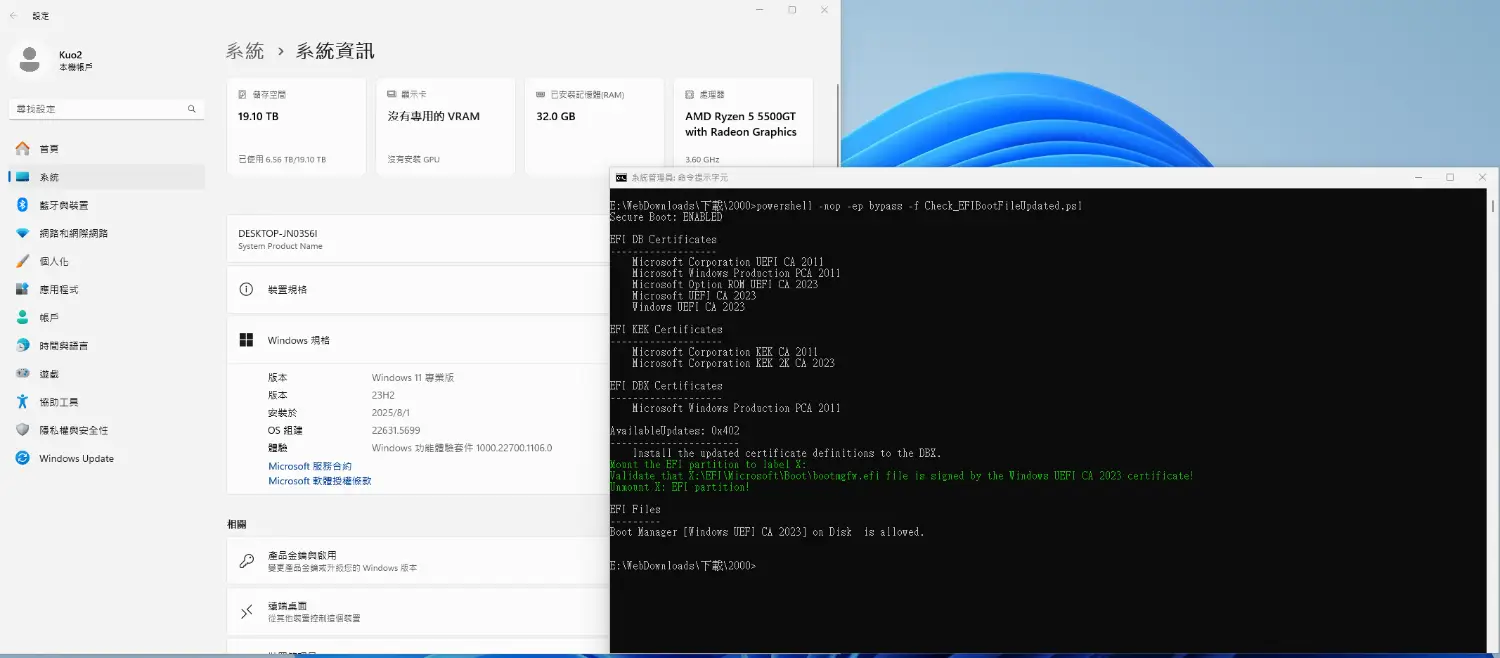
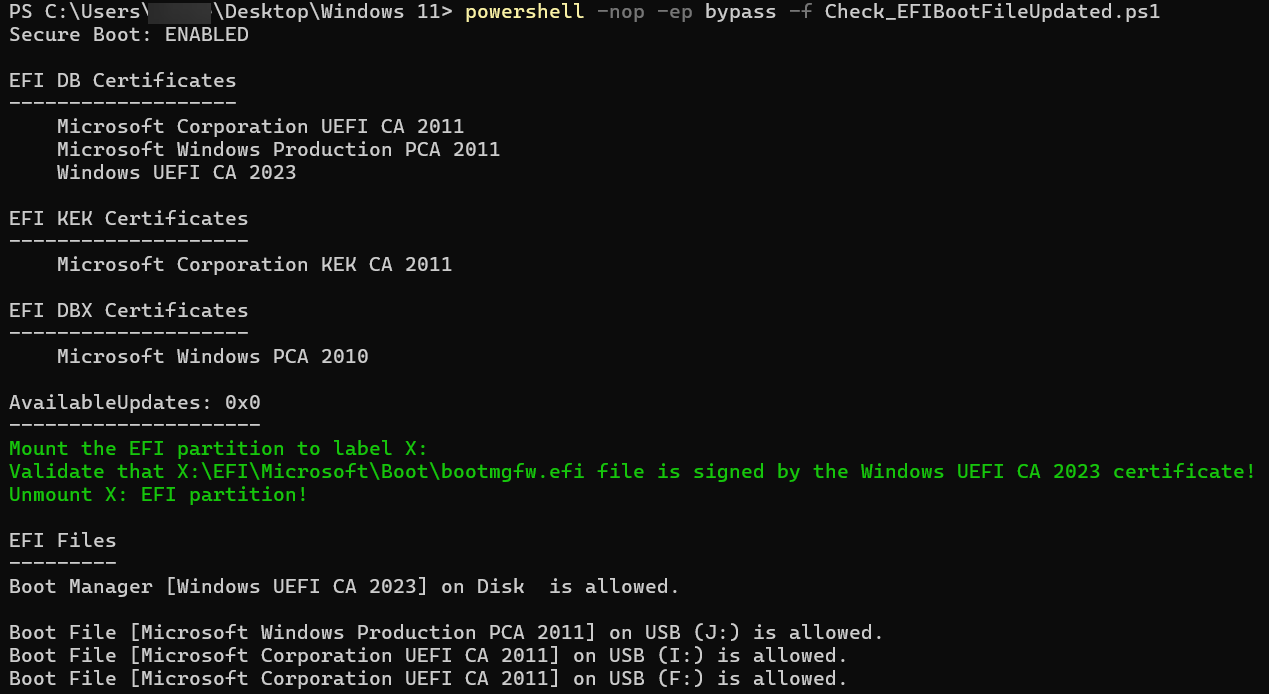
I improved the Check_EFIBootFile.ps1 script.

And thanks to the original author who created this script:
DESCRIPTION
Original Author: Matthew Graeber (@mattifestation)
Modified By: Jeremiah Cox (@int0x6)
Modified By: Joel Roth (@nafai)
Additional Source: A basic "dbx" UEFI variable parser to dump blacklisted UEFI bootloader hashes
Additional Source: SplitDbxContent 1.0
License: BSD 3-Clause
  • Added KEK certificate.
  • Added Try {} catch {} to DB, KEK and DBX certificate detection.
  • Mount the EFI partition to verify the actual Windows Boot Manager certificate.

Modified 1:
Code:
try {
$db_Certs = @((Get-SecureBootUEFI db | Get-UefiDatabaseSignatures).SignatureList.SignatureData.Subject | where { $_ -match 'Microsoft' } | foreach { $null = $_ -match $CN_regex; $Matches[2] })
} catch {
$db_Certs = $false
}
if ( $db_Certs -eq $false) {
Print-Header 'EFI DB Certificates'
} else {
Print-Header 'EFI DB Certificates'
foreach ($Cert in $db_Certs) {
    "    {0}" -f $Cert
}
}

try {
$kek_Certs = @((Get-SecureBootUEFI kek | Get-UefiDatabaseSignatures).SignatureList.SignatureData.Subject | where { $_ -match 'Microsoft' } | foreach { $null = $_ -match $CN_regex; $Matches[2] })
} catch {
$kek_Certs = $false
}
if ( $kek_Certs -eq $false) {
Print-Header 'EFI KEK Certificates'
} else {
Print-Header 'EFI KEK Certificates'
foreach ($Cert in $kek_Certs) {
    "    {0}" -f $Cert
}
}

try {
$dbx_Certs = @((Get-SecureBootUEFI dbx | Get-UefiDatabaseSignatures).SignatureList.SignatureData.Subject | where { $_ -match 'Microsoft' } | foreach { $null = $_ -match $CN_regex; $Matches[2] })
} catch {
$dbx_Certs = $false
}
if ( $dbx_Certs -eq $false) {
Print-Header 'EFI DBX Certificates'
} else {
Print-Header 'EFI DBX Certificates'
foreach ($Cert in $dbx_Certs) {
    "    {0}" -f $Cert
}
}

Modified 2
Code:
Write-Host "Mount the EFI partition to label X:" -ForegroundColor Green
$command = 'mountvol X: /s'
Start-Process -FilePath "cmd.exe" -ArgumentList "/c $command" -NoNewWindow -Wait

$BootMgr_File = "X:\EFI\Microsoft\Boot\bootmgfw.efi"
$BootMgr_Cert = Get-PFXCert $BootMgr_File
Write-Host "Validate that $BootMgr_File file is signed by the $BootMgr_Cert certificate!" -ForegroundColor Green
Write-Host "Unmount X: EFI partition!" -ForegroundColor Green
$command = 'mountvol X: /d'
Start-Process -FilePath "cmd.exe" -ArgumentList "/c $command" -NoNewWindow -Wait

Ax9C25v.png


Code:
powershell -nop -ep bypass -f Check_EFIBootFileUpdated.ps1
This is what mines shows:
1756529432054.webp

How do I get the:
1) Microsoft UEFI CA 2023 under DFI DB Certificates?
2) Microsoft Corporation KEK 2K CA 2023 under EFI KEK Certificates?

I'll try what's mentioned in the comment here:
which has a link to:

Thanks!
 
Last edited:

My Computer My Computer

At a glance

WindowsXP/7/8/8.1/10/11,Linux,Android,FreeBSD...Intel® Core™ i7-8750H 8th Gen 2.2Ghz up to 4....64GB using 2x32GB CL16 Mushkin redLine modulesIntel UHD 630 & NVIDIA GeForce GTX 1050 Ti wi...
OS
WindowsXP/7/8/8.1/10/11,Linux,Android,FreeBSD Unix
Computer type
Laptop
Manufacturer/Model
Dell XPS 15 9570
CPU
Intel® Core™ i7-8750H 8th Gen 2.2Ghz up to 4.1Ghz
Motherboard
Dell XPS 15 9570
Memory
64GB using 2x32GB CL16 Mushkin redLine modules
Graphics Card(s)
Intel UHD 630 & NVIDIA GeForce GTX 1050 Ti with 4GB DDR5
Sound Card
Realtek ALC3266-CG
Monitor(s) Displays
15.6" 4K Touch UltraHD 3840x2160 made by Sharp
Screen Resolution
3840x2160 4K UltraHD
Hard Drives
Samsung MZ-V9P4T0B/AM 990 PRO 4TB PCIe®4.0 NVMe™ M.2 SSD was Toshiba KXG60ZNV1T02 NVMe 1TB SSD
PSU
Dell XPS 15 9570
Case
Dell XPS 15 9570
Cooling
Stock
Keyboard
Stock
Mouse
SwitftPoint ProPoint
Internet Speed
Comcast/XFinity 1.44Gbps/42.5Mbps
Browser
Microsoft EDGE (Chromium based) & Google Chrome
Antivirus
Windows Defender that came with Windows

My Computer My Computer

At a glance

WindowsXP/7/8/8.1/10/11,Linux,Android,FreeBSD...Intel® Core™ i7-8750H 8th Gen 2.2Ghz up to 4....64GB using 2x32GB CL16 Mushkin redLine modulesIntel UHD 630 & NVIDIA GeForce GTX 1050 Ti wi...
OS
WindowsXP/7/8/8.1/10/11,Linux,Android,FreeBSD Unix
Computer type
Laptop
Manufacturer/Model
Dell XPS 15 9570
CPU
Intel® Core™ i7-8750H 8th Gen 2.2Ghz up to 4.1Ghz
Motherboard
Dell XPS 15 9570
Memory
64GB using 2x32GB CL16 Mushkin redLine modules
Graphics Card(s)
Intel UHD 630 & NVIDIA GeForce GTX 1050 Ti with 4GB DDR5
Sound Card
Realtek ALC3266-CG
Monitor(s) Displays
15.6" 4K Touch UltraHD 3840x2160 made by Sharp
Screen Resolution
3840x2160 4K UltraHD
Hard Drives
Samsung MZ-V9P4T0B/AM 990 PRO 4TB PCIe®4.0 NVMe™ M.2 SSD was Toshiba KXG60ZNV1T02 NVMe 1TB SSD
PSU
Dell XPS 15 9570
Case
Dell XPS 15 9570
Cooling
Stock
Keyboard
Stock
Mouse
SwitftPoint ProPoint
Internet Speed
Comcast/XFinity 1.44Gbps/42.5Mbps
Browser
Microsoft EDGE (Chromium based) & Google Chrome
Antivirus
Windows Defender that came with Windows
In principle, your motherboard maker should have provided a recent UEFI update which pushed out the KEK 2023 keys.
Unless it's been abandoned as too old for updates.
 

My Computer My Computer

At a glance

Windows 7
OS
Windows 7
In principle, your motherboard maker should have provided a recent UEFI update which pushed out the KEK 2023 keys.
Unless it's been abandoned as too old for updates.
The Dell XPS 15 9570 notebook has been abandoned since the last BIOS update was in 2022 or 2021. The Dell Precision 5530 which shares the same motherboard and firmware is still current and the last BIOS update was in December 2024 which I had been using for last 2 weeks and of course, it does not have the KEK 2023 keys.
 

My Computer My Computer

At a glance

WindowsXP/7/8/8.1/10/11,Linux,Android,FreeBSD...Intel® Core™ i7-8750H 8th Gen 2.2Ghz up to 4....64GB using 2x32GB CL16 Mushkin redLine modulesIntel UHD 630 & NVIDIA GeForce GTX 1050 Ti wi...
OS
WindowsXP/7/8/8.1/10/11,Linux,Android,FreeBSD Unix
Computer type
Laptop
Manufacturer/Model
Dell XPS 15 9570
CPU
Intel® Core™ i7-8750H 8th Gen 2.2Ghz up to 4.1Ghz
Motherboard
Dell XPS 15 9570
Memory
64GB using 2x32GB CL16 Mushkin redLine modules
Graphics Card(s)
Intel UHD 630 & NVIDIA GeForce GTX 1050 Ti with 4GB DDR5
Sound Card
Realtek ALC3266-CG
Monitor(s) Displays
15.6" 4K Touch UltraHD 3840x2160 made by Sharp
Screen Resolution
3840x2160 4K UltraHD
Hard Drives
Samsung MZ-V9P4T0B/AM 990 PRO 4TB PCIe®4.0 NVMe™ M.2 SSD was Toshiba KXG60ZNV1T02 NVMe 1TB SSD
PSU
Dell XPS 15 9570
Case
Dell XPS 15 9570
Cooling
Stock
Keyboard
Stock
Mouse
SwitftPoint ProPoint
Internet Speed
Comcast/XFinity 1.44Gbps/42.5Mbps
Browser
Microsoft EDGE (Chromium based) & Google Chrome
Antivirus
Windows Defender that came with Windows
The Dell XPS 15 9570 notebook has been abandoned since the last BIOS update was in 2022 or 2021. The Dell Precision 5530 which shares the same motherboard and firmware is still current and the last BIOS update was in December 2024 which I had been using for last 2 weeks and of course, it does not have the KEK 2023 keys.

You may have try @Akeo's Mosby.
 

My Computer My Computer

At a glance

Windows 7
OS
Windows 7
You may have try @Akeo's Mosby.
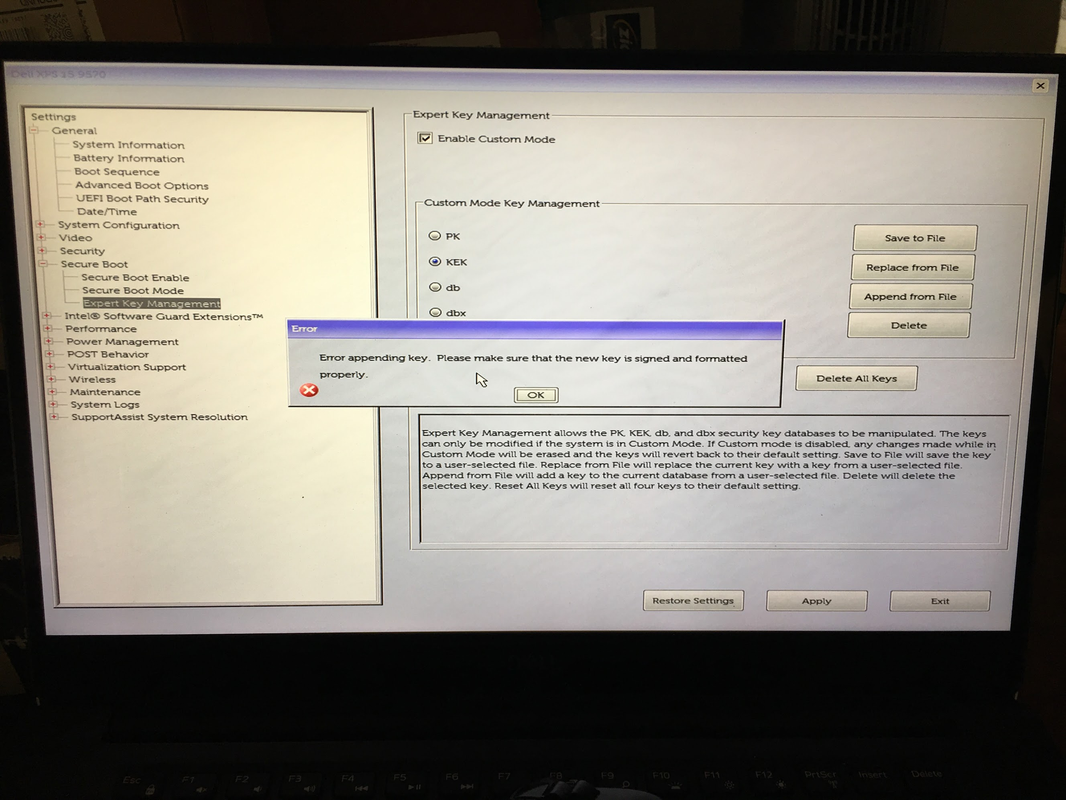
Mosby appears to be probably the only way to do it because I tried what @uncyler825 mentioned of using the .der files from secureboot_objects/PreSignedObjects at main · microsoft/secureboot_objects on my Dell XPS 15 9570 notebook and this is what it shows when trying the KEK and DB Amending:
image.png

It doesn't like the .der files as that's the response for each one. When I turned off Enable Custom Mode, it deleted the Windows UEFI CA 2023 certificate so the system will not boot unless Secure Mode is off.

My two identical Ventoy USB was not working for most things as other than Hiren's BootCD, everything including Macrium Reflect 8's Rescue Disk, DiskGenius Pro v6.0.1.1645 WinPE - English version, WinPE11_10_Sergei_Strelec_x64_2025.05.22_English.iso which are all under Ventoy as ISO files are BSOD's with a Kernel Security Check Failure during bootup.

I got Secure Boot working again by following How to manage the Windows Boot Manager revocations for Secure Boot changes associated with CVE-2023-24932 - Microsoft Support and did this:

image.png

Before, I fixed it by using EaseUS Partition Master's Boot Repair while in Sergei Strelec's WinPE ISO but since that won't boot, I decided to try the above instead.

which did allow the Secure Boot to work again:
image.png


Anyone know what files I need to replace and what tool to use to modify the ISO's?

I will be trying Mosby later today after I do a repair in-place install after building a Windows Beta ISO from UUPDump as I think some of the things on my system got corrupted one way or another a few months ago when the capacitor was causing the system to randomly power cycle anywhere from a few minutes to hours randomly for 2 months before the capacitor burned down as well as took some other component on the other side with it on the notebook motherboard and I had the motherboardreplaced with a i9-8950HK from the original i7-8750H. Will report back on my experience with Mosby. A question for @Akeo - can Mosby be used to sign a .efi file so it will work with Secure Boot as someone else told me to sign the .efi file with sbctl except I run all the Linux Live ISO's under Ventoy.

On my Dell, there is not Setup or User Mode but rather a Deployed and Audit mode. So hopefully I am correct that Audit=Setup and Deployed=User mode?
 

My Computer My Computer

At a glance

WindowsXP/7/8/8.1/10/11,Linux,Android,FreeBSD...Intel® Core™ i7-8750H 8th Gen 2.2Ghz up to 4....64GB using 2x32GB CL16 Mushkin redLine modulesIntel UHD 630 & NVIDIA GeForce GTX 1050 Ti wi...
OS
WindowsXP/7/8/8.1/10/11,Linux,Android,FreeBSD Unix
Computer type
Laptop
Manufacturer/Model
Dell XPS 15 9570
CPU
Intel® Core™ i7-8750H 8th Gen 2.2Ghz up to 4.1Ghz
Motherboard
Dell XPS 15 9570
Memory
64GB using 2x32GB CL16 Mushkin redLine modules
Graphics Card(s)
Intel UHD 630 & NVIDIA GeForce GTX 1050 Ti with 4GB DDR5
Sound Card
Realtek ALC3266-CG
Monitor(s) Displays
15.6" 4K Touch UltraHD 3840x2160 made by Sharp
Screen Resolution
3840x2160 4K UltraHD
Hard Drives
Samsung MZ-V9P4T0B/AM 990 PRO 4TB PCIe®4.0 NVMe™ M.2 SSD was Toshiba KXG60ZNV1T02 NVMe 1TB SSD
PSU
Dell XPS 15 9570
Case
Dell XPS 15 9570
Cooling
Stock
Keyboard
Stock
Mouse
SwitftPoint ProPoint
Internet Speed
Comcast/XFinity 1.44Gbps/42.5Mbps
Browser
Microsoft EDGE (Chromium based) & Google Chrome
Antivirus
Windows Defender that came with Windows
HP advised me not to manually update the certificate. They couldn't provide a date when it will be updated. :(
 

My Computer My Computer

At a glance

Windows 11 25H2 Home11th Generation Intel Core i712GB
OS
Windows 11 25H2 Home
Computer type
Laptop
Manufacturer/Model
HP ENVY Laptop 17m-ch1xxx
CPU
11th Generation Intel Core i7
Memory
12GB
Monitor(s) Displays
17.3” FHD Display
HP advised me not to manually update the certificate. They couldn't provide a date when it will be updated. :(
That sounds like a crap tech support answer. HP clearly understands the Oct. 2026 deadline is approaching.

They've had several years to prepare a new BIOS update, or should inform you that your PC is too old to be supported. If it's the latter, you can run with Secure Boot disabled. It's not ideal, but you continue to have a working Windows unless you want to play newer games that have anti-cheat software.
 

My Computer My Computer

At a glance

Windows 7
OS
Windows 7
That sounds like a crap tech support answer. HP clearly understands the Oct. 2026 deadline is approaching.

They've had several years to prepare a new BIOS update, or should inform you that your PC is too old to be supported. If it's the latter, you can run with Secure Boot disabled. It's not ideal, but you continue to have a working Windows unless you want to play newer games that have anti-cheat software.
I agree! This is just another reason I will not by an HP product again.
 

My Computer My Computer

At a glance

Windows 11 25H2 Home11th Generation Intel Core i712GB
OS
Windows 11 25H2 Home
Computer type
Laptop
Manufacturer/Model
HP ENVY Laptop 17m-ch1xxx
CPU
11th Generation Intel Core i7
Memory
12GB
Monitor(s) Displays
17.3” FHD Display
In general, I've been happiest with building my own from parts. I get to select the capabilities of each part and match it to my requirements vs. accepting the configuration that some company thought was a good idea. Sadly, while the specifications of some of the major brands look great, when the reality of actually examining them in detail, you frequently find they cut corners to make maximum profit.
 

My Computers My Computers

  • At a glance

    Win 11 Pro 25H2, Build 26200.8894Intel Core i5 1450064GB DDR4GeForce RTX 4060
    OS
    Win 11 Pro 25H2, Build 26200.8894
    Computer type
    PC/Desktop
    Manufacturer/Model
    Home Brew
    CPU
    Intel Core i5 14500
    Motherboard
    Gigabyte B760M G P WIFI
    Memory
    64GB DDR4
    Graphics Card(s)
    GeForce RTX 4060
    Sound Card
    Chipset Realtek
    Monitor(s) Displays
    LG 45" Ultragear, Acer 24" 1080p
    Screen Resolution
    5120x1440, 1920x1080
    Hard Drives
    Crucial P310 2TB 2280 PCIe Gen4 3D NAND NVMe M.2 SSD (O/S)
    Silicon Power 2TB US75 NVMe PCIe Gen4 M.2 2280 SSD (backup)
    Crucial BX500 2TB 3D NAND (2nd backup)
    Seagate 4TB Ironwolf, rotating HDD archive files
    External off-line backup Drives: 2 NVMe 4TB drives in external enclosures
    PSU
    Thermaltake Toughpower GF3 750W
    Case
    LIAN LI LANCOOL 216 E-ATX PC Case
    Cooling
    Lots of fans!
    Keyboard
    Microsoft Comfort Curve 2000
    Mouse
    Logitech G305
    Internet Speed
    Verizon FiOS 1GB
    Browser
    Firefox
    Antivirus
    Malware Bytes & Windows Defender Security
  • At a glance

    Win 11 Pro 25H2, Build 26200.8894Intel Core i5 1440032GB DDR5Intel 700 Embedded GPU
    Operating System
    Win 11 Pro 25H2, Build 26200.8894
    Computer type
    PC/Desktop
    Manufacturer/Model
    Home Brew
    CPU
    Intel Core i5 14400
    Motherboard
    Gigabyte B760M DS3H AX
    Memory
    32GB DDR5
    Graphics card(s)
    Intel 700 Embedded GPU
    Sound Card
    Realtek Embedded
    Monitor(s) Displays
    27" HP 1080p
    Screen Resolution
    1920x1080
    Hard Drives
    Crucial P310 2TB 2280 PCIe Gen4 eD NAND PCIe SSD
    Samsung EVO 990 2TB NVMe Gen4 SSD
    Samsung 2TB SATA SSD
    PSU
    Thermaltake Smart BM3 650W
    Case
    Okinos Micro ATX Case
    Cooling
    Fans
    Keyboard
    Microsoft Comfort Curve 2000
    Mouse
    Logitech G305
    Internet Speed
    Verizon FiOS 1GB
    Browser
    Firefox
    Antivirus
    Malware Bytes & Windows Defender Security
  • Nimo N171 17" Laptop, (Intel i3-1215U, 16GB RAM, 2TB NVMe, Win11 Pro)
    Acemagic Vista Mini PC V1 (Intel N150, 16GB RAM, 1TB NVMe, Win11 Pro)
    HP ENVY h8-1540t, (24GB RAM, 2TB SSD, 2TB HDD, Win11 Pro)
First-time poster here. I've been reading this thread with great interest and have learned a whole ton of stuff. I'm not an IT guy, but I hate doing things I don't understand. This thread has helped tremendously in my understanding. Thanks to everyone participating!

I wanted to share my experience with a home-built system having an MSI motherboard with secure boot enabled. I'm still on Win10, but will be switching to Win11 in a couple of weeks. I decided to try the changes in the MS articles linked in the first post of this thread. I used the Check_EFIBootFileUpdated.ps1 script uploaded in an earlier post of this thread to make sure the results were as expected.

I applied all the changes, including the 2011 certificate revocation via the EFI DBX. The Check_EFIBootFileUpdated.ps1 showed that the revocation had indeed taken place. Then I began to have second thoughts. I wondered if this revocation would cause my Macrium recovery USB stick to fail to boot in secure mode. I was almost sure it wouldn't boot in fact. Yet when I tried to boot it, there was no problem. "What's going on?" I thought. "Is this a bug in the MSI secure boot implementation?" Both my desktop machines have this same motherboard, but then I realized I could try it on my laptop, to which I had also applied the 2011 certificate revocations via the EFI DBX.

The Macrium recovery media would not boot in the laptop, instead giving me a security violation. This is exactly what I expected the revocation to do. So what's going on with the MSI motherboard? I double-checked to make sure secure boot was enabled, which it was. Meanwhile, my second thoughts about the revocation began to bother me. I wondered if I could "revoke the revocation" as it were. :-)

So I went into the Secure Boot section of the MSI BIOS setup. "Secure Boot Mode" was set to "Standard", and all other options were disabled. I changed it from "Standard" to "Custom", which then enabled some other options, one of which allowed me to reset the DBX certificate data back to the default, which I did. Changing "Secure Boot Mode" to "Custom" also enabled a menu called "Secure Boot Preset". In this menu, there were two options: "Hardware/OS Compatibility" and "Maximum Security". The default was "Hardware/OS Compatibility", so I left that as-is.

I went back and re-ran the Check_EFIBootFileUpdated.ps1. It showed what I had hoped, that the 2011 certificate revocation was no longer shown in the EFI DBX section. But then I began to wonder about the "Secure Boot Preset" options "Hardware/OS Compatibility" and "Maximum Security", so I did some searching.

Holy moly. I found a couple of articles about questionable MSI Secure Boot BIOS implementations here and here. I looked in some other places too, and those sources said that the "Secure Boot Preset" option had to be set to "Maximum Security" for Secure Boot to work correctly. This option is not the default. So I went back and re-enabled the 2011 certificate revocations and verified them with Check_EFIBootFileUpdated.ps1. The 2011 certificates were revoked again.

Next, I went back into the BIOS and set the "Secure Boot Preset" option to "Maximum Security". Then I tried to boot the Macrium recovery media. Finally, it was rejected with a security violation, unlike before. This indicated to me that Secure Boot was doing what it was supposed to do, at least in this specific instance.

So the bottom line is this: with at least some machines (maybe all?) based on an MSI motherboard, you must go into the BIOS, change "Secure Boot Mode" from "Standard" to "Custom", then set "Secure Boot Preset" to "Maximum Security". Otherwise it won't actually implement the revocation of the 2011 certificates in the DBX.

Now that I feel comfortable dealing with all this crazy stuff and know how to get myself out of the woods if need be, I think I'll leave the 2011 certificate revocation in place in the DBX. I did try the fix to the Macrium recovery media that was described earlier in this thread. It worked just dandy, so thanks for that.

Edit: My motherboard is an MSI B450m Bazooka with the latest beta BIOS from MSI, dated 2024-08-09.
 

My Computer My Computer

At a glance

Windows 11 pro 25h2AMD Ryzen 7 5700G64 GB G.Skill (F4-3200C16Q-64GVK)Integrated into CPU
OS
Windows 11 pro 25h2
Computer type
PC/Desktop
Manufacturer/Model
DIY
CPU
AMD Ryzen 7 5700G
Motherboard
MSI B450M Bazooka, BIOS version 7A38vHJ5 (latest beta as of 2025-09-23)
Memory
64 GB G.Skill (F4-3200C16Q-64GVK)
Graphics Card(s)
Integrated into CPU
Sound Card
Realtek (built into motherboard)
Monitor(s) Displays
Generic HDMI
Screen Resolution
1080p
Hard Drives
System and apps: SK hynix Gold P31 1TB M.2
Data: Toshiba HDWQ140 4TB internal SATA
PSU
Seasonic 400W SS-400FL2 fanless
Case
Fractal Design Define R5
Cooling
Cooler Master Hyper 212 Evo
Keyboard
Lenovo Preferred Pro II Wired External USB Keyboard (4X30M86879)
Mouse
Belkin cheapo corded USB mouse
Internet Speed
300 MBit/sec
Browser
Firefox
Antivirus
Windows Defender
Now have the Windows UEFI CA 2023 on the boot media.
In the steps on MS site about checking the update.

mountvol s: /s
copy S:\EFI\Microsoft\Boot\bootmgfw.efi c:\bootmgfw_2023.efi

I then took that bootmgfw_2023.efi renamed it to bootx64.efi then replaced the bootx64.efi file on USB "drive:\efi\boot\bootx64.efi" with the updated file.
I can boot Macrium or Terabyte recovery media with secure boot on and the Windows Production PCA 2011 revoked.

View attachment 140476

Thanks for the pointer. I have a slightly different issue as the things I am booting are all .ISO files running under VenToy, what can I use to replace the file in a .ISO file?

Update: One can use PowerISO or any other ISO Image editor to replace the file.
 
Last edited:

My Computer My Computer

At a glance

WindowsXP/7/8/8.1/10/11,Linux,Android,FreeBSD...Intel® Core™ i7-8750H 8th Gen 2.2Ghz up to 4....64GB using 2x32GB CL16 Mushkin redLine modulesIntel UHD 630 & NVIDIA GeForce GTX 1050 Ti wi...
OS
WindowsXP/7/8/8.1/10/11,Linux,Android,FreeBSD Unix
Computer type
Laptop
Manufacturer/Model
Dell XPS 15 9570
CPU
Intel® Core™ i7-8750H 8th Gen 2.2Ghz up to 4.1Ghz
Motherboard
Dell XPS 15 9570
Memory
64GB using 2x32GB CL16 Mushkin redLine modules
Graphics Card(s)
Intel UHD 630 & NVIDIA GeForce GTX 1050 Ti with 4GB DDR5
Sound Card
Realtek ALC3266-CG
Monitor(s) Displays
15.6" 4K Touch UltraHD 3840x2160 made by Sharp
Screen Resolution
3840x2160 4K UltraHD
Hard Drives
Samsung MZ-V9P4T0B/AM 990 PRO 4TB PCIe®4.0 NVMe™ M.2 SSD was Toshiba KXG60ZNV1T02 NVMe 1TB SSD
PSU
Dell XPS 15 9570
Case
Dell XPS 15 9570
Cooling
Stock
Keyboard
Stock
Mouse
SwitftPoint ProPoint
Internet Speed
Comcast/XFinity 1.44Gbps/42.5Mbps
Browser
Microsoft EDGE (Chromium based) & Google Chrome
Antivirus
Windows Defender that came with Windows
Now have the Windows UEFI CA 2023 on the boot media.
In the steps on MS site about checking the update.

mountvol s: /s
copy S:\EFI\Microsoft\Boot\bootmgfw.efi c:\bootmgfw_2023.efi

I then took that bootmgfw_2023.efi renamed it to bootx64.efi then replaced the bootx64.efi file on USB "drive:\efi\boot\bootx64.efi" with the updated file.
I can boot Macrium or Terabyte recovery media with secure boot on and the Windows Production PCA 2011 revoked.

View attachment 140476

I gave this a test try on the VenToy USB by replacing the bootx64.efi for VenToy itself and this is what it showed instead of VenToy booting:
1757904488413.webp
 

My Computer My Computer

At a glance

WindowsXP/7/8/8.1/10/11,Linux,Android,FreeBSD...Intel® Core™ i7-8750H 8th Gen 2.2Ghz up to 4....64GB using 2x32GB CL16 Mushkin redLine modulesIntel UHD 630 & NVIDIA GeForce GTX 1050 Ti wi...
OS
WindowsXP/7/8/8.1/10/11,Linux,Android,FreeBSD Unix
Computer type
Laptop
Manufacturer/Model
Dell XPS 15 9570
CPU
Intel® Core™ i7-8750H 8th Gen 2.2Ghz up to 4.1Ghz
Motherboard
Dell XPS 15 9570
Memory
64GB using 2x32GB CL16 Mushkin redLine modules
Graphics Card(s)
Intel UHD 630 & NVIDIA GeForce GTX 1050 Ti with 4GB DDR5
Sound Card
Realtek ALC3266-CG
Monitor(s) Displays
15.6" 4K Touch UltraHD 3840x2160 made by Sharp
Screen Resolution
3840x2160 4K UltraHD
Hard Drives
Samsung MZ-V9P4T0B/AM 990 PRO 4TB PCIe®4.0 NVMe™ M.2 SSD was Toshiba KXG60ZNV1T02 NVMe 1TB SSD
PSU
Dell XPS 15 9570
Case
Dell XPS 15 9570
Cooling
Stock
Keyboard
Stock
Mouse
SwitftPoint ProPoint
Internet Speed
Comcast/XFinity 1.44Gbps/42.5Mbps
Browser
Microsoft EDGE (Chromium based) & Google Chrome
Antivirus
Windows Defender that came with Windows
Back
Top Bottom