Act now: Secure Boot certificates expire in June 2026


UPDATE:


 Windows IT Pro Blog:

Prepare for the first global large-scale certificate update to Secure Boot.

The Microsoft certificates used in Secure Boot are the basis of trust for operating system security, and all will be expiring beginning June 2026. The way to automatically get timely updates to new certificates for supported Windows systems is to let Microsoft manage your Windows updates, which include Secure Boot. A close collaboration with original equipment manufacturers (OEMs) who provide Secure Boot firmware updates is also essential.

If you haven't yet, begin evaluating options and start preparing for the rollout of updated certificates across your organization in the coming months. Learn about this effort, its impact, and what you as an IT admin should do to help ensure that your Windows devices can receive updates after June 2026 without compromising system security.

Important: While platforms beyond Windows are affected, this article focuses on the solution for Windows systems. Be sure to monitor the Secure Boot certificate rollout landing page for status and guidance updates.

Recap: Why Secure Boot requires updating​

Secure Boot helps to prevent malware from running early in the startup sequence of a Windows device. Coupled with the Unified Extensible Firmware Interface (UEFI) firmware signing process, Secure Boot uses cryptographic keys, known as certificate authorities (CAs), to validate that firmware modules come from a trusted source.

After 15 years, the Secure Boot certificates that are part of Windows systems will start expiring in June 2026. Windows devices will need new certificates to maintain continuity and protection.
  • Affected: Physical and virtual machines (VMs) on supported versions of Windows 10, Windows 11, Windows Server 2025, Windows Server 2022, Windows Server 2019, Windows Server 2016, Windows Server 2012, Windows Server 2012 R2—the systems released since 2012, including the long-term servicing channel (LTSC)
  • Not affected: Copilot+ PCs released in 2025
Note: Affected third-party OS includes MacOS. However, it's outside the scope of Microsoft support. For Linux systems dual booting with Windows, Windows will update the certificates that Linux relies on.

Secure Boot uses certificate-based trust hierarchy to ensure that only authorized software runs during system startup. At the top of this hierarchy is the Platform Key (PK), typically managed by the OEM or a delegate, which acts as the root of trust. The PK authorizes updates to the Key Enrollment Key (KEK) database, which in turn authorizes updates to two critical signature databases: the Allowed Signature Database (DB) and the Forbidden Signature Database (DBX). This layered structure ensures that only validated updates can modify the system's boot policy, maintaining a secure boot environment. See how it works in Updating Secure Boot keys.

The change: Expiring certificates​

Windows systems released since 2012 might have expiring versions of the certificates listed below. The UEFI Secure Boot DB and KEK need to be updated with the corresponding new certificate versions.

See what new certificates will be available in the coming months to maintain UEFI Secure Boot continuity.

Expiration dateExpiring certificateUpdated certificateWhat it doesStoring location
June 2026Microsoft Corporation KEK CA 2011Microsoft Corporation KEK 2K CA 2023Signs updates to DB and DBXKEK
June 2026Microsoft Corporation UEFI CA 2011 (or third-party UEFI CA)*a) Microsoft Corporation UEFI CA 2023
b) Microsoft Option ROM UEFI CA 2023
a) Signs third-party OS and hardware driver components
b) Signs third-party option ROMs
DB
Oct 2026Microsoft Windows Production PCA 2011Windows UEFI CA 2023Signs the Windows bootloader and boot componentsDB
*You need two new certificates for Microsoft Corporation UEFI CA 2011, which together allow for more granular control.

Microsoft and partner OEMs will be rolling out certificates to add trust for the new DB and KEK certificates in the coming months.

The impact and implications​

The CAs ensure the integrity of the device startup sequence. When these CAs expire, the systems will stop receiving security fixes for the Windows Boot Manager and the Secure Boot components. Compromised security at startup threatens the overall security of affected Windows devices, especially due to bootkit malware. Bootkit malware can be difficult or impossible to detect with standard antivirus software. For example, even today, the unsecured boot path can be used as a cyberattack vector by the BlackLotus UEFI bootkit (CVE-2023-24932).

Every Windows system with Secure Boot enabled includes the same three certificates in support of third-party hardware and Windows ecosystem. Unless prepared, physical devices and VMs will:
  • Lose the ability to install Secure Boot security updates after June 2026.
  • Not trust third-party software signed with new certificates after June 2026.
  • Not receive security fixes for Windows Boot Manager by October 2026.
To prevent this, you'll need to update your organization's entire Windows ecosystem with certificates dated 2023 or newer. This will also help you apply mitigations needed to help secure your systems against the BlackLotus and similar boot-level cyberattacks today.

Take action today​

To begin, bookmark the Secure Boot certificate rollout landing page and take our readiness survey!

Important: Check with your OEMs on the latest available OEM firmware. Apply any available firmware updates to your Windows systems before applying the new certificates. In the Secure Boot flow, firmware updates from OEMs are the foundation for Windows Secure Boot updates to apply correctly.

Microsoft support is only available for supported client versions of Windows 11 and Windows 10. Once Windows 10 reaches end of support in October 2025, consider getting Extended Security Updates (ESU) for Windows 10, version 22H2 if you're not ready to upgrade.

In the coming months, we expect to update the Secure Boot certificates as part of our latest cumulative update cycle.

The solution that requires the least effort is letting Microsoft manage your Windows device updates, including Secure Boot updates. However, you might need to adopt multiple solutions. Your specific next step depends on the Windows systems and how you manage them.

Enterprise IT-managed systems that send diagnostic data​

No action is required if Windows systems at your organization receive Windows updates from Microsoft and send diagnostic data back to Microsoft. This includes devices that receive updates through Windows Autopatch, Microsoft Configuration Manager, or third-party solutions.

Note: Check that your firewall doesn't block diagnostic data. If it does, please take action to help diagnostic data reach Microsoft.

Windows diagnostic data and OEM feedback will help us group devices with similar hardware and firmware profiles to gradually release Secure Boot updates to you. This allows us to intelligently monitor the rollout process, proactively pausing, addressing any issues, and continuing as needed. Just keep your devices updated with the latest Windows updates!

Enterprise IT-managed systems that don't send diagnostic data​

Enable Windows diagnostic data and let Microsoft manage your updates by taking the following steps:
  1. Configure your organizational policies to allow at least the “required” level of diagnostic data. You can use Group Policy or mobile device management (MDM) to do this. See how to do this in Group Policy Management Editor for Windows 11 and Windows 10.
  2. Allow Microsoft to manage Secure Boot-related updates for your devices by setting the following registry key:
  • o Registry path: HKEY_LOCAL_MACHINE\SYSTEM\CurrentControlSet\Control\Secureboot
  • o Key name: MicrosoftUpdateManagedOptIn
  • o Type: DWORD
  • o DWORD value: 0x5944 (opt in to Windows Secure Boot updates)
We recommend setting this key to 0x5944. It indicates that all certificates should be updated in a manner that preserves the security profile of the existing device. It also updates the boot manager to the one signed by the Windows UEFI CA 2023 certificate. Note: If the DWORD value is 0 or the key doesn't exist, Windows diagnostic data is disabled.

If you prefer not to enable diagnostic data, please take this anonymous readiness survey. Help us assess the needs of environments like yours to create future guidance on managing the update process independently. You'll remain fully in control and responsible to execute and monitor these updates.

Air-gapped devices, such as in government scenarios or manufacturing, are a special case. Because Microsoft cannot manage these updates, we can only offer the following limited support:
  • Recommend known steps or methods for deploying these updates
  • Share data gathered from our rollout stream
When available, look for these resources on the Secure Boot certificate rollout landing page.

Systems with Secure Boot disabled​

Windows cannot update the active variables of the Secure Boot certificates if Secure Boot is disabled.

Important: Toggling Secure Boot on or off might erase the updated certificates. If Secure Boot is on, leave it enabled. Turning it off can reset the settings with defaults, which is not desirable.

Share these recommendations with individual users:

  1. Press Windows key + R, type msinfo32, and then press Enter.
  2. In the System Information window, look for Secure Boot State.
  3. If it says On, you're good to go!
If Secure Boot is off or unsupported, the device may not receive the new CAs. For these devices, you may choose to enable Secure Boot with this guidance: Windows 11 and Secure Boot.


Change management considerations​

Don't wait until June 2026! Updating DB and KEK with new 2023 certificates will help prevent your systems from boot-level security vulnerabilities today.

Get the latest OEM firmware updates and let Microsoft manage your Windows updates to receive Secure Boot updates automatically. Otherwise, help us understand your special case by completing this anonymous readiness survey.

Watch the release notes for Windows 11, version 24H2, version 23H2, and Windows 10 in the coming months to know when these updates are available to you. Stay tuned for additional guidance for the LTSC as needed.

Bookmark these additional resources:


 Source:


See also:
 
Last edited:

My Computer

System One

  • OS
    WindowsXP/7/8/8.1/10/11,Linux,Android,FreeBSD Unix
    Computer type
    Laptop
    Manufacturer/Model
    Dell XPS 15 9570
    CPU
    Intel® Core™ i7-8750H 8th Gen 2.2Ghz up to 4.1Ghz
    Motherboard
    Dell XPS 15 9570
    Memory
    64GB using 2x32GB CL16 Mushkin redLine modules
    Graphics Card(s)
    Intel UHD 630 & NVIDIA GeForce GTX 1050 Ti with 4GB DDR5
    Sound Card
    Realtek ALC3266-CG
    Monitor(s) Displays
    15.6" 4K Touch UltraHD 3840x2160 made by Sharp
    Screen Resolution
    3840x2160 4K UltraHD
    Hard Drives
    Samsung MZ-V9P4T0B/AM 990 PRO 4TB PCIe®4.0 NVMe™ M.2 SSD was Toshiba KXG60ZNV1T02 NVMe 1TB SSD
    PSU
    Dell XPS 15 9570
    Case
    Dell XPS 15 9570
    Cooling
    Stock
    Keyboard
    Stock
    Mouse
    SwitftPoint ProPoint
    Internet Speed
    Comcast/XFinity 1.44Gbps/42.5Mbps
    Browser
    Microsoft EDGE (Chromium based) & Google Chrome
    Antivirus
    Windows Defender that came with Windows
Perhaps Ventoy is different.
In my post I stated the two I tested.

I can boot Macrium or Terabyte recovery media with secure boot on and the Windows Production PCA 2011 revoked.
 

My Computer

System One

  • OS
    Windows 11 Pro
Perhaps Ventoy is different.
In my post I stated the two I tested.
What happens exactly if you didn't replace the files? This is what I noticed:
If I used the Windows 11 24H2 Beta Insiders build ISO from UUP Dump without modifications, there are no problems
HirenBootCD PE works fine.
but I had a Macrium Reflect 8 Recovery media, DiskGenius and a few others that right after the spinning circle will all BSOD with Kernel Security Check failure when Secure Boot is actually disabled. VenToy on Dell machines will not work with secure boot enabled as I read, one has to actually downgrade to a older version before there is even the option to enroll the key.
 
Last edited:

My Computer

System One

  • OS
    WindowsXP/7/8/8.1/10/11,Linux,Android,FreeBSD Unix
    Computer type
    Laptop
    Manufacturer/Model
    Dell XPS 15 9570
    CPU
    Intel® Core™ i7-8750H 8th Gen 2.2Ghz up to 4.1Ghz
    Motherboard
    Dell XPS 15 9570
    Memory
    64GB using 2x32GB CL16 Mushkin redLine modules
    Graphics Card(s)
    Intel UHD 630 & NVIDIA GeForce GTX 1050 Ti with 4GB DDR5
    Sound Card
    Realtek ALC3266-CG
    Monitor(s) Displays
    15.6" 4K Touch UltraHD 3840x2160 made by Sharp
    Screen Resolution
    3840x2160 4K UltraHD
    Hard Drives
    Samsung MZ-V9P4T0B/AM 990 PRO 4TB PCIe®4.0 NVMe™ M.2 SSD was Toshiba KXG60ZNV1T02 NVMe 1TB SSD
    PSU
    Dell XPS 15 9570
    Case
    Dell XPS 15 9570
    Cooling
    Stock
    Keyboard
    Stock
    Mouse
    SwitftPoint ProPoint
    Internet Speed
    Comcast/XFinity 1.44Gbps/42.5Mbps
    Browser
    Microsoft EDGE (Chromium based) & Google Chrome
    Antivirus
    Windows Defender that came with Windows
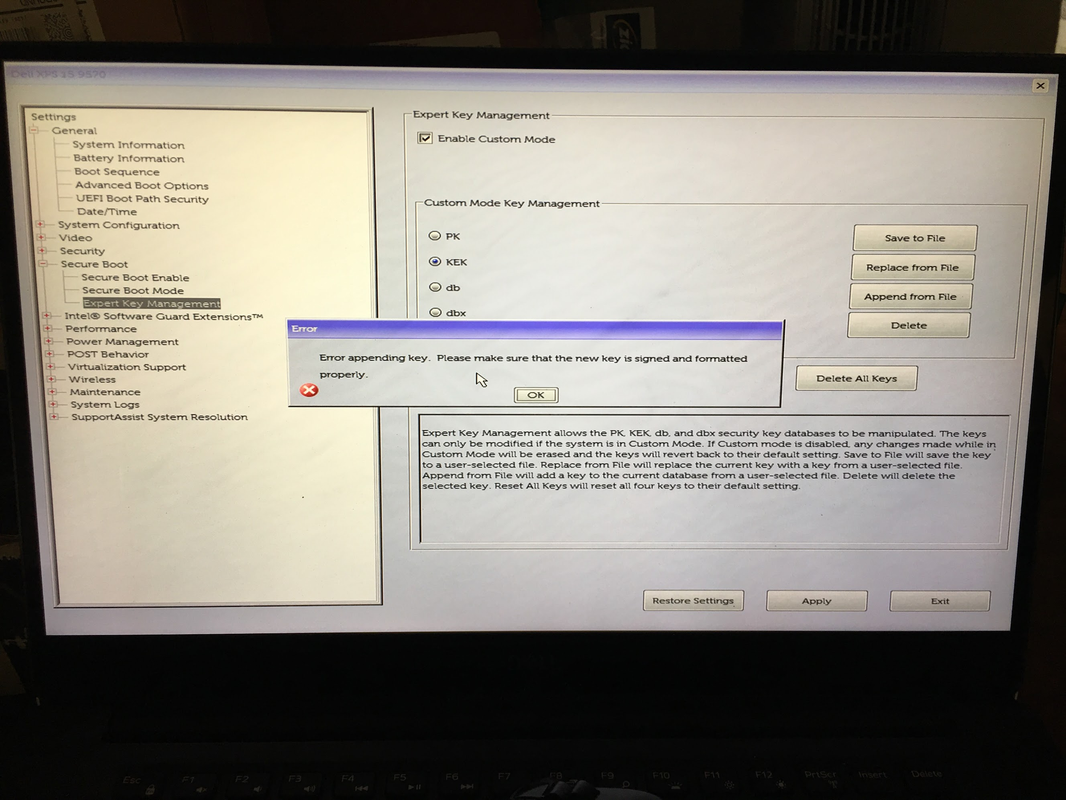
Mosby appears to be probably the only way to do it because I tried what @uncyler825 mentioned of using the .der files from secureboot_objects/PreSignedObjects at main · microsoft/secureboot_objects on my Dell XPS 15 9570 notebook and this is what it shows when trying the KEK and DB Amending:
image.png

It doesn't like the .der files as that's the response for each one. When I turned off Enable Custom Mode, it deleted the Windows UEFI CA 2023 certificate so the system will not boot unless Secure Mode is off.

My two identical Ventoy USB was not working for most things as other than Hiren's BootCD, everything including Macrium Reflect 8's Rescue Disk, DiskGenius Pro v6.0.1.1645 WinPE - English version, WinPE11_10_Sergei_Strelec_x64_2025.05.22_English.iso which are all under Ventoy as ISO files are BSOD's with a Kernel Security Check Failure during bootup.

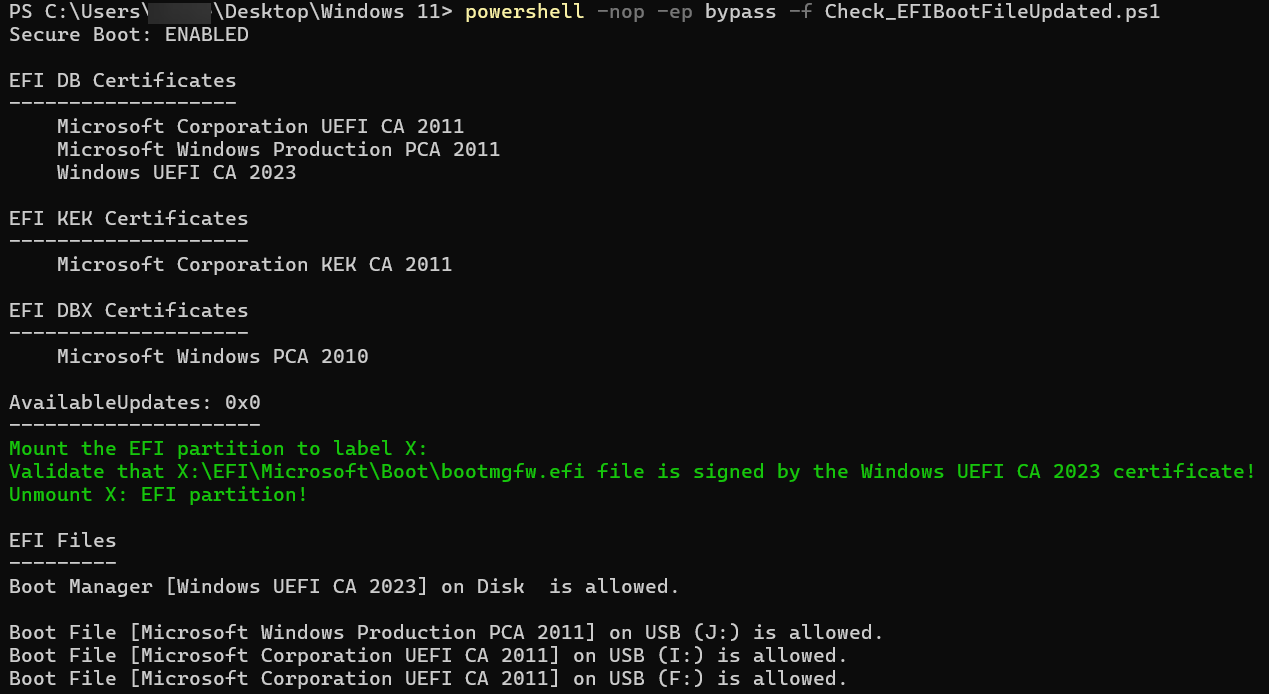
I got Secure Boot working again by following How to manage the Windows Boot Manager revocations for Secure Boot changes associated with CVE-2023-24932 - Microsoft Support and did this:

image.png

Before, I fixed it by using EaseUS Partition Master's Boot Repair while in Sergei Strelec's WinPE ISO but since that won't boot, I decided to try the above instead.

which did allow the Secure Boot to work again:
image.png


Anyone know what files I need to replace and what tool to use to modify the ISO's?

I will be trying Mosby later today after I do a repair in-place install after building a Windows Beta ISO from UUPDump as I think some of the things on my system got corrupted one way or another a few months ago when the capacitor was causing the system to randomly power cycle anywhere from a few minutes to hours randomly for 2 months before the capacitor burned down as well as took some other component on the other side with it on the notebook motherboard and I had the motherboardreplaced with a i9-8950HK from the original i7-8750H. Will report back on my experience with Mosby. A question for @Akeo - can Mosby be used to sign a .efi file so it will work with Secure Boot as someone else told me to sign the .efi file with sbctl except I run all the Linux Live ISO's under Ventoy.

On my Dell, there is not Setup or User Mode but rather a Deployed and Audit mode. So hopefully I am correct that Audit=Setup and Deployed=User mode?

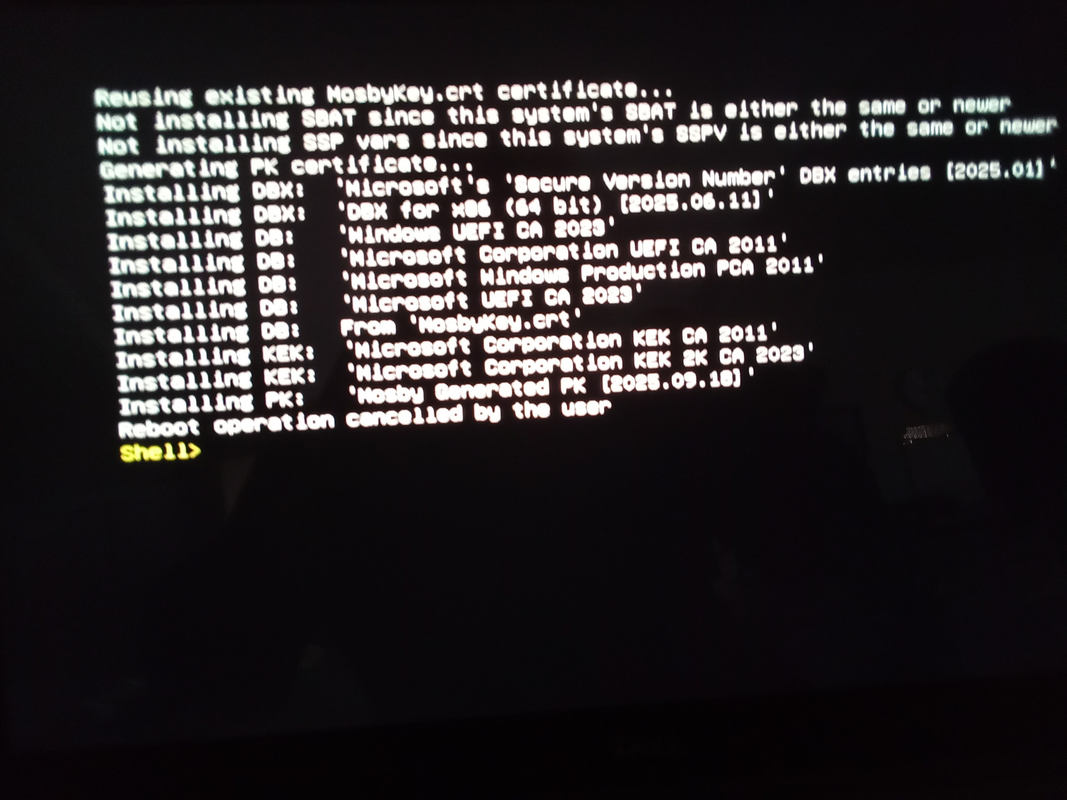
I finally Mosby working on the Dell XPS 15 9570 thanks to someone answering my question on reddit at:

image.png


image.png


Basically, Setup Mode on the Dell is basically:
Secure Boot Enabled = off, Audit Mode, Delete All keys in Expert Key Management after enabling Custom Mode.

However, I ran into a different issue when I did:
Secure Boot Enabled = on, Deployment Mode which is needed so system boots with Secure Boot Mode = On, Expert Key Management after enabling Custom Mode:
1758205660261-webp.145763


Anyone have a script to check what Platform Keys is actually on the system?

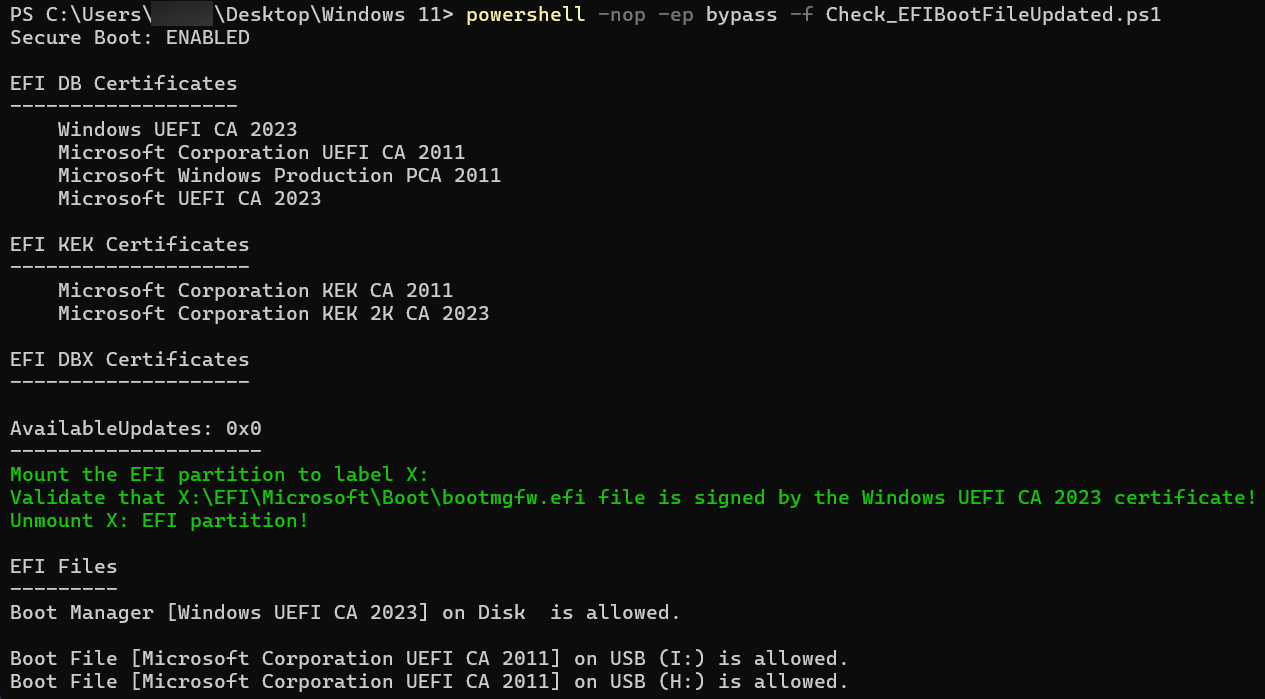
Mosby works but I am still missing the Microsoft Option ROM UEFI CA 2023 as seen above.

Update:
I used secureboot_objects/PostSignedObjects/Optional/DB/amd64/DBUpdateOROM2023.bin at main · microsoft/secureboot_objects and amended db from file in Custom Keys in the UEFI BIOS Setup to get the Microsoft Option ROM UEFI CA 2023 installed.

1758323821421.webp
 
Last edited:

My Computer

System One

  • OS
    WindowsXP/7/8/8.1/10/11,Linux,Android,FreeBSD Unix
    Computer type
    Laptop
    Manufacturer/Model
    Dell XPS 15 9570
    CPU
    Intel® Core™ i7-8750H 8th Gen 2.2Ghz up to 4.1Ghz
    Motherboard
    Dell XPS 15 9570
    Memory
    64GB using 2x32GB CL16 Mushkin redLine modules
    Graphics Card(s)
    Intel UHD 630 & NVIDIA GeForce GTX 1050 Ti with 4GB DDR5
    Sound Card
    Realtek ALC3266-CG
    Monitor(s) Displays
    15.6" 4K Touch UltraHD 3840x2160 made by Sharp
    Screen Resolution
    3840x2160 4K UltraHD
    Hard Drives
    Samsung MZ-V9P4T0B/AM 990 PRO 4TB PCIe®4.0 NVMe™ M.2 SSD was Toshiba KXG60ZNV1T02 NVMe 1TB SSD
    PSU
    Dell XPS 15 9570
    Case
    Dell XPS 15 9570
    Cooling
    Stock
    Keyboard
    Stock
    Mouse
    SwitftPoint ProPoint
    Internet Speed
    Comcast/XFinity 1.44Gbps/42.5Mbps
    Browser
    Microsoft EDGE (Chromium based) & Google Chrome
    Antivirus
    Windows Defender that came with Windows
Anyone have a script to check what Platform Keys is actually on the system?

Mosby works but I am still missing the Microsoft Option ROM UEFI CA 2023 as seen above.
Here's where we run into problems. The current version of my script (you're actually using someone else's version) fails on trying to decipher a Mosby certificate. There's a disagreement on how a borrowed bit of UEFI code parses the full certificate fields.

While you can match a specific substring (like "Mosby") in the string of bytes, it doesn't inform us whether the entire cert passes muster.

The best you can do is run this command:
Code:
[System.Text.RegularExpressions.Regex]::Replace([System.Text.Encoding]::ASCII.GetString((Get-SecureBootUEFI PK).Bytes), '[^\w\s]', '')
 

My Computer

System One

  • OS
    Windows 7
Here's where we run into problems. The current version of my script (you're actually using someone else's version) fails on trying to decipher a Mosby certificate. There's a disagreement on how a borrowed bit of UEFI code parses the full certificate fields.

While you can match a specific substring (like "Mosby") in the string of bytes, it doesn't inform us whether the entire cert passes muster.

The best you can do is run this command:
Code:
[System.Text.RegularExpressions.Regex]::Replace([System.Text.Encoding]::ASCII.GetString((Get-SecureBootUEFI PK).Bytes), '[^\w\s]', '')

Many thanks!

And this is the result:
1758257863675.webp

This is the Dell Default Platform Key:
1758309893664.webp
 
Last edited:

My Computer

System One

  • OS
    WindowsXP/7/8/8.1/10/11,Linux,Android,FreeBSD Unix
    Computer type
    Laptop
    Manufacturer/Model
    Dell XPS 15 9570
    CPU
    Intel® Core™ i7-8750H 8th Gen 2.2Ghz up to 4.1Ghz
    Motherboard
    Dell XPS 15 9570
    Memory
    64GB using 2x32GB CL16 Mushkin redLine modules
    Graphics Card(s)
    Intel UHD 630 & NVIDIA GeForce GTX 1050 Ti with 4GB DDR5
    Sound Card
    Realtek ALC3266-CG
    Monitor(s) Displays
    15.6" 4K Touch UltraHD 3840x2160 made by Sharp
    Screen Resolution
    3840x2160 4K UltraHD
    Hard Drives
    Samsung MZ-V9P4T0B/AM 990 PRO 4TB PCIe®4.0 NVMe™ M.2 SSD was Toshiba KXG60ZNV1T02 NVMe 1TB SSD
    PSU
    Dell XPS 15 9570
    Case
    Dell XPS 15 9570
    Cooling
    Stock
    Keyboard
    Stock
    Mouse
    SwitftPoint ProPoint
    Internet Speed
    Comcast/XFinity 1.44Gbps/42.5Mbps
    Browser
    Microsoft EDGE (Chromium based) & Google Chrome
    Antivirus
    Windows Defender that came with Windows
Hello, did users who performed the update and are using the CA2023 have to update the GPU BIOS?
 

My Computer

System One

  • OS
    Windows 11 24h2
    Computer type
    PC/Desktop
    CPU
    Ryzen 5 2600
    Motherboard
    Gigabyte B450M DS3H
    Memory
    16GB DDR4 DC
    Graphics Card(s)
    RX 580
    Screen Resolution
    1080P

My Computer

System One

  • OS
    WindowsXP/7/8/8.1/10/11,Linux,Android,FreeBSD Unix
    Computer type
    Laptop
    Manufacturer/Model
    Dell XPS 15 9570
    CPU
    Intel® Core™ i7-8750H 8th Gen 2.2Ghz up to 4.1Ghz
    Motherboard
    Dell XPS 15 9570
    Memory
    64GB using 2x32GB CL16 Mushkin redLine modules
    Graphics Card(s)
    Intel UHD 630 & NVIDIA GeForce GTX 1050 Ti with 4GB DDR5
    Sound Card
    Realtek ALC3266-CG
    Monitor(s) Displays
    15.6" 4K Touch UltraHD 3840x2160 made by Sharp
    Screen Resolution
    3840x2160 4K UltraHD
    Hard Drives
    Samsung MZ-V9P4T0B/AM 990 PRO 4TB PCIe®4.0 NVMe™ M.2 SSD was Toshiba KXG60ZNV1T02 NVMe 1TB SSD
    PSU
    Dell XPS 15 9570
    Case
    Dell XPS 15 9570
    Cooling
    Stock
    Keyboard
    Stock
    Mouse
    SwitftPoint ProPoint
    Internet Speed
    Comcast/XFinity 1.44Gbps/42.5Mbps
    Browser
    Microsoft EDGE (Chromium based) & Google Chrome
    Antivirus
    Windows Defender that came with Windows
Certificate check PS: [System.Text.Encoding]::ASCII.GetString((Get-SecureBootUEFI db).bytes) -match 'Windows UEFI CA 2023'
1759590052751.webp
 

My Computer

System One

  • OS
    Win10 Pro, Win10 Pro N, Win10 Home, Windows 8.1 Pro, Ubuntu
    Computer type
    PC/Desktop
    Manufacturer/Model
    ۞ΞЖ†ԘΜΞ۞
    CPU
    Intel Core i9 9900K
    Motherboard
    ASUS ROG Maximus X Hero
    Memory
    32 GB Quad Kit, G.Skill Trident Z RGB Series schwarz, DDR4-3866, 18-19-19-39-2T
    Graphics Card(s)
    ASUS GeForce RTX 3090 ROG Strix O24G, 24576 MB GDDR6X
    Sound Card
    (1) HD Webcam C270 (2) NVIDIA High Definition Audio (3) Realtek High Definition Audio
    Monitor(s) Displays
    BenQ BL2711U(4K) and a hp 27vx(1080p)
    Hard Drives
    C: Samsung 960 EVO NVMe M.2 SSD
    E: & O: Libraries & OneDrive-> Samsung 850 EVO 1TB
    D: Hyper-V VM's -> Samsung PM951 Client M.2 512Gb SSD
    G: System Images -> Samsung 860 Pro 2TB
    PSU
    Corsair HX1000i High Performance ATX Power Supply 80+ Platinum
    Case
    Phanteks Enthoo Pro TG
    Cooling
    Thermaltake Floe Riing RGB TT Premium-Edition 360mm and 2x120 Phantek& Halo front, and 1x140 Phanteks
    Keyboard
    Trust GTX THURA
    Mouse
    Trust GTX 148
    Internet Speed
    25+/5+ (+usually faster)
    Browser
    Edge; Chrome;
    Antivirus
    Windows Defender of course & Malwarebytes Anti-Exploit as an added layer between browser & OS
    Other Info
    Router: FRITZ!Box 7590 AX V2
    Sound system: SHARP HT-SBW460 Dolby Atmos Soundbar
    Webcam: Logitech BRIO ULTRA HD PRO WEBCAM 4K webcam with HDR
And Mine Look Like This Windows Run in CA2023 Certificate and Boot USB run in CA 2023CA2023.webp
 

My Computer

System One

  • OS
    Windows 11
    Computer type
    PC/Desktop
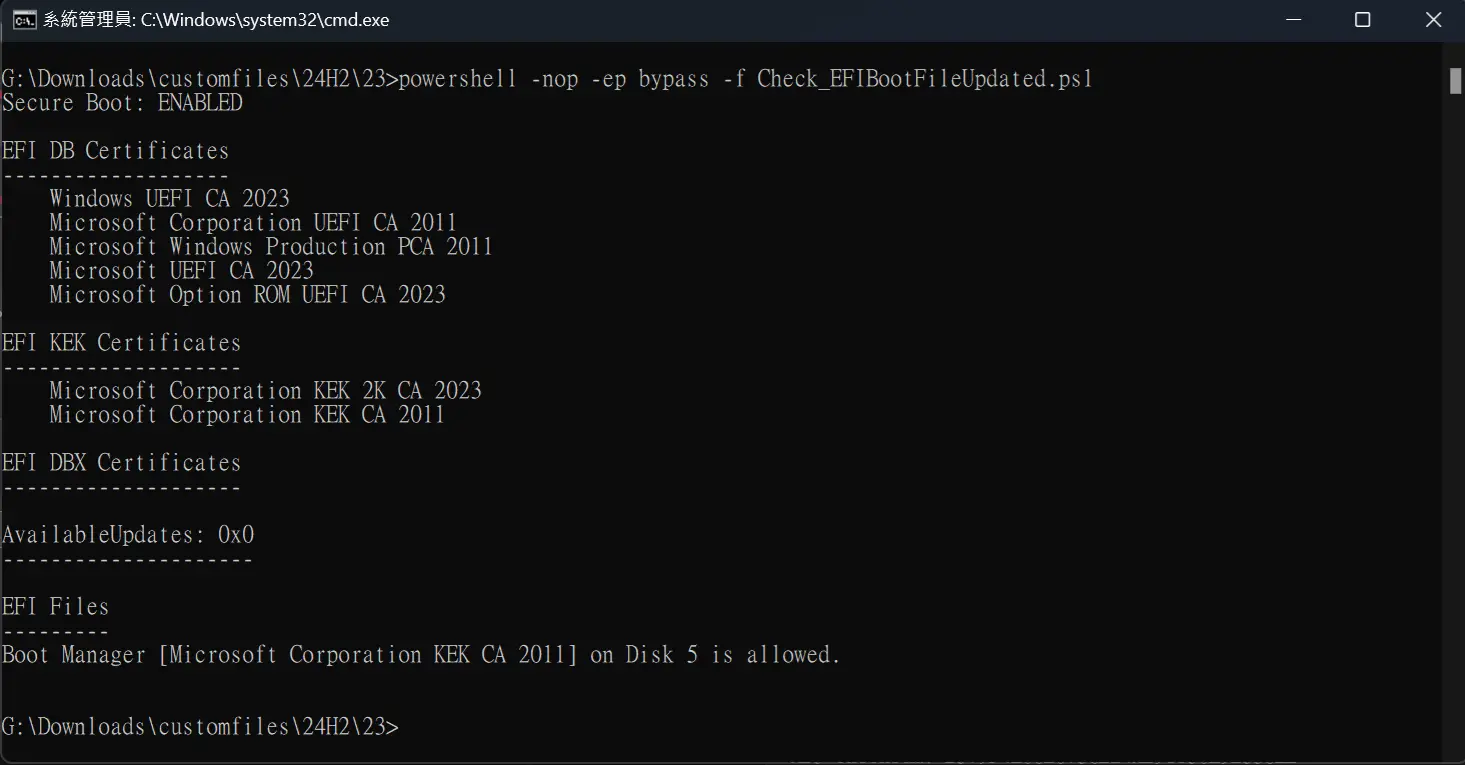
If you are still missing the CA 2023 certificate and you see Event ID 1795 in the Event Viewer. This means Windows is trying to update the certificate but access is denied. Your firmware may be missing the Microsoft KEK certificate, so the Secure Boot denies Windows certificate access.

You can check this with an additional KEK script based on @garlin PowerShell script.
PGLmSmU.png


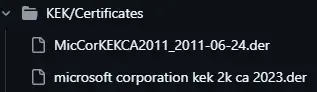
If your "EFI KEK Certificates" is empty. You need to manually download the KEK certificate and add *.der in BIOS. Otherwise you will never get the CA 2023 certificate updated.

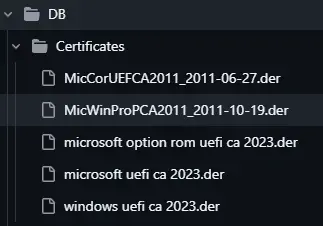
Download "MicCorKEKCA2011_2011-06-24.der" and "microsoft corporation kek 2k ca 2023.der" from HERE. You can also download all 2023 certificates and add them.
DfqWS42.png

3Zh8lEU.png

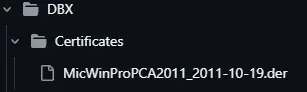
Reminder: DBX is a certificate blacklist, it is not recommended to add CA 2011 certificate to the blacklist too early.
ncgbtBJ.png


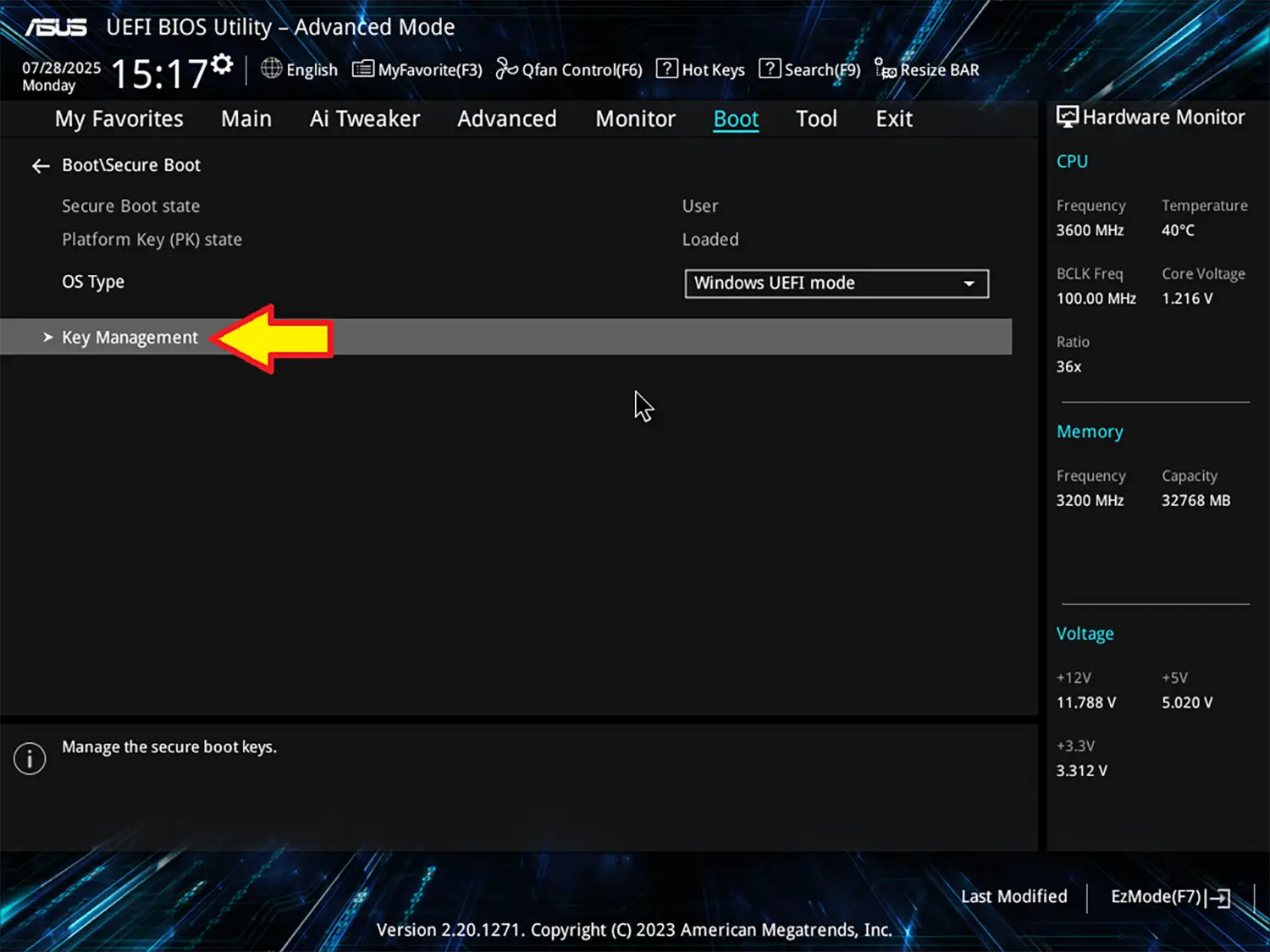
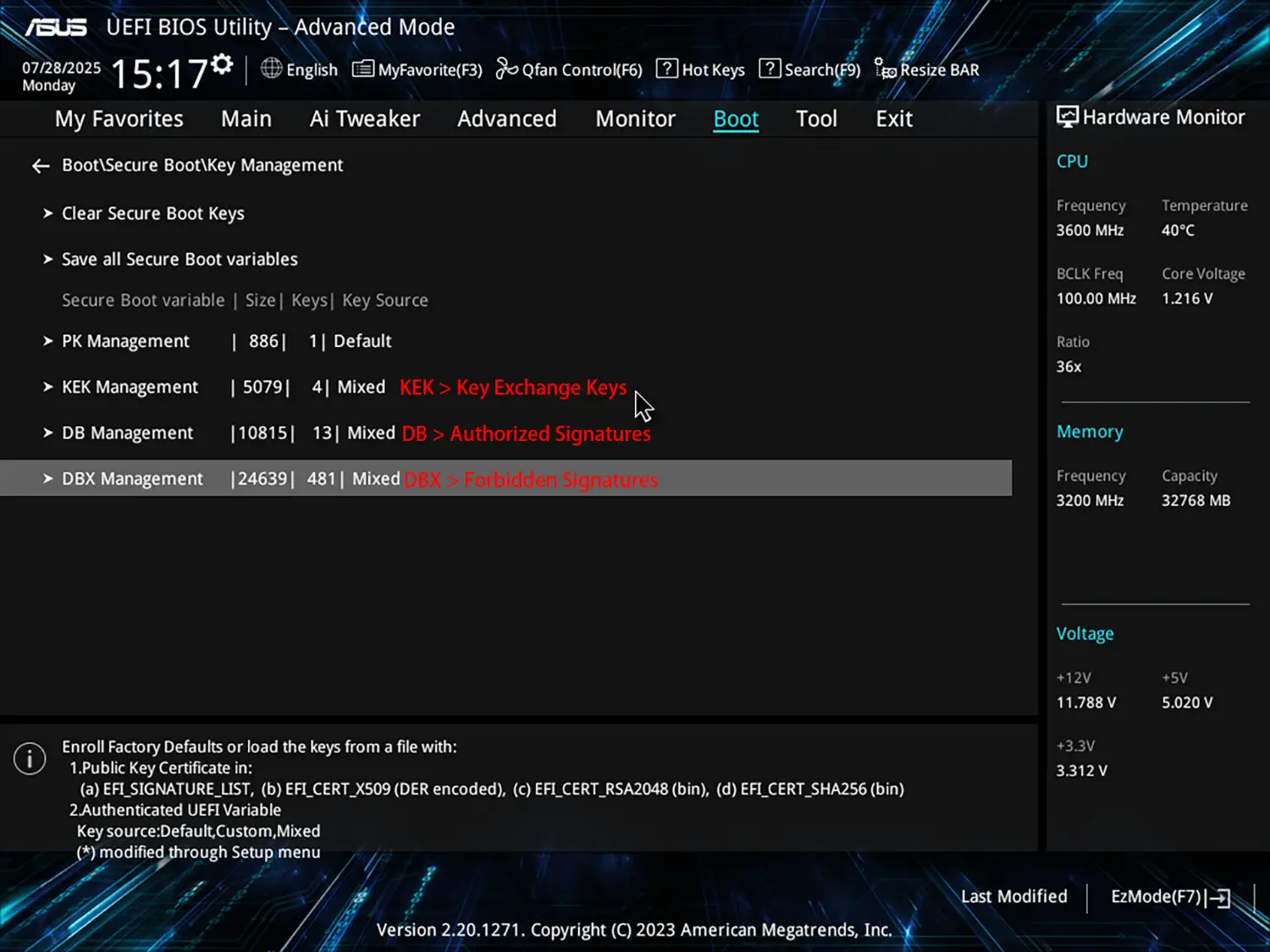
Then prepare a USB and put these two files into the USB. Enter to BIOS. And navigate to Secure Boot > Key Management
7pGkhc8.png

a4xzDax.png


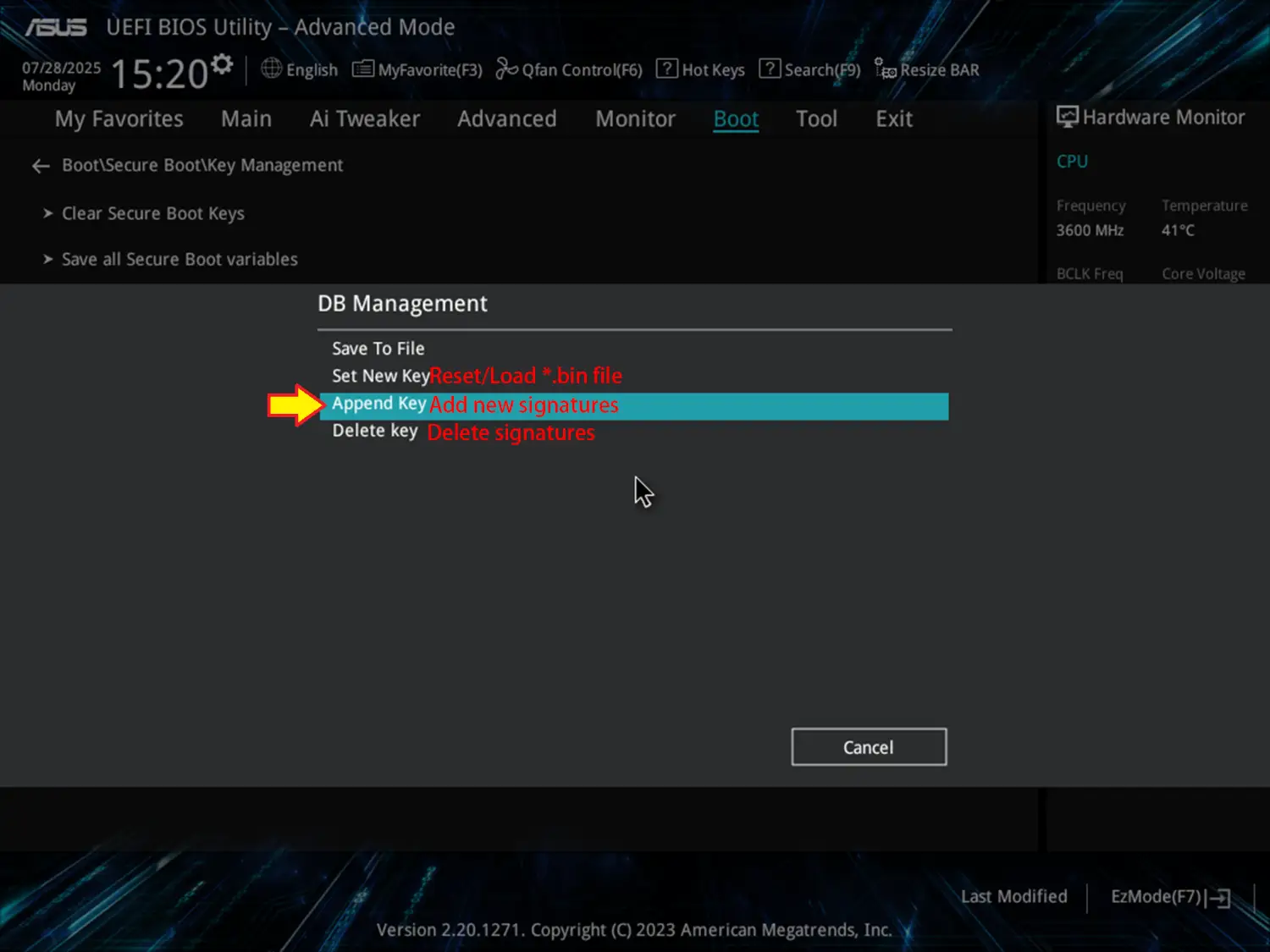
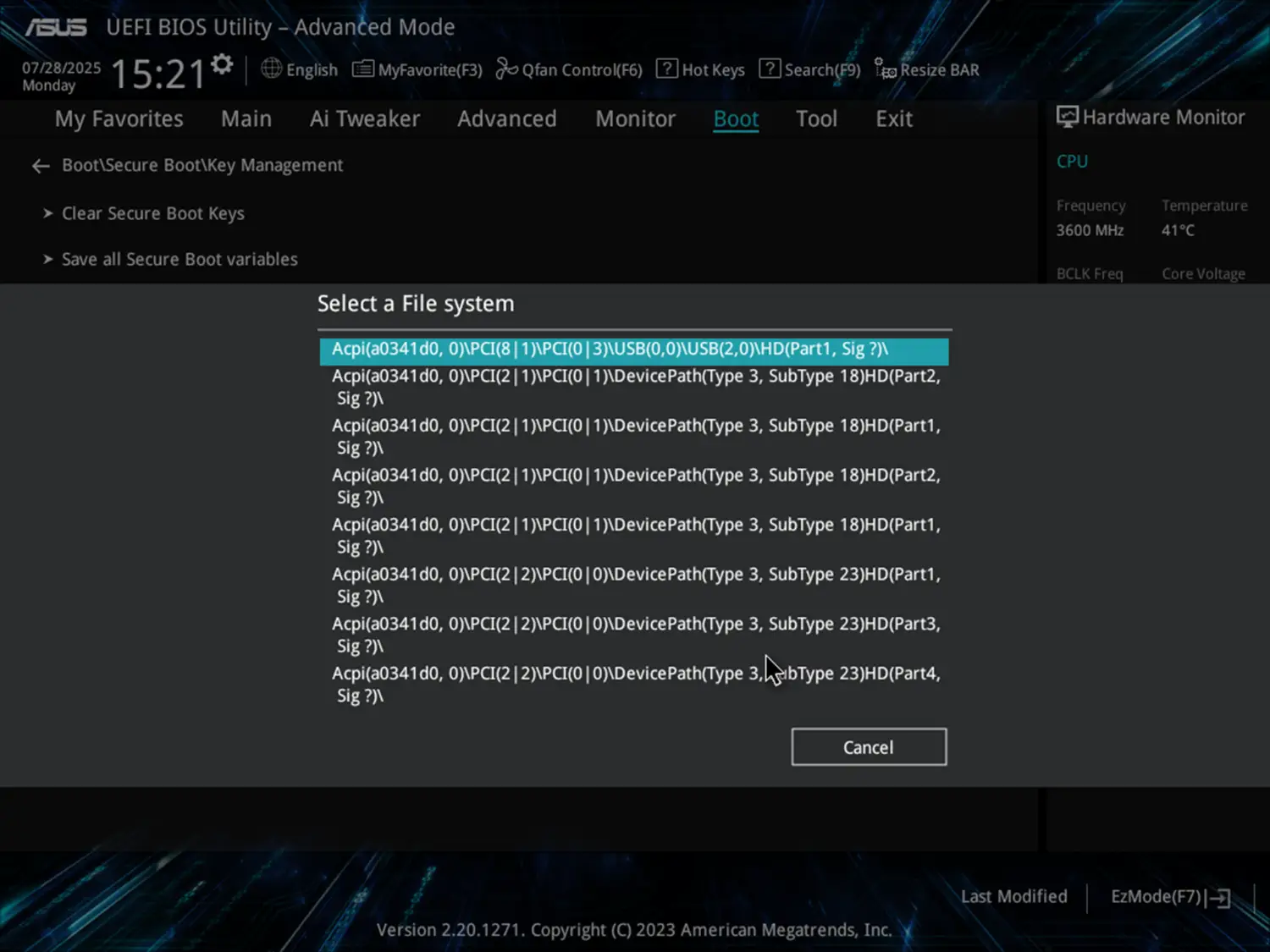
For example. I like to add CA 2023 certificate to DB allowlist. Select DB Management > Append Key
0LJZ3qT.png


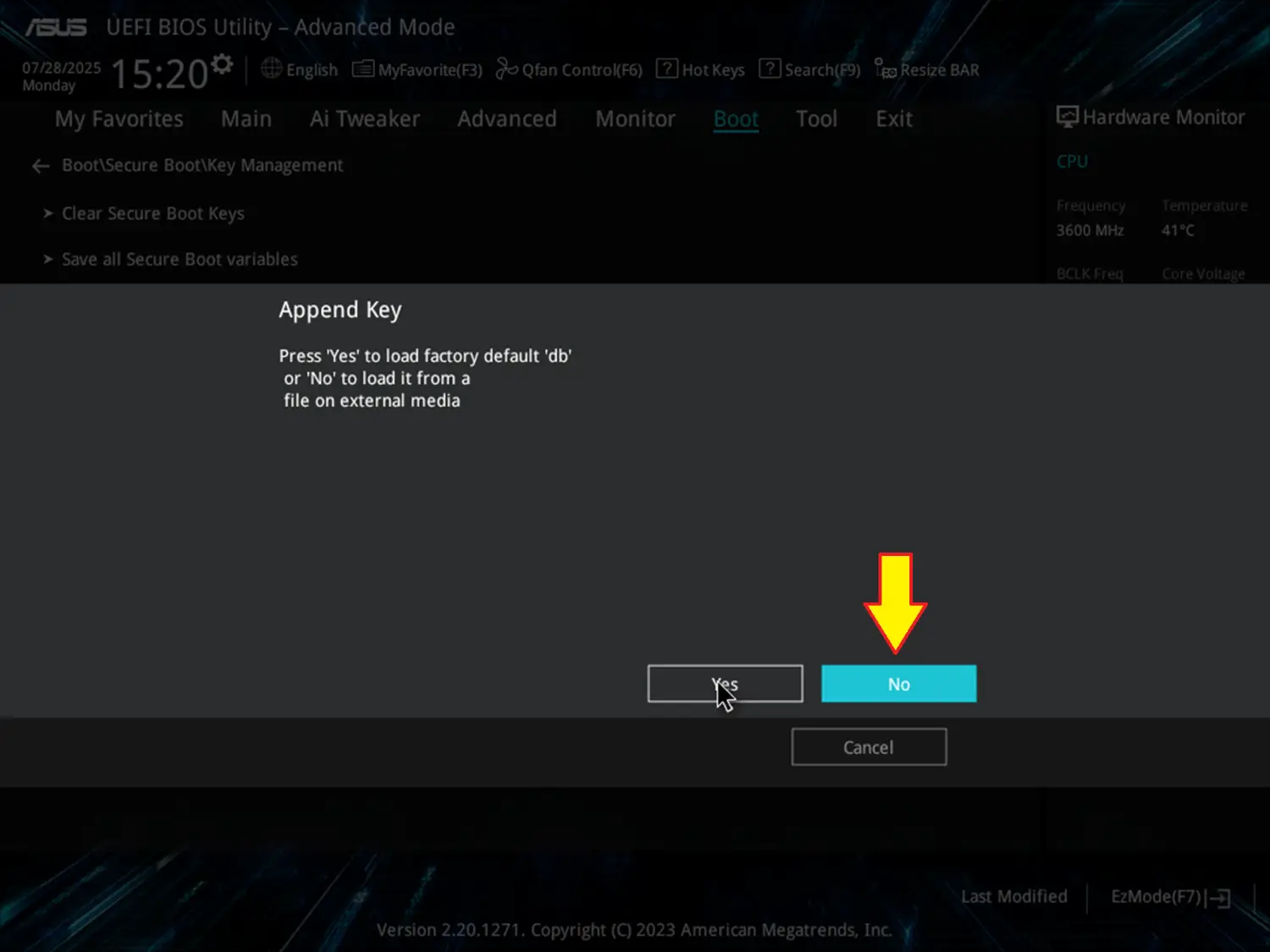
Choose No to load it from a file on external media.
GEyHFZy.png

IRb6Xmu.png


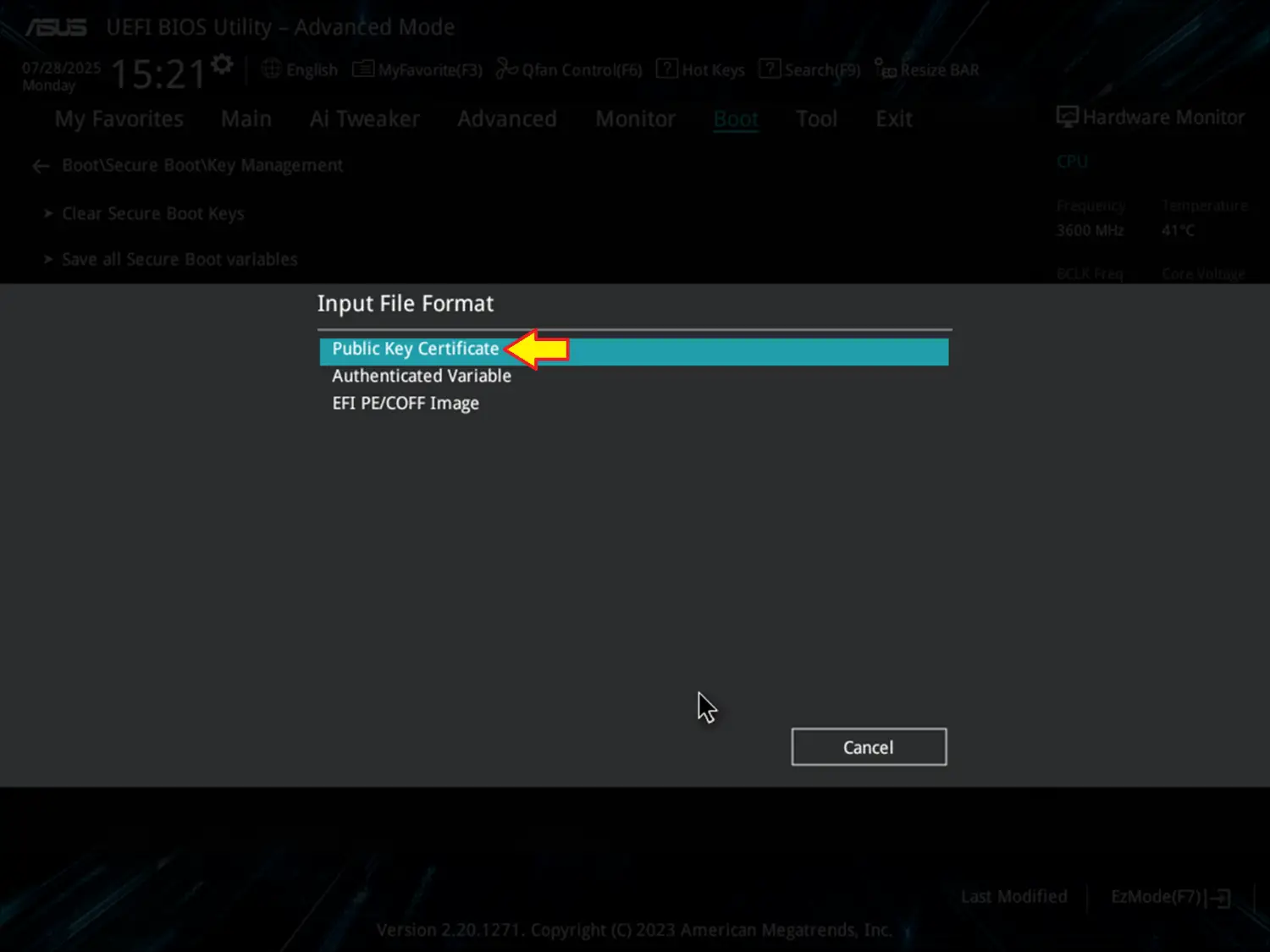
Choose Public Key Certificate.
jaAYAI0.png


After completing these actions, exit BIOS.
Oh thank you for saving me. I asked in the forum but no one helped me except you.
I followed your instructions and I think I succeeded.
Thank you very much, God bless you.
PS. Please look at the attached photo below, is everything ok?
 

Attachments

  • Capture.webp
    Capture.webp
    54.9 KB · Views: 8

My Computer

System One

  • OS
    Windows 10
HI all,

At the risk of asking a stupid question (after having read thru this post, without getting sufficient clarity)...

I have created a script gathering together a bunch of other scripts that query system certification status. Its current output on my system reads as follows:

Code:
SB_Certs.ps1 ver 1.00

Initial DB Check for Windows UEFI CA 2023 Certificate...
~~~~~~~~~~~~~~~~~~~~~~~~~~~~~~~~~~~~~~~~~~~~~~~~~~~~~~~~
True


Detailed DB & DBX Check & System Info...
~~~~~~~~~~~~~~~~~~~~~~~~~~~~~~~~~~~~~~~~
Checking for Administrator permission...
Running as administrator - continuing execution...

2025 Nov 17  17:39
Manufacturer: Micro-Star International Co., Ltd.
Model: MS-7C83
BIOS: American Megatrends Inc., A.70, A.70, ALASKA - 1072009
Windows version: 23H2 (Build 22631.6199)

Secure Boot status: Enabled

Current UEFI KEK
√ Microsoft Corporation KEK CA 2011 (revoked: False)

√ Microsoft Corporation KEK 2K CA 2023 (revoked: False)

Default UEFI KEK
√ Microsoft Corporation KEK CA 2011 (revoked: False)

√ Microsoft Corporation KEK 2K CA 2023 (revoked: False)

Current UEFI DB
√ Microsoft Windows Production PCA 2011 (revoked: False)
√ Microsoft Corporation UEFI CA 2011 (revoked: False)
√ Windows UEFI CA 2023 (revoked: False)
√ Microsoft UEFI CA 2023 (revoked: False)
X Microsoft Option ROM UEFI CA 2023

Default UEFI DB
√ Microsoft Windows Production PCA 2011 (revoked: False)
√ Microsoft Corporation UEFI CA 2011 (revoked: False)
√ Windows UEFI CA 2023 (revoked: False)
√ Microsoft UEFI CA 2023 (revoked: False)
X Microsoft Option ROM UEFI CA 2023

Current UEFI DBX (only the latest one is needed to be secure)
2023-03-14          : FAIL: Check DBX failed
2023-05-09          : FAIL: Check DBX failed
2025-01-14 (v1.3.1) : FAIL: Check DBX failed
2025-06-11 (v1.5.1) : FAIL: Check DBX failed


View DB & DBX and Current System Boot File...
~~~~~~~~~~~~~~~~~~~~~~~~~~~~~~~~~~~~~~~~~~~~~
Secure Boot: ON
BitLocker on (C:) OFF

UEFI KEK Certs
--------------
    Microsoft Corporation KEK CA 2011
    Microsoft Corporation KEK 2K CA 2023

UEFI DB Certs
-------------
    Microsoft Corporation UEFI CA 2011
    Microsoft Windows Production PCA 2011
    Microsoft UEFI CA 2023
    Windows UEFI CA 2023

UEFI DBX Certs
--------------

EFI Files
---------
    Disk 0: Boot Manager [Production PCA 2011] is ALLOWED.

    Registry: WindowsUEFICA2023Capable = 1
        [Windows UEFI CA 2023] is in UEFI DB.


View Secure Boot Update Events...
~~~~~~~~~~~~~~~~~~~~~~~~~~~~~~~~~
   ProviderName: Microsoft-Windows-TPM-WMI

TimeCreated                      Id LevelDisplayName Message
-----------                      -- ---------------- -------
17/11/2025 12:32:23            1801 Error            Secure Boot CA/keys need to be updated. This device signature information is included here....
15/11/2025 12:22:48            1801 Error            Secure Boot CA/keys need to be updated. This device signature information is included here....
14/11/2025 15:04:22            1801 Error            Secure Boot CA/keys need to be updated. This device signature information is included here....
14/11/2025 09:11:28            1801 Error            Secure Boot CA/keys need to be updated. This device signature information is included here....
14/11/2025 01:48:01            1801 Error            Secure Boot CA/keys need to be updated. This device signature information is included here....
14/11/2025 01:31:47            1801 Error            Secure Boot CA/keys need to be updated. This device signature information is included here....
14/11/2025 01:08:19            1801 Error            Secure Boot CA/keys need to be updated. This device signature information is included here....
14/11/2025 00:40:32            1801 Error            Secure Boot CA/keys need to be updated. This device signature information is included here....
13/11/2025 23:50:49            1801 Error            Secure Boot CA/keys need to be updated. This device signature information is included here....
13/11/2025 22:55:56            1801 Error            Secure Boot CA/keys need to be updated. This device signature information is included here....
13/11/2025 18:16:16            1801 Error            Secure Boot CA/keys need to be updated. This device signature information is included here....
13/11/2025 17:56:53            1801 Error            Secure Boot CA/keys need to be updated. This device signature information is included here....
13/11/2025 17:15:47            1801 Error            Secure Boot CA/keys need to be updated. This device signature information is included here....
13/11/2025 10:51:34            1801 Error            Secure Boot CA/keys need to be updated. This device signature information is included here....
13/11/2025 10:41:58            1801 Error            Secure Boot CA/keys need to be updated. This device signature information is included here....
13/11/2025 10:24:55            1801 Error            Secure Boot CA/keys need to be updated. This device signature information is included here....
13/11/2025 09:40:00            1801 Error            Secure Boot CA/keys need to be updated. This device signature information is included here....
13/11/2025 09:24:34            1801 Error            Secure Boot CA/keys need to be updated. This device signature information is included here....
13/11/2025 09:11:40            1801 Error            Secure Boot CA/keys need to be updated. This device signature information is included here....
13/11/2025 08:59:14            1801 Error            Secure Boot CA/keys need to be updated. This device signature information is included here....
13/11/2025 07:56:05            1801 Error            Secure Boot CA/keys need to be updated. This device signature information is included here....
12/11/2025 17:33:38            1801 Error            Secure Boot CA/keys need to be updated. This device signature information is included here....
12/11/2025 17:21:16            1801 Error            Secure Boot CA/keys need to be updated. This device signature information is included here....
12/11/2025 14:35:51            1801 Error            Secure Boot CA/keys need to be updated. This device signature information is included here....
12/11/2025 07:43:00            1801 Error            Secure Boot CA/keys need to be updated. This device signature information is included here....
11/11/2025 18:10:03            1801 Error            Secure Boot CA/keys need to be updated. This device signature information is included here....
11/11/2025 18:00:16            1801 Error            Secure Boot CA/keys need to be updated. This device signature information is included here....
11/11/2025 08:06:14            1801 Error            Secure Boot CA/keys need to be updated. This device signature information is included here....
10/11/2025 14:58:47            1801 Error            Secure Boot CA/keys need to be updated. This device signature information is included here....
10/11/2025 09:06:04            1801 Error            Secure Boot CA/keys need to be updated. This device signature information is included here....
08/11/2025 18:25:12            1801 Error            Secure Boot CA/keys need to be updated. This device signature information is included here....
08/11/2025 17:15:17            1801 Error            Secure Boot CA/keys need to be updated. This device signature information is included here....
08/11/2025 16:20:24            1801 Error            Secure Boot CA/keys need to be updated. This device signature information is included here....
08/11/2025 10:02:03            1801 Error            Secure Boot CA/keys need to be updated. This device signature information is included here....
08/11/2025 09:37:37            1801 Error            Secure Boot CA/keys need to be updated. This device signature information is included here....
08/11/2025 09:15:59            1801 Error            Secure Boot CA/keys need to be updated. This device signature information is included here....
07/11/2025 16:07:22            1801 Error            Secure Boot CA/keys need to be updated. This device signature information is included here....
07/11/2025 13:19:35            1801 Error            Secure Boot CA/keys need to be updated. This device signature information is included here....
07/11/2025 12:08:17            1801 Error            Secure Boot CA/keys need to be updated. This device signature information is included here....
07/11/2025 11:52:16            1801 Error            Secure Boot CA/keys need to be updated. This device signature information is included here....
07/11/2025 10:15:18            1801 Error            Secure Boot CA/keys need to be updated. This device signature information is included here....
07/11/2025 09:18:14            1801 Error            Secure Boot CA/keys need to be updated. This device signature information is included here....
06/11/2025 17:13:11            1801 Error            Secure Boot CA/keys need to be updated. This device signature information is included here....
06/11/2025 16:25:29            1801 Error            Secure Boot CA/keys need to be updated. This device signature information is included here....
06/11/2025 12:49:40            1801 Error            Secure Boot CA/keys need to be updated. This device signature information is included here....
06/11/2025 08:22:31            1801 Error            Secure Boot CA/keys need to be updated. This device signature information is included here....
05/11/2025 17:38:12            1801 Error            Secure Boot CA/keys need to be updated. This device signature information is included here....
05/11/2025 09:25:56            1801 Error            Secure Boot CA/keys need to be updated. This device signature information is included here....
04/11/2025 08:05:30            1801 Error            Secure Boot CA/keys need to be updated. This device signature information is included here....
03/11/2025 10:17:26            1801 Error            Secure Boot CA/keys need to be updated. This device signature information is included here....
02/11/2025 12:46:04            1801 Error            Secure Boot CA/keys need to be updated. This device signature information is included here....
02/11/2025 10:06:39            1801 Error            Secure Boot CA/keys need to be updated. This device signature information is included here....
31/10/2025 08:11:07            1801 Error            Secure Boot CA/keys need to be updated. This device signature information is included here....
29/10/2025 15:05:17            1801 Error            Secure Boot CA/keys need to be updated. This device signature information is included here....
26/10/2025 10:15:35            1801 Error            Secure Boot CA/keys need to be updated. This device signature information is included here....
25/10/2025 15:32:34            1801 Error            Secure Boot CA/keys need to be updated. This device signature information is included here....
24/10/2025 15:23:51            1801 Error            Secure Boot CA/keys need to be updated. This device signature information is included here....
24/10/2025 07:57:09            1801 Error            Secure Boot CA/keys need to be updated. This device signature information is included here....
22/10/2025 18:34:03            1801 Error            Secure Boot CA/keys need to be updated. This device signature information is included here....
21/10/2025 19:55:31            1801 Error            Secure Boot CA/keys need to be updated. This device signature information is included here....
21/10/2025 10:19:31            1801 Error            Secure Boot CA/keys need to be updated. This device signature information is included here....
21/10/2025 07:15:42            1801 Error            Secure Boot CA/keys need to be updated. This device signature information is included here....
19/10/2025 22:56:00            1801 Error            Secure Boot CA/keys need to be updated. This device signature information is included here....
19/10/2025 21:00:01            1801 Error            Secure Boot CA/keys need to be updated. This device signature information is included here....
19/10/2025 17:54:44            1801 Error            Secure Boot CA/keys need to be updated. This device signature information is included here....
19/10/2025 15:45:16            1801 Error            Secure Boot CA/keys need to be updated. This device signature information is included here....
18/10/2025 11:41:12            1801 Error            Secure Boot CA/keys need to be updated. This device signature information is included here....
16/10/2025 20:23:39            1801 Error            Secure Boot CA/keys need to be updated. This device signature information is included here....
15/10/2025 17:52:23            1801 Error            Secure Boot CA/keys need to be updated. This device signature information is included here....
15/10/2025 17:36:56            1801 Error            Secure Boot CA/keys need to be updated. This device signature information is included here....
15/10/2025 17:15:10            1034 Information      Secure Boot Dbx update applied successfully
15/10/2025 17:15:10            1801 Error            Secure Boot CA/keys need to be updated. This device signature information is included here....
07/10/2025 12:14:53            1036 Information      Secure Boot Db update applied successfully
10/09/2025 16:54:19            1034 Information      Secure Boot Dbx update applied successfully
=============================================END=============================================

As I understand it, my system is not safe yet due to result:
EFI Files
---------
Disk 0: Boot Manager [Production PCA 2011] is ALLOWED.


Also, there's the myriad of 1801 error, each one every time I boot/re-boot the system.

So, can anybody please clarify mys suspicion that my system is in this "state" due to an old (@ Aug 2024) BIOS? (MSI support have not been much help so far).

Or is there something(s) else I can do, either now, or later, to get this system over the CA 2023 "finish line"?

Any and all help/advice/information greatly appreciated,

Loo
 

My Computer

System One

  • OS
    Win11 Pro 23H2 Final?...
    Computer type
    PC/Desktop
    Manufacturer/Model
    DIY
    CPU
    i3 gen 10
    Motherboard
    MSI
    Memory
    8G
    Graphics Card(s)
    NVidia GTX
    Sound Card
    Integrated
    Monitor(s) Displays
    TV
    Screen Resolution
    HD
    Hard Drives
    SSD
    Other Info
    System fully W11 compliant (per WhyNotWin11 2.7.0.0.)
    It is Local Account only and never knowingly been attached to a MS Account.
Update to my post #313
================

MSI have surprisingly (but to their credit) provided me with an unofficial/trial BIOS, in which they claim to have updated the Secure Boot certificates.

I've successfully applied the update, and it has made some changes that I can detect:-

Current UEFI DB
√ Microsoft Windows Production PCA 2011 (revoked: False)
√ Microsoft Corporation UEFI CA 2011 (revoked: False)
√ Windows UEFI CA 2023 (revoked: False)
√ Microsoft UEFI CA 2023 (revoked: False)
√ Microsoft Option ROM UEFI CA 2023 (revoked: False) <<<was "X" now "√" and added revoked staus

Default UEFI DB
√ Microsoft Windows Production PCA 2011 (revoked: False)
√ Microsoft Corporation UEFI CA 2011 (revoked: False)
√ Windows UEFI CA 2023 (revoked: False)
√ Microsoft UEFI CA 2023 (revoked: False)
√ Microsoft Option ROM UEFI CA 2023 (revoked: False) <<<was "X" now "√" and added revoked staus
UEFI DB Certs
-------------
Microsoft Corporation UEFI CA 2011
Microsoft Windows Production PCA 2011
Microsoft Option ROM UEFI CA 2023 <<<new entry
Microsoft UEFI CA 2023
Windows UEFI CA 2023


I think these changed/new entries confirm that CA 2023 certification is now available, although the system is still using PCA 2011, per...

Current UEFI DBX (only the latest one is needed to be secure)
2023-03-14 : FAIL: Check DBX failed
2023-05-09 : FAIL: Check DBX failed
2025-01-14 (v1.3.1) : FAIL: Check DBX failed
2025-06-11 (v1.5.1) : FAIL: Check DBX failed

EFI Files
---------
Disk 0: Boot Manager [Production PCA 2011] is ALLOWED.

Registry: WindowsUEFICA2023Capable = 1
[Windows UEFI CA 2023] is in UEFI DB.


However, I'm still getting:-

19/11/2025 14:31:02 1801 Error Secure Boot CA/keys need to be updated.

This I thought (hoped!) would go away with updated BIOS.

Can anybody please help me understand this, or point me to a not-to-technical article/thread that might help?

As before, any and all help/advice/information greatly appreciated,

Loo
 

My Computer

System One

  • OS
    Win11 Pro 23H2 Final?...
    Computer type
    PC/Desktop
    Manufacturer/Model
    DIY
    CPU
    i3 gen 10
    Motherboard
    MSI
    Memory
    8G
    Graphics Card(s)
    NVidia GTX
    Sound Card
    Integrated
    Monitor(s) Displays
    TV
    Screen Resolution
    HD
    Hard Drives
    SSD
    Other Info
    System fully W11 compliant (per WhyNotWin11 2.7.0.0.)
    It is Local Account only and never knowingly been attached to a MS Account.
You may use the following STEPS:

Pls note: Each "reg add ..." command must run in command prompt run as admin and each "start-ScheduledTask .. " must run in Powershell as admin. After you open the command prompt and run reg add command, do not close the command prompt window. Just type in powershell and press enter key, powershell will start. Read the descriptions in paranthesies carefully.

STEP 1 (UPLOAD THE UPDATED CERT in DB):

reg add HKEY_LOCAL_MACHINE\SYSTEM\CurrentControlSet\Control\Secureboot /v AvailableUpdates /t REG_DWORD /d 0x40 /f

Start-ScheduledTask -TaskName "\Microsoft\Windows\PI\Secure-Boot-Update"

Restart && Restart

STEP 2 (VERIFY IF NEW CERT IS UPLOADED. THE FOLLOWING POWERSHELL COMMAND MUST RETURN "TRUE" VALUE. IF NOT, DO NOT PROCEED FURTHER.):

[System.Text.Encoding]::ASCII.GetString((Get-SecureBootUEFI db).bytes) -match 'Windows UEFI CA 2023'

STEP 3 (UPDATE BOOT MANAGER with CA2023):

reg add HKEY_LOCAL_MACHINE\SYSTEM\CurrentControlSet\Control\Secureboot /v AvailableUpdates /t REG_DWORD /d 0x100 /f

Start-ScheduledTask -TaskName "\Microsoft\Windows\PI\Secure-Boot-Update"

STEP 4 (VERIFY IF UPDATED CERT IS IN EFI SYSTEM PARTITION):

mountvol s: /s (where S: is EFI SYS PART)

copy S:\EFI\Microsoft\Boot\bootmgfw.efi c:\bootmgfw_2023.efi (SEE IF CA2023 CERT IS OBSERVED IN DIGITAL SIGNATURES)

STEP 5 (REVOKE OLD CERT CA2011):

reg add HKEY_LOCAL_MACHINE\SYSTEM\CurrentControlSet\Control\Secureboot /v AvailableUpdates /t REG_DWORD /d 0x80 /f

Start-ScheduledTask -TaskName "\Microsoft\Windows\PI\Secure-Boot-Update"

STEP 6 (CHECK REVOKED CERT CA2011):

[System.Text.Encoding]::ASCII. GetString((Get-SecureBootUEFI dbx).bytes) -match 'Microsoft Windows Production PCA 2011'

STEP 7 (APPLY SVN UPDATE TO THE FIRMWARE):

reg add HKEY_LOCAL_MACHINE\SYSTEM\CurrentControlSet\Control\Secureboot /v AvailableUpdates /t REG_DWORD /d 0x200 /f

Start-ScheduledTask -TaskName "\Microsoft\Windows\PI\Secure-Boot-Update"

STEP 8 (APPLY NEW CERT in BIOS)

reg add HKEY_LOCAL_MACHINE\SYSTEM\CurrentControlSet\Control\Secureboot /v AvailableUpdates /t REG_DWORD /d 0x5944 /f

Start-ScheduledTask -TaskName "\Microsoft\Windows\PI\Secure-Boot-Update"

STEP 9 (CHECK in REGISTRY)

Computer\HKEY_LOCAL_MACHINE\SYSTEM\CurrentControlSet\Control\SecureBoot\Servicing

UEFICA2023Status 'Updated' (NOT/IN PROGRESS)
WindowsUEFICA2023Capable 0x00000002

STEP 10 (CHECK NEW CERTS in BIOS):

[System.Text.Encoding]::ASCII.GetString((Get-SecureBootUEFI KEK).bytes) -match 'Microsoft Corporation KEK 2K CA 2023'

[System.Text.Encoding]::ASCII.GetString((Get-SecureBootUEFI KEKDefault).bytes) -match 'Microsoft Corporation KEK 2K CA 2023'

[System.Text.Encoding]::ASCII.GetString((Get-SecureBootUEFI db).bytes) -match 'Windows UEFI CA 2023'

[System.Text.Encoding]::ASCII.GetString((Get-SecureBootUEFI dbDefault).bytes) -match 'Windows UEFI CA 2023'

STEP 11 (UPDATE RECOVERY MEDIA):

COPY D:\EFI\MICROSOFT\BOOT\BCD D:\EFI\MICROSOFT\BOOT\BCD.BAK where D: is USB recovery media or Windows installation media

bcdboot C:\Windows /f UEFI /s D: /bootex

COPY D:\EFI\MICROSOFT\BOOT\BCD.BAK D:\EFI\MICROSOFT\BOOT\BCD

After running the above commands except STEP 7, I got the following:

revoke-cert.webp

If your BIOS blocks updating certificates, you must wait for your PC manufacturer to release a BIOS update.

Hope this helps.
 

My Computers

System One System Two

  • OS
    Windows 11 Pro build 26200.8524
    Computer type
    PC/Desktop
    Manufacturer/Model
    Home Built
    CPU
    Intel i7-4790
    Motherboard
    Asus H97 Pro Gamer with add-on TPM1.2 module
    Memory
    Teams DDR3-1600 4x4 GB
    Graphics Card(s)
    MSI Nvidia GeForce GTX 1050Ti
    Sound Card
    Realtek ALC1150
    Monitor(s) Displays
    Dell P2425D
    Screen Resolution
    2560 by 1440 pixels
    Hard Drives
    Corsair NVMe M.2 Core XT 1000 GB (Windows 11 v.25H2); Samsung SATA Evo 870 500 GB (Windows 11 v.25H2);
    PSU
    Corsair HX850
    Case
    Gigabyte Solo 210
    Cooling
    Zalman CNPS7X Tower
    Keyboard
    Microsoft AIO Wireless (includes touchpad)
    Mouse
    HP S1000 Plus Wireless
    Internet Speed
    500 Mb fiber optic
    Browser
    Chrome; MS Edge
    Antivirus
    Windows Defender
  • Operating System
    MacOS 12 Monterey
    Computer type
    Laptop
    Manufacturer/Model
    Apple Macbook Air
    CPU
    Intel Core i5
    Memory
    8 GB
    Graphics card(s)
    Intel integrated
    Screen Resolution
    1440 by 900 pixels
    Hard Drives
    128 GB
    Keyboard
    Built-in
    Mouse
    Microsoft Wireless
    Internet Speed
    802.11 ac
    Browser
    Chrome; Safari
    Antivirus
    N/A
Hi suatcini54,

Thanks for you detailed instructions.

I have not executed them yet as some of the status checks/verifications steps are already true in my system, and also there's steps I dont understand, and would like to clarify. So going thru these steps:

Step 2 is already true in my system; preusmably I dont need to do that again?

Step 4; I copied c:\bootmgfw_2023.efi OK, but how does the check it for CA2023 using Digital Signatures work? All I get with my file properties is " Microsoft Windows, sha256, 08 October 2025 13:35:59 ?? (The file's binary so unreadable to me).

Step 5 is not done yet, and hence (still) getting "False" for Step 6 check for MS Windows Production PCA 2011 in the dbx.

Steps 7 & 8, not done yet, hence Step 9 showing this in registry key;-
UEFICA2023Status=NotStarted
WindowsUEFICA2023Capable=1 (hex)

Steps 10 queries all (still) showing "True" already on my system. Presumably nothing more to do for this om my system either?

Step 11; not yet done.


Taking an overview, seems like my system has entries for the CA2023 certificates, in all the required places, it merely lacks the correct entries in the dbx base. But can you confirm if error 1801 will stop should I resolve the all above?

Clarifications/comments on any of the above point appreciated, especially Step 4.

Thanks,

Loo
 

My Computer

System One

  • OS
    Win11 Pro 23H2 Final?...
    Computer type
    PC/Desktop
    Manufacturer/Model
    DIY
    CPU
    i3 gen 10
    Motherboard
    MSI
    Memory
    8G
    Graphics Card(s)
    NVidia GTX
    Sound Card
    Integrated
    Monitor(s) Displays
    TV
    Screen Resolution
    HD
    Hard Drives
    SSD
    Other Info
    System fully W11 compliant (per WhyNotWin11 2.7.0.0.)
    It is Local Account only and never knowingly been attached to a MS Account.

My Computer

System One

  • OS
    Win11 Pro 23H2 Final?...
    Computer type
    PC/Desktop
    Manufacturer/Model
    DIY
    CPU
    i3 gen 10
    Motherboard
    MSI
    Memory
    8G
    Graphics Card(s)
    NVidia GTX
    Sound Card
    Integrated
    Monitor(s) Displays
    TV
    Screen Resolution
    HD
    Hard Drives
    SSD
    Other Info
    System fully W11 compliant (per WhyNotWin11 2.7.0.0.)
    It is Local Account only and never knowingly been attached to a MS Account.
Microsoft Windows, sha256, 08 October 2025 13:35:59

Select that, then click Details>View Certificate>Certification Path tab.

1763616293477.webp
 

My Computers

System One System Two

  • OS
    Win 11 Pro 25H2 26200.8524
    Computer type
    PC/Desktop
    Manufacturer/Model
    Self Built
    CPU
    Intel® Core™ i7-14700K
    Motherboard
    ASUS TUF Z690-PLUS WIFI BIOS 4505 11/29/25
    Memory
    G.SKILL Ripjaws S5 Series 64GB (2 x 32GB) DDR5
    Graphics Card(s)
    ASUS GeForce RTX 4070 Super 12GB
    Sound Card
    Sound Blaster AE-5 Plus
    Monitor(s) Displays
    ASUS TUF Gaming 27" 2K HDR Gaming
    Screen Resolution
    2560 x 1440
    Hard Drives
    Samsung 990 Pro 1TB NVMe (Win 11 25H2)
    SK hynix P41 500GB NVMe 25H2 DEV/Games
    SK hynix P41 2TB NVMe (x3)
    Crucial P3 Plus 4TB
    PSU
    Corsair RM850x Shift
    Case
    Antec Dark Phantom DP502 FLUX
    Cooling
    Corsair Nautilus 360 RS AIO
    Keyboard
    Logitech MK 320
    Mouse
    Razer Basilisk V3
    Internet Speed
    350Mbs
    Browser
    Firefox
    Antivirus
    Winows Security
    Other Info
    MR 8.1 Home

    System 3 Specs
    Win 11 Pro 25H2 26200.8524
    ASUS PRIME Z370-P II BIOS 3004 7/12/21
    Intel Core i7-8700 CPU @ 3.20GHz
    32GB DDR4 RAM (4x8)
    iGPU Intel UHD Graphics 630
  • Operating System
    Win 11 Pro 25H2 26200.8524
    Computer type
    PC/Desktop
    Manufacturer/Model
    Self Built
    CPU
    Intel Core i7-11700F
    Motherboard
    Asus TUF Gaming Z590 Plus WiFi (BIOS 2803)
    Memory
    64 GB DDR4
    Graphics card(s)
    MSI GeForce RTX 3060 Ventus 2X 12GB
    Sound Card
    SoundBlaster Audigy Fx V2
    Monitor(s) Displays
    Samsung F27T350
    Screen Resolution
    1920x1080
    Hard Drives
    Samsung 980 Pro 1TB
    Samsung 970 EVO Plus 2TB
    Samsung 870 EVO 500GB SSD
    PSU
    Corsair HX750
    Case
    Cougar MX330-G Window
    Cooling
    Thermalright Frozen Edge 240 Black AIO
    Internet Speed
    350Mbps
    Browser
    Firefox
    Antivirus
    Windows Security
I'm just an old Texas woman who flies by the seat of her britches. In my younger years I walked a little on the wild side. Nowadays, me and my cane hobble over to it so I'll continue on living dangerously with secure boot off. This is absolute gobbly gook to me and more trouble than it's worth.
I'll be cheering you young'uns on, though.
 

My Computers

System One System Two

  • OS
    Windows 11 Pro 25H2
    Computer type
    PC/Desktop
    Manufacturer/Model
    Dell Optiplex 7080
    CPU
    i9-10900 10 core 20 threads
    Motherboard
    DELL 0J37VM
    Memory
    32 gb
    Graphics Card(s)
    none-Intel UHD Graphics 630
    Sound Card
    Integrated Realtek
    Monitor(s) Displays
    Benq 27
    Screen Resolution
    2560x1440
    Hard Drives
    2x1tb Solidigm m.2 nvme /External drives 512gb Samsung m.2 sata+2tb Kingston m2.nvme
    PSU
    500w
    Case
    MT
    Cooling
    Dell Premium
    Keyboard
    Logitech wired
    Mouse
    Logitech wireless
    Internet Speed
    so slow I'm too embarrassed to tell
    Browser
    #1 Edge #2 Firefox
    Antivirus
    Defender+MWB Premium
  • Operating System
    Windows 11 Pro 24H2 26200.8457
    Computer type
    PC/Desktop
    Manufacturer/Model
    Beelink Mini PC SER5
    CPU
    AMD Ryzen 7 6800U
    Memory
    32 gb
    Graphics card(s)
    integrated
    Sound Card
    integrated
    Monitor(s) Displays
    Benq 27
    Screen Resolution
    2560x1440
    Hard Drives
    1TB Crucial nvme
    Keyboard
    Logitech wired
    Mouse
    Logitech wireless
    Internet Speed
    still too embarrassed to tell
    Browser
    Firefox
    Antivirus
    Defender
    Other Info
    System 3 is non compliant Dell 9020 i7-4770/24gb ram Win11 PRO 26200.8457
I'm just an old Texas woman who flies by the seat of her britches. In my younger years I walked a little on the wild side. Nowadays, me and my cane hobble over to it so I'll continue on living dangerously with secure boot off. This is absolute gobbly gook to me and more trouble than it's worth.
I'll be cheering you young'uns on, though.
I'm an IT savvy Yorkshire pensioner - remember we boomers invented modern IT. I could do the above but the risk of breaking something is high so I'm waiting for Microsoft to provide the updates.
 

My Computer

System One

  • OS
    Windows 11 Pro
    Computer type
    PC/Desktop
    Manufacturer/Model
    Self build
    CPU
    Core i7-13700K
    Motherboard
    Asus TUF Gaming Plus WiFi Z790
    Memory
    64 GB Kingston Fury Beast DDR5
    Graphics Card(s)
    Gigabyte GeForce RTX 2060 Super Gaming OC 8G
    Sound Card
    Realtek S1200A
    Monitor(s) Displays
    Viewsonic VP2770 & Dell (secondary)
    Screen Resolution
    2560 x 1440
    Hard Drives
    Kingston KC3000 2TB NVME SSD & SATA HDDs & SSD
    PSU
    EVGA SuperNova G2 850W
    Case
    Nanoxia Deep Silence 1
    Cooling
    Noctua NH-D14
    Keyboard
    Microsoft Digital Media Pro
    Mouse
    Logitech Wireless
    Internet Speed
    80 Mb / s
    Browser
    Chrome
    Antivirus
    Defender, Malwarebytes Free & AdwCleaner
Back
Top Bottom