Act now: Secure Boot certificates expire in June 2026


UPDATE:


 Windows IT Pro Blog:

Prepare for the first global large-scale certificate update to Secure Boot.

The Microsoft certificates used in Secure Boot are the basis of trust for operating system security, and all will be expiring beginning June 2026. The way to automatically get timely updates to new certificates for supported Windows systems is to let Microsoft manage your Windows updates, which include Secure Boot. A close collaboration with original equipment manufacturers (OEMs) who provide Secure Boot firmware updates is also essential.

If you haven't yet, begin evaluating options and start preparing for the rollout of updated certificates across your organization in the coming months. Learn about this effort, its impact, and what you as an IT admin should do to help ensure that your Windows devices can receive updates after June 2026 without compromising system security.

Important: While platforms beyond Windows are affected, this article focuses on the solution for Windows systems. Be sure to monitor the Secure Boot certificate rollout landing page for status and guidance updates.

Recap: Why Secure Boot requires updating​

Secure Boot helps to prevent malware from running early in the startup sequence of a Windows device. Coupled with the Unified Extensible Firmware Interface (UEFI) firmware signing process, Secure Boot uses cryptographic keys, known as certificate authorities (CAs), to validate that firmware modules come from a trusted source.

After 15 years, the Secure Boot certificates that are part of Windows systems will start expiring in June 2026. Windows devices will need new certificates to maintain continuity and protection.
  • Affected: Physical and virtual machines (VMs) on supported versions of Windows 10, Windows 11, Windows Server 2025, Windows Server 2022, Windows Server 2019, Windows Server 2016, Windows Server 2012, Windows Server 2012 R2—the systems released since 2012, including the long-term servicing channel (LTSC)
  • Not affected: Copilot+ PCs released in 2025
Note: Affected third-party OS includes MacOS. However, it's outside the scope of Microsoft support. For Linux systems dual booting with Windows, Windows will update the certificates that Linux relies on.

Secure Boot uses certificate-based trust hierarchy to ensure that only authorized software runs during system startup. At the top of this hierarchy is the Platform Key (PK), typically managed by the OEM or a delegate, which acts as the root of trust. The PK authorizes updates to the Key Enrollment Key (KEK) database, which in turn authorizes updates to two critical signature databases: the Allowed Signature Database (DB) and the Forbidden Signature Database (DBX). This layered structure ensures that only validated updates can modify the system's boot policy, maintaining a secure boot environment. See how it works in Updating Secure Boot keys.

The change: Expiring certificates​

Windows systems released since 2012 might have expiring versions of the certificates listed below. The UEFI Secure Boot DB and KEK need to be updated with the corresponding new certificate versions.

See what new certificates will be available in the coming months to maintain UEFI Secure Boot continuity.

Expiration dateExpiring certificateUpdated certificateWhat it doesStoring location
June 2026Microsoft Corporation KEK CA 2011Microsoft Corporation KEK 2K CA 2023Signs updates to DB and DBXKEK
June 2026Microsoft Corporation UEFI CA 2011 (or third-party UEFI CA)*a) Microsoft Corporation UEFI CA 2023
b) Microsoft Option ROM UEFI CA 2023
a) Signs third-party OS and hardware driver components
b) Signs third-party option ROMs
DB
Oct 2026Microsoft Windows Production PCA 2011Windows UEFI CA 2023Signs the Windows bootloader and boot componentsDB
*You need two new certificates for Microsoft Corporation UEFI CA 2011, which together allow for more granular control.

Microsoft and partner OEMs will be rolling out certificates to add trust for the new DB and KEK certificates in the coming months.

The impact and implications​

The CAs ensure the integrity of the device startup sequence. When these CAs expire, the systems will stop receiving security fixes for the Windows Boot Manager and the Secure Boot components. Compromised security at startup threatens the overall security of affected Windows devices, especially due to bootkit malware. Bootkit malware can be difficult or impossible to detect with standard antivirus software. For example, even today, the unsecured boot path can be used as a cyberattack vector by the BlackLotus UEFI bootkit (CVE-2023-24932).

Every Windows system with Secure Boot enabled includes the same three certificates in support of third-party hardware and Windows ecosystem. Unless prepared, physical devices and VMs will:
  • Lose the ability to install Secure Boot security updates after June 2026.
  • Not trust third-party software signed with new certificates after June 2026.
  • Not receive security fixes for Windows Boot Manager by October 2026.
To prevent this, you'll need to update your organization's entire Windows ecosystem with certificates dated 2023 or newer. This will also help you apply mitigations needed to help secure your systems against the BlackLotus and similar boot-level cyberattacks today.

Take action today​

To begin, bookmark the Secure Boot certificate rollout landing page and take our readiness survey!

Important: Check with your OEMs on the latest available OEM firmware. Apply any available firmware updates to your Windows systems before applying the new certificates. In the Secure Boot flow, firmware updates from OEMs are the foundation for Windows Secure Boot updates to apply correctly.

Microsoft support is only available for supported client versions of Windows 11 and Windows 10. Once Windows 10 reaches end of support in October 2025, consider getting Extended Security Updates (ESU) for Windows 10, version 22H2 if you're not ready to upgrade.

In the coming months, we expect to update the Secure Boot certificates as part of our latest cumulative update cycle.

The solution that requires the least effort is letting Microsoft manage your Windows device updates, including Secure Boot updates. However, you might need to adopt multiple solutions. Your specific next step depends on the Windows systems and how you manage them.

Enterprise IT-managed systems that send diagnostic data​

No action is required if Windows systems at your organization receive Windows updates from Microsoft and send diagnostic data back to Microsoft. This includes devices that receive updates through Windows Autopatch, Microsoft Configuration Manager, or third-party solutions.

Note: Check that your firewall doesn't block diagnostic data. If it does, please take action to help diagnostic data reach Microsoft.

Windows diagnostic data and OEM feedback will help us group devices with similar hardware and firmware profiles to gradually release Secure Boot updates to you. This allows us to intelligently monitor the rollout process, proactively pausing, addressing any issues, and continuing as needed. Just keep your devices updated with the latest Windows updates!

Enterprise IT-managed systems that don't send diagnostic data​

Enable Windows diagnostic data and let Microsoft manage your updates by taking the following steps:
  1. Configure your organizational policies to allow at least the “required” level of diagnostic data. You can use Group Policy or mobile device management (MDM) to do this. See how to do this in Group Policy Management Editor for Windows 11 and Windows 10.
  2. Allow Microsoft to manage Secure Boot-related updates for your devices by setting the following registry key:
  • o Registry path: HKEY_LOCAL_MACHINE\SYSTEM\CurrentControlSet\Control\Secureboot
  • o Key name: MicrosoftUpdateManagedOptIn
  • o Type: DWORD
  • o DWORD value: 0x5944 (opt in to Windows Secure Boot updates)
We recommend setting this key to 0x5944. It indicates that all certificates should be updated in a manner that preserves the security profile of the existing device. It also updates the boot manager to the one signed by the Windows UEFI CA 2023 certificate. Note: If the DWORD value is 0 or the key doesn't exist, Windows diagnostic data is disabled.

If you prefer not to enable diagnostic data, please take this anonymous readiness survey. Help us assess the needs of environments like yours to create future guidance on managing the update process independently. You'll remain fully in control and responsible to execute and monitor these updates.

Air-gapped devices, such as in government scenarios or manufacturing, are a special case. Because Microsoft cannot manage these updates, we can only offer the following limited support:
  • Recommend known steps or methods for deploying these updates
  • Share data gathered from our rollout stream
When available, look for these resources on the Secure Boot certificate rollout landing page.

Systems with Secure Boot disabled​

Windows cannot update the active variables of the Secure Boot certificates if Secure Boot is disabled.

Important: Toggling Secure Boot on or off might erase the updated certificates. If Secure Boot is on, leave it enabled. Turning it off can reset the settings with defaults, which is not desirable.

Share these recommendations with individual users:

  1. Press Windows key + R, type msinfo32, and then press Enter.
  2. In the System Information window, look for Secure Boot State.
  3. If it says On, you're good to go!
If Secure Boot is off or unsupported, the device may not receive the new CAs. For these devices, you may choose to enable Secure Boot with this guidance: Windows 11 and Secure Boot.


Change management considerations​

Don't wait until June 2026! Updating DB and KEK with new 2023 certificates will help prevent your systems from boot-level security vulnerabilities today.

Get the latest OEM firmware updates and let Microsoft manage your Windows updates to receive Secure Boot updates automatically. Otherwise, help us understand your special case by completing this anonymous readiness survey.

Watch the release notes for Windows 11, version 24H2, version 23H2, and Windows 10 in the coming months to know when these updates are available to you. Stay tuned for additional guidance for the LTSC as needed.

Bookmark these additional resources:


 Source:


See also:
 
Last edited:
For most users, its not an issue because Microsoft will automatically update expiring certificates though Windows Update, This is like all the wrought panic over Y2K, which turned out to be much ado about nothing.
 

My Computers

System One System Two

  • OS
    Windows 11 Education For 25H2
    Computer type
    Laptop
    Manufacturer/Model
    HP ZBook G2
    CPU
    Intel® Core i7 5500u
    Motherboard
    HP
    Memory
    8 GB
    Graphics Card(s)
    Intel HD Family Graphics 5500 AMD Firepro 4150M
    Sound Card
    Realtek High Audio
    Hard Drives
    1 TB SSD
    Mouse
    HP USB Mouse
    Antivirus
    Windows Defender
  • Operating System
    Windows 11 Pro For Workstations 25H2
    Computer type
    Laptop
    Manufacturer/Model
    HP Zbook G4
    CPU
    Xeon 1535m v6
    Motherboard
    HP
    Memory
    32 GB
    Graphics card(s)
    AMD Quadro Pro 4100
    Sound Card
    Bang and Olufson Audio
    Hard Drives
    1TB SSD
    Mouse
    HP USB Mouse
    Antivirus
    Windows Defender
For most users, its not an issue because Microsoft will automatically update expiring certificates though Windows Update, This is like all the wrought panic over Y2K, which turned out to be much ado about nothing.
Microsoft and Dell have automagically updated my machines, so I'm snug as a bug in a rug. And yes, I'm reminded of how much this is like the Y2K panic. Just like then, everyone is dashing about like headless chickens.
 

My Computers

System One System Two

  • OS
    Windows 11 Pro
    Computer type
    Laptop
    Manufacturer/Model
    Dell XPS 16 DA16260
    CPU
    Intel Series 3 Core Ultra X9 388H
    Memory
    64GB LPDDR5x 9600 MT/s
    Graphics Card(s)
    Intel Arc graphics B390 Panther Lake
    Monitor(s) Displays
    16" 3.2K Tandem OLED Infinity Edge
    Screen Resolution
    3200 x 2000 16:10 236 PPI
    Hard Drives
    1 Terabyte M.2 PCIe NVMe SSD
    Case
    Black Anodized Aluminum
    Cooling
    Vapor Chamber Cooling
    Mouse
    None
    Internet Speed
    942 Mbps Netgear Mesh + 2 Satellites
    Browser
    Microsoft Edge (Chromium)
    Antivirus
    Windows Security (Defender)
    Other Info
    NPU delivering 67 TOPS
    Microsoft 365 subscription
    Microsoft OneDrive 1TB Cloud
    Microsoft Visual Studio
    Microsoft Visual Studio Code
    Microsoft Sysinternals Suite
    Microsoft BitLocker
    Microsoft Copilot
    Dell Support Assist
    Dell Command | Update
    Macrium Reflect X subscription
    1Password Password Manager
    Amazon Kindle for PC
    Lightroom/Photoshop subscription
    Interactive Brokers Trader Workstation
  • Operating System
    Windows 11 Pro
    Computer type
    Laptop
    Manufacturer/Model
    Microsoft Surface Laptop 7
    CPU
    Snapdragon® X Elite (12 Core) with Hexagon NPU delivering 45 TOPS
    Memory
    32GB LPDDR5x 8448 MT/s
    Graphics card(s)
    Integrated Adreno GPU
    Sound Card
    Omnisonic speakers with Dolby Atmos spatial sound
    Monitor(s) Displays
    13.8″ PixelSense Flow touchscreen 120 Hz 600 NIT
    Screen Resolution
    2304 × 1536 (201 PPI), 3:2 aspect ratio
    Hard Drives
    1 TB PCIe NVMe Gen 4 SSD
    Case
    Black Anodized Aluminum
    Cooling
    Vapor Chamber Cooling
    Mouse
    None
    Internet Speed
    942 Mbps Netgear Mesh + 2 Satellites
    Browser
    Microsoft Edge (Chromium)
    Antivirus
    Windows Security (Defender)
    Other Info
    Microsoft 365 subscription (Office)
    Microsoft OneDrive 1TB Cloud
    Microsoft Visual Studio 2026
    Microsoft Visual Studio Code
    Interactive Brokers Trader Workstation
    Lightroom/Photoshop subscription
    1Password Password Manager
    Microsoft Sysinternals
    Amazon Kindle for PC
    Microsoft BitLocker
    Microsoft Copilot
Microsoft and Dell have automagically updated my machines, so I'm snug as a bug in a rug. And yes, I'm reminded of how much this is like the Y2K panic. Just like then, everyone is dashing about like headless chickens.
Macium Reflect have also updated their 'Recovery Media' in the latest update - v 10.0.8731 on 19/11/2025.

1.webp
 

My Computer

System One

  • OS
    Windows 11 Pro 25H2 (Build 26200.8524)
    Computer type
    PC/Desktop
    Manufacturer/Model
    Dell Pro Max Tower T2 FCT2250
    CPU
    Intel Core Ultra 9 285 5.6 GHz
    Motherboard
    64-bit operating system, x64-based processor
    Memory
    32.00 GB
    Graphics Card(s)
    Intel Integrated Graphics (128 MB)
    Sound Card
    Realtek Audio
    Monitor(s) Displays
    Dell P2714H Monitor
    Screen Resolution
    1920 x 1080
    Hard Drives
    1 x 512GB M.2 XG10d SED KIOXIA PCIe solid state drive (Internal)
    1 x 2TB Seagate ST2000DM008-2UB102 HDD (Internal)
    1 x 1TB Seagate STGX4000400 External HDD
    1 x 4TB Seagate STGX4000400 External HDD
    1 x 6TB WD Elements AE 2689 External HDD
    PSU
    500 Watts
    Cooling
    Air
    Keyboard
    Microsoft Wired Keyboard 600
    Mouse
    Microsoft USB Basic Optical Mouse v2.0
    Browser
    Firefox
    Antivirus
    Windows Defender + Malwarebytes Premium
    Other Info
    BaseBoard Manufacturer Dell Inc.
    BaseBoard Product 022RY57
    BaseBoard Version A01

My Computer

System One

  • OS
    Win11 Pro 23H2 Final?...
    Computer type
    PC/Desktop
    Manufacturer/Model
    DIY
    CPU
    i3 gen 10
    Motherboard
    MSI
    Memory
    8G
    Graphics Card(s)
    NVidia GTX
    Sound Card
    Integrated
    Monitor(s) Displays
    TV
    Screen Resolution
    HD
    Hard Drives
    SSD
    Other Info
    System fully W11 compliant (per WhyNotWin11 2.7.0.0.)
    It is Local Account only and never knowingly been attached to a MS Account.
Would be really odd if it did (Microsoft expecting average Windows users to figure out how to do this manually), without - being included in a Windows update.

Exactly my thought so I was relieved when I was prompted to install an update for Secure Boot earlier on this week, which installed quickly and without issue.

I get why Secure Boot is a good think and accept that Windows 11 requires it to run (which is why I was unable to use it at all until I bought a new PC in December 2022 which came with Windows 11 Pro pre-installed) but I find it baffling as to why these security features even have expiry dates in the first place.

Clearly, I do not understand how these work but assumption is that this only affects Windows and not, say, Linux or other operating systems that can be installed on PC hardware?
 

My Computer

System One

  • OS
    Windows 11 Pro
    Computer type
    PC/Desktop
    Manufacturer/Model
    PCSpecialist
    CPU
    Intel Core i5-13600KF
    Motherboard
    ASUS ROG Strix Z690-A Gaming Wi-Fi D4 (BIOS version 4301)
    Memory
    32 GB Corsair Vengeance LPX DDR4 3600 MHz (2 x 16 GB)
    Graphics Card(s)
    16 GB NVIDIA RTX 4080 Founders Edition
    Sound Card
    N/A
    Monitor(s) Displays
    27" 1440p 360 Hz Alienware AW2725DF QD-OLED (G-SYNC)
    Screen Resolution
    2560x1440
    Hard Drives
    4x 2 TB NVMe M.2 SSDs (Samsung 970 Pro Plus, Samsung 980 EVO, 2x Seagate FireCuda 520)
    PSU
    Corsair 850W RMe Series
    Case
    CoolerMaster MasterBox TD500 Mesh ARGB Gaming Case
    Cooling
    Corsair iCUE H100i Elite Capellix RGB Hydro Series High Performance CPU Cooler
    Keyboard
    Corsair K70 RGB Max
    Mouse
    Corsair M65 Elite RGB
    Internet Speed
    940 Mb/s download / 500 Mb/s upload
    Browser
    Microsoft Edge
    Antivirus
    Windows Defender
I'm an IT savvy Yorkshire pensioner - remember we boomers invented modern IT. I could do the above but the risk of breaking something is high so I'm waiting for Microsoft to provide the updates.
Half Yorkshire pensioner here :-) Waiting.
 

My Computers

System One System Two

  • OS
    Windows 11 Home 25H2
    Computer type
    Laptop
    Manufacturer/Model
    HP Pavilion 14-ce3606sa
    CPU
    Core i5-1035G1
    Memory
    32gb
    Hard Drives
    Samsung 870 evo sata ssd
    Cooling
    Could be better
    Internet Speed
    50 mbps Starlink
    Browser
    Firefox
    Other Info
    Originally came installed with a 500gb H10 Optane ssd
  • Operating System
    Windows 11 Home
    Computer type
    Laptop
    Manufacturer/Model
    HP Pavilion ce3606sa
    CPU
    Intel Core i5-1035G1
    Memory
    16gb
    Hard Drives
    Hynix Gold P31 2TB
    Internet Speed
    200mbps Starlink
    Browser
    Firefox
    Antivirus
    Defender
Microsoft and Dell have automagically updated my machines, so I'm snug as a bug in a rug. And yes, I'm reminded of how much this is like the Y2K panic. Just like then, everyone is dashing about like headless chickens.
But I admit that being online up until we hit midnight on the 31st of December 1999 (even taking into account of the various time zones) was a hoot. I was a bit disappointed (better change that to relieved) that there were no airplanes falling from the sky...

edited because I forgot what century we are in
 
Last edited:

My Computers

System One System Two

  • OS
    Win 11 Pro
    Computer type
    PC/Desktop
    Manufacturer/Model
    ABS (Newegg)
    CPU
    Intel(R) Core(TM) i5-10400F CPU @ 2.90GHz
    Motherboard
    ASUSTeK COMPUTER INC. PRIME B560M-A AC Rev 1.xx
    Memory
    Corsair VENGEANCE® LPX 32GB (2 x 16GB) DDR4 DRAM 3600MHz
    Graphics Card(s)
    MSI NVIDIA GeForce RTX 3060 Ti
    Sound Card
    Realtek Digital Output (Realtek(R) Audio)
    Monitor(s) Displays
    Viewsonic VS 2725 -2k 27"
    Screen Resolution
    2560x1440 100hz
    Hard Drives
    T-FORCE TM8FP800 1TB + a couple SATA SSDs
    PSU
    Gigabyte P650E
    Case
    DeepCool Matrexx 50 mid-tower
    Cooling
    Assassin X 120 Refined SE and 5 Thermalright TL-C12C case fans
    Keyboard
    Redragon K655 or K720
    Mouse
    CoolerMaster MM711 or Redragon M612
    Internet Speed
    Starlink: speed varies
    Browser
    Brave (default), Chrome (for ATG), Edge (for ATMS)
    Antivirus
    Windows Defender
    Other Info
    An assortment of "land fill, obsolete" computers all running Linux Mint 22 (at the moment).
  • Operating System
    Linux Mint 22.2 Cinnamon
    Computer type
    PC/Desktop
    Manufacturer/Model
    Hewlett-Packard HP ProDesk 600 G1 SFF
    CPU
    i5 4590
    Motherboard
    HP
    Memory
    16 GB
    Graphics card(s)
    Intel(R) HD Graphics 4600
    Sound Card
    Realtek High Definition Audio
    Monitor(s) Displays
    Generic 24"
    Hard Drives
    Samsung SSD 860 EVO 500GB
    Hitachi HUA722010CLA330
    WDC WD40EZAZ-19SF3B0
    PSU
    Factory 240 watt
    Case
    Low Profile Desktop
    Cooling
    Factory cooling
    Keyboard
    HP
    Mouse
    HP
    Internet Speed
    Starlink
    Browser
    Brave
    Antivirus
    ?
    Other Info
    This is my media server
Understood now. Thanks.

I hope to perform this complete task later today and report back here on the outcome...
🤞

I have done so much reading, both on this forum's threads, and in particular here How to manage the Windows Boot Manager revocations for Secure Boot changes associated with CVE-2023-24932...

And to be honest, I've now been quite put off from attempting my own migration by the numerous warnings of rendering one's system unbootable (and the prospective actions to attempt recovery).

The potential mechanisms for the above seem to me that the boot process rejects execution of non CA2023 code/applications - an easy concept to understand, but how do you mitigate that??

For curiosity, I checked the drivers on for my SSD and VGA card, two items that I would expect to be involved during boot. The former were installed by Windows and are PCA2011; the later were supplied by NVidia and are CA2021. Neither seem compatible with CA2023! So will they cause a boot failure? And what, if anything, can I do about it before migration? And worse still, how many other device drivers do I need to discover and address to ensure my CA2023 migrated system will boot???...

One final thing bothers me as well; Even though Brink started this thread, I can find no tutorial from him regarding how to undertake a CA2023 migration (safely, or otherwise) - So what should I read into that???... (If Brink ever reads this then I'd certainly relish his comments).

So for now, I go no further until I understand more. I really dont want to be recovering an unbootable system...

Thanks to all who have helped me get this far,

Loo
 
Last edited:

My Computer

System One

  • OS
    Win11 Pro 23H2 Final?...
    Computer type
    PC/Desktop
    Manufacturer/Model
    DIY
    CPU
    i3 gen 10
    Motherboard
    MSI
    Memory
    8G
    Graphics Card(s)
    NVidia GTX
    Sound Card
    Integrated
    Monitor(s) Displays
    TV
    Screen Resolution
    HD
    Hard Drives
    SSD
    Other Info
    System fully W11 compliant (per WhyNotWin11 2.7.0.0.)
    It is Local Account only and never knowingly been attached to a MS Account.
Microsoft and Dell have automagically updated my machines, so I'm snug as a bug in a rug. And yes, I'm reminded of how much this is like the Y2K panic. Just like then, everyone is dashing about like headless chickens.
I too remember the Y2K debackle (even had various family, friends etc seek advice re what to do about it).
:-)

I note you seem to have two fairly new-ish laptops (9th and 10th gen intel?); would you please mind confirming:
- Which of you PC's is CA2023 migrated/updated?
- Have the PCA2011 certificates definately been revoked i.e. are present in the DBX database?
- Win Build versions of the PCs?

Thanks in advance,

Loo
 

My Computer

System One

  • OS
    Win11 Pro 23H2 Final?...
    Computer type
    PC/Desktop
    Manufacturer/Model
    DIY
    CPU
    i3 gen 10
    Motherboard
    MSI
    Memory
    8G
    Graphics Card(s)
    NVidia GTX
    Sound Card
    Integrated
    Monitor(s) Displays
    TV
    Screen Resolution
    HD
    Hard Drives
    SSD
    Other Info
    System fully W11 compliant (per WhyNotWin11 2.7.0.0.)
    It is Local Account only and never knowingly been attached to a MS Account.
I too remember the Y2K debackle (even had various family, friends etc seek advice re what to do about it).
:-)

I note you seem to have two fairly new-ish laptops (9th and 10th gen intel?); would you please mind confirming:
- Which of you PC's is CA2023 migrated/updated?
- Have the PCA2011 certificates definately been revoked i.e. are present in the DBX database?
- Win Build versions of the PCs?

Thanks in advance,

Loo

I have the 2011 CA revoked (in the DBX database) on my HP Laptop purchased January 2023
My PC has a Samsung SSD, Intel Iris X graphics and Elan Touchpad, Realtek Network and Bluetooth drivers all installed by Windows and I have no trouble booting with secure boot enabled.

Windows 11 Pro 25H2 26200.7171

Edit: corrected Windows version
 

My Computer

System One

  • OS
    Windows 11 Pro 25H2
    Computer type
    Laptop
    Manufacturer/Model
    HP 15s-fq5xxx
    CPU
    12th Gen Intel(R) Core(TM) i7-1255U (1.70 GHz
    Memory
    16.0 GB
    Graphics Card(s)
    Intel iRIS Xe
    Screen Resolution
    1920 x 1080
    Hard Drives
    Samsung SSD 512 GB
    Mouse
    Logitech Pebble
    Internet Speed
    500/50 Mb/sec
    Browser
    Chrome
    Antivirus
    Defender
I have the 2011 CA revoked (in the DBX database) on my HP Laptop purchased January 2023
My PC has a Samsung SSD, Intel Iris X graphics and Elan Touchpad, Realtek Network and Bluetooth drivers all installed by Windows and I have no trouble booting with secure boot enabled.

Windows 11 Pro 25H2 26200.7171

Edit: corrected Windows version
That's interesting (and obviously I still dont understand enough about the Secure Boot process)...

Did Windows do the migrates automatically for you, or did do you manually do either machine and if so, what was YOUR process?
 

My Computer

System One

  • OS
    Win11 Pro 23H2 Final?...
    Computer type
    PC/Desktop
    Manufacturer/Model
    DIY
    CPU
    i3 gen 10
    Motherboard
    MSI
    Memory
    8G
    Graphics Card(s)
    NVidia GTX
    Sound Card
    Integrated
    Monitor(s) Displays
    TV
    Screen Resolution
    HD
    Hard Drives
    SSD
    Other Info
    System fully W11 compliant (per WhyNotWin11 2.7.0.0.)
    It is Local Account only and never knowingly been attached to a MS Account.
That's interesting (and obviously I still dont understand enough about the Secure Boot process)...

Did Windows do the migrates automatically for you, or did do you manually do either machine and if so, what was YOUR process?

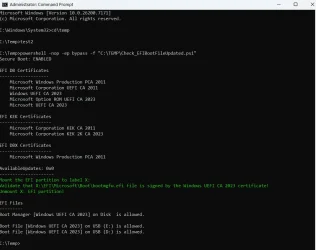
I ran these scripts from MokiChU


They installed all certificates including the Option ROM
I did do a BIOS update on my HP Laptop a week earlier which was dated September 25th 2025. I don't know if this included the 2023 KEK or not, HP aren't exactly forthcoming with their info on what their updates include.
The revoke of the 2011 CA I did myself after updating the boot files on my 2 Install USB's (24H2 and 25H2) with the 2023 signed certificates.
 

My Computer

System One

  • OS
    Windows 11 Pro 25H2
    Computer type
    Laptop
    Manufacturer/Model
    HP 15s-fq5xxx
    CPU
    12th Gen Intel(R) Core(TM) i7-1255U (1.70 GHz
    Memory
    16.0 GB
    Graphics Card(s)
    Intel iRIS Xe
    Screen Resolution
    1920 x 1080
    Hard Drives
    Samsung SSD 512 GB
    Mouse
    Logitech Pebble
    Internet Speed
    500/50 Mb/sec
    Browser
    Chrome
    Antivirus
    Defender
I have an HP Pro 400 ("mini") that I bought this year. It has factory-updated certificates, but the CA 2011 is not in the DBX database. It has an option in the UEFI firmware "Enable MS UEFI CA key", which can be checked or unchecked.

I have it temporarily unchecked, to be able to boot from some Linux-based UFDs. I don´t know if the certificate will be "eventually" included in the DBX by WU or HP.
 

My Computer

System One

  • OS
    Windows 10
I have an HP Pro 400 ("mini") that I bought this year. It has factory-updated certificates, but the CA 2011 is not in the DBX database. It has an option in the UEFI firmware "Enable MS UEFI CA key", which can be checked or unchecked.

I have it temporarily unchecked, to be able to boot from some Linux-based UFDs. I don´t know if the certificate will be "eventually" included in the DBX by WU or HP.

My HP UEFI Firmware does not include that option, it's very spartan. The only options regarding certificates are "delete all certificates" and "load factory defaults" or something along those lines, both options are greyed out until you disable secure boot then "delete all certificates" becomes available and I would assume that if you do that then "load factory defaults" would be available. I haven't been game to try that for obvious reasons! :mad:

As far as booting Linux goes, I have booted both Linux Mint Cinnamon latest version and Ubuntu 24.04 LTS from live USB's with 2011 certificate revoked and Secure boot enabled, no issues.
 

My Computer

System One

  • OS
    Windows 11 Pro 25H2
    Computer type
    Laptop
    Manufacturer/Model
    HP 15s-fq5xxx
    CPU
    12th Gen Intel(R) Core(TM) i7-1255U (1.70 GHz
    Memory
    16.0 GB
    Graphics Card(s)
    Intel iRIS Xe
    Screen Resolution
    1920 x 1080
    Hard Drives
    Samsung SSD 512 GB
    Mouse
    Logitech Pebble
    Internet Speed
    500/50 Mb/sec
    Browser
    Chrome
    Antivirus
    Defender
That's interesting (and obviously I still dont understand enough about the Secure Boot process)...

Did Windows do the migrates automatically for you, or did do you manually do either machine and if so, what was YOUR process?

This is my system after running the MokiChU scripts
 

Attachments

  • Screenshot 2025-11-22 001516.webp
    Screenshot 2025-11-22 001516.webp
    66.1 KB · Views: 6

My Computer

System One

  • OS
    Windows 11 Pro 25H2
    Computer type
    Laptop
    Manufacturer/Model
    HP 15s-fq5xxx
    CPU
    12th Gen Intel(R) Core(TM) i7-1255U (1.70 GHz
    Memory
    16.0 GB
    Graphics Card(s)
    Intel iRIS Xe
    Screen Resolution
    1920 x 1080
    Hard Drives
    Samsung SSD 512 GB
    Mouse
    Logitech Pebble
    Internet Speed
    500/50 Mb/sec
    Browser
    Chrome
    Antivirus
    Defender
Morning all,

My brain is a little foggy this morning, but I thought I read somewhere that nVidia cards may also need a bios update to work with the new Secure Boot keys? My google-fu isn't working well (nor is my searching on here) so if someone could please point me in the correct direction I would appreciate it.

I thought there was a PS script that could check, but I'm not sure.

Thanks much.....
 

My Computer

System One

  • OS
    Windows 11 Pro 25H2 (26200.8457)
    Computer type
    PC/Desktop
    Manufacturer/Model
    Pre-built
    CPU
    AMD Ryzen 7 7800X3D
    Motherboard
    MSI Pro B650-VC WiFi
    Memory
    32gb Team Group (T-Force) DDR5-6000
    Graphics Card(s)
    Zotac nVidia GeForce RTX 4070 SUPER - 12gb
    Sound Card
    Sound BlasterX G6
    Monitor(s) Displays
    Koorui G2421V and ViewSonic VX2453
    Screen Resolution
    P:2560x1440 S:1920x1080
    Hard Drives
    WD Blue SN5000 - 500gb NVME
    WD Blue SN580 - 2TB NVME
    Seagate 4TB HDD - ST4000VN008-2DR166
    Keyboard
    Mountain Everest
    Mouse
    Logitech G502 Hero
    Internet Speed
    T-Mobile Home Internet
    Browser
    Firefox
    Other Info
    QNAP TS-469 Pro NAS
    TP-Link W7200 (2 unit mesh network)
    Elgato Streamdeck
Macium Reflect have also updated their 'Recovery Media' in the latest update - v 10.0.8731 on 19/11/2025.

View attachment 153665
I use the last free version of Macrium Reflect - 8.0.7783. Am I going to have a problem trying to boot from the Rescue Media when these certificates expire? I don't really understand how this whole certificate thing works and what the impacts to me are going to be.
 

My Computers

System One System Two

  • OS
    Windows 11 Pro 25H2
    Computer type
    Laptop
    Manufacturer/Model
    Lenovo T490 (2020 Hardware)
    CPU
    i7-8565U
    Motherboard
    20N20028US
    Memory
    16GB
    Graphics Card(s)
    Intel UHD Graphics 620
    Sound Card
    Realtec Audio
    Monitor(s) Displays
    ASUS VE248
    Screen Resolution
    1920 X 1080
    Hard Drives
    Samsung SSD 970 PRO 512GB NVMe
    Internet Speed
    Frontier fiber 1GB
    Browser
    Chrome, Firefox, Edge
    Antivirus
    Norton 360 Deluxe Plus
    Other Info
    Supported hardware, upgraded from Windows 10 Pro to Windows 11 Pro version 24H2 on 06/01/2025 using the Windows 11 ISO file. Used the enablement package to upgrade to version 25H2 on 10/07/2025. Secure boot enabled. Secure Boot CA 2023 updated.
  • Operating System
    Windows 11 Pro 25H2
    Computer type
    PC/Desktop
    Manufacturer/Model
    Lenovo ThinkCentre M83 (2014 Hardware)
    CPU
    i7-4770 (with SSE4.2, and POPCNT)
    Motherboard
    10AL000GUS
    Memory
    16GB
    Graphics card(s)
    Intel HD Graphics 4600
    Sound Card
    Realtec High Definition Audio
    Monitor(s) Displays
    ASUS VE248
    Screen Resolution
    1920 X 1080
    Hard Drives
    Samsung SSD 860 PRO 1TB SATA
    Internet Speed
    Frontier fiber 1GB
    Browser
    Chrome, Firefox, Edge
    Antivirus
    Norton 360 Deluxe Plus
    Other Info
    Unsupported hardware, upgraded from Windows 10 Pro (TPM 1.2 & unsupported CPU, but does have SSE4.2, and POPCNT) to Windows 11 Pro version 24H2 on 06/15/2025. Added Registry Key HKEY_LOCAL_MACHINE\SYSTEM\Setup\MoSetup – AllowUpgradesWithUnsupportedTPMOrCPU=1 to allow installation using the Windows 11 ISO file. Used the enablement package to upgrade to version 25H2 on 10/08/2025. Secure boot enabled. Secure Boot CA 2023 updated.
I use the last free version of Macrium Reflect - 8.0.7783. Am I going to have a problem trying to boot from the Rescue Media when these certificates expire? I don't really understand how this whole certificate thing works and what the impacts to me are going to be.
Possibly. The latest versiion of MR - v 10.0.8731 - uses the the latest 'Windows PE Component Files' from MS.

However, you could try the update as in message #323 and see if you get the updated option 'Boot Media Signing Certificate' as shown below -

1.webp
I VERY STRONGLY SUGGEST YOU BACK-UP YOUR SYSTEM BEFORE ATTEMPTING THIS
 

My Computer

System One

  • OS
    Windows 11 Pro 25H2 (Build 26200.8524)
    Computer type
    PC/Desktop
    Manufacturer/Model
    Dell Pro Max Tower T2 FCT2250
    CPU
    Intel Core Ultra 9 285 5.6 GHz
    Motherboard
    64-bit operating system, x64-based processor
    Memory
    32.00 GB
    Graphics Card(s)
    Intel Integrated Graphics (128 MB)
    Sound Card
    Realtek Audio
    Monitor(s) Displays
    Dell P2714H Monitor
    Screen Resolution
    1920 x 1080
    Hard Drives
    1 x 512GB M.2 XG10d SED KIOXIA PCIe solid state drive (Internal)
    1 x 2TB Seagate ST2000DM008-2UB102 HDD (Internal)
    1 x 1TB Seagate STGX4000400 External HDD
    1 x 4TB Seagate STGX4000400 External HDD
    1 x 6TB WD Elements AE 2689 External HDD
    PSU
    500 Watts
    Cooling
    Air
    Keyboard
    Microsoft Wired Keyboard 600
    Mouse
    Microsoft USB Basic Optical Mouse v2.0
    Browser
    Firefox
    Antivirus
    Windows Defender + Malwarebytes Premium
    Other Info
    BaseBoard Manufacturer Dell Inc.
    BaseBoard Product 022RY57
    BaseBoard Version A01
Well this is interesting...........

Important: Toggling Secure Boot on or off might erase the updated certificates. If Secure Boot is on, leave it enabled. Turning it off can reset the settings with defaults, which is not desirable.

lol you think? That's kind of stupid........

At least my org is ready, so shouldn't need to do anything.
 

My Computers

System One System Two

  • OS
    Windows 11 Pro
    Computer type
    PC/Desktop
    Manufacturer/Model
    Custom Built
    CPU
    Ryzen 7 5700 X3D
    Motherboard
    MSI MPG B550 GAMING PLUS
    Memory
    64 GB DDR4 3600mhz Gskill Ripjaws V
    Graphics Card(s)
    RTX 4070 Super , 12GB VRAM Asus EVO Overclock
    Monitor(s) Displays
    Gigabyte M27Q (rev. 2.0) 2560 x 1440 @ 170hz HDR
    Hard Drives
    2TB Samsung nvme ssd
    4TB Western Digital nvme ssd
    PSU
    CORSAIR RMx SHIFT Series™ RM750x 80 PLUS Gold Fully Modular ATX Power Supply
    Case
    CORSAIR 3500X ARGB Mid-Tower ATX PC Case – Black
    Cooling
    ID-COOLING FROSTFLOW X 240 CPU Water Cooler
    Keyboard
    Logitech G213
    Mouse
    Logitech G203
    Internet Speed
    1.2gbps Fiber 😎
  • Operating System
    Chrome OS
    Computer type
    Laptop
    Manufacturer/Model
    HP Chromebook
    CPU
    Intel Pentium Quad Core
    Memory
    4GB LPDDR4
    Monitor(s) Displays
    14 Inch HD SVA anti glare micro edge display
    Hard Drives
    64 GB emmc
I ran Mosby and installed and updated all certificates, Revoked the 2011 Windows Cert, and all is well.
 

My Computers

System One System Two

  • OS
    Win 11 Pro 25H2, Build 26200.8524
    Computer type
    PC/Desktop
    Manufacturer/Model
    Home Brew
    CPU
    Intel Core i5 14500
    Motherboard
    Gigabyte B760M G P WIFI
    Memory
    64GB DDR4
    Graphics Card(s)
    GeForce RTX 4060
    Sound Card
    Chipset Realtek
    Monitor(s) Displays
    LG 45" Ultragear, Acer 24" 1080p
    Screen Resolution
    5120x1440, 1920x1080
    Hard Drives
    Crucial P310 2TB 2280 PCIe Gen4 3D NAND NVMe M.2 SSD (O/S)
    Silicon Power 2TB US75 NVMe PCIe Gen4 M.2 2280 SSD (backup)
    Crucial BX500 2TB 3D NAND (2nd backup)
    Seagate 4TB Ironwolf, rotating HDD archive files
    External off-line backup Drives: 2 NVMe 4TB drives in external enclosures
    PSU
    Thermaltake Toughpower GF3 750W
    Case
    LIAN LI LANCOOL 216 E-ATX PC Case
    Cooling
    Lots of fans!
    Keyboard
    Microsoft Comfort Curve 2000
    Mouse
    Logitech G305
    Internet Speed
    Verizon FiOS 1GB
    Browser
    Firefox
    Antivirus
    Malware Bytes & Windows Defender Security
  • Operating System
    Win 11 Pro 25H2, Build 26200.8524
    Computer type
    PC/Desktop
    Manufacturer/Model
    Home Brew
    CPU
    Intel Core i5 14400
    Motherboard
    Gigabyte B760M DS3H AX
    Memory
    32GB DDR5
    Graphics card(s)
    Intel 700 Embedded GPU
    Sound Card
    Realtek Embedded
    Monitor(s) Displays
    27" HP 1080p
    Screen Resolution
    1920x1080
    Hard Drives
    Crucial P310 2TB 2280 PCIe Gen4 eD NAND PCIe SSD
    Samsung EVO 990 2TB NVMe Gen4 SSD
    Samsung 2TB SATA SSD
    PSU
    Thermaltake Smart BM3 650W
    Case
    Okinos Micro ATX Case
    Cooling
    Fans
    Keyboard
    Microsoft Comfort Curve 2000
    Mouse
    Logitech G305
    Internet Speed
    Verizon FiOS 1GB
    Browser
    Firefox
    Antivirus
    Malware Bytes & Windows Defender Security

Latest Support Threads

Back
Top Bottom