Personalization Add or Remove Gallery in File Explorer Navigation Pane in Windows 11


Gallery_banner.png

This tutorial will show you how to add or remove Gallery in the navigation pane of File Explorer for your account or all users in Windows 11.

Starting with Windows 11 version 22H2 KB5030310 Build 22621.2361, Microsoft is introducing Gallery, a new feature in File Explorer designed to make it easy to access your photo collection. The content in Gallery is the same as what you see in the All Photos view in the Photos app. Your most recently taken photos appear at the top of Gallery. This includes photos from your phone if you have OneDrive Camera Roll Backup set up.

Gallery displays the contents of the Pictures library. When you include a folder, the files appear in the Gallery but continue to be stored in their original locations.

You can choose which folders are shown in Gallery through the Collection dropdown. You can also add subfolders of existing sources to filter to a subset of your content, such as desktop backgrounds and SD card/camera imports.

Gallery also works from the file picking dialog, bringing that same ease of use to situations such as inserting attachments, building a PowerPoint deck, or crafting social media posts.

A new Add Phone Photos button in the Command Bar in File Explorer Gallery will help with setting up your PC to be ready to show photos from your phone via OneDrive in Gallery. Clicking this button will open a URL with a OneDrive QR code that you can scan with your phone to get started.

If you do not want Gallery in the navigation pane of File Explorer, you can remove it.

Indexing must be turned on to use File Explorer Gallery.


Contents

  • Option One: Add or Remove Gallery in File Explorer Navigation Pane for Current User
  • Option Two: Add or Remove Gallery in File Explorer Navigation Pane for All Users


EXAMPLE: Gallery in navigation pane of File Explorer

Gallery_in_File_Explorer_navigation_pane.png


Option One

Add or Remove Gallery in File Explorer Navigation Pane for Current User


If you turn on Show all folders in the navigation pane when using this option, Gallery will always show in the navigation pane.


1 Do step 2 (add) or step 3 (remove) below for what you want.

2 Add Gallery to Navigation Pane in File Explorer for Current User

This is the default setting.


A) Click/tap on the Download button below to download the file below, and go to step 4 below.​

Add_Gallery_to_navigation_pane_in_File_Explorer_for_current_user.reg


(Contents of REG file for reference)
Code:
Windows Registry Editor Version 5.00

[HKEY_CURRENT_USER\Software\Classes\CLSID\{e88865ea-0e1c-4e20-9aa6-edcd0212c87c}]
"System.IsPinnedToNameSpaceTree"=dword:00000001

3 Remove Gallery from Navigation Pane in File Explorer for Current User

A) Click/tap on the Download button below to download the file below, and go to step 4 below.​

Remove_Gallery_from_navigation_pane_in_File_Explorer_for_current_user.reg


(Contents of REG file for reference)
Code:
Windows Registry Editor Version 5.00

[HKEY_CURRENT_USER\Software\Classes\CLSID\{e88865ea-0e1c-4e20-9aa6-edcd0212c87c}]
"System.IsPinnedToNameSpaceTree"=dword:00000000

4 Save the .reg file to your desktop.

5 If you have Smart App Control turned on, you will need to unblock the downloaded REG file.

6 Double click/tap on the downloaded .reg file to merge it.

7 When prompted, click/tap on Run, Yes (UAC), Yes, and OK to approve the merge.

8 If File Explorer is currently open, then close and reopen File Explorer to apply.

9 You can now delete the downloaded .reg file if you like.


Option Two

Add or Remove Gallery in File Explorer Navigation Pane for All Users


You must be signed in as an administrator to use this option.

This option will completely remove Gallery from the File Explorer navigation pane even if Show all folders is turned on.


1 Do step 2 (add) or step 3 (remove) below for what you want.


 2. Allow Add Gallery to Navigation Pane in File Explorer for All Users

This is the default setting.


A) Click/tap on the Download button below to download the file below, and go to step 4 below.​

Add_Gallery_to_navigation_pane_in_File_Explorer_for_all_users.reg


(Contents of REG file for reference)
Code:
Windows Registry Editor Version 5.00

[HKEY_LOCAL_MACHINE\SOFTWARE\Microsoft\Windows\CurrentVersion\Explorer\Desktop\NameSpace\{e88865ea-0e1c-4e20-9aa6-edcd0212c87c}]
@="Gallery"
"HiddenByDefault"=-

[HKEY_LOCAL_MACHINE\SOFTWARE\WOW6432Node\Microsoft\Windows\CurrentVersion\Explorer\Desktop\NameSpace\{e88865ea-0e1c-4e20-9aa6-edcd0212c87c}]
@="{e88865ea-0e1c-4e20-9aa6-edcd0212c87c}"

[HKEY_LOCAL_MACHINE\SOFTWARE\Microsoft\Windows\CurrentVersion\Policies\NonEnum]
"{e88865ea-0e1c-4e20-9aa6-edcd0212c87c}"=-


 3. Remove Gallery from Navigation Pane in File Explorer for All Users

A) Click/tap on the Download button below to download the file below, and go to step 4 below.​

Remove_Gallery_from_navigation_pane_in_File_Explorer_for_all_users.reg


(Contents of REG file for reference)
Code:
Windows Registry Editor Version 5.00

[HKEY_LOCAL_MACHINE\SOFTWARE\Microsoft\Windows\CurrentVersion\Explorer\Desktop\NameSpace\{e88865ea-0e1c-4e20-9aa6-edcd0212c87c}]
@="Gallery"
"HiddenByDefault"=dword:00000001

[-HKEY_LOCAL_MACHINE\SOFTWARE\WOW6432Node\Microsoft\Windows\CurrentVersion\Explorer\Desktop\NameSpace\{e88865ea-0e1c-4e20-9aa6-edcd0212c87c}]

[HKEY_LOCAL_MACHINE\SOFTWARE\Microsoft\Windows\CurrentVersion\Policies\NonEnum]
"{e88865ea-0e1c-4e20-9aa6-edcd0212c87c}"=dword:00000001

4 Save the .reg file to your desktop.

5 If you have Smart App Control turned on, you will need to unblock the downloaded REG file.

6 Double click/tap on the downloaded .reg file to merge it.

7 When prompted, click/tap on Run, Yes (UAC), Yes, and OK to approve the merge.

8 Either restart explorer process, sign out and sign in, or restart the computer to apply.

9 You can now delete the downloaded .reg file if you like.


Attachments

Last edited:
I just tested it and it seems to work without the need to change the second registry key:

Powershell:
[HKEY_LOCAL_MACHINE\SOFTWARE\Microsoft\Windows\CurrentVersion\Policies\NonEnum]
"{e88865ea-0e1c-4e20-9aa6-edcd0212c87c}"=dword:00000001

My question would be: is it really necessary? it's effect require a computer restart anyway and what it does is like another way of preventing the first key to be applied. To be more clear, if you only use HiddenByDefault after you executed the line above, it would prevent the Gallery to appear again, until you remove the second key, and restart your computer.

Hello Boggy, and welcome to the forum. :alien:

A restart is usually not necessary for any of the options in this tutorial to apply them.

That line is redundant, but it's there to help make sure.
 

My Computers

System One System Two

  • OS
    Windows 11 Pro for Workstations
    Computer type
    PC/Desktop
    Manufacturer/Model
    Custom self build
    CPU
    Intel i7-8700K 5 GHz
    Motherboard
    ASUS ROG Maximus XI Formula Z390
    Memory
    64 GB (4x16GB) G.SKILL TridentZ RGB DDR4 3600 MHz (F4-3600C18D-32GTZR)
    Graphics Card(s)
    ASUS ROG-STRIX-GTX1080TI-O11G-GAMING (11GB GDDR5X)
    Sound Card
    Integrated Digital Audio (S/PDIF)
    Monitor(s) Displays
    2 x Samsung Odyssey G75 27"
    Screen Resolution
    2560x1440
    Hard Drives
    1TB Samsung 990 PRO M.2,
    4TB Samsung 990 PRO M.2,
    TerraMaster F8 SSD Plus NAS
    PSU
    Seasonic Prime Titanium 850W
    Case
    Thermaltake Core P3 wall mounted
    Cooling
    Corsair Hydro H115i
    Keyboard
    Amazon Basics Wired Full Keyboard MD005
    Mouse
    Logitech MX Master 4
    Internet Speed
    2 Gbps Download and 100 Mbps Upload
    Browser
    Chrome and Edge
    Antivirus
    Microsoft Defender
    Other Info
    Logitech Z625 speaker system,
    Logitech BRIO 4K Pro webcam,
    HP Color LaserJet Pro MFP M477fdn,
    CyberPower CP1500PFCLCD
    Galaxy S23 Plus phone
  • Operating System
    Windows 11 Pro
    Computer type
    Laptop
    Manufacturer/Model
    Surface Laptop 7 Copilot+ PC
    CPU
    Snapdragon X Elite (12 core) 3.42 GHz
    Memory
    16 GB LPDDR5x-7467 MHz
    Monitor(s) Displays
    15" HDR
    Screen Resolution
    2496 x 1664
    Hard Drives
    1 TB SSD
    Internet Speed
    Wi-Fi 7 and Bluetooth 5.4
    Browser
    Chrome and Edge
    Antivirus
    Microsoft Defender
Hello Boggy, and welcome to the forum. :alien:

A restart is usually not necessary for any of the options in this tutorial to apply them.

That line is redundant, but it's there to help make sure.
Thank you for answering. The second line requires a restart to take effect, and it's efect is that the first line has no effect until the second allows it.
 

My Computer

System One

  • OS
    Windows 11
    Computer type
    PC/Desktop
Thank you for answering. The second line requires a restart to take effect, and it's efect is that the first line has no effect until the second allows it.

Restarting the explorer process is usually enough to apply that line without having to restart the computer.

The first line works immediately, and the second line is just to enforce and make sure. The add REG file does remove it.
 

My Computers

System One System Two

  • OS
    Windows 11 Pro for Workstations
    Computer type
    PC/Desktop
    Manufacturer/Model
    Custom self build
    CPU
    Intel i7-8700K 5 GHz
    Motherboard
    ASUS ROG Maximus XI Formula Z390
    Memory
    64 GB (4x16GB) G.SKILL TridentZ RGB DDR4 3600 MHz (F4-3600C18D-32GTZR)
    Graphics Card(s)
    ASUS ROG-STRIX-GTX1080TI-O11G-GAMING (11GB GDDR5X)
    Sound Card
    Integrated Digital Audio (S/PDIF)
    Monitor(s) Displays
    2 x Samsung Odyssey G75 27"
    Screen Resolution
    2560x1440
    Hard Drives
    1TB Samsung 990 PRO M.2,
    4TB Samsung 990 PRO M.2,
    TerraMaster F8 SSD Plus NAS
    PSU
    Seasonic Prime Titanium 850W
    Case
    Thermaltake Core P3 wall mounted
    Cooling
    Corsair Hydro H115i
    Keyboard
    Amazon Basics Wired Full Keyboard MD005
    Mouse
    Logitech MX Master 4
    Internet Speed
    2 Gbps Download and 100 Mbps Upload
    Browser
    Chrome and Edge
    Antivirus
    Microsoft Defender
    Other Info
    Logitech Z625 speaker system,
    Logitech BRIO 4K Pro webcam,
    HP Color LaserJet Pro MFP M477fdn,
    CyberPower CP1500PFCLCD
    Galaxy S23 Plus phone
  • Operating System
    Windows 11 Pro
    Computer type
    Laptop
    Manufacturer/Model
    Surface Laptop 7 Copilot+ PC
    CPU
    Snapdragon X Elite (12 core) 3.42 GHz
    Memory
    16 GB LPDDR5x-7467 MHz
    Monitor(s) Displays
    15" HDR
    Screen Resolution
    2496 x 1664
    Hard Drives
    1 TB SSD
    Internet Speed
    Wi-Fi 7 and Bluetooth 5.4
    Browser
    Chrome and Edge
    Antivirus
    Microsoft Defender
Do you know how to remove Gallery from here?

SS_20250314_18102277.webp
 

My Computer

System One

  • OS
    Windows 11 25H2 Home Single Language (26200.8037)
    Computer type
    Laptop
    Manufacturer/Model
    LENOVO IdeaPad 5 15ITL05
    CPU
    Intel Core i3-1115G4
    Motherboard
    There is no such a God, I only know mother-Earth
    Memory
    8GB
    Graphics Card(s)
    on-board
    Sound Card
    on-board
    Monitor(s) Displays
    (s) is too ambitious for me
    Screen Resolution
    1920*1080
    Hard Drives
    256GB (SSD)
    PSU
    I was very young when I last saw a PSU
    Case
    ...
    Cooling
    My coldness is enough to cool the computer
    Keyboard
    A broken and very clean keyboard
    Mouse
    Rat
    Internet Speed
    Slowest internet connection in Europe
    Browser
    ChromePortable / FirefoxPortable / TorBrowser
    Antivirus
    G-Virus
    Other Info
    I can simply say that I took the red pill and I am not happy with it.

My Computers

System One System Two

  • OS
    Windows 11 Pro for Workstations
    Computer type
    PC/Desktop
    Manufacturer/Model
    Custom self build
    CPU
    Intel i7-8700K 5 GHz
    Motherboard
    ASUS ROG Maximus XI Formula Z390
    Memory
    64 GB (4x16GB) G.SKILL TridentZ RGB DDR4 3600 MHz (F4-3600C18D-32GTZR)
    Graphics Card(s)
    ASUS ROG-STRIX-GTX1080TI-O11G-GAMING (11GB GDDR5X)
    Sound Card
    Integrated Digital Audio (S/PDIF)
    Monitor(s) Displays
    2 x Samsung Odyssey G75 27"
    Screen Resolution
    2560x1440
    Hard Drives
    1TB Samsung 990 PRO M.2,
    4TB Samsung 990 PRO M.2,
    TerraMaster F8 SSD Plus NAS
    PSU
    Seasonic Prime Titanium 850W
    Case
    Thermaltake Core P3 wall mounted
    Cooling
    Corsair Hydro H115i
    Keyboard
    Amazon Basics Wired Full Keyboard MD005
    Mouse
    Logitech MX Master 4
    Internet Speed
    2 Gbps Download and 100 Mbps Upload
    Browser
    Chrome and Edge
    Antivirus
    Microsoft Defender
    Other Info
    Logitech Z625 speaker system,
    Logitech BRIO 4K Pro webcam,
    HP Color LaserJet Pro MFP M477fdn,
    CyberPower CP1500PFCLCD
    Galaxy S23 Plus phone
  • Operating System
    Windows 11 Pro
    Computer type
    Laptop
    Manufacturer/Model
    Surface Laptop 7 Copilot+ PC
    CPU
    Snapdragon X Elite (12 core) 3.42 GHz
    Memory
    16 GB LPDDR5x-7467 MHz
    Monitor(s) Displays
    15" HDR
    Screen Resolution
    2496 x 1664
    Hard Drives
    1 TB SSD
    Internet Speed
    Wi-Fi 7 and Bluetooth 5.4
    Browser
    Chrome and Edge
    Antivirus
    Microsoft Defender
Hello, :alien:

Either option 1 or 2 in this tutorial should remove "Gallery" from the "Save as" dialog for Chrome. At least it did for me after testing.

Hello Brink, option 1 is not works here for save as dialog for me but option 2 is working well. Thanks for the answer.
 

My Computer

System One

  • OS
    Windows 11 25H2 Home Single Language (26200.8037)
    Computer type
    Laptop
    Manufacturer/Model
    LENOVO IdeaPad 5 15ITL05
    CPU
    Intel Core i3-1115G4
    Motherboard
    There is no such a God, I only know mother-Earth
    Memory
    8GB
    Graphics Card(s)
    on-board
    Sound Card
    on-board
    Monitor(s) Displays
    (s) is too ambitious for me
    Screen Resolution
    1920*1080
    Hard Drives
    256GB (SSD)
    PSU
    I was very young when I last saw a PSU
    Case
    ...
    Cooling
    My coldness is enough to cool the computer
    Keyboard
    A broken and very clean keyboard
    Mouse
    Rat
    Internet Speed
    Slowest internet connection in Europe
    Browser
    ChromePortable / FirefoxPortable / TorBrowser
    Antivirus
    G-Virus
    Other Info
    I can simply say that I took the red pill and I am not happy with it.
Hello Brink, option 1 is not works here for save as dialog for me but option 2 is working well. Thanks for the answer.

Great news. :shawn:
 

My Computers

System One System Two

  • OS
    Windows 11 Pro for Workstations
    Computer type
    PC/Desktop
    Manufacturer/Model
    Custom self build
    CPU
    Intel i7-8700K 5 GHz
    Motherboard
    ASUS ROG Maximus XI Formula Z390
    Memory
    64 GB (4x16GB) G.SKILL TridentZ RGB DDR4 3600 MHz (F4-3600C18D-32GTZR)
    Graphics Card(s)
    ASUS ROG-STRIX-GTX1080TI-O11G-GAMING (11GB GDDR5X)
    Sound Card
    Integrated Digital Audio (S/PDIF)
    Monitor(s) Displays
    2 x Samsung Odyssey G75 27"
    Screen Resolution
    2560x1440
    Hard Drives
    1TB Samsung 990 PRO M.2,
    4TB Samsung 990 PRO M.2,
    TerraMaster F8 SSD Plus NAS
    PSU
    Seasonic Prime Titanium 850W
    Case
    Thermaltake Core P3 wall mounted
    Cooling
    Corsair Hydro H115i
    Keyboard
    Amazon Basics Wired Full Keyboard MD005
    Mouse
    Logitech MX Master 4
    Internet Speed
    2 Gbps Download and 100 Mbps Upload
    Browser
    Chrome and Edge
    Antivirus
    Microsoft Defender
    Other Info
    Logitech Z625 speaker system,
    Logitech BRIO 4K Pro webcam,
    HP Color LaserJet Pro MFP M477fdn,
    CyberPower CP1500PFCLCD
    Galaxy S23 Plus phone
  • Operating System
    Windows 11 Pro
    Computer type
    Laptop
    Manufacturer/Model
    Surface Laptop 7 Copilot+ PC
    CPU
    Snapdragon X Elite (12 core) 3.42 GHz
    Memory
    16 GB LPDDR5x-7467 MHz
    Monitor(s) Displays
    15" HDR
    Screen Resolution
    2496 x 1664
    Hard Drives
    1 TB SSD
    Internet Speed
    Wi-Fi 7 and Bluetooth 5.4
    Browser
    Chrome and Edge
    Antivirus
    Microsoft Defender
any way to remove Gallery when "Show all folders" is on...I mean, it's not a folder and I don't want it.
 

My Computer

System One

  • OS
    11
    Computer type
    PC/Desktop
    Internet Speed
    fast
    Browser
    firefox
    Antivirus
    avast
nevermind, here is the key

[-HKEY_LOCAL_MACHINE\SOFTWARE\Microsoft\Windows\CurrentVersion\Explorer\Desktop\NameSpace\{e88865ea-0e1c-4e20-9aa6-edcd0212c87c}]
 

My Computer

System One

  • OS
    11
    Computer type
    PC/Desktop
    Internet Speed
    fast
    Browser
    firefox
    Antivirus
    avast
nevermind, here is the key

[-HKEY_LOCAL_MACHINE\SOFTWARE\Microsoft\Windows\CurrentVersion\Explorer\Desktop\NameSpace\{e88865ea-0e1c-4e20-9aa6-edcd0212c87c}]

Yep, that'll be option two. :alien:
 

My Computers

System One System Two

  • OS
    Windows 11 Pro for Workstations
    Computer type
    PC/Desktop
    Manufacturer/Model
    Custom self build
    CPU
    Intel i7-8700K 5 GHz
    Motherboard
    ASUS ROG Maximus XI Formula Z390
    Memory
    64 GB (4x16GB) G.SKILL TridentZ RGB DDR4 3600 MHz (F4-3600C18D-32GTZR)
    Graphics Card(s)
    ASUS ROG-STRIX-GTX1080TI-O11G-GAMING (11GB GDDR5X)
    Sound Card
    Integrated Digital Audio (S/PDIF)
    Monitor(s) Displays
    2 x Samsung Odyssey G75 27"
    Screen Resolution
    2560x1440
    Hard Drives
    1TB Samsung 990 PRO M.2,
    4TB Samsung 990 PRO M.2,
    TerraMaster F8 SSD Plus NAS
    PSU
    Seasonic Prime Titanium 850W
    Case
    Thermaltake Core P3 wall mounted
    Cooling
    Corsair Hydro H115i
    Keyboard
    Amazon Basics Wired Full Keyboard MD005
    Mouse
    Logitech MX Master 4
    Internet Speed
    2 Gbps Download and 100 Mbps Upload
    Browser
    Chrome and Edge
    Antivirus
    Microsoft Defender
    Other Info
    Logitech Z625 speaker system,
    Logitech BRIO 4K Pro webcam,
    HP Color LaserJet Pro MFP M477fdn,
    CyberPower CP1500PFCLCD
    Galaxy S23 Plus phone
  • Operating System
    Windows 11 Pro
    Computer type
    Laptop
    Manufacturer/Model
    Surface Laptop 7 Copilot+ PC
    CPU
    Snapdragon X Elite (12 core) 3.42 GHz
    Memory
    16 GB LPDDR5x-7467 MHz
    Monitor(s) Displays
    15" HDR
    Screen Resolution
    2496 x 1664
    Hard Drives
    1 TB SSD
    Internet Speed
    Wi-Fi 7 and Bluetooth 5.4
    Browser
    Chrome and Edge
    Antivirus
    Microsoft Defender
Yep, that'll be option two. :alien:
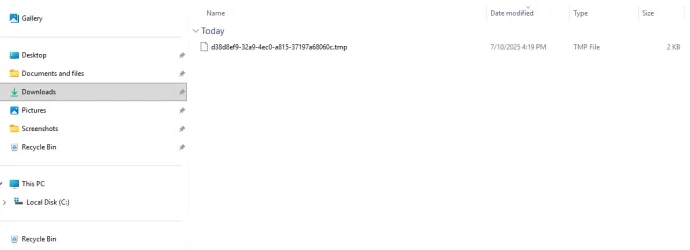
Every time I go to option 3, Remove Gallery from Navigation Pane in File Explorer for All Users, and try to download the Registry file, Windows 11 saves it as a .tmp file. How can I get around that? I would work with RegEdit directly, but I'm not sure if I would add the code (and where?) or if I would use it to replace something, etc. I'm still new to working with RegEdit so I want to be sure I know exactly what I'm doing before I do it.
-------------------------------

[HKEY_LOCAL_MACHINE\SOFTWARE\Microsoft\Windows\CurrentVersion\Explorer\Desktop\NameSpace\{e88865ea-0e1c-4e20-9aa6-edcd0212c87c}]<br>@="Gallery"<br>"HiddenByDefault"=dword:00000001<br><br>

[HKEY_LOCAL_MACHINE\SOFTWARE\Microsoft\Windows\CurrentVersion\Policies\NonEnum]<br>"{e88865ea-0e1c-4e20-9aa6-edcd0212c87c}"=dword:00000001
 

Attachments

  • Screenshot 2025-10-07 162021.webp
    Screenshot 2025-10-07 162021.webp
    13.6 KB · Views: 30

My Computer

System One

  • OS
    Windows 11 Pro - version 24H2
    Computer type
    PC/Desktop
    CPU
    AMD Ryzen 5 7600X 6 Core AM5 5.3GHz CPU
    Motherboard
    2024 MSI MAG B650 GAMING PLUS WIFI
    Memory
    Silicon Power XPOWER Zenith 32GB (16GBx2) CL30,1.35V UDIMM 6000MHz DDR5 RAM
    Graphics Card(s)
    MSI GeForce RTX 4060 Ventus 2X Black 8G OC Graphics Card
    Monitor(s) Displays
    Asus ROG Strix XG32WCS - 32in HDR VA 180Hz USB Type-C FreeSync Curved Gaming Monitor
    Screen Resolution
    2560 x 1440
    Hard Drives
    1) Silicon Power 1TB P34A60 Gen3x4 TLC R/W up to 2,200/1,600 MB/s PCIe M.2 NVMe SSD

    2) Crucial 1TB E100 CT1000E100SSD8 Gen4 M.2 NVMe SSD
    PSU
    MSI 750W MAG A750GL 80+ Gold PCIe 5 ATX 3.0 Modular Power Supply
    Case
    SilverStone Fara R1 Pro V2 Tempered Glass ATX Case - Black
    Cooling
    Thermalright Peerless Assassin 120 SE ARGB Dual Loop CPU Cooler, 120mm Fan
    Antivirus
    Microsoft Defender
Every time I go to option 3, Remove Gallery from Navigation Pane in File Explorer for All Users, and try to download the Registry file, Windows 11 saves it as a .tmp file. How can I get around that? I would work with RegEdit directly, but I'm not sure if I would add the code (and where?) or if I would use it to replace something, etc. I'm still new to working with RegEdit so I want to be sure I know exactly what I'm doing before I do it.

As a test, right click on the Download button for the REG file, click on the "Save as link" type option in the context menu, and see if you are able to save it as a REG file to your desktop.
 

My Computers

System One System Two

  • OS
    Windows 11 Pro for Workstations
    Computer type
    PC/Desktop
    Manufacturer/Model
    Custom self build
    CPU
    Intel i7-8700K 5 GHz
    Motherboard
    ASUS ROG Maximus XI Formula Z390
    Memory
    64 GB (4x16GB) G.SKILL TridentZ RGB DDR4 3600 MHz (F4-3600C18D-32GTZR)
    Graphics Card(s)
    ASUS ROG-STRIX-GTX1080TI-O11G-GAMING (11GB GDDR5X)
    Sound Card
    Integrated Digital Audio (S/PDIF)
    Monitor(s) Displays
    2 x Samsung Odyssey G75 27"
    Screen Resolution
    2560x1440
    Hard Drives
    1TB Samsung 990 PRO M.2,
    4TB Samsung 990 PRO M.2,
    TerraMaster F8 SSD Plus NAS
    PSU
    Seasonic Prime Titanium 850W
    Case
    Thermaltake Core P3 wall mounted
    Cooling
    Corsair Hydro H115i
    Keyboard
    Amazon Basics Wired Full Keyboard MD005
    Mouse
    Logitech MX Master 4
    Internet Speed
    2 Gbps Download and 100 Mbps Upload
    Browser
    Chrome and Edge
    Antivirus
    Microsoft Defender
    Other Info
    Logitech Z625 speaker system,
    Logitech BRIO 4K Pro webcam,
    HP Color LaserJet Pro MFP M477fdn,
    CyberPower CP1500PFCLCD
    Galaxy S23 Plus phone
  • Operating System
    Windows 11 Pro
    Computer type
    Laptop
    Manufacturer/Model
    Surface Laptop 7 Copilot+ PC
    CPU
    Snapdragon X Elite (12 core) 3.42 GHz
    Memory
    16 GB LPDDR5x-7467 MHz
    Monitor(s) Displays
    15" HDR
    Screen Resolution
    2496 x 1664
    Hard Drives
    1 TB SSD
    Internet Speed
    Wi-Fi 7 and Bluetooth 5.4
    Browser
    Chrome and Edge
    Antivirus
    Microsoft Defender
As a test, right click on the Download button for the REG file, click on the "Save as link" type option in the context menu, and see if you are able to save it as a REG file to your desktop.
At first, saving the file to the desktop and then clicking on the link only brought up the error message that Smart App Control was blocking it. But when I opened RegEdit, I found I could use the Import function! RegEdit said it was now part of the Registry.

Thanks for your help! (y)(y)
 

My Computer

System One

  • OS
    Windows 11 Pro - version 24H2
    Computer type
    PC/Desktop
    CPU
    AMD Ryzen 5 7600X 6 Core AM5 5.3GHz CPU
    Motherboard
    2024 MSI MAG B650 GAMING PLUS WIFI
    Memory
    Silicon Power XPOWER Zenith 32GB (16GBx2) CL30,1.35V UDIMM 6000MHz DDR5 RAM
    Graphics Card(s)
    MSI GeForce RTX 4060 Ventus 2X Black 8G OC Graphics Card
    Monitor(s) Displays
    Asus ROG Strix XG32WCS - 32in HDR VA 180Hz USB Type-C FreeSync Curved Gaming Monitor
    Screen Resolution
    2560 x 1440
    Hard Drives
    1) Silicon Power 1TB P34A60 Gen3x4 TLC R/W up to 2,200/1,600 MB/s PCIe M.2 NVMe SSD

    2) Crucial 1TB E100 CT1000E100SSD8 Gen4 M.2 NVMe SSD
    PSU
    MSI 750W MAG A750GL 80+ Gold PCIe 5 ATX 3.0 Modular Power Supply
    Case
    SilverStone Fara R1 Pro V2 Tempered Glass ATX Case - Black
    Cooling
    Thermalright Peerless Assassin 120 SE ARGB Dual Loop CPU Cooler, 120mm Fan
    Antivirus
    Microsoft Defender
At first, saving the file to the desktop and then clicking on the link only brought up the error message that Smart App Control was blocking it. But when I opened RegEdit, I found I could use the Import function! RegEdit said it was now part of the Registry.

Thanks for your help! (y)(y)

Glad you worked around it. :shawn:
 

My Computers

System One System Two

  • OS
    Windows 11 Pro for Workstations
    Computer type
    PC/Desktop
    Manufacturer/Model
    Custom self build
    CPU
    Intel i7-8700K 5 GHz
    Motherboard
    ASUS ROG Maximus XI Formula Z390
    Memory
    64 GB (4x16GB) G.SKILL TridentZ RGB DDR4 3600 MHz (F4-3600C18D-32GTZR)
    Graphics Card(s)
    ASUS ROG-STRIX-GTX1080TI-O11G-GAMING (11GB GDDR5X)
    Sound Card
    Integrated Digital Audio (S/PDIF)
    Monitor(s) Displays
    2 x Samsung Odyssey G75 27"
    Screen Resolution
    2560x1440
    Hard Drives
    1TB Samsung 990 PRO M.2,
    4TB Samsung 990 PRO M.2,
    TerraMaster F8 SSD Plus NAS
    PSU
    Seasonic Prime Titanium 850W
    Case
    Thermaltake Core P3 wall mounted
    Cooling
    Corsair Hydro H115i
    Keyboard
    Amazon Basics Wired Full Keyboard MD005
    Mouse
    Logitech MX Master 4
    Internet Speed
    2 Gbps Download and 100 Mbps Upload
    Browser
    Chrome and Edge
    Antivirus
    Microsoft Defender
    Other Info
    Logitech Z625 speaker system,
    Logitech BRIO 4K Pro webcam,
    HP Color LaserJet Pro MFP M477fdn,
    CyberPower CP1500PFCLCD
    Galaxy S23 Plus phone
  • Operating System
    Windows 11 Pro
    Computer type
    Laptop
    Manufacturer/Model
    Surface Laptop 7 Copilot+ PC
    CPU
    Snapdragon X Elite (12 core) 3.42 GHz
    Memory
    16 GB LPDDR5x-7467 MHz
    Monitor(s) Displays
    15" HDR
    Screen Resolution
    2496 x 1664
    Hard Drives
    1 TB SSD
    Internet Speed
    Wi-Fi 7 and Bluetooth 5.4
    Browser
    Chrome and Edge
    Antivirus
    Microsoft Defender
I was able to get the Current User disabled / enabled by doing a version of Option 2 except replacing the registry path, like so ...

[HKEY_CURRENT_USER\Software\Microsoft\Windows\CurrentVersion\Explorer\Desktop\NameSpace\{e88865ea-0e1c-4e20-9aa6-edcd0212c87c}]
@="Gallery"
"HiddenByDefault"=dword:00000001

[HKEY_CURRENT_USER\Software\Microsoft\Windows\CurrentVersion\Policies\NonEnum]
"{e88865ea-0e1c-4e20-9aa6-edcd0212c87c}"=dword:00000001

The original Option 1 did not work for me.

I am on Build 22621.4317
 

My Computer

System One

  • OS
    Windows 11 Pro 22H2 OS build 22621.4317
    Computer type
    PC/Desktop
    CPU
    Intel(R) Core(TM) i7-8700K CPU @ 3.70GHz 3.70 GHz
    Memory
    32.0 GB
    Graphics Card(s)
    Radeon (TM) RX 480 Series (8GB)
    Monitor(s) Displays
    2 x Dell S3222HN
    Screen Resolution
    1920x1080
    Hard Drives
    Samsung SSD 840 EVO 120GB (Games)
    Samsung SSD 840 EVO 500GB (OS)
    ST6000DX000-1H217Z 6 TB (Data)
    ATAPI iHBS112 2 (DVD/CD-ROM drive)
    Keyboard
    Steelseries Apex M400
    Mouse
    Steelseries Rival 300 Black
    Internet Speed
    AT&T Fiber 1 GB (6 ms ping, 937 Mbps down, 938 Mbps up)
I'm not sure if it's been mentioned but I spent a lot of time looking, unsuccessfully for it, so I thought I'd post it here where others may have use of it.
Removing the Gallery from Explorer does NOT remove it from all places, as it is still there in the Save dialogs.

I found a way to Remove Gallery from the Save Dialog, Remove Gallery from the 32bit dialogs, Remove Gallery from the Common Items dialogs, whatever you want to call it.

1. Navigate to HKEY_LOCAL_MACHINE\SOFTWARE\WOW6432Node\Microsoft\Windows\CurrentVersion\Explorer\Desktop\NameSpace\
2. Delete the Key: {e88865ea-0e1c-4e20-9aa6-edcd0212c87c}
3. That's it
4. It's gone
 

My Computer

System One

  • OS
    Windows 11, Windows 10, Proxmox, Ubuntu, Debian 12, Debian 11, PopOS
    Computer type
    PC/Desktop
    Manufacturer/Model
    Dell
Thanks for this Brink. It worked fine for me (26200.7171).

Bo
 

My Computer

System One

  • OS
    Windows11
    Computer type
    PC/Desktop
    Manufacturer/Model
    HP
    Memory
    16GB
    Keyboard
    HP 310
    Mouse
    HP
    Browser
    Firefox

My Computers

System One System Two

  • OS
    Windows 11 Pro for Workstations
    Computer type
    PC/Desktop
    Manufacturer/Model
    Custom self build
    CPU
    Intel i7-8700K 5 GHz
    Motherboard
    ASUS ROG Maximus XI Formula Z390
    Memory
    64 GB (4x16GB) G.SKILL TridentZ RGB DDR4 3600 MHz (F4-3600C18D-32GTZR)
    Graphics Card(s)
    ASUS ROG-STRIX-GTX1080TI-O11G-GAMING (11GB GDDR5X)
    Sound Card
    Integrated Digital Audio (S/PDIF)
    Monitor(s) Displays
    2 x Samsung Odyssey G75 27"
    Screen Resolution
    2560x1440
    Hard Drives
    1TB Samsung 990 PRO M.2,
    4TB Samsung 990 PRO M.2,
    TerraMaster F8 SSD Plus NAS
    PSU
    Seasonic Prime Titanium 850W
    Case
    Thermaltake Core P3 wall mounted
    Cooling
    Corsair Hydro H115i
    Keyboard
    Amazon Basics Wired Full Keyboard MD005
    Mouse
    Logitech MX Master 4
    Internet Speed
    2 Gbps Download and 100 Mbps Upload
    Browser
    Chrome and Edge
    Antivirus
    Microsoft Defender
    Other Info
    Logitech Z625 speaker system,
    Logitech BRIO 4K Pro webcam,
    HP Color LaserJet Pro MFP M477fdn,
    CyberPower CP1500PFCLCD
    Galaxy S23 Plus phone
  • Operating System
    Windows 11 Pro
    Computer type
    Laptop
    Manufacturer/Model
    Surface Laptop 7 Copilot+ PC
    CPU
    Snapdragon X Elite (12 core) 3.42 GHz
    Memory
    16 GB LPDDR5x-7467 MHz
    Monitor(s) Displays
    15" HDR
    Screen Resolution
    2496 x 1664
    Hard Drives
    1 TB SSD
    Internet Speed
    Wi-Fi 7 and Bluetooth 5.4
    Browser
    Chrome and Edge
    Antivirus
    Microsoft Defender

Latest Support Threads

Back
Top Bottom