Add the unallocated 48GB to the D drive


Especially if you run reagectc /disable before deleting the recovery partitions. After they are deleted, the run reagentc /enable and you still have recovery environment enabled, it's just the files are under C:\Recovery now. I see absolutely no use for a recovery partition that is on the same physical disk as the Windows OS is on.
Now we are back on track. Chuff Chuff

1647887880553.png
 

My Computer My Computer

At a glance

Windows 11 Pro + Win11 Canary VM.I9 13th gen i9-13900H 2.60 GHZ16 GB solderedIntegrated Intel Iris XE
OS
Windows 11 Pro + Win11 Canary VM.
Computer type
Laptop
Manufacturer/Model
ASUS Zenbook 14
CPU
I9 13th gen i9-13900H 2.60 GHZ
Motherboard
Yep, Laptop has one.
Memory
16 GB soldered
Graphics Card(s)
Integrated Intel Iris XE
Sound Card
Realtek built in
Monitor(s) Displays
laptop OLED screen
Screen Resolution
2880x1800 touchscreen
Hard Drives
1 TB NVME SSD (only weakness is only one slot)
PSU
Internal + 65W thunderbolt USB4 charger
Case
Yep, got one
Cooling
Stella Artois (UK pint cans - 568 ml) - extra cost.
Keyboard
Built in UK keybd
Mouse
Bluetooth , wireless dongled, wired
Internet Speed
900 mbs (ethernet), wifi 6 typical 350-450 mb/s both up and down
Browser
Edge
Antivirus
Defender
Other Info
TPM 2.0, 2xUSB4 thunderbolt, 1xUsb3 (usb a), 1xUsb-c, hdmi out, 3.5 mm audio out/in combo, ASUS backlit trackpad (inc. switchable number pad)

Macrium Reflect Home V8
Office 365 Family (6 users each 1TB onedrive space)
Hyper-V (a vm runs almost as fast as my older laptop)
Thanks Cerebus, the quote feature does no really work for me. So I do it the old way.

> Run following from admin command prompt
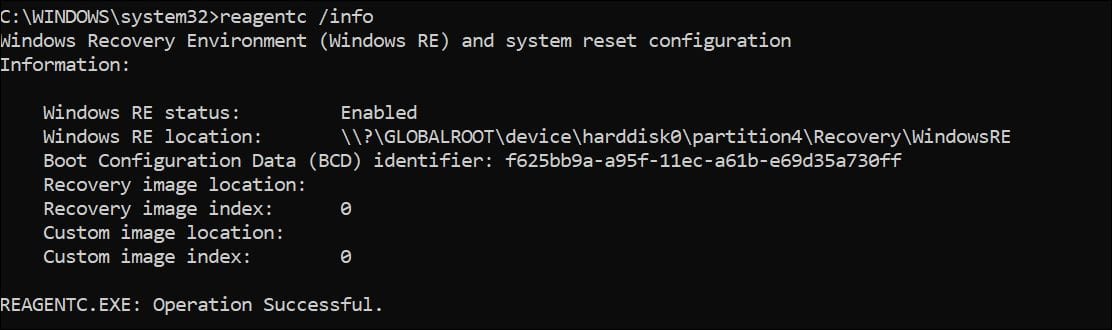
This is the result is ....

Capture4.jpg


So I should keep Partition4 and can delete Partition6 , correct ?

> My only other comment (more my preference) is your C drive is a bit small

I am not sure I understand that. I hardly install any new software so I think it is unlikely this Operating System Partition will be too small in the foreseeable future.

> I will look into that.
 

My Computer My Computer

At a glance

Windows 11 Home 64-bitIntel Core i7 13700H32GB DDR4Intel Iris Xe Graphics
OS
Windows 11 Home 64-bit
Computer type
Laptop
Manufacturer/Model
MSI Laptop - Commercial 14 H A13MG vPRO-098
CPU
Intel Core i7 13700H
Motherboard
MSl Co., Ltd. MS-14L1 (U3E1)
Memory
32GB DDR4
Graphics Card(s)
Intel Iris Xe Graphics
Sound Card
Intel Smart Sound Technology - Realtek High Definition Audio
Monitor(s) Displays
Generic 1920x1200 @ 60Hz
Screen Resolution
1920 x 1200 pixels
Hard Drives
1TB NVMe WD SSD
Mouse
Bluetooth
Browser
Microsoft Edge
Antivirus
McAfee , Malwarebytes
Thanks for the response Glasscuter

> DO NOT mess with the reserved partition.

Ah ok, seems opinions come in various flavors :-)

> I would like to ask a question though. What is your D: drive used for?

C = Operating System
D = Files
 

My Computer My Computer

At a glance

Windows 11 Home 64-bitIntel Core i7 13700H32GB DDR4Intel Iris Xe Graphics
OS
Windows 11 Home 64-bit
Computer type
Laptop
Manufacturer/Model
MSI Laptop - Commercial 14 H A13MG vPRO-098
CPU
Intel Core i7 13700H
Motherboard
MSl Co., Ltd. MS-14L1 (U3E1)
Memory
32GB DDR4
Graphics Card(s)
Intel Iris Xe Graphics
Sound Card
Intel Smart Sound Technology - Realtek High Definition Audio
Monitor(s) Displays
Generic 1920x1200 @ 60Hz
Screen Resolution
1920 x 1200 pixels
Hard Drives
1TB NVMe WD SSD
Mouse
Bluetooth
Browser
Microsoft Edge
Antivirus
McAfee , Malwarebytes
Thanks Cerebus, the quote feature does no really work for me. So I do it the old way.

> Run following from admin command prompt
This is the result is ....

Capture4.jpg


So I should keep Partition4 and can delete Partition6 , correct ?

> My only other comment (more my preference) is your C drive is a bit small

I am not sure I understand that. I hardly install any new software so I think it is unlikely this Operating System Partition will be too small in the foreseeable future.

> I will look into that.
Yes, you can safely remove partition 6 i.e. far most right partition.

Re. C drive - it varies from person to person, but as I said, now you know how to move/resize partitions, this is something you can do on an as needs basis in future.
 

My Computer My Computer

At a glance

Windows 11 Pro + Win11 Canary VM.I9 13th gen i9-13900H 2.60 GHZ16 GB solderedIntegrated Intel Iris XE
OS
Windows 11 Pro + Win11 Canary VM.
Computer type
Laptop
Manufacturer/Model
ASUS Zenbook 14
CPU
I9 13th gen i9-13900H 2.60 GHZ
Motherboard
Yep, Laptop has one.
Memory
16 GB soldered
Graphics Card(s)
Integrated Intel Iris XE
Sound Card
Realtek built in
Monitor(s) Displays
laptop OLED screen
Screen Resolution
2880x1800 touchscreen
Hard Drives
1 TB NVME SSD (only weakness is only one slot)
PSU
Internal + 65W thunderbolt USB4 charger
Case
Yep, got one
Cooling
Stella Artois (UK pint cans - 568 ml) - extra cost.
Keyboard
Built in UK keybd
Mouse
Bluetooth , wireless dongled, wired
Internet Speed
900 mbs (ethernet), wifi 6 typical 350-450 mb/s both up and down
Browser
Edge
Antivirus
Defender
Other Info
TPM 2.0, 2xUSB4 thunderbolt, 1xUsb3 (usb a), 1xUsb-c, hdmi out, 3.5 mm audio out/in combo, ASUS backlit trackpad (inc. switchable number pad)

Macrium Reflect Home V8
Office 365 Family (6 users each 1TB onedrive space)
Hyper-V (a vm runs almost as fast as my older laptop)
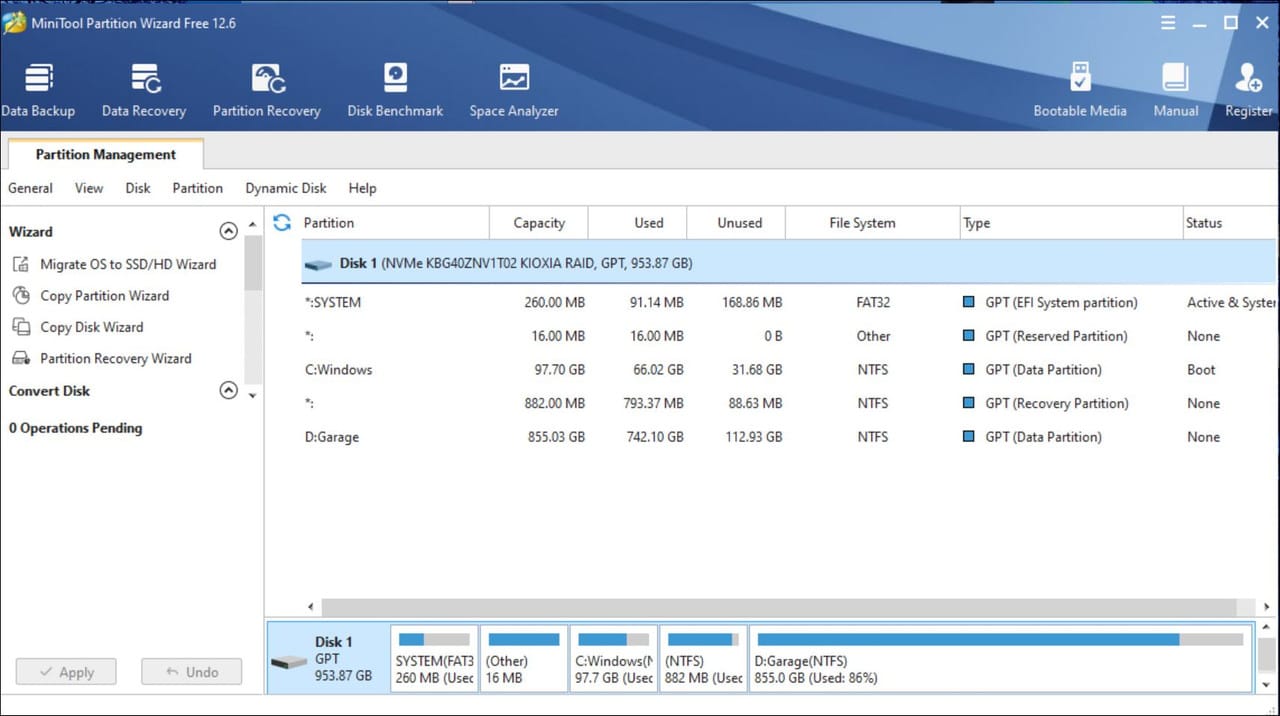
My goto program for disk management is Mini tool partition wizard, it works for me.
 

My Computers My Computers

  • At a glance

    W11 pro betaAthlon 3000G16Gb Crucial DDR4 2400onboard cpu
    OS
    W11 pro beta
    Computer type
    PC/Desktop
    Manufacturer/Model
    home built
    CPU
    Athlon 3000G
    Motherboard
    Asrock A320M-HDV r4.0
    Memory
    16Gb Crucial DDR4 2400
    Graphics Card(s)
    onboard cpu
    Sound Card
    onboard
    Monitor(s) Displays
    LG 22EA53
    Screen Resolution
    1920 x 1080
    Hard Drives
    WD black SN750 M2 500Gb
    PSU
    500W Seasonic core 80+gold non modular
    Case
    Fractal Design Define R2
    Cooling
    front 2 x 120mm rear 100mm stock psu
    Internet Speed
    135/20
    Browser
    Firefox and edge
    Antivirus
    Windows Security and free Malwarebytes
  • At a glance

    W11 pro 64 beta (from W10 pro system builder ...Ryzen 7 5700G4 x 8Gb Corsair Vengeance LPX 3000 DDR4onboard cpu
    Operating System
    W11 pro 64 beta (from W10 pro system builder pack)
    Computer type
    PC/Desktop
    Manufacturer/Model
    homebuilt
    CPU
    Ryzen 7 5700G
    Motherboard
    MSI B450 tomahawk max II
    Memory
    4 x 8Gb Corsair Vengeance LPX 3000 DDR4
    Graphics card(s)
    onboard cpu
    Sound Card
    motherboard
    Monitor(s) Displays
    AOC 27
    Screen Resolution
    2560 x 1440
    Hard Drives
    WD 1Tb Black M2 SN850X on Asus hyper M2 X16 max V2 card
    PSU
    Be Quiet 400 semi modular 80+gold
    Case
    Coolermaster Silencio 650
    Cooling
    140mm front, 120 rear Akasa Vegas Chroma AM
    Internet Speed
    135/20
    Browser
    edge/Firefox
    Antivirus
    WD plus Malwarebytes free
I did the following

- reagentc /disable
- delete the partition I thought had to be deleted and extend partition D with that unallocated space
- reagentc /enable

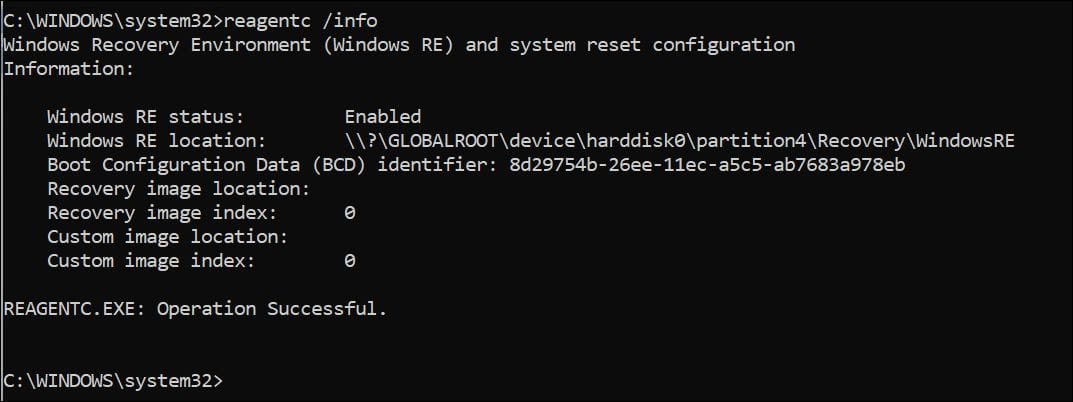
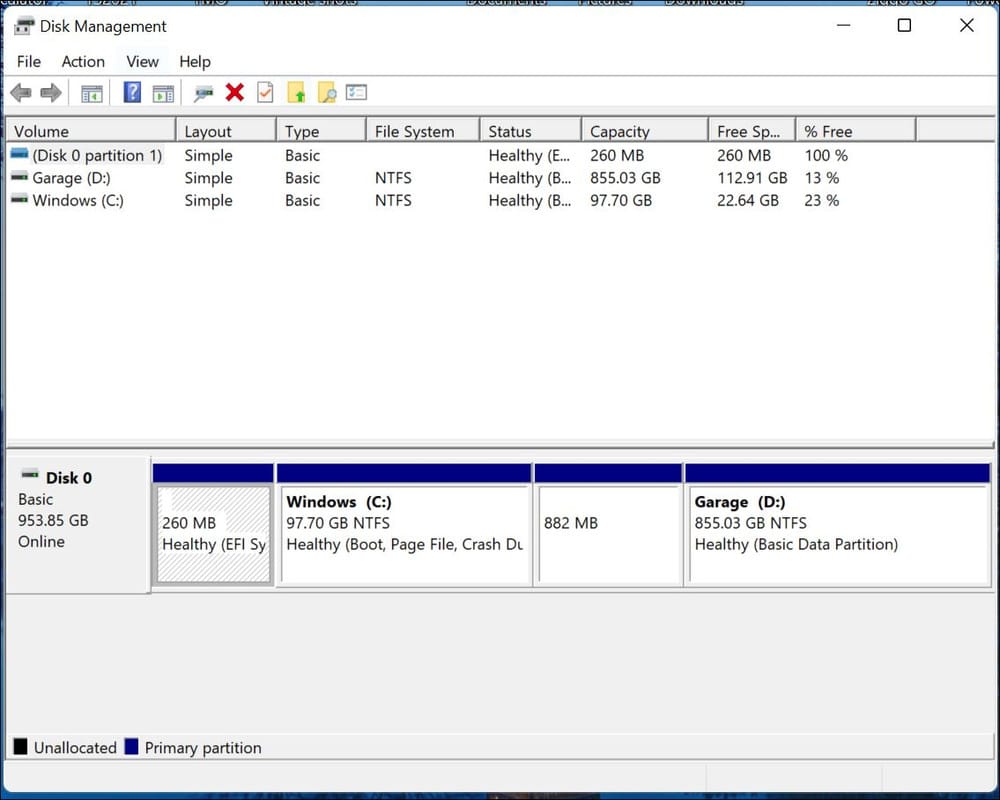
But seems I do not have a partition marks with RECOVERY anymore, as I had in the screenshot in the first post of this thread. At least according to disk manager. The Mini Tool has a different opinion?!?!

Also . . what is that 16MB partition good for ? Is tiny, so don't need that space, but still, can I get rid of that ?

I now have the following . . . .

DISK MANAGEMENT
Capture5.jpg


MINI TOOL PARTITION WIZARD
Capture7.jpg


DOS PROMPT
Capture6.jpg
 
Last edited:

My Computer My Computer

At a glance

Windows 11 Home 64-bitIntel Core i7 13700H32GB DDR4Intel Iris Xe Graphics
OS
Windows 11 Home 64-bit
Computer type
Laptop
Manufacturer/Model
MSI Laptop - Commercial 14 H A13MG vPRO-098
CPU
Intel Core i7 13700H
Motherboard
MSl Co., Ltd. MS-14L1 (U3E1)
Memory
32GB DDR4
Graphics Card(s)
Intel Iris Xe Graphics
Sound Card
Intel Smart Sound Technology - Realtek High Definition Audio
Monitor(s) Displays
Generic 1920x1200 @ 60Hz
Screen Resolution
1920 x 1200 pixels
Hard Drives
1TB NVMe WD SSD
Mouse
Bluetooth
Browser
Microsoft Edge
Antivirus
McAfee , Malwarebytes
Re. Recovery Partition, not sure why label is gone but still seems to be working ok

Re. 16 MB partition, this is a total mystery to all users. It is reserved for a future function which MS have never specified. It used to be 128 MB on W8 but was reduced to 16 MB on Windows 10. However presence of partition complies with MS requirements for a UEFI installation. In this case, it really is so small, it is not worh doing anything with. It does not even show in Disk Management.

Personally, I think it is only there now as nobody even in MS knows why it was there on first place and nobody can make a decision to remove it LOL.
 

My Computer My Computer

At a glance

Windows 11 Pro + Win11 Canary VM.I9 13th gen i9-13900H 2.60 GHZ16 GB solderedIntegrated Intel Iris XE
OS
Windows 11 Pro + Win11 Canary VM.
Computer type
Laptop
Manufacturer/Model
ASUS Zenbook 14
CPU
I9 13th gen i9-13900H 2.60 GHZ
Motherboard
Yep, Laptop has one.
Memory
16 GB soldered
Graphics Card(s)
Integrated Intel Iris XE
Sound Card
Realtek built in
Monitor(s) Displays
laptop OLED screen
Screen Resolution
2880x1800 touchscreen
Hard Drives
1 TB NVME SSD (only weakness is only one slot)
PSU
Internal + 65W thunderbolt USB4 charger
Case
Yep, got one
Cooling
Stella Artois (UK pint cans - 568 ml) - extra cost.
Keyboard
Built in UK keybd
Mouse
Bluetooth , wireless dongled, wired
Internet Speed
900 mbs (ethernet), wifi 6 typical 350-450 mb/s both up and down
Browser
Edge
Antivirus
Defender
Other Info
TPM 2.0, 2xUSB4 thunderbolt, 1xUsb3 (usb a), 1xUsb-c, hdmi out, 3.5 mm audio out/in combo, ASUS backlit trackpad (inc. switchable number pad)

Macrium Reflect Home V8
Office 365 Family (6 users each 1TB onedrive space)
Hyper-V (a vm runs almost as fast as my older laptop)
Re. Recovery Partition, not sure why label is gone but still seems to be working ok

Re. 16 MB partition, this is a total mystery to all users. It is reserved for a future function which MS have never specified. It used to be 128 MB on W8 but was reduced to 16 MB on Windows 10. However presence of partition complies with MS requirements for a UEFI installation. In this case, it really is so small, it is not worh doing anything with. It does not even show in Disk Management.

Personally, I think it is only there now as nobody even in MS knows why it was there on first place and nobody can make a decision to remove it LOL.
What's really interesting is if you convert an MBR disk to GPT using Microsoft's own mbr2gpt tool - there is no MSR partition created! So, apparently Microsoft does not really require it on GPT disks like they claim in other documents.
 

My Computers My Computers

  • At a glance

    Windows 11AMD Ryzen 7 3800XT32GBEVGA GeForce GTX 1080 Ti
    OS
    Windows 11
    Computer type
    PC/Desktop
    Manufacturer/Model
    Homebuilt
    CPU
    AMD Ryzen 7 3800XT
    Motherboard
    ASUS ROG Crosshair VII Hero (WiFi)
    Memory
    32GB
    Graphics Card(s)
    EVGA GeForce GTX 1080 Ti
  • At a glance

    Windows 11 EducationIntel i7-8550U32GBNvidia Geforce MX150
    Operating System
    Windows 11 Education
    Computer type
    Laptop
    Manufacturer/Model
    Dell Inspiron 7773
    CPU
    Intel i7-8550U
    Memory
    32GB
    Graphics card(s)
    Nvidia Geforce MX150
    Sound Card
    Realtek
    Monitor(s) Displays
    17"
    Screen Resolution
    1920 x 1080
    Hard Drives
    Toshiba 512GB NVMe SSD
    SK Hynix 512GB SATA SSD
    Internet Speed
    Fast!
What's really interesting is if you convert an MBR disk to GPT using Microsoft's own mbr2gpt tool - there is no MSR partition created! So, apparently Microsoft does not really require it on GPT disks like they claim in other documents.
I guess that is because you can only have 3 primary partitions to use mbr2gpt. It tries to create the EFI partition first and falls over if already 4. So I guess it deletes msr (only if four partitions?) to ensure only 3 partitions.
 

My Computer My Computer

At a glance

Windows 11 Pro + Win11 Canary VM.I9 13th gen i9-13900H 2.60 GHZ16 GB solderedIntegrated Intel Iris XE
OS
Windows 11 Pro + Win11 Canary VM.
Computer type
Laptop
Manufacturer/Model
ASUS Zenbook 14
CPU
I9 13th gen i9-13900H 2.60 GHZ
Motherboard
Yep, Laptop has one.
Memory
16 GB soldered
Graphics Card(s)
Integrated Intel Iris XE
Sound Card
Realtek built in
Monitor(s) Displays
laptop OLED screen
Screen Resolution
2880x1800 touchscreen
Hard Drives
1 TB NVME SSD (only weakness is only one slot)
PSU
Internal + 65W thunderbolt USB4 charger
Case
Yep, got one
Cooling
Stella Artois (UK pint cans - 568 ml) - extra cost.
Keyboard
Built in UK keybd
Mouse
Bluetooth , wireless dongled, wired
Internet Speed
900 mbs (ethernet), wifi 6 typical 350-450 mb/s both up and down
Browser
Edge
Antivirus
Defender
Other Info
TPM 2.0, 2xUSB4 thunderbolt, 1xUsb3 (usb a), 1xUsb-c, hdmi out, 3.5 mm audio out/in combo, ASUS backlit trackpad (inc. switchable number pad)

Macrium Reflect Home V8
Office 365 Family (6 users each 1TB onedrive space)
Hyper-V (a vm runs almost as fast as my older laptop)
I guess that is because you can only have 3 primary partitions to use mbr2gpt. It tries to create the EFI partition first and falls over if already 4. So I guess it deletes msr (only if four partitions?) to ensure only 3 partitions.
There would be no existing MSR partition to delete because you cannot create an MSR partition on an MBR drive. If Microsoft really needed the MSR partition, then the mbr2gpt tool could simply shrink the EFI System Partition by 16 MB and create an MSR partition in the empty space - after the conversion to GPT, of course. But it apparently is not that important to them.
 

My Computers My Computers

  • At a glance

    Windows 11AMD Ryzen 7 3800XT32GBEVGA GeForce GTX 1080 Ti
    OS
    Windows 11
    Computer type
    PC/Desktop
    Manufacturer/Model
    Homebuilt
    CPU
    AMD Ryzen 7 3800XT
    Motherboard
    ASUS ROG Crosshair VII Hero (WiFi)
    Memory
    32GB
    Graphics Card(s)
    EVGA GeForce GTX 1080 Ti
  • At a glance

    Windows 11 EducationIntel i7-8550U32GBNvidia Geforce MX150
    Operating System
    Windows 11 Education
    Computer type
    Laptop
    Manufacturer/Model
    Dell Inspiron 7773
    CPU
    Intel i7-8550U
    Memory
    32GB
    Graphics card(s)
    Nvidia Geforce MX150
    Sound Card
    Realtek
    Monitor(s) Displays
    17"
    Screen Resolution
    1920 x 1080
    Hard Drives
    Toshiba 512GB NVMe SSD
    SK Hynix 512GB SATA SSD
    Internet Speed
    Fast!
Thanks Cerebus

So that means I can enable bitlocker again.

I have a pdf with the Bitlocker Drive Encryption Recovery key. Will that key stay the same . . . ?
 
Last edited:

My Computer My Computer

At a glance

Windows 11 Home 64-bitIntel Core i7 13700H32GB DDR4Intel Iris Xe Graphics
OS
Windows 11 Home 64-bit
Computer type
Laptop
Manufacturer/Model
MSI Laptop - Commercial 14 H A13MG vPRO-098
CPU
Intel Core i7 13700H
Motherboard
MSl Co., Ltd. MS-14L1 (U3E1)
Memory
32GB DDR4
Graphics Card(s)
Intel Iris Xe Graphics
Sound Card
Intel Smart Sound Technology - Realtek High Definition Audio
Monitor(s) Displays
Generic 1920x1200 @ 60Hz
Screen Resolution
1920 x 1200 pixels
Hard Drives
1TB NVMe WD SSD
Mouse
Bluetooth
Browser
Microsoft Edge
Antivirus
McAfee , Malwarebytes
There would be no existing MSR partition to delete because you cannot create an MSR partition on an MBR drive. If Microsoft really needed the MSR partition, then the mbr2gpt tool could simply shrink the EFI System Partition by 16 MB and create an MSR partition in the empty space - after the conversion to GPT, of course. But it apparently is not that important to them.
Dohhh - of course - Brain not in gear!

I agree with your logic i.e. creating msr after gpt conversion would work, but as you say they do not bother.

I would love somebody in MS to expain why. Response would be probably in Emojish ":unsure:🤷‍♀️⛔"
which for anybody over 14 translates to "Hmmm, no idea, don't go there!".
 

My Computer My Computer

At a glance

Windows 11 Pro + Win11 Canary VM.I9 13th gen i9-13900H 2.60 GHZ16 GB solderedIntegrated Intel Iris XE
OS
Windows 11 Pro + Win11 Canary VM.
Computer type
Laptop
Manufacturer/Model
ASUS Zenbook 14
CPU
I9 13th gen i9-13900H 2.60 GHZ
Motherboard
Yep, Laptop has one.
Memory
16 GB soldered
Graphics Card(s)
Integrated Intel Iris XE
Sound Card
Realtek built in
Monitor(s) Displays
laptop OLED screen
Screen Resolution
2880x1800 touchscreen
Hard Drives
1 TB NVME SSD (only weakness is only one slot)
PSU
Internal + 65W thunderbolt USB4 charger
Case
Yep, got one
Cooling
Stella Artois (UK pint cans - 568 ml) - extra cost.
Keyboard
Built in UK keybd
Mouse
Bluetooth , wireless dongled, wired
Internet Speed
900 mbs (ethernet), wifi 6 typical 350-450 mb/s both up and down
Browser
Edge
Antivirus
Defender
Other Info
TPM 2.0, 2xUSB4 thunderbolt, 1xUsb3 (usb a), 1xUsb-c, hdmi out, 3.5 mm audio out/in combo, ASUS backlit trackpad (inc. switchable number pad)

Macrium Reflect Home V8
Office 365 Family (6 users each 1TB onedrive space)
Hyper-V (a vm runs almost as fast as my older laptop)
Encrypting went pretty fast and could be done while using the computer. Think it was completed in about 12 to 15 hrs.
 

My Computer My Computer

At a glance

Windows 11 Home 64-bitIntel Core i7 13700H32GB DDR4Intel Iris Xe Graphics
OS
Windows 11 Home 64-bit
Computer type
Laptop
Manufacturer/Model
MSI Laptop - Commercial 14 H A13MG vPRO-098
CPU
Intel Core i7 13700H
Motherboard
MSl Co., Ltd. MS-14L1 (U3E1)
Memory
32GB DDR4
Graphics Card(s)
Intel Iris Xe Graphics
Sound Card
Intel Smart Sound Technology - Realtek High Definition Audio
Monitor(s) Displays
Generic 1920x1200 @ 60Hz
Screen Resolution
1920 x 1200 pixels
Hard Drives
1TB NVMe WD SSD
Mouse
Bluetooth
Browser
Microsoft Edge
Antivirus
McAfee , Malwarebytes
Back
Top Bottom