Added an extra 1Tb M.2 SSD, now all my programs take ages to open. Why?


johnnyboy114

Member
Local time
10:21 PM
Posts
1
OS
Windows 11
Hi

I recently rebuilt my computer with a new motherboard, CPU and graphics card and all was going swimmingly.

It's an MSI Z790 Gaming with Wifi, Intel Core i7 14700K CPU and a GeForce 3060 GPU with 12Gb. System is also running 32Gb DDR5.

Windows version is 23H2 running on a 1Tb M.2 SSD

I am a professional wedding photographer and the computer really only runs editing running predominantly, predominantly Lightroom, Photoshop, Photo Mechanic etc.

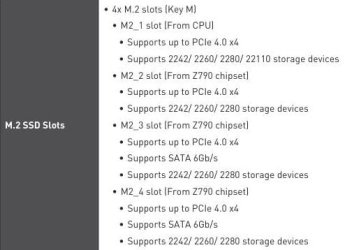
For extra storage and speed, I decided I wanted to add another M.2 SSD, so added a Crucial P3 Plus 1Tb M.2 SSD to the third slot of my motherboard (the board can take 4 x M.2 slots).

When I did this and initialised the disk, I suddenly found that programs like Lightroom etc all started to slow down significantly.....so much so that when trying to load them, it would take up to 4 mins at a time for Lightroom to even become usable.

Is there a reason for this? Why would the addition of an SSD SLOW the computer down? I would have imagined it would have had at LEAST no effect on this as it's purely storage, nothing else? And the board is relatively decent and should be able to take 4 M.2 SSD's.

I do have an older 250Gb M.2 SSD in the second slot on the motherboard, so I am wondering if I am overloading the motherboard? Or is there something I need to configure, maybe in BIOS?

I am a total complete computer idiot when it comes to this detailed kind of thing, so any help would be really grateful. Thank you!
 
Windows Build/Version
23H2 (OS Build 22631.3737)

My Computer My Computer

At a glance

Windows 11Intel Core i7 14700K32Gb DDR5GeForce 3060
OS
Windows 11
Computer type
PC/Desktop
Manufacturer/Model
Chillblast
CPU
Intel Core i7 14700K
Motherboard
MSI Z790 Gaming with Wifi
Memory
32Gb DDR5
Graphics Card(s)
GeForce 3060
Monitor(s) Displays
Samsung
Case
Corsair
Connecting M.2 SSD is the way to speed up application startup time try different M.2 slot or maybe you did not connect the M.2 SSD securely check that as well.
 

My Computer My Computer

At a glance

Windows 11AMD Ryzen 7 5700GMicron Technology DDR4-3200 16GBNVIDIA GeForce RTX 3060
OS
Windows 11
Computer type
PC/Desktop
Manufacturer/Model
HP Pavilion
CPU
AMD Ryzen 7 5700G
Motherboard
Erica6
Memory
Micron Technology DDR4-3200 16GB
Graphics Card(s)
NVIDIA GeForce RTX 3060
Sound Card
Realtek ALC671
Monitor(s) Displays
Samsung SyncMaster U28E590
Screen Resolution
3840 x 2160
Hard Drives
SAMSUNG MZVLQ1T0HALB-000H1
Which M.2 slots are used can also be important to speed of programs loading.
Check your manual and your BIOS setting options.
In many cases, the data lanes used by the slots are altered in number of lanes available to any one slot when one introduces a new M.2 device. (Especially if the device is not the same generation as the other on the Motherboard.)
 

My Computer My Computer

At a glance

Windows 11 Pro 26200.8875Ryzen 5 5600G24GB
OS
Windows 11 Pro 26200.8875
Computer type
PC/Desktop
Manufacturer/Model
Home Built
CPU
Ryzen 5 5600G
Motherboard
ASUS X470 Prime Pro
Memory
24GB
Monitor(s) Displays
Alienware 2518HF
Screen Resolution
1920 x 1080
Hard Drives
Boot: NVME WDC WDS500G; ASUS M.2 Riser card with 3 additional NVME drives
Various Internal SDD (Samsung and WDC) and HDD drives mostly Western Digital
PSU
Seasonic Focus Gold 650W
Case
Corsair 200R
Cooling
Noctua PWM fans x 3
Keyboard
Corsair K60 SE Pro
Mouse
Corsair Dark Core RGB Pro SE
Internet Speed
500/500
Browser
MS Edge
Antivirus
Malwarebytes Premium
your motherboard might have a limitation on speed and pci bandwidth depending on how many sata drives you have connected, as well as combined with nvme. Check your motherboard manual for information to see if your limiting yourself.

You could also run something like crystal disk mark with the drive not connected and with it installed to see if the speed is being affected.
 

My Computers My Computers

  • At a glance

    Windows 11 ProRyzen 7 5700 X3D64 GB DDR4 3600mhz Gskill Ripjaws VRTX 4070 Super , 12GB VRAM Asus EVO Overclock
    OS
    Windows 11 Pro
    Computer type
    PC/Desktop
    Manufacturer/Model
    Custom Built
    CPU
    Ryzen 7 5700 X3D
    Motherboard
    MSI MPG B550 GAMING PLUS
    Memory
    64 GB DDR4 3600mhz Gskill Ripjaws V
    Graphics Card(s)
    RTX 4070 Super , 12GB VRAM Asus EVO Overclock
    Monitor(s) Displays
    Gigabyte M27Q (rev. 2.0) 2560 x 1440 @ 170hz HDR
    Hard Drives
    2TB Samsung nvme ssd
    4TB Western Digital nvme ssd
    PSU
    CORSAIR RMx SHIFT Series™ RM750x 80 PLUS Gold Fully Modular ATX Power Supply
    Case
    CORSAIR 3500X ARGB Mid-Tower ATX PC Case – Black
    Cooling
    ID-COOLING FROSTFLOW X 240 CPU Water Cooler
    Keyboard
    Logitech G213
    Mouse
    Logitech G203
    Internet Speed
    1.2gbps Fiber 😎
  • At a glance

    Chrome OSIntel Pentium Quad Core4GB LPDDR4
    Operating System
    Chrome OS
    Computer type
    Laptop
    Manufacturer/Model
    HP Chromebook
    CPU
    Intel Pentium Quad Core
    Memory
    4GB LPDDR4
    Monitor(s) Displays
    14 Inch HD SVA anti glare micro edge display
    Hard Drives
    64 GB emmc
You should also enable AHCI mode from BIOS, you need to select SATA Mode and switch to AHCI.
 

My Computer My Computer

At a glance

Windows 11AMD Ryzen 7 5700GMicron Technology DDR4-3200 16GBNVIDIA GeForce RTX 3060
OS
Windows 11
Computer type
PC/Desktop
Manufacturer/Model
HP Pavilion
CPU
AMD Ryzen 7 5700G
Motherboard
Erica6
Memory
Micron Technology DDR4-3200 16GB
Graphics Card(s)
NVIDIA GeForce RTX 3060
Sound Card
Realtek ALC671
Monitor(s) Displays
Samsung SyncMaster U28E590
Screen Resolution
3840 x 2160
Hard Drives
SAMSUNG MZVLQ1T0HALB-000H1
I have a Desktop with a 512GB NVMe M.2 and added a 2TB SATA HDD, no speed issue accessing files on it. The HDD is 7200RPM.
 

My Computers My Computers

  • At a glance

    Win11 Pro RTM Version 24H2 Build 26100.4202Intel Core i5 11th Gen. 2.40GHz12GB
    OS
    Win11 Pro RTM Version 24H2 Build 26100.4202
    Computer type
    Laptop
    Manufacturer/Model
    Dell Vostro 3400
    CPU
    Intel Core i5 11th Gen. 2.40GHz
    Memory
    12GB
    Hard Drives
    256GB SSD NVMe M.2
  • At a glance

    Win11 Pro RTM Version 24H2 Build 26100.4202Intel Core i5 10th Gen. 2.90GHz16GBOnboard, no VGA, using a DisplayPort-to-VGA a...
    Operating System
    Win11 Pro RTM Version 24H2 Build 26100.4202
    Computer type
    PC/Desktop
    Manufacturer/Model
    Dell Vostro 5890
    CPU
    Intel Core i5 10th Gen. 2.90GHz
    Memory
    16GB
    Graphics card(s)
    Onboard, no VGA, using a DisplayPort-to-VGA adapter
    Monitor(s) Displays
    24" Dell
    Hard Drives
    512GB SSD NVMe, 4TB Seagate HDD
    Browser
    Firefox, Edge
    Antivirus
    Windows Defender/Microsoft Security
That's certainly not something I would expect you to see. Even if you did drop speeds a bit on the PCI Express bus due to the number of devices connected, it shouldn't be something that would slow down loads of applications like Lightroom to take up to 4 minutes to become usable.

I would certainly do some testing on that new SSD if you can? For example, I would drop it in a test box (as I have extra) and would run it by itself just to make sure that it works as expected.

I would remove the drive from your current setup to make sure that speeds immediately return back to normal.
 

My Computers My Computers

  • At a glance

    Windows 11 ProIntel Core i5-8279u32GB DDR4 2666MhzIntel Iris Plus 655
    OS
    Windows 11 Pro
    Computer type
    PC/Desktop
    Manufacturer/Model
    Beelink SEI8
    CPU
    Intel Core i5-8279u
    Motherboard
    AZW SEI
    Memory
    32GB DDR4 2666Mhz
    Graphics Card(s)
    Intel Iris Plus 655
    Sound Card
    Intel SST
    Monitor(s) Displays
    Asus ProArt PA278QV
    Screen Resolution
    2560x1440
    Hard Drives
    512GB NVMe
    PSU
    NA
    Case
    NA
    Cooling
    NA
    Keyboard
    NA
    Mouse
    NA
    Internet Speed
    500/50
    Browser
    Edge
    Antivirus
    Defender
    Other Info
    Mini PC used for testing Windows 11.
  • At a glance

    Windows 10 ProRyzen 9 5900x64GB DDR4-3600EVGA GeForce 3080 FT3 Ultra
    Operating System
    Windows 10 Pro
    Computer type
    PC/Desktop
    Manufacturer/Model
    Custom
    CPU
    Ryzen 9 5900x
    Motherboard
    Asus Rog Strix X570-E Gaming
    Memory
    64GB DDR4-3600
    Graphics card(s)
    EVGA GeForce 3080 FT3 Ultra
    Sound Card
    Onboard
    Monitor(s) Displays
    ASUS TUF Gaming VG27AQ. ASUS ProArt Display PA278QV 27” WQHD
    Screen Resolution
    2560x1440
    Hard Drives
    2TB WD SN850 PCI-E Gen 4 NVMe
    2TB Sandisk Ultra 2.5" SATA SSD
    PSU
    Seasonic Focus 850
    Case
    Fractal Meshify S2 in White
    Cooling
    Dark Rock Pro CPU cooler, 3 x 140mm case fans
    Keyboard
    Corsiar K65 RGB Lux
    Mouse
    Logitech G9 Laser Mouse
    Internet Speed
    500/50
    Browser
    Chrome
    Antivirus
    Defender.
I would update BIOS, chipset driver and check whether M2 is not damaged.

capture_06142024_170401.jpg
 

My Computer My Computer

At a glance

Home26H2CanAMD Ryzen 5 8600G (07/24)2x32GB Kingston FURY DDR5 5600 MHz CL36 @5200...ASROCK Radeon RX 6600 Challenger D 8G @48FPS ...
OS
Home26H2Can
Computer type
PC/Desktop
CPU
AMD Ryzen 5 8600G (07/24)
Motherboard
ASROCK B650M-HDV/M.2 (07/24) BIOS 4.21 AGESA ComboAM5 1.3.0.1 (04/26)
Memory
2x32GB Kingston FURY DDR5 5600 MHz CL36 @5200 CL36 (07/24)
Graphics Card(s)
ASROCK Radeon RX 6600 Challenger D 8G @48FPS (08/24)
Sound Card
Creative Sound BlasterX AE-5 Plus (05/24)
Monitor(s) Displays
24" Philips 24M1N3200ZS/00 (05/24)
Screen Resolution
1920×1080@165Hz via DP1.4
Hard Drives
Kingston KC3000 NVMe 2TB (05/24)
ADATA XPG GAMMIX S11 Pro 512GB (07/19)
PSU
Seasonic Core GM 550 Gold (04/24)
Case
Fractal Design Define 7 Mini with 3x Noctua NF-P14s/12@555rpm (04/24)
Cooling
Noctua NH-U12S with Noctua NF-P12 (04/24)
Keyboard
HP Pavilion Wired Keyboard 300 (07/24) + Rabalux 76017 Parker (01/24)
Mouse
Logitech M330 Silent Plus (01/26)
Internet Speed
500/100 Mbps via RouterOS (05/21) & TCP Optimizer
Browser
Edge, Brave for YouTube, LibreWolf for FB
Antivirus
NextDNS blocking 1/3 Traffic
Other Info
Phone: Motorola Moto G86 (02/26)
Backup: Hasleo Backup Suite (PreOS)
Headphones: Sennheiser RS170 (09/10)
Chair: Huzaro Force 4.4 Grey Mesh (05/24)
Notifier: Xiaomi Mi Band 9 Milanese (10/24)
FlexCore USB-C 3.2 Gen 1 (M) to LAN (F) (08/25)
Back
Top Bottom