Adding a new toolbar by the system tray to show a menu of a given folder like past Windows did


miloshapiro

Active member
Local time
3:39 PM
Posts
38
OS
Windows
Re: Adding a new toolbar by the system tray to show a menu of a given folder like past Windows did

Hello! I'm a Win7 user who is in the process of purchasing a new Win11 tower. One thing I'm concerned about is recreating an option that I use over and over each day, but have been hearing isn't so simple in Win11. Hoping to find out if there's an easy way.
...
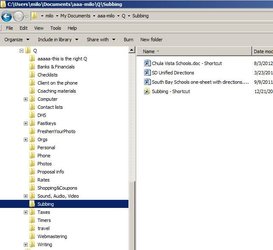
I have a folder named Q at C:\Users\milo\Documents\aaa-milo\Q .
All that Q is is a bunch more folders (for organization sake) and within those are shortcuts to documents that I use a lot. (see screen prints)
I then right-clicked on the toolbar near the system tray, chose "Toolbars", chose "New Toolbar" and voila!
I got that little "Q" with the ">>" next to it permanently on my tool by next to the system tray. Any time I click on the ">>", I get a pop-up from there of all the folders in Q so that I can quickly get to frequently-used documents. (see attached photo of what it looks like when I click the >>)
...
So my question is, when I get the new computer, does this functionality still exist? And if so, how do I do it? Hope it won't require some sort of add-on to simulate win7; would hate to think Windows11 got rid of such a useful thing. But if I have to go a route like that, I would to get that functionality back.
...
Thank you!!! - Milo
 
Windows Build/Version
I'm buying a Win11 computer very soon and getting ready for it; writing this from Win7

Attachments

  • Add-Toolbar-at-bottom.JPG
    Add-Toolbar-at-bottom.JPG
    43.9 KB · Views: 10
  • my-q-toolbar-folder.JPG
    my-q-toolbar-folder.JPG
    43.7 KB · Views: 9

My Computer My Computer

At a glance

Windows32G
OS
Windows
Computer type
PC/Desktop
Manufacturer/Model
HP
Memory
32G
Mouse
yes
Internet Speed
cable hi speed
Browser
firefox preferred, can use Chrome or Edge when need be
Antivirus
Kaspersky
Not native to Windows 11 but can be done if you use an add-on like ExplorerPatcher which gives back a lot of the Win 10 options.
 

My Computers My Computers

  • At a glance

    Windows 11 2xH2 (latest update ... forever anal)Intel i5-124008GBNVIDIA GeForce GT730
    OS
    Windows 11 2xH2 (latest update ... forever anal)
    Computer type
    PC/Desktop
    Manufacturer/Model
    HP Slim S01
    CPU
    Intel i5-12400
    Memory
    8GB
    Graphics Card(s)
    NVIDIA GeForce GT730
    Sound Card
    OOBE
    Monitor(s) Displays
    Acer 32"
    Screen Resolution
    1920x1080
    Hard Drives
    512GB KIOXIA NVMe
    1TB SATA SSD
    PSU
    OOBE
    Case
    OOBE
    Cooling
    OOBE
    Keyboard
    BT
    Mouse
    BT
    Browser
    Brave FFox Chrome Opera
    Antivirus
    KIS
  • At a glance

    Windows 11 Pro 2xH2 (latest update ... 4ever ...i7-1165G7 @ 2.80GHzIntel Iris Xe Graphics
    Operating System
    Windows 11 Pro 2xH2 (latest update ... 4ever anal)
    Computer type
    Laptop
    Manufacturer/Model
    HP Pavillion 15
    CPU
    i7-1165G7 @ 2.80GHz
    Graphics card(s)
    Intel Iris Xe Graphics
    Hard Drives
    Samsung NVMe 512GB
    + numerous/multiple SSD Type C USB enclosures
    Internet Speed
    NBN FTTN 50
    Browser
    Brave
    Antivirus
    KIS
Thanks for such a quick response, Idgat. I did find a youtube video (
) that talked about ExplorerPatcher . Just made me nervous to be messing with how 11 works as soon as I get it. I'm just a user; not a real techy type.
...
Kind of hard to believe they'd have gotten rid of this, but not the first time a good feature disappears. Curious if there's any way to do this that doesn't mean having to turn back time. And hoping that if I do that I won't be missing out on features on Win 11 because I brought up the old look?
 

My Computer My Computer

At a glance

Windows32G
OS
Windows
Computer type
PC/Desktop
Manufacturer/Model
HP
Memory
32G
Mouse
yes
Internet Speed
cable hi speed
Browser
firefox preferred, can use Chrome or Edge when need be
Antivirus
Kaspersky
You could pin your "Q" folder to the taskbar. I have done that for 2 folders on my Win 11 system.


My Computer My Computer

At a glance

windows 11 ,Ubuntu Cinnamon - for tinkering onlyIntel i51140016 GB0
OS
windows 11 ,Ubuntu Cinnamon - for tinkering only
Computer type
PC/Desktop
Manufacturer/Model
No Name - Assembled by a Compute shop in a Strip Mall.
CPU
Intel i511400
Motherboard
ASUS PRIME B560-PLUS motherboard
Memory
16 GB
Graphics Card(s)
0
Sound Card
0
Monitor(s) Displays
25 in BenQ
Screen Resolution
1920 x 1080
Hard Drives
9 SSDs 4 Nvme, 2 in M.2 slot and 2 in PCIE with adapter + 5 Sata. DVD drive
PSU
600w
Case
Antec- VSK4000E-U3 Mid Tower
Internet Speed
Bell pure fibre optic. 3 GB package. 6E Wireless adapter 750/500
Browser
Firefox, Microsoft Edge
Antivirus
Defender
I would suggest using an app like Macrium Reflect (plenty of good tutorials on these forums) to image your system so that you can experiment with 3rd party modifications risk free.
MS is currently looking at including more of the Win10 functions people have come to rely on, but it takes a while to implement after testing on the insider rings (drag & drop of files to Start Menu/ Task Bar apps is the current one they are looking at, I believe).
The issue is that some Windows 11 functions were written from the ground up and didn't include some options that were baked into Win10. A lot of the original registry keys from Win10 still exist though ( I assume for compatibility) and so it is possible to "hack" these lost functions into use, but mileage may vary as some instability or GUI oddness may be introduced (like a squashed clock for example).
Why MS didn't just include the lost features in the Windows 11 update (maybe with a settings page to enable or not) is a matter for lengthy discussion and argument, after all they gave us a new right-click menu but tacked the old one on as well (an odd design choice) like an after thought, and you can set both it and Explorer's menu bar back to the Win10 style without much effort.
I think if we wait long enough most of the missing features will be added back in. :crossed
 

My Computer My Computer

At a glance

Windows 11 Pro 22H2, build: 22621.521Intel i7-12700K 3.6GHz Base (5.0GHz Turbo)64GB DDR 3600MhzAsus Tuff RTX 3080 10GB OC
OS
Windows 11 Pro 22H2, build: 22621.521
Computer type
PC/Desktop
Manufacturer/Model
Scan 3XS Custom 1700
CPU
Intel i7-12700K 3.6GHz Base (5.0GHz Turbo)
Motherboard
Asus ProArt Creator B660 D4
Memory
64GB DDR 3600Mhz
Graphics Card(s)
Asus Tuff RTX 3080 10GB OC
Sound Card
Onboard Realtek
Monitor(s) Displays
Gigabyte G32QC 32inch 16:9 curved @2560 x 1440p 165Hz Freesync Premium Pro/ Dell SE2422H 24inch 16:9 1920 x 1080p 75Hz Freesync
Screen Resolution
2560 x 1440p & 1920 x 1080p
Hard Drives
WD SN570 1TB NVME (Boot), Samsung 870QVO 1TB (SSD), SanDisk 3D Ultra 500Gb (SSD) x2, Seagate 3Tb Expansion Desk (Ext HDD), 2x Toshiba 1Tb P300 (Ext HDD)
PSU
Corsair RM1000X Modular
Case
Corsair 4000D Airflow Desktop
Cooling
Corsair Hydro H150i RGB Pro XT 360mm Liquid Cooler, 3 x 120mm fans, 1x Exhaust
Keyboard
Microsoft Ergonomic
Mouse
Logitech G402
Internet Speed
800Mbs
Browser
Edge Chromium
Antivirus
Defender, Malwarebytes

My Computer My Computer

At a glance

Windows 11, Pro for Workstations, 22631.2861 ...Amd Ryzen 5 5500 ("Zen 3") (3.6GHz,45-65W,L3:...DDR4 OLOy Owl Black, 8GB, 3200MHZ, (x2)Colorful GeForce GTX 1650 Super
OS
Windows 11, Pro for Workstations, 22631.2861 (23H2)
Computer type
PC/Desktop
Manufacturer/Model
Custom
CPU
Amd Ryzen 5 5500 ("Zen 3") (3.6GHz,45-65W,L3:16M,6/12)
Motherboard
Asus Prime B450M Gaming/BR Chipset B450 AMD AM4 mATX DDR4 - BIOS 4002
Memory
DDR4 OLOy Owl Black, 8GB, 3200MHZ, (x2)
Graphics Card(s)
Colorful GeForce GTX 1650 Super
Sound Card
-
Monitor(s) Displays
Philips TV 43PFG5102/78
Screen Resolution
1920x1080
Hard Drives
SSD: 120GB, Sata III, Leitura 560MBs e Gravação 540MBs
HD: Seagate Barracuda 1TB, Sata III, 7200RPM, 64MB
PSU
Corsair ATX CV550 550W, 80 Plus Bronze, PFC Ativo
Case
Wheel Jack, Mid Tower, Vidro Temperado, Black
Cooling
default
Keyboard
common
Mouse
commom
Internet Speed
600mb
Browser
Opera
Antivirus
Windows Defender
TrueLaunchBar still works after you do some tweaks. Just search here. Winaero Tweaker helps, StartAllBack helps, UltimateWindowsTweaker helps.
 

My Computer My Computer

At a glance

11 64i932GBNvidia GeForce RTX 2060
OS
11 64
Computer type
PC/Desktop
Manufacturer/Model
Lenovo
CPU
i9
Motherboard
Lenovo
Memory
32GB
Graphics Card(s)
Nvidia GeForce RTX 2060
Sound Card
Realtek
Monitor(s) Displays
Dell U3415W
Screen Resolution
3440 x 1440
Internet Speed
1 GB
Kind of hard to believe they'd have gotten rid of this, but not the first time a good feature disappears. Curious if there's any way to do this that doesn't mean having to turn back time. And hoping that if I do that I won't be missing out on features on Win 11 because I brought up the old look?

The amazing thing I find is that with every version of Windows there is some inexplicable change either to functionality or design, for no apparent reason other than to p1ss the user off.

If Microsoft is so dead-set on any of these changes being productive or necessary, how come it's so easy to change then back to what a user wants, from not what Microsoft "thinks" a user wants, or virtually dictating what a user must have! Being able to change back, Windows has almost become open source software.
 

My Computers My Computers

  • At a glance

    Windows 11 2xH2 (latest update ... forever anal)Intel i5-124008GBNVIDIA GeForce GT730
    OS
    Windows 11 2xH2 (latest update ... forever anal)
    Computer type
    PC/Desktop
    Manufacturer/Model
    HP Slim S01
    CPU
    Intel i5-12400
    Memory
    8GB
    Graphics Card(s)
    NVIDIA GeForce GT730
    Sound Card
    OOBE
    Monitor(s) Displays
    Acer 32"
    Screen Resolution
    1920x1080
    Hard Drives
    512GB KIOXIA NVMe
    1TB SATA SSD
    PSU
    OOBE
    Case
    OOBE
    Cooling
    OOBE
    Keyboard
    BT
    Mouse
    BT
    Browser
    Brave FFox Chrome Opera
    Antivirus
    KIS
  • At a glance

    Windows 11 Pro 2xH2 (latest update ... 4ever ...i7-1165G7 @ 2.80GHzIntel Iris Xe Graphics
    Operating System
    Windows 11 Pro 2xH2 (latest update ... 4ever anal)
    Computer type
    Laptop
    Manufacturer/Model
    HP Pavillion 15
    CPU
    i7-1165G7 @ 2.80GHz
    Graphics card(s)
    Intel Iris Xe Graphics
    Hard Drives
    Samsung NVMe 512GB
    + numerous/multiple SSD Type C USB enclosures
    Internet Speed
    NBN FTTN 50
    Browser
    Brave
    Antivirus
    KIS
System Tray Menu
 

My Computer My Computer

At a glance

Windows 11 Pro 64BitIntel Core i3 10100 @ 3.60GHz Comet Lake 14nm...32GB2048MB ATI Radeon RX550/550 Series (ASRock)
OS
Windows 11 Pro 64Bit
CPU
Intel Core i3 10100 @ 3.60GHz Comet Lake 14nm Tech
Motherboard
ASRock H410M-HDV (CPUSocket)
Memory
32GB
Graphics Card(s)
2048MB ATI Radeon RX550/550 Series (ASRock)
Sound Card
Realtek High Definition Audio
Monitor(s) Displays
(2)DELL S2721HS (1920x1080@60Hz)
Screen Resolution
1920x1080@60Hz
Hard Drives
931GB Crucial CT1000MX500SSD1 (SATA (SSD))
465GB Samsung SSD 870 EVO 500GB (SATA (SSD)) 25 °C
931GB Inateck ASM1153E SCSI Disk Device (USB (SATA) ) 32 °C
1863GB JMicron Generic SCSI Disk Device (USB (SATA) )
PSU
Gamdias Kratos M1-750B 750W ATX12V v2.2 80 PLUS BRONZE Certified Non-Modular Active PFC Power Supply with Built-in RGB Lighting Effects and Addressable LEDs
Cooling
Fans
Keyboard
ARTECK
Mouse
Logitech
Internet Speed
252.23 Mbps
Browser
Chrome
Antivirus
Malwarebytes premium
Other Info
Sound Cards
Playback Devices
Speakers (2- Xonar SoundCard)
Speakers (Realtek High Definition Audio) (default)
Speakers (Yeti Stereo Microphone)
SPDIF Interface (2- Xonar SoundCard)
Recording Devices
Microphone (Yeti Stereo Microphone)
Line (2- Xonar SoundCard)
Microphone (2- Xonar SoundCard) (default)
Microphone (Live Streamer CAM313 Microphone)
I spoke to the Geek Squad woman at Best Buy who is bringing my new computer up to speed so I can bring it home and make the transition. I told her about this issue and this thread. Her response, summarizing, was "I've had people who wanted to use these simulators before to be able to run older software. Using them adds a vulnerability to your computer because that's not how they are supposed to be running. If they even found out that I put a past-version simulator on the computer, I could lose my job for it. I have to advise you not to, but I can't control what you do after you bring it home." So that has me a little wary of what I'm seeing above.
...
The only solution that I see above that doesn't seem to involve a simulator is the one from FDretired. I don't know yet what pinning looks like on Win11, but it seems like a possible way without using a simulator, but I suspect that's going to open a window every time that I'll have to close, instead of just giving a nice menu that goes away when I click on the option that I want.
...
Really appreciate you all on this!
 

My Computer My Computer

At a glance

Windows32G
OS
Windows
Computer type
PC/Desktop
Manufacturer/Model
HP
Memory
32G
Mouse
yes
Internet Speed
cable hi speed
Browser
firefox preferred, can use Chrome or Edge when need be
Antivirus
Kaspersky
"I've had people who wanted to use these simulators before to be able to run older software. Using them adds a vulnerability to your computer because that's not how they are supposed to be running.
Right and wrong at the same time, most of these apps just use existing registry keys and support .dll functions that may have been disabled by MS in the latest OS version but left intact for compatibility reasons, most are cosmetic in nature and other than turning on a feature in the registry tend to use their own settings/ configuration/ support files instead of modifying or replacing Windows ones.
Using the Geek Squad argument anything you install that modifies the OS in any way whatsoever or adds any files other than those distributed by Microsoft is "not how they are supposed to be running", she basically just doesn't want to take responsibility for installing a 3rd party app that may screw something up, actually a perfectly acceptable stance from her.
Plenty of people do use these apps and have used them for many years without issues, most of the apps have dedicated forums for support as well, so as long as you use the most often recommended ones and maybe do a bit of usability research you should be fine.
As to these apps adding a vulnerability to your computer, ask her how exactly and which specific vulnerabilities she is talking about, if these apps were opening up attack vectors it would very quickly become known.
After all is said and done the choice is yours, live with Win11 the way it is and wait for changes to filter down or customise it to your liking.
As with all things that change the way Windows behaves, make a system image first, then if it all goes wrong, a quick restore and you are back to before you made the change. :)
 

My Computer My Computer

At a glance

Windows 11 Pro 22H2, build: 22621.521Intel i7-12700K 3.6GHz Base (5.0GHz Turbo)64GB DDR 3600MhzAsus Tuff RTX 3080 10GB OC
OS
Windows 11 Pro 22H2, build: 22621.521
Computer type
PC/Desktop
Manufacturer/Model
Scan 3XS Custom 1700
CPU
Intel i7-12700K 3.6GHz Base (5.0GHz Turbo)
Motherboard
Asus ProArt Creator B660 D4
Memory
64GB DDR 3600Mhz
Graphics Card(s)
Asus Tuff RTX 3080 10GB OC
Sound Card
Onboard Realtek
Monitor(s) Displays
Gigabyte G32QC 32inch 16:9 curved @2560 x 1440p 165Hz Freesync Premium Pro/ Dell SE2422H 24inch 16:9 1920 x 1080p 75Hz Freesync
Screen Resolution
2560 x 1440p & 1920 x 1080p
Hard Drives
WD SN570 1TB NVME (Boot), Samsung 870QVO 1TB (SSD), SanDisk 3D Ultra 500Gb (SSD) x2, Seagate 3Tb Expansion Desk (Ext HDD), 2x Toshiba 1Tb P300 (Ext HDD)
PSU
Corsair RM1000X Modular
Case
Corsair 4000D Airflow Desktop
Cooling
Corsair Hydro H150i RGB Pro XT 360mm Liquid Cooler, 3 x 120mm fans, 1x Exhaust
Keyboard
Microsoft Ergonomic
Mouse
Logitech G402
Internet Speed
800Mbs
Browser
Edge Chromium
Antivirus
Defender, Malwarebytes
I spoke to the Geek Squad woman at Best Buy who is bringing my new computer up to speed so I can bring it home and make the transition. I told her about this issue and this thread. Her response, summarizing, was "I've had people who wanted to use these simulators before to be able to run older software. Using them adds a vulnerability to your computer because that's not how they are supposed to be running. If they even found out that I put a past-version simulator on the computer, I could lose my job for it. I have to advise you not to, but I can't control what you do after you bring it home." So that has me a little wary of what I'm seeing above.

An appropriate response caveat for a computer technician in a commercial environment ... professional responsibility (but that would otherwise be known as 4rse covering).

Not an appropriate thing to be asking such a person to be involved in, in the first place. Just do it yourself.
 

My Computers My Computers

  • At a glance

    Windows 11 2xH2 (latest update ... forever anal)Intel i5-124008GBNVIDIA GeForce GT730
    OS
    Windows 11 2xH2 (latest update ... forever anal)
    Computer type
    PC/Desktop
    Manufacturer/Model
    HP Slim S01
    CPU
    Intel i5-12400
    Memory
    8GB
    Graphics Card(s)
    NVIDIA GeForce GT730
    Sound Card
    OOBE
    Monitor(s) Displays
    Acer 32"
    Screen Resolution
    1920x1080
    Hard Drives
    512GB KIOXIA NVMe
    1TB SATA SSD
    PSU
    OOBE
    Case
    OOBE
    Cooling
    OOBE
    Keyboard
    BT
    Mouse
    BT
    Browser
    Brave FFox Chrome Opera
    Antivirus
    KIS
  • At a glance

    Windows 11 Pro 2xH2 (latest update ... 4ever ...i7-1165G7 @ 2.80GHzIntel Iris Xe Graphics
    Operating System
    Windows 11 Pro 2xH2 (latest update ... 4ever anal)
    Computer type
    Laptop
    Manufacturer/Model
    HP Pavillion 15
    CPU
    i7-1165G7 @ 2.80GHz
    Graphics card(s)
    Intel Iris Xe Graphics
    Hard Drives
    Samsung NVMe 512GB
    + numerous/multiple SSD Type C USB enclosures
    Internet Speed
    NBN FTTN 50
    Browser
    Brave
    Antivirus
    KIS
There is a simple utility to get this type of functionality back. I created it. See here: Releases · brondavies/TrayToolbar

  • Replaces the Windows 7-10 feature that no longer exists in Windows 11 for custom toolbars on the taskbar
  • Choose the folder and customize the file filter
  • Launches links, files and apps from this menu which exist in the chosen folder
  • Includes support for English, Spanish, French, German, Portuguese, Italian, and Japanese
 

My Computer My Computer

At a glance

Windows 11, Linux Ubuntu, Windows 10
OS
Windows 11, Linux Ubuntu, Windows 10
Computer type
PC/Desktop
Manufacturer/Model
Custom
A 2-year-old post so to get the OP's attention use @idgat
 

My Computers My Computers

  • At a glance

    Win11 Pro RTM Version 24H2 Build 26100.4202Intel Core i5 11th Gen. 2.40GHz12GB
    OS
    Win11 Pro RTM Version 24H2 Build 26100.4202
    Computer type
    Laptop
    Manufacturer/Model
    Dell Vostro 3400
    CPU
    Intel Core i5 11th Gen. 2.40GHz
    Memory
    12GB
    Hard Drives
    256GB SSD NVMe M.2
  • At a glance

    Win11 Pro RTM Version 24H2 Build 26100.4202Intel Core i5 10th Gen. 2.90GHz16GBOnboard, no VGA, using a DisplayPort-to-VGA a...
    Operating System
    Win11 Pro RTM Version 24H2 Build 26100.4202
    Computer type
    PC/Desktop
    Manufacturer/Model
    Dell Vostro 5890
    CPU
    Intel Core i5 10th Gen. 2.90GHz
    Memory
    16GB
    Graphics card(s)
    Onboard, no VGA, using a DisplayPort-to-VGA adapter
    Monitor(s) Displays
    24" Dell
    Hard Drives
    512GB SSD NVMe, 4TB Seagate HDD
    Browser
    Firefox, Edge
    Antivirus
    Windows Defender/Microsoft Security
OOOOps
 

My Computers My Computers

  • At a glance

    Win11 Pro RTM Version 24H2 Build 26100.4202Intel Core i5 11th Gen. 2.40GHz12GB
    OS
    Win11 Pro RTM Version 24H2 Build 26100.4202
    Computer type
    Laptop
    Manufacturer/Model
    Dell Vostro 3400
    CPU
    Intel Core i5 11th Gen. 2.40GHz
    Memory
    12GB
    Hard Drives
    256GB SSD NVMe M.2
  • At a glance

    Win11 Pro RTM Version 24H2 Build 26100.4202Intel Core i5 10th Gen. 2.90GHz16GBOnboard, no VGA, using a DisplayPort-to-VGA a...
    Operating System
    Win11 Pro RTM Version 24H2 Build 26100.4202
    Computer type
    PC/Desktop
    Manufacturer/Model
    Dell Vostro 5890
    CPU
    Intel Core i5 10th Gen. 2.90GHz
    Memory
    16GB
    Graphics card(s)
    Onboard, no VGA, using a DisplayPort-to-VGA adapter
    Monitor(s) Displays
    24" Dell
    Hard Drives
    512GB SSD NVMe, 4TB Seagate HDD
    Browser
    Firefox, Edge
    Antivirus
    Windows Defender/Microsoft Security
There is a simple utility to get this type of functionality back. I created it. See here: Releases · brondavies/TrayToolbar
  • Replaces the Windows 7-10 feature that no longer exists in Windows 11 for custom toolbars on the taskbar
  • Choose the folder and customize the file filter
  • Launches links, files and apps from this menu which exist in the chosen folder
  • Includes support for English, Spanish, French, German, Portuguese, Italian, and Japanese
Sounds good. I'm going to try it out tomorrow.
 

My Computer My Computer

At a glance

Windows 10/11
OS
Windows 10/11
Computer type
Laptop
Manufacturer/Model
Acer

My Computer My Computer

At a glance

Windows 11 Home x64 Version 25H2 Build 26200....
OS
Windows 11 Home x64 Version 25H2 Build 26200.8037
I tried TrayToolbar, but twice it froze and I had to terminate it with Task Manager. Since I don't have any non-standard mods to Windows, I figure it's time to move on and find a better solution. :oops:
 

My Computers My Computers

  • At a glance

    Win 11 Pro 25H2, Build 26200.8894Intel Core i5 1450064GB DDR4GeForce RTX 4060
    OS
    Win 11 Pro 25H2, Build 26200.8894
    Computer type
    PC/Desktop
    Manufacturer/Model
    Home Brew
    CPU
    Intel Core i5 14500
    Motherboard
    Gigabyte B760M G P WIFI
    Memory
    64GB DDR4
    Graphics Card(s)
    GeForce RTX 4060
    Sound Card
    Chipset Realtek
    Monitor(s) Displays
    LG 45" Ultragear, Acer 24" 1080p
    Screen Resolution
    5120x1440, 1920x1080
    Hard Drives
    Crucial P310 2TB 2280 PCIe Gen4 3D NAND NVMe M.2 SSD (O/S)
    Silicon Power 2TB US75 NVMe PCIe Gen4 M.2 2280 SSD (backup)
    Crucial BX500 2TB 3D NAND (2nd backup)
    Seagate 4TB Ironwolf, rotating HDD archive files
    External off-line backup Drives: 2 NVMe 4TB drives in external enclosures
    PSU
    Thermaltake Toughpower GF3 750W
    Case
    LIAN LI LANCOOL 216 E-ATX PC Case
    Cooling
    Lots of fans!
    Keyboard
    Microsoft Comfort Curve 2000
    Mouse
    Logitech G305
    Internet Speed
    Verizon FiOS 1GB
    Browser
    Firefox
    Antivirus
    Malware Bytes & Windows Defender Security
  • At a glance

    Win 11 Pro 25H2, Build 26200.8894Intel Core i5 1440032GB DDR5Intel 700 Embedded GPU
    Operating System
    Win 11 Pro 25H2, Build 26200.8894
    Computer type
    PC/Desktop
    Manufacturer/Model
    Home Brew
    CPU
    Intel Core i5 14400
    Motherboard
    Gigabyte B760M DS3H AX
    Memory
    32GB DDR5
    Graphics card(s)
    Intel 700 Embedded GPU
    Sound Card
    Realtek Embedded
    Monitor(s) Displays
    27" HP 1080p
    Screen Resolution
    1920x1080
    Hard Drives
    Crucial P310 2TB 2280 PCIe Gen4 eD NAND PCIe SSD
    Samsung EVO 990 2TB NVMe Gen4 SSD
    Samsung 2TB SATA SSD
    PSU
    Thermaltake Smart BM3 650W
    Case
    Okinos Micro ATX Case
    Cooling
    Fans
    Keyboard
    Microsoft Comfort Curve 2000
    Mouse
    Logitech G305
    Internet Speed
    Verizon FiOS 1GB
    Browser
    Firefox
    Antivirus
    Malware Bytes & Windows Defender Security
  • Nimo N171 17" Laptop, (Intel i3-1215U, 16GB RAM, 2TB NVMe, Win11 Pro)
    Acemagic Vista Mini PC V1 (Intel N150, 16GB RAM, 1TB NVMe, Win11 Pro)
    HP ENVY h8-1540t, (24GB RAM, 2TB SSD, 2TB HDD, Win11 Pro)

My Computer My Computer

At a glance

Windows 11 Home x64 Version 25H2 Build 26200....
OS
Windows 11 Home x64 Version 25H2 Build 26200.8037
Back
Top Bottom