Solved After Win10 to Win11 upgrade, laptop fails boot every time with code 0XC000000F


but is it possible this all happened because of insufficient free disk space?
Yes, the upgrade it will 100% bomb if you don't have enough space, but there are other reasons as well. You have to have enough free space for the upgrade to create the windows.old folder. There is no fixed size requirement for creating that folder because no 2 computers are the same. It could be as much as 60gb if your user profile(s) is large or even a 100gb if your user profile is huge.

The Windows.old folder size is determined by the combination of the following.
  • Your previous Windows installation size (Windows folder, Program Files, ProgramData)
  • All User profiles (Desktop, Documents, Pictures, AppData)
  • Installed programs
  • Driver store
  • Language packs and optional features

Before you clean off anything left by the failed upgade, you must first get your windows boot configuration automatically booting into Windows 10 and making sure you have no corrupt system files preventing the upgrade. To do that you Open a command prompt as administrator and type
dism /online /cleanup-image /restorehealth
When complete restart. Then open command prompt as admin again and run sfc /scannow
Pay attention to the scan results to see if SFC found anything it could not repair

Then, to clean up the disk, run Disk Cleanup as administrator and check every box. If the failed upgrade created any erroneous partitions you will have to manually deal with that. At this point download the iso, mount the iso and run the setup.exe file.
At what point am I ready to reattempt the Win10->Win11 upgrade?
At the point you get your machine stable running Windows 10.

As I said there are various reasons an upgrade can fail, low disk space being one of them. Incompatible drivers is another. Mine failed because my user account was corrupted.. I ended up having to do a clean install.
I say again, Protect yourself. I strongly suggest you backup your personal files.
 

My Computers My Computers

  • At a glance

    Windows 11 Pro 25H2 26200.8655i9-10900 10 core 20 threads32 gbnone-Intel UHD Graphics 630
    OS
    Windows 11 Pro 25H2 26200.8655
    Computer type
    PC/Desktop
    Manufacturer/Model
    Dell Optiplex 7080
    CPU
    i9-10900 10 core 20 threads
    Motherboard
    DELL 0J37VM
    Memory
    32 gb
    Graphics Card(s)
    none-Intel UHD Graphics 630
    Sound Card
    Integrated Realtek
    Monitor(s) Displays
    Benq 27
    Screen Resolution
    2560x1440
    Hard Drives
    2x1tb Solidigm m.2 nvme /External drives 512gb Samsung m.2 sata+2tb Kingston m2.nvme
    PSU
    500w
    Case
    MT
    Cooling
    Dell Premium
    Keyboard
    Logitech wired
    Mouse
    Logitech wireless
    Internet Speed
    so slow I'm too embarrassed to tell
    Browser
    #1 Edge #2 Firefox
    Antivirus
    Defender+MWB Premium
  • At a glance

    Windows 11 Pro 24H2 26200.8457AMD Ryzen 7 6800U32 gbintegrated
    Operating System
    Windows 11 Pro 24H2 26200.8457
    Computer type
    PC/Desktop
    Manufacturer/Model
    Beelink Mini PC SER5
    CPU
    AMD Ryzen 7 6800U
    Memory
    32 gb
    Graphics card(s)
    integrated
    Sound Card
    integrated
    Monitor(s) Displays
    Benq 27
    Screen Resolution
    2560x1440
    Hard Drives
    1TB Crucial nvme
    Keyboard
    Logitech wired
    Mouse
    Logitech wireless
    Internet Speed
    still too embarrassed to tell
    Browser
    Firefox
    Antivirus
    Defender
    Other Info
    System 3 is non compliant Dell 9020 i7-4770/24gb ram Win11 PRO 26200.8457
However, I have one very important question. After I complete your "What should be done" steps, what is the state of the PC? Are the Win11 files from the messed up upgrade attempt still sitting on my disk? If so, don't I have to get rid of them?

Editing boot entries in the Boot tab of System Configuration (msconfig) does not delete any files; it only modifies the Boot Configuration Data (BCD) store.

If the boot entries are modified or deleted and Windows 10 no longer boots, you can repair the boot files using the bcdboot (bcdboot <source>) command by booting from a Windows 10/11 installation USB and opening Command Prompt.

Microsoft: "BCDBoot creates a new BCD store and initialize the BCD boot-environment files on the system partition, including the Windows Boot Manager, using the %WINDIR%\System32\Config\BCD-Template file."

Then, to clean up the disk, run Disk Cleanup as administrator and check every box.

Run Disk Cleanup (cleanmgr) as Administrator.

Then select:
- Temporary Windows installation files
- Previous Windows installation(s) (if present)

You can select each checkbox, Disk Cleanup will not delete any important files.

previous-windows-installation.webp
 
Last edited:

My Computers My Computers

  • At a glance

    Windows 11 ProAMD Ryzen 9 9950X3DKingston FURY Beast 64GB (2x32GB) DDR5 6000MT/sASUS TUF Gaming Radeon RX 9070 OC Edition 16G...
    OS
    Windows 11 Pro
    Computer type
    PC/Desktop
    CPU
    AMD Ryzen 9 9950X3D
    Motherboard
    ASRock B650E Taichi Lite
    Memory
    Kingston FURY Beast 64GB (2x32GB) DDR5 6000MT/s
    Graphics Card(s)
    ASUS TUF Gaming Radeon RX 9070 OC Edition 16GB GDDR6
    Hard Drives
    Solidigm P44 Pro 2TB M.2 NVMe SSD
  • At a glance

    Windows 11 HomeIntel Core Ultra 9 275HX64GB (2x 32GB) DDR5-6400NVIDIA GeForce RTX 5080 16GB GDDR7 Laptop GPU
    Operating System
    Windows 11 Home
    Computer type
    Laptop
    Manufacturer/Model
    Lenovo Legion Pro 7i Gen 10 16"
    CPU
    Intel Core Ultra 9 275HX
    Memory
    64GB (2x 32GB) DDR5-6400
    Graphics card(s)
    NVIDIA GeForce RTX 5080 16GB GDDR7 Laptop GPU
    Hard Drives
    2x 1TB M.2 NVMe SSD (SK Hynix)
Good backup practice could solve such problem easily. Boot from WinPE or WinRE, find and copy all recent documents, then restore the last disk image of OS (Windows 10 in this case) from backup. After that, perform OS upgrade using Win11 USB drive.
Sure, this advice cannot help right now, but it may be useful in the future.
 

My Computer My Computer

At a glance

Windows 11 Pro 25H2AMD Rysen 5 4600H32 GB (2 x 16 GB Samsung SO-DIMM DDR4-3200)GeForce GTX 1650 Ti, 4 GB GDDR6
OS
Windows 11 Pro 25H2
Computer type
Laptop
Manufacturer/Model
Lenovo Legion 5-15ARH05
CPU
AMD Rysen 5 4600H
Memory
32 GB (2 x 16 GB Samsung SO-DIMM DDR4-3200)
Graphics Card(s)
GeForce GTX 1650 Ti, 4 GB GDDR6
Screen Resolution
1920x1080
Hard Drives
SSD M.2 512 GB SAMSUNG MZALQ512; SSD M.2 1 TB Seagate FireCuda 530
Mouse
Logitech M650L in Bluetooth mode
These commands are intended for legacy BIOS/MBR-based systems. They are not applicable to UEFI/GPT configurations, where the UEFI firmware loads EFI executables (.efi) directly from the EFI system partition, so traditional MBR/VBR boot sectors are not used.

bootrec /FixMbr
- Writes a standard Windows Master Boot Record (MBR) to the first sector of the disk.

bootrec /FixBoot
- Writes a new Volume Boot Record (VBR) to the active system partition.

MBR Disk Boot Process (BIOS-based booting):

1. BIOS firmware performs the POST (Power-On Self-Test).
2. BIOS checks the configured boot order and selects the boot disk.
3. BIOS reads the Master Boot Record (MBR) from the first sector (LBA 0) of the boot disk (the boot sector of that disk).
4. The MBR boot code identifies the active (bootable) partition and transfers control to its Volume Boot Record (VBR), which is the boot sector of that partition.
5. The VBR boot code loads the Windows Boot Manager (bootmgr), a file in the root of the boot partition.
6. bootmgr reads the Boot Configuration Data (BCD) store from the \Boot\BCD path on the system partition.
7. Based on BCD settings, it launches winload.exe, the OS loader for BIOS-based systems, to start Windows.

GPT Disk Boot Process (UEFI-based booting):

1. UEFI firmware performs the POST (Power-On Self-Test).
2. UEFI checks the system's NVRAM for boot entries.
3. A boot entry (usually named "Windows Boot Manager") points to \EFI\Microsoft\Boot\bootmgfw.efi on the EFI system partition.
4. bootmgfw.efi is the Windows Boot Manager, which loads and reads the Boot Configuration Data (BCD) store from the same EFI system partition.
5. Based on BCD settings, it launches winload.efi, the OS loader for UEFI-based systems, to start Windows.

In Other Words:

MBR disks rely on a chain of boot sectors (the Master Boot Record and Volume Boot Record) and an Active partition to locate and launch the bootmgr executable.

GPT disks dispense with boot sectors and the "Active" flag. Instead, the UEFI firmware loads EFI executables (.efi) directly from the EFI system partition.


UEFI systems are programmed with a standardized search order. If no specific boot entries (like "Windows Boot Manager") are found in the NVRAM, the firmware looks for a "fallback" file on any FAT32 partition marked as an EFI system partition.

\EFI\Microsoft\Boot\bootmgfw.efi is launched via a firmware boot entry stored in NVRAM.

\EFI\Boot\bootx64.efi is the standard fallback boot path defined by the UEFI specification, used when no valid NVRAM boot entry is found.
 
Last edited:

My Computers My Computers

  • At a glance

    Windows 11 ProAMD Ryzen 9 9950X3DKingston FURY Beast 64GB (2x32GB) DDR5 6000MT/sASUS TUF Gaming Radeon RX 9070 OC Edition 16G...
    OS
    Windows 11 Pro
    Computer type
    PC/Desktop
    CPU
    AMD Ryzen 9 9950X3D
    Motherboard
    ASRock B650E Taichi Lite
    Memory
    Kingston FURY Beast 64GB (2x32GB) DDR5 6000MT/s
    Graphics Card(s)
    ASUS TUF Gaming Radeon RX 9070 OC Edition 16GB GDDR6
    Hard Drives
    Solidigm P44 Pro 2TB M.2 NVMe SSD
  • At a glance

    Windows 11 HomeIntel Core Ultra 9 275HX64GB (2x 32GB) DDR5-6400NVIDIA GeForce RTX 5080 16GB GDDR7 Laptop GPU
    Operating System
    Windows 11 Home
    Computer type
    Laptop
    Manufacturer/Model
    Lenovo Legion Pro 7i Gen 10 16"
    CPU
    Intel Core Ultra 9 275HX
    Memory
    64GB (2x 32GB) DDR5-6400
    Graphics card(s)
    NVIDIA GeForce RTX 5080 16GB GDDR7 Laptop GPU
    Hard Drives
    2x 1TB M.2 NVMe SSD (SK Hynix)
Thank you for all the information. Before I try any of this, I have one question: What environment do I run these tools from? Should I run them from the Win10 system that I can get into successfully? Should I run them from a command prompt that I can get after booting the machine from a bootable Win11 installation USB? Obviously, I can't run them from Win11 itself. And if I should run them from win10, do I need to get into a command prompt window running as administrator? Thanks.

I have screen shots and other info. from the things I tried before, and I plan to upload them soon.
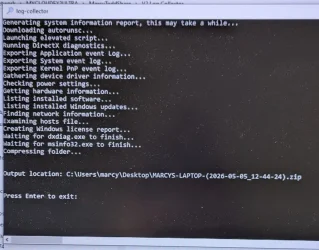
I ran the log collector, and copied the output ZIP file to a Google Drive that you should be able to access. Click on this link: MARCYS-LAPTOP-(2026-05-05_12-44-24).zip
In case it's useful in any way, I'm also attaching a screen shot of the window where the log collector ran.
 

Attachments

  • log collector execution window.webp
    log collector execution window.webp
    104.2 KB · Views: 1

My Computer My Computer

At a glance

Windows 11
OS
Windows 11
Computer type
Laptop
Manufacturer/Model
Lenovo
Whenever possible take pictures of any recently performed steps > post images or share links


1) Please run the V2 log collector > post a share link


2) Enable regback:

Enable Automatic Backup of System Registry when Restart in Windows 10


3) Create a new restore point:

Create System Restore Point in Windows 10


4) Run upgrade_failure_info.bat > post a share link


5) Run Tuneup plus > post a share link

https://www.tenforums.com/attachmen...-files-use-bsod-debugging-tuneup_plus_log.bat

Batch files for use in BSOD debugging - Windows 10 Help Forums


6) Run diskparinfo.bat > post a share link


Batch files for use in BSOD debugging - Windows 10 Help Forums


Code:
ERROR_INVALID_DRIVE  = The system cannot find the drive specified.
winerror
Sorry to be a pain in the neck, but I have a few more minor questions before I run everything you indicated.
  1. Should I run everything one after another without doing anything in between, or should I try a reboot after each step to see if the problem is fixed or is different? Should I look for any kinds of errors on any of the steps that would indicate I should not run the others?
  2. You posted a link to the whole list of "Batch files for use in BSOD debugging". You just wanted me to run the ones you mentioned, right? "V2 log collector", "regback", creation of restore point, "upgrade_failure_info", "tuneup_plus", and "diskpartinfo".
  3. You posted a link to the Lenovo page for P73 downloads - was there something in particular you wanted me to get there? As I already mentioned, I ran the Lenovo utility to check for any available updates, and it only found one for BIOS, which I installed.
  4. Did you see the results I posted earlier today for the V2 log collector? I made a post, but I don't see it anywhere - hopefully, you did.
Finally, I have to report that my wife changed her answer to the question "were there any errors during the upgrade". She now says there were errors, but of course she can't remember what they were. (the perils of being married to a graphic artist instead of a tech person... :() When I asked her that same question a couple of days ago, she said there were no errors - not sure what she misunderstood then.
 

My Computer My Computer

At a glance

Windows 11
OS
Windows 11
Computer type
Laptop
Manufacturer/Model
Lenovo
  1. Should I run everything one after another without doing anything in between, or should I try a reboot after each step to see if the problem is fixed or is different? Should I look for any kinds of errors on any of the steps that would indicate I should not run the others?

The scripts are independent from each other.
They can run without rebooting.
There should be no errors while the scripts run.

  1. You posted a link to the whole list of "Batch files for use in BSOD debugging". You just wanted me to run the ones you mentioned, right? "V2 log collector", "regback", creation of restore point, "upgrade_failure_info", "tuneup_plus", and "diskpartinfo".


Yes please run the specific bat file.

  1. You posted a link to the Lenovo page for P73 downloads - was there something in particular you wanted me to get there? As I already mentioned, I ran the Lenovo utility to check for any available updates, and it only found one for BIOS, which I installed.

Please enter the computer's serial number into the link to have the optimal computer support link.

  1. Did you see the results I posted earlier today for the V2 log collector? I made a post, but I don't see it anywhere - hopefully, you did.

It was just scanned.

When available please post share links for the specified bat scripts.


Event viewer (system and application):

Run administrative PS: > post share links

wevtutil epl Application "$env:USERPROFILE\Desktop\application.evtx" /ow:true

wevtutil epl System "$env:USERPROFILE\Desktop\system.evtx" /ow:true


Code:
Event[1444]:
  Log Name: System
  Source: Microsoft-Windows-WindowsUpdateClient
  Date: 2026-04-27T13:18:32.8740000Z
  Event ID: 20
  Task: Windows Update Agent
  Level: Error
  Opcode: Installation
  Keyword: Installation,Failure
  User: S-1-5-18
  User Name: NT AUTHORITY\SYSTEM
  Computer: Marcys-Laptop
  Description:
Installation Failure: Windows failed to install the following update with error 0x80070652: Windows 11, version 25H2.


Code:
Event[1325]:
  Log Name: System
  Source: Microsoft-Windows-Kernel-Power
  Date: 2026-04-27T12:01:27.6980000Z
  Event ID: 41
  Task: N/A
  Level: Critical
  Opcode: Info
  Keyword: N/A
  User: S-1-5-18
  User Name: NT AUTHORITY\SYSTEM
  Computer: Marcys-Laptop
  Description:
The system has rebooted without cleanly shutting down first. This error could be caused if the system stopped responding, crashed, or lost power unexpectedly.


Code:
Event[1312]:
  Log Name: System
  Source: EventLog
  Date: 2026-04-27T12:01:37.1070000Z
  Event ID: 6008
  Task: N/A
  Level: Error
  Opcode: N/A
  Keyword: Classic
  User: N/A
  User Name: N/A
  Computer: Marcys-Laptop
  Description:
The previous system shutdown at 8:58:05 AM on ?4/?26/?2026 was unexpected.
 
Last edited:

My Computer My Computer

At a glance

Windows 10Intel(R) Core(TM) i7-4800MQ CPU @ 2.70GHz16 GB Total: Manufacturer : Samsung MemoryTyp...NVIDIA Quadro K3100M; Intel(R) HD Graphics 4600
OS
Windows 10
Computer type
Laptop
Manufacturer/Model
HP
CPU
Intel(R) Core(TM) i7-4800MQ CPU @ 2.70GHz
Motherboard
Product : 190A Version : KBC Version 94.56
Memory
16 GB Total: Manufacturer : Samsung MemoryType : DDR3 FormFactor : SODIMM Capacity : 8GB Speed : 1600
Graphics Card(s)
NVIDIA Quadro K3100M; Intel(R) HD Graphics 4600
Sound Card
IDT High Definition Audio CODEC; PNP Device ID HDAUDIO\FUNC_01&VEN_111D&DEV_76E0
Hard Drives
Model Hitachi HTS727575A9E364
Antivirus
Microsoft Defender
Other Info
Mobile Workstation
Also, I know my wife's laptop is always short on disk space. She cleared a bunch off before doing the upgrade, but is it possible this all happened because of insufficient free disk space? (It would surprise me if the upgrade process did not verify there is enough free space, but I suppose anything is possible.)
I asked, you on post #2, how did upgraded to win 11 and how much free disk space you have.
If you have less than 30G of free disk space can explain why it wasn't successful on the upgrade.
 

My Computers My Computers

  • At a glance

    Windows 11 Pro - Windows 7 HP 64 - Lubuntui5 6600K - 800MHz to 4400MHz4+4G GSkill DDR4 3000IG - Intel 530
    OS
    Windows 11 Pro - Windows 7 HP 64 - Lubuntu
    Computer type
    PC/Desktop
    Manufacturer/Model
    custom build
    CPU
    i5 6600K - 800MHz to 4400MHz
    Motherboard
    GA-Z170-HD3P
    Memory
    4+4G GSkill DDR4 3000
    Graphics Card(s)
    IG - Intel 530
    Monitor(s) Displays
    Samsung 226BW
    Screen Resolution
    1680x1050
    Hard Drives
    (1) -1 SM951 – 128GB M.2 AHCI PCIe SSD drive for Win 11
    (2) -1 WD SATA 3 - 1T for Data
    (3) -1 WD SATA 3 - 1T for backup
    (4) -1 BX500 SSD - 256G for Windows 7 and Lubuntu
    PSU
    Thermaltake 450W TR2 gold
    Keyboard
    Old and good Chicony mechanical keyboard
    Mouse
    Logitech mX performance - 9 buttons (had to disable some)
    Internet Speed
    500 Mb/s
    Browser
    Firefox 64
  • At a glance

    Windows 11 Proi7-4500U 800- 3000MHz(4+4)G DDR3 1600IG intel 4400 + NVIDIA GeForce GT 745M
    Operating System
    Windows 11 Pro
    Computer type
    Laptop
    Manufacturer/Model
    Asus Q550LF
    CPU
    i7-4500U 800- 3000MHz
    Motherboard
    Asus Q550LF
    Memory
    (4+4)G DDR3 1600
    Graphics card(s)
    IG intel 4400 + NVIDIA GeForce GT 745M
    Sound Card
    Realtek
    Monitor(s) Displays
    LG Display LP156WF4-SPH1
    Screen Resolution
    1920 x 1080
    Hard Drives
    BX500 120G SSD for Windows and programs
    & 1T HDD for data
    Internet Speed
    500 Mb/s
    Browser
    Firefox 64
Whenever possible take pictures of any recently performed steps > post images or share links


1) Please run the V2 log collector > post a share link


2) Enable regback:

Enable Automatic Backup of System Registry when Restart in Windows 10


3) Create a new restore point:

Create System Restore Point in Windows 10


4) Run upgrade_failure_info.bat > post a share link


5) Run Tuneup plus > post a share link

https://www.tenforums.com/attachmen...-files-use-bsod-debugging-tuneup_plus_log.bat

Batch files for use in BSOD debugging - Windows 10 Help Forums


6) Run diskparinfo.bat > post a share link


Batch files for use in BSOD debugging - Windows 10 Help Forums


Code:
ERROR_INVALID_DRIVE  = The system cannot find the drive specified.
winerror
I have now completed all the steps you described. I am attaching screen shots for the things I just ran (but those basically say they ran OK), and here are links to the three files they created:
The PC started installed a bunch of updates when I rebooted it after running these. That's been running for a while, and it looks like it won't finish soon - so I will send this post now and report later on how things work after the updates are finished.

By the way, the current free disk space is 54.9GB out of a total space of 475GB.
 

My Computer My Computer

At a glance

Windows 11
OS
Windows 11
Computer type
Laptop
Manufacturer/Model
Lenovo
By the way, the current free disk space is 54.9GB out of a total space of 475GB.
That indicates to me that the combination of the following folders is more than 54 gb in size. Look at the size of all these, add them together and you need at least that much space to upgrade.
  • Your previous Windows installation size (Windows folder, Program Files, ProgramData)
  • All User profiles (Desktop, Documents, Pictures, AppData)
  • Installed programs
  • Driver store
  • Language packs and optional features

I suggest you move the default location of user folders to another internal or external drive. Option 6 here
OR
move your current installation of Windows to a larger drive which can be done using a cloning application.
 

My Computers My Computers

  • At a glance

    Windows 11 Pro 25H2 26200.8655i9-10900 10 core 20 threads32 gbnone-Intel UHD Graphics 630
    OS
    Windows 11 Pro 25H2 26200.8655
    Computer type
    PC/Desktop
    Manufacturer/Model
    Dell Optiplex 7080
    CPU
    i9-10900 10 core 20 threads
    Motherboard
    DELL 0J37VM
    Memory
    32 gb
    Graphics Card(s)
    none-Intel UHD Graphics 630
    Sound Card
    Integrated Realtek
    Monitor(s) Displays
    Benq 27
    Screen Resolution
    2560x1440
    Hard Drives
    2x1tb Solidigm m.2 nvme /External drives 512gb Samsung m.2 sata+2tb Kingston m2.nvme
    PSU
    500w
    Case
    MT
    Cooling
    Dell Premium
    Keyboard
    Logitech wired
    Mouse
    Logitech wireless
    Internet Speed
    so slow I'm too embarrassed to tell
    Browser
    #1 Edge #2 Firefox
    Antivirus
    Defender+MWB Premium
  • At a glance

    Windows 11 Pro 24H2 26200.8457AMD Ryzen 7 6800U32 gbintegrated
    Operating System
    Windows 11 Pro 24H2 26200.8457
    Computer type
    PC/Desktop
    Manufacturer/Model
    Beelink Mini PC SER5
    CPU
    AMD Ryzen 7 6800U
    Memory
    32 gb
    Graphics card(s)
    integrated
    Sound Card
    integrated
    Monitor(s) Displays
    Benq 27
    Screen Resolution
    2560x1440
    Hard Drives
    1TB Crucial nvme
    Keyboard
    Logitech wired
    Mouse
    Logitech wireless
    Internet Speed
    still too embarrassed to tell
    Browser
    Firefox
    Antivirus
    Defender
    Other Info
    System 3 is non compliant Dell 9020 i7-4770/24gb ram Win11 PRO 26200.8457
You people are INCREDIBLE! It looks like the PC successfully booted in Windows 11 after running all the scripts suggested by ZBOOK (who I ESPCEIALLY thank!). And those scripts are truly magic!
1778109376952.webp
1778109278647.webp
 

My Computer My Computer

At a glance

Windows 11
OS
Windows 11
Computer type
Laptop
Manufacturer/Model
Lenovo

My Computer My Computer

At a glance

Windows 10Intel(R) Core(TM) i7-4800MQ CPU @ 2.70GHz16 GB Total: Manufacturer : Samsung MemoryTyp...NVIDIA Quadro K3100M; Intel(R) HD Graphics 4600
OS
Windows 10
Computer type
Laptop
Manufacturer/Model
HP
CPU
Intel(R) Core(TM) i7-4800MQ CPU @ 2.70GHz
Motherboard
Product : 190A Version : KBC Version 94.56
Memory
16 GB Total: Manufacturer : Samsung MemoryType : DDR3 FormFactor : SODIMM Capacity : 8GB Speed : 1600
Graphics Card(s)
NVIDIA Quadro K3100M; Intel(R) HD Graphics 4600
Sound Card
IDT High Definition Audio CODEC; PNP Device ID HDAUDIO\FUNC_01&VEN_111D&DEV_76E0
Hard Drives
Model Hitachi HTS727575A9E364
Antivirus
Microsoft Defender
Other Info
Mobile Workstation
Please mark this thread as Solved
 

My Computers My Computers

  • At a glance

    Windows 11 Pro - Windows 7 HP 64 - Lubuntui5 6600K - 800MHz to 4400MHz4+4G GSkill DDR4 3000IG - Intel 530
    OS
    Windows 11 Pro - Windows 7 HP 64 - Lubuntu
    Computer type
    PC/Desktop
    Manufacturer/Model
    custom build
    CPU
    i5 6600K - 800MHz to 4400MHz
    Motherboard
    GA-Z170-HD3P
    Memory
    4+4G GSkill DDR4 3000
    Graphics Card(s)
    IG - Intel 530
    Monitor(s) Displays
    Samsung 226BW
    Screen Resolution
    1680x1050
    Hard Drives
    (1) -1 SM951 – 128GB M.2 AHCI PCIe SSD drive for Win 11
    (2) -1 WD SATA 3 - 1T for Data
    (3) -1 WD SATA 3 - 1T for backup
    (4) -1 BX500 SSD - 256G for Windows 7 and Lubuntu
    PSU
    Thermaltake 450W TR2 gold
    Keyboard
    Old and good Chicony mechanical keyboard
    Mouse
    Logitech mX performance - 9 buttons (had to disable some)
    Internet Speed
    500 Mb/s
    Browser
    Firefox 64
  • At a glance

    Windows 11 Proi7-4500U 800- 3000MHz(4+4)G DDR3 1600IG intel 4400 + NVIDIA GeForce GT 745M
    Operating System
    Windows 11 Pro
    Computer type
    Laptop
    Manufacturer/Model
    Asus Q550LF
    CPU
    i7-4500U 800- 3000MHz
    Motherboard
    Asus Q550LF
    Memory
    (4+4)G DDR3 1600
    Graphics card(s)
    IG intel 4400 + NVIDIA GeForce GT 745M
    Sound Card
    Realtek
    Monitor(s) Displays
    LG Display LP156WF4-SPH1
    Screen Resolution
    1920 x 1080
    Hard Drives
    BX500 120G SSD for Windows and programs
    & 1T HDD for data
    Internet Speed
    500 Mb/s
    Browser
    Firefox 64

My Computer My Computer

At a glance

Windows 11
OS
Windows 11
Computer type
Laptop
Manufacturer/Model
Lenovo
AV software commonly interfere with upgrades.

This uninstall can be performed to make sure that there are no residual files.


Code:
2026-04-30 13:40:15, Warning               SP         CMonitoredPath::AddOverride: Found existing override [C:\Program Files\Panda Security\WAC\PSANHost.exe, !WGUA.Bin\wgua_critical_file.3g2] for path C:\Users\Public\Documents, will remove it

Code:
2026-04-30 13:32:28, Warning               SP     CMonitoredPath::AddOverride: Found existing override [C:\Program Files\Panda Security\WAC\PSANHost.exe, !WGUA.Bin\wgua_critical_file.3g2] for path C:\Users\Public\Documents, will remove it

Code:
2026-04-30 20:16:23, Info                  SP             [2] Process: C:\Program Files\Panda Security\WAC\PSANHost.exe
2026-04-30 20:16:23, Info                  SP             [2] Pattern: !WGUA.Bin\wgua_critical_file.3g2
2026-04-30 20:16:23, Info                  SP             [2] Mode: 1
2026-04-30 20:16:23, Info                  SP             [3] Process: C:\Program Files (x86)\Panda Security\WAC\PSANHost.exe


Code:
2026-04-30 13:40:15, Warning               SP         SPCalculateMonitoringPaths: Found invalid line in Monitoring.ExtraPaths: U,%CSIDL_DESKTOP%,L,%ProgramFiles%\Panda Security\WAC\PSANHost.exe!WGUA.Bin\wgua_critical_file.3g2
 

My Computer My Computer

At a glance

Windows 10Intel(R) Core(TM) i7-4800MQ CPU @ 2.70GHz16 GB Total: Manufacturer : Samsung MemoryTyp...NVIDIA Quadro K3100M; Intel(R) HD Graphics 4600
OS
Windows 10
Computer type
Laptop
Manufacturer/Model
HP
CPU
Intel(R) Core(TM) i7-4800MQ CPU @ 2.70GHz
Motherboard
Product : 190A Version : KBC Version 94.56
Memory
16 GB Total: Manufacturer : Samsung MemoryType : DDR3 FormFactor : SODIMM Capacity : 8GB Speed : 1600
Graphics Card(s)
NVIDIA Quadro K3100M; Intel(R) HD Graphics 4600
Sound Card
IDT High Definition Audio CODEC; PNP Device ID HDAUDIO\FUNC_01&VEN_111D&DEV_76E0
Hard Drives
Model Hitachi HTS727575A9E364
Antivirus
Microsoft Defender
Other Info
Mobile Workstation
AV software commonly interfere with upgrades.

This uninstall can be performed to make sure that there are no residual files.


Code:
2026-04-30 13:40:15, Warning               SP         CMonitoredPath::AddOverride: Found existing override [C:\Program Files\Panda Security\WAC\PSANHost.exe, !WGUA.Bin\wgua_critical_file.3g2] for path C:\Users\Public\Documents, will remove it

Code:
2026-04-30 13:32:28, Warning               SP     CMonitoredPath::AddOverride: Found existing override [C:\Program Files\Panda Security\WAC\PSANHost.exe, !WGUA.Bin\wgua_critical_file.3g2] for path C:\Users\Public\Documents, will remove it

Code:
2026-04-30 20:16:23, Info                  SP             [2] Process: C:\Program Files\Panda Security\WAC\PSANHost.exe
2026-04-30 20:16:23, Info                  SP             [2] Pattern: !WGUA.Bin\wgua_critical_file.3g2
2026-04-30 20:16:23, Info                  SP             [2] Mode: 1
2026-04-30 20:16:23, Info                  SP             [3] Process: C:\Program Files (x86)\Panda Security\WAC\PSANHost.exe


Code:
2026-04-30 13:40:15, Warning               SP         SPCalculateMonitoringPaths: Found invalid line in Monitoring.ExtraPaths: U,%CSIDL_DESKTOP%,L,%ProgramFiles%\Panda Security\WAC\PSANHost.exe!WGUA.Bin\wgua_critical_file.3g2
But why would any vendor (non-Microsoft) A/V software be on this machine, since it just did a fresh Win11 install? Not trying to be argumentative, but I don't understand how that would happen. And that web page you pointed to lists a ton of different uninstallers, each apparently targeted to a specific vendor's A/V software - Avast, Kaspersky, Malwarebytes, etc. Why did you point me specifically to one for Panda?
 

My Computer My Computer

At a glance

Windows 11
OS
Windows 11
Computer type
Laptop
Manufacturer/Model
Lenovo
The log file reports for Panda were posted in post #35.


Download and install: voidtools

Search for: Panda > post images or share links
 

My Computer My Computer

At a glance

Windows 10Intel(R) Core(TM) i7-4800MQ CPU @ 2.70GHz16 GB Total: Manufacturer : Samsung MemoryTyp...NVIDIA Quadro K3100M; Intel(R) HD Graphics 4600
OS
Windows 10
Computer type
Laptop
Manufacturer/Model
HP
CPU
Intel(R) Core(TM) i7-4800MQ CPU @ 2.70GHz
Motherboard
Product : 190A Version : KBC Version 94.56
Memory
16 GB Total: Manufacturer : Samsung MemoryType : DDR3 FormFactor : SODIMM Capacity : 8GB Speed : 1600
Graphics Card(s)
NVIDIA Quadro K3100M; Intel(R) HD Graphics 4600
Sound Card
IDT High Definition Audio CODEC; PNP Device ID HDAUDIO\FUNC_01&VEN_111D&DEV_76E0
Hard Drives
Model Hitachi HTS727575A9E364
Antivirus
Microsoft Defender
Other Info
Mobile Workstation
The log file reports for Panda were posted in post #35.


Download and install: voidtools

Search for: Panda > post images or share links
I love Everything - been one of my favorite tools for years. However, it shows no Panda stuff on my wife's laptop:
1778173409119.webp
 

My Computer My Computer

At a glance

Windows 11
OS
Windows 11
Computer type
Laptop
Manufacturer/Model
Lenovo
It's not clear to me what had happened with the panda seen in the upgrade fail logs.

2026-04-30 13:32:28, Warning SP CMonitoredPath::AddOverride: Found existing override [C:\Program Files\Panda Security\WAC\PSANHost.exe, !WGUA.Bin\wgua_critical_file.3g2] for path C:\Users\Public\Documents, will remove it
 

My Computer My Computer

At a glance

Windows 10Intel(R) Core(TM) i7-4800MQ CPU @ 2.70GHz16 GB Total: Manufacturer : Samsung MemoryTyp...NVIDIA Quadro K3100M; Intel(R) HD Graphics 4600
OS
Windows 10
Computer type
Laptop
Manufacturer/Model
HP
CPU
Intel(R) Core(TM) i7-4800MQ CPU @ 2.70GHz
Motherboard
Product : 190A Version : KBC Version 94.56
Memory
16 GB Total: Manufacturer : Samsung MemoryType : DDR3 FormFactor : SODIMM Capacity : 8GB Speed : 1600
Graphics Card(s)
NVIDIA Quadro K3100M; Intel(R) HD Graphics 4600
Sound Card
IDT High Definition Audio CODEC; PNP Device ID HDAUDIO\FUNC_01&VEN_111D&DEV_76E0
Hard Drives
Model Hitachi HTS727575A9E364
Antivirus
Microsoft Defender
Other Info
Mobile Workstation
It's not clear to me what had happened with the panda seen in the upgrade fail logs.

2026-04-30 13:32:28, Warning SP CMonitoredPath::AddOverride: Found existing override [C:\Program Files\Panda Security\WAC\PSANHost.exe, !WGUA.Bin\wgua_critical_file.3g2] for path C:\Users\Public\Documents, will remove it
I don't see that in the c:\program files directory. Here's a listing, including any hidden directories:

Volume in drive C is Windows
Volume Serial Number is FA61-38EC

Directory of C:\Program Files

05/06/2026 10:23 PM <DIR> .
05/07/2026 07:23 PM <DIR> ..
06/25/2020 03:18 PM <DIR> 7-Zip
07/17/2025 02:45 PM <DIR> Acronis
04/25/2026 04:35 PM <DIR> Adobe
11/28/2022 10:52 AM <DIR> Bonjour
04/12/2024 04:06 PM <DIR> BookWright
05/06/2026 10:23 PM <DIR> Common Files
04/27/2025 06:47 AM <DIR> Dropbox
06/25/2020 01:14 PM <DIR> EpsonNet
06/26/2020 12:43 PM <DIR> Everything
05/06/2026 10:23 PM <DIR> Intel
05/06/2026 10:16 PM <DIR> Internet Explorer
01/03/2026 12:48 PM <DIR> IrfanView
03/21/2021 03:50 PM <DIR> KeyboardNotification
06/25/2020 12:52 PM <DIR> Lenovo
04/25/2026 10:50 AM <DIR> Logi
04/28/2026 03:01 PM <DIR> LogiOptionsPlus
06/25/2020 01:01 PM <DIR> Microsoft Office
06/25/2020 01:01 PM <DIR> Microsoft Office 15
11/02/2023 10:12 PM <DIR> Microsoft Update Health Tools
04/01/2024 03:26 AM <DIR> ModifiableWindowsApps
09/18/2025 01:49 PM <DIR> Mozilla Firefox
05/06/2026 10:11 PM <DIR> MSBuild
08/12/2021 09:29 PM <DIR> NVIDIA Corporation
04/29/2022 09:44 AM <DIR> PCHealthCheck
05/06/2026 10:11 PM <DIR> Reference Assemblies
06/28/2025 08:35 PM <DIR> RUXIM
11/28/2021 07:21 PM <DIR> Tablet
10/17/2019 12:07 AM <DIR> Uninstall Information
05/06/2026 10:23 PM <DIR> UNP
03/05/2021 02:32 PM <DIR> VideoLAN
05/06/2026 06:33 PM <DIR> Windows Defender
05/06/2026 10:16 PM <DIR> Windows Defender Advanced Threat Protection
05/06/2026 10:16 PM <DIR> Windows Mail
05/06/2026 10:16 PM <DIR> Windows Media Player
04/01/2024 04:00 AM <DIR> Windows NT
05/06/2026 10:16 PM <DIR> Windows Photo Viewer
04/01/2024 03:34 AM <DIR> Windows Sidebar
05/07/2026 12:59 PM <DIR> WindowsApps
04/01/2024 03:34 AM <DIR> WindowsPowerShell
0 File(s) 0 bytes
41 Dir(s) 71,742,255,104 bytes free
 

My Computer My Computer

At a glance

Windows 11
OS
Windows 11
Computer type
Laptop
Manufacturer/Model
Lenovo

Latest Support Threads

Back
Top Bottom