"Alert! TPM not detected" warning on boot


mugs001

New member
Local time
7:39 PM
Posts
4
OS
windows 11
I have a Dell Optiplex 7050 that I installed Windows 11 on. PC HealthCheck said I wouldn't be able to install it because of my CPU and not having TPM. I installed it anyway with the Rufus workaround where the "Remove requirement for...TPM 2.0" line was checked. It installed and seemed to work fine.

One day, I cleaned the dust out of the case and upon putting the cover back on and restarting, I got the warning/alert, "TPM not detected", and the choice to hit F1, F2, or F5. I get that all the time now. F1 boots it up and everything works properly but on start and restart I always get that black screen first. F2 will get me to BIOS.

I've done lots of reading on this. It would seem that yes, I don't have TPM capability. I don't see it in the BIOS Security or Advanced settings. The BIOS is the latest version (1.27). When I check using "tpm.msc" in the Run dialog it says, "Compatible TPM cannot be found". I've also checked in the Security processor details section of Windows Security in settings. It shows that there is no TPM version.

I have unplugged the machine to do a hard reset, removed and reinstalled the CMOS battery, and reset the jumper. No change. Now, I just want to get rid of the warning message and delayed boot. I reinstalled Windows 11 (clean install) but still get the error. I have the chassis intrusion warning disabled in the BIOS. That was the only thing I could think of that would have caused the warning message in the first place.

Is there a way to fix this?

Thanks!
 

My Computer

System One

  • OS
    windows 11
    Computer type
    PC/Desktop
    Manufacturer/Model
    Dell Optiplex 7050
    CPU
    Intel Core (R) Core (TM) i7-7700 [email protected] GHz, 3600 Mhz
    Motherboard
    0NW6H5 (Baseboard version A00)
    Memory
    16 GB
    Monitor(s) Displays
    Old Dell monitor
    Hard Drives
    Samsung SSD
    PSU
    Factory installed
    Case
    The factory case
    Cooling
    factory installed fan
    Keyboard
    Dell came in the box
    Mouse
    Dell came in the box
    Internet Speed
    186 mb down/186 mb up
    Browser
    Firefox
    Antivirus
    Avast
First, is it possible that you only started getting this error after cleaning out the computer because you do have a TPM but knocked it loose?

Check your system user guide for the location where a TPM module would be plugged in and see if one is present, maybe just partially dislodged.

If you really do not have a TPM module at all, check the BIOS to make sure that it is disabled there.
 

My Computers

System One System Two

  • OS
    Win11 Pro 25H2 (RTM+)
    Computer type
    PC/Desktop
    Manufacturer/Model
    Acemagic
    CPU
    Intel i7-14650HX
    Memory
    32 GB
    Graphics Card(s)
    No GPU - Built-in Intel Graphics
    Sound Card
    Integrated
    Monitor(s) Displays
    Varies as machine will often be moved to locations with different monitors
    Screen Resolution
    Varies
    Hard Drives
    1 x 1TB Gen 4 NVMe SSD
    PSU
    120W Power Brick
    Keyboard
    Corsair K70 Max RGB Magnetic Keyboard
    Mouse
    Logitech MX Master 3
    Internet Speed
    1Gb Up / 1 Gb Down
    Browser
    Edge
    Antivirus
    Windows Defender
  • Operating System
    Win11 Pro 25H2 (RTM+)
    Computer type
    Laptop
    Manufacturer/Model
    Lenovo ThinkBook 13x Gen 2
    CPU
    Intel i7-1255U
    Memory
    16 GB
    Graphics card(s)
    Intel Iris Xe Graphics
    Sound Card
    Realtek® ALC3306-CG codec
    Monitor(s) Displays
    13.3-inch IPS Display
    Screen Resolution
    WQXGA (2560 x 1600)
    Hard Drives
    2 TB 4 x 4 NVMe SSD
    PSU
    USB-C / Thunderbolt 4 Power / Charging
    Keyboard
    Backlit, spill resistant keyboard
    Mouse
    Buttonless Glass Precision Touchpad
    Internet Speed
    1Gb Up / 1Gb Down
    Browser
    Edge
    Antivirus
    Windows Defender
    Other Info
    WiFi 6e / Bluetooth 5.1 / Facial Recognition / Fingerprint Sensor / ToF (Time of Flight) Human Presence Sensor
according to the spec of your PC it has TPM2 and is Windows 11 compliant.

best of luck, Steve ..
 

My Computers

System One System Two

  • OS
    Debian Trixie KDE Windows 11 Home
    Computer type
    PC/Desktop
    Manufacturer/Model
    HP 24" AiO
    CPU
    Ryzen 7 5825u
    Motherboard
    HP
    Memory
    64GB DDR4 3200
    Graphics Card(s)
    Ryzen 7 5825u
    Sound Card
    RealTek
    Monitor(s) Displays
    24" HP AiO
    Screen Resolution
    1920 x 1080 @60 Hz
    Hard Drives
    1TB WD Blue SN580 M2 SSD Partitioned.
    2x 1TB USB HDD External Backup/Storage.
    PSU
    90W external power brick
    Case
    24" All in One
    Cooling
    Default Air Cooling
    Keyboard
    HP WiFi UK extended
    Mouse
    HP WiFi 3 Button
    Internet Speed
    1GB full fibre
    Browser
    Edge & Firefox
    Antivirus
    AVG Internet Security/Windows Defender
    Other Info
    Mainly Open Source Software
  • Operating System
    Ubuntu 22.04.5 LTS
    Computer type
    Laptop
    Manufacturer/Model
    Dell 13" Latitude 2017
    CPU
    i5 7200u
    Motherboard
    Dell
    Memory
    16GB DDR4
    Graphics card(s)
    Intel
    Sound Card
    Intel
    Monitor(s) Displays
    13" Dell Laptop
    Hard Drives
    250GB Crucial 2.5" SSD
    Mouse
    Generic WiFi 3 button
    Internet Speed
    WiFi only
    Browser
    Firefox
    Antivirus
    ClamAV TK
    Other Info
    Mainly Open Source Software
Thank you both! I'll open it up first thing tomorrow.
 

My Computer

System One

  • OS
    windows 11
    Computer type
    PC/Desktop
    Manufacturer/Model
    Dell Optiplex 7050
    CPU
    Intel Core (R) Core (TM) i7-7700 [email protected] GHz, 3600 Mhz
    Motherboard
    0NW6H5 (Baseboard version A00)
    Memory
    16 GB
    Monitor(s) Displays
    Old Dell monitor
    Hard Drives
    Samsung SSD
    PSU
    Factory installed
    Case
    The factory case
    Cooling
    factory installed fan
    Keyboard
    Dell came in the box
    Mouse
    Dell came in the box
    Internet Speed
    186 mb down/186 mb up
    Browser
    Firefox
    Antivirus
    Avast
Screen Shot 2024-12-19 at 1.05.05 PM.webp

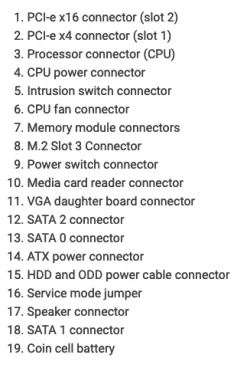
So today I opened up the unit. I removed the fan and the drives to get a better view of things. I didn't see anything labeled TPM or anything that looked like some examples of TPMs and their plug-in housings on the motherboard. Yes, I also saw that the documentation seems to say that TPM is enabled in that model. I've attached the manual's pic of the motherboard. Any idea where I should look? I wonder if this is one of the ones where it's built into the CPU? Also, I see people talk about downgrading the BIOS as a solution?

Screen Shot 2024-12-19 at 5.05.11 PM.webpScreen Shot 2024-12-19 at 5.05.11 PM.webpScreen Shot 2024-12-19 at 5.05.11 PM.webp
 

My Computer

System One

  • OS
    windows 11
    Computer type
    PC/Desktop
    Manufacturer/Model
    Dell Optiplex 7050
    CPU
    Intel Core (R) Core (TM) i7-7700 [email protected] GHz, 3600 Mhz
    Motherboard
    0NW6H5 (Baseboard version A00)
    Memory
    16 GB
    Monitor(s) Displays
    Old Dell monitor
    Hard Drives
    Samsung SSD
    PSU
    Factory installed
    Case
    The factory case
    Cooling
    factory installed fan
    Keyboard
    Dell came in the box
    Mouse
    Dell came in the box
    Internet Speed
    186 mb down/186 mb up
    Browser
    Firefox
    Antivirus
    Avast
download the iso for the same build of windows 11 that you have installed.


save this .cmd and run it as admin. once it says installed, run a repair install via the iso you downloaded. it will perform an in-place upgrade and you won't lose anything. that *should* fix the tpm issue as it'll bypass the tpm requirement and 'install' windows again. worth a shot with no downside...
 

My Computer

System One

  • OS
    Windows 11 Pro
Acccording to spec sheet it can have a TPM 1.2 or TPM 2.0
Screenshot 2024-12-19 173501.webp
 

My Computers

System One System Two

  • OS
    Windows 11 Pro 25H2
    Computer type
    PC/Desktop
    Manufacturer/Model
    Dell Optiplex 7080
    CPU
    i9-10900 10 core 20 threads
    Motherboard
    DELL 0J37VM
    Memory
    32 gb
    Graphics Card(s)
    none-Intel UHD Graphics 630
    Sound Card
    Integrated Realtek
    Monitor(s) Displays
    Benq 27
    Screen Resolution
    2560x1440
    Hard Drives
    2x1tb Solidigm m.2 nvme /External drives 512gb Samsung m.2 sata+2tb Kingston m2.nvme
    PSU
    500w
    Case
    MT
    Cooling
    Dell Premium
    Keyboard
    Logitech wired
    Mouse
    Logitech wireless
    Internet Speed
    so slow I'm too embarrassed to tell
    Browser
    #1 Edge #2 Firefox
    Antivirus
    Defender+MWB Premium
  • Operating System
    Windows 11 Pro 24H2 26200.8457
    Computer type
    PC/Desktop
    Manufacturer/Model
    Beelink Mini PC SER5
    CPU
    AMD Ryzen 7 6800U
    Memory
    32 gb
    Graphics card(s)
    integrated
    Sound Card
    integrated
    Monitor(s) Displays
    Benq 27
    Screen Resolution
    2560x1440
    Hard Drives
    1TB Crucial nvme
    Keyboard
    Logitech wired
    Mouse
    Logitech wireless
    Internet Speed
    still too embarrassed to tell
    Browser
    Firefox
    Antivirus
    Defender
    Other Info
    System 3 is non compliant Dell 9020 i7-4770/24gb ram Win11 PRO 26200.8457

My Computers

System One System Two

  • OS
    Debian Trixie KDE Windows 11 Home
    Computer type
    PC/Desktop
    Manufacturer/Model
    HP 24" AiO
    CPU
    Ryzen 7 5825u
    Motherboard
    HP
    Memory
    64GB DDR4 3200
    Graphics Card(s)
    Ryzen 7 5825u
    Sound Card
    RealTek
    Monitor(s) Displays
    24" HP AiO
    Screen Resolution
    1920 x 1080 @60 Hz
    Hard Drives
    1TB WD Blue SN580 M2 SSD Partitioned.
    2x 1TB USB HDD External Backup/Storage.
    PSU
    90W external power brick
    Case
    24" All in One
    Cooling
    Default Air Cooling
    Keyboard
    HP WiFi UK extended
    Mouse
    HP WiFi 3 Button
    Internet Speed
    1GB full fibre
    Browser
    Edge & Firefox
    Antivirus
    AVG Internet Security/Windows Defender
    Other Info
    Mainly Open Source Software
  • Operating System
    Ubuntu 22.04.5 LTS
    Computer type
    Laptop
    Manufacturer/Model
    Dell 13" Latitude 2017
    CPU
    i5 7200u
    Motherboard
    Dell
    Memory
    16GB DDR4
    Graphics card(s)
    Intel
    Sound Card
    Intel
    Monitor(s) Displays
    13" Dell Laptop
    Hard Drives
    250GB Crucial 2.5" SSD
    Mouse
    Generic WiFi 3 button
    Internet Speed
    WiFi only
    Browser
    Firefox
    Antivirus
    ClamAV TK
    Other Info
    Mainly Open Source Software
I doubt this system has a dedicated TPM chip and uses the CPU/motherboard combo for TPM. I suspect it got turned off somehow. You said you looked for the setting in the bios but didn't see it. I fired up the latest Dell system I have to compare. Mine is a AIO with a 9th gen processor. The TPM settings are under -Security | -TPM 20 Security. From there is the option for TPM ON and Enabled(2 separate settings).
 

My Computer

System One

  • OS
    Win 7/10/11
    Computer type
    PC/Desktop
    Other Info
    I'm a computer enthusiast so have quite a few systems that I run. More like an advanced hobby.
Right. That was the first thing I did. Nothing TPM related in the Bios whether under Security or Advanced menus.
 

My Computer

System One

  • OS
    windows 11
    Computer type
    PC/Desktop
    Manufacturer/Model
    Dell Optiplex 7050
    CPU
    Intel Core (R) Core (TM) i7-7700 [email protected] GHz, 3600 Mhz
    Motherboard
    0NW6H5 (Baseboard version A00)
    Memory
    16 GB
    Monitor(s) Displays
    Old Dell monitor
    Hard Drives
    Samsung SSD
    PSU
    Factory installed
    Case
    The factory case
    Cooling
    factory installed fan
    Keyboard
    Dell came in the box
    Mouse
    Dell came in the box
    Internet Speed
    186 mb down/186 mb up
    Browser
    Firefox
    Antivirus
    Avast
  • Per Dell If you don't see TPM settings, look for any option related to ``Security Device Support'' and ensure it's enabled.
 

My Computers

System One System Two

  • OS
    Windows 11 Pro 25H2
    Computer type
    PC/Desktop
    Manufacturer/Model
    Dell Optiplex 7080
    CPU
    i9-10900 10 core 20 threads
    Motherboard
    DELL 0J37VM
    Memory
    32 gb
    Graphics Card(s)
    none-Intel UHD Graphics 630
    Sound Card
    Integrated Realtek
    Monitor(s) Displays
    Benq 27
    Screen Resolution
    2560x1440
    Hard Drives
    2x1tb Solidigm m.2 nvme /External drives 512gb Samsung m.2 sata+2tb Kingston m2.nvme
    PSU
    500w
    Case
    MT
    Cooling
    Dell Premium
    Keyboard
    Logitech wired
    Mouse
    Logitech wireless
    Internet Speed
    so slow I'm too embarrassed to tell
    Browser
    #1 Edge #2 Firefox
    Antivirus
    Defender+MWB Premium
  • Operating System
    Windows 11 Pro 24H2 26200.8457
    Computer type
    PC/Desktop
    Manufacturer/Model
    Beelink Mini PC SER5
    CPU
    AMD Ryzen 7 6800U
    Memory
    32 gb
    Graphics card(s)
    integrated
    Sound Card
    integrated
    Monitor(s) Displays
    Benq 27
    Screen Resolution
    2560x1440
    Hard Drives
    1TB Crucial nvme
    Keyboard
    Logitech wired
    Mouse
    Logitech wireless
    Internet Speed
    still too embarrassed to tell
    Browser
    Firefox
    Antivirus
    Defender
    Other Info
    System 3 is non compliant Dell 9020 i7-4770/24gb ram Win11 PRO 26200.8457

Dell Firmware Update to TPM Version 2.0 or Downgrade to TPM Version 1.2 (OptiPlex 7050)​


it is not obvious so

Phil's your man


My Computers

System One System Two

  • OS
    Win7,Win11
    Computer type
    PC/Desktop
    CPU
    i7-9700
    Motherboard
    gigabyte b365m ds3h
    Memory
    2x16gb 3600mhz
    Monitor(s) Displays
    benq gw2480
    PSU
    bequiet pure power 11 400CM
    Cooling
    cryorig m9i
  • Operating System
    win7,win11
    Computer type
    PC/Desktop
    CPU
    i5-8400
    Motherboard
    gigabyte b365m ds3h
    Memory
    2x8gb 3200
    PSU
    xfx pro 450
I checked 2 older identical Opti 3040s I have. Both of them show the same TPM 2.0 Security in the same place as mentioned above. So it's possible you damaged something with your cleaning or you might have a corrupt Bios. You might try reflashing the latest bios. Basically flashing over top of the same one in case something corrupted the current bios.
 

My Computer

System One

  • OS
    Win 7/10/11
    Computer type
    PC/Desktop
    Other Info
    I'm a computer enthusiast so have quite a few systems that I run. More like an advanced hobby.
@SIW2 is correct. The 7050 came with TPM 1.2 and was flashable to 2.0. It’s not part of the BIOS/UEFI update; it’s a separate download.

If the TPM isn’t showing on an OptiPlex, you can usually get it to re-appear by shutting down the device, unplugging the power cord, and holding in the power button for 60 seconds. Plug it back in and fire it up.
 

My Computer

System One

  • OS
    Windows 11 Pro 25H2
    Computer type
    PC/Desktop
    Manufacturer/Model
    Intel NUC12WSHi7
    CPU
    12th Gen Core i7-1260P
    Motherboard
    NUC12WSBi7
    Memory
    64 GB Micron PC4-25600
    Graphics Card(s)
    Intel Iris Xe Graphics
    Sound Card
    on-board Realtek HD Audio
    Monitor(s) Displays
    Dell U3219Q
    Screen Resolution
    3840 x 2160
    Hard Drives
    Samsung SSD 990 PRO 1TB
    Crucial MX500 2 TB
    Antivirus
    Microsoft Defender
I had this issue today an hour ago on my XPS 15 9570 with a new motherboard with the i9-8950HK from early June 2025 when my original i7-8750H motherboard died on May 28, 2025 due to the capacitor burning down and also burn whatever was right under the F5 key.

Before this, I held down power button for 25 seconds to reset the RTC CMOS which did not fix the problem.

The way I fixed it didn't involve opening up the computer.

I saw in the XPS 15 9560 thread here:

Where it says:
1) Unplug AC Adapter cable, wait 1 minute
2) Hold down Ctrl+ESC while plugging the AC Adapter back in and system should turn on itself
3) It will show a BIOS Recovery Menu
4) Select reset bios back to default

In my case, I didn't do step 4 because I tried to memorize the post and instead select Cancel and it fixed it. #4 might be the correct choice.

This brought back the missing TPM setting under Security in the BIOS.
 

My Computer

System One

  • OS
    WindowsXP/7/8/8.1/10/11,Linux,Android,FreeBSD Unix
    Computer type
    Laptop
    Manufacturer/Model
    Dell XPS 15 9570
    CPU
    Intel® Core™ i7-8750H 8th Gen 2.2Ghz up to 4.1Ghz
    Motherboard
    Dell XPS 15 9570
    Memory
    64GB using 2x32GB CL16 Mushkin redLine modules
    Graphics Card(s)
    Intel UHD 630 & NVIDIA GeForce GTX 1050 Ti with 4GB DDR5
    Sound Card
    Realtek ALC3266-CG
    Monitor(s) Displays
    15.6" 4K Touch UltraHD 3840x2160 made by Sharp
    Screen Resolution
    3840x2160 4K UltraHD
    Hard Drives
    Samsung MZ-V9P4T0B/AM 990 PRO 4TB PCIe®4.0 NVMe™ M.2 SSD was Toshiba KXG60ZNV1T02 NVMe 1TB SSD
    PSU
    Dell XPS 15 9570
    Case
    Dell XPS 15 9570
    Cooling
    Stock
    Keyboard
    Stock
    Mouse
    SwitftPoint ProPoint
    Internet Speed
    Comcast/XFinity 1.44Gbps/42.5Mbps
    Browser
    Microsoft EDGE (Chromium based) & Google Chrome
    Antivirus
    Windows Defender that came with Windows

Latest Support Threads

Back
Top Bottom