Solved All three of my browsers block one website


Can you create a new profile in either Chrome or Firefox, without any extensions and check ?
 

My Computer My Computer

At a glance

Windows 11 23H2Intel i7-7700k16 GBIntel 630 onboard
OS
Windows 11 23H2
Computer type
PC/Desktop
Manufacturer/Model
Assembled
CPU
Intel i7-7700k
Motherboard
Asrock Z270 Taichi
Memory
16 GB
Graphics Card(s)
Intel 630 onboard
Sound Card
Onboard
Monitor(s) Displays
Benq 1080p
Screen Resolution
1920*1080
Hard Drives
NVMe, SSD and HDD
Case
Cooler Master
Keyboard
Asus wireless
Mouse
Asus Wireless
Internet Speed
75 Mbps
Browser
Chrome, Edge, Arc
Antivirus
Windows Defender
Random thought...

Try changing the DNS provider on the problem PC (maybe it is different to the one that works). ISP provided DNS can sometimes cause such issues in my experience. Google DNS or Cloudflare are two worth trying. Takes seconds to do.


From my notes:
Google Public DNS IP addresses

The Google Public DNS IP addresses (IPv4) are as follows:
8.8.8.8
8.8.4.4

The Google Public DNS IPv6 addresses are as follows:
2001:4860:4860::8888
2001:4860:4860::8844

--------------------------------------------------------------

Cloudflare DNS:

For IPv4:
1.1.1.1
1.0.0.1

For IPv6:
2606:4700:4700::1111
2606:4700:4700::1001
 

My Computer My Computer

At a glance

W11 Pro x64 ongoing Canary 29500 latest buildsIntel i58GbIntel HD Graphics
OS
W11 Pro x64 ongoing Canary 29500 latest builds
Computer type
Laptop
Manufacturer/Model
Dell 7760 Mobile Precision 17"
CPU
Intel i5
Motherboard
Unknown
Memory
8Gb
Graphics Card(s)
Intel HD Graphics
Sound Card
Realtek
Monitor(s) Displays
Internal
Hard Drives
2 x 256Gb SSD
PSU
Dell 240 watt
Mouse
Dell Premier Bluetooth
Internet Speed
50Mbps
Browser
Edge
Antivirus
Default Microsoft Security
Thanks, But that link gets me

Hmmm… can't reach this page​

The connection was reset.

Well, it was worth a shot.

I'm sorry it didn't work for you, and that I can not offer a solution.


For what it's worth, I too am using Windows Security and Malwarebytes Premium, and can reach it with no problem.


I wish you the best. (y)
 

My Computer My Computer

At a glance

Windows 10 Pro 64-bit 22H2 19045.4046Intel i7-3770 @ 3.40GHz8 GBAMD 7500 Radeon HD Series
OS
Windows 10 Pro 64-bit 22H2 19045.4046
Computer type
PC/Desktop
Manufacturer/Model
Dell/Vostro 470 (Year 2012)
CPU
Intel i7-3770 @ 3.40GHz
Memory
8 GB
Graphics Card(s)
AMD 7500 Radeon HD Series
Sound Card
Realtek Hi-Def Audio
Monitor(s) Displays
Dell U2412M
Hard Drives
1 TB 7200 HDD
Keyboard
Dell/USB
Mouse
Dell/USB
Internet Speed
100/10
Browser
Edge
Antivirus
Windows Security/MalwareBytes Premium

My Computers My Computers

  • At a glance

    Win 11 ProAMD Ryzen™ 7 7730U24GB Dual-Channel DDR4 @ 1596MHz (22-22-22-52)512MB ATI AMD Radeon Graphics (ASUStek Comput...
    OS
    Win 11 Pro
    Computer type
    Laptop
    Manufacturer/Model
    ASUS Vivobook
    CPU
    AMD Ryzen™ 7 7730U
    Motherboard
    M1605YA
    Memory
    24GB Dual-Channel DDR4 @ 1596MHz (22-22-22-52)
    Graphics Card(s)
    512MB ATI AMD Radeon Graphics (ASUStek Computer Inc)
    Monitor(s) Displays
    Generic PnP Monitor (1920x1200@60Hz) - P1 PLUS (1920x1080@59Hz)
    Screen Resolution
    1920 X 1200
    Hard Drives
    953GB Western Digital WD
    PSU
    45 Watts
    Mouse
    Lenovo Bluetooth.
    Internet Speed
    500 Mbps
    Browser
    Edge
    Antivirus
    Defender
  • At a glance

    Windows 11AMD Ryzen 7 5800H / 3.2 GHz32 GB DDR4 SDRAM 3200 MHzNVIDIA GeForce RTX 3060 6 GB GDDR6 SDRAM
    Operating System
    Windows 11
    Computer type
    Laptop
    Manufacturer/Model
    ACER NITRO
    CPU
    AMD Ryzen 7 5800H / 3.2 GHz
    Motherboard
    CZ Scala_CAS (FP6)
    Memory
    32 GB DDR4 SDRAM 3200 MHz
    Graphics card(s)
    NVIDIA GeForce RTX 3060 6 GB GDDR6 SDRAM
    Sound Card
    Realtek Audio. NVIDIA High Definition Audio
    Monitor(s) Displays
    15.6" LED backlight 1920 x 1080 (Full HD) 144 Hz
    Screen Resolution
    1920 x 1080 (Full HD)
    Hard Drives
    Samsung 970 Evo Plus 2TB NVMe M.2
    PSU
    180 Watt, 19.5 V
    Mouse
    Lenovo Bluetooth
    Internet Speed
    500 Mbps
    Browser
    Edge
    Antivirus
    Defender
Working here on Firefox, maybe try clearing the DNS cache? Admin Command or terminal Window "ipconfig /flushdns" less the quotes.
 

My Computers My Computers

  • At a glance

    Windows 11 22H2 OS Build 22623.1095AMD Ryzen 7 3800X16GB Corsair Vengeance LPX DDR4 @3000MhzASUS - GeForce RTX 3070 Ti 8 GB TUF GAMING OC
    OS
    Windows 11 22H2 OS Build 22623.1095
    Computer type
    PC/Desktop
    Manufacturer/Model
    Self Build
    CPU
    AMD Ryzen 7 3800X
    Motherboard
    Asus PRIME B350-PLUS
    Memory
    16GB Corsair Vengeance LPX DDR4 @3000Mhz
    Graphics Card(s)
    ASUS - GeForce RTX 3070 Ti 8 GB TUF GAMING OC
    Sound Card
    On Board Realtec
    Monitor(s) Displays
    Acer KA241
    Screen Resolution
    1920 x 1080 @60Hz
    Hard Drives
    240GB PNY CS900 SSD - OS
    2 x 1TB Crucial MX500 SSD
    1 x 500GB Crucial MX300 SSD
    2TB Seagate ST2000DM001-1ER164
    2TB Seagate ST2000DM008-2FR102
    PSU
    750 Watt Corsair TX750 Plus
    Case
    Cooler Master 690 III
    Cooling
    Akasa AK98 5 Case Fans
    Keyboard
    Logitech K270 - wireless
    Mouse
    Logitech - M185 wireless
    Internet Speed
    BT Fibre 75 Mbps
    Browser
    Firefox
    Antivirus
    Windows Defender
    Other Info
    Use hardware KVM to switch monitors on three PCs and software (input director) to use mouse and keyboard on all 4 PCs.
  • At a glance

    Windows 11 Pro 22H2 build 22621.900Intel i5 - 1040016GB of HyperX Fury @ 2133 MhzEVGA 6GB GTX 1060.
    Operating System
    Windows 11 Pro 22H2 build 22621.900
    Computer type
    PC/Desktop
    Manufacturer/Model
    Dell Inspiron 3881 - modified with SFX PSU fitted internally
    CPU
    Intel i5 - 10400
    Motherboard
    Dell 032w55 version A00
    Memory
    16GB of HyperX Fury @ 2133 Mhz
    Graphics card(s)
    EVGA 6GB GTX 1060.
    Sound Card
    Builtin
    Monitor(s) Displays
    ACER KA241
    Screen Resolution
    1920x 1080 @60Hz
    Hard Drives
    256GB SK hynix NVMe
    1TB Western Digital WD10EZEX-75WN4A1
    PSU
    Modular 450 Watt Corsair SF450 Platinum ( Mod to replace the Dell 265 Watt PSU)
    Case
    Inspiron Small Desktop
    Cooling
    Dell stock cooler
    Keyboard
    Dell
    Mouse
    Dell
    Internet Speed
    BT Fibre 75 Mbps
    Browser
    Firefox
    Antivirus
    Windows Defender
    Other Info
    Use hardware KVM to switch monitors on three PCs and software (input director) to use mouse and keyboard on all 4 PCs.
I have had things like websites do that, the fix was always reset the browser. It will keep your passwords and bookmarks.
The problem could be a bad cookie?
 

My Computer My Computer

At a glance

windows 11old AMD B958gb
OS
windows 11
Computer type
PC/Desktop
Manufacturer/Model
some kind of old ASUS MB
CPU
old AMD B95
Motherboard
ASUS
Memory
8gb
Hard Drives
ssd WD 500 gb
Yes. Maleware Premium and Windows Defender on both.
Hi,
Just use in-private browsing and see
The website is pretty obnoxious with the cookie crap
When you see it just hit settings and click the off slider to on to not sell your info and close that tab. close the popup annoyance.
 

My Computer My Computer

At a glance

Win-7-10-11Pro's10900k & 9940x & 5930kTrident-Z Royal 4000c16 2x16gb & Trident-Z 36...Titan Xp & 1080ti FTW3 & evga 980ti gaming
OS
Win-7-10-11Pro's
Computer type
PC/Desktop
Manufacturer/Model
Acer 17" Nitro 7840sn/ 2x16gb 5600c40/ 4060/ stock 1tb-os/ 4tb sn850x
CPU
10900k & 9940x & 5930k
Motherboard
z490-Apex & x299-Apex & x99-Sabertooth
Memory
Trident-Z Royal 4000c16 2x16gb & Trident-Z 3600c16 4x8gb & 3200c14 4x8gb
Graphics Card(s)
Titan Xp & 1080ti FTW3 & evga 980ti gaming
Sound Card
Onboard Realtek x3
Monitor(s) Displays
1-AOC G2460PG 24"G-Sync 144Hz/ 2nd 1-ASUS VG248QE 24"/ 3rd LG 43" series
Screen Resolution
1920-1080 not sure what the t.v is besides 43" class scales from 1920-1080 perfectly
Hard Drives
2-WD-sn850x 4tb/ 970evo+500gb/ 980 pro 2tb.
PSU
1000p2 & 1200p2 & 850p2
Case
D450 x2 & 1 Test bench in cherry Entertainment center
Cooling
Custom water loops x3 with 2x mora 360mm rads only 980ti gaming air cooled
Keyboard
G710+x3
Mouse
Redragon x3
Internet Speed
xfinity gigabyte
Browser
Firefox
Antivirus
mbam pro
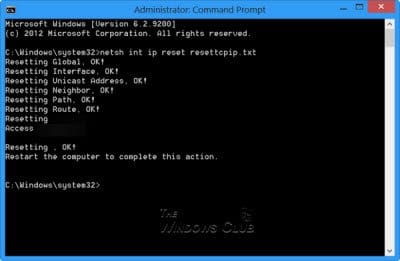
Run CMD in admin mode and type the following commands.
  • Type ipconfig /flushdns and press Enter.
  • Type ipconfig /registerdns and press Enter.
  • Type ipconfig /release and press Enter.
  • Type ipconfig /renew and press Enter.
  • Type netsh winsock reset and press Enter.
Restart computer.

If it still happens, one of 4 things is happening if the problem is on your computer. Your firewall, router, MWB, or your hosts file is blocking it.

Do you have dedicated internet access or are you tethering your phone to your PC for internet?
Your ISP could also be blocking it. If you know someone else using the same isp, have them give it a try.
 

My Computers My Computers

  • At a glance

    Windows 11 Pro 25H2 26200.8655i9-10900 10 core 20 threads32 gbnone-Intel UHD Graphics 630
    OS
    Windows 11 Pro 25H2 26200.8655
    Computer type
    PC/Desktop
    Manufacturer/Model
    Dell Optiplex 7080
    CPU
    i9-10900 10 core 20 threads
    Motherboard
    DELL 0J37VM
    Memory
    32 gb
    Graphics Card(s)
    none-Intel UHD Graphics 630
    Sound Card
    Integrated Realtek
    Monitor(s) Displays
    Benq 27
    Screen Resolution
    2560x1440
    Hard Drives
    2x1tb Solidigm m.2 nvme /External drives 512gb Samsung m.2 sata+2tb Kingston m2.nvme
    PSU
    500w
    Case
    MT
    Cooling
    Dell Premium
    Keyboard
    Logitech wired
    Mouse
    Logitech wireless
    Internet Speed
    so slow I'm too embarrassed to tell
    Browser
    #1 Edge #2 Firefox
    Antivirus
    Defender+MWB Premium
  • At a glance

    Windows 11 Pro 24H2 26200.8457AMD Ryzen 7 6800U32 gbintegrated
    Operating System
    Windows 11 Pro 24H2 26200.8457
    Computer type
    PC/Desktop
    Manufacturer/Model
    Beelink Mini PC SER5
    CPU
    AMD Ryzen 7 6800U
    Memory
    32 gb
    Graphics card(s)
    integrated
    Sound Card
    integrated
    Monitor(s) Displays
    Benq 27
    Screen Resolution
    2560x1440
    Hard Drives
    1TB Crucial nvme
    Keyboard
    Logitech wired
    Mouse
    Logitech wireless
    Internet Speed
    still too embarrassed to tell
    Browser
    Firefox
    Antivirus
    Defender
    Other Info
    System 3 is non compliant Dell 9020 i7-4770/24gb ram Win11 PRO 26200.8457
Hi,
Just use in-private browsing and see
The website is pretty obnoxious with the cookie crap
When you see it just hit settings and click the off slider to on to not sell your info and close that tab. close the popup annoyance.
THANKS, I TRIED IN-PRIVATE BROWSING. STILL DOESN’T WORK.
 

My Computer My Computer

At a glance

windows 11 home11th Gen Intel(R) Core(TM) i7 11700 processor...16GB, 8Gx2, DDR4, 2933MHz 370 AGHWNVIDIA(R) GeForce(R) GTX 1660 Ti 6GB GDDR6 49...
OS
windows 11 home
Computer type
PC/Desktop
Manufacturer/Model
Dell XPS 8940
CPU
11th Gen Intel(R) Core(TM) i7 11700 processor(8 Core, 1
Motherboard
Dell Studio XPS 8900 Desktop Motherboard LGA1151 XJ8C4 0XJ8C4.
Memory
16GB, 8Gx2, DDR4, 2933MHz 370 AGHW
Graphics Card(s)
NVIDIA(R) GeForce(R) GTX 1660 Ti 6GB GDDR6 490 BFUK
Monitor(s) Displays
2
Screen Resolution
1920x
Hard Drives
256GB M.2 PCIe NVMe Solid State Drive (WIN 11 home)
+ 1TB 7200 rpm 3.5" SATA
+ 2.5 inch 512MB Crucial SSDs (WIN 10 home)
PSU
500 W
Case
Mini Tower
Cooling
fan
Keyboard
basic Dell
Mouse
basic Dell
Internet Speed
300 MBps
Browser
firefox, chrome, edge
Antivirus
MS Defender and malwarebytes
Run CMD in admin mode and type the following commands.
  • Type ipconfig /flushdns and press Enter.
  • Type ipconfig /registerdns and press Enter.
  • Type ipconfig /release and press Enter.
  • Type ipconfig /renew and press Enter.
  • Type netsh winsock reset and press Enter.
Restart computer.

If it still happens, one of 4 things is happening if the problem is on your computer. Your firewall, router, MWB, or your hosts file is blocking it.

Do you have dedicated internet access or are you tethering your phone to your PC for internet?
Your ISP could also be blocking it. If you know someone else using the same isp, have them give it a try.
Glasskuter, Thanks for trying. I had high hopes, but it didn't work. (I tried it several times with several reboots). Also,
I have a 2nd pc (win 10 pro) on the same network, and it logs in with no problem, as do my iPad and iPhone.
 

My Computer My Computer

At a glance

windows 11 home11th Gen Intel(R) Core(TM) i7 11700 processor...16GB, 8Gx2, DDR4, 2933MHz 370 AGHWNVIDIA(R) GeForce(R) GTX 1660 Ti 6GB GDDR6 49...
OS
windows 11 home
Computer type
PC/Desktop
Manufacturer/Model
Dell XPS 8940
CPU
11th Gen Intel(R) Core(TM) i7 11700 processor(8 Core, 1
Motherboard
Dell Studio XPS 8900 Desktop Motherboard LGA1151 XJ8C4 0XJ8C4.
Memory
16GB, 8Gx2, DDR4, 2933MHz 370 AGHW
Graphics Card(s)
NVIDIA(R) GeForce(R) GTX 1660 Ti 6GB GDDR6 490 BFUK
Monitor(s) Displays
2
Screen Resolution
1920x
Hard Drives
256GB M.2 PCIe NVMe Solid State Drive (WIN 11 home)
+ 1TB 7200 rpm 3.5" SATA
+ 2.5 inch 512MB Crucial SSDs (WIN 10 home)
PSU
500 W
Case
Mini Tower
Cooling
fan
Keyboard
basic Dell
Mouse
basic Dell
Internet Speed
300 MBps
Browser
firefox, chrome, edge
Antivirus
MS Defender and malwarebytes
I have had things like websites do that, the fix was always reset the browser. It will keep your passwords and bookmarks.
The problem could be a bad cookie?
I've tried all the tricks above. I even down loaded Opera and tried DuckDuckGo Nothing works. I've gone into Malwarebytes to allow T-mobile and looked at Defender to see if it's blocking. Nothing works so far.
 

My Computer My Computer

At a glance

windows 11 home11th Gen Intel(R) Core(TM) i7 11700 processor...16GB, 8Gx2, DDR4, 2933MHz 370 AGHWNVIDIA(R) GeForce(R) GTX 1660 Ti 6GB GDDR6 49...
OS
windows 11 home
Computer type
PC/Desktop
Manufacturer/Model
Dell XPS 8940
CPU
11th Gen Intel(R) Core(TM) i7 11700 processor(8 Core, 1
Motherboard
Dell Studio XPS 8900 Desktop Motherboard LGA1151 XJ8C4 0XJ8C4.
Memory
16GB, 8Gx2, DDR4, 2933MHz 370 AGHW
Graphics Card(s)
NVIDIA(R) GeForce(R) GTX 1660 Ti 6GB GDDR6 490 BFUK
Monitor(s) Displays
2
Screen Resolution
1920x
Hard Drives
256GB M.2 PCIe NVMe Solid State Drive (WIN 11 home)
+ 1TB 7200 rpm 3.5" SATA
+ 2.5 inch 512MB Crucial SSDs (WIN 10 home)
PSU
500 W
Case
Mini Tower
Cooling
fan
Keyboard
basic Dell
Mouse
basic Dell
Internet Speed
300 MBps
Browser
firefox, chrome, edge
Antivirus
MS Defender and malwarebytes
Working here on Firefox, maybe try clearing the DNS cache? Admin Command or terminal Window "ipconfig /flushdns" less the quotes.
Tried it. Glasskuter's link with other suggestions. Still doesn't work.
 

My Computer My Computer

At a glance

windows 11 home11th Gen Intel(R) Core(TM) i7 11700 processor...16GB, 8Gx2, DDR4, 2933MHz 370 AGHWNVIDIA(R) GeForce(R) GTX 1660 Ti 6GB GDDR6 49...
OS
windows 11 home
Computer type
PC/Desktop
Manufacturer/Model
Dell XPS 8940
CPU
11th Gen Intel(R) Core(TM) i7 11700 processor(8 Core, 1
Motherboard
Dell Studio XPS 8900 Desktop Motherboard LGA1151 XJ8C4 0XJ8C4.
Memory
16GB, 8Gx2, DDR4, 2933MHz 370 AGHW
Graphics Card(s)
NVIDIA(R) GeForce(R) GTX 1660 Ti 6GB GDDR6 490 BFUK
Monitor(s) Displays
2
Screen Resolution
1920x
Hard Drives
256GB M.2 PCIe NVMe Solid State Drive (WIN 11 home)
+ 1TB 7200 rpm 3.5" SATA
+ 2.5 inch 512MB Crucial SSDs (WIN 10 home)
PSU
500 W
Case
Mini Tower
Cooling
fan
Keyboard
basic Dell
Mouse
basic Dell
Internet Speed
300 MBps
Browser
firefox, chrome, edge
Antivirus
MS Defender and malwarebytes
Random thought...

Try changing the DNS provider on the problem PC (maybe it is different to the one that works). ISP provided DNS can sometimes cause such issues in my experience. Google DNS or Cloudflare are two worth trying. Takes seconds to do.


From my notes:
Google Public DNS IP addresses

The Google Public DNS IP addresses (IPv4) are as follows:
8.8.8.8
8.8.4.4

The Google Public DNS IPv6 addresses are as follows:
2001:4860:4860::8888
2001:4860:4860::8844

--------------------------------------------------------------

Cloudflare DNS:

For IPv4:
1.1.1.1
1.0.0.1

For IPv6:
2606:4700:4700::1111
2606:4700:4700::1001
I've tried these manual settings. Same problem. www.t-mobile.com comes up with error messages on all four browsers. Thanks,
 

My Computer My Computer

At a glance

windows 11 home11th Gen Intel(R) Core(TM) i7 11700 processor...16GB, 8Gx2, DDR4, 2933MHz 370 AGHWNVIDIA(R) GeForce(R) GTX 1660 Ti 6GB GDDR6 49...
OS
windows 11 home
Computer type
PC/Desktop
Manufacturer/Model
Dell XPS 8940
CPU
11th Gen Intel(R) Core(TM) i7 11700 processor(8 Core, 1
Motherboard
Dell Studio XPS 8900 Desktop Motherboard LGA1151 XJ8C4 0XJ8C4.
Memory
16GB, 8Gx2, DDR4, 2933MHz 370 AGHW
Graphics Card(s)
NVIDIA(R) GeForce(R) GTX 1660 Ti 6GB GDDR6 490 BFUK
Monitor(s) Displays
2
Screen Resolution
1920x
Hard Drives
256GB M.2 PCIe NVMe Solid State Drive (WIN 11 home)
+ 1TB 7200 rpm 3.5" SATA
+ 2.5 inch 512MB Crucial SSDs (WIN 10 home)
PSU
500 W
Case
Mini Tower
Cooling
fan
Keyboard
basic Dell
Mouse
basic Dell
Internet Speed
300 MBps
Browser
firefox, chrome, edge
Antivirus
MS Defender and malwarebytes
Then it's specific to that PC and is not the router blocking it. Disable defender, MWB, and your firewall and test. If you can get to the website, turn them on one at a time and test until you can find the culprit.

If you still cannot get through with them disabled, to do this next step you have to be viewing hidden files. Open Control Panel-File Explorer Options-View tab- check 'show hidden files and folders- Apply-OK
Open notepad. Click FILE-Open-browse to C:\Windows\System32\Drivers\etc\hosts
If it's at default, it should look exactly like this.

------------------------------------------------------------------
# Copyright (c) 1993-2009 Microsoft Corp.
#
# This is a sample HOSTS file used by Microsoft TCP/IP for Windows.
#
# This file contains the mappings of IP addresses to host names. Each
# entry should be kept on an individual line. The IP address should
# be placed in the first column followed by the corresponding host name.
# The IP address and the host name should be separated by at least one
# space.
#
# Additionally, comments (such as these) may be inserted on individual
# lines or following the machine name denoted by a '#' symbol.
#
# For example:
#
# 102.54.94.97 rhino.acme.com # source server
# 38.25.63.10 x.acme.com # x client host

# localhost name resolution is handle within DNS itself.
# 127.0.0.1 localhost
# ::1 localhost

----------------------------------------------------------------
If it looks any differently you can reset it back to default using this tutorial. Reset Hosts file back to default in Windows

If none of that fixes the issue,there's a corrupted registry key somewhere which would probably be impossible to find. After all you've done, I would have only one other suggestion and that's to add another user account for testing. See if the problem exists in another account. If the website works in the new account, that proves the corruption is in your user account. If the problem exists in the new account as well, a repair install should fix it. However, a repair install would NOT fix it if your user account is corrupted.

I know we've worn you out with all these suggestions and I apologize, but for some things, even simple ones like this, there is not always a simple fix. Enable the things you disabled in the first step. You can turn off hidden files and folders if you wish.

 

My Computers My Computers

  • At a glance

    Windows 11 Pro 25H2 26200.8655i9-10900 10 core 20 threads32 gbnone-Intel UHD Graphics 630
    OS
    Windows 11 Pro 25H2 26200.8655
    Computer type
    PC/Desktop
    Manufacturer/Model
    Dell Optiplex 7080
    CPU
    i9-10900 10 core 20 threads
    Motherboard
    DELL 0J37VM
    Memory
    32 gb
    Graphics Card(s)
    none-Intel UHD Graphics 630
    Sound Card
    Integrated Realtek
    Monitor(s) Displays
    Benq 27
    Screen Resolution
    2560x1440
    Hard Drives
    2x1tb Solidigm m.2 nvme /External drives 512gb Samsung m.2 sata+2tb Kingston m2.nvme
    PSU
    500w
    Case
    MT
    Cooling
    Dell Premium
    Keyboard
    Logitech wired
    Mouse
    Logitech wireless
    Internet Speed
    so slow I'm too embarrassed to tell
    Browser
    #1 Edge #2 Firefox
    Antivirus
    Defender+MWB Premium
  • At a glance

    Windows 11 Pro 24H2 26200.8457AMD Ryzen 7 6800U32 gbintegrated
    Operating System
    Windows 11 Pro 24H2 26200.8457
    Computer type
    PC/Desktop
    Manufacturer/Model
    Beelink Mini PC SER5
    CPU
    AMD Ryzen 7 6800U
    Memory
    32 gb
    Graphics card(s)
    integrated
    Sound Card
    integrated
    Monitor(s) Displays
    Benq 27
    Screen Resolution
    2560x1440
    Hard Drives
    1TB Crucial nvme
    Keyboard
    Logitech wired
    Mouse
    Logitech wireless
    Internet Speed
    still too embarrassed to tell
    Browser
    Firefox
    Antivirus
    Defender
    Other Info
    System 3 is non compliant Dell 9020 i7-4770/24gb ram Win11 PRO 26200.8457
Then it's specific to that PC and is not the router blocking it. Disable defender, MWB, and your firewall and test. If you can get to the website, turn them on one at a time and test until you can find the culprit.

If you still cannot get through with them disabled, to do this next step you have to be viewing hidden files. Open Control Panel-File Explorer Options-View tab- check 'show hidden files and folders- Apply-OK
Open notepad. Click FILE-Open-browse to C:\Windows\System32\Drivers\etc\hosts
If it's at default, it should look exactly like this.

------------------------------------------------------------------
# Copyright (c) 1993-2009 Microsoft Corp.
#
# This is a sample HOSTS file used by Microsoft TCP/IP for Windows.
#
# This file contains the mappings of IP addresses to host names. Each
# entry should be kept on an individual line. The IP address should
# be placed in the first column followed by the corresponding host name.
# The IP address and the host name should be separated by at least one
# space.
#
# Additionally, comments (such as these) may be inserted on individual
# lines or following the machine name denoted by a '#' symbol.
#
# For example:
#
# 102.54.94.97 rhino.acme.com # source server
# 38.25.63.10 x.acme.com # x client host

# localhost name resolution is handle within DNS itself.
# 127.0.0.1 localhost
# ::1 localhost

----------------------------------------------------------------
If it looks any differently you can reset it back to default using this tutorial. Reset Hosts file back to default in Windows

If none of that fixes the issue,there's a corrupted registry key somewhere which would probably be impossible to find. After all you've done, I would have only one other suggestion and that's to add another user account for testing. See if the problem exists in another account. If the website works in the new account, that proves the corruption is in your user account. If the problem exists in the new account as well, a repair install should fix it. However, a repair install would NOT fix it if your user account is corrupted.

I know we've worn you out with all these suggestions and I apologize, but for some things, even simple ones like this, there is not always a simple fix. Enable the things you disabled in the first step. You can turn off hidden files and folders if you wish.
Thanks again Glasskuter. Zero for three. I disabled defender, MWB, and your firewall and test. Nada. C:\Windows\System32\Drivers\etc\hosts looked exactly as yours. I opened my 2nd admin account. Nada.
One other test. I originally had Sprint, which was bought by T-Mobile last year. I logged into Sprint successfully. They have a link to T-mobile, but that link gave me the same error garbage as logging in directly.
FOR THE TIME BEING, I'LL LEAVE THIS POST OPEN.
 

My Computer My Computer

At a glance

windows 11 home11th Gen Intel(R) Core(TM) i7 11700 processor...16GB, 8Gx2, DDR4, 2933MHz 370 AGHWNVIDIA(R) GeForce(R) GTX 1660 Ti 6GB GDDR6 49...
OS
windows 11 home
Computer type
PC/Desktop
Manufacturer/Model
Dell XPS 8940
CPU
11th Gen Intel(R) Core(TM) i7 11700 processor(8 Core, 1
Motherboard
Dell Studio XPS 8900 Desktop Motherboard LGA1151 XJ8C4 0XJ8C4.
Memory
16GB, 8Gx2, DDR4, 2933MHz 370 AGHW
Graphics Card(s)
NVIDIA(R) GeForce(R) GTX 1660 Ti 6GB GDDR6 490 BFUK
Monitor(s) Displays
2
Screen Resolution
1920x
Hard Drives
256GB M.2 PCIe NVMe Solid State Drive (WIN 11 home)
+ 1TB 7200 rpm 3.5" SATA
+ 2.5 inch 512MB Crucial SSDs (WIN 10 home)
PSU
500 W
Case
Mini Tower
Cooling
fan
Keyboard
basic Dell
Mouse
basic Dell
Internet Speed
300 MBps
Browser
firefox, chrome, edge
Antivirus
MS Defender and malwarebytes
Can you reboot to safe mode with networking and see if it loads the web page?
 

My Computer My Computer

At a glance

windows 11old AMD B958gb
OS
windows 11
Computer type
PC/Desktop
Manufacturer/Model
some kind of old ASUS MB
CPU
old AMD B95
Motherboard
ASUS
Memory
8gb
Hard Drives
ssd WD 500 gb
Can you reboot to safe mode with networking and see if it loads the web page?
YES. T-mobile connects on all browsers when I’m in safe mode with networking While I was in this mode, Malewarebytes reminded me that it was off. So I turned it on. Again, T-mobile connected. So Safe Mode doesn’t block T-mobile.
 

My Computer My Computer

At a glance

windows 11 home11th Gen Intel(R) Core(TM) i7 11700 processor...16GB, 8Gx2, DDR4, 2933MHz 370 AGHWNVIDIA(R) GeForce(R) GTX 1660 Ti 6GB GDDR6 49...
OS
windows 11 home
Computer type
PC/Desktop
Manufacturer/Model
Dell XPS 8940
CPU
11th Gen Intel(R) Core(TM) i7 11700 processor(8 Core, 1
Motherboard
Dell Studio XPS 8900 Desktop Motherboard LGA1151 XJ8C4 0XJ8C4.
Memory
16GB, 8Gx2, DDR4, 2933MHz 370 AGHW
Graphics Card(s)
NVIDIA(R) GeForce(R) GTX 1660 Ti 6GB GDDR6 490 BFUK
Monitor(s) Displays
2
Screen Resolution
1920x
Hard Drives
256GB M.2 PCIe NVMe Solid State Drive (WIN 11 home)
+ 1TB 7200 rpm 3.5" SATA
+ 2.5 inch 512MB Crucial SSDs (WIN 10 home)
PSU
500 W
Case
Mini Tower
Cooling
fan
Keyboard
basic Dell
Mouse
basic Dell
Internet Speed
300 MBps
Browser
firefox, chrome, edge
Antivirus
MS Defender and malwarebytes
THANKS, I TRIED IN-PRIVATE BROWSING. STILL DOESN’T WORK.
Hi,
Then obviously a browser add-on is allowed during in-private browsing

Safe mode working so you're infected dude and so is your caps lock key :lmao:
 

My Computer My Computer

At a glance

Win-7-10-11Pro's10900k & 9940x & 5930kTrident-Z Royal 4000c16 2x16gb & Trident-Z 36...Titan Xp & 1080ti FTW3 & evga 980ti gaming
OS
Win-7-10-11Pro's
Computer type
PC/Desktop
Manufacturer/Model
Acer 17" Nitro 7840sn/ 2x16gb 5600c40/ 4060/ stock 1tb-os/ 4tb sn850x
CPU
10900k & 9940x & 5930k
Motherboard
z490-Apex & x299-Apex & x99-Sabertooth
Memory
Trident-Z Royal 4000c16 2x16gb & Trident-Z 3600c16 4x8gb & 3200c14 4x8gb
Graphics Card(s)
Titan Xp & 1080ti FTW3 & evga 980ti gaming
Sound Card
Onboard Realtek x3
Monitor(s) Displays
1-AOC G2460PG 24"G-Sync 144Hz/ 2nd 1-ASUS VG248QE 24"/ 3rd LG 43" series
Screen Resolution
1920-1080 not sure what the t.v is besides 43" class scales from 1920-1080 perfectly
Hard Drives
2-WD-sn850x 4tb/ 970evo+500gb/ 980 pro 2tb.
PSU
1000p2 & 1200p2 & 850p2
Case
D450 x2 & 1 Test bench in cherry Entertainment center
Cooling
Custom water loops x3 with 2x mora 360mm rads only 980ti gaming air cooled
Keyboard
G710+x3
Mouse
Redragon x3
Internet Speed
xfinity gigabyte
Browser
Firefox
Antivirus
mbam pro
YES. T-mobile connects on all browsers when I’m in safe mode with networking While I was in this mode, Malewarebytes reminded me that it was off. So I turned it on. Again, T-mobile connected. So Safe Mode doesn’t block T-mobile.
some software then must be running in regular mode, and might be malware
 

My Computer My Computer

At a glance

windows 11old AMD B958gb
OS
windows 11
Computer type
PC/Desktop
Manufacturer/Model
some kind of old ASUS MB
CPU
old AMD B95
Motherboard
ASUS
Memory
8gb
Hard Drives
ssd WD 500 gb
Check you hosts file for an entry blocking that website.

C:\Windows\System32\drivers\etc\hosts (the file does not have an extension, so you'll need to pick a way to view it, Notepad works just fine, but you'll need to allow elevated privileges for Notepad to be able to edit it).

Don't post the contents here - but see if the T-mobile domain (t-mobile.com) appears anywhere in there. If it does, then you should really, before doing much of anything else, run a full scan on your system, because there is no reason this entry should be in there.
 

My Computers My Computers

  • At a glance

    Windows 11 23H2 Current buildAMD Ryzen 9 3950X4 * 32 GB - Corsair Vengeance 3600 MHzEVGA GeForce RTX 3080 Ti XC3 ULTRA GAMING (12...
    OS
    Windows 11 23H2 Current build
    Computer type
    PC/Desktop
    Manufacturer/Model
    HomeBrew
    CPU
    AMD Ryzen 9 3950X
    Motherboard
    MSI MEG X570 GODLIKE
    Memory
    4 * 32 GB - Corsair Vengeance 3600 MHz
    Graphics Card(s)
    EVGA GeForce RTX 3080 Ti XC3 ULTRA GAMING (12G-P5-3955-KR)
    Sound Card
    Realtek® ALC1220 Codec
    Monitor(s) Displays
    2x Eve Spectrum ES07D03 4K Gaming Monitor (Matte) | Eve Spectrum ES07DC9 4K Gaming Monitor (Glossy)
    Screen Resolution
    3x 3840 x 2160
    Hard Drives
    3x Samsung 980 Pro NVMe PCIe 4 M.2 2 TB SSD (MZ-V8P2T0B/AM) } 3x Sabrent Rocket NVMe 4.0 1 TB SSD (USB)
    PSU
    PC Power & Cooling’s Silencer Series 1050 Watt, 80 Plus Platinum
    Case
    Fractal Design Define 7 XL Dark ATX Full Tower Case
    Cooling
    Arctic Liquid Freezer III 420 RGB + Air 3x 140mm case fans (pull front) + 1x 120 mm (push back) and 1 x 120 mm (pull bottom)
    Keyboard
    SteelSeries Apex Pro Wired Gaming Keyboard
    Mouse
    Logitech MX Master 3S | MX Master 3 for Business
    Internet Speed
    AT&T LightSpeed Gigabit Duplex Ftth
    Browser
    Nightly (default) + Firefox (stable), Chrome, Edge , Arc
    Antivirus
    Defender + MB 5 Beta
  • At a glance

    ChromeOS Flex Dev Channel (current)Intel(R) Core(TM) i5-6300U CPU @ 2.40GHz, 250...16 GBIntel(R) HD Graphics 520
    Operating System
    ChromeOS Flex Dev Channel (current)
    Computer type
    Laptop
    Manufacturer/Model
    Dell Latitude E5470
    CPU
    Intel(R) Core(TM) i5-6300U CPU @ 2.40GHz, 2501 Mhz, 2 Core(s), 4 Logical Processor(s)
    Motherboard
    Dell
    Memory
    16 GB
    Graphics card(s)
    Intel(R) HD Graphics 520
    Sound Card
    Intel(R) HD Graphics 520 + RealTek Audio
    Monitor(s) Displays
    Dell laptop display 15"
    Screen Resolution
    1920 * 1080
    Hard Drives
    Toshiba 128GB M.2 22300 drive
    INTEL Cherryville 520 Series SSDSC2CW180A 180 GB SATA III SSD
    PSU
    Dell
    Case
    Dell
    Cooling
    Dell
    Keyboard
    Dell
    Mouse
    Logitech MX Master 3S (shared w. Sys 1) | Dell TouchPad
    Internet Speed
    AT&T LightSpeed Gigabit Duplex Ftth
Back
Top Bottom