
Alternatives to SyncToy


I prefer to use BAT files that i defined rules of backing up but

I have also this one.


latest version
Actual version: 3.6.276 (July 26, 2025)
Changed: Translation improvements.
Changed: Target framework changed to .NET Framework 4.8.

So you dont have to install .NET Framework 3.5
 

My Computer My Computer

At a glance

Windows 11 25H2 Home Single Language (26200.8...Intel Core i3-1115G48GBon-board
OS
Windows 11 25H2 Home Single Language (26200.8037)
Computer type
Laptop
Manufacturer/Model
LENOVO IdeaPad 5 15ITL05
CPU
Intel Core i3-1115G4
Motherboard
There is no such a God, I only know mother-Earth
Memory
8GB
Graphics Card(s)
on-board
Sound Card
on-board
Monitor(s) Displays
(s) is too ambitious for me
Screen Resolution
1920*1080
Hard Drives
256GB (SSD)
PSU
I was very young when I last saw a PSU
Case
...
Cooling
My coldness is enough to cool the computer
Keyboard
A broken and very clean keyboard
Mouse
Rat
Internet Speed
Slowest internet connection in Europe
Browser
ChromePortable / FirefoxPortable / TorBrowser
Antivirus
G-Virus
Other Info
I can simply say that I took the red pill and I am not happy with it.
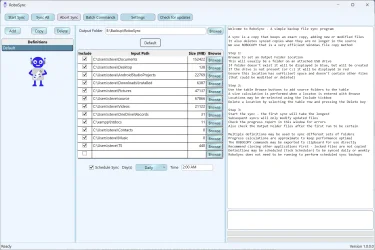
I used SyncToy for ages, couldn't fine a straight forward alternative that worked so I wrote my own, based on RoboCopy. It writes simple bat scripts that are run from the app or scheduled in Task Scheduler via SchTasks. I wrote it for personal use, but it is open source on GitHub.

GitHub - litdev1/RoboSync: Backup sync program using Windows ROBOCOPY

1782942527576.webp
 

My Computer My Computer

At a glance

Windows 11
OS
Windows 11
Computer type
Laptop
Manufacturer/Model
ASUS/K6604IJ
SyncToy is abandoned , no development anywhere, time to move on. GS RichCopy 360 fits your use case ,and if you want free, FreeFileSync and SyncBack Free are solid too. Try free first, upgrade if you hit limits.
 

My Computer My Computer

At a glance

Windows 11
OS
Windows 11
Computer type
Laptop
I have been using PureSync for years now. It comes in a free version and a paid version with advanced features.
 

My Computer My Computer

At a glance

Windows 11AMD Ryzen 9 5950XCorsair Vengeance LPX CMK32GX4M2B3200C16 (64 GB)Asus ProArt RTX 5070 Ti OC
OS
Windows 11
Computer type
PC/Desktop
Manufacturer/Model
Custom
CPU
AMD Ryzen 9 5950X
Motherboard
Asus ROG Strix X570-F Gaming
Memory
Corsair Vengeance LPX CMK32GX4M2B3200C16 (64 GB)
Graphics Card(s)
Asus ProArt RTX 5070 Ti OC
Sound Card
Sound Blaster AE-9
Monitor(s) Displays
2 x Dell UltraSharp U2413f
Screen Resolution
1920 x 1200
Hard Drives
Samsung 990 Pro (2000 GB, M.2 2280)
Seagate Barracuda Pro (12TB, 3.5")
Seagate Exos X12 512E (12TB, 3.5")
WD Red Plus (12 TB, 3.5", CMR)
Corsair Force MP510 M.2 NVME SSD (1788 GB)
Samsung SSD 870 EVO 2TB (SATA)
PSU
Seasonic Vertex PX-1000 (1000 W)
Case
Corsair Obsidian 750D
Cooling
Deepcool GamerStorm Captain 240 Pro (12cm)
Keyboard
Logitech G910
Mouse
Logitech G502
Internet Speed
1000 Mbit/s (synchronous)
Browser
Firefox, Vivaldi
Antivirus
GDATA Internet Security
Beyond Compare from Scooter Software.

Best money I ever spent on a Windows utility.

The Standard Edition does everything we need it to.
 

My Computer My Computer

At a glance

Windows 11 Pro 25H2
OS
Windows 11 Pro 25H2
Computer type
Laptop
Manufacturer/Model
Toshiba
Beyond Compare from Scooter Software.

Best money I ever spent on a Windows utility.

The Standard Edition does everything we need it to.
That seems like a great piece of software! :)

I was just looking for a sync software for Win and Mac and may have found what i am looking for. Today on Win i use SyncBackPro but they don´t have a Mac version while Beyond Compare has both. The testings i have done now on Win looks promising. Thanks for posting it here! :)
 

My Computer My Computer

At a glance

Windows 11 Pro for WorkstationsIntel Xeon w5-2465X (3.10 GHz)128 GBNvidia RTX PRO 4000 Blackwell
OS
Windows 11 Pro for Workstations
Computer type
PC/Desktop
Manufacturer/Model
HP
CPU
Intel Xeon w5-2465X (3.10 GHz)
Motherboard
HP Z4 G5
Memory
128 GB
Graphics Card(s)
Nvidia RTX PRO 4000 Blackwell
Sound Card
On board, Realtek
Monitor(s) Displays
ASUS Swift PG279Q (27")
Screen Resolution
2560x1440
Hard Drives
OS: SK hynix PC801 HFS001TEJ9X101N
Storage: 4 x Samsung 9100 Pro 8TB
Storage: 1 x Samsung 990 Pro 4TB
Keyboard
Steelseries Apex Pro Gen 3
Mouse
Contour Rollermouse Red
Internet Speed
500/500
Browser
MS Edge
Other Info
This is a HP Z4 G5 Workstation.
I've been using SyncToy for years with no issues. What are the issues with using Net Framework 2.0/3.5?
 

My Computers My Computers

  • At a glance

    Windows 10 ProIntel i9 - 11900K32GB Crucial Ballistix 3200 MHzEVGA GeForce RTX 3070 Ti FTW3 ULTRA GAMING
    OS
    Windows 10 Pro
    Computer type
    PC/Desktop
    CPU
    Intel i9 - 11900K
    Motherboard
    Gigabyte B560 Aorus Pro AX
    Memory
    32GB Crucial Ballistix 3200 MHz
    Graphics Card(s)
    EVGA GeForce RTX 3070 Ti FTW3 ULTRA GAMING
    Monitor(s) Displays
    ASUS TUF Gaming VG27AQ 27"
    Screen Resolution
    2560 x 1440
    Hard Drives
    C: Seagate Firecuda 520 1TB PCIe Gen 4 NVMe
    D: Western Digital SSD 1 TB
    PSU
    EVGA Supernova 850 G2
    Case
    Lian Li Lancool 216RW White with Additional I/O Kit
    Cooling
    Noctua NH-U12S chromax black tower
    Keyboard
    Logitech G610 Orion Red
  • At a glance

    Windows 11 Homei7-1185G7 @3.00GHz16GB
    Operating System
    Windows 11 Home
    Computer type
    Laptop
    Manufacturer/Model
    Lenovo Yoga 14ITL5
    CPU
    i7-1185G7 @3.00GHz
    Memory
    16GB
    Monitor(s) Displays
    Pen and Touch Support
    Screen Resolution
    3840 X 2160
    Hard Drives
    Western Digital WD_BLACK 1TB SN770 NVMe
I've been using SyncToy for years with no issues. What are the issues with using Net Framework 2.0/3.5?

Nothing wrong with .NET Framework 3.5 today, but it is slated to go out of support in 2029. So you have an unsupported sync app with dying platform underneath. Whether you’re cool with that is up to you alone.
 

My Computer My Computer

At a glance

Windows 11 Enterprise 25H2
OS
Windows 11 Enterprise 25H2
Just keep Windows Defender updated or a third-party antivirus, be a little careful what you do online and you should have no issues. At work we use old computers running Windows 7 SP1 or even XP but we keep Microsoft Security Essentials updated (has the same virus definitions as Windows Defender). So as long as you use an updated antivirus and common sense you can keep using any application that has gone out of support. I use very old video apps such as VirtualDub2 because I can't find exactly the same functionality on modern apps.
 

My Computers My Computers

  • At a glance

    Windows 11 Pro 23H2 (7582), 25H2 (9457)Mobile DualCore Intel Core 2 Duo T7250, 2000 MHz4GBMobile Intel(R) GMA 4500M (Mobile 4 series)
    OS
    Windows 11 Pro 23H2 (7582), 25H2 (9457)
    Computer type
    Laptop
    Manufacturer/Model
    Acer Extensa 5630EZ
    CPU
    Mobile DualCore Intel Core 2 Duo T7250, 2000 MHz
    Motherboard
    Acer Extensa 5630
    Memory
    4GB
    Graphics Card(s)
    Mobile Intel(R) GMA 4500M (Mobile 4 series)
    Sound Card
    Realtek ALC268 @ Intel 82801IB ICH9 - High Definition Audio Controller
    Monitor(s) Displays
    1
    Screen Resolution
    1280x800
    Hard Drives
    Samsung SSD 850 EVO 250GB SATA Device (250 GB, SATA-III)
    Internet Speed
    802.11g wireless 54 Mbps
    Browser
    MICROSOFT EDGE
    Antivirus
    WINDOWS DEFENDER
    Other Info
    Legacy MBR installation, no TPM, no Secure Boot, no WDDM 2.0 graphics drivers, no SSE4.2, cannot get more unsupported ;) This is only my test laptop. I had installed Windows 11 here before upgrading my main PC. For my main PC I use everyday see my 2nd system specs.
  • At a glance

    Windows 11 Pro 25H2 (build 26200.9457)Intel Core-i7 3770 3.40GHz s1155 (3rd generat...2x Kingston Hyper-X Blu 8GB DDR3-1600GIGABYTE GeForce RTX 3050 WINDFORCE OC V2 6GB...
    Operating System
    Windows 11 Pro 25H2 (build 26200.9457)
    Computer type
    PC/Desktop
    Manufacturer/Model
    Custom-built PC
    CPU
    Intel Core-i7 3770 3.40GHz s1155 (3rd generation)
    Motherboard
    Asus P8H61 s1155 ATX
    Memory
    2x Kingston Hyper-X Blu 8GB DDR3-1600
    Graphics card(s)
    GIGABYTE GeForce RTX 3050 WINDFORCE OC V2 6GB (GV-N3050WF2OCV2-6GD)
    Sound Card
    Realtek HD audio (ALC887)
    Monitor(s) Displays
    Sony Bravia KDL-19L4000 19" LCD TV via VGA
    Screen Resolution
    1440x900 32-bit 60Hz
    Hard Drives
    WD Blue SA510 2.5 1000GB SSD as system disk, Western Digital Caviar Purple 4TB SATA III (WD40PURZ) as second
    PSU
    Thermaltake Litepower RGB 550W Full Wired
    Case
    SUPERCASE MIDI-TOWER
    Cooling
    Deepcool Gamma Archer CPU cooler, 1x 8cm fan at the back
    Keyboard
    Mitsumi 101-key PS/2
    Mouse
    Microsoft Compact Optical Mouse
    Internet Speed
    802.11ac 5GHz wireless 260Mpbs
    Browser
    Microsoft Edge, Mozilla Firefox
    Antivirus
    Microsoft Windows Defender
    Other Info
    Legacy BIOS (MBR) installation, no TPM, no Secure Boot, WDDM 3.0 graphics drivers, WEI score 7.4
Back
Top Bottom




