Always See Icons In Icon Tray


SightUp

Well-known member
Member
Local time
5:22 AM
Posts
182
OS
Windows
Back in Windows 10, you were able to use the command

explorer shell:::{05d7b0f4-2121-4eff-bf6b-ed3f69b894d9}

to always see your icons in the icon tray. You can still use this command but when you do it in Windows 11, you end up having to do it every time you restart Windows. Has anyone came up with a way to make it so you always see the icons?

1657107874458.png
 

My Computer My Computer

At a glance

WindowsIntel 8086kEVGA 3080 Ti FTW3 Ultra
OS
Windows
CPU
Intel 8086k
Motherboard
Asus z370-F
Graphics Card(s)
EVGA 3080 Ti FTW3 Ultra
Sound Card
ADI-2 DAC fs
Back in Windows 10, you were able to use the command


to always see your icons in the icon tray. You can still use this command but when you do it in Windows 11, you end up having to do it every time you restart Windows. Has anyone came up with a way to make it so you always see the icons?

View attachment 33218
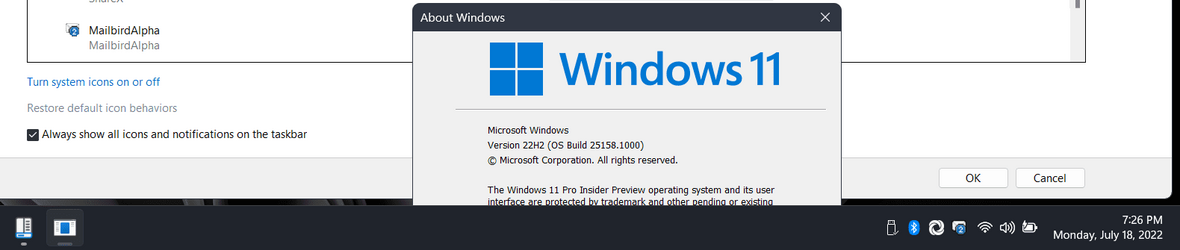
If you right-click on the taskbar and select "Taskbar settings", you'll see "Other system tray icons". Turn on those you wish to see.
 

My Computers My Computers

  • At a glance

    Windows 11 Pro 25H2 RP channelRyzen 9 5900XCorsair Vengeance RGB PRO 64GB (2x32GB) DDR4 ...ASUS GeForce RTX 4070 Super OC 12GB DDR6 / ZO...
    OS
    Windows 11 Pro 25H2 RP channel
    Computer type
    PC/Desktop
    Manufacturer/Model
    Home built
    CPU
    Ryzen 9 5900X
    Motherboard
    MSI MPG X570S Edge Max WiFi
    Memory
    Corsair Vengeance RGB PRO 64GB (2x32GB) DDR4 3600 (PC4-28800) C18
    Graphics Card(s)
    ASUS GeForce RTX 4070 Super OC 12GB DDR6 / ZOTAC RTX 3060 Twin Edge OC 12GB GDDR6
    Sound Card
    Proprietary on MB / FiiO K5Pro DAC
    Monitor(s) Displays
    ViewSonic XG2530 25"/Benq XL2411P 24"/ ASUS VA24DQSB) 23.8"
    Screen Resolution
    1920x1080 240Hz/144Hz/60Hz (based on monitor setup above)
    Hard Drives
    SK hynix Gold P31 1TB PCIe NVMe Gen3 M.2 2280 Internal SSD
    ADATA XPG SX8200 Pro 1TB
    Samsung SSD 860 EVO 1TB 2.5 Inch SATA III Internal SSD
    PSU
    Corsair RM1000e
    Case
    Phanteks Enthoo Pro Full Tower Chassis with Window
    Cooling
    Corsair iCUE H60i RGB PRO XT Liquid CPU Cooler
    Keyboard
    Corsair K70
    Mouse
    Logitech MX Master 3
    Internet Speed
    ~950Mb/s download / ~700Mb/s upload
    Browser
    Edge (Chromium)
    Antivirus
    Norton 360
  • At a glance

    Windows 11 ProRyzen 7 3700X32MB DDR4I forget, but it's old. I can't see the need ...
    Operating System
    Windows 11 Pro
    Computer type
    PC/Desktop
    Manufacturer/Model
    Home Built
    CPU
    Ryzen 7 3700X
    Motherboard
    MSI B550 Gaming GEN3 Gaming Motherboard
    Memory
    32MB DDR4
    Graphics card(s)
    I forget, but it's old. I can't see the need to upgrade it.
    Sound Card
    Propietary
    Monitor(s) Displays
    ACER LED 24" (dual monitor setup)
    Screen Resolution
    1920X1080
    Hard Drives
    1TB Samsung SSD 3.5"
    Case
    Corsair
    Cooling
    Stock
    Keyboard
    Logitech
    Mouse
    Logitech
    Internet Speed
    ~750Mb/s download / ~750Mb/s upload
    Browser
    Edge
    Antivirus
    Defender and Malware Bytes
  • ASUS Vivobook 16X, 16" WUXGA(1920x1200) Business Laptop Computer, AMD Ryzen 7, 16GB DDR4 RAM, 1TB SSD, Windows 11 Pro, Wi-Fi 6, USB-C, Full-Sized Keyboard, Webcam, HDMI
If you right-click on the taskbar and select "Taskbar settings", you'll see "Other system tray icons". Turn on those you wish to see.

I was looking for that always on feature that seems to have disappeared in Windows 11.
 

My Computer My Computer

At a glance

WindowsIntel 8086kEVGA 3080 Ti FTW3 Ultra
OS
Windows
CPU
Intel 8086k
Motherboard
Asus z370-F
Graphics Card(s)
EVGA 3080 Ti FTW3 Ultra
Sound Card
ADI-2 DAC fs
I was looking for that always on feature that seems to have disappeared in Windows 11.
It's there. They probably just moved it to where I specified.
 

My Computers My Computers

  • At a glance

    Windows 11 Pro 25H2 RP channelRyzen 9 5900XCorsair Vengeance RGB PRO 64GB (2x32GB) DDR4 ...ASUS GeForce RTX 4070 Super OC 12GB DDR6 / ZO...
    OS
    Windows 11 Pro 25H2 RP channel
    Computer type
    PC/Desktop
    Manufacturer/Model
    Home built
    CPU
    Ryzen 9 5900X
    Motherboard
    MSI MPG X570S Edge Max WiFi
    Memory
    Corsair Vengeance RGB PRO 64GB (2x32GB) DDR4 3600 (PC4-28800) C18
    Graphics Card(s)
    ASUS GeForce RTX 4070 Super OC 12GB DDR6 / ZOTAC RTX 3060 Twin Edge OC 12GB GDDR6
    Sound Card
    Proprietary on MB / FiiO K5Pro DAC
    Monitor(s) Displays
    ViewSonic XG2530 25"/Benq XL2411P 24"/ ASUS VA24DQSB) 23.8"
    Screen Resolution
    1920x1080 240Hz/144Hz/60Hz (based on monitor setup above)
    Hard Drives
    SK hynix Gold P31 1TB PCIe NVMe Gen3 M.2 2280 Internal SSD
    ADATA XPG SX8200 Pro 1TB
    Samsung SSD 860 EVO 1TB 2.5 Inch SATA III Internal SSD
    PSU
    Corsair RM1000e
    Case
    Phanteks Enthoo Pro Full Tower Chassis with Window
    Cooling
    Corsair iCUE H60i RGB PRO XT Liquid CPU Cooler
    Keyboard
    Corsair K70
    Mouse
    Logitech MX Master 3
    Internet Speed
    ~950Mb/s download / ~700Mb/s upload
    Browser
    Edge (Chromium)
    Antivirus
    Norton 360
  • At a glance

    Windows 11 ProRyzen 7 3700X32MB DDR4I forget, but it's old. I can't see the need ...
    Operating System
    Windows 11 Pro
    Computer type
    PC/Desktop
    Manufacturer/Model
    Home Built
    CPU
    Ryzen 7 3700X
    Motherboard
    MSI B550 Gaming GEN3 Gaming Motherboard
    Memory
    32MB DDR4
    Graphics card(s)
    I forget, but it's old. I can't see the need to upgrade it.
    Sound Card
    Propietary
    Monitor(s) Displays
    ACER LED 24" (dual monitor setup)
    Screen Resolution
    1920X1080
    Hard Drives
    1TB Samsung SSD 3.5"
    Case
    Corsair
    Cooling
    Stock
    Keyboard
    Logitech
    Mouse
    Logitech
    Internet Speed
    ~750Mb/s download / ~750Mb/s upload
    Browser
    Edge
    Antivirus
    Defender and Malware Bytes
  • ASUS Vivobook 16X, 16" WUXGA(1920x1200) Business Laptop Computer, AMD Ryzen 7, 16GB DDR4 RAM, 1TB SSD, Windows 11 Pro, Wi-Fi 6, USB-C, Full-Sized Keyboard, Webcam, HDMI
I assure you I checked where you said to. I see where I can do individual icons, but a option to enable all by default.
 

My Computer My Computer

At a glance

WindowsIntel 8086kEVGA 3080 Ti FTW3 Ultra
OS
Windows
CPU
Intel 8086k
Motherboard
Asus z370-F
Graphics Card(s)
EVGA 3080 Ti FTW3 Ultra
Sound Card
ADI-2 DAC fs

taskbar icons.jpg
 

My Computers My Computers

  • At a glance

    Windows 11 Pro 25H2 RP channelRyzen 9 5900XCorsair Vengeance RGB PRO 64GB (2x32GB) DDR4 ...ASUS GeForce RTX 4070 Super OC 12GB DDR6 / ZO...
    OS
    Windows 11 Pro 25H2 RP channel
    Computer type
    PC/Desktop
    Manufacturer/Model
    Home built
    CPU
    Ryzen 9 5900X
    Motherboard
    MSI MPG X570S Edge Max WiFi
    Memory
    Corsair Vengeance RGB PRO 64GB (2x32GB) DDR4 3600 (PC4-28800) C18
    Graphics Card(s)
    ASUS GeForce RTX 4070 Super OC 12GB DDR6 / ZOTAC RTX 3060 Twin Edge OC 12GB GDDR6
    Sound Card
    Proprietary on MB / FiiO K5Pro DAC
    Monitor(s) Displays
    ViewSonic XG2530 25"/Benq XL2411P 24"/ ASUS VA24DQSB) 23.8"
    Screen Resolution
    1920x1080 240Hz/144Hz/60Hz (based on monitor setup above)
    Hard Drives
    SK hynix Gold P31 1TB PCIe NVMe Gen3 M.2 2280 Internal SSD
    ADATA XPG SX8200 Pro 1TB
    Samsung SSD 860 EVO 1TB 2.5 Inch SATA III Internal SSD
    PSU
    Corsair RM1000e
    Case
    Phanteks Enthoo Pro Full Tower Chassis with Window
    Cooling
    Corsair iCUE H60i RGB PRO XT Liquid CPU Cooler
    Keyboard
    Corsair K70
    Mouse
    Logitech MX Master 3
    Internet Speed
    ~950Mb/s download / ~700Mb/s upload
    Browser
    Edge (Chromium)
    Antivirus
    Norton 360
  • At a glance

    Windows 11 ProRyzen 7 3700X32MB DDR4I forget, but it's old. I can't see the need ...
    Operating System
    Windows 11 Pro
    Computer type
    PC/Desktop
    Manufacturer/Model
    Home Built
    CPU
    Ryzen 7 3700X
    Motherboard
    MSI B550 Gaming GEN3 Gaming Motherboard
    Memory
    32MB DDR4
    Graphics card(s)
    I forget, but it's old. I can't see the need to upgrade it.
    Sound Card
    Propietary
    Monitor(s) Displays
    ACER LED 24" (dual monitor setup)
    Screen Resolution
    1920X1080
    Hard Drives
    1TB Samsung SSD 3.5"
    Case
    Corsair
    Cooling
    Stock
    Keyboard
    Logitech
    Mouse
    Logitech
    Internet Speed
    ~750Mb/s download / ~750Mb/s upload
    Browser
    Edge
    Antivirus
    Defender and Malware Bytes
  • ASUS Vivobook 16X, 16" WUXGA(1920x1200) Business Laptop Computer, AMD Ryzen 7, 16GB DDR4 RAM, 1TB SSD, Windows 11 Pro, Wi-Fi 6, USB-C, Full-Sized Keyboard, Webcam, HDMI
I assure you I checked where you said to. I see where I can do individual icons, but a option to enable all by default.
No, you have to enable them individually.
 

My Computers My Computers

  • At a glance

    Windows 11 Pro 25H2 RP channelRyzen 9 5900XCorsair Vengeance RGB PRO 64GB (2x32GB) DDR4 ...ASUS GeForce RTX 4070 Super OC 12GB DDR6 / ZO...
    OS
    Windows 11 Pro 25H2 RP channel
    Computer type
    PC/Desktop
    Manufacturer/Model
    Home built
    CPU
    Ryzen 9 5900X
    Motherboard
    MSI MPG X570S Edge Max WiFi
    Memory
    Corsair Vengeance RGB PRO 64GB (2x32GB) DDR4 3600 (PC4-28800) C18
    Graphics Card(s)
    ASUS GeForce RTX 4070 Super OC 12GB DDR6 / ZOTAC RTX 3060 Twin Edge OC 12GB GDDR6
    Sound Card
    Proprietary on MB / FiiO K5Pro DAC
    Monitor(s) Displays
    ViewSonic XG2530 25"/Benq XL2411P 24"/ ASUS VA24DQSB) 23.8"
    Screen Resolution
    1920x1080 240Hz/144Hz/60Hz (based on monitor setup above)
    Hard Drives
    SK hynix Gold P31 1TB PCIe NVMe Gen3 M.2 2280 Internal SSD
    ADATA XPG SX8200 Pro 1TB
    Samsung SSD 860 EVO 1TB 2.5 Inch SATA III Internal SSD
    PSU
    Corsair RM1000e
    Case
    Phanteks Enthoo Pro Full Tower Chassis with Window
    Cooling
    Corsair iCUE H60i RGB PRO XT Liquid CPU Cooler
    Keyboard
    Corsair K70
    Mouse
    Logitech MX Master 3
    Internet Speed
    ~950Mb/s download / ~700Mb/s upload
    Browser
    Edge (Chromium)
    Antivirus
    Norton 360
  • At a glance

    Windows 11 ProRyzen 7 3700X32MB DDR4I forget, but it's old. I can't see the need ...
    Operating System
    Windows 11 Pro
    Computer type
    PC/Desktop
    Manufacturer/Model
    Home Built
    CPU
    Ryzen 7 3700X
    Motherboard
    MSI B550 Gaming GEN3 Gaming Motherboard
    Memory
    32MB DDR4
    Graphics card(s)
    I forget, but it's old. I can't see the need to upgrade it.
    Sound Card
    Propietary
    Monitor(s) Displays
    ACER LED 24" (dual monitor setup)
    Screen Resolution
    1920X1080
    Hard Drives
    1TB Samsung SSD 3.5"
    Case
    Corsair
    Cooling
    Stock
    Keyboard
    Logitech
    Mouse
    Logitech
    Internet Speed
    ~750Mb/s download / ~750Mb/s upload
    Browser
    Edge
    Antivirus
    Defender and Malware Bytes
  • ASUS Vivobook 16X, 16" WUXGA(1920x1200) Business Laptop Computer, AMD Ryzen 7, 16GB DDR4 RAM, 1TB SSD, Windows 11 Pro, Wi-Fi 6, USB-C, Full-Sized Keyboard, Webcam, HDMI

My Computer My Computer

At a glance

WindowsIntel 8086kEVGA 3080 Ti FTW3 Ultra
OS
Windows
CPU
Intel 8086k
Motherboard
Asus z370-F
Graphics Card(s)
EVGA 3080 Ti FTW3 Ultra
Sound Card
ADI-2 DAC fs
Yeah, that shows them all individually. I am looking for the option that Windows 10 had where it enabled them all all at once with a single check box.
That doesn't exist from what I've seen. I can't imagine switching them to "On" is too much an effort, though.
 

My Computers My Computers

  • At a glance

    Windows 11 Pro 25H2 RP channelRyzen 9 5900XCorsair Vengeance RGB PRO 64GB (2x32GB) DDR4 ...ASUS GeForce RTX 4070 Super OC 12GB DDR6 / ZO...
    OS
    Windows 11 Pro 25H2 RP channel
    Computer type
    PC/Desktop
    Manufacturer/Model
    Home built
    CPU
    Ryzen 9 5900X
    Motherboard
    MSI MPG X570S Edge Max WiFi
    Memory
    Corsair Vengeance RGB PRO 64GB (2x32GB) DDR4 3600 (PC4-28800) C18
    Graphics Card(s)
    ASUS GeForce RTX 4070 Super OC 12GB DDR6 / ZOTAC RTX 3060 Twin Edge OC 12GB GDDR6
    Sound Card
    Proprietary on MB / FiiO K5Pro DAC
    Monitor(s) Displays
    ViewSonic XG2530 25"/Benq XL2411P 24"/ ASUS VA24DQSB) 23.8"
    Screen Resolution
    1920x1080 240Hz/144Hz/60Hz (based on monitor setup above)
    Hard Drives
    SK hynix Gold P31 1TB PCIe NVMe Gen3 M.2 2280 Internal SSD
    ADATA XPG SX8200 Pro 1TB
    Samsung SSD 860 EVO 1TB 2.5 Inch SATA III Internal SSD
    PSU
    Corsair RM1000e
    Case
    Phanteks Enthoo Pro Full Tower Chassis with Window
    Cooling
    Corsair iCUE H60i RGB PRO XT Liquid CPU Cooler
    Keyboard
    Corsair K70
    Mouse
    Logitech MX Master 3
    Internet Speed
    ~950Mb/s download / ~700Mb/s upload
    Browser
    Edge (Chromium)
    Antivirus
    Norton 360
  • At a glance

    Windows 11 ProRyzen 7 3700X32MB DDR4I forget, but it's old. I can't see the need ...
    Operating System
    Windows 11 Pro
    Computer type
    PC/Desktop
    Manufacturer/Model
    Home Built
    CPU
    Ryzen 7 3700X
    Motherboard
    MSI B550 Gaming GEN3 Gaming Motherboard
    Memory
    32MB DDR4
    Graphics card(s)
    I forget, but it's old. I can't see the need to upgrade it.
    Sound Card
    Propietary
    Monitor(s) Displays
    ACER LED 24" (dual monitor setup)
    Screen Resolution
    1920X1080
    Hard Drives
    1TB Samsung SSD 3.5"
    Case
    Corsair
    Cooling
    Stock
    Keyboard
    Logitech
    Mouse
    Logitech
    Internet Speed
    ~750Mb/s download / ~750Mb/s upload
    Browser
    Edge
    Antivirus
    Defender and Malware Bytes
  • ASUS Vivobook 16X, 16" WUXGA(1920x1200) Business Laptop Computer, AMD Ryzen 7, 16GB DDR4 RAM, 1TB SSD, Windows 11 Pro, Wi-Fi 6, USB-C, Full-Sized Keyboard, Webcam, HDMI
That doesn't exist from what I've seen. I can't imagine switching them to "On" is too much an effort, though.
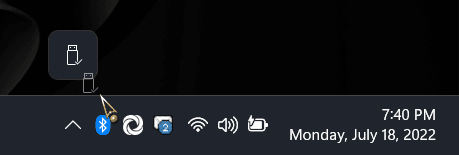
No, not at all, but whenever you install something new, and it has a icon down there, you have to enable it or click and drag it to the area that's always showing.
 

My Computer My Computer

At a glance

WindowsIntel 8086kEVGA 3080 Ti FTW3 Ultra
OS
Windows
CPU
Intel 8086k
Motherboard
Asus z370-F
Graphics Card(s)
EVGA 3080 Ti FTW3 Ultra
Sound Card
ADI-2 DAC fs
No, not at all, but whenever you install something new, and it has a icon down there, you have to enable it or click and drag it to the area that's always showing.
I gotcha.
 

My Computers My Computers

  • At a glance

    Windows 11 Pro 25H2 RP channelRyzen 9 5900XCorsair Vengeance RGB PRO 64GB (2x32GB) DDR4 ...ASUS GeForce RTX 4070 Super OC 12GB DDR6 / ZO...
    OS
    Windows 11 Pro 25H2 RP channel
    Computer type
    PC/Desktop
    Manufacturer/Model
    Home built
    CPU
    Ryzen 9 5900X
    Motherboard
    MSI MPG X570S Edge Max WiFi
    Memory
    Corsair Vengeance RGB PRO 64GB (2x32GB) DDR4 3600 (PC4-28800) C18
    Graphics Card(s)
    ASUS GeForce RTX 4070 Super OC 12GB DDR6 / ZOTAC RTX 3060 Twin Edge OC 12GB GDDR6
    Sound Card
    Proprietary on MB / FiiO K5Pro DAC
    Monitor(s) Displays
    ViewSonic XG2530 25"/Benq XL2411P 24"/ ASUS VA24DQSB) 23.8"
    Screen Resolution
    1920x1080 240Hz/144Hz/60Hz (based on monitor setup above)
    Hard Drives
    SK hynix Gold P31 1TB PCIe NVMe Gen3 M.2 2280 Internal SSD
    ADATA XPG SX8200 Pro 1TB
    Samsung SSD 860 EVO 1TB 2.5 Inch SATA III Internal SSD
    PSU
    Corsair RM1000e
    Case
    Phanteks Enthoo Pro Full Tower Chassis with Window
    Cooling
    Corsair iCUE H60i RGB PRO XT Liquid CPU Cooler
    Keyboard
    Corsair K70
    Mouse
    Logitech MX Master 3
    Internet Speed
    ~950Mb/s download / ~700Mb/s upload
    Browser
    Edge (Chromium)
    Antivirus
    Norton 360
  • At a glance

    Windows 11 ProRyzen 7 3700X32MB DDR4I forget, but it's old. I can't see the need ...
    Operating System
    Windows 11 Pro
    Computer type
    PC/Desktop
    Manufacturer/Model
    Home Built
    CPU
    Ryzen 7 3700X
    Motherboard
    MSI B550 Gaming GEN3 Gaming Motherboard
    Memory
    32MB DDR4
    Graphics card(s)
    I forget, but it's old. I can't see the need to upgrade it.
    Sound Card
    Propietary
    Monitor(s) Displays
    ACER LED 24" (dual monitor setup)
    Screen Resolution
    1920X1080
    Hard Drives
    1TB Samsung SSD 3.5"
    Case
    Corsair
    Cooling
    Stock
    Keyboard
    Logitech
    Mouse
    Logitech
    Internet Speed
    ~750Mb/s download / ~750Mb/s upload
    Browser
    Edge
    Antivirus
    Defender and Malware Bytes
  • ASUS Vivobook 16X, 16" WUXGA(1920x1200) Business Laptop Computer, AMD Ryzen 7, 16GB DDR4 RAM, 1TB SSD, Windows 11 Pro, Wi-Fi 6, USB-C, Full-Sized Keyboard, Webcam, HDMI
I can't imagine switching them to "On" is too much an effort, though.
My favorite part of the internet is when you ask for help doing something you want to do, and the response is, "I can't imagine why you don't want to do it the way I do it."

Totally with you, OP, it is super-annoying to have to change this several times a session (even when I have them all selected, sometimes things like Google Drive will de-select). Would be nice to have the "Show all icons all the time" option, or at least for it to remember what we selected last time...
 

My Computer My Computer

At a glance

Windows 1111th Gen Intel(R) Core(TM) i7-1185G7 @ 3.00GH16GB
OS
Windows 11
Computer type
Laptop
Manufacturer/Model
MSFT Surface Pro 8
CPU
11th Gen Intel(R) Core(TM) i7-1185G7 @ 3.00GH
Memory
16GB
All I can say is skip the post if you don't like it.
 

My Computers My Computers

  • At a glance

    Windows 11 Pro 25H2 RP channelRyzen 9 5900XCorsair Vengeance RGB PRO 64GB (2x32GB) DDR4 ...ASUS GeForce RTX 4070 Super OC 12GB DDR6 / ZO...
    OS
    Windows 11 Pro 25H2 RP channel
    Computer type
    PC/Desktop
    Manufacturer/Model
    Home built
    CPU
    Ryzen 9 5900X
    Motherboard
    MSI MPG X570S Edge Max WiFi
    Memory
    Corsair Vengeance RGB PRO 64GB (2x32GB) DDR4 3600 (PC4-28800) C18
    Graphics Card(s)
    ASUS GeForce RTX 4070 Super OC 12GB DDR6 / ZOTAC RTX 3060 Twin Edge OC 12GB GDDR6
    Sound Card
    Proprietary on MB / FiiO K5Pro DAC
    Monitor(s) Displays
    ViewSonic XG2530 25"/Benq XL2411P 24"/ ASUS VA24DQSB) 23.8"
    Screen Resolution
    1920x1080 240Hz/144Hz/60Hz (based on monitor setup above)
    Hard Drives
    SK hynix Gold P31 1TB PCIe NVMe Gen3 M.2 2280 Internal SSD
    ADATA XPG SX8200 Pro 1TB
    Samsung SSD 860 EVO 1TB 2.5 Inch SATA III Internal SSD
    PSU
    Corsair RM1000e
    Case
    Phanteks Enthoo Pro Full Tower Chassis with Window
    Cooling
    Corsair iCUE H60i RGB PRO XT Liquid CPU Cooler
    Keyboard
    Corsair K70
    Mouse
    Logitech MX Master 3
    Internet Speed
    ~950Mb/s download / ~700Mb/s upload
    Browser
    Edge (Chromium)
    Antivirus
    Norton 360
  • At a glance

    Windows 11 ProRyzen 7 3700X32MB DDR4I forget, but it's old. I can't see the need ...
    Operating System
    Windows 11 Pro
    Computer type
    PC/Desktop
    Manufacturer/Model
    Home Built
    CPU
    Ryzen 7 3700X
    Motherboard
    MSI B550 Gaming GEN3 Gaming Motherboard
    Memory
    32MB DDR4
    Graphics card(s)
    I forget, but it's old. I can't see the need to upgrade it.
    Sound Card
    Propietary
    Monitor(s) Displays
    ACER LED 24" (dual monitor setup)
    Screen Resolution
    1920X1080
    Hard Drives
    1TB Samsung SSD 3.5"
    Case
    Corsair
    Cooling
    Stock
    Keyboard
    Logitech
    Mouse
    Logitech
    Internet Speed
    ~750Mb/s download / ~750Mb/s upload
    Browser
    Edge
    Antivirus
    Defender and Malware Bytes
  • ASUS Vivobook 16X, 16" WUXGA(1920x1200) Business Laptop Computer, AMD Ryzen 7, 16GB DDR4 RAM, 1TB SSD, Windows 11 Pro, Wi-Fi 6, USB-C, Full-Sized Keyboard, Webcam, HDMI
0001245.png
 

My Computers My Computers

  • At a glance

    Windows 11 Pro
    OS
    Windows 11 Pro
    Computer type
    PC/Desktop
    Manufacturer/Model
    ASUS ROG Strix
  • At a glance

    Windows 11 Pro
    Operating System
    Windows 11 Pro
    Computer type
    Laptop
    Manufacturer/Model
    ASUS VivoBook
  • ASUS VivoBook 'Lite' ~ Windows 11 Home
I presume to get to that screen - because that's not the 11 standard "Settings" screen - you did something like execute:
explorer shell:::{05d7b0f4-2121-4eff-bf6b-ed3f69b894d9}

And that works, one time. But when I reboot, or add new software that interacts with the tray, it does NOT stick. I suspect the OP is in a similar bind.

If there's another way to get to that screen - and get Win to retain it, post-reboot, please share how you did it!

Thanks
 

My Computer My Computer

At a glance

Windows 1111th Gen Intel(R) Core(TM) i7-1185G7 @ 3.00GH16GB
OS
Windows 11
Computer type
Laptop
Manufacturer/Model
MSFT Surface Pro 8
CPU
11th Gen Intel(R) Core(TM) i7-1185G7 @ 3.00GH
Memory
16GB
Okay, if the Classic Settings thing doesn't work...,
try dragging the items out of the tray manually. They should stay post reboot then.

0001247.png
 

My Computers My Computers

  • At a glance

    Windows 11 Pro
    OS
    Windows 11 Pro
    Computer type
    PC/Desktop
    Manufacturer/Model
    ASUS ROG Strix
  • At a glance

    Windows 11 Pro
    Operating System
    Windows 11 Pro
    Computer type
    Laptop
    Manufacturer/Model
    ASUS VivoBook
  • ASUS VivoBook 'Lite' ~ Windows 11 Home
If you right-click on the taskbar and select "Taskbar settings", you'll see "Other system tray icons". Turn on those you wish to see.
i find that No matter what I do I cannot remove the Windows Security icon from the overflow menu..even if I have it turned off. Anyone have an idea to remove that? Its annoying and I use Avast not Microsofts B.S.
 

My Computer My Computer

At a glance

Windows 11 Pro Version 23H2(OS Build 22631.4890)12-Core AMD Ryzen 9 5900X, 4950 MHz (49.5 x 100)4 - G Skill Trident Z Neo F4-3600C16-16GTZNCPCI Express 4.0 x16: PowerColor RX 6800
OS
Windows 11 Pro Version 23H2(OS Build 22631.4890)
Computer type
PC/Desktop
Manufacturer/Model
AMD
CPU
12-Core AMD Ryzen 9 5900X, 4950 MHz (49.5 x 100)
Motherboard
Gigabyte X570 Aorus Master
Memory
4 - G Skill Trident Z Neo F4-3600C16-16GTZNC
Graphics Card(s)
PCI Express 4.0 x16: PowerColor RX 6800
Sound Card
Realtek ALC1220 @ AMD K19.2 - High Definition Audio Controller
Monitor(s) Displays
2 - 27 inch Westinghouse
Screen Resolution
1920 x 1080
Hard Drives
2 SSD - 2 TB each
1 SSD - 4TB
1 HDD - 2TB
Keyboard
logitech
Mouse
logitech
Internet Speed
1 GB
Browser
Firefox
Antivirus
Eset Endpoint Security
i find that No matter what I do I cannot remove the Windows Security icon from the overflow menu..even if I have it turned off. Anyone have an idea to remove that? Its annoying and I use Avast not Microsofts B.S.
End the task SecurityHealtSysTray in Task Manager/Processes, disable it as a Startup item, pass your mouse over the icon in the System Tray and it will disappear.


My Computers My Computers

  • At a glance

    Windows 11 Pro
    OS
    Windows 11 Pro
    Computer type
    PC/Desktop
    Manufacturer/Model
    ASUS ROG Strix
  • At a glance

    Windows 11 Pro
    Operating System
    Windows 11 Pro
    Computer type
    Laptop
    Manufacturer/Model
    ASUS VivoBook
  • ASUS VivoBook 'Lite' ~ Windows 11 Home
End the task SecurityHealtSysTray in Task Manager/Processes, disable it as a Startup item, pass your mouse over the icon in the System Tray and it will disappear.

Worked TY
 

My Computer My Computer

At a glance

Windows 11 Pro Version 23H2(OS Build 22631.4890)12-Core AMD Ryzen 9 5900X, 4950 MHz (49.5 x 100)4 - G Skill Trident Z Neo F4-3600C16-16GTZNCPCI Express 4.0 x16: PowerColor RX 6800
OS
Windows 11 Pro Version 23H2(OS Build 22631.4890)
Computer type
PC/Desktop
Manufacturer/Model
AMD
CPU
12-Core AMD Ryzen 9 5900X, 4950 MHz (49.5 x 100)
Motherboard
Gigabyte X570 Aorus Master
Memory
4 - G Skill Trident Z Neo F4-3600C16-16GTZNC
Graphics Card(s)
PCI Express 4.0 x16: PowerColor RX 6800
Sound Card
Realtek ALC1220 @ AMD K19.2 - High Definition Audio Controller
Monitor(s) Displays
2 - 27 inch Westinghouse
Screen Resolution
1920 x 1080
Hard Drives
2 SSD - 2 TB each
1 SSD - 4TB
1 HDD - 2TB
Keyboard
logitech
Mouse
logitech
Internet Speed
1 GB
Browser
Firefox
Antivirus
Eset Endpoint Security

Latest Support Threads

Back
Top Bottom