Am I Still protected?


Prettystarz4eve

New member
Local time
9:53 AM
Posts
2
OS
Windows 11
Hello, I need some help.

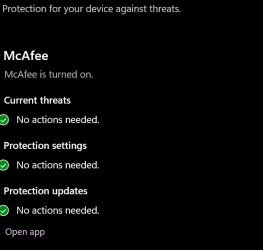
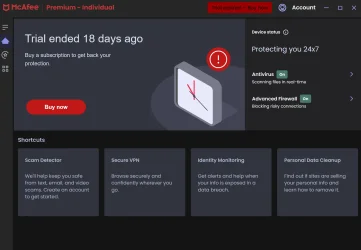
For Christmas, my dad got me a brand new AlienWare Gaming Computer. It's been an absolute dream. After much research and scanning of reddit, I've seen many people say that Windows Defender is more than enough to keep your computer protected against virus', malware, ect. But, as I am paranoid to somehow still get a virus while browsing, I would like to have my computer scanned and scrubbed if needed. So, in order to run a scan, I went to where Windows Defender is. On there, it tells me Mcafee is still active. However, I'm confused by this because when I click it, it tells me that the free trial is over. Does that mean I am no longer protected? Should I look for someone else? I heard Avast Antivirus was a good alternative, but again, my concern is whether or not my computer is still being protected.

Thank you for any help!
 
Windows Build/Version
Windows 11

Attachments

  • Screenshot 2026-02-03 155941.webp
    Screenshot 2026-02-03 155941.webp
    16.1 KB · Views: 1
  • Screenshot 2026-02-03 160020.webp
    Screenshot 2026-02-03 160020.webp
    87.6 KB · Views: 1

My Computer

System One

  • OS
    Windows 11
    Computer type
    Laptop
Uninstall McAfee and just use Defender. You'll be ffine.
 

My Computer

System One

  • OS
    W11
    Computer type
    PC/Desktop
    Manufacturer/Model
    2 HP Desktops, 1 Dell Desktop, 2 Dell XPS Laptops, 1 HP Laptop
    Keyboard
    Logitech
    Mouse
    Logitech MX Master 4 & 3
    Internet Speed
    500 mps
    Browser
    Firefox
    Antivirus
    Bitdefender
I agree with @allan 100%!!!
 

My Computer

System One

  • OS
    Windows 11 Pro
    Computer type
    PC/Desktop
    Manufacturer/Model
    Home Built
    CPU
    AMD Ryzen 7 5800X
    Motherboard
    GIGABYTE B550 AORUS ELITE AX V2
    Memory
    32GB
    Graphics Card(s)
    Nvidea??
    Sound Card
    MB Sound only
    Hard Drives
    m2.nvme
    PSU
    Seasonic Focus
    Case
    Cougar
    Cooling
    Enermax Liquid CPU
    Keyboard
    Logitech K800
    Mouse
    Logitech MX Master 3
    Internet Speed
    2.5 GB
    Browser
    BRAVE
    Antivirus
    Windows Defender

My Computer

System One

  • OS
    Windows 11 25H2
    Computer type
    PC/Desktop
    Manufacturer/Model
    EVGA home brew
    CPU
    Broadwell-e 6850K 4.5ghz @1.36v
    Motherboard
    EVGA X99 FTW K
    Memory
    32GB Corsair LPM 3600 C16
    Graphics Card(s)
    EVGA RTX 3080Ti FTW
    Sound Card
    Asus Centurion true 7.1 headset. (5 speakers in each earpeice)
    Monitor(s) Displays
    LG C4 55"
    Screen Resolution
    4K 144hz
    Hard Drives
    Various models of SSDs ~10TB No HDDs installed.
    PSU
    be quiet! BN516 Straight Power 12-1000w 80 Plus Platinum
    Case
    Corsair 780T modified to dual 200mm intake fans
    Cooling
    Corsair H110i
    Keyboard
    Corsair K95 Platinum
    Mouse
    Corsair M65 RGB Elite
    Internet Speed
    50Mbs

My Computer

System One

  • OS
    Windows 11 25H2
    Computer type
    PC/Desktop
    Manufacturer/Model
    EVGA home brew
    CPU
    Broadwell-e 6850K 4.5ghz @1.36v
    Motherboard
    EVGA X99 FTW K
    Memory
    32GB Corsair LPM 3600 C16
    Graphics Card(s)
    EVGA RTX 3080Ti FTW
    Sound Card
    Asus Centurion true 7.1 headset. (5 speakers in each earpeice)
    Monitor(s) Displays
    LG C4 55"
    Screen Resolution
    4K 144hz
    Hard Drives
    Various models of SSDs ~10TB No HDDs installed.
    PSU
    be quiet! BN516 Straight Power 12-1000w 80 Plus Platinum
    Case
    Corsair 780T modified to dual 200mm intake fans
    Cooling
    Corsair H110i
    Keyboard
    Corsair K95 Platinum
    Mouse
    Corsair M65 RGB Elite
    Internet Speed
    50Mbs
I am paranoid to somehow still get a virus while browsing
No Antivirus program works 100%. Most of the threats these days are malware/adware and the threats are developed faster than the AV companies can address them. That said, As far as protection goes, quite a few of us here use Microsoft Defender. It updates its definitions every day.

But we users here take another step to protect our systems by making regular system images that can be restored in case of infection or system failure. I highly recomment having a backup plan to everyone. There are a number of available applications that can do this. Some paid, some free. If you choose to have a backup plan, be sure you create recovery media (usb) for whichever app you choose to use.

Hasleo Backup Suite is a good free one that is easy to use. Hasleo provides Windows Backup & Clone, Data Recovery, Windows To Go Creator, and more.
IMO the best paid imaging app is Macrium. I've used it for many years. Macrium Reflect Home | The complete backup solution for personal use.

At the end of the day, The best protection is the user and his/her internet habits.
Don't click on ads.
Beware of links on social media sites.
Don't click on links in emails unless you are sure of their validity.
Do NOT go to the top sites in your search results unless they are official company sites or using well known domains.
Pay attention when installing software that it is from a reputable source, not some sketchy site.. Make sure that you uncheck any additional software that companies pack into their installers. Read each step during installing.
Do not ever give anyone remote access to your device unless you are 100% positive who they are. Hackers are known to identify themselves as being from Microsoft, Google, McAfee, etc. These companies will NEVER contact you and ask for access or give you a phone number to call them. I repeat NEVER.
Any popup you might get giving you a number to call is a scam.

Regarding Avast. Many years ago I highly recommended it, but not anymore. It's complete bloatware now.

New Dell computers come with a free trial of McAfee installed. The first thing I advice is to Uninstall McAfee using McAfeer uninstaller tool (MCPR)
If you uninstall it using normal uninstall method it leaves a bunch of registry entries behind. Using the tool is best. https://www.mcafee.com/support/s/article/000001616?language=en_US

After uninstall, restart the computer. Windows Defender should have turned on and be active. You can check by opening Search and typing "windows security". Then open Windows Security from the search results. It it did not automatically enable, manually turn it on.

I know you will enjoy your new computer. You dad bought a really good one. I commend you for wanting to be vigilant while using it.


My Computers

System One System Two

  • OS
    Windows 11 Pro 25H2
    Computer type
    PC/Desktop
    Manufacturer/Model
    Dell Optiplex 7080
    CPU
    i9-10900 10 core 20 threads
    Motherboard
    DELL 0J37VM
    Memory
    32 gb
    Graphics Card(s)
    none-Intel UHD Graphics 630
    Sound Card
    Integrated Realtek
    Monitor(s) Displays
    Benq 27
    Screen Resolution
    2560x1440
    Hard Drives
    2x1tb Solidigm m.2 nvme /External drives 512gb Samsung m.2 sata+2tb Kingston m2.nvme
    PSU
    500w
    Case
    MT
    Cooling
    Dell Premium
    Keyboard
    Logitech wired
    Mouse
    Logitech wireless
    Internet Speed
    so slow I'm too embarrassed to tell
    Browser
    #1 Edge #2 Firefox
    Antivirus
    Defender+MWB Premium
  • Operating System
    Windows 11 Pro 24H2 26200.8457
    Computer type
    PC/Desktop
    Manufacturer/Model
    Beelink Mini PC SER5
    CPU
    AMD Ryzen 7 6800U
    Memory
    32 gb
    Graphics card(s)
    integrated
    Sound Card
    integrated
    Monitor(s) Displays
    Benq 27
    Screen Resolution
    2560x1440
    Hard Drives
    1TB Crucial nvme
    Keyboard
    Logitech wired
    Mouse
    Logitech wireless
    Internet Speed
    still too embarrassed to tell
    Browser
    Firefox
    Antivirus
    Defender
    Other Info
    System 3 is non compliant Dell 9020 i7-4770/24gb ram Win11 PRO 26200.8457
If you want to add some low-impact protection to your web browser(s), you might try this.


My Computer

System One

  • OS
    Windows 11 Professional 25H2
    Computer type
    PC/Desktop
    Manufacturer/Model
    Digital Storm VELOX
    CPU
    Intel Core i9 11900K
    Motherboard
    ASUS PRIME Z590-P
    Memory
    64GB
    Graphics Card(s)
    NVIDIA GeForce GTX 1650
    Sound Card
    Realtek onboard
    Monitor(s) Displays
    Acer R221Q 21.5"
    Screen Resolution
    1920 x 1080
    Hard Drives
    2 x Samsung SSD 990 EVO Plus (1 TB)
    2 x Seagate ST4000NE001 (4 TB)
    PSU
    None
    Case
    VELOX
    Cooling
    Cooler Master
    Keyboard
    Logitech
    Mouse
    Kensington trackball
    Browser
    Firefox, Chrome
    Antivirus
    Windows Defender, Malwarebytes
Firefox by default blocks suspect web sites so in conjunction with Windows Defender your covered and do a malware-bytes scan a few times a year out of curiosity to see if it finds anything. Keep good company if you want to be safe.
 

My Computers

System One System Two

  • OS
    Windows 11 (up to date)
    Computer type
    PC/Desktop
    Manufacturer/Model
    Custom
    CPU
    Intel i5 12400
    Motherboard
    Gigabyte Z690 UA
    Memory
    Corsair Vengeance LPX 16GB
    Graphics Card(s)
    On Board the Z690
    Sound Card
    On Board
    Monitor(s) Displays
    43" Samsung tu7000
    Screen Resolution
    2560 x 1440
    Hard Drives
    SAMSUNG SSD 1TB NVMe M.2
    PSU
    Thermaltake smart 500w 80+
    Case
    LIAN LANCOOL_205M
    Cooling
    Bunch of fans . . . :o) (lights dont work)
    Keyboard
    Unicomp: Ultra Classic White Buckling Spring USB
    Mouse
    M510
    Internet Speed
    50mbps on Ethernet
    Browser
    Fire Fox
    Antivirus
    Windows
    Other Info
    Love this computer but I still prefer Win-7 like I love my old Lazy Boy Recliner . . . it just feels better.
  • Operating System
    WIN-7-64BIT and Win-11 pro for testing on unsupported hardware
    Computer type
    PC/Desktop
    Manufacturer/Model
    Home built
    CPU
    i5-3570K CPU @ 3.40GHz, 3801 Mhz, 4 Core(s), 4 Logical Processor(s)
    Motherboard
    GA-Z77-HD3
    Memory
    16 GB - Crucial Ballistick 4GB PC3-14900 DDR3-1333 MHz
    Graphics card(s)
    NVIDIA GeForce GTX 1050
    Sound Card
    On Board
    Monitor(s) Displays
    ASUS VP278
    Screen Resolution
    1920 x 1080
    Hard Drives
    4 - internal Samsung 2.5" SSD, 1 WD HDD 7200 and some external drives
    PSU
    EVGA 550w
    Case
    Old Gygabyte Tower
    Cooling
    Yes
    Keyboard
    Unicomp - UNIOP4A USB (like the old IBM Model H that I started with)
    Mouse
    M510
    Internet Speed
    50mbps
    Browser
    Firefox
    Antivirus
    Windows
    Other Info
    The only thing it lack is USB-3.2 on the front face but it has 3.0 on the back
I agree with others...,
Prudent computer/surfing habits and Windows Security (Defender),
you'll be fine.

(Take the aforementioned suggestions and purge your PC of McAfee, if you decide to go that route)
 

My Computers

System One System Two

  • OS
    Windows 11 Pro
    Computer type
    PC/Desktop
    Manufacturer/Model
    ASUS ROG Strix
  • Operating System
    Windows 11 Pro
    Computer type
    Laptop
    Manufacturer/Model
    ASUS VivoBook
Microsoft also have Microsoft Safety Scanner which you can use to scan your computer as a backup option.
Microsoft Safety Scanner is a non memory resident application, stand alone app that is regularly updated you download each time to use the latest version, runs from the download and does not install anything on your computer.
If you decide to use Microsoft Safety Scanner as a second option, don't be alarmed if you initially see a lot of Files Infected during the scan wait until the scan has finished to see if there are any infected files.
 

My Computer

System One

  • OS
    Windows 11
    Computer type
    PC/Desktop
    Manufacturer/Model
    Generic
    CPU
    AMD Ryzen 8700G
    Motherboard
    Gigabyte B650 UD AC
    Memory
    64 GB
    Graphics Card(s)
    Onboard
    Sound Card
    Onboard
    Monitor(s) Displays
    Del U2723QE
    Screen Resolution
    3840 x 2160
    Hard Drives
    Corsiar MP600 1TB
    PSU
    Silverstone 750 GOLD
    Case
    Silverstone FARA 513
Back
Top Bottom