
Another Macrium Secure Boot Question


won't simply recreating the USB boot drive with Macrium

We dont know what it does. Maybe the old version 8.0 doesnt know what to do.

If just copying those two files in my previous post works ,it is a lot quicker and easier.
 

My Computers

System One System Two

  • OS
    Win7,Win11
    Computer type
    PC/Desktop
    CPU
    i7-9700
    Motherboard
    gigabyte b365m ds3h
    Memory
    2x16gb 3600mhz
    Monitor(s) Displays
    benq gw2480
    PSU
    bequiet pure power 11 400CM
    Cooling
    cryorig m9i
  • Operating System
    win7,win11
    Computer type
    PC/Desktop
    CPU
    i5-8400
    Motherboard
    gigabyte b365m ds3h
    Memory
    2x8gb 3200
    PSU
    xfx pro 450
I asked Copilot and got this response. My version of Macrium 8 is up to date so I'm going to presume by recreating the recovery media the correct certificates will be propagated. Of course this depends on trusting Copilot. :-)

Macrium Reflect can recreate recovery media that uses the new 2023 Secure Boot certificates, but only if you’re on a sufficiently recent v8 build.
✅ What the evidence shows
• Macrium states that Windows updates released February 13, 2024 and later add the Windows UEFI CA 2023 certificate to the Secure Boot allowed database on most systems. Rescue Media built on such systems can incorporate the updated certificate.
• Community and vendor guidance indicates you must be running Macrium Reflect 8.1.7544 or later to generate rescue media that will boot after the 2011 certificate revocations (the BlackLotus-related changes).
🎯 So will Reflect v8 recreate the new certificates?
Yes — but only if:
1. Your installed version is 8.1.7544 or newer, and
2. Your Windows environment already has the 2023 UEFI CA certificate installed (which most systems do if fully updated after Feb 2024).
If both conditions are met, rebuilding Rescue Media in Reflect v8 will produce media signed with the updated certificate chain.
If your Reflect v8 build is older than 8.1.7544, it will not generate recovery media compatible with the 2023 certificate requirements.
 

My Computer

System One

  • OS
    Windows 11 Professional 25H2
    Computer type
    PC/Desktop
    Manufacturer/Model
    Digital Storm VELOX
    CPU
    Intel Core i9 11900K
    Motherboard
    ASUS PRIME Z590-P
    Memory
    64GB
    Graphics Card(s)
    NVIDIA GeForce GTX 1650
    Sound Card
    Realtek onboard
    Monitor(s) Displays
    Acer R221Q 21.5"
    Screen Resolution
    1920 x 1080
    Hard Drives
    2 x Samsung SSD 990 EVO Plus (1 TB)
    2 x Seagate ST4000NE001 (4 TB)
    PSU
    None
    Case
    VELOX
    Cooling
    Cooler Master
    Keyboard
    Logitech
    Mouse
    Kensington trackball
    Browser
    Firefox, Chrome
    Antivirus
    Windows Defender, Malwarebytes
FWIW, over the last month or so I’ve been experimenting with Haselo free on a gifted older win 10 laptop. I’ve successfully made a dozen or more images and have successfully restored at least six of the images using their recovery usb media. While I’m not quite ready to switch over yet on my win 11 computers, you may want to try it out and see if the Haselo recovery usb can boot on a win 11 machine with the new certificates. Info on the web claims their recovery media should be compatible with Secure Boot activated.
Hasleo won't boot from the Windows boot menu if you have updated your secure boot certificates. This is because Hasleo adds its own EFI loader into the boot path.
Secure Boot requires every component in the chain to be signed by a trusted key in firmware.
Hasleo’s loader is not signed with a Microsoft-trusted Secure Boot key.
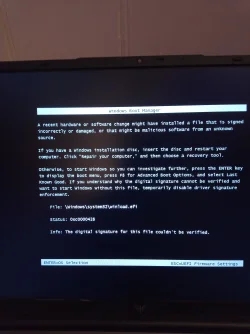
Therefore, the firmware blocks the chain and falsely reports winload.efi as invalid.


My Computers

System One System Two

  • OS
    Windows 11 Pro 25H2 26200.8524
    Computer type
    Laptop
    Manufacturer/Model
    Acemagic LX15PRO
    CPU
    AMD Ryzen 7 5825U with Radeon Graphics
    Memory
    16GB
    Screen Resolution
    1920 x 1080
    Hard Drives
    SSD 2TB
    Internet Speed
    30 Mbps
    Browser
    Brave
    Antivirus
    Webroot Secure Anywhere
    Other Info
    System 3

    Acer Swift SF114-34 laptop
    OS Windows 11 Pro 26200.8524
    CPU Pentium Silver N6000
    RAM 4GB
    SSD Samsung 970 EVO Plus SSD 2TB (an upgrade)
  • Operating System
    Windows 11 Pro 23H2 22631.2506
    Computer type
    Laptop
    Manufacturer/Model
    HP Mini 210-1090NR PC (bought in late 2009!)
    CPU
    Atom N450 1.66GHz
    Memory
    2GB
    Browser
    Brave
    Antivirus
    Webroot
Hasleo won't boot from the Windows boot menu if you have updated your secure boot certificates. This is because Hasleo adds its own EFI loader into the boot path.
Secure Boot requires every component in the chain to be signed by a trusted key in firmware.
Hasleo’s loader is not signed with a Microsoft-trusted Secure Boot key.
Therefore, the firmware blocks the chain and falsely reports winload.efi as invalid.

Well, hopefully after the smoke clears later this year, Haselo and others will see fit to make their free products seamlessly compatible with Secure Boot without having to jump thru hoops.
 

My Computers

System One System Two

  • OS
    Windows 11
    Computer type
    PC/Desktop
    Manufacturer/Model
    Alienware R13
  • Operating System
    Windows 11
    Computer type
    Laptop
    Manufacturer/Model
    Dell Inspiron 5493
Hasleo won't boot from the Windows boot menu if you have updated your secure boot certificates. This is because Hasleo adds its own EFI loader into the boot path.
Secure Boot requires every component in the chain to be signed by a trusted key in firmware.
Hasleo’s loader is not signed with a Microsoft-trusted Secure Boot key.
Therefore, the firmware blocks the chain and falsely reports winload.efi as invalid.


That sounds odd to me

lets try it out


abswinpe1.webp


abswinpe2.webp


not downloading winpe using winre

abswinpe3.webp

abswinpe4.webp

Boots up fine no problem with cak 2023

winload is fine

If you had made the winpe with the old winre.wim presumably you need to make winpe again using the newer winre.wim


abswinpe6.webp

this one is 26100.7447

abswinpe7.webp
 
Last edited:

My Computers

System One System Two

  • OS
    Win7,Win11
    Computer type
    PC/Desktop
    CPU
    i7-9700
    Motherboard
    gigabyte b365m ds3h
    Memory
    2x16gb 3600mhz
    Monitor(s) Displays
    benq gw2480
    PSU
    bequiet pure power 11 400CM
    Cooling
    cryorig m9i
  • Operating System
    win7,win11
    Computer type
    PC/Desktop
    CPU
    i5-8400
    Motherboard
    gigabyte b365m ds3h
    Memory
    2x8gb 3200
    PSU
    xfx pro 450
View attachment 160750


View attachment 160751


not downloading winpe using winre

View attachment 160752

View attachment 160753

Boots up fine no problem with cak 2023

winload is fine

If you had made the winpe with the old winre.wim presumably you need to make winpe again using the newer winre.wim


View attachment 160754

this one is 26100.7447

View attachment 160755
I have done all that and my laptop will not boot into Hasleo from the Windows boot menu. Yours may, but mine does not, even after completely uninstalling and reinstalling Hasleo.
 

My Computers

System One System Two

  • OS
    Windows 11 Pro 25H2 26200.8524
    Computer type
    Laptop
    Manufacturer/Model
    Acemagic LX15PRO
    CPU
    AMD Ryzen 7 5825U with Radeon Graphics
    Memory
    16GB
    Screen Resolution
    1920 x 1080
    Hard Drives
    SSD 2TB
    Internet Speed
    30 Mbps
    Browser
    Brave
    Antivirus
    Webroot Secure Anywhere
    Other Info
    System 3

    Acer Swift SF114-34 laptop
    OS Windows 11 Pro 26200.8524
    CPU Pentium Silver N6000
    RAM 4GB
    SSD Samsung 970 EVO Plus SSD 2TB (an upgrade)
  • Operating System
    Windows 11 Pro 23H2 22631.2506
    Computer type
    Laptop
    Manufacturer/Model
    HP Mini 210-1090NR PC (bought in late 2009!)
    CPU
    Atom N450 1.66GHz
    Memory
    2GB
    Browser
    Brave
    Antivirus
    Webroot
Is there a message ? If there is a winload problem it should tell you

Have a look at the build number of the hasleo winpe

if it is something else check the bcd entry should look something like this

Windows Boot Loader
-------------------
identifier {bc70a0c2-ff30-4264-9a6c-c353d9f4fdbe}
device ramdisk=[C:]\boot\BC70A0C3-FF30-4264-9A6C-C353D9F4FDBF.WIM,{bc70a0c1-ff30-4264-9a6c-c353d9f4fdbd}
path \Windows\system32\winload.efi
description Windows PE (Hasleo Backup Suite)
locale en-US
inherit {bootloadersettings}
flightsigning Yes
osdevice ramdisk=[C:]\boot\BC70A0C3-FF30-4264-9A6C-C353D9F4FDBF.WIM,{bc70a0c1-ff30-4264-9a6c-c353d9f4fdbd}
systemroot \windows
nx OptIn
detecthal Yes
winpe Yes

Device options
--------------
identifier {bc70a0c1-ff30-4264-9a6c-c353d9f4fdbd}
description Windows PE (Hasleo Backup Suite)
ramdisksdidevice partition=C:
ramdisksdipath \boot\BC70A0C3-FF30-4264-9A6C-C353D9F4FDBF.SDI
 

My Computers

System One System Two

  • OS
    Win7,Win11
    Computer type
    PC/Desktop
    CPU
    i7-9700
    Motherboard
    gigabyte b365m ds3h
    Memory
    2x16gb 3600mhz
    Monitor(s) Displays
    benq gw2480
    PSU
    bequiet pure power 11 400CM
    Cooling
    cryorig m9i
  • Operating System
    win7,win11
    Computer type
    PC/Desktop
    CPU
    i5-8400
    Motherboard
    gigabyte b365m ds3h
    Memory
    2x8gb 3200
    PSU
    xfx pro 450
Is there a message ? If there is a winload problem it should tell you

Have a look at the build number of the hasleo winpe
It was downloaded today.
 

Attachments

  • IMG_20260122_192750_845.webp
    IMG_20260122_192750_845.webp
    873.2 KB · Views: 4

My Computers

System One System Two

  • OS
    Windows 11 Pro 25H2 26200.8524
    Computer type
    Laptop
    Manufacturer/Model
    Acemagic LX15PRO
    CPU
    AMD Ryzen 7 5825U with Radeon Graphics
    Memory
    16GB
    Screen Resolution
    1920 x 1080
    Hard Drives
    SSD 2TB
    Internet Speed
    30 Mbps
    Browser
    Brave
    Antivirus
    Webroot Secure Anywhere
    Other Info
    System 3

    Acer Swift SF114-34 laptop
    OS Windows 11 Pro 26200.8524
    CPU Pentium Silver N6000
    RAM 4GB
    SSD Samsung 970 EVO Plus SSD 2TB (an upgrade)
  • Operating System
    Windows 11 Pro 23H2 22631.2506
    Computer type
    Laptop
    Manufacturer/Model
    HP Mini 210-1090NR PC (bought in late 2009!)
    CPU
    Atom N450 1.66GHz
    Memory
    2GB
    Browser
    Brave
    Antivirus
    Webroot
dont download it. Use your current winre.wim which should be up to date
 

My Computers

System One System Two

  • OS
    Win7,Win11
    Computer type
    PC/Desktop
    CPU
    i7-9700
    Motherboard
    gigabyte b365m ds3h
    Memory
    2x16gb 3600mhz
    Monitor(s) Displays
    benq gw2480
    PSU
    bequiet pure power 11 400CM
    Cooling
    cryorig m9i
  • Operating System
    win7,win11
    Computer type
    PC/Desktop
    CPU
    i5-8400
    Motherboard
    gigabyte b365m ds3h
    Memory
    2x8gb 3200
    PSU
    xfx pro 450
I didn't revoke the PCA 2011 certificate, but the Hasleo recovery disk, an ISO file in Ventoy, wouldn't boot.

What I did was delete the winpe.iso file in the Hasleo "bin" folder (C:\Program Files\Hasleo), recreate a recovery disk from the Hasleo interface. I chose ISO file. It works the ISO boots without error.

That said, it wasn't a digital signature issue.

Edit: During the recovery disk creation process, I didn't choose the Microsoft WinPE, but rather the one from the computer.

Hasleo must be up to date before recreating the recovery disk.
 

My Computer

System One

  • OS
    windows 11
Windows Boot Loader
-------------------
identifier {bc70a0c2-ff30-4264-9a6c-c353d9f4fdbe}
device ramdisk=[C:]\boot\BC70A0C3-FF30-4264-9A6C-C353D9F4FDBF.WIM,{bc70a0c1-ff30-4264-9a6c-c353d9f4fdbd}
path \Windows\system32\winload.efi
description Windows PE (Hasleo Backup Suite)
locale en-US
inherit {bootloadersettings}
flightsigning Yes
osdevice ramdisk=[C:]\boot\BC70A0C3-FF30-4264-9A6C-C353D9F4FDBF.WIM,{bc70a0c1-ff30-4264-9a6c-c353d9f4fdbd}
systemroot \windows
nx OptIn
detecthal Yes
winpe Yes

Device options
--------------
identifier {bc70a0c1-ff30-4264-9a6c-c353d9f4fdbd}
description Windows PE (Hasleo Backup Suite)
ramdisksdidevice partition=C:
ramdisksdipath \boot\BC70A0C3-FF30-4264-9A6C-C353D9F4FDBF.SD
How did you generate that output
 

My Computers

System One System Two

  • OS
    Windows 11 Pro 25H2 26200.8524
    Computer type
    Laptop
    Manufacturer/Model
    Acemagic LX15PRO
    CPU
    AMD Ryzen 7 5825U with Radeon Graphics
    Memory
    16GB
    Screen Resolution
    1920 x 1080
    Hard Drives
    SSD 2TB
    Internet Speed
    30 Mbps
    Browser
    Brave
    Antivirus
    Webroot Secure Anywhere
    Other Info
    System 3

    Acer Swift SF114-34 laptop
    OS Windows 11 Pro 26200.8524
    CPU Pentium Silver N6000
    RAM 4GB
    SSD Samsung 970 EVO Plus SSD 2TB (an upgrade)
  • Operating System
    Windows 11 Pro 23H2 22631.2506
    Computer type
    Laptop
    Manufacturer/Model
    HP Mini 210-1090NR PC (bought in late 2009!)
    CPU
    Atom N450 1.66GHz
    Memory
    2GB
    Browser
    Brave
    Antivirus
    Webroot
at admin cmd
bcdedit -enum all
then scroll down to the relevant entries

But your screenshot indicates the bcd is fine. It is the old winpe you have that seems the issue

It is better to use winre.wim from your system
 
Last edited:

My Computers

System One System Two

  • OS
    Win7,Win11
    Computer type
    PC/Desktop
    CPU
    i7-9700
    Motherboard
    gigabyte b365m ds3h
    Memory
    2x16gb 3600mhz
    Monitor(s) Displays
    benq gw2480
    PSU
    bequiet pure power 11 400CM
    Cooling
    cryorig m9i
  • Operating System
    win7,win11
    Computer type
    PC/Desktop
    CPU
    i5-8400
    Motherboard
    gigabyte b365m ds3h
    Memory
    2x8gb 3200
    PSU
    xfx pro 450
Thanks. How do I update the winpe?
 

My Computers

System One System Two

  • OS
    Windows 11 Pro 25H2 26200.8524
    Computer type
    Laptop
    Manufacturer/Model
    Acemagic LX15PRO
    CPU
    AMD Ryzen 7 5825U with Radeon Graphics
    Memory
    16GB
    Screen Resolution
    1920 x 1080
    Hard Drives
    SSD 2TB
    Internet Speed
    30 Mbps
    Browser
    Brave
    Antivirus
    Webroot Secure Anywhere
    Other Info
    System 3

    Acer Swift SF114-34 laptop
    OS Windows 11 Pro 26200.8524
    CPU Pentium Silver N6000
    RAM 4GB
    SSD Samsung 970 EVO Plus SSD 2TB (an upgrade)
  • Operating System
    Windows 11 Pro 23H2 22631.2506
    Computer type
    Laptop
    Manufacturer/Model
    HP Mini 210-1090NR PC (bought in late 2009!)
    CPU
    Atom N450 1.66GHz
    Memory
    2GB
    Browser
    Brave
    Antivirus
    Webroot
If anyone making macrium usb stcik, use winre.wim

I have a suspicion the v8.0 just copies the boot files to the usb stick from %windir%\boot folder. It doesnt know it might need to copy from the _ex folders instead.

In that case try Another Macrium Secure Boot Question after creating macrium v8.0 usb stick
 
Last edited:

My Computers

System One System Two

  • OS
    Win7,Win11
    Computer type
    PC/Desktop
    CPU
    i7-9700
    Motherboard
    gigabyte b365m ds3h
    Memory
    2x16gb 3600mhz
    Monitor(s) Displays
    benq gw2480
    PSU
    bequiet pure power 11 400CM
    Cooling
    cryorig m9i
  • Operating System
    win7,win11
    Computer type
    PC/Desktop
    CPU
    i5-8400
    Motherboard
    gigabyte b365m ds3h
    Memory
    2x8gb 3200
    PSU
    xfx pro 450
i am talking about Hasleo.
 

My Computers

System One System Two

  • OS
    Windows 11 Pro 25H2 26200.8524
    Computer type
    Laptop
    Manufacturer/Model
    Acemagic LX15PRO
    CPU
    AMD Ryzen 7 5825U with Radeon Graphics
    Memory
    16GB
    Screen Resolution
    1920 x 1080
    Hard Drives
    SSD 2TB
    Internet Speed
    30 Mbps
    Browser
    Brave
    Antivirus
    Webroot Secure Anywhere
    Other Info
    System 3

    Acer Swift SF114-34 laptop
    OS Windows 11 Pro 26200.8524
    CPU Pentium Silver N6000
    RAM 4GB
    SSD Samsung 970 EVO Plus SSD 2TB (an upgrade)
  • Operating System
    Windows 11 Pro 23H2 22631.2506
    Computer type
    Laptop
    Manufacturer/Model
    HP Mini 210-1090NR PC (bought in late 2009!)
    CPU
    Atom N450 1.66GHz
    Memory
    2GB
    Browser
    Brave
    Antivirus
    Webroot
Thanks. How do I update the winpe?
Not in win11 right now so I will have to guess. Remove it from menu first then delete the longnumber.wim and longnumber.sdi from c:\boot folder

I dont know if it has stored your previous download somewhere else . Have a look. If the download is hanging around it might assume you want to use it
 

My Computers

System One System Two

  • OS
    Win7,Win11
    Computer type
    PC/Desktop
    CPU
    i7-9700
    Motherboard
    gigabyte b365m ds3h
    Memory
    2x16gb 3600mhz
    Monitor(s) Displays
    benq gw2480
    PSU
    bequiet pure power 11 400CM
    Cooling
    cryorig m9i
  • Operating System
    win7,win11
    Computer type
    PC/Desktop
    CPU
    i5-8400
    Motherboard
    gigabyte b365m ds3h
    Memory
    2x8gb 3200
    PSU
    xfx pro 450
That file is dated today so I dont think it is out of date.
 

My Computers

System One System Two

  • OS
    Windows 11 Pro 25H2 26200.8524
    Computer type
    Laptop
    Manufacturer/Model
    Acemagic LX15PRO
    CPU
    AMD Ryzen 7 5825U with Radeon Graphics
    Memory
    16GB
    Screen Resolution
    1920 x 1080
    Hard Drives
    SSD 2TB
    Internet Speed
    30 Mbps
    Browser
    Brave
    Antivirus
    Webroot Secure Anywhere
    Other Info
    System 3

    Acer Swift SF114-34 laptop
    OS Windows 11 Pro 26200.8524
    CPU Pentium Silver N6000
    RAM 4GB
    SSD Samsung 970 EVO Plus SSD 2TB (an upgrade)
  • Operating System
    Windows 11 Pro 23H2 22631.2506
    Computer type
    Laptop
    Manufacturer/Model
    HP Mini 210-1090NR PC (bought in late 2009!)
    CPU
    Atom N450 1.66GHz
    Memory
    2GB
    Browser
    Brave
    Antivirus
    Webroot
WE dont know what it is. It could be when you select download winpe it links to an older win11 pe somewhere in the sky

if you use winre.wim from your system you know it is up to date
 

My Computers

System One System Two

  • OS
    Win7,Win11
    Computer type
    PC/Desktop
    CPU
    i7-9700
    Motherboard
    gigabyte b365m ds3h
    Memory
    2x16gb 3600mhz
    Monitor(s) Displays
    benq gw2480
    PSU
    bequiet pure power 11 400CM
    Cooling
    cryorig m9i
  • Operating System
    win7,win11
    Computer type
    PC/Desktop
    CPU
    i5-8400
    Motherboard
    gigabyte b365m ds3h
    Memory
    2x8gb 3200
    PSU
    xfx pro 450
Hasleo does not seem to offer a choice, it's WinPE or nothing. anyway, I'm off to bed. Thanks.
 

My Computers

System One System Two

  • OS
    Windows 11 Pro 25H2 26200.8524
    Computer type
    Laptop
    Manufacturer/Model
    Acemagic LX15PRO
    CPU
    AMD Ryzen 7 5825U with Radeon Graphics
    Memory
    16GB
    Screen Resolution
    1920 x 1080
    Hard Drives
    SSD 2TB
    Internet Speed
    30 Mbps
    Browser
    Brave
    Antivirus
    Webroot Secure Anywhere
    Other Info
    System 3

    Acer Swift SF114-34 laptop
    OS Windows 11 Pro 26200.8524
    CPU Pentium Silver N6000
    RAM 4GB
    SSD Samsung 970 EVO Plus SSD 2TB (an upgrade)
  • Operating System
    Windows 11 Pro 23H2 22631.2506
    Computer type
    Laptop
    Manufacturer/Model
    HP Mini 210-1090NR PC (bought in late 2009!)
    CPU
    Atom N450 1.66GHz
    Memory
    2GB
    Browser
    Brave
    Antivirus
    Webroot
It is the screenshots I posted. Download winpe is an option, it does not need to be ticked. Just click next

you can have a look at the build of the thing you currently have using dism or dism++ or gimagex, or whatever is your fancy

it is not difficult

toolkit>imagex

imagex1.webp

Browse to your longnumber.wim

imagex2.webp


imagex3.webp


dble click it

imagex4.webp

It displays the details

imagex5.webp

when you have had a look click cancel becuase you dont want to edit the image
 
Last edited:

My Computers

System One System Two

  • OS
    Win7,Win11
    Computer type
    PC/Desktop
    CPU
    i7-9700
    Motherboard
    gigabyte b365m ds3h
    Memory
    2x16gb 3600mhz
    Monitor(s) Displays
    benq gw2480
    PSU
    bequiet pure power 11 400CM
    Cooling
    cryorig m9i
  • Operating System
    win7,win11
    Computer type
    PC/Desktop
    CPU
    i5-8400
    Motherboard
    gigabyte b365m ds3h
    Memory
    2x8gb 3200
    PSU
    xfx pro 450
Back
Top Bottom




