

- Local time
- 2:53 AM
- Posts
- 778
- OS
- Windows 11
Sorry I can not see section for games but games are apps , right ? anyway I googled alot to fix this game issue and I got the update , reduced settings, turned off reflections but nothing worked.
I found in the net solution say :
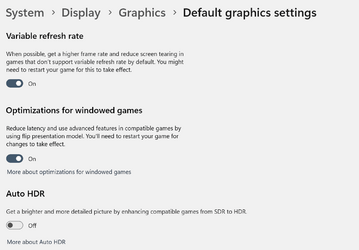
Go to settings/system/display/Graphics settings and turn on Hardware accelerated GPU Scheduling.
But I can not see this option !!. Any ideas ? system spec in my profile
I found in the net solution say :
Go to settings/system/display/Graphics settings and turn on Hardware accelerated GPU Scheduling.
But I can not see this option !!. Any ideas ? system spec in my profile
My Computer
At a glance
Windows 115900x32 GB G.SkillRX 6800 XT
- OS
- Windows 11
- Computer type
- PC/Desktop
- CPU
- 5900x
- Motherboard
- MAG X570S TOMAHAWK MAX WIFI
- Memory
- 32 GB G.Skill
- Graphics Card(s)
- RX 6800 XT
- Sound Card
- Creative Sound Blaster Z
- Monitor(s) Displays
- BENQ and AOC QHD 120Hz
- Screen Resolution
- QHD
- Hard Drives
- 2TB Intel 660p and 2TB Sabrent Rokect 4 plus nvme, 4TB HDD HGST
- PSU
- Corsair RM750
- Case
- Bloody rage
- Cooling
- Water cooling gamdias 240
- Keyboard
- razer ornata
- Mouse
- razer da v2
- Browser
- FF and Chrome
- Antivirus
- Malwarebytes






