Anyone using a mechanical keyboard?


Interesting "evolution".

Many of the "recommended" mechanical keyboards on reddit and other socials recommend keyboards without a number pad. This reminds me of back in the day at my first job where I was so used to a keyboard with a numpad, but the "dinasours" in the office continued to type numbers using the top row on the keyboard. With the way things are going in the word today, it certainly seems we're regressing in many areas.
 

My Computer My Computer

At a glance

Windows 11NVIDA 1650 Ti
OS
Windows 11
Computer type
Laptop
Manufacturer/Model
Lenovo
Graphics Card(s)
NVIDA 1650 Ti
Monitor(s) Displays
Lenovo C32q-20
In the 90's, I went out of my way to buy an IBM Model M buckling spring keyboard and thought it was the greatest thing ever. I've since come to my senses and use Logitech keyboards with scissor switches like the MX Keys and K950. I briefly dabbled in modern mechanical keyboards, and, well, let's just say that was a very brief dalliance, and the scissor switches won. They're not like your electric typewriter feel, but they do feature definite actuation without the weirdness I perceived in modern mechanical switches, nor are they indeterminate mush like membrane keyboards.
I tested out the K950 and it didn't work for me at all. Glad you found something you liked.
 

My Computer My Computer

At a glance

Windows 11NVIDA 1650 Ti
OS
Windows 11
Computer type
Laptop
Manufacturer/Model
Lenovo
Graphics Card(s)
NVIDA 1650 Ti
Monitor(s) Displays
Lenovo C32q-20
I tested out the K950 and it didn't work for me at all. Glad you found something you liked.

Phew, that was a couple months ago! Now that you mention it, I returned the K950 because it felt cheaper than my MX Keys, and the keycap labels were even less readable than the non-illuminated keys on my MX Keys in my environment (I don't use the backlight, which shines around the keys more than through them - it's such a bust of an expensive feature). I bought the K950 because the left arrow key broke off the MX Keys, and I ended up replacing it with an MX Keys S. I do have to use the MX Keys S in Bluetooth mode, because its Bolt receiver is prone to losing the Ctrl when I wake it with Ctrl+C or other combo. The Unifying Receiver never had this problem, and Bluetooth seems to be immune. Yeah, I tried disabling the power options for the Bolt in Device Manager, but it didn't help. Gotta keep the Bolt for non-Bluetooth environments like the BIOS, though.
 

My Computer My Computer

At a glance

Windows 11
OS
Windows 11
I never type hard and those who have ever used the IBC Selectric typewriter know what I'm talking about when I write it practically types itself. It's essentially "low friction" and there's effectively no effort so "tactile switches" are a sensation not an actual function of responsiveness of a keyboard. The keys didn't feel like they required effort. Once you initiated the stroke, the mechanism seemed to take over. The sensation was one of extremely low friction and very little resistance. It felt responsive, effortless, and almost as if the machine was helping you type.

If you can, visist a local computer store to try out different keyboards. Were i live they have many keyboards unpacked so one can test each one directly in store.

I bought the Steelseries Apex Pro Gen 3 a while ago to replace my Steelseries Apex 7 that had brown switches. The Steelseries Apex Pro Gen 3 has only one switch, their OmniPoint. At first i was not really in love, i thought the keys were to light, as you describe it abowe "The keys didn't feel like they required effort. Once you initiated the stroke, the mechanism seemed to take over".

After a couple of days i had "adjusted" myself and now i am in love and love the OmniPoint switches.

Yes, it´s a gaming keyboard but you can turn of the lightning keys and use it as a regular keyboard, or just use one solid color and no irritating RGB bling.

On this keyboard you can even adjust how much you must press a key before anything happens, iow if they should react very fast or if one must press they key down to 100% or anything in between. I just use the default settings and that works for me.

Steelseries Apex Pro Gen 3: https://steelseries.com/en-us/gamin...eyboardSize=fullSize&keyboardLanguage=english
 

My Computer My Computer

At a glance

Windows 11 Pro for WorkstationsIntel Xeon w5-2465X (3.10 GHz)128 GBNvidia RTX PRO 4000 Blackwell
OS
Windows 11 Pro for Workstations
Computer type
PC/Desktop
Manufacturer/Model
HP
CPU
Intel Xeon w5-2465X (3.10 GHz)
Motherboard
HP Z4 G5
Memory
128 GB
Graphics Card(s)
Nvidia RTX PRO 4000 Blackwell
Sound Card
On board, Realtek
Monitor(s) Displays
ASUS Swift PG279Q (27")
Screen Resolution
2560x1440
Hard Drives
OS: SK hynix PC801 HFS001TEJ9X101N
Storage: 4 x Samsung 9100 Pro 8TB
Storage: 1 x Samsung 990 Pro 4TB
Keyboard
Steelseries Apex Pro Gen 3
Mouse
Contour Rollermouse Red
Internet Speed
500/500
Browser
MS Edge
Other Info
This is a HP Z4 G5 Workstation.
IBM Model M if you can still find them. Have one from 1996.It's brilliant still !!!! and far better than loads of modern keyboards.

Screenshot_20260901_092559.webp


You might be able to source one somewhere though on a site like vinted or similar.Probably cost you around €120 or equiv in your local currency.

Note though no € sign and some other modern symbols so you will have to type the key combo - being an IBM product remember IBM used EBCDIC rather than ASCII for lots of things !!!

It DOES have a number pad which helps of course.

Cheers
jimbo
 

My Computer My Computer

At a glance

Windows XP,11 Linux Fedora Rawhide pre-releas...2 X Intel i7
OS
Windows XP,11 Linux Fedora Rawhide pre-release 46
Computer type
PC/Desktop
CPU
2 X Intel i7
Screen Resolution
4KUHD X 2
IBM Model M if you can still find them. Have one from 1996.It's brilliant still !!!! and far better than loads of modern keyboards.

View attachment 181406


You might be able to source one somewhere though on a site like vinted or similar.Probably cost you around €120 or equiv in your local currency.

Note though no € sign and some other modern symbols so you will have to type the key combo - being an IBM product remember IBM used EBCDIC rather than ASCII for lots of things !!!

It DOES have a number pad which helps of course.

Cheers
jimbo
OMG. That keyboard brings back memories. And this video too:


My Computer My Computer

At a glance

Windows 11NVIDA 1650 Ti
OS
Windows 11
Computer type
Laptop
Manufacturer/Model
Lenovo
Graphics Card(s)
NVIDA 1650 Ti
Monitor(s) Displays
Lenovo C32q-20
@Sammy888,

I know the feeling you are looking for. The old Selectric used a powered mechanical action with a motor and this most of the work for you after the key was pressed. Unfortunately, as you are finding out, the mechanical keyboards fill a completely different niche and it's unlikely that most, if not all, aren't going to give you that key actuation you are looking for.

I am using a mechanical keyboard on my Windows 11 desktop which is my gaming computer. I am using the Corsair K70 TKL. I've been really happy with this keyboard for my gaming sessions and such.

My favorite keyboard, is surprisingly the Logitech K380 that at I use on my Mac Mini. It's a bluetooth keyboard, can pair with 3 devices, and I have it paired to my Mini as well as my iPad Pro. I love the fact it's small, but it feels really solid. It has the Apple keys on it (CMD and Option). Battery life has been outstanding, and being bluetooth, I have no dongles to deal with.

Here they are, side by side. Yeah Yeah, I know. My corsair is pretty dirty. Oh well.

Edit: LOL, I just realized I still have the plastic film with the blue pull tab over the corsair logo. I've seriously never noticed it before I posted this picture.

1788351573304.webp
 
Last edited:

My Computers My Computers

  • At a glance

    Windows 11 ProIntel Core i5-8279u32GB DDR4 2666MhzIntel Iris Plus 655
    OS
    Windows 11 Pro
    Computer type
    PC/Desktop
    Manufacturer/Model
    Beelink SEI8
    CPU
    Intel Core i5-8279u
    Motherboard
    AZW SEI
    Memory
    32GB DDR4 2666Mhz
    Graphics Card(s)
    Intel Iris Plus 655
    Sound Card
    Intel SST
    Monitor(s) Displays
    Asus ProArt PA278QV
    Screen Resolution
    2560x1440
    Hard Drives
    512GB NVMe
    PSU
    NA
    Case
    NA
    Cooling
    NA
    Keyboard
    NA
    Mouse
    NA
    Internet Speed
    500/50
    Browser
    Edge
    Antivirus
    Defender
    Other Info
    Mini PC used for testing Windows 11.
  • At a glance

    Windows 10 ProRyzen 9 5900x64GB DDR4-3600EVGA GeForce 3080 FT3 Ultra
    Operating System
    Windows 10 Pro
    Computer type
    PC/Desktop
    Manufacturer/Model
    Custom
    CPU
    Ryzen 9 5900x
    Motherboard
    Asus Rog Strix X570-E Gaming
    Memory
    64GB DDR4-3600
    Graphics card(s)
    EVGA GeForce 3080 FT3 Ultra
    Sound Card
    Onboard
    Monitor(s) Displays
    ASUS TUF Gaming VG27AQ. ASUS ProArt Display PA278QV 27” WQHD
    Screen Resolution
    2560x1440
    Hard Drives
    2TB WD SN850 PCI-E Gen 4 NVMe
    2TB Sandisk Ultra 2.5" SATA SSD
    PSU
    Seasonic Focus 850
    Case
    Fractal Meshify S2 in White
    Cooling
    Dark Rock Pro CPU cooler, 3 x 140mm case fans
    Keyboard
    Corsiar K65 RGB Lux
    Mouse
    Logitech G9 Laser Mouse
    Internet Speed
    500/50
    Browser
    Chrome
    Antivirus
    Defender.
And just for funsies, and because i'm in the "i like what I like, and I know what I like" thread, I thought that I would post this picture of my trackball that I use on my work computer. I've literally had this mouse and used it daily now for 25 years. One of the best pieces of hardware, IMHO, that Microsoft ever made.

1788351863823.webp
 

My Computers My Computers

  • At a glance

    Windows 11 ProIntel Core i5-8279u32GB DDR4 2666MhzIntel Iris Plus 655
    OS
    Windows 11 Pro
    Computer type
    PC/Desktop
    Manufacturer/Model
    Beelink SEI8
    CPU
    Intel Core i5-8279u
    Motherboard
    AZW SEI
    Memory
    32GB DDR4 2666Mhz
    Graphics Card(s)
    Intel Iris Plus 655
    Sound Card
    Intel SST
    Monitor(s) Displays
    Asus ProArt PA278QV
    Screen Resolution
    2560x1440
    Hard Drives
    512GB NVMe
    PSU
    NA
    Case
    NA
    Cooling
    NA
    Keyboard
    NA
    Mouse
    NA
    Internet Speed
    500/50
    Browser
    Edge
    Antivirus
    Defender
    Other Info
    Mini PC used for testing Windows 11.
  • At a glance

    Windows 10 ProRyzen 9 5900x64GB DDR4-3600EVGA GeForce 3080 FT3 Ultra
    Operating System
    Windows 10 Pro
    Computer type
    PC/Desktop
    Manufacturer/Model
    Custom
    CPU
    Ryzen 9 5900x
    Motherboard
    Asus Rog Strix X570-E Gaming
    Memory
    64GB DDR4-3600
    Graphics card(s)
    EVGA GeForce 3080 FT3 Ultra
    Sound Card
    Onboard
    Monitor(s) Displays
    ASUS TUF Gaming VG27AQ. ASUS ProArt Display PA278QV 27” WQHD
    Screen Resolution
    2560x1440
    Hard Drives
    2TB WD SN850 PCI-E Gen 4 NVMe
    2TB Sandisk Ultra 2.5" SATA SSD
    PSU
    Seasonic Focus 850
    Case
    Fractal Meshify S2 in White
    Cooling
    Dark Rock Pro CPU cooler, 3 x 140mm case fans
    Keyboard
    Corsiar K65 RGB Lux
    Mouse
    Logitech G9 Laser Mouse
    Internet Speed
    500/50
    Browser
    Chrome
    Antivirus
    Defender.
I use a semi mechanical and I've had a Das Keyboard... loved it and I hope to get a new one next year.
 

My Computer My Computer

At a glance

Windows 11 Home- RP - 26H2 -26300.9807AMD Ryzen 5 5600GG.SKILL Ripjaws V Series 64GB 4x16Nvidia geforce gtx titan x
OS
Windows 11 Home- RP - 26H2 -26300.9807
Computer type
PC/Desktop
Manufacturer/Model
Banana Junior 5600-G Series
CPU
AMD Ryzen 5 5600G
Motherboard
Asus ROG Strix B550-F
Memory
G.SKILL Ripjaws V Series 64GB 4x16
Graphics Card(s)
Nvidia geforce gtx titan x
Monitor(s) Displays
28" ASUS VP28U 4k
Screen Resolution
4K
Hard Drives
Primary SAMSUNG 970 EVO Plus
PSU
EVGA BQ 700w 80+ Bronze
Case
Zalman i3 NEO
Cooling
ARCTIC Freezer 7 X
Keyboard
Corsair
Mouse
Amazon Generic with Cord
Internet Speed
Download: 295.11 mbps Upload: 65.35 mbps T-Mobile Internet
Browser
Firefox and Edge
Antivirus
MS - Defender
Other Info
Speakers: Klipsch ProMedia 2.1
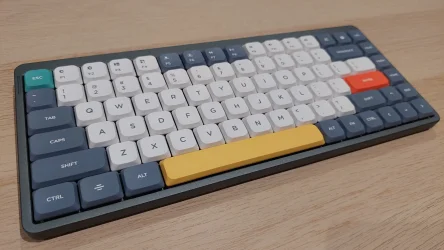
NuPhy Air75 V1 with GATERON KS-33 Low Profile 2.0 Switches (Brown)
 

Attachments

  • 20260922_190441.webp
    20260922_190441.webp
    866.2 KB · Views: 8

My Computers My Computers

  • At a glance

    Win11 Home 64-bit (25H2)Intel Core i7-11800H (UHD Graphics)TIMETEC 32GB DDR4-3200 (2 x 16GB)NVIDIA GeForce RTX 3070 (8GB GDDR6)
    OS
    Win11 Home 64-bit (25H2)
    Computer type
    Laptop
    Manufacturer/Model
    HP OMEN 16-b0146TX (2021)
    CPU
    Intel Core i7-11800H (UHD Graphics)
    Motherboard
    HP 88F4
    Memory
    TIMETEC 32GB DDR4-3200 (2 x 16GB)
    Graphics Card(s)
    NVIDIA GeForce RTX 3070 (8GB GDDR6)
    Monitor(s) Displays
    16.1" IPS 144Hz
    Screen Resolution
    1920 x 1080 (FHD)
    Hard Drives
    SAMSUNG 1TB Gen4 NVMe M.2 SSD
  • At a glance

    Win11 Home 64-bit (25H2)AMD Ryzen 7 4800H (Vega 7)SAMSUNG 16GB DDR4-3200 (2 x 8GB)NVIDIA GeForce GTX 1650 Ti (4GB GDDR6)
    Operating System
    Win11 Home 64-bit (25H2)
    Computer type
    Laptop
    Manufacturer/Model
    HP OMEN 15-en0012ax (2020)
    CPU
    AMD Ryzen 7 4800H (Vega 7)
    Motherboard
    HP 8788
    Memory
    SAMSUNG 16GB DDR4-3200 (2 x 8GB)
    Graphics card(s)
    NVIDIA GeForce GTX 1650 Ti (4GB GDDR6)
    Monitor(s) Displays
    15.6" IPS 60Hz
    Screen Resolution
    1920 x 1080 (FHD)
    Hard Drives
    SAMSUNG 512GB Gen3 NVMe M.2 SSD
  • Beelink MINI S13 (N150)
    Beelink SER5 MAX 5800H (Vega 8)
    Beelink SEi13 Pro (i9-13900HK)
    GMKtec M7 6850H (680M)
    GMKtec AD-GP1 eGPU (RX 7600M XT)
I'm up to roughly 20 mechanical keyboards so far and adding roughly one every 2 weeks or so. Even with all of those keyboards, I still have not yet found the "perfect" keyboard. Every single one has something that I dislike.

I mainly like mechanical keyboards with shine through backlit keycaps, and the problems almost always center around some issue with the backlight.

I also detest anything that is not a full-sized keyboard. Most of these 68%, 70%, etc. compact keyboards that are popular with gamers these days just don't do it for me, although I have quite a few of them. How anyone can use a keyboard lacking basic keys like end, home, pgup, pgdn, etc. is simply beyond me.

It's funny, I can find mice that I like all day long, but I just cannot find a keyboard that really does it for me. Some come close, but I keep looking.
 

My Computers My Computers

  • At a glance

    Win11 Pro 26H2Intel i7-14650HX32 GBBuilt-in Intel Graphics
    OS
    Win11 Pro 26H2
    Computer type
    PC/Desktop
    Manufacturer/Model
    Acemagic Matrix M5
    CPU
    Intel i7-14650HX
    Memory
    32 GB
    Graphics Card(s)
    Built-in Intel Graphics
    Sound Card
    Integrated
    Monitor(s) Displays
    Varies as machine will often be moved to locations with different monitors
    Screen Resolution
    Varies
    Hard Drives
    1 x 1TB Gen 4 NVMe SSD
    PSU
    120W Power Brick (an especially compact GaN charger)
    Keyboard
    Corsair K70 Max RGB Magnetic Keyboard
    Mouse
    Logitech MX Master 3
    Internet Speed
    1Gb Up / 1 Gb Down
    Browser
    Edge
    Antivirus
    Windows Defender
  • At a glance

    Win11 Pro 26H2Intel i7-1255U16 GBIntel Iris Xe Graphics
    Operating System
    Win11 Pro 26H2
    Computer type
    Laptop
    Manufacturer/Model
    Lenovo ThinkBook 13x Gen 2
    CPU
    Intel i7-1255U
    Memory
    16 GB
    Graphics card(s)
    Intel Iris Xe Graphics
    Sound Card
    Realtek® ALC3306-CG codec
    Monitor(s) Displays
    13.3-inch IPS Display
    Screen Resolution
    WQXGA (2560 x 1600)
    Hard Drives
    4 TB 4 x 4 NVMe SSD
    PSU
    USB-C / Thunderbolt 4 Power / Charging Using an Anker 160W Charger
    Keyboard
    Backlit, spill resistant keyboard
    Mouse
    Buttonless Glass Precision Touchpad
    Internet Speed
    1Gb Up / 1Gb Down
    Browser
    Edge
    Antivirus
    Windows Defender
    Other Info
    WiFi 6e / Bluetooth 5.1 / Facial Recognition / Fingerprint Sensor / ToF (Time of Flight) Human Presence Sensor
@hsehestedt
To be fair, 75% keyboards have the dedicated PgUp/PgDown/Home/End keys. I personally wouldn't go for anything lower though because I read PDFs a lot.

20260922_190329.webp


You do miss out on the numpad, which is doable for me.
 

My Computers My Computers

  • At a glance

    Win11 Home 64-bit (25H2)Intel Core i7-11800H (UHD Graphics)TIMETEC 32GB DDR4-3200 (2 x 16GB)NVIDIA GeForce RTX 3070 (8GB GDDR6)
    OS
    Win11 Home 64-bit (25H2)
    Computer type
    Laptop
    Manufacturer/Model
    HP OMEN 16-b0146TX (2021)
    CPU
    Intel Core i7-11800H (UHD Graphics)
    Motherboard
    HP 88F4
    Memory
    TIMETEC 32GB DDR4-3200 (2 x 16GB)
    Graphics Card(s)
    NVIDIA GeForce RTX 3070 (8GB GDDR6)
    Monitor(s) Displays
    16.1" IPS 144Hz
    Screen Resolution
    1920 x 1080 (FHD)
    Hard Drives
    SAMSUNG 1TB Gen4 NVMe M.2 SSD
  • At a glance

    Win11 Home 64-bit (25H2)AMD Ryzen 7 4800H (Vega 7)SAMSUNG 16GB DDR4-3200 (2 x 8GB)NVIDIA GeForce GTX 1650 Ti (4GB GDDR6)
    Operating System
    Win11 Home 64-bit (25H2)
    Computer type
    Laptop
    Manufacturer/Model
    HP OMEN 15-en0012ax (2020)
    CPU
    AMD Ryzen 7 4800H (Vega 7)
    Motherboard
    HP 8788
    Memory
    SAMSUNG 16GB DDR4-3200 (2 x 8GB)
    Graphics card(s)
    NVIDIA GeForce GTX 1650 Ti (4GB GDDR6)
    Monitor(s) Displays
    15.6" IPS 60Hz
    Screen Resolution
    1920 x 1080 (FHD)
    Hard Drives
    SAMSUNG 512GB Gen3 NVMe M.2 SSD
  • Beelink MINI S13 (N150)
    Beelink SER5 MAX 5800H (Vega 8)
    Beelink SEi13 Pro (i9-13900HK)
    GMKtec M7 6850H (680M)
    GMKtec AD-GP1 eGPU (RX 7600M XT)
Sounds like this might be what your looking for. It's going to come the closest to a Selectric and what you're talking about.


They're are probably some used ones out there that vary in what condition they're in. You can also look at any of the recycling centers and see if there are any unused ones that somebody might have thrown out.
 

My Computers My Computers

  • At a glance

    Windows 11 Pro 25H2 build: (26200.7623)32GB
    OS
    Windows 11 Pro 25H2 build: (26200.7623)
    Computer type
    Laptop
    Manufacturer/Model
    Microsoft Surface Pro
    Memory
    32GB
  • At a glance

    Microsoft 25H2 ProIntel Core Ultra 764GBIntel Integrated Graphics
    Operating System
    Microsoft 25H2 Pro
    Computer type
    Laptop
    Manufacturer/Model
    Dell Pro 14 - PC14250
    CPU
    Intel Core Ultra 7
    Memory
    64GB
    Graphics card(s)
    Intel Integrated Graphics
    Hard Drives
    Micron 1TB SSD
To be fair, 75% keyboards have the dedicated PgUp/PgDown/Home/End keys.

Not all of them. In fact, I am sitting in front of one that has some of those keys, but has no Prt Sc, Scroll, Pause, Home, or End keys. At least on this one there are Fn key combos to get those keys but you have to commit to memory what those key combos are.

Then there is this brand new keyboard from Cherry:

Meet the "K63W Pro Compact Ultra-Wideband, Wireless 70% Gaming Keyboard" which sells for $180 on Amazon. Take a look at this image:

Im1.webp


There is no PgUp, no PgDn, no Home, End, Pause, Scroll, Prt Sc. Hopefully I have listed them all. I thought, no problem. I''ll use the Cherry software to program key combos for the missing keys. Nope. Such functionality does not exist. I even contacted Cherry and there is no workaround for this.

At least on this keyboard, the backlighting actually lights both the upper and lower characters on the keys and all keys light properly.

I get that this is a gaming keyboard, but look, even gamers have to do real work sometimes so such a slipshod design in a $180 keyboard is unforgivable. This keyboard now resides in my trash bin waiting for garbage collection next week.
 

My Computers My Computers

  • At a glance

    Win11 Pro 26H2Intel i7-14650HX32 GBBuilt-in Intel Graphics
    OS
    Win11 Pro 26H2
    Computer type
    PC/Desktop
    Manufacturer/Model
    Acemagic Matrix M5
    CPU
    Intel i7-14650HX
    Memory
    32 GB
    Graphics Card(s)
    Built-in Intel Graphics
    Sound Card
    Integrated
    Monitor(s) Displays
    Varies as machine will often be moved to locations with different monitors
    Screen Resolution
    Varies
    Hard Drives
    1 x 1TB Gen 4 NVMe SSD
    PSU
    120W Power Brick (an especially compact GaN charger)
    Keyboard
    Corsair K70 Max RGB Magnetic Keyboard
    Mouse
    Logitech MX Master 3
    Internet Speed
    1Gb Up / 1 Gb Down
    Browser
    Edge
    Antivirus
    Windows Defender
  • At a glance

    Win11 Pro 26H2Intel i7-1255U16 GBIntel Iris Xe Graphics
    Operating System
    Win11 Pro 26H2
    Computer type
    Laptop
    Manufacturer/Model
    Lenovo ThinkBook 13x Gen 2
    CPU
    Intel i7-1255U
    Memory
    16 GB
    Graphics card(s)
    Intel Iris Xe Graphics
    Sound Card
    Realtek® ALC3306-CG codec
    Monitor(s) Displays
    13.3-inch IPS Display
    Screen Resolution
    WQXGA (2560 x 1600)
    Hard Drives
    4 TB 4 x 4 NVMe SSD
    PSU
    USB-C / Thunderbolt 4 Power / Charging Using an Anker 160W Charger
    Keyboard
    Backlit, spill resistant keyboard
    Mouse
    Buttonless Glass Precision Touchpad
    Internet Speed
    1Gb Up / 1Gb Down
    Browser
    Edge
    Antivirus
    Windows Defender
    Other Info
    WiFi 6e / Bluetooth 5.1 / Facial Recognition / Fingerprint Sensor / ToF (Time of Flight) Human Presence Sensor
Oh yeah, one more great piece of design on that Cherry keyboard. Look at the left arrow key. That is also the Fn key. So, when that key works as a Fn key, you have no arrow keys. You can press Fn + Ins to switch those keys so that the arrow keys are active. But then you have no Fn key. In that scenario, the Ins key becomes the Fn key. This is the most bizarre and completely unusable arrangement. And this is a VERY CURRENT kb, just released a few weeks ago.
 

My Computers My Computers

  • At a glance

    Win11 Pro 26H2Intel i7-14650HX32 GBBuilt-in Intel Graphics
    OS
    Win11 Pro 26H2
    Computer type
    PC/Desktop
    Manufacturer/Model
    Acemagic Matrix M5
    CPU
    Intel i7-14650HX
    Memory
    32 GB
    Graphics Card(s)
    Built-in Intel Graphics
    Sound Card
    Integrated
    Monitor(s) Displays
    Varies as machine will often be moved to locations with different monitors
    Screen Resolution
    Varies
    Hard Drives
    1 x 1TB Gen 4 NVMe SSD
    PSU
    120W Power Brick (an especially compact GaN charger)
    Keyboard
    Corsair K70 Max RGB Magnetic Keyboard
    Mouse
    Logitech MX Master 3
    Internet Speed
    1Gb Up / 1 Gb Down
    Browser
    Edge
    Antivirus
    Windows Defender
  • At a glance

    Win11 Pro 26H2Intel i7-1255U16 GBIntel Iris Xe Graphics
    Operating System
    Win11 Pro 26H2
    Computer type
    Laptop
    Manufacturer/Model
    Lenovo ThinkBook 13x Gen 2
    CPU
    Intel i7-1255U
    Memory
    16 GB
    Graphics card(s)
    Intel Iris Xe Graphics
    Sound Card
    Realtek® ALC3306-CG codec
    Monitor(s) Displays
    13.3-inch IPS Display
    Screen Resolution
    WQXGA (2560 x 1600)
    Hard Drives
    4 TB 4 x 4 NVMe SSD
    PSU
    USB-C / Thunderbolt 4 Power / Charging Using an Anker 160W Charger
    Keyboard
    Backlit, spill resistant keyboard
    Mouse
    Buttonless Glass Precision Touchpad
    Internet Speed
    1Gb Up / 1Gb Down
    Browser
    Edge
    Antivirus
    Windows Defender
    Other Info
    WiFi 6e / Bluetooth 5.1 / Facial Recognition / Fingerprint Sensor / ToF (Time of Flight) Human Presence Sensor
Not all of them. In fact, I am sitting in front of one that has some of those keys, but has no Prt Sc, Scroll, Pause, Home, or End keys. At least on this one there are Fn key combos to get those keys but you have to commit to memory what those key combos are.

Then there is this brand new keyboard from Cherry:

Meet the "K63W Pro Compact Ultra-Wideband, Wireless 70% Gaming Keyboard" which sells for $180 on Amazon. Take a look at this image:

View attachment 183823

There is no PgUp, no PgDn, no Home, End, Pause, Scroll, Prt Sc. Hopefully I have listed them all. I thought, no problem. I''ll use the Cherry software to program key combos for the missing keys. Nope. Such functionality does not exist. I even contacted Cherry and there is no workaround for this.

At least on this keyboard, the backlighting actually lights both the upper and lower characters on the keys and all keys light properly.

I get that this is a gaming keyboard, but look, even gamers have to do real work sometimes so such a slipshod design in a $180 keyboard is unforgivable. This keyboard now resides in my trash bin waiting for garbage collection next week.
You did show a 70% keyboard. I'm particular to the 75%. May you show a 75% also from your collection (if you have any)?

I only have NuPhy branded 75% mech keyboards (Air75, Halo75) and they both have the PrntScrn, Del, Ins, PgUp, PgDn, Home, and End keys.

I'm curious if other brands do the same. Thanks!
 

My Computers My Computers

  • At a glance

    Win11 Home 64-bit (25H2)Intel Core i7-11800H (UHD Graphics)TIMETEC 32GB DDR4-3200 (2 x 16GB)NVIDIA GeForce RTX 3070 (8GB GDDR6)
    OS
    Win11 Home 64-bit (25H2)
    Computer type
    Laptop
    Manufacturer/Model
    HP OMEN 16-b0146TX (2021)
    CPU
    Intel Core i7-11800H (UHD Graphics)
    Motherboard
    HP 88F4
    Memory
    TIMETEC 32GB DDR4-3200 (2 x 16GB)
    Graphics Card(s)
    NVIDIA GeForce RTX 3070 (8GB GDDR6)
    Monitor(s) Displays
    16.1" IPS 144Hz
    Screen Resolution
    1920 x 1080 (FHD)
    Hard Drives
    SAMSUNG 1TB Gen4 NVMe M.2 SSD
  • At a glance

    Win11 Home 64-bit (25H2)AMD Ryzen 7 4800H (Vega 7)SAMSUNG 16GB DDR4-3200 (2 x 8GB)NVIDIA GeForce GTX 1650 Ti (4GB GDDR6)
    Operating System
    Win11 Home 64-bit (25H2)
    Computer type
    Laptop
    Manufacturer/Model
    HP OMEN 15-en0012ax (2020)
    CPU
    AMD Ryzen 7 4800H (Vega 7)
    Motherboard
    HP 8788
    Memory
    SAMSUNG 16GB DDR4-3200 (2 x 8GB)
    Graphics card(s)
    NVIDIA GeForce GTX 1650 Ti (4GB GDDR6)
    Monitor(s) Displays
    15.6" IPS 60Hz
    Screen Resolution
    1920 x 1080 (FHD)
    Hard Drives
    SAMSUNG 512GB Gen3 NVMe M.2 SSD
  • Beelink MINI S13 (N150)
    Beelink SER5 MAX 5800H (Vega 8)
    Beelink SEi13 Pro (i9-13900HK)
    GMKtec M7 6850H (680M)
    GMKtec AD-GP1 eGPU (RX 7600M XT)
Give me a nice big keyboard with all the keys, and even some macro keys. And Cherry linear switches. I love them, they are so quiet, but still give you that mechanical feel.

Logi G815.webp


That's a Logitech G815 RGB keyboard. My second favorite. I also have one of these (Logitech G710+):

Logi.webp


I love this one the most, but the keys are a bit loud. Both are solid keyboards.
 

My Computers My Computers

  • At a glance

    Win 11 Pro 25H2Intel i7 13700KF32 GB Team Group DDR5 - 6000 CL 30ASUS TUF GAMING RTX 3070 Ti
    OS
    Win 11 Pro 25H2
    Computer type
    PC/Desktop
    Manufacturer/Model
    Self build
    CPU
    Intel i7 13700KF
    Motherboard
    Gigabyte Z790 UD AC
    Memory
    32 GB Team Group DDR5 - 6000 CL 30
    Graphics Card(s)
    ASUS TUF GAMING RTX 3070 Ti
    Sound Card
    On board Realtek
    Monitor(s) Displays
    ACER 34 inch
    Screen Resolution
    Not 4K like I thought. 35" wide though.
    Hard Drives
    1 TB Samsung 980 Pro Nvme, 1 TB Samsung 970 EVO Nvme, 2 x Samsung 970 2TB SSD SATA
    PSU
    EVGA 1000Q
    Case
    Rosewill something or other
    Cooling
    Noctua NH-D15. A whole schwak of Noctua case fans. $$$
    Keyboard
    Logitech G815
    Mouse
    Logitech G502 Hero
    Internet Speed
    700 up, 600 down
    Browser
    Firefox
    Antivirus
    MalwareBytes
  • At a glance

    Widows 11 ProRyzen 2700X32 GB DDR4XFX Radeon R9 280
    Operating System
    Widows 11 Pro
    Computer type
    PC/Desktop
    Manufacturer/Model
    Self build
    CPU
    Ryzen 2700X
    Motherboard
    MSI X470 Gaming Plus Max
    Memory
    32 GB DDR4
    Graphics card(s)
    XFX Radeon R9 280
    Sound Card
    Onboard
    Monitor(s) Displays
    Two 27 inch Acer monitors
    Screen Resolution
    1920 x 1080
    Hard Drives
    One 1 TB NVME (Samsung)
    PSU
    Corsair 750 Watt
    Case
    HAF 912
    Cooling
    Wraith cooler and case fans
    Keyboard
    Logitech G710+
    Mouse
    Generic
    Internet Speed
    700 down, 650 up
    Browser
    Firefox, Chrome
    Antivirus
    Malware bytes
I've been using this one for five years. Still going strong:
Mine came with brown switches that "offer a satisfying tactile bump without the loud click of blue switches". I can't seem to find the brown switch variety for sale anymore. I do NOT do "gaming", strictly for typing.
 

My Computers My Computers

  • At a glance

    Windows 11 ProIntel Core i7-11700k16GB Patriot Viper Steel @ DDR4-3200RTX2070
    OS
    Windows 11 Pro
    Computer type
    PC/Desktop
    Manufacturer/Model
    ASUS z590
    CPU
    Intel Core i7-11700k
    Motherboard
    ASUS z590
    Memory
    16GB Patriot Viper Steel @ DDR4-3200
    Graphics Card(s)
    RTX2070
    Monitor(s) Displays
    Sony XBR65Z9D
    Hard Drives
    1TB Crucial T500 M.2 PCIe Gen4 + many SATA + many USB
    PSU
    AS Rock Steel Legend 850W
    Case
    Silverstone
    Internet Speed
    1Gbps
  • At a glance

    Windows 11 ProIntel Core Ultra 7 255H32GB Samsung LPDDR5-8533NVIDIA GeForce RTX 5060 Laptop GPU
    Operating System
    Windows 11 Pro
    Computer type
    Laptop
    Manufacturer/Model
    Lenovo T1G Gen 8
    CPU
    Intel Core Ultra 7 255H
    Motherboard
    21TD000LUS
    Memory
    32GB Samsung LPDDR5-8533
    Graphics card(s)
    NVIDIA GeForce RTX 5060 Laptop GPU
    Monitor(s) Displays
    16" WQUXGA IPS HDR+DoVi
    Screen Resolution
    3840x2400
    Hard Drives
    1TB M.2 PCIe Gen5 NVMe
    Keyboard
    Redragon S113-KN-DE (Brown switches)
    Mouse
    Logitech MX Ergo S
    Internet Speed
    1Gbps
You did show a 70% keyboard. I'm particular to the 75%. May you show a 75% also from your collection (if you have any)?

I only have NuPhy branded 75% mech keyboards (Air75, Halo75) and they both have the PrntScrn, Del, Ins, PgUp, PgDn, Home, and End keys.

I'm curious if other brands do the same. Thanks!

I'm not in a position to take photos at the moment, but I'll respond later with a pic or two of a 75% that I really like. I should point out that part of my frustration is that it is entirely possible to implement this on a 75% or even smaller keyboard. I have a 68% keyboard that omits absolutely NOTHING, in fact, it even allows you to perform all mouse functions right from the keyboard. Again, photos coming later today or this evening. I just wanted to respond now so you don't think that I am avoiding the question.
 

My Computers My Computers

  • At a glance

    Win11 Pro 26H2Intel i7-14650HX32 GBBuilt-in Intel Graphics
    OS
    Win11 Pro 26H2
    Computer type
    PC/Desktop
    Manufacturer/Model
    Acemagic Matrix M5
    CPU
    Intel i7-14650HX
    Memory
    32 GB
    Graphics Card(s)
    Built-in Intel Graphics
    Sound Card
    Integrated
    Monitor(s) Displays
    Varies as machine will often be moved to locations with different monitors
    Screen Resolution
    Varies
    Hard Drives
    1 x 1TB Gen 4 NVMe SSD
    PSU
    120W Power Brick (an especially compact GaN charger)
    Keyboard
    Corsair K70 Max RGB Magnetic Keyboard
    Mouse
    Logitech MX Master 3
    Internet Speed
    1Gb Up / 1 Gb Down
    Browser
    Edge
    Antivirus
    Windows Defender
  • At a glance

    Win11 Pro 26H2Intel i7-1255U16 GBIntel Iris Xe Graphics
    Operating System
    Win11 Pro 26H2
    Computer type
    Laptop
    Manufacturer/Model
    Lenovo ThinkBook 13x Gen 2
    CPU
    Intel i7-1255U
    Memory
    16 GB
    Graphics card(s)
    Intel Iris Xe Graphics
    Sound Card
    Realtek® ALC3306-CG codec
    Monitor(s) Displays
    13.3-inch IPS Display
    Screen Resolution
    WQXGA (2560 x 1600)
    Hard Drives
    4 TB 4 x 4 NVMe SSD
    PSU
    USB-C / Thunderbolt 4 Power / Charging Using an Anker 160W Charger
    Keyboard
    Backlit, spill resistant keyboard
    Mouse
    Buttonless Glass Precision Touchpad
    Internet Speed
    1Gb Up / 1Gb Down
    Browser
    Edge
    Antivirus
    Windows Defender
    Other Info
    WiFi 6e / Bluetooth 5.1 / Facial Recognition / Fingerprint Sensor / ToF (Time of Flight) Human Presence Sensor
I'm not in a position to take photos at the moment, but I'll respond later with a pic or two of a 75% that I really like. I should point out that part of my frustration is that it is entirely possible to implement this on a 75% or even smaller keyboard. I have a 68% keyboard that omits absolutely NOTHING, in fact, it even allows you to perform all mouse functions right from the keyboard. Again, photos coming later today or this evening. I just wanted to respond now so you don't think that I am avoiding the question.
No pressure at all. I'm genuinely curious to see how other brands do it.

Plus, keyboards aren't something we should get worked up over. It's a keyboard. 😂

Looking forward to your pics. Thank you!
 

My Computers My Computers

  • At a glance

    Win11 Home 64-bit (25H2)Intel Core i7-11800H (UHD Graphics)TIMETEC 32GB DDR4-3200 (2 x 16GB)NVIDIA GeForce RTX 3070 (8GB GDDR6)
    OS
    Win11 Home 64-bit (25H2)
    Computer type
    Laptop
    Manufacturer/Model
    HP OMEN 16-b0146TX (2021)
    CPU
    Intel Core i7-11800H (UHD Graphics)
    Motherboard
    HP 88F4
    Memory
    TIMETEC 32GB DDR4-3200 (2 x 16GB)
    Graphics Card(s)
    NVIDIA GeForce RTX 3070 (8GB GDDR6)
    Monitor(s) Displays
    16.1" IPS 144Hz
    Screen Resolution
    1920 x 1080 (FHD)
    Hard Drives
    SAMSUNG 1TB Gen4 NVMe M.2 SSD
  • At a glance

    Win11 Home 64-bit (25H2)AMD Ryzen 7 4800H (Vega 7)SAMSUNG 16GB DDR4-3200 (2 x 8GB)NVIDIA GeForce GTX 1650 Ti (4GB GDDR6)
    Operating System
    Win11 Home 64-bit (25H2)
    Computer type
    Laptop
    Manufacturer/Model
    HP OMEN 15-en0012ax (2020)
    CPU
    AMD Ryzen 7 4800H (Vega 7)
    Motherboard
    HP 8788
    Memory
    SAMSUNG 16GB DDR4-3200 (2 x 8GB)
    Graphics card(s)
    NVIDIA GeForce GTX 1650 Ti (4GB GDDR6)
    Monitor(s) Displays
    15.6" IPS 60Hz
    Screen Resolution
    1920 x 1080 (FHD)
    Hard Drives
    SAMSUNG 512GB Gen3 NVMe M.2 SSD
  • Beelink MINI S13 (N150)
    Beelink SER5 MAX 5800H (Vega 8)
    Beelink SEi13 Pro (i9-13900HK)
    GMKtec M7 6850H (680M)
    GMKtec AD-GP1 eGPU (RX 7600M XT)

Latest Support Threads

Back
Top Bottom