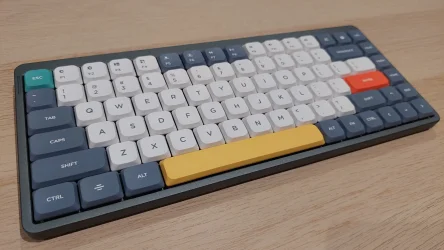
Anyone using a mechanical keyboard?


Interesting "evolution".

Many of the "recommended" mechanical keyboards on reddit and other socials recommend keyboards without a number pad. This reminds me of back in the day at my first job where I was so used to a keyboard with a numpad, but the "dinasours" in the office continued to type numbers using the top row on the keyboard. With the way things are going in the word today, it certainly seems we're regressing in many areas.
 

My Computer My Computer

At a glance

Windows 11NVIDA 1650 Ti
OS
Windows 11
Computer type
Laptop
Manufacturer/Model
Lenovo
Graphics Card(s)
NVIDA 1650 Ti
Monitor(s) Displays
Lenovo C32q-20
In the 90's, I went out of my way to buy an IBM Model M buckling spring keyboard and thought it was the greatest thing ever. I've since come to my senses and use Logitech keyboards with scissor switches like the MX Keys and K950. I briefly dabbled in modern mechanical keyboards, and, well, let's just say that was a very brief dalliance, and the scissor switches won. They're not like your electric typewriter feel, but they do feature definite actuation without the weirdness I perceived in modern mechanical switches, nor are they indeterminate mush like membrane keyboards.
I tested out the K950 and it didn't work for me at all. Glad you found something you liked.
 

My Computer My Computer

At a glance

Windows 11NVIDA 1650 Ti
OS
Windows 11
Computer type
Laptop
Manufacturer/Model
Lenovo
Graphics Card(s)
NVIDA 1650 Ti
Monitor(s) Displays
Lenovo C32q-20
I tested out the K950 and it didn't work for me at all. Glad you found something you liked.

Phew, that was a couple months ago! Now that you mention it, I returned the K950 because it felt cheaper than my MX Keys, and the keycap labels were even less readable than the non-illuminated keys on my MX Keys in my environment (I don't use the backlight, which shines around the keys more than through them - it's such a bust of an expensive feature). I bought the K950 because the left arrow key broke off the MX Keys, and I ended up replacing it with an MX Keys S. I do have to use the MX Keys S in Bluetooth mode, because its Bolt receiver is prone to losing the Ctrl when I wake it with Ctrl+C or other combo. The Unifying Receiver never had this problem, and Bluetooth seems to be immune. Yeah, I tried disabling the power options for the Bolt in Device Manager, but it didn't help. Gotta keep the Bolt for non-Bluetooth environments like the BIOS, though.
 

My Computer My Computer

At a glance

Windows 11
OS
Windows 11
I never type hard and those who have ever used the IBC Selectric typewriter know what I'm talking about when I write it practically types itself. It's essentially "low friction" and there's effectively no effort so "tactile switches" are a sensation not an actual function of responsiveness of a keyboard. The keys didn't feel like they required effort. Once you initiated the stroke, the mechanism seemed to take over. The sensation was one of extremely low friction and very little resistance. It felt responsive, effortless, and almost as if the machine was helping you type.

If you can, visist a local computer store to try out different keyboards. Were i live they have many keyboards unpacked so one can test each one directly in store.

I bought the Steelseries Apex Pro Gen 3 a while ago to replace my Steelseries Apex 7 that had brown switches. The Steelseries Apex Pro Gen 3 has only one switch, their OmniPoint. At first i was not really in love, i thought the keys were to light, as you describe it abowe "The keys didn't feel like they required effort. Once you initiated the stroke, the mechanism seemed to take over".

After a couple of days i had "adjusted" myself and now i am in love and love the OmniPoint switches.

Yes, it´s a gaming keyboard but you can turn of the lightning keys and use it as a regular keyboard, or just use one solid color and no irritating RGB bling.

On this keyboard you can even adjust how much you must press a key before anything happens, iow if they should react very fast or if one must press they key down to 100% or anything in between. I just use the default settings and that works for me.

Steelseries Apex Pro Gen 3: https://steelseries.com/en-us/gamin...eyboardSize=fullSize&keyboardLanguage=english
 

My Computer My Computer

At a glance

Windows 11 Pro for WorkstationsIntel Xeon w5-2465X (3.10 GHz)128 GBNvidia RTX PRO 4000 Blackwell
OS
Windows 11 Pro for Workstations
Computer type
PC/Desktop
Manufacturer/Model
HP
CPU
Intel Xeon w5-2465X (3.10 GHz)
Motherboard
HP Z4 G5
Memory
128 GB
Graphics Card(s)
Nvidia RTX PRO 4000 Blackwell
Sound Card
On board, Realtek
Monitor(s) Displays
ASUS Swift PG279Q (27")
Screen Resolution
2560x1440
Hard Drives
OS: SK hynix PC801 HFS001TEJ9X101N
Storage: 4 x Samsung 9100 Pro 8TB
Storage: 1 x Samsung 990 Pro 4TB
Keyboard
Steelseries Apex Pro Gen 3
Mouse
Contour Rollermouse Red
Internet Speed
500/500
Browser
MS Edge
Other Info
This is a HP Z4 G5 Workstation.
IBM Model M if you can still find them. Have one from 1996.It's brilliant still !!!! and far better than loads of modern keyboards.

Screenshot_20260901_092559.webp


You might be able to source one somewhere though on a site like vinted or similar.Probably cost you around €120 or equiv in your local currency.

Note though no € sign and some other modern symbols so you will have to type the key combo - being an IBM product remember IBM used EBCDIC rather than ASCII for lots of things !!!

It DOES have a number pad which helps of course.

Cheers
jimbo
 

My Computer My Computer

At a glance

Windows XP,11 Linux Fedora Rawhide pre-releas...2 X Intel i7
OS
Windows XP,11 Linux Fedora Rawhide pre-release 46
Computer type
PC/Desktop
CPU
2 X Intel i7
Screen Resolution
4KUHD X 2
IBM Model M if you can still find them. Have one from 1996.It's brilliant still !!!! and far better than loads of modern keyboards.

View attachment 181406


You might be able to source one somewhere though on a site like vinted or similar.Probably cost you around €120 or equiv in your local currency.

Note though no € sign and some other modern symbols so you will have to type the key combo - being an IBM product remember IBM used EBCDIC rather than ASCII for lots of things !!!

It DOES have a number pad which helps of course.

Cheers
jimbo
OMG. That keyboard brings back memories. And this video too:


My Computer My Computer

At a glance

Windows 11NVIDA 1650 Ti
OS
Windows 11
Computer type
Laptop
Manufacturer/Model
Lenovo
Graphics Card(s)
NVIDA 1650 Ti
Monitor(s) Displays
Lenovo C32q-20

Latest Support Threads

Back
Top Bottom