AOMEI Backupper version update


Marcus Vinicus

Semper paratus
Pro User
VIP
Local time
3:31 AM
Posts
2,472
Location
New Zealand
OS
Windows 11 Pro 26H2
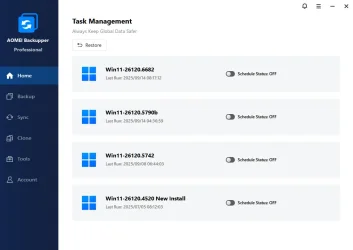
This new version 8.0.0 has a refreshed GUI and some other changes.
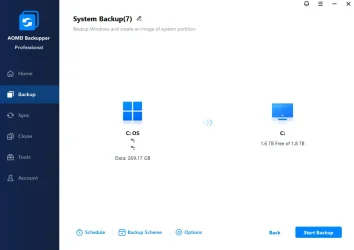
  • Brand-new user interface and interaction experience: A fully refreshed visual design with a more intuitive layout and streamlined workflows makes every use smoother, easier, and more efficient.
  • Added "Lock": When enabled, a password is required each time AOMEI Backupper launches, effectively preventing unauthorized access and comprehensively safeguarding your backed up data and privacy.
  • Fixed some known bugs.

aomei-backupper1.webp

aomei-backupper2.webp
 

My Computers My Computers

  • At a glance

    Windows 11 Pro 26H2Intel Core i9 13900KCorsair Dominator Platinum 64gb 5600MT/s DDR5...Sapphire NITRO+ AMD Radeon RX 7900 XTX Vapor-...
    OS
    Windows 11 Pro 26H2
    Computer type
    PC/Desktop
    Manufacturer/Model
    Homebuilt
    CPU
    Intel Core i9 13900K
    Motherboard
    Asus ProArt Z790 Creator WiFi - Bios 3202
    Memory
    Corsair Dominator Platinum 64gb 5600MT/s DDR5 Dual Channel
    Graphics Card(s)
    Sapphire NITRO+ AMD Radeon RX 7900 XTX Vapor-X 24GB
    Sound Card
    External DAC: Cambridge Audio DACMagic200M - Headphone Amps: Topping L70 & SMSL H400
    Monitor(s) Displays
    Samsung S95F OLED 55" TV
    Screen Resolution
    3840 x 2160 120hz
    Hard Drives
    Samsung 980 Pro 2TB (OS)
    Samsung 980 Pro 1TB (Files)
    Lexar NZ790 4TB
    LaCie d2 Professional 6TB external - USB 3.1
    Seagate Expansion 16TB external - USB 3.2
    Seagate One Touch 18TB external HD - USB 3.0
    PSU
    Corsair RM1200x Shift
    Case
    Corsair RGB Smart Case 5000x (white)
    Cooling
    NAUTILUS 360 RS Liquid CPU Cooler
    Keyboard
    Incase Ergonomic USB (Microsoft clone)
    Mouse
    Logitech MX Master 3S
    Internet Speed
    Fibre 900/500 Mbps
    Browser
    Microsoft Edge Chromium
    Antivirus
    Bitdefender Total Security
    Other Info
    AMD Radeon Software & Drivers
    Hasleo Backup Suite
    Dashlane password manager
    Kensington Verimark fingerprint reader
    Logitech Brio 4K webcam
    Orico 10-port powered USB 3.0 hub
  • At a glance

    Windows 11 Pro 25H2Intel® Core™ i9-13900H32GB DDR4-3200 Dual channel*Intel Iris Xᵉ Graphics G7
    Operating System
    Windows 11 Pro 25H2
    Computer type
    Laptop
    Manufacturer/Model
    Asus Vivobook X1605VA
    CPU
    Intel® Core™ i9-13900H
    Motherboard
    Asus X1605VA bios 309
    Memory
    32GB DDR4-3200 Dual channel
    Graphics card(s)
    *Intel Iris Xᵉ Graphics G7
    Sound Card
    Realtek | Intel SST Bluetooth & USB
    Monitor(s) Displays
    16.0-inch, WUXGA 16:10 aspect ratio, IPS-level Panel
    Screen Resolution
    1920 x 1200 60hz
    Hard Drives
    512GB M.2 NVMe™ PCIe® 3.0 SSD
    Mouse
    Logitech MX Ergo Trackball
    Antivirus
    Bitdefender Total Security
    Other Info
    720p Webcam
    WiFi & USB to ethernet
After using Ventoy , with latest AoMEI 8 on it , I can only boot AoMEI in Wimboot ( after choosing AoMEI in Ventoy ). When choosing " normal boot" , the program wont start and PC shows a black screen !
What goes wrong , HOW(??) to fix it..........??
Made the backup-ISO within the AoMEI program , it downloaded a PE from the AoMEI-site to make the backup-ISO.
 

My Computers My Computers

  • At a glance

    Windows11 Pro 25H2i732GBnVidia
    OS
    Windows11 Pro 25H2
    Computer type
    PC/Desktop
    Manufacturer/Model
    Asus
    CPU
    i7
    Motherboard
    z97k
    Memory
    32GB
    Graphics Card(s)
    nVidia
    Sound Card
    Realtek
    Hard Drives
    3
    Cooling
    air
    Browser
    Edge
    Antivirus
    ESET
  • At a glance

    Windows11 ProIntel i516GBIntel
    Operating System
    Windows11 Pro
    Computer type
    PC/Desktop
    Manufacturer/Model
    ASUS
    CPU
    Intel i5
    Motherboard
    ASUS Basic
    Memory
    16GB
    Graphics card(s)
    Intel
    Sound Card
    Realtek
    Monitor(s) Displays
    Samsung
    Hard Drives
    one intern , 0ne extern, OS on SSD
    Cooling
    air
    Keyboard
    wireless Logitech
    Mouse
    wireless Logitech
    Internet Speed
    1GB
    Browser
    Edge
    Antivirus
    ESET
Just tested this - what a total disappointment - apart from some pathetic animations, virtually no difference to previous version apart from lock function (which I would not use anyway).

It still has the major weakness on partition backups that you can only restore one partition at a time.
Why it needs to differentiate between partition and disk backups is a mystery to me.

It STILL does not have any drag and drop capability to reorder partitions during a restore. You have to do it in a clumsy restore one partition at a time (multiple restores in effect).

To quote Bill - this is "Much Ado About Nothing".
 
Last edited:

My Computer My Computer

At a glance

Windows 11 Pro + Win11 Canary VM.I9 13th gen i9-13900H 2.60 GHZ16 GB solderedIntegrated Intel Iris XE
OS
Windows 11 Pro + Win11 Canary VM.
Computer type
Laptop
Manufacturer/Model
ASUS Zenbook 14
CPU
I9 13th gen i9-13900H 2.60 GHZ
Motherboard
Yep, Laptop has one.
Memory
16 GB soldered
Graphics Card(s)
Integrated Intel Iris XE
Sound Card
Realtek built in
Monitor(s) Displays
laptop OLED screen
Screen Resolution
2880x1800 touchscreen
Hard Drives
1 TB NVME SSD (only weakness is only one slot)
PSU
Internal + 65W thunderbolt USB4 charger
Case
Yep, got one
Cooling
Stella Artois (UK pint cans - 568 ml) - extra cost.
Keyboard
Built in UK keybd
Mouse
Bluetooth , wireless dongled, wired
Internet Speed
900 mbs (ethernet), wifi 6 typical 350-450 mb/s both up and down
Browser
Edge
Antivirus
Defender
Other Info
TPM 2.0, 2xUSB4 thunderbolt, 1xUsb3 (usb a), 1xUsb-c, hdmi out, 3.5 mm audio out/in combo, ASUS backlit trackpad (inc. switchable number pad)

Macrium Reflect Home V8
Office 365 Family (6 users each 1TB onedrive space)
Hyper-V (a vm runs almost as fast as my older laptop)
FYI: I tend to agree with the review of Version 8.0.0. I have had a few irritating issues with both this and the earlier version 7.5.
I think a lot of the internal software uses VC8 run-time and this is 2005 vintage as far as I can tell. I am unsure if it is currently in step with the current Windows11 security updates.

Cloning works efficiently enough, however, power/tech users need to be aware of a couple of irritating gremlins:
1) If you have identical internal disks, and say clone from C to E, you often see big differences in the target size after. It turns out that unless you drop into "Restart Mode" (WinPE), it uses VSS to copy, that have unexpected restrictions. There are registry entries under FilesNotToSnapshot under BackupRestore (inside HKEY_LOCAL_MACHINE\SYSTEMCurrentControlSet\Control) that stop Outlook *ost and *oab plus others from being copied. There may be other things missed.
2) At the end of ANY clone, Backupper makes the assumption I want to boot from the cloned disk, messes with the BCDBOOT part of the BCD, and reboots into the wrong disk (i.e. changes the boot order). The SSD slots might have different performance, so I want to have the original DISK 0 booted from!
3) After cloning, the cloned disk is left mounted, which is not good security from a Ransomware perspective. My old Paragon software ALWAYS unmounted the clone, and I NEVER had a boot order issue. I now have to rename the clone, then remove the drive letter with Disk Management.

NOTE: that last issue caused a BIG problem recently, when I forgot to un-mount the cloned disk, and a Windows update kicked in, that needed 2 reboots.
The KB5070773 update started on the booted C disk, but after its first reboot, tried to complete the WinRE update on the WRONG DISK. This left the Partition Table for the Recovery Partition locked on the C drive, that stopped any new disk clone working.

Fortunately, AOMEI support were very helpful, and provided a very useful procedure to delete and recreate the Recovery Partitions on both drives.
You need to download the latest Windows 11 ISO and mount it, and 22 complex commands later, it is done!

I have put in a request to AOMEI to have a tick-box to unmount the cloned target disk at clone completion.

By the way, I have found that if you run "Create Bootable Media" in the TOOLS UI, it DOES create a bootable DVD, BUT the "makedisc.exe" routine inside that tool hangs at 99%m but DOES eject the disk. I thinks its cleanup is failing in a hard loop. That DVD DOES have BACKUPPER integrated, and DOES create an exact clone copy, of identical size, as the OS is not getting in the way, as it runs inside the WinPE, so presumably uses XCOPY.
 

My Computer My Computer

At a glance

Windows 11 25H2 (Build 26200.7171)AMD 5600G16GB (Corsair DDR4 CMK16GX4M2D3600C18 x 2)AMD Radion Graphics Embedded in 5600G CPU
OS
Windows 11 25H2 (Build 26200.7171)
Computer type
PC/Desktop
Manufacturer/Model
Gigabyte
CPU
AMD 5600G
Motherboard
Gigabyte B550M DSH3
Memory
16GB (Corsair DDR4 CMK16GX4M2D3600C18 x 2)
Graphics Card(s)
AMD Radion Graphics Embedded in 5600G CPU
Sound Card
N/A
Monitor(s) Displays
Samsung 24"
Screen Resolution
1920x1080
Hard Drives
Sabrent Rocket Q4 1TB x 2 (C: and E: for cloning).
PSU
550W
Case
Antec
Cooling
Smart Fans
Keyboard
AUKEY
Mouse
logi
Browser
Firefox
Antivirus
MalwareBytes premium
Back
Top Bottom