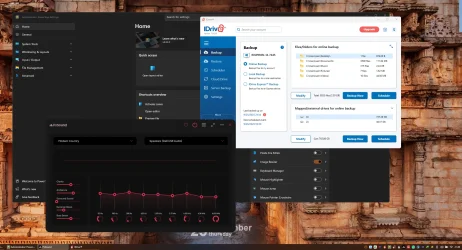
Hello all, my issue is that when I restart my system most of my stratup programs are opened to the system tray and all is good. However I have 3 programs that startup opened after restart so I have to manually hit he "X" in the right hand corner of the app and then it dissappears into the tray. Is there a way to automatically minimize them to the tray like the others without any intervention fromm me? Thanks in advance for any help provided.
My Computer
At a glance
Windows 11 HomeAMD Ryzen 7 8840HSKingston FURY Impact 32GB (2x16GB) 5600MT/s DDR5AMD Radeon 780M Graphics
- OS
- Windows 11 Home
- Computer type
- Laptop
- Manufacturer/Model
- Dell Inspiron 7445 2in1
- CPU
- AMD Ryzen 7 8840HS
- Motherboard
- 0MT90K
- Memory
- Kingston FURY Impact 32GB (2x16GB) 5600MT/s DDR5
- Graphics Card(s)
- AMD Radeon 780M Graphics
- Sound Card
- AMD High Definition Audio Device
- Monitor(s) Displays
- Dell 27"
- Screen Resolution
- 2560x1440
- Hard Drives
- EG6 KIOXIA 1TB (NVMe)
- PSU
- 6-Cell 97WHr Integrated
- Case
- Platinum Silver
- Keyboard
- Arteck 5.1
- Mouse
- Logitech M650
- Internet Speed
- 1000 | 25
- Browser
- Google Chrome
- Antivirus
- Windows Defender
- Other Info
- If you listen cartefully, you can hear me not caring.