
Apps won't just open in system tray automatically after startup


izzyforeal

I hate peer pressure and you should too.
Member
Local time
7:18 AM
Posts
118
Location
Ohio
OS
Windows 11 Home
Hello all, my issue is that when I restart my system most of my stratup programs are opened to the system tray and all is good. However I have 3 programs that startup opened after restart so I have to manually hit he "X" in the right hand corner of the app and then it dissappears into the tray. Is there a way to automatically minimize them to the tray like the others without any intervention fromm me? Thanks in advance for any help provided.
 

My Computer

System One

  • OS
    Windows 11 Home
    Computer type
    Laptop
    Manufacturer/Model
    Dell Inspiron 7445 2in1
    CPU
    AMD Ryzen 7 8840HS
    Motherboard
    0MT90K
    Memory
    Kingston FURY Impact 32GB (2x16GB) 5600MT/s DDR5
    Graphics Card(s)
    AMD Radeon 780M Graphics
    Sound Card
    AMD High Definition Audio Device
    Monitor(s) Displays
    Dell 27"
    Screen Resolution
    2560x1440
    Hard Drives
    EG6 KIOXIA 1TB (NVMe)
    PSU
    6-Cell 97WHr Integrated
    Case
    Platinum Silver
    Keyboard
    Arteck 5.1
    Mouse
    Logitech M650
    Internet Speed
    1000 | 25
    Browser
    Google Chrome
    Antivirus
    Windows Defender
    Other Info
    If you listen cartefully, you can hear me not caring.
most programs within their own settings have an option on minimising to the tray.

you could also try the programs exe file > properties and set that to start minimised.

best of luck, Steve ..
 

My Computers

System One System Two

  • OS
    Debian 13 Trixie .. Windows 11 Home
    Computer type
    PC/Desktop
    Manufacturer/Model
    HP 24" AiO
    CPU
    Ryzen 7 5825u
    Motherboard
    HP
    Memory
    64GB DDR4 3200
    Graphics Card(s)
    Ryzen 7 5825u
    Sound Card
    RealTek
    Monitor(s) Displays
    24" HP AiO
    Screen Resolution
    1920 x 1080 @60 Hz
    Hard Drives
    1TB WD Blue SN580 M2 SSD Partitioned.
    2x 1TB USB HDD External Backup/Storage.
    PSU
    90W external power brick
    Case
    24" All in One
    Cooling
    Default Air Cooling
    Keyboard
    HP WiFi UK extended
    Mouse
    HP WiFi 3 Button
    Internet Speed
    1GB full fibre
    Browser
    Edge & Firefox
    Antivirus
    AVG Internet Security/Windows Defender
    Other Info
    Mainly Open Source Software
  • Operating System
    Ubuntu 22.04.5 LTS
    Computer type
    Laptop
    Manufacturer/Model
    Dell 13" Latitude 2017
    CPU
    i5 7200u
    Motherboard
    Dell
    Memory
    16GB DDR4
    Graphics card(s)
    Intel
    Sound Card
    Intel
    Monitor(s) Displays
    13" Dell Laptop
    Hard Drives
    250GB Crucial 2.5" SSD
    Mouse
    Generic WiFi 3 button
    Internet Speed
    WiFi only
    Browser
    Firefox
    Antivirus
    ClamAV TK
    Other Info
    Mainly Open Source Software
most programs within their own settings have an option on minimising to the tray.

you could also try the programs exe file > properties and set that to start minimised.

best of luck, Steve ..
Hello Steve, you’re right but neither option works. Thx for the reply.
 

My Computer

System One

  • OS
    Windows 11 Home
    Computer type
    Laptop
    Manufacturer/Model
    Dell Inspiron 7445 2in1
    CPU
    AMD Ryzen 7 8840HS
    Motherboard
    0MT90K
    Memory
    Kingston FURY Impact 32GB (2x16GB) 5600MT/s DDR5
    Graphics Card(s)
    AMD Radeon 780M Graphics
    Sound Card
    AMD High Definition Audio Device
    Monitor(s) Displays
    Dell 27"
    Screen Resolution
    2560x1440
    Hard Drives
    EG6 KIOXIA 1TB (NVMe)
    PSU
    6-Cell 97WHr Integrated
    Case
    Platinum Silver
    Keyboard
    Arteck 5.1
    Mouse
    Logitech M650
    Internet Speed
    1000 | 25
    Browser
    Google Chrome
    Antivirus
    Windows Defender
    Other Info
    If you listen cartefully, you can hear me not caring.
Hello all, my issue is that when I restart my system most of my stratup programs are opened to the system tray and all is good. However I have 3 programs that startup opened after restart so I have to manually hit he "X" in the right hand corner of the app and then it dissappears into the tray. Is there a way to automatically minimize them to the tray like the others without any intervention fromm me? Thanks in advance for any help provided.

Clicking the "x" in the upper right corner does not minimize an application, it closes the application.
It sounds like the problem applications have their own taskbar icons and you just don't want them to open at startup. If this is the case, press Ctrl, Alt, and Del simultaneously, click "Task Manager" and use the startup tab to disable them.

Ben
 

My Computer

System One

  • OS
    Windows 10 Home
    Computer type
    Laptop
    Manufacturer/Model
    HP Elitebook 2530p
    CPU
    Intel Core 2 Duo [email protected] GHz
    Memory
    2 GB
Clicking the "x" in the upper right corner does not minimize an application, it closes the application.
It sounds like the problem applications have their own taskbar icons and you just don't want them to open at startup. If this is the case, press Ctrl, Alt, and Del simultaneously, click "Task Manager" and use the startup tab to disable them.

Ben
Ben thanks for the response you're normally correct. Here's an example, Powertoys opens full screeen when I restart and when i hit the "X" in the top right hand corner (normally used to close programs), Powertoys goes down to the system tray. I have 3 programs that do this. I just want when I restart that the programs that belong in the system tray start in the system tray until they are needed.
 

My Computer

System One

  • OS
    Windows 11 Home
    Computer type
    Laptop
    Manufacturer/Model
    Dell Inspiron 7445 2in1
    CPU
    AMD Ryzen 7 8840HS
    Motherboard
    0MT90K
    Memory
    Kingston FURY Impact 32GB (2x16GB) 5600MT/s DDR5
    Graphics Card(s)
    AMD Radeon 780M Graphics
    Sound Card
    AMD High Definition Audio Device
    Monitor(s) Displays
    Dell 27"
    Screen Resolution
    2560x1440
    Hard Drives
    EG6 KIOXIA 1TB (NVMe)
    PSU
    6-Cell 97WHr Integrated
    Case
    Platinum Silver
    Keyboard
    Arteck 5.1
    Mouse
    Logitech M650
    Internet Speed
    1000 | 25
    Browser
    Google Chrome
    Antivirus
    Windows Defender
    Other Info
    If you listen cartefully, you can hear me not caring.
please try, place your cursor on the top bar of the window you want to minimise
right click the top bar and on this menu is minimise
hold the 'shift' key and then click minimise on that menu.

see if the settings hold on restart.
best of luck, Steve ..
 

My Computers

System One System Two

  • OS
    Debian 13 Trixie .. Windows 11 Home
    Computer type
    PC/Desktop
    Manufacturer/Model
    HP 24" AiO
    CPU
    Ryzen 7 5825u
    Motherboard
    HP
    Memory
    64GB DDR4 3200
    Graphics Card(s)
    Ryzen 7 5825u
    Sound Card
    RealTek
    Monitor(s) Displays
    24" HP AiO
    Screen Resolution
    1920 x 1080 @60 Hz
    Hard Drives
    1TB WD Blue SN580 M2 SSD Partitioned.
    2x 1TB USB HDD External Backup/Storage.
    PSU
    90W external power brick
    Case
    24" All in One
    Cooling
    Default Air Cooling
    Keyboard
    HP WiFi UK extended
    Mouse
    HP WiFi 3 Button
    Internet Speed
    1GB full fibre
    Browser
    Edge & Firefox
    Antivirus
    AVG Internet Security/Windows Defender
    Other Info
    Mainly Open Source Software
  • Operating System
    Ubuntu 22.04.5 LTS
    Computer type
    Laptop
    Manufacturer/Model
    Dell 13" Latitude 2017
    CPU
    i5 7200u
    Motherboard
    Dell
    Memory
    16GB DDR4
    Graphics card(s)
    Intel
    Sound Card
    Intel
    Monitor(s) Displays
    13" Dell Laptop
    Hard Drives
    250GB Crucial 2.5" SSD
    Mouse
    Generic WiFi 3 button
    Internet Speed
    WiFi only
    Browser
    Firefox
    Antivirus
    ClamAV TK
    Other Info
    Mainly Open Source Software
please try, place your cursor on the top bar of the window you want to minimise
right click the top bar and on this menu is minimise
hold the 'shift' key and then click minimise on that menu.

see if the settings hold on restart.
best of luck, Steve ..
Hello Steve and thanks for responding. When I do as you suggested it just minimizes the app so it's still open at the bottom of the taskbar. I'm interested basically that it closes but remains open in the system tray like everything else thats in there.
 

My Computer

System One

  • OS
    Windows 11 Home
    Computer type
    Laptop
    Manufacturer/Model
    Dell Inspiron 7445 2in1
    CPU
    AMD Ryzen 7 8840HS
    Motherboard
    0MT90K
    Memory
    Kingston FURY Impact 32GB (2x16GB) 5600MT/s DDR5
    Graphics Card(s)
    AMD Radeon 780M Graphics
    Sound Card
    AMD High Definition Audio Device
    Monitor(s) Displays
    Dell 27"
    Screen Resolution
    2560x1440
    Hard Drives
    EG6 KIOXIA 1TB (NVMe)
    PSU
    6-Cell 97WHr Integrated
    Case
    Platinum Silver
    Keyboard
    Arteck 5.1
    Mouse
    Logitech M650
    Internet Speed
    1000 | 25
    Browser
    Google Chrome
    Antivirus
    Windows Defender
    Other Info
    If you listen cartefully, you can hear me not caring.
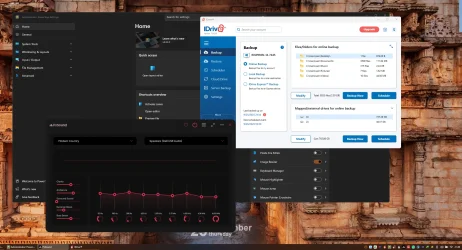
Here's an image of my restart hope it helps. In the image during reboot those 3 windows open but if you look in the system tray all 3 of those programs are already running. So when I select the "X" to close the program, it closes but remains running in the system tray.
 

Attachments

  • EaseUS_2025_09_25_21_41_15.webp
    EaseUS_2025_09_25_21_41_15.webp
    293.8 KB · Views: 1

My Computer

System One

  • OS
    Windows 11 Home
    Computer type
    Laptop
    Manufacturer/Model
    Dell Inspiron 7445 2in1
    CPU
    AMD Ryzen 7 8840HS
    Motherboard
    0MT90K
    Memory
    Kingston FURY Impact 32GB (2x16GB) 5600MT/s DDR5
    Graphics Card(s)
    AMD Radeon 780M Graphics
    Sound Card
    AMD High Definition Audio Device
    Monitor(s) Displays
    Dell 27"
    Screen Resolution
    2560x1440
    Hard Drives
    EG6 KIOXIA 1TB (NVMe)
    PSU
    6-Cell 97WHr Integrated
    Case
    Platinum Silver
    Keyboard
    Arteck 5.1
    Mouse
    Logitech M650
    Internet Speed
    1000 | 25
    Browser
    Google Chrome
    Antivirus
    Windows Defender
    Other Info
    If you listen cartefully, you can hear me not caring.
Ok, I've figured out a couple of my issues. 1) The FXSound application had 2 startup entried in different areas. Once I figured out which I could delete I don't see the window at startup any longer. 2) The Powertoys app had the same thing but a little bit different. It was in the startup folder but also created a task to run the program. Once I deleted the one in the startup folder, that window also does not popup any longer. 3) The iDrive app hasn't be so simple. The app has some issues with it that the window always open after restrat. Once I close it and select the iDrive icon from the system tray to run, the app opens and logs me in again. So if I close the window, the app doesn't run...weird. Thanks to everyone for the assistance.
 

My Computer

System One

  • OS
    Windows 11 Home
    Computer type
    Laptop
    Manufacturer/Model
    Dell Inspiron 7445 2in1
    CPU
    AMD Ryzen 7 8840HS
    Motherboard
    0MT90K
    Memory
    Kingston FURY Impact 32GB (2x16GB) 5600MT/s DDR5
    Graphics Card(s)
    AMD Radeon 780M Graphics
    Sound Card
    AMD High Definition Audio Device
    Monitor(s) Displays
    Dell 27"
    Screen Resolution
    2560x1440
    Hard Drives
    EG6 KIOXIA 1TB (NVMe)
    PSU
    6-Cell 97WHr Integrated
    Case
    Platinum Silver
    Keyboard
    Arteck 5.1
    Mouse
    Logitech M650
    Internet Speed
    1000 | 25
    Browser
    Google Chrome
    Antivirus
    Windows Defender
    Other Info
    If you listen cartefully, you can hear me not caring.

Latest Support Threads

Back
Top Bottom




