Asus computer and upgrading win 11


DaveE

Member
Local time
4:55 AM
Posts
25
OS
Win 11
Hi folks and bear with my ignorance please.
My Asus netbook could not upgrade to win 24H2 and I always thought it was just a hardware thing and I was stuck. I just googled again and an update from Asus helped.
Trouble is when I went to install the update there is not enough space on my c drive. Using O&O software I have cloned the c drive to an internal ssd drive and increased the size. In fact it's right now (I think) downloading 25H2.
I have changed the boot sequence.
How do I format the c drive once I'm sure all is ok? It won't let me (understandably).
Cheers.
 

My Computer

System One

  • OS
    Win 11
    Computer type
    PC/Desktop
    Manufacturer/Model
    Computer concept
So you've got 2 internal drives, and cloned one to the other?

How do I format the c drive once I'm sure all is ok? It won't let me (understandably).
The first test will be to remove the "old" drive and make sure the device boots to the new cloned drive, independently. With both drives still connected, there's no guarantee which drive the booting is happening from.

Do this before any attempt to wipe the "old" c drive? (What sort of drive was it - NVMe, SSD?)
 
Last edited:

My Computers

System One System Two

  • OS
    Windows 11 2xH2 (latest update ... forever anal)
    Computer type
    PC/Desktop
    Manufacturer/Model
    HP Slim S01
    CPU
    Intel i5-12400
    Memory
    8GB
    Graphics Card(s)
    NVIDIA GeForce GT730
    Sound Card
    OOBE
    Monitor(s) Displays
    Acer 32"
    Screen Resolution
    1920x1080
    Hard Drives
    512GB KIOXIA NVMe
    1TB SATA SSD
    PSU
    OOBE
    Case
    OOBE
    Cooling
    OOBE
    Keyboard
    BT
    Mouse
    BT
    Browser
    Brave FFox Chrome Opera
    Antivirus
    KIS
  • Operating System
    Windows 11 Pro 2xH2 (latest update ... 4ever anal)
    Computer type
    Laptop
    Manufacturer/Model
    HP Pavillion 15
    CPU
    i7-1165G7 @ 2.80GHz
    Graphics card(s)
    Intel Iris Xe Graphics
    Hard Drives
    Samsung NVMe 512GB
    + numerous/multiple SSD Type C USB enclosures
    Internet Speed
    NBN FTTN 50
    Browser
    Brave
    Antivirus
    KIS
Please perform the following steps:


1) Add WMIC:

DISM /Online /Add-Capability /CapabilityName:WMIC~~~~


2) Run Tuneup plus > post a share link


3) Run upgrade_failure_info.bat > post a share link


4) Run diskparinfo.bat > post a share link


5) Run the V2 log collector > post a share link


My Computer

System One

  • OS
    Windows 10
    Computer type
    Laptop
    Manufacturer/Model
    HP
    CPU
    Intel(R) Core(TM) i7-4800MQ CPU @ 2.70GHz
    Motherboard
    Product : 190A Version : KBC Version 94.56
    Memory
    16 GB Total: Manufacturer : Samsung MemoryType : DDR3 FormFactor : SODIMM Capacity : 8GB Speed : 1600
    Graphics Card(s)
    NVIDIA Quadro K3100M; Intel(R) HD Graphics 4600
    Sound Card
    IDT High Definition Audio CODEC; PNP Device ID HDAUDIO\FUNC_01&VEN_111D&DEV_76E0
    Hard Drives
    Model Hitachi HTS727575A9E364
    Antivirus
    Microsoft Defender
    Other Info
    Mobile Workstation
what's the RAM and storage size?

If limited by RAM and Storage, you could try this solution.
 

My Computer

System One

  • OS
    Windows 7/11
    Computer type
    PC/Desktop
    Manufacturer/Model
    HP/Lenovo/Asus
    CPU
    Intel i7-11800H
    Motherboard
    Lenovo Legion 5i Pro Gen 6
    Memory
    32GB DDR4 3200MHz
    Graphics Card(s)
    NVIDIA GeForce RTX 3070
    Monitor(s) Displays
    LG 35WN65C-B
    Screen Resolution
    3440 x 1440
    Hard Drives
    1TB PCIe SSD
    Other Info
    Edition Windows 11 Pro
    Version 25H2
    Installed on ‎12/‎12/‎2025
    OS build 26200.7462
I assume that you are using a UEFI/GPT boot configuration (where the Windows boot files are stored in the EFI partition) and that you cloned all partitions to the target SSD, including the EFI partition.

I have changed the boot sequence.

Do you mean that there are two ‘Windows Boot Manager’ entries in the UEFI boot priority settings and that you changed the order?

If so, and each installation uses a separate EFI partition, then formatting the original drive should not affect booting the remaining Windows installation.

But if you want to be sure, do as @idgat suggested: "The first test will be to remove the "old" drive and make sure the device boots to the new cloned drive, independently."
 

My Computers

System One System Two

  • OS
    Windows 11 Pro
    Computer type
    PC/Desktop
    CPU
    AMD Ryzen 9 9950X3D
    Motherboard
    ASRock B650E Taichi Lite
    Memory
    Kingston FURY Beast 64GB (2x32GB) DDR5 6000MT/s
    Graphics Card(s)
    ASUS TUF Gaming Radeon RX 9070 OC Edition 16GB GDDR6
    Hard Drives
    Solidigm P44 Pro 2TB M.2 NVMe SSD
  • Operating System
    Windows 11 Home
    Computer type
    Laptop
    Manufacturer/Model
    Lenovo Legion Pro 7i Gen 10 16"
    CPU
    Intel Core Ultra 9 275HX
    Memory
    64GB (2x 32GB) DDR5-6400
    Graphics card(s)
    NVIDIA GeForce RTX 5080 16GB GDDR7 Laptop GPU
    Hard Drives
    2x 1TB M.2 NVMe SSD (SK Hynix)
I appear to have misled you a little. Sorry about that.
The computer is an Asus Netbook with 4gb ram and my c drive is 50 gb. I did install a larger SSD drive, E which has plenty of space.
I thought I had changed the boot sequence but I did get the message that there is not enough space to d/load and install both 24H2 and 25H2.
I will delete the windows on E to prevent confusion. It's easily reversed if needed,
Back to the drawing board. All the software I see will not do everything.
 

My Computer

System One

  • OS
    Win 11
    Computer type
    PC/Desktop
    Manufacturer/Model
    Computer concept
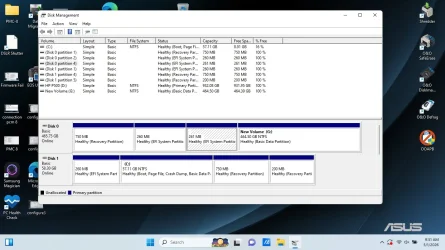
I appear to have 2 EFI partitions, which I cannot delete. I load up windows ok using the c drive, albeit an older version of win 11.
I would like to just have one partition on that G drive, (ex E).
 

My Computer

System One

  • OS
    Win 11
    Computer type
    PC/Desktop
    Manufacturer/Model
    Computer concept
You now have a dual-boot installation of Windows.

Disk 0 contains a cloned Windows installation. The cloning was not completely successful because there are two EFI partitions on the disk. It is possible to delete the second EFI partition, but there is no need to do so, as having an extra EFI partition does no harm.

Disk 1 contains the original Windows installation.

If you remove Disk 1, does Windows still boot?
 

My Computers

System One System Two

  • OS
    Windows 11 Pro
    Computer type
    PC/Desktop
    CPU
    AMD Ryzen 9 9950X3D
    Motherboard
    ASRock B650E Taichi Lite
    Memory
    Kingston FURY Beast 64GB (2x32GB) DDR5 6000MT/s
    Graphics Card(s)
    ASUS TUF Gaming Radeon RX 9070 OC Edition 16GB GDDR6
    Hard Drives
    Solidigm P44 Pro 2TB M.2 NVMe SSD
  • Operating System
    Windows 11 Home
    Computer type
    Laptop
    Manufacturer/Model
    Lenovo Legion Pro 7i Gen 10 16"
    CPU
    Intel Core Ultra 9 275HX
    Memory
    64GB (2x 32GB) DDR5-6400
    Graphics card(s)
    NVIDIA GeForce RTX 5080 16GB GDDR7 Laptop GPU
    Hard Drives
    2x 1TB M.2 NVMe SSD (SK Hynix)
Thanks Celery
I have no boot if I use my samsung larger drive but can boot ok if i use my c drive. I may delete the samsung drive but it may take time using saferase.
 

My Computer

System One

  • OS
    Win 11
    Computer type
    PC/Desktop
    Manufacturer/Model
    Computer concept
I may delete the samsung drive but it may take time using saferase.

You don’t need to use SafeErase. Use SafeErase only if you need to securely wipe all data so it cannot be recovered.

You can delete all partitions as follows.

Run the following commands as an administrator:

diskpart
list disk
select disk #
clean
 

My Computers

System One System Two

  • OS
    Windows 11 Pro
    Computer type
    PC/Desktop
    CPU
    AMD Ryzen 9 9950X3D
    Motherboard
    ASRock B650E Taichi Lite
    Memory
    Kingston FURY Beast 64GB (2x32GB) DDR5 6000MT/s
    Graphics Card(s)
    ASUS TUF Gaming Radeon RX 9070 OC Edition 16GB GDDR6
    Hard Drives
    Solidigm P44 Pro 2TB M.2 NVMe SSD
  • Operating System
    Windows 11 Home
    Computer type
    Laptop
    Manufacturer/Model
    Lenovo Legion Pro 7i Gen 10 16"
    CPU
    Intel Core Ultra 9 275HX
    Memory
    64GB (2x 32GB) DDR5-6400
    Graphics card(s)
    NVIDIA GeForce RTX 5080 16GB GDDR7 Laptop GPU
    Hard Drives
    2x 1TB M.2 NVMe SSD (SK Hynix)
A computer with a 50GB primary drive is ridiculous. Replace THAT drive with a similar larger drive, don't just add a new secondary drive - booting from the larger drive (if there are 2 drives installed) requires more than just changing the boot order

Steps ...
- remove that secondary newer larger drive
- put that drive in an external USB enclosure
- download and install Minitool Partition Wizard
- use that program to wipe all the partitions
- image the existing system to an external drive (Note : IMAGE, not clone)
- replace the original 50GB drive with a new larger drive
- restore the image to that newly inserted drive

Alternatively
- create a Win 11 installation boot USB using Rufus (making sure you tick all the options to bypass/ignore)
- swap out the old drive for a new one
- boot from the Win 11 Rufus USB, wipe all the partitions and do a clean install of Win 11

Alternatively
- image the existing system to an external drive (Note : IMAGE, not clone), including the recovery USB
- replace the drive with a larger one
- boot from the recovery USB and install the image (wiping the drive, if there's anything on it, will be automatic)

Alternatively ....
- the options are endless
 
Last edited:

My Computers

System One System Two

  • OS
    Windows 11 2xH2 (latest update ... forever anal)
    Computer type
    PC/Desktop
    Manufacturer/Model
    HP Slim S01
    CPU
    Intel i5-12400
    Memory
    8GB
    Graphics Card(s)
    NVIDIA GeForce GT730
    Sound Card
    OOBE
    Monitor(s) Displays
    Acer 32"
    Screen Resolution
    1920x1080
    Hard Drives
    512GB KIOXIA NVMe
    1TB SATA SSD
    PSU
    OOBE
    Case
    OOBE
    Cooling
    OOBE
    Keyboard
    BT
    Mouse
    BT
    Browser
    Brave FFox Chrome Opera
    Antivirus
    KIS
  • Operating System
    Windows 11 Pro 2xH2 (latest update ... 4ever anal)
    Computer type
    Laptop
    Manufacturer/Model
    HP Pavillion 15
    CPU
    i7-1165G7 @ 2.80GHz
    Graphics card(s)
    Intel Iris Xe Graphics
    Hard Drives
    Samsung NVMe 512GB
    + numerous/multiple SSD Type C USB enclosures
    Internet Speed
    NBN FTTN 50
    Browser
    Brave
    Antivirus
    KIS
Thanks idgat

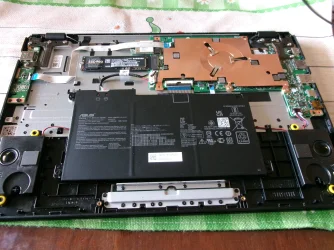
I have taken the back off, but I can't identify the original 50 gb drive. It may be covered by a copper heatsink. I can identify the E drive which is larger.
I seem to recall that replacing the original hd was hard if not impossible. Others may chime in. I do have a usb drive (HP) as seen above. Drive D.
I downloaded Minitool but it goes to a webpage and wants me to pay, which I'm happy to do as long as it worked.
 
Last edited:

My Computer

System One

  • OS
    Win 11
    Computer type
    PC/Desktop
    Manufacturer/Model
    Computer concept
I downloaded Minitool but it goes to a webpage and wants me to pay, which I'm happy to do as long as it worked.
You've probably downloaded the Pro version. This is the free Home version

Full details of the type of device - model number for a start

YouTube is great for "How to" video instructions on changing drives, you might try there.

EDIT Had a look at a couple, looks like the drive access is under the keyboard, which has to be removed. Fragile component, be very, very careful
 

My Computers

System One System Two

  • OS
    Windows 11 2xH2 (latest update ... forever anal)
    Computer type
    PC/Desktop
    Manufacturer/Model
    HP Slim S01
    CPU
    Intel i5-12400
    Memory
    8GB
    Graphics Card(s)
    NVIDIA GeForce GT730
    Sound Card
    OOBE
    Monitor(s) Displays
    Acer 32"
    Screen Resolution
    1920x1080
    Hard Drives
    512GB KIOXIA NVMe
    1TB SATA SSD
    PSU
    OOBE
    Case
    OOBE
    Cooling
    OOBE
    Keyboard
    BT
    Mouse
    BT
    Browser
    Brave FFox Chrome Opera
    Antivirus
    KIS
  • Operating System
    Windows 11 Pro 2xH2 (latest update ... 4ever anal)
    Computer type
    Laptop
    Manufacturer/Model
    HP Pavillion 15
    CPU
    i7-1165G7 @ 2.80GHz
    Graphics card(s)
    Intel Iris Xe Graphics
    Hard Drives
    Samsung NVMe 512GB
    + numerous/multiple SSD Type C USB enclosures
    Internet Speed
    NBN FTTN 50
    Browser
    Brave
    Antivirus
    KIS
Macrium Reflect Home Edition 30-day trial.

See the link below for instructions on cloning with Macrium. Clone all partitions except the 200 MB recovery partition (clear the check box for that partition).

Post #5.


My Computers

System One System Two

  • OS
    Windows 11 Pro
    Computer type
    PC/Desktop
    CPU
    AMD Ryzen 9 9950X3D
    Motherboard
    ASRock B650E Taichi Lite
    Memory
    Kingston FURY Beast 64GB (2x32GB) DDR5 6000MT/s
    Graphics Card(s)
    ASUS TUF Gaming Radeon RX 9070 OC Edition 16GB GDDR6
    Hard Drives
    Solidigm P44 Pro 2TB M.2 NVMe SSD
  • Operating System
    Windows 11 Home
    Computer type
    Laptop
    Manufacturer/Model
    Lenovo Legion Pro 7i Gen 10 16"
    CPU
    Intel Core Ultra 9 275HX
    Memory
    64GB (2x 32GB) DDR5-6400
    Graphics card(s)
    NVIDIA GeForce RTX 5080 16GB GDDR7 Laptop GPU
    Hard Drives
    2x 1TB M.2 NVMe SSD (SK Hynix)

My Computers

System One System Two

  • OS
    Windows 11 2xH2 (latest update ... forever anal)
    Computer type
    PC/Desktop
    Manufacturer/Model
    HP Slim S01
    CPU
    Intel i5-12400
    Memory
    8GB
    Graphics Card(s)
    NVIDIA GeForce GT730
    Sound Card
    OOBE
    Monitor(s) Displays
    Acer 32"
    Screen Resolution
    1920x1080
    Hard Drives
    512GB KIOXIA NVMe
    1TB SATA SSD
    PSU
    OOBE
    Case
    OOBE
    Cooling
    OOBE
    Keyboard
    BT
    Mouse
    BT
    Browser
    Brave FFox Chrome Opera
    Antivirus
    KIS
  • Operating System
    Windows 11 Pro 2xH2 (latest update ... 4ever anal)
    Computer type
    Laptop
    Manufacturer/Model
    HP Pavillion 15
    CPU
    i7-1165G7 @ 2.80GHz
    Graphics card(s)
    Intel Iris Xe Graphics
    Hard Drives
    Samsung NVMe 512GB
    + numerous/multiple SSD Type C USB enclosures
    Internet Speed
    NBN FTTN 50
    Browser
    Brave
    Antivirus
    KIS
The primary drive is probably an eMMC (embedded Multi-Media Card) so if that's your case it cannot be replaced, as it is soldered to the motherboard causing the new SSD to always be the secondary drive. You can't install Windows on a USB drive so, getting an external enclosure is not a solution to this.
 

My Computers

System One System Two

  • OS
    11 Home
    Computer type
    Laptop
    Manufacturer/Model
    Asus TUF Gaming F16 (2024)
    CPU
    i7 13650HX
    Memory
    16GB DDR5
    Graphics Card(s)
    GeForce RTX 4060 Mobile
    Sound Card
    Eastern Electric MiniMax DAC Supreme; Emotiva UMC-200; Astell & Kern AK240
    Monitor(s) Displays
    Sony Bravia XR-55X90J
    Screen Resolution
    3840×2160
    Hard Drives
    512GB SSD internal
    37TB external
    PSU
    Li-ion
    Cooling
    2× Arc Flow Fans, 4× exhaust vents, 5× heatpipes
    Keyboard
    Logitech K800
    Mouse
    Logitech G402
    Internet Speed
    30Mbit/s up, 500Mbit/s down
    Browser
    FF
    Antivirus
    What's an antivirus?
  • Operating System
    11 Home
    Computer type
    Laptop
    Manufacturer/Model
    Medion S15450
    CPU
    i5 1135G7
    Memory
    16GB DDR4
    Graphics card(s)
    Intel Iris Xe
    Sound Card
    Eastern Electric MiniMax DAC Supreme; Emotiva UMC-200; Astell & Kern AK240
    Monitor(s) Displays
    Sony Bravia XR-55X90J
    Screen Resolution
    3840×2160
    Hard Drives
    2TB SSD internal
    37TB external
    PSU
    Li-ion
    Keyboard
    Logitech K800
    Mouse
    Logitech G402
    Internet Speed
    30Mbit/s up, 500Mbit/s down
    Browser
    FF
It might be easiest to get a laptop from amazon and install a version of linux on this.
Thanks for the help.
 

My Computer

System One

  • OS
    Win 11
    Computer type
    PC/Desktop
    Manufacturer/Model
    Computer concept
If cloning is not successful, perform a clean installation of Windows 11 on the larger disk by deleting all partitions on both disks from the "Select location to install Windows 11" screen.

When installing Windows in UEFI mode, Windows Setup searches all connected disks for an existing EFI partition. It will reuse an existing partition if found; otherwise, it creates a new EFI partition on the same disk where you are installing Windows.

Windows Setup then creates a UEFI boot entry (Windows Boot Manager) in NVRAM that points to the bootloader (bootmgfw.efi) on the EFI partition.
 

My Computers

System One System Two

  • OS
    Windows 11 Pro
    Computer type
    PC/Desktop
    CPU
    AMD Ryzen 9 9950X3D
    Motherboard
    ASRock B650E Taichi Lite
    Memory
    Kingston FURY Beast 64GB (2x32GB) DDR5 6000MT/s
    Graphics Card(s)
    ASUS TUF Gaming Radeon RX 9070 OC Edition 16GB GDDR6
    Hard Drives
    Solidigm P44 Pro 2TB M.2 NVMe SSD
  • Operating System
    Windows 11 Home
    Computer type
    Laptop
    Manufacturer/Model
    Lenovo Legion Pro 7i Gen 10 16"
    CPU
    Intel Core Ultra 9 275HX
    Memory
    64GB (2x 32GB) DDR5-6400
    Graphics card(s)
    NVIDIA GeForce RTX 5080 16GB GDDR7 Laptop GPU
    Hard Drives
    2x 1TB M.2 NVMe SSD (SK Hynix)

Latest Support Threads

Back
Top Bottom