ASUS ROG Strix SCAR 17 X3D (2023) G733PYV (notebook) - Realtek driver (audio)


TOM1

New member
Local time
2:52 PM
Posts
7
OS
Windows 11
I need help with the latest drivers of Realtek audio for this laptop.
I have an ASUS ROG Strix SCAR 17 X3D (2023) G733PYV laptop:
Code:
https://rog.asus.com/laptops/rog-strix/rog-strix-scar-17-x3d-2023/helpdesk_download/

I tried installing all versions from this page:
Code:
https://www.elevenforum.com/t/drivers-realtek-audio-amd-3xx-4xx-5xx-6xx-8xx-intel-2xx-3xx-4xx-5xx-6xx-7xx-8xx.11390/
and
Code:
https://www.tenforums.com/sound-audio/182081-latest-realtek-hd-audio-driver-version-3-a-157.html

Unfortunately, no luck.
I'm still using the drivers I found earlier. The drivers were labeled:
DolbyAtmosdriverforROG_TUF_V3.30504.544.1_14911_1

I also have installed:
SmartAMP_Cirrus_DCH_ROG_Cirrus_J_V23.26.47.753_32992.exe

I also use Dolby Access for sound enhancement.

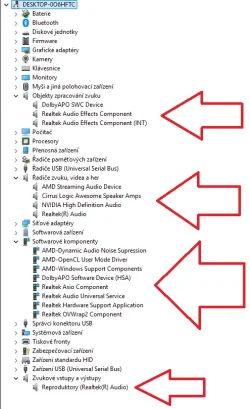
I am attaching a screenshot from Device Manager.

Does anyone know what the correct driver version is for my laptop?


Thank you very much for tips... ;-)
 
Windows Build/Version
Windows 11 25H2

Attachments

  • Realtek.webp
    Realtek.webp
    58.9 KB · Views: 1

My Computer My Computer

At a glance

Windows 11
OS
Windows 11
Info from AIDA64:
Code:
Popis zařízení    AMD K19.6 - Audio Processor - High Definition Audio Controller (Standalone AZ)
Popis zařízení (Windows)    Řadič High Definition Audio
Typ sběrnice    PCI
Sběrnice / Zařízení / Funkce    8 / 0 / 6
ID zařízení    1022-15E3
ID subsystému    1043-1503
Revize    00
ID hardwaru    PCI\VEN_1022&DEV_15E3&SUBSYS_15031043&REV_00

Code:
Popis zařízení    Realtek ALC294
Popis zařízení (Windows)    Realtek(R) Audio
Druh zařízení    Audio
Typ sběrnice    HDAUDIO
ID zařízení    10EC-0294
ID subsystému    1043-1503
Revize    1000
ID hardwaru    HDAUDIO\FUNC_01&VEN_10EC&DEV_0294&SUBSYS_10431503&REV_1000
 

My Computer My Computer

At a glance

Windows 11
OS
Windows 11

My Computer My Computer

At a glance

Windows 11 Pro 25H2AMD Ryzen™ 7 6800H 3.2-4.7 GHz32 GB DDR5 4800MHz Dual Channel CrucialNVIDIA GeForce RTX™ 3050
OS
Windows 11 Pro 25H2
Computer type
Laptop
Manufacturer/Model
ASUS ROG STRIX G513RC
CPU
AMD Ryzen™ 7 6800H 3.2-4.7 GHz
Memory
32 GB DDR5 4800MHz Dual Channel Crucial
Graphics Card(s)
NVIDIA GeForce RTX™ 3050
Monitor(s) Displays
15.6 inches FHD (1920 x 1080) IPS Display
Hard Drives
Crucial T500 2TB
Western Digital Black SN770 2TB
Keyboard
RGB Keyboard
Thanks werty...
But I see ALC285 in case this notebook.

The drivers are newer, but not the latest... I haven't tried installing - updating yet.
 

My Computer My Computer

At a glance

Windows 11
OS
Windows 11
All you have to do is get drivers for your specific Laptop from ASUS support followed up with Windows updates.
You have listed the correct versions from ASUS.
Nothing wrong with what is showing in Device Manager.

It does not matter about latest versions. No need to update manually they will come via Windows updates or the ASUS update App.
 

My Computer My Computer

At a glance

Windows 11
OS
Windows 11
I know that I can install WU sound correctly after a fresh installation of W11, but outdated versions are installed.
I don't want to have a 2021/2023 driver version on W11 25H2.
I don't understand why there are so many versions of sound processing these days.
Nobody knows anything about it.
There are a lot of software and hardware solutions, and yet they don't benefit the sound at all.
And the worst thing is that drivers cannot be found on the manufacturer's website as easily as they can for example with AMD, Intel, Nvidia...
Just a sigh...

I'll try to update at least to the version from the new G16...
 

My Computer My Computer

At a glance

Windows 11
OS
Windows 11
.
I know that I can install WU sound correctly after a fresh installation of W11, but outdated versions are installed.

Outdated for what?

I don't want to have a 2021/2023 driver version on W11 25H2.

You’re nitpicking about something irrelevant. It’s the laptop motherboard and not Windows 11 25H2, the version of OS is irrelevent.

The last Realtek driver, as you probably know, is from 2023 on your support page. Looking for newer won’t make a difference, unless it’s due to a security issue, perhaps. A new driver is highly unlikely to make any difference to the sound. It’s a laptop, sound is never 100%
Spending money on decent speakers or headphones, that’s another story.
 
Last edited:

My Computers My Computers

  • At a glance

    Windows 11 Pro 25H2 Build 26200.8894Intel(R) Core(TM) i7-4770K CPU @ 3.50GHz32.0 GB of I forget and the box is in storage.Gigabyte nVidia GeForce GTX 1660 Super OC 6GB
    OS
    Windows 11 Pro 25H2 Build 26200.8894
    Computer type
    PC/Desktop
    Manufacturer/Model
    Sin-built 2013
    CPU
    Intel(R) Core(TM) i7-4770K CPU @ 3.50GHz
    Motherboard
    ASUS ROG Maximus VI Formula
    Memory
    32.0 GB of I forget and the box is in storage.
    Graphics Card(s)
    Gigabyte nVidia GeForce GTX 1660 Super OC 6GB
    Sound Card
    ROG SupremeFX Formula 8-Channel High Definition Audio
    Monitor(s) Displays
    5 x LG 25MS500-B - 1 x 24MK430H-B - 1 x Wacom Pro 22" Touch Screen Tablet
    Screen Resolution
    All over the place
    Hard Drives
    Too many to list. OS on Samsung 1TB 870 QVO SATA
    PSU
    Silverstone 1500
    Case
    NZXT Phantom 820 Full-Tower Case
    Cooling
    Noctua NH-D15 Elite Class Dual Tower CPU Cooler / 6 x EziDIY 120mm / 2 x Corsair 140mm somethings / 1 x 140mm Thermaltake something / 2 x 200mm Corsair.
    Keyboard
    Corsair K95 / Logitech diNovo Edge Wireless
    Mouse
    Logitech: G402 / G502 / Mx Masters / Mx Air Cordless
    Internet Speed
    2000/500Mbps
    Browser
    All sorts
    Antivirus
    Kaspersky Premium
    Other Info
    ㅤㅤㅤㅤㅤㅤㅤㅤㅤㅤㅤㅤㅤㅤㅤㅤㅤㅤㅤㅤㅤㅤㅤㅤㅤㅤㅤㅤㅤㅤㅤㅤㅤㅤㅤㅤㅤㅤㅤㅤ⠀⠀⠀⠀⠀⠀⠀⠀⠀⠀
    TP-Link BE9300 WiFi 7 Bluetooth 5.4 (Archer TBE550E)
    TP-Link TX201 V1 2.5GB Lan

    Grandstream HT812 - VoIP
    ASUS DSL-AX82U - Mesh
    ASUS RT-AC68U - Mesh
    ASUS RT-BE88U Router

    Brother MFC-L2880DW Printer

    I’m on a horse.
  • At a glance

    Windows 11 Pro 25H2 Build 26200.8894 (Wifes)13th Generation Intel® Core™ i5-1340P Process...16GB LPDDR5-52001x Intel® Iris® Xe Graphics
    Operating System
    Windows 11 Pro 25H2 Build 26200.8894 (Wifes)
    Computer type
    Laptop
    Manufacturer/Model
    LENOVO Yoga 7 14IRL8 - Type 82YL
    CPU
    13th Generation Intel® Core™ i5-1340P Processor(Core™ i5-1340P)
    Memory
    16GB LPDDR5-5200
    Graphics card(s)
    1x Intel® Iris® Xe Graphics
    Sound Card
    Optimized with Dolby Atmos®
    Screen Resolution
    QHD 2880 x 1800 OLED
    Hard Drives
    M.2 512 GB SSD PCIe
    Mouse
    Logiteck MX Master 3S
    Internet Speed
    2000/500
    Antivirus
    Defender / Malwarebytes
    Other Info
    …still on a horse.


    Wireless Network: Wi-Fi 6E 2x2 AX; Bluetooth® 5.1 or above
    Ports: 1x 1 Novo button; 2 in 1 Audio Combo jack; Micro SD Card Reader; HDMI 1.4b; 2 x USB Type-C (TBT4)
    USB 3.2 Gen 2 DP 1.4a
    PD 3.0); 1 x USB 3.2 Gen1 Type A
    Camera
    1x 1080P FHD IR/RGB Hybrid with Privacy Shutter and Dual Array Microphone
    Graphics
    1x Intel® Iris® Xe Graphics
    Monitor
    14" WUXGA
    Form Factor
    Convertible Notebook
  • Windows 11 Pro 25H2 Build 26200.8894 (Wifes)

    Yoga 7 2-in-1 14IML9 - Type 83DJ

    Processor: Intel® Core™ Ultra 7 155H Processor(Core™ Ultra 7 155H)

    Memory: 32GB LPD5X-7467

    Hard Drive: 1 TB SSD PCIe

    Wireless Network: 1x Wi-Fi 6E 2x2 AX; Bluetooth® 5.1 or above

    Ports: 1 x HDMI 2.1 TMDS; 1 x Novo Button; 1 x Combo Audio Jack
    2 x USB-C (USB 4.0)
    1 x USB-A 3.2 Gen 1

    Camera: 1080P FHD IR Hybrid with Dual Microphone

    Graphics: Intel® Arc™ Graphics

    Monitor: 14" 2.8K

    ...Where's my horse?
I like up-to-date drivers if they work.
That's all.
I just wanted to know if anyone knows what version is for my laptop, as I have managed to download a driver from an unofficial source in the past that works.

And it's sad that the most expensive laptop doesn't have up-to-date drivers (updated maybe 2x/year).
 

My Computer My Computer

At a glance

Windows 11
OS
Windows 11
"I just wanted to know if anyone knows what version is for my laptop"

That is exactly what Windows updates does. Identifies your Laptop and Hardware and installs a driver or updates various elements/links to Windows.

"And it's sad that the most expensive laptop doesn't have up-to-date drivers (updated maybe 2x/year)."

Audio drivers for Laptops never have been updated that often. An expensive Laptop will have a low end Realtek audio chipset with an Overlay/APO in your case this is Dolby Atmos. On mine it is Nahimic.

No point in wasting time on this and reading README txts about updating. It works be happy.
 

My Computer My Computer

At a glance

Windows 11
OS
Windows 11
I like up-to-date drivers if they work.
That's all.

Simply a placebo. This is more of an OCD than a real issue. You came asking for help, people advised, you rejected.

I just wanted to know if anyone knows what version is for my laptop

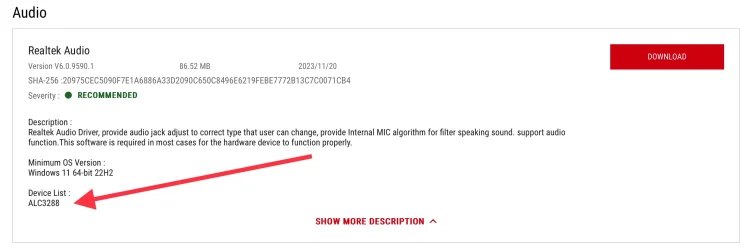
Realtek ALC3288 (USB Audio Codec) It’s listed as clear as day.

IMG_5867.webp


The one listed at the support page. It was written with the audio for your laptop in mind. Adding random drivers could render it useless.

Normally, I would advise people against using Driver updaters, but for you I say, go for it, because I don’t believe anything else will satisfy you.

Manufacturers create the drivers, not Windows. Windows will identify the hardware and offer an update accordingly.
Device manager will tell you the same if nothing (updated) is available.

  1. Press Win + X and select Device Manager.
  2. Expand the category that contains your Realtek device:
    • Sound, video and game controllers > Realtek High Definition Audio
    • Network adapters > Realtek PCIe LAN / Realtek WiFi
    • Bluetooth > Realtek Bluetooth (if applicable)
  3. Right‑click the Realtek device and choose Update driver.
  4. Select Search automatically for drivers.
  5. Wait while Windows checks Windows Update for newer Realtek drivers.
  6. If Windows reports “The best drivers are already installed,” you can still check manually via:
    • Windows Update > Optional updates > Driver updates
    • Your motherboard or laptop manufacturer’s support page
    • Realtek’s official download page (for audio: HD Audio Codec)
  7. After updating, reboot the system to apply changes.
From the looks of the image in the first post (I have no idea what language that is) and the comment:

I tried installing all versions from this page:

I can’t imagine the possible mess.

You can check fro driver updates in Windows Update > Advanced Options > Optional Updates.

You can also enable the following.

 
Last edited:

My Computers My Computers

  • At a glance

    Windows 11 Pro 25H2 Build 26200.8894Intel(R) Core(TM) i7-4770K CPU @ 3.50GHz32.0 GB of I forget and the box is in storage.Gigabyte nVidia GeForce GTX 1660 Super OC 6GB
    OS
    Windows 11 Pro 25H2 Build 26200.8894
    Computer type
    PC/Desktop
    Manufacturer/Model
    Sin-built 2013
    CPU
    Intel(R) Core(TM) i7-4770K CPU @ 3.50GHz
    Motherboard
    ASUS ROG Maximus VI Formula
    Memory
    32.0 GB of I forget and the box is in storage.
    Graphics Card(s)
    Gigabyte nVidia GeForce GTX 1660 Super OC 6GB
    Sound Card
    ROG SupremeFX Formula 8-Channel High Definition Audio
    Monitor(s) Displays
    5 x LG 25MS500-B - 1 x 24MK430H-B - 1 x Wacom Pro 22" Touch Screen Tablet
    Screen Resolution
    All over the place
    Hard Drives
    Too many to list. OS on Samsung 1TB 870 QVO SATA
    PSU
    Silverstone 1500
    Case
    NZXT Phantom 820 Full-Tower Case
    Cooling
    Noctua NH-D15 Elite Class Dual Tower CPU Cooler / 6 x EziDIY 120mm / 2 x Corsair 140mm somethings / 1 x 140mm Thermaltake something / 2 x 200mm Corsair.
    Keyboard
    Corsair K95 / Logitech diNovo Edge Wireless
    Mouse
    Logitech: G402 / G502 / Mx Masters / Mx Air Cordless
    Internet Speed
    2000/500Mbps
    Browser
    All sorts
    Antivirus
    Kaspersky Premium
    Other Info
    ㅤㅤㅤㅤㅤㅤㅤㅤㅤㅤㅤㅤㅤㅤㅤㅤㅤㅤㅤㅤㅤㅤㅤㅤㅤㅤㅤㅤㅤㅤㅤㅤㅤㅤㅤㅤㅤㅤㅤㅤ⠀⠀⠀⠀⠀⠀⠀⠀⠀⠀
    TP-Link BE9300 WiFi 7 Bluetooth 5.4 (Archer TBE550E)
    TP-Link TX201 V1 2.5GB Lan

    Grandstream HT812 - VoIP
    ASUS DSL-AX82U - Mesh
    ASUS RT-AC68U - Mesh
    ASUS RT-BE88U Router

    Brother MFC-L2880DW Printer

    I’m on a horse.
  • At a glance

    Windows 11 Pro 25H2 Build 26200.8894 (Wifes)13th Generation Intel® Core™ i5-1340P Process...16GB LPDDR5-52001x Intel® Iris® Xe Graphics
    Operating System
    Windows 11 Pro 25H2 Build 26200.8894 (Wifes)
    Computer type
    Laptop
    Manufacturer/Model
    LENOVO Yoga 7 14IRL8 - Type 82YL
    CPU
    13th Generation Intel® Core™ i5-1340P Processor(Core™ i5-1340P)
    Memory
    16GB LPDDR5-5200
    Graphics card(s)
    1x Intel® Iris® Xe Graphics
    Sound Card
    Optimized with Dolby Atmos®
    Screen Resolution
    QHD 2880 x 1800 OLED
    Hard Drives
    M.2 512 GB SSD PCIe
    Mouse
    Logiteck MX Master 3S
    Internet Speed
    2000/500
    Antivirus
    Defender / Malwarebytes
    Other Info
    …still on a horse.


    Wireless Network: Wi-Fi 6E 2x2 AX; Bluetooth® 5.1 or above
    Ports: 1x 1 Novo button; 2 in 1 Audio Combo jack; Micro SD Card Reader; HDMI 1.4b; 2 x USB Type-C (TBT4)
    USB 3.2 Gen 2 DP 1.4a
    PD 3.0); 1 x USB 3.2 Gen1 Type A
    Camera
    1x 1080P FHD IR/RGB Hybrid with Privacy Shutter and Dual Array Microphone
    Graphics
    1x Intel® Iris® Xe Graphics
    Monitor
    14" WUXGA
    Form Factor
    Convertible Notebook
  • Windows 11 Pro 25H2 Build 26200.8894 (Wifes)

    Yoga 7 2-in-1 14IML9 - Type 83DJ

    Processor: Intel® Core™ Ultra 7 155H Processor(Core™ Ultra 7 155H)

    Memory: 32GB LPD5X-7467

    Hard Drive: 1 TB SSD PCIe

    Wireless Network: 1x Wi-Fi 6E 2x2 AX; Bluetooth® 5.1 or above

    Ports: 1 x HDMI 2.1 TMDS; 1 x Novo Button; 1 x Combo Audio Jack
    2 x USB-C (USB 4.0)
    1 x USB-A 3.2 Gen 1

    Camera: 1080P FHD IR Hybrid with Dual Microphone

    Graphics: Intel® Arc™ Graphics

    Monitor: 14" 2.8K

    ...Where's my horse?
Guys Helmut and antspants, calm down... ;-)
I didn't come here to argue.
I'll try the version intended for the G16 (2025) laptop, as werty wrote.

If my ALC version refuses it, then nothing can be done.
If it works smoothly, like with the older - current version of the driver in my notebook, then I'll be satisfied.

I have an MSI laptop from 2015 and there was Nahimic and the situation was almost the same. I knew that I had to have a modified version from Realtek FF03 (if I remember correctly) and I always searched for it on the Internet and found it.
And the famous WU for W10/11 never offered me a more current version, even though it existed and was available.

I just wanted to know what version I should look for for my laptop -> the same situation as with MSI Nahimic.

My mistake, that I didn't think to go the way described by werty -> newer version of the notebook, which can be built on the same principle of audio processing.

Otherwise, this problem is exactly the same with the touchpad driver and there is also the problem that it doesn't work properly with the driver version on the website for my notebook model and WU doesn't offer an update (the mouse bounces when moving smoothly, doesn't register a double click correctly, etc.). So here too, I'm sure that the newest version can solve the situation, or at least improve it.

I've been using computers/notebooks for decades, but from my point of view, the situation with drivers and their compatibility is only getting worse.

Audio drivers are constantly getting bigger, but functionality and stability are often not 100% with any version.

I'll try and see, so far thanks to everyone - also to the critics... :-)
 

My Computer My Computer

At a glance

Windows 11
OS
Windows 11
I updated the drivers and managed to update most of the devices in the device manager to newer versions.
I also updated BT, Touchpad, etc.

Overall I am satisfied.
Of course I did not notice any meteoric leap forward, but I am happy that there are newer drivers that are compatible with my laptop.

Thank you werty again.
 

My Computer My Computer

At a glance

Windows 11
OS
Windows 11

Latest Support Threads

Back
Top Bottom