ASUS TUF A17 FA706IC Crashes (IRQL, PAGED, SYSTEM_SERVICE) and freezes (black screen), unable to diagnoze


Thank you for the reminder, I do hope to get around to that tomorrow, sorry for being that slow.

In the meantime, however, 2 more BSODs happened. The first one was when I tried to start a game (Civilization V). The second one came right at the time when I was creating a restore point after uploading all the information from the first one.
Interestingly enough, these two BSODs pointed to concrete processes this time -- Ntfs.sys and win32k.sys. Here they are:
 

My Computer My Computer

At a glance

Windows 11
OS
Windows 11
Computer type
Laptop
Manufacturer/Model
Asus TUF A17 FA706IC

I apologize if I missed it but have you tried reinstalling Windows? I you do then when that is finished back up your computer. That way if it starts becoming unstable again you can restore from that backup. After Windows is installed again only update from Windows update. Hold on installing anything else until you run for a week or two to see if your system is stable.
 

My Computers My Computers

  • At a glance

    Windows 11 Pro 25H2 (26200.6901)AMD Ryzen 7 6800H with Radeon 680M GPU (486MB...Crucial DDR5-4800 (2400MHz) 32GB (2 x 16GB)NVIDIA RTX 3060 Laptop (6GB RAM)
    OS
    Windows 11 Pro 25H2 (26200.6901)
    Computer type
    Laptop
    Manufacturer/Model
    ASUS TUF Gaming A15 (2022)
    CPU
    AMD Ryzen 7 6800H with Radeon 680M GPU (486MB RAM)
    Memory
    Crucial DDR5-4800 (2400MHz) 32GB (2 x 16GB)
    Graphics Card(s)
    NVIDIA RTX 3060 Laptop (6GB RAM)
    Sound Card
    n/a
    Monitor(s) Displays
    15.6-inch
    Screen Resolution
    1920x1080 300Hz
    Hard Drives
    2 x Samsung 990 Evo Plus (2TB M.2 NVME SSD)
    PSU
    n/a
    Mouse
    Wireless Mouse M510
    Internet Speed
    2100Mbps/300Mbps
    Browser
    Firefox
    Antivirus
    Malwarebytes
  • At a glance

    Windows 11 Pro 25H2 (26200.8246)AMD Ryzen 7 5700X3DG.SKILL Flare X 32GB (2x16GB) DDR4ASUS ROG-STRIX-RTX3060TI-08G-V2-GAMING (RTX 3...
    Operating System
    Windows 11 Pro 25H2 (26200.8246)
    Computer type
    PC/Desktop
    Manufacturer/Model
    Custom build
    CPU
    AMD Ryzen 7 5700X3D
    Motherboard
    ASUS ROG Strix B550-F Gaming WiFi II
    Memory
    G.SKILL Flare X 32GB (2x16GB) DDR4
    Graphics card(s)
    ASUS ROG-STRIX-RTX3060TI-08G-V2-GAMING (RTX 3060-Ti, 8GB RAM)
    Monitor(s) Displays
    Samsung G50D IPS 27"
    Screen Resolution
    1440p/180Hz
    Hard Drives
    SAMSUNG 990 EVO Plus (2TB] M.2 NVME SSD
    SAMSUNG 990 EVO Plus (4TB) M.2 NVME SSD
    PSU
    Corsair RM750x (750 watts)
    Case
    Cooler Master MasterCase 5
    Cooling
    Scythe Mugen 6
    Keyboard
    Logitech K520 (MK540 keyboard/mouse combo)
    Mouse
    Logitech M310 (MK540 keyboard/mouse combo)
    Internet Speed
    2100 Mbps down / 300 Mbps up
    Browser
    Firefox, Edge, Chrome
    Antivirus
    Malwarebytes (Premium)
    Other Info
    ASUS Blu-ray Burner BW-16D1HT (SATA) || Western Digital Easystore 20TB USB 3.0 external hard drive used with Acronis True Image 2025 backup software || HP OfficeJet Pro 6975 Printer/Scanner
I used the driver verifier with the suggested check settings -- there were no BSODs (the system booted properly, and I was even able to play a game without any issues or lag).

However, I had two BSODs in the meantime:
The first one occurred BEFORE I applied Driver Verifier, and it was during a gaming session.
The second one is more interesting -- I was gathering the logs from the previous BSOD, and noticed that the temperature of the SSD was spiking. So, I went to Resource Monitor, and it was the Windows Update process. The system BSODed shortly after, after I created a restore point (per instructions given to me above).

So, on a hunch, I booted back, gathered the logs and dumps, as per usual, and after creating a restore point, I manually launched the latest update. The installation of the update failed; however, more importantly, this is what I noticed: Screenshot 2025-11-14 223344.png

The SSD temperature spiked to 81 degrees during this process. It looks like it might be the culprit after all...

I apologize if I missed it but have you tried reinstalling Windows? I you do then when that is finished back up your computer. That way if it starts becoming unstable again you can restore from that backup. After Windows is installed again only update from Windows update. Hold on installing anything else until you run for a week or two to see if your system is stable.
Actually, I started this thread after reinstalling Windows (and getting BSODs WHILE the system was being reinstalled). Please see the initial post for details. Basically, I did a clean reinstall, and still got BSODs, so I ended up going to this forum for help.
 

My Computer My Computer

At a glance

Windows 11
OS
Windows 11
Computer type
Laptop
Manufacturer/Model
Asus TUF A17 FA706IC

For WDV please repeat the tutorial run > post a V2 or verifier / querysettings share link
 

My Computer My Computer

At a glance

Windows 10Intel(R) Core(TM) i7-4800MQ CPU @ 2.70GHz16 GB Total: Manufacturer : Samsung MemoryTyp...NVIDIA Quadro K3100M; Intel(R) HD Graphics 4600
OS
Windows 10
Computer type
Laptop
Manufacturer/Model
HP
CPU
Intel(R) Core(TM) i7-4800MQ CPU @ 2.70GHz
Motherboard
Product : 190A Version : KBC Version 94.56
Memory
16 GB Total: Manufacturer : Samsung MemoryType : DDR3 FormFactor : SODIMM Capacity : 8GB Speed : 1600
Graphics Card(s)
NVIDIA Quadro K3100M; Intel(R) HD Graphics 4600
Sound Card
IDT High Definition Audio CODEC; PNP Device ID HDAUDIO\FUNC_01&VEN_111D&DEV_76E0
Hard Drives
Model Hitachi HTS727575A9E364
Antivirus
Microsoft Defender
Other Info
Mobile Workstation
Actually, today I booted with the same WDV settings without realizing it (I forgot to turn it off before shutting down the laptop last time). So far it has been running in the background with no issues.
Here is the file with `verifier /querysettings` output: Verifier Flags 0x00100610.txt
 

My Computer My Computer

At a glance

Windows 11
OS
Windows 11
Computer type
Laptop
Manufacturer/Model
Asus TUF A17 FA706IC

Create a new restore point.


Restart WDV with these groups of customized tests:


Group a
Code:
    [ ] 0x00000002 Force IRQL checking.
    [ ] 0x00000008 Pool tracking.
    [ ] 0x00000100 Security checks.
    [ ] 0x00008000 Power framework delay fuzzing.
    [ ] 0x00010000 Port/miniport interface checking.
    [ ] 0x00040000 Systematic low resources simulation.
    [ ] 0x00200000 NDIS/WIFI verification.
    [ ] 0x00800000 Kernel synchronization delay fuzzing.
    [ ] 0x01000000 VM switch verification.
    [ ] 0x02000000 Code integrity checks.


Group b
Code:
    [ ] 0x00000001 Special pool.
    [ ] 0x00000010 I/O verification.
    [ ] 0x00000200 Force pending I/O requests.
    [ ] 0x00000400 IRP logging.
    [ ] 0x00002000 Invariant MDL checking for stack.
    [ ] 0x00004000 Invariant MDL checking for driver.
    [ ] 0x00020000 DDI compliance checking.
    [ ] 0x00080000 DDI compliance checking (additional).
    [ ] 0x00000020 Deadlock detection.
    [ ] 0x00000800 Miscellaneous checks.
    [ ] 0x00000080 DMA checking.
For each group if there is no immediate BSOD then open administrative command prompt and copy and paste:

verifier /querysettings

Post a share link.


For any BSOD post a new V2 share link into the newest post.
 

My Computer My Computer

At a glance

Windows 10Intel(R) Core(TM) i7-4800MQ CPU @ 2.70GHz16 GB Total: Manufacturer : Samsung MemoryTyp...NVIDIA Quadro K3100M; Intel(R) HD Graphics 4600
OS
Windows 10
Computer type
Laptop
Manufacturer/Model
HP
CPU
Intel(R) Core(TM) i7-4800MQ CPU @ 2.70GHz
Motherboard
Product : 190A Version : KBC Version 94.56
Memory
16 GB Total: Manufacturer : Samsung MemoryType : DDR3 FormFactor : SODIMM Capacity : 8GB Speed : 1600
Graphics Card(s)
NVIDIA Quadro K3100M; Intel(R) HD Graphics 4600
Sound Card
IDT High Definition Audio CODEC; PNP Device ID HDAUDIO\FUNC_01&VEN_111D&DEV_76E0
Hard Drives
Model Hitachi HTS727575A9E364
Antivirus
Microsoft Defender
Other Info
Mobile Workstation

My Computer My Computer

At a glance

Windows 11
OS
Windows 11
Computer type
Laptop
Manufacturer/Model
Asus TUF A17 FA706IC

1) Choose one of the temperature monitoring software applications: Speed fan, Speecy, HW monitor:

SpeedFan - Access temperature sensor in your computer: SpeedFan - Access temperature sensor in your computer

Speccy - Free Download - Piriform: Speccy - System Information - Free

HWMONITOR | Softwares | CPUID: HWMONITOR | Softwares | CPUID


2) Run Prime95 - Stress Test Your CPU

Prime95 - Stress Test Your CPU Windows 10 Performance Maintenance Tutorials

a) Record the maximum temperature and post the maximum temperature into the thread
b) Record test duration and post the uninterrupted test duration into the thread
c) Aim for testing > 3 hrs and abort testing as needed for freezing, temperature changes (see link)
d) Post images into the thread
 

My Computer My Computer

At a glance

Windows 10Intel(R) Core(TM) i7-4800MQ CPU @ 2.70GHz16 GB Total: Manufacturer : Samsung MemoryTyp...NVIDIA Quadro K3100M; Intel(R) HD Graphics 4600
OS
Windows 10
Computer type
Laptop
Manufacturer/Model
HP
CPU
Intel(R) Core(TM) i7-4800MQ CPU @ 2.70GHz
Motherboard
Product : 190A Version : KBC Version 94.56
Memory
16 GB Total: Manufacturer : Samsung MemoryType : DDR3 FormFactor : SODIMM Capacity : 8GB Speed : 1600
Graphics Card(s)
NVIDIA Quadro K3100M; Intel(R) HD Graphics 4600
Sound Card
IDT High Definition Audio CODEC; PNP Device ID HDAUDIO\FUNC_01&VEN_111D&DEV_76E0
Hard Drives
Model Hitachi HTS727575A9E364
Antivirus
Microsoft Defender
Other Info
Mobile Workstation
For reference here are some tests I did on one of my desktops after I did some upgrades on it last week.

Here is an example of testing a Ryzen 7 3700X with Prime 95 for about 10 minutes. Min=38.6C & Max= 67.2C.

StressCPU.webp

Also, an example of stress testing a Nvidia GTX 1060 6GB with Heaven Benchmark (select Benchmark).Min=35.1C & Max= 61.1C.

StressGPU.webp
 

My Computers My Computers

  • At a glance

    Windows 11 Pro 25H2 (26200.6901)AMD Ryzen 7 6800H with Radeon 680M GPU (486MB...Crucial DDR5-4800 (2400MHz) 32GB (2 x 16GB)NVIDIA RTX 3060 Laptop (6GB RAM)
    OS
    Windows 11 Pro 25H2 (26200.6901)
    Computer type
    Laptop
    Manufacturer/Model
    ASUS TUF Gaming A15 (2022)
    CPU
    AMD Ryzen 7 6800H with Radeon 680M GPU (486MB RAM)
    Memory
    Crucial DDR5-4800 (2400MHz) 32GB (2 x 16GB)
    Graphics Card(s)
    NVIDIA RTX 3060 Laptop (6GB RAM)
    Sound Card
    n/a
    Monitor(s) Displays
    15.6-inch
    Screen Resolution
    1920x1080 300Hz
    Hard Drives
    2 x Samsung 990 Evo Plus (2TB M.2 NVME SSD)
    PSU
    n/a
    Mouse
    Wireless Mouse M510
    Internet Speed
    2100Mbps/300Mbps
    Browser
    Firefox
    Antivirus
    Malwarebytes
  • At a glance

    Windows 11 Pro 25H2 (26200.8246)AMD Ryzen 7 5700X3DG.SKILL Flare X 32GB (2x16GB) DDR4ASUS ROG-STRIX-RTX3060TI-08G-V2-GAMING (RTX 3...
    Operating System
    Windows 11 Pro 25H2 (26200.8246)
    Computer type
    PC/Desktop
    Manufacturer/Model
    Custom build
    CPU
    AMD Ryzen 7 5700X3D
    Motherboard
    ASUS ROG Strix B550-F Gaming WiFi II
    Memory
    G.SKILL Flare X 32GB (2x16GB) DDR4
    Graphics card(s)
    ASUS ROG-STRIX-RTX3060TI-08G-V2-GAMING (RTX 3060-Ti, 8GB RAM)
    Monitor(s) Displays
    Samsung G50D IPS 27"
    Screen Resolution
    1440p/180Hz
    Hard Drives
    SAMSUNG 990 EVO Plus (2TB] M.2 NVME SSD
    SAMSUNG 990 EVO Plus (4TB) M.2 NVME SSD
    PSU
    Corsair RM750x (750 watts)
    Case
    Cooler Master MasterCase 5
    Cooling
    Scythe Mugen 6
    Keyboard
    Logitech K520 (MK540 keyboard/mouse combo)
    Mouse
    Logitech M310 (MK540 keyboard/mouse combo)
    Internet Speed
    2100 Mbps down / 300 Mbps up
    Browser
    Firefox, Edge, Chrome
    Antivirus
    Malwarebytes (Premium)
    Other Info
    ASUS Blu-ray Burner BW-16D1HT (SATA) || Western Digital Easystore 20TB USB 3.0 external hard drive used with Acronis True Image 2025 backup software || HP OfficeJet Pro 6975 Printer/Scanner
In the earlier post (#14) what testing was performed by the technician?

If there are problems detected while running Prime95 then plan to swap test the CPU.

If there are no problems detected while running Prime95 then plan to run additional software that stress test hardware.

MisterEd has used UNIGINE Benchmarks and may be willing to guide the testing.
 

My Computer My Computer

At a glance

Windows 10Intel(R) Core(TM) i7-4800MQ CPU @ 2.70GHz16 GB Total: Manufacturer : Samsung MemoryTyp...NVIDIA Quadro K3100M; Intel(R) HD Graphics 4600
OS
Windows 10
Computer type
Laptop
Manufacturer/Model
HP
CPU
Intel(R) Core(TM) i7-4800MQ CPU @ 2.70GHz
Motherboard
Product : 190A Version : KBC Version 94.56
Memory
16 GB Total: Manufacturer : Samsung MemoryType : DDR3 FormFactor : SODIMM Capacity : 8GB Speed : 1600
Graphics Card(s)
NVIDIA Quadro K3100M; Intel(R) HD Graphics 4600
Sound Card
IDT High Definition Audio CODEC; PNP Device ID HDAUDIO\FUNC_01&VEN_111D&DEV_76E0
Hard Drives
Model Hitachi HTS727575A9E364
Antivirus
Microsoft Defender
Other Info
Mobile Workstation
In the meantime, another BSOD occurred: BSOD19 - Google Drive I opened up a game, and it crashed soon afterwards. Upon reboot, I've discovered that another Windows Update was attempting to install itself (actually, it was the same one that I mentioned a little bit earlier), so I paused it for a week to see what happens.

In the earlier post (#14) what testing was performed by the technician?
They just booted up CrystalDisk and showed me a screenshot from there.
If there are problems detected while running Prime95 then plan to swap test the CPU.
Thank you for the instructions!
Sadly, even if there are troubles with the Prime95 test, I won't be able to perform such a test, since I don't have another CPU to test with. I have just two laptops, and the second one is a work laptop, which I absolutely can't use in any such activities...
I will have to find a 3hour window to monitor the CPU to be able to run this test, so it'll take a while.
 

My Computer My Computer

At a glance

Windows 11
OS
Windows 11
Computer type
Laptop
Manufacturer/Model
Asus TUF A17 FA706IC
Sorry the System Model ASUS TUF Gaming A17 FA706IC_FA706IC is a laptop and most components cannot be replaced. So if prime 95 reports problems plan to replace the board or laptop (no swap testing).
 

My Computer My Computer

At a glance

Windows 10Intel(R) Core(TM) i7-4800MQ CPU @ 2.70GHz16 GB Total: Manufacturer : Samsung MemoryTyp...NVIDIA Quadro K3100M; Intel(R) HD Graphics 4600
OS
Windows 10
Computer type
Laptop
Manufacturer/Model
HP
CPU
Intel(R) Core(TM) i7-4800MQ CPU @ 2.70GHz
Motherboard
Product : 190A Version : KBC Version 94.56
Memory
16 GB Total: Manufacturer : Samsung MemoryType : DDR3 FormFactor : SODIMM Capacity : 8GB Speed : 1600
Graphics Card(s)
NVIDIA Quadro K3100M; Intel(R) HD Graphics 4600
Sound Card
IDT High Definition Audio CODEC; PNP Device ID HDAUDIO\FUNC_01&VEN_111D&DEV_76E0
Hard Drives
Model Hitachi HTS727575A9E364
Antivirus
Microsoft Defender
Other Info
Mobile Workstation
In the meantime, another BSOD occurred: BSOD19 - Google Drive I opened up a game, and it crashed soon afterwards. Upon reboot, I've discovered that another Windows Update was attempting to install itself (actually, it was the same one that I mentioned a little bit earlier), so I paused it for a week to see what happens.


They just booted up CrystalDisk and showed me a screenshot from there.

Thank you for the instructions!
Sadly, even if there are troubles with the Prime95 test, I won't be able to perform such a test, since I don't have another CPU to test with. I have just two laptops, and the second one is a work laptop, which I absolutely can't use in any such activities...
I will have to find a 3hour window to monitor the CPU to be able to run this test, so it'll take a while.
If you run the Prime95 select Options > Torture Test your computer should reach a max temperature within 10 minutes. By then you should know what the max temperature is and if your computer is stable. When ready to stop testing you need to select Test > Stop. Otherwise Prime95 won't stop testing even if you exit Prime95.

Prime95 only shows if your computer is stable when the CPU is running at its maximum load. You probably want to do the same with your GPU. You can use a program like Heaven or Furmark to do that.

Stress testing the CPU and GPU will help show whether you have a hardware instability in your computer.

For example, I had a computer that BSOD when I played games. Stress testing showed that I had a power problem that caused the GPU to crash the computer.
 
Last edited:

My Computers My Computers

  • At a glance

    Windows 11 Pro 25H2 (26200.6901)AMD Ryzen 7 6800H with Radeon 680M GPU (486MB...Crucial DDR5-4800 (2400MHz) 32GB (2 x 16GB)NVIDIA RTX 3060 Laptop (6GB RAM)
    OS
    Windows 11 Pro 25H2 (26200.6901)
    Computer type
    Laptop
    Manufacturer/Model
    ASUS TUF Gaming A15 (2022)
    CPU
    AMD Ryzen 7 6800H with Radeon 680M GPU (486MB RAM)
    Memory
    Crucial DDR5-4800 (2400MHz) 32GB (2 x 16GB)
    Graphics Card(s)
    NVIDIA RTX 3060 Laptop (6GB RAM)
    Sound Card
    n/a
    Monitor(s) Displays
    15.6-inch
    Screen Resolution
    1920x1080 300Hz
    Hard Drives
    2 x Samsung 990 Evo Plus (2TB M.2 NVME SSD)
    PSU
    n/a
    Mouse
    Wireless Mouse M510
    Internet Speed
    2100Mbps/300Mbps
    Browser
    Firefox
    Antivirus
    Malwarebytes
  • At a glance

    Windows 11 Pro 25H2 (26200.8246)AMD Ryzen 7 5700X3DG.SKILL Flare X 32GB (2x16GB) DDR4ASUS ROG-STRIX-RTX3060TI-08G-V2-GAMING (RTX 3...
    Operating System
    Windows 11 Pro 25H2 (26200.8246)
    Computer type
    PC/Desktop
    Manufacturer/Model
    Custom build
    CPU
    AMD Ryzen 7 5700X3D
    Motherboard
    ASUS ROG Strix B550-F Gaming WiFi II
    Memory
    G.SKILL Flare X 32GB (2x16GB) DDR4
    Graphics card(s)
    ASUS ROG-STRIX-RTX3060TI-08G-V2-GAMING (RTX 3060-Ti, 8GB RAM)
    Monitor(s) Displays
    Samsung G50D IPS 27"
    Screen Resolution
    1440p/180Hz
    Hard Drives
    SAMSUNG 990 EVO Plus (2TB] M.2 NVME SSD
    SAMSUNG 990 EVO Plus (4TB) M.2 NVME SSD
    PSU
    Corsair RM750x (750 watts)
    Case
    Cooler Master MasterCase 5
    Cooling
    Scythe Mugen 6
    Keyboard
    Logitech K520 (MK540 keyboard/mouse combo)
    Mouse
    Logitech M310 (MK540 keyboard/mouse combo)
    Internet Speed
    2100 Mbps down / 300 Mbps up
    Browser
    Firefox, Edge, Chrome
    Antivirus
    Malwarebytes (Premium)
    Other Info
    ASUS Blu-ray Burner BW-16D1HT (SATA) || Western Digital Easystore 20TB USB 3.0 external hard drive used with Acronis True Image 2025 backup software || HP OfficeJet Pro 6975 Printer/Scanner
So, I've had 10 days without crashes, but today another one happened before boot: BSOD20 - Google Drive

I actually paused Windows Updates for a time, since it was causing the SSD to overheat -- as I observed above, and that seemed to coincide with this period of peace, but... unfortunately, that didn't help fully. Interestingly enough, today I booted the laptop earlier than I usually do (I usually do so at around 12PM - 3PM, today I booted it at 9:50 AM, hence the question I had earlier about whether boot time matters).
 

My Computer My Computer

At a glance

Windows 11
OS
Windows 11
Computer type
Laptop
Manufacturer/Model
Asus TUF A17 FA706IC
There were no misbehaving drivers seen in the latest crash with BSOD bugcheck 1E.


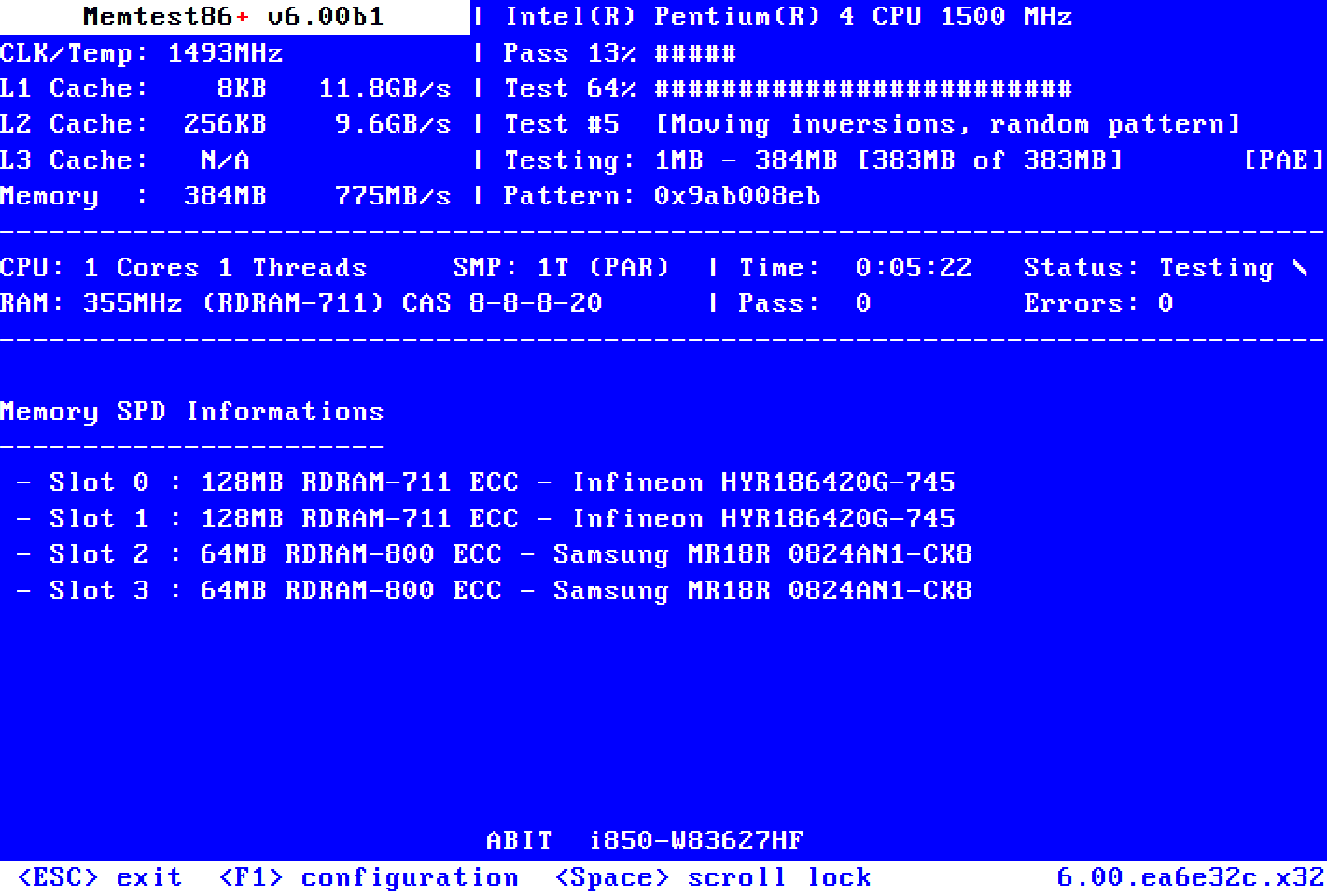
Please try again to run Memtest86+ (not Memtest86)


Run Memtest86+ for 8 or more passes > take pictures > post images or share links

Memtest86+ | The Open-Source Memory Testing Tool

Just 1 error is a test fail and testing can be aborted.

The more the passes the better the testing conditions.

It sometimes takes passes into the 20's to detect malfunctioning RAM.

The RAM can be tested all at one time or one at a time in the same DIMM.

Memtest86+ | The Open-Source Memory Testing Tool

MemTest86+ - Test RAM


1. Try another USB stick
2. Try all USB ports (2.0 and 3.0)
3. Maybe when using UEFI Bios you have to temporarily switch to Legacy in BIOS settings
4. Turn off temporarily fast boot, secure boot, CSM if enabled


This is what another member with ASUS G551JW had modified:

Hello @zbook Here are the steps I followed to get my USB to boot into my bios.
for memtest86+: ASUS G551JW-----Press F2 to bios menu (ESC to boot menu)
1. I disabled the fast boot
2. I diasbled the secure boot control to get into CSM
3. I enabled the CSM and F10 to save and exit
4. Press F2 and in the boot menu we will find 4 options:
a) 2 for UEFI: boot manager, UEFI Flash disk
b) 2 for bios: boot manager, flash disk
5. Select the bios flash disk which will be the last option(fourth) and set it as primary boot device.
6. Press F10 to save and exit and wait for the memtest86+ to run.
 
Last edited:

My Computer My Computer

At a glance

Windows 10Intel(R) Core(TM) i7-4800MQ CPU @ 2.70GHz16 GB Total: Manufacturer : Samsung MemoryTyp...NVIDIA Quadro K3100M; Intel(R) HD Graphics 4600
OS
Windows 10
Computer type
Laptop
Manufacturer/Model
HP
CPU
Intel(R) Core(TM) i7-4800MQ CPU @ 2.70GHz
Motherboard
Product : 190A Version : KBC Version 94.56
Memory
16 GB Total: Manufacturer : Samsung MemoryType : DDR3 FormFactor : SODIMM Capacity : 8GB Speed : 1600
Graphics Card(s)
NVIDIA Quadro K3100M; Intel(R) HD Graphics 4600
Sound Card
IDT High Definition Audio CODEC; PNP Device ID HDAUDIO\FUNC_01&VEN_111D&DEV_76E0
Hard Drives
Model Hitachi HTS727575A9E364
Antivirus
Microsoft Defender
Other Info
Mobile Workstation
In the meantime, I got another crash before the login screen today: BSOD21 - Google Drive

Wonder if it's the GPU, and not the SSD...
As for memtest86+ -- for now, I wasn't able to make it work. I don't have another USB stick to test it on, but I assume the problem isn't with the stick, since it worked for setting up Windows / running the "commercial" version of memtest
 

My Computer My Computer

At a glance

Windows 11
OS
Windows 11
Computer type
Laptop
Manufacturer/Model
Asus TUF A17 FA706IC
In the meantime, I got another crash before the login screen today: BSOD21 - Google Drive

Wonder if it's the GPU, and not the SSD...
As for memtest86+ -- for now, I wasn't able to make it work. I don't have another USB stick to test it on, but I assume the problem isn't with the stick, since it worked for setting up Windows / running the "commercial" version of memtest
You can try to install ArmouryCrate and disable the discrete graphic card to check if when the system is running only on the on board graphics the errors will continue.
 

My Computer My Computer

At a glance

Windows 11 Pro 25H2AMD Ryzen™ 7 6800H 3.2-4.7 GHz32 GB DDR5 4800MHz Dual Channel CrucialNVIDIA GeForce RTX™ 3050
OS
Windows 11 Pro 25H2
Computer type
Laptop
Manufacturer/Model
ASUS ROG STRIX G513RC
CPU
AMD Ryzen™ 7 6800H 3.2-4.7 GHz
Memory
32 GB DDR5 4800MHz Dual Channel Crucial
Graphics Card(s)
NVIDIA GeForce RTX™ 3050
Monitor(s) Displays
15.6 inches FHD (1920 x 1080) IPS Display
Hard Drives
Crucial T500 2TB
Western Digital Black SN770 2TB
Keyboard
RGB Keyboard
The cause of the latest BSOD was a misbehaving Nvidia GPU driver.

There were some bystanders in the crash.


Please find each of the three driver replacements.


After finding all three drivers make sure that the Nvidia driver is different from the current driver.

The other drivers can be reinstalled from the Asus laptop support website:


Clean install the GPU drivers using DDU:


Code:
Name    NVIDIA GeForce RTX 3050 Laptop GPU
PNP Device ID    PCI\VEN_10DE&DEV_25A2&SUBSYS_120C1043&REV_A1\4&2B1A879F&0&0009
Adapter Type    NVIDIA GeForce RTX 3050 Laptop GPU, NVIDIA compatible
Adapter Description    NVIDIA GeForce RTX 3050 Laptop GPU
Adapter RAM    (1,048,576) bytes
Installed Drivers    C:\WINDOWS\System32\DriverStore\FileRepository\nvam.inf_amd64_4ae7e10b45473e65\nvldumdx.dll,C:\WINDOWS\System32\DriverStore\FileRepository\nvam.inf_amd64_4ae7e10b45473e65\nvldumdx.dll,C:\WINDOWS\System32\DriverStore\FileRepository\nvam.inf_amd64_4ae7e10b45473e65\nvldumdx.dll,C:\WINDOWS\System32\DriverStore\FileRepository\nvam.inf_amd64_4ae7e10b45473e65\nvldumdx.dll
Driver Version    32.0.15.6607
INF File    oem11.inf (Section170 section)
Driver    C:\WINDOWS\SYSTEM32\DRIVERSTORE\FILEREPOSITORY\NVAM.INF_AMD64_4AE7E10B45473E65\NVLDDMKM.SYS (32.0.15.6607, 72.77 MB (76,301,472 bytes), 10/16/2025 8:24 PM)


Code:
Name    Realtek High Definition Audio
Manufacturer    Realtek
Status    OK
PNP Device ID    HDAUDIO\FUNC_01&VEN_10EC&DEV_0256&SUBSYS_10431EFE&REV_1000\5&33C71E07&0&0001
Driver    C:\WINDOWS\SYSTEM32\DRIVERS\RTKVHD64.SYS (6.0.9427.1, 6.10 MB (6,396,152 bytes), 10/16/2025 8:27 PM)


Code:
RTKVHD64.sys Tue Oct 18 05:10:49 2022 (634E7BA9)

Code:
amdkmdag.sys Tue Jul 12 18:10:48 2022 (62CDFF78)

Code:
nvlddmkm.sys Sun Oct 20 09:46:16 2024 (671517B8)
 

My Computer My Computer

At a glance

Windows 10Intel(R) Core(TM) i7-4800MQ CPU @ 2.70GHz16 GB Total: Manufacturer : Samsung MemoryTyp...NVIDIA Quadro K3100M; Intel(R) HD Graphics 4600
OS
Windows 10
Computer type
Laptop
Manufacturer/Model
HP
CPU
Intel(R) Core(TM) i7-4800MQ CPU @ 2.70GHz
Motherboard
Product : 190A Version : KBC Version 94.56
Memory
16 GB Total: Manufacturer : Samsung MemoryType : DDR3 FormFactor : SODIMM Capacity : 8GB Speed : 1600
Graphics Card(s)
NVIDIA Quadro K3100M; Intel(R) HD Graphics 4600
Sound Card
IDT High Definition Audio CODEC; PNP Device ID HDAUDIO\FUNC_01&VEN_111D&DEV_76E0
Hard Drives
Model Hitachi HTS727575A9E364
Antivirus
Microsoft Defender
Other Info
Mobile Workstation
@jiallombardo are these your laptop specs? If so it appears to be a 2021 model. Did you get it 4 years ago?

ASUS TUF Gaming A17 (2021)
Model: FA706IC
DSP: 17.3-inch (1080p/144Hz)
CPU: AMD Ryzen 7 4800H (8C/16T)
RAM: 16GB (2x8GB) DDR4-3200
GP1: AMD Radeon Vega
GP2: Nvidia RTX 3050 Laptop 4GB
DRV: 512GB NVMe M.2 SS2
O/S: Windows 10 Home

I bought my laptop in October 2022 (3 years ago).
ASUS TUF Gaming A15 (2022)
Model: FA507RM
DSP: 15.6-inch (1080p 300Hz)
CPU: AMD Ryzen 7 6800H (8C/16T)
RAM: 16GB (2x8GB) DDR5-4800
GPU1: AMD Radeon 680M
GPU2: Nvidia RTX 3060 Laptop 6GB
DRV: 512GB NVMe M.2 SS2
O/S: Windows 11 Home

I upgrades the RAM to 32GB (2x16GB) DDR5-4800 and the drives to 2 x 2TB NVMe M.2 SS2.

I update the chipset and graphic drivers using the following apps in the tray: AMD Adrenalin app and Nvidia App
 

My Computers My Computers

  • At a glance

    Windows 11 Pro 25H2 (26200.6901)AMD Ryzen 7 6800H with Radeon 680M GPU (486MB...Crucial DDR5-4800 (2400MHz) 32GB (2 x 16GB)NVIDIA RTX 3060 Laptop (6GB RAM)
    OS
    Windows 11 Pro 25H2 (26200.6901)
    Computer type
    Laptop
    Manufacturer/Model
    ASUS TUF Gaming A15 (2022)
    CPU
    AMD Ryzen 7 6800H with Radeon 680M GPU (486MB RAM)
    Memory
    Crucial DDR5-4800 (2400MHz) 32GB (2 x 16GB)
    Graphics Card(s)
    NVIDIA RTX 3060 Laptop (6GB RAM)
    Sound Card
    n/a
    Monitor(s) Displays
    15.6-inch
    Screen Resolution
    1920x1080 300Hz
    Hard Drives
    2 x Samsung 990 Evo Plus (2TB M.2 NVME SSD)
    PSU
    n/a
    Mouse
    Wireless Mouse M510
    Internet Speed
    2100Mbps/300Mbps
    Browser
    Firefox
    Antivirus
    Malwarebytes
  • At a glance

    Windows 11 Pro 25H2 (26200.8246)AMD Ryzen 7 5700X3DG.SKILL Flare X 32GB (2x16GB) DDR4ASUS ROG-STRIX-RTX3060TI-08G-V2-GAMING (RTX 3...
    Operating System
    Windows 11 Pro 25H2 (26200.8246)
    Computer type
    PC/Desktop
    Manufacturer/Model
    Custom build
    CPU
    AMD Ryzen 7 5700X3D
    Motherboard
    ASUS ROG Strix B550-F Gaming WiFi II
    Memory
    G.SKILL Flare X 32GB (2x16GB) DDR4
    Graphics card(s)
    ASUS ROG-STRIX-RTX3060TI-08G-V2-GAMING (RTX 3060-Ti, 8GB RAM)
    Monitor(s) Displays
    Samsung G50D IPS 27"
    Screen Resolution
    1440p/180Hz
    Hard Drives
    SAMSUNG 990 EVO Plus (2TB] M.2 NVME SSD
    SAMSUNG 990 EVO Plus (4TB) M.2 NVME SSD
    PSU
    Corsair RM750x (750 watts)
    Case
    Cooler Master MasterCase 5
    Cooling
    Scythe Mugen 6
    Keyboard
    Logitech K520 (MK540 keyboard/mouse combo)
    Mouse
    Logitech M310 (MK540 keyboard/mouse combo)
    Internet Speed
    2100 Mbps down / 300 Mbps up
    Browser
    Firefox, Edge, Chrome
    Antivirus
    Malwarebytes (Premium)
    Other Info
    ASUS Blu-ray Burner BW-16D1HT (SATA) || Western Digital Easystore 20TB USB 3.0 external hard drive used with Acronis True Image 2025 backup software || HP OfficeJet Pro 6975 Printer/Scanner
Today I've had another BSOD before boot. Actually, there were two back-to-back BSODs -- the first one occurred before the logon screen; the second one -- after the screen appeared, but before the password prompt showed up. Here are the files:

I will now proceed to reinstall the video drivers. I'm just not 100% sure, which three drivers you meant. Should I reinstall the latest from the NVIDIA website, or the one from the ASUS support website? Because the latter has very outdated suggested drivers.
After finding all three drivers make sure that the Nvidia driver is different from the current driver.

The other drivers can be reinstalled from the Asus laptop support website:

As for @MisterEd -- I bought the laptop in 2022, it was a year-old model at the time. I haven't made any adjustments to it, and I removed all ASUS software from it, since I suspected it was tampering with power settings.
 

My Computer My Computer

At a glance

Windows 11
OS
Windows 11
Computer type
Laptop
Manufacturer/Model
Asus TUF A17 FA706IC
Back
Top Bottom