Solved "Attempting to boot form hard drive" - weeks of frustration


adamcodes716

Member
Local time
3:45 PM
Posts
7
OS
Windows 11
I have now spent weeks on this problem, with no end in sight.

Background

I have a few HP workstations - one z200 and several z620s. I like to buy similar machines so that I can swap parts out when I have difficulties like this. Admittedly, these workstations were not eligible for windows 11 upgrade, so I had to create a boot device to fool the eligibility requirements. I have been running windows 11 on all of these machines since for a couple of years now. I don't use this pc a lot, but the other ones get used daily and have not had an issue. There were no changes to the pc before I started experiencing this issue.

Last month, I booted up my z200 only to be met with the "Attempting to boot from hard drive" error. To be clear, the OS drive has always been seen in the BIOS, and it is always the first in the boot sequence (I disabled other drives while I tried to get the OS drive working).

Attempt 1: Replace the disk

I had been meaning to buy a new SSD as a backup, so I thought I would try this. I copied the original drive, and had the same issue (which should not be surprising)

Attempt 2: Fix with EasyBCD

I booted the pc into Hiren's BootCD and used EasyBCD to fix the MBR (the z200 is NOT UEFI). This worked! That is, it worked for a few days, and then I was back to the issue.

Attempt 3: Clean Install

I wiped the disk and created a single partition. I installed Win10, and then Win11 from that. This worked! .... for a few days, again.

Attempts 3 - 867: Banging Head on Table

I tried numerous things - other programs on the BootCD, various OS commands, etc. I had copilot walk me through numerous scenarios. I fed it screen captures of my settings, it told me what to do. The instructions were all of the same things you would find in guides - fixmbr, etc. I tried it with the boot files in the recovery partition and that partition as active, and I tried the same thing with the boot in the OS partition and the recovery partition removed. Nothing I did seemed to matter. Before every try, I had it set up exactly as I was told.

What Now?

Are windows updates potentially the culprit here? ANY help would be GREATLY appreciated. I really don't know what to try next.
 

My Computer

System One

  • OS
    Windows 11
    Computer type
    PC/Desktop
    Manufacturer/Model
    HP Z200
    Memory
    16GB
Are windows updates potentially the culprit here?
Impossible to tell since you do not mention any build/version of the OS.
And Sorry about your troubles.
I also think that this might require @zbook 's expertise.
 

My Computers

System One System Two

  • OS
    All Branches but Release
    Computer type
    Laptop
    Manufacturer/Model
    Acer Nitro ANV15-51
    CPU
    AMD Ryzen 7 7735HS 3200-4500 Mhz 8 cores x 2
    Motherboard
    Sportage_RBH
    Memory
    32 GB DDR5
    Graphics Card(s)
    Radeon Graphic / NVIDIA GeForce RTX 4060 8 GB GDDR6
    Sound Card
    AMD/Realtek(R) Audio
    Monitor(s) Displays
    Integrated Monitor (15.3"vis)
    Screen Resolution
    FHD 1920X1080 16:9 144Hz
    Hard Drives
    KINGSTON OM8SEP4512Q-AA 1TB
    Western Digital 256GB
    PSU
    19V DC 6.32 A 120 W
    Cooling
    Dual Fans
    Mouse
    MS Bluetooth
    Internet Speed
    Fiber 1GB Cox -us & 1GB Orange-fr
    Browser
    Edge Canary- Firefox Nightly-Chrome Dev-Chrome Dev
    Antivirus
    Windows Defender
  • Operating System
    Windows 11 Beta
    Computer type
    Laptop
    Manufacturer/Model
    Asus X751BP
    CPU
    AMD A9-9420
    Memory
    8 GB of DDR4
    Graphics card(s)
    AMD Radeon R5
    Screen Resolution
    1600x900
    Hard Drives
    Seagate 1 TB
I would suspect a failing drive.
 

My Computers

System One System Two

  • OS
    W10
    Computer type
    PC/Desktop
    Manufacturer/Model
    Home brew
    CPU
    Ryzen3-2200G
    Motherboard
    GA-A320M-S2H
    Memory
    16 GB Kingston HyperX DDR4
    Graphics Card(s)
    Integrated
    Sound Card
    Integrated
    Monitor(s) Displays
    LG W2246
    Screen Resolution
    1920x1080
    Hard Drives
    Intel 760p 256GB NVMe M.2
    Seagate Barracuda 7200 1TB
    Gash Seagate ST31608
    PSU
    2006-vintage no-name
    Case
    Acer Aspire 2006
    Cooling
    Air (fan-assist)
    Keyboard
    HP SK-2885
    Mouse
    wireless
    Internet Speed
    32 mbps
    Browser
    FF latest
    Antivirus
    MS Defender
  • Operating System
    W10
    Computer type
    Laptop
    Manufacturer/Model
    HP 255 G8
    CPU
    Ryzen 5 3500U
    Memory
    8 GB
    Graphics card(s)
    on-board
    Monitor(s) Displays
    16"
    Screen Resolution
    1920x1080
    Hard Drives
    Samsung SSD 512GB Nvme
    Browser
    FF + Edge
    Antivirus
    MS Defender
Although you may know it, when installing Windows 10 the best is having the target drive totally unformatted, without partitions, and no other drives connected except the installing media (specially ones that have or have had OSs). You can get this with the diskpart command "clean" (careful to apply it to the correct drive). If you use "clean all" instead it will wipe the drive (overwrite every sector with zeroes), what can take some hours (but you might have malware and it would be worth).

This sounds me to hw problem w/o discarding malware. If the 2nd drive was new I'd suspect about RAM or motherboard, but I'd also expect software malfunctions due to the data deterioration before it affects the (small in size) info required to boot (I must admit some lack of experience and maybe knowledge here, possibly the booting info is more exposed because it changes every hour or anything, I've seen many cases described but I have only experienced some few random and transient problems in my own disks and 0 disk deaths in like 35 years, what you have is whatever except "random" or "transient", with a clean install and the other repairs failing in days I'd expect a "well-established" problem). In possible malware situations I trust more a DVD (it should be a dual layer one) than an USB stick, as the former requires recording software to be altered.

Researching the specs of a model requires a lot of time and may turn out impossible. I've seen a Z200 i3 540 4GB RAM for 60€, that would/could correspond to a no UEFI computer (in this kind of computer 16 GB RAM might be possible but "forced" or in the limit), and a Z240 with an i7 7700 that nearly supports Win11 officially and I don't consider possible it hasn't UEFI and 16 GB is standard for it (sounds there's also a Z200 with a 7th Gen i3 or similar). All this doubts go away with the actual current specs :) .

An old and very tightened PSU is an instability factor and not bad suspect (PSU failures/weaknesses tend to produce other kinds of instability and even booting failures, like no POST or hangs during bootup, but if it affects the data integrity it can produce this).
 

My Computer

System One

  • OS
    Windows 11
    Manufacturer/Model
    MeLE Quieter 2Q (fanless miniPC)
    CPU
    Celeron J4125 (10th gen)
    Memory
    8GB DDR4
    Monitor(s) Displays
    Samsung SyncMaster T260
    Screen Resolution
    1920x1200
    Hard Drives
    256GB eMMC (Windows)
    2TB USB3 HDD Toshiba (Data)
Although you may know it, when installing Windows 10 the best is having the target drive totally unformatted, without partitions, and no other drives connected except the installing media (specially ones that have or have had OSs). You can get this with the diskpart command "clean" (careful to apply it to the correct drive). If you use "clean all" instead it will wipe the drive (overwrite every sector with zeroes), what can take some hours (but you might have malware and it would be worth).

This sounds me to hw problem w/o discarding malware. If the 2nd drive was new I'd suspect about RAM or motherboard, but I'd also expect software malfunctions due to the data deterioration before it affects the (small in size) info required to boot (I must admit some lack of experience and maybe knowledge here, possibly the booting info is more exposed because it changes every hour or anything, I've seen many cases described but I have only experienced some few random and transient problems in my own disks and 0 disk deaths in like 35 years, what you have is whatever except "random" or "transient", with a clean install and the other repairs failing in days I'd expect a "well-established" problem). In possible malware situations I trust more a DVD (it should be a dual layer one) than an USB stick, as the former requires recording software to be altered.

Researching the specs of a model requires a lot of time and may turn out impossible. I've seen a Z200 i3 540 4GB RAM for 60€, that would/could correspond to a no UEFI computer (in this kind of computer 16 GB RAM might be possible but "forced" or in the limit), and a Z240 with an i7 7700 that nearly supports Win11 officially and I don't consider possible it hasn't UEFI and 16 GB is standard for it (sounds there's also a Z200 with a 7th Gen i3 or similar). All this doubts go away with the actual current specs :) .

An old and very tightened PSU is an instability factor and not bad suspect (PSU failures/weaknesses tend to produce other kinds of instability and even booting failures, like no POST or hangs during bootup, but if it affects the data integrity it can produce this).
Thank you so much! I really appreciate you taking the time to type out all of that. I might try to install Windows 10 just to see if it is something with windows 11 that might be causing the issue. When I was able to get a successful Win11 install, it seemed to survive a few days worth of boots and then it would fail. In several of the attempts that I tried, I did at different times delete the partition and let the installer do the work.
 

My Computer

System One

  • OS
    Windows 11
    Computer type
    PC/Desktop
    Manufacturer/Model
    HP Z200
    Memory
    16GB
Thanks for the response! In attempt #1, I said that I had replaced the drive
and were all the subsequent tests on the new drive? If so, then sorry, I didn't read carefully enough.

But if you copied a failing drive to a new one, perhaos that copied some unwanted 'bits', like a damaged MBR - I would start with a blank drive and work from that. Or get the duff drive working (albeit temporarily) as before, then clone it pronto.
 

My Computers

System One System Two

  • OS
    W10
    Computer type
    PC/Desktop
    Manufacturer/Model
    Home brew
    CPU
    Ryzen3-2200G
    Motherboard
    GA-A320M-S2H
    Memory
    16 GB Kingston HyperX DDR4
    Graphics Card(s)
    Integrated
    Sound Card
    Integrated
    Monitor(s) Displays
    LG W2246
    Screen Resolution
    1920x1080
    Hard Drives
    Intel 760p 256GB NVMe M.2
    Seagate Barracuda 7200 1TB
    Gash Seagate ST31608
    PSU
    2006-vintage no-name
    Case
    Acer Aspire 2006
    Cooling
    Air (fan-assist)
    Keyboard
    HP SK-2885
    Mouse
    wireless
    Internet Speed
    32 mbps
    Browser
    FF latest
    Antivirus
    MS Defender
  • Operating System
    W10
    Computer type
    Laptop
    Manufacturer/Model
    HP 255 G8
    CPU
    Ryzen 5 3500U
    Memory
    8 GB
    Graphics card(s)
    on-board
    Monitor(s) Displays
    16"
    Screen Resolution
    1920x1080
    Hard Drives
    Samsung SSD 512GB Nvme
    Browser
    FF + Edge
    Antivirus
    MS Defender
I wiped the disk and created a single partition. I installed Win10, and then Win11 from that. This worked! .... for a few days, again.
I would have restored a system image to see, if the problem persist or if it was caused by a system change, like windows updates.

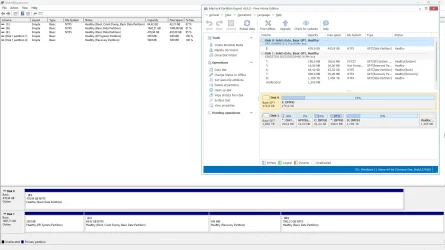
You have not mentioned, do you use secure boot, GPT and most importantly, what partitions you have, like:
 

Attachments

  • capture_08232025_201351.webp
    capture_08232025_201351.webp
    110.6 KB · Views: 2

My Computer

System One

  • OS
    Home26H2Can
    Computer type
    PC/Desktop
    CPU
    AMD Ryzen 5 8600G (07/24)
    Motherboard
    ASROCK B650M-HDV/M.2 (07/24) BIOS 4.21 AGESA ComboAM5 1.3.0.1 (04/26)
    Memory
    2x32GB Kingston FURY DDR5 5600 MHz CL36 @5200 CL36 (07/24)
    Graphics Card(s)
    ASROCK Radeon RX 6600 Challenger D 8G @48FPS (08/24)
    Sound Card
    Creative Sound BlasterX AE-5 Plus (05/24)
    Monitor(s) Displays
    24" Philips 24M1N3200ZS/00 (05/24)
    Screen Resolution
    1920×1080@165Hz via DP1.4
    Hard Drives
    Kingston KC3000 NVMe 2TB (05/24)
    ADATA XPG GAMMIX S11 Pro 512GB (07/19)
    PSU
    Seasonic Core GM 550 Gold (04/24)
    Case
    Fractal Design Define 7 Mini with 3x Noctua NF-P14s/12@555rpm (04/24)
    Cooling
    Noctua NH-U12S with Noctua NF-P12 (04/24)
    Keyboard
    HP Pavilion Wired Keyboard 300 (07/24) + Rabalux 76017 Parker (01/24)
    Mouse
    Logitech M330 Silent Plus (01/26)
    Internet Speed
    500/100 Mbps via RouterOS (05/21) & TCP Optimizer
    Browser
    Edge, Brave for YouTube, LibreWolf for FB
    Antivirus
    NextDNS blocking 1/3 Traffic
    Other Info
    Phone: Motorola Moto G86 (02/26)
    Backup: Hasleo Backup Suite (PreOS)
    Headphones: Sennheiser RS170 (09/10)
    Chair: Huzaro Force 4.4 Grey Mesh (05/24)
    Notifier: Xiaomi Mi Band 9 Milanese (10/24)
    FlexCore USB-C 3.2 Gen 1 (M) to LAN (F) (08/25)
I too have a Z200 Workstation set up the same way with the exact same issues.
Looking for answers.
 

My Computer

System One

  • OS
    Windows 11 Pro
    Computer type
    PC/Desktop
    Manufacturer/Model
    Beelink EQR5
    CPU
    AMD Ryzen 5 PRO 5650U (2.30 GHz)
    Memory
    16GB
    Graphics Card(s)
    Radeon Graphics
I too have a Z200 Workstation set up the same way with the exact same issues.
Looking for answers.
Did this also happen to you out of the blue? I wiped everything clean and reinstalled again, and I haven't rebooted since - so far, so good. I believe that I haven't gotten the windows updates since the install either. I don't use the PC much so I have been putting it to sleep when not in use.
 

My Computer

System One

  • OS
    Windows 11
    Computer type
    PC/Desktop
    Manufacturer/Model
    HP Z200
    Memory
    16GB
Did this also happen to you out of the blue? I wiped everything clean and reinstalled again, and I haven't rebooted since - so far, so good. I believe that I haven't gotten the windows updates since the install either. I don't use the PC much so I have been putting it to sleep when not in use.
Yes, I had retired it for a newer mini computer but still had files I wanted to start migrating, and when I started it up one day, all I saw was the cursor blinking in the corner, with no message, no logo, nothing.
I have since gotten it to boot long enough to get into the BIOS.
I'm checking my boot drive for files I need to save, and I may wipe it and reload
I may switch to an SSD strictly for booting my system, like they do on servers.
 

My Computer

System One

  • OS
    Windows 11 Pro
    Computer type
    PC/Desktop
    Manufacturer/Model
    Beelink EQR5
    CPU
    AMD Ryzen 5 PRO 5650U (2.30 GHz)
    Memory
    16GB
    Graphics Card(s)
    Radeon Graphics
Yes, I had retired it for a newer mini computer but still had files I wanted to start migrating, and when I started it up one day, all I saw was the cursor blinking in the corner, with no message, no logo, nothing.
I have since gotten it to boot long enough to get into the BIOS.
I'm checking my boot drive for files I need to save, and I may wipe it and reload
I may switch to an SSD strictly for booting my system, like they do on servers.
That sounds like a completely different issue, probably hardware-related. I had no problem getting into the bios or accessing anything else on startup. I didn't hit an issue until it tried to find windows. Putting your OS on an SSD is always a good idea.
 

My Computer

System One

  • OS
    Windows 11
    Computer type
    PC/Desktop
    Manufacturer/Model
    HP Z200
    Memory
    16GB
So I skated on the latest installation of Windows 11 for several weeks until the pc rebooted on me. I am now strangely getting a "disk read error" when it tries to boot up - that is a different error than I have seen since I started this. In the bios I can still see all of the storage devices.
 

My Computer

System One

  • OS
    Windows 11
    Computer type
    PC/Desktop
    Manufacturer/Model
    HP Z200
    Memory
    16GB
Yes, I had retired it for a newer mini computer but still had files I wanted to start migrating, and when I started it up one day, all I saw was the cursor blinking in the corner, with no message, no logo, nothing.
I have since gotten it to boot long enough to get into the BIOS.
I'm checking my boot drive for files I need to save, and I may wipe it and reload
I may switch to an SSD strictly for booting my system, like they do on servers.
I FOUND THE PROBLEM! For some reason, the pc started to care about which SATA slots the drives were in even though the boot order was clearly set. As soon as I put the OS drive in slot 0, it fired right up. I can confirm that this was also the problem with the original drive - I popped it in and - after a boot into safe mode - it came back to life on the next boot.
 

My Computer

System One

  • OS
    Windows 11
    Computer type
    PC/Desktop
    Manufacturer/Model
    HP Z200
    Memory
    16GB
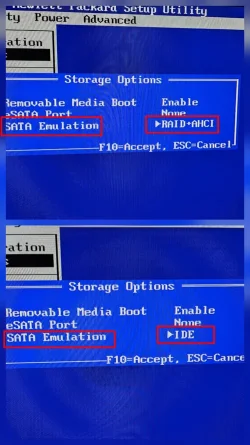
I found my problem, too. See picture.
For MANY years, my drives were set as RAID+AHCI.
I changed the setting to IDE and VOLIA!
It's booting up with all the updates.
pic.webp
 

My Computer

System One

  • OS
    Windows 11 Pro
    Computer type
    PC/Desktop
    Manufacturer/Model
    Beelink EQR5
    CPU
    AMD Ryzen 5 PRO 5650U (2.30 GHz)
    Memory
    16GB
    Graphics Card(s)
    Radeon Graphics
I FOUND THE PROBLEM! For some reason, the pc started to care about which SATA slots the drives were in even though the boot order was clearly set. As soon as I put the OS drive in slot 0, it fired right up. I can confirm that this was also the problem with the original drive - I popped it in and - after a boot into safe mode - it came back to life on the next boot.
Glad to learn you discovered the problem. I just found this thread but if you are still using Easy BCD they also have some software tools that can help with solving booting issues, especially on older systems. Myself, especially when using MBR, I don't like sharing a boot strap with other operating systems because if one OS goes down the rest go down with it.
I found my problem, too. See picture.
For MANY years, my drives were set as RAID+AHCI.
I changed the setting to IDE and VOLIA!
It's booting up with all the updates.
View attachment 146830
WOW. IDE saves the day! Who woulda thought? Definitely not me. That old girl must be pushing 16 years or so for IDE to still be an option. Reminds me of an old DELL Inspiron that refused to die on me so I gave it to some kids a few years back. This option wouldn't work for me as I'm a fan of RAID. Still good to know though. Thanks for sharing.
 

My Computer

System One

  • OS
    WIN 11, WIN 10, WIN 8.1, WIN 7 U, WIN 7 PRO, WIN 7 HOME (32 Bit), LINUX MINT
    Computer type
    PC/Desktop
    Manufacturer/Model
    DIY, ASUS, and DELL
    CPU
    Intel i7 6900K and i9-7960X / AMD 3800X (8 core)
    Motherboard
    ASUS X99E-WS USB 3.1 and ASUS X299 SAGE
    Memory
    128 GB CORSAIR DOMINATOR PLATINUM (B DIE)
    Graphics Card(s)
    NVIDIA 1070 and RTX 3070
    Sound Card
    Crystal Sound (onboard)
    Monitor(s) Displays
    single Samsung 30" 4K and 8" aux monitor
    Screen Resolution
    4K and something equally attrocious. I'll be working on this.
    Hard Drives
    A, B, C, D, E, F, G, H, I, J, K, L, M, N, O, P, Q, R, S, T, U, V, W

    Ports X, Y, and Z are reserved for USB access and removable drives.

    Drive types consist of the following: Various mechanical hard drives bearing the brand names, Seagate, Toshiba, and Western Digital. Various NVMe drives bearing the brand names Kingston, Intel, Silicon Power, Crucial, Western Digital, and Team Group. Various SATA SSDs bearing various different brand names.

    RAID arrays included:

    LSI RAID 10 (WD Velociraptors) 1115.72 GB
    LSI RAID 10 (WD SSDS) 463.80 GB

    INTEL RAID 0 (KINGSTON HYPER X) System 447.14 GB
    INTEL RAID 1 TOSHIBA ENTERPRIZE class Data 2794.52 GB
    INTEL RAID 1 SEAGATE HYBRID 931.51 GB
    PSU
    SEVERAL. I prefer my Corsair Platinum HX1000i but I also like EVGA power supplies
    Case
    ThermalTake Level 10 GT (among others)
    Cooling
    Noctua is my favorite and I use it in my main. I also own various other coolers.
    Keyboard
    all kinds.
    Mouse
    all kinds
    Internet Speed
    360 mbps - 1 gbps (depending)
    Browser
    FIREFOX
    Antivirus
    KASPERSKY (no apologies)
    Other Info
    Gave Dell touch screen with Windows 11 to daughter and got me an OTVOC. Being a PC builder I own many desktop PCs as well. I am a father of five providing PCs, laptops, and tablets for all my family, most of which I have modified, rebuilt, or simply built from scratch. I do not own a cell phone, never have, never will.
I FOUND THE PROBLEM! For some reason, the pc started to care about which SATA slots the drives were in even though the boot order was clearly set. As soon as I put the OS drive in slot 0, it fired right up. I can confirm that this was also the problem with the original drive - I popped it in and - after a boot into safe mode - it came back to life on the next boot.
 

My Computer

System One

  • OS
    Windows 11
    Computer type
    PC/Desktop
    Manufacturer/Model
    Multiple devices
With mine HP Z200 the exact same problem uccurred after running one of the latest security updates of 25H2. Now I posponed the updates but this can only be done for 6 weeks. If the problem happens again I hope to solve it with the mentioned solutions. So choose IDE instead of RAID+ACHI OR switch the sata port to port 0. It would be great to keep using the Z200 as I just changed the CPU with a i5-760 and GTX-1050 which makes it fast enough for most applications and lots of games. Thank you for posting the problem.
 

My Computer

System One

  • OS
    Windows 11
    Computer type
    PC/Desktop
    Manufacturer/Model
    Multiple devices
Back
Top Bottom