Audio broken on Bluetooth earbuds after Windows 11 Canary 25982 update


Sani

Member
Local time
10:54 PM
Posts
5
OS
Windows 11 Insider Preview Canary Channel
Windows 11 Canary 25982 broke the audio driver for my Bluetooth headphones. Terrible choppy audio quality. In the Bluetooth menu, it states "Connected mic", instead of "Connected mic, audio" before the update. I tried installing the latest Bluetooth driver and Realtek audio driver from the Intel website, which was the first search result on both Google & Bing. (Realtek* High Definition Audio Driver for Windows® 10 & Windows 11* for Intel® NUC8i7BE, NUC8i5BE, NUC8i3BE Products.)
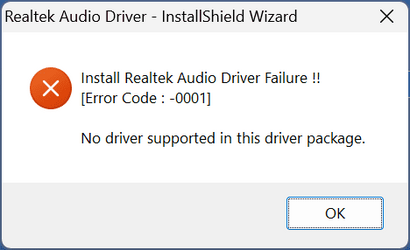
Updating the Bluetooth driver changed absolutely nothing, and updating the Realtek audio driver actually broke Windows Audio completely, and gave this error:
Install Realtek Audio Driver Failure !! [Error Code: -0001] No driver supported in this driver package.
This led me to think that maybe my hardware wasn't compatible with this newer driver, so I checked the Dell website to download the latest supported driver for my device from this link: Realtek High Definition Audio Driver | Driver Details | Dell Pakistan
But alas, I got the same error code! Feeling dejected, I just restarted the computer and opened Windows Update. And voila, Windows Update fetched compatible drivers all by itself! It took several restarts to install them all, but all compatible drivers were finally installed through Windows Update. I thought that maybe my broken Bluetooth audio would also be fixed this way, but alas! Even after this entire panic and ordeal, the audio on my Bluetooth earbuds is still broken! And the problem isn't with the Bluetooth earbuds! I checked them on my phone and on another Windows machine as well! They work perfectly fine! The problem seems to be within the updated Windows 11 Canary kernel IMO, but I'd be elated if there is some other, fixable issue that I may have overlooked!
 
Windows Build/Version
Windows 11 Canary 25982

Attachments

  • Setup_bJ3FxD8Bp8.png
    Setup_bJ3FxD8Bp8.png
    4.8 KB · Views: 4

My Computer My Computer

At a glance

Windows 11 Insider Preview Canary Channeli7-10870H16GBRTX 3060 Laptop
OS
Windows 11 Insider Preview Canary Channel
Computer type
Laptop
Manufacturer/Model
Dell G15 5510
CPU
i7-10870H
Memory
16GB
Graphics Card(s)
RTX 3060 Laptop
Screen Resolution
1080p
Hard Drives
512GB NVMe M.2 SSD
Windows 11 Canary 25982 broke the audio driver for my Bluetooth headphones. Terrible choppy audio quality. In the Bluetooth menu, it states "Connected mic", instead of "Connected mic, audio" before the update. I tried installing the latest Bluetooth driver and Realtek audio driver from the Intel website, which was the first search result on both Google & Bing. (Realtek* High Definition Audio Driver for Windows® 10 & Windows 11* for Intel® NUC8i7BE, NUC8i5BE, NUC8i3BE Products.)
Updating the Bluetooth driver changed absolutely nothing, and updating the Realtek audio driver actually broke Windows Audio completely, and gave this error:
Install Realtek Audio Driver Failure !! [Error Code: -0001] No driver supported in this driver package.
This led me to think that maybe my hardware wasn't compatible with this newer driver, so I checked the Dell website to download the latest supported driver for my device from this link: Realtek High Definition Audio Driver | Driver Details | Dell Pakistan
But alas, I got the same error code! Feeling dejected, I just restarted the computer and opened Windows Update. And voila, Windows Update fetched compatible drivers all by itself! It took several restarts to install them all, but all compatible drivers were finally installed through Windows Update. I thought that maybe my broken Bluetooth audio would also be fixed this way, but alas! Even after this entire panic and ordeal, the audio on my Bluetooth earbuds is still broken! And the problem isn't with the Bluetooth earbuds! I checked them on my phone and on another Windows machine as well! They work perfectly fine! The problem seems to be within the updated Windows 11 Canary kernel IMO, but I'd be elated if there is some other, fixable issue that I may have overlooked!
I suspect this is related to the alleged new feature to connect to bluetooth low energy hearing aids to Windows for streaming.
I just cannot get it to work - my hearing aids connect for about three seconds then disconnect.

I have checked drivers, hardware etc and as far as I can tell it my laptop is compatible, and my drivers ok but it just does not work.
It works fine with my Samsung mobile phones.

I cannot say for certain but I thought earbuds used BLE for earbuds.

"Bluetooth Low Energy Audio (BLE with my Audio) is a new Bluetooth standard for audio streaming introduced in Bluetooth 5.2. BLE Audio is designed to work with low-power, battery-powered audio devices, such as wireless earbuds, headphones, and portable speakers"
 

My Computer My Computer

At a glance

Windows 11 Pro + Win11 Canary VM.I9 13th gen i9-13900H 2.60 GHZ16 GB solderedIntegrated Intel Iris XE
OS
Windows 11 Pro + Win11 Canary VM.
Computer type
Laptop
Manufacturer/Model
ASUS Zenbook 14
CPU
I9 13th gen i9-13900H 2.60 GHZ
Motherboard
Yep, Laptop has one.
Memory
16 GB soldered
Graphics Card(s)
Integrated Intel Iris XE
Sound Card
Realtek built in
Monitor(s) Displays
laptop OLED screen
Screen Resolution
2880x1800 touchscreen
Hard Drives
1 TB NVME SSD (only weakness is only one slot)
PSU
Internal + 65W thunderbolt USB4 charger
Case
Yep, got one
Cooling
Stella Artois (UK pint cans - 568 ml) - extra cost.
Keyboard
Built in UK keybd
Mouse
Bluetooth , wireless dongled, wired
Internet Speed
900 mbs (ethernet), wifi 6 typical 350-450 mb/s both up and down
Browser
Edge
Antivirus
Defender
Other Info
TPM 2.0, 2xUSB4 thunderbolt, 1xUsb3 (usb a), 1xUsb-c, hdmi out, 3.5 mm audio out/in combo, ASUS backlit trackpad (inc. switchable number pad)

Macrium Reflect Home V8
Office 365 Family (6 users each 1TB onedrive space)
Hyper-V (a vm runs almost as fast as my older laptop)

My Computers My Computers

  • At a glance

    Win 11 ProAMD Ryzen™ 7 7730U24GB Dual-Channel DDR4 @ 1596MHz (22-22-22-52)512MB ATI AMD Radeon Graphics (ASUStek Comput...
    OS
    Win 11 Pro
    Computer type
    Laptop
    Manufacturer/Model
    ASUS Vivobook
    CPU
    AMD Ryzen™ 7 7730U
    Motherboard
    M1605YA
    Memory
    24GB Dual-Channel DDR4 @ 1596MHz (22-22-22-52)
    Graphics Card(s)
    512MB ATI AMD Radeon Graphics (ASUStek Computer Inc)
    Monitor(s) Displays
    Generic PnP Monitor (1920x1200@60Hz) - P1 PLUS (1920x1080@59Hz)
    Screen Resolution
    1920 X 1200
    Hard Drives
    953GB Western Digital WD
    PSU
    45 Watts
    Mouse
    Lenovo Bluetooth.
    Internet Speed
    500 Mbps
    Browser
    Edge
    Antivirus
    Defender
  • At a glance

    Windows 11AMD Ryzen 7 5800H / 3.2 GHz32 GB DDR4 SDRAM 3200 MHzNVIDIA GeForce RTX 3060 6 GB GDDR6 SDRAM
    Operating System
    Windows 11
    Computer type
    Laptop
    Manufacturer/Model
    ACER NITRO
    CPU
    AMD Ryzen 7 5800H / 3.2 GHz
    Motherboard
    CZ Scala_CAS (FP6)
    Memory
    32 GB DDR4 SDRAM 3200 MHz
    Graphics card(s)
    NVIDIA GeForce RTX 3060 6 GB GDDR6 SDRAM
    Sound Card
    Realtek Audio. NVIDIA High Definition Audio
    Monitor(s) Displays
    15.6" LED backlight 1920 x 1080 (Full HD) 144 Hz
    Screen Resolution
    1920 x 1080 (Full HD)
    Hard Drives
    Samsung 970 Evo Plus 2TB NVMe M.2
    PSU
    180 Watt, 19.5 V
    Mouse
    Lenovo Bluetooth
    Internet Speed
    500 Mbps
    Browser
    Edge
    Antivirus
    Defender
Windows 11 Canary 25982 broke the audio driver for my Bluetooth headphones. Terrible choppy audio quality. In the Bluetooth menu, it states "Connected mic", instead of "Connected mic, audio" before the update. I tried installing the latest Bluetooth driver and Realtek audio driver from the Intel website, which was the first search result on both Google & Bing. (Realtek* High Definition Audio Driver for Windows® 10 & Windows 11* for Intel® NUC8i7BE, NUC8i5BE, NUC8i3BE Products.)
Updating the Bluetooth driver changed absolutely nothing, and updating the Realtek audio driver actually broke Windows Audio completely, and gave this error:
Install Realtek Audio Driver Failure !! [Error Code: -0001] No driver supported in this driver package.
This led me to think that maybe my hardware wasn't compatible with this newer driver, so I checked the Dell website to download the latest supported driver for my device from this link: Realtek High Definition Audio Driver | Driver Details | Dell Pakistan
But alas, I got the same error code! Feeling dejected, I just restarted the computer and opened Windows Update. And voila, Windows Update fetched compatible drivers all by itself! It took several restarts to install them all, but all compatible drivers were finally installed through Windows Update. I thought that maybe my broken Bluetooth audio would also be fixed this way, but alas! Even after this entire panic and ordeal, the audio on my Bluetooth earbuds is still broken! And the problem isn't with the Bluetooth earbuds! I checked them on my phone and on another Windows machine as well! They work perfectly fine! The problem seems to be within the updated Windows 11 Canary kernel IMO, but I'd be elated if there is some other, fixable issue that I may have overlooked!
I have the same issue on my Desktop/W11 with any USB BT 5.x Dongle!!! ANY!!! I tried 3 different Dongles (BT 5.1 + 5.2 + 5.3)!!! 🤦‍♂️

After testing Dongles in other Systems, the issue, IMO, is the Realtek Audio Driver for W11. For some reason it's buggy!!! 🙄😒

Using same Dongles inside an Intel MiniPC, all with Intel chipset (audio/video etc...), with same identical BT drivers, Dongles works perfect with all devices i have. For me Realtek forgot something in W11 audio support for BT!!! 🤦‍♂️🤦‍♂️🤦‍♂️

AMD Desktop with Realtek Audio Chipset
BT5.x_KO.jpg
INTEL MiniPC with... Intel Chipset 😉
BT5.x_OK.jpg
I'll wait for new 2024 drivers, and see if they fix the problem, if the problem is really from Realtek, but can't see other cases 🤷‍♂️
For now i have my BT 4.1 Dongle working perfect with all devices with Realtek chipset 🤷‍♂️
 

My Computer My Computer

At a glance

Windows 11Ryzen 7 5800X32GBNvidia RTX 4060
OS
Windows 11
Computer type
PC/Desktop
Manufacturer/Model
Assembled
CPU
Ryzen 7 5800X
Motherboard
Gigabyte B450 Gaming X
Memory
32GB
Graphics Card(s)
Nvidia RTX 4060
Sound Card
Realtek
Monitor(s) Displays
AOC 32"
Screen Resolution
QHD
Hard Drives
M.2 240GB
HDD 2TB
HDD 8TB
HDD 16TB
PSU
Corsair 650W
Case
ATX
So... i tried a Windows 11 To Go on an external USB DRIVE, on the same Desktop, with same hardware, and the Dongles 5.x work perfectly 🙄

So the problem is not from Realtek, but from Microsoft itsself, upgrading W10 to W11 🤦‍♂️🤦‍♂️🤦‍♂️

I'll do a clean install of W11 later and leave W10 back to past... the upgrade seems to break something inside W11 🤦‍♂️🤦‍♂️🤦‍♂️😒
 

My Computer My Computer

At a glance

Windows 11Ryzen 7 5800X32GBNvidia RTX 4060
OS
Windows 11
Computer type
PC/Desktop
Manufacturer/Model
Assembled
CPU
Ryzen 7 5800X
Motherboard
Gigabyte B450 Gaming X
Memory
32GB
Graphics Card(s)
Nvidia RTX 4060
Sound Card
Realtek
Monitor(s) Displays
AOC 32"
Screen Resolution
QHD
Hard Drives
M.2 240GB
HDD 2TB
HDD 8TB
HDD 16TB
PSU
Corsair 650W
Case
ATX
i Guys seems like you have similar problems like myself - at x-mas 25 I bought nyself some everydau raycon earbuds - and they have been working great until a few days ago - everytime tryto connect them I get aa light blue screen sating something to the effect of (Its on up for a couple of seconds) !we have encontered some errors - we need ro collect tome erro inffo and then restrart your machine -which its dos every time - other blutooth item connect fine - the earbuds work fne on all other machines including 2 old laptops - I have turned ff all blutooth points on other machines but it makes no dfference - I have a Microsoft techie log onto my laptop (after much talk about security!) he sent over 45 minutes to god knows what - only to tell me he didnt have a clue and soeak to rea;tech wh where also of no ise I even spoke to raycon who said it was a micrisoft issue
 

My Computer My Computer

At a glance

wndows 1112th gen intel core(TM) i5 1235U cores 10 thr...RAM 8GB & 4096 MBIntel(R) Iris(R) Xe Graphics - 1920 x 1080 - ...
OS
wndows 11
Computer type
Laptop
Manufacturer/Model
HP Pavilion 15-egxxx
CPU
12th gen intel core(TM) i5 1235U cores 10 threads 12 -
Motherboard
PQCBED28JHH24N
Memory
RAM 8GB & 4096 MB
Graphics Card(s)
Intel(R) Iris(R) Xe Graphics - 1920 x 1080 - 60 Hz
Sound Card
Realtech - Intel® Smart Sound Technology for Bluetooth® Audio - drv IntcBTAu.sys + device 2 & 3
Monitor(s) Displays
Intel (R) Iris (R) Xe Graphics
Hard Drives
500 GB SSD
Cooling
internal fan + undertray multi fan
Mouse
Logitech wirleless
Browser
edge
Antivirus
surfshark
Back
Top Bottom