Audio Issue


Joe Shades

Well-known member
Member
Local time
11:08 PM
Posts
65
Location
Philadelphia
OS
Windows 11
When I first plug in any headphones the first time after a pc restart they work fine, but when i unplug them and plug back in they do not work, i have fx sound installed and maxaudio pro comes with the system but that is disabled unless I disable fxsound. I tried both front and back ports and, in the back, if i remove the speakers and plug back in they don't work
 

My Computer My Computer

At a glance

Windows 1112TH gen I716GB DDR5Intel
OS
Windows 11
Computer type
PC/Desktop
Manufacturer/Model
Dell CPS 8950
CPU
12TH gen I7
Memory
16GB DDR5
Graphics Card(s)
Intel
Monitor(s) Displays
28" Acer
Screen Resolution
1080P
Hard Drives
WD 2TB SSD, 1TB WD HDD
Antivirus
Windows
According to my experience fxsound always priviledges the display sound driver at startup over your driver which came with your speaker. You always need to switch to the other driver in the fx settings after boot. I did not find a setting in fx sound to change that automatic behaviour. So I completely uninstalled the display sound driver, so that only one sound drlver was left.
 

My Computer My Computer

At a glance

Windows 11Intel Core i3 12 100 12th generationKingston DDR4-3200 16 GBytesIntel UHD 730
OS
Windows 11
Computer type
PC/Desktop
Manufacturer/Model
Gigabyte H610M H V2 DDR4 (Rev. 1.0)
CPU
Intel Core i3 12 100 12th generation
Motherboard
American Megatrend F34
Memory
Kingston DDR4-3200 16 GBytes
Graphics Card(s)
Intel UHD 730
According to my experience fxsound always priviledges the display sound driver at startup over your driver which came with your speaker. You always need to switch to the other driver in the fx settings after boot. I did not find a setting in fx sound to change that automatic behaviour. So I completely uninstalled the display sound driver, so that only one sound drlver was left.
It is both a speaker and headphones issue, the first time after a reboot everything works fine i can't unplug and then plug back in
 

My Computer My Computer

At a glance

Windows 1112TH gen I716GB DDR5Intel
OS
Windows 11
Computer type
PC/Desktop
Manufacturer/Model
Dell CPS 8950
CPU
12TH gen I7
Memory
16GB DDR5
Graphics Card(s)
Intel
Monitor(s) Displays
28" Acer
Screen Resolution
1080P
Hard Drives
WD 2TB SSD, 1TB WD HDD
Antivirus
Windows
1782067922663.webp

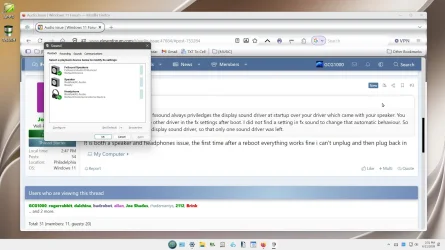
I suggest you check your Sound settings and see if could fix your problem. Good luck. BTW, it it looks like mine then everything should be OK.
 

My Computers My Computers

  • At a glance

    Windows 11 (25H2)Core(TM) i5-12400T12.0 GB (11.7 GB usable)Intel(R) UHD Graphics 730
    OS
    Windows 11 (25H2)
    Computer type
    PC/Desktop
    Manufacturer/Model
    HP Pavilion 577B5AA#ABA
    CPU
    Core(TM) i5-12400T
    Motherboard
    HP 89E9
    Memory
    12.0 GB (11.7 GB usable)
    Graphics Card(s)
    Intel(R) UHD Graphics 730
    Sound Card
    DFX Audio
    Monitor(s) Displays
    HO Generic PnP Monitor
    Screen Resolution
    1920 x 1080
    Hard Drives
    SAMSUNG MZVLQ10HBLB00BH1 SSD 1TB
    PSU
    HP Std. for this product
    Case
    All-in-One
    Cooling
    Fan
    Keyboard
    HP Wireless / Bluetooth
    Mouse
    HP Wireless / Bluetooth
    Internet Speed
    Link speed (Receive/Transmit): 1000/1000 (Mbps)
    Browser
    Firefox
    Antivirus
    Malwarebytes Pro / Windows Security
    Other Info
    Retired IT professional.
  • At a glance

    Windows 11 (25H2)Intel I-7-1165G78 GB DDR4-3200 SDRAMIntel Iris Xe Graphics
    Operating System
    Windows 11 (25H2)
    Computer type
    Laptop
    Manufacturer/Model
    HP 15tegooo [HP Pavilion Laptop Intel I-7]
    CPU
    Intel I-7-1165G7
    Motherboard
    HP
    Memory
    8 GB DDR4-3200 SDRAM
    Graphics card(s)
    Intel Iris Xe Graphics
    Sound Card
    Realtek
    Monitor(s) Displays
    HP HD micro edge, Bright View, 250 nits
    Screen Resolution
    1366 x768
    Hard Drives
    256 GB DD4-3200 SDRAM
    PSU
    HP
    Case
    Std HP Laptop
    Cooling
    Fan
    Keyboard
    std
    Mouse
    Logi M585
    Browser
    Edge
    Antivirus
    Windows Security
View attachment 174851

I suggest you check your Sound settings and see if could fix your problem. Good luck. BTW, it it looks like mine then everything should be OK.
Other than the first time after a reboot, when i plug any headphones in, it says unplugged
 

My Computer My Computer

At a glance

Windows 1112TH gen I716GB DDR5Intel
OS
Windows 11
Computer type
PC/Desktop
Manufacturer/Model
Dell CPS 8950
CPU
12TH gen I7
Memory
16GB DDR5
Graphics Card(s)
Intel
Monitor(s) Displays
28" Acer
Screen Resolution
1080P
Hard Drives
WD 2TB SSD, 1TB WD HDD
Antivirus
Windows
what happens if you plug them in, unplug them, then plug them in again.. and when it says unplugged - disable and re-enable that audio device? does it detect them then? when you're rebooting, all it can really be doing is restarting the service or driver. if it were hardware, a reboot wouldn't work every time
 

My Computer My Computer

At a glance

Windows 11 Pro
OS
Windows 11 Pro
what happens if you plug them in, unplug them, then plug them in again.. and when it says unplugged - disable and re-enable that audio device? does it detect them then? when you're rebooting, all it can really be doing is restarting the service or driver. if it were hardware, a reboot wouldn't work every time
Nope doesn't detect I tried the disable and enable still nothing, this is baffling
 

My Computer My Computer

At a glance

Windows 1112TH gen I716GB DDR5Intel
OS
Windows 11
Computer type
PC/Desktop
Manufacturer/Model
Dell CPS 8950
CPU
12TH gen I7
Memory
16GB DDR5
Graphics Card(s)
Intel
Monitor(s) Displays
28" Acer
Screen Resolution
1080P
Hard Drives
WD 2TB SSD, 1TB WD HDD
Antivirus
Windows
did you try restarting the audio service in services.msc as well?
 

My Computer My Computer

At a glance

Windows 11 Pro
OS
Windows 11 Pro
did you try restarting the audio service in services.msc as well?
yes i did, windows audio and windows audio endpoint builder
 

My Computer My Computer

At a glance

Windows 1112TH gen I716GB DDR5Intel
OS
Windows 11
Computer type
PC/Desktop
Manufacturer/Model
Dell CPS 8950
CPU
12TH gen I7
Memory
16GB DDR5
Graphics Card(s)
Intel
Monitor(s) Displays
28" Acer
Screen Resolution
1080P
Hard Drives
WD 2TB SSD, 1TB WD HDD
Antivirus
Windows
Uninstall fxsound and maxaudio.
Then a power off shutdown and restart. Does the problem still exist ?
 

My Computer My Computer

At a glance

win 10amd ryzen 5-2600ng skill sniper x 16gbnvidea gtx 1050
OS
win 10
Computer type
PC/Desktop
Manufacturer/Model
home built
CPU
amd ryzen 5-2600
Motherboard
gigabyte b450m-ds3h
Memory
ng skill sniper x 16gb
Graphics Card(s)
nvidea gtx 1050
Monitor(s) Displays
benq fp 92
Hard Drives
samsung 860 evo 500gb m2 ssd
PSU
antec ea550g
Case
nzxt noctis 450
Browser
edge
before you do that, run
Code:
rundll32 shell32.dll,Control_RunDLL mmsys.cpl
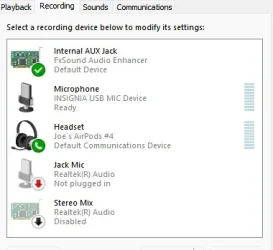
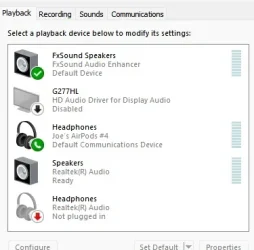
and post screenshots of your playback and recording tabs. i know you stated its all good, but just to verify
 

My Computer My Computer

At a glance

Windows 11 Pro
OS
Windows 11 Pro
before you do that, run
Code:
rundll32 shell32.dll,Control_RunDLL mmsys.cpl
and post screenshots of your playback and recording tabs. i know you stated its all good, but just to verify
R.webp
 

Attachments

  • PB.webp
    PB.webp
    17.3 KB · Views: 1

My Computer My Computer

At a glance

Windows 1112TH gen I716GB DDR5Intel
OS
Windows 11
Computer type
PC/Desktop
Manufacturer/Model
Dell CPS 8950
CPU
12TH gen I7
Memory
16GB DDR5
Graphics Card(s)
Intel
Monitor(s) Displays
28" Acer
Screen Resolution
1080P
Hard Drives
WD 2TB SSD, 1TB WD HDD
Antivirus
Windows
headphones is set as default communications device... right click it and set as default device
 

My Computer My Computer

At a glance

Windows 11 Pro
OS
Windows 11 Pro

My Computer My Computer

At a glance

Windows 1112TH gen I716GB DDR5Intel
OS
Windows 11
Computer type
PC/Desktop
Manufacturer/Model
Dell CPS 8950
CPU
12TH gen I7
Memory
16GB DDR5
Graphics Card(s)
Intel
Monitor(s) Displays
28" Acer
Screen Resolution
1080P
Hard Drives
WD 2TB SSD, 1TB WD HDD
Antivirus
Windows
right click fxsound speakers > set as default, then when the headphones dont show any green checks, unplug them and plug them back in and observe what it does while that dialog is open. does it just auto set the headphones as default communications device?
 

My Computer My Computer

At a glance

Windows 11 Pro
OS
Windows 11 Pro
right click fxsound speakers > set as default, then when the headphones dont show any green checks, unplug them and plug them back in and observe what it does while that dialog is open. does it just auto set the headphones as default communications device?
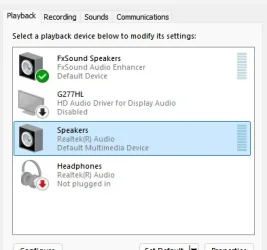
pluged in now this is what i get

p.webp
 

My Computer My Computer

At a glance

Windows 1112TH gen I716GB DDR5Intel
OS
Windows 11
Computer type
PC/Desktop
Manufacturer/Model
Dell CPS 8950
CPU
12TH gen I7
Memory
16GB DDR5
Graphics Card(s)
Intel
Monitor(s) Displays
28" Acer
Screen Resolution
1080P
Hard Drives
WD 2TB SSD, 1TB WD HDD
Antivirus
Windows
sounds odd, but i've had similar strange things on a dell optiplex before... what happens if you plug your headphones into the Line-In port?
 

My Computer My Computer

At a glance

Windows 11 Pro
OS
Windows 11 Pro
sounds odd, but i've had similar strange things on a dell optiplex before... what happens if you plug your headphones into the Line-In port?
I plugged them into every port on the back and nothing
 

My Computer My Computer

At a glance

Windows 1112TH gen I716GB DDR5Intel
OS
Windows 11
Computer type
PC/Desktop
Manufacturer/Model
Dell CPS 8950
CPU
12TH gen I7
Memory
16GB DDR5
Graphics Card(s)
Intel
Monitor(s) Displays
28" Acer
Screen Resolution
1080P
Hard Drives
WD 2TB SSD, 1TB WD HDD
Antivirus
Windows
I went into device manager uninstalled reltek, then rebooted, it seems to be working now
 

My Computer My Computer

At a glance

Windows 1112TH gen I716GB DDR5Intel
OS
Windows 11
Computer type
PC/Desktop
Manufacturer/Model
Dell CPS 8950
CPU
12TH gen I7
Memory
16GB DDR5
Graphics Card(s)
Intel
Monitor(s) Displays
28" Acer
Screen Resolution
1080P
Hard Drives
WD 2TB SSD, 1TB WD HDD
Antivirus
Windows
pluged in now this is what i get

View attachment 174876
I'm a long time user of DFX / FxSound. It has some minor issues.

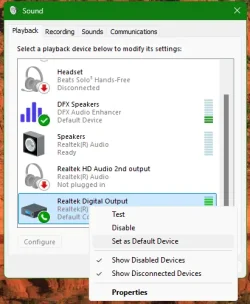
Right click on your default speakers and choose Set as Default Device. Don't worry about the FxSound Speakers for now. It should automatically work after you do the previous step.

2026-06-22_155951_.webp

Notice I have selected my digital output because I have an optical connection.
It doesn't appear that you have that.
 

My Computers My Computers

  • At a glance

    Windows 11 ProIntel Core i9-10900XCorsair 64 GB (4 x 16 GB) CMW64GX4M4C3000C15 ...GIGABYTE GeForce GTX 1660 Super Mini ITX 6 GB OC
    OS
    Windows 11 Pro
    Computer type
    PC/Desktop
    Manufacturer/Model
    Stigg's Build
    CPU
    Intel Core i9-10900X
    Motherboard
    GIGABYTE X299X DESIGNARE 10G
    Memory
    Corsair 64 GB (4 x 16 GB) CMW64GX4M4C3000C15 Vengeance RGB Pro 3000Mhz DDR4
    Graphics Card(s)
    GIGABYTE GeForce GTX 1660 Super Mini ITX 6 GB OC
    Sound Card
    Realtek ALC1220
    Monitor(s) Displays
    Samsung 27" FHD LED FreeSync Gaming Monitor (LS27F350FHEXXY)
    Screen Resolution
    1920 x 1080
    Hard Drives
    Samsung 970 Pro Series 1TB M.2 2280 NVMe SSD
    Western Digital Red Pro WD8003FFBX-68B9AN0 8 TB, 7200 RPM, SATA-III
    Western Digital Red Pro WD8003FFBX-68B9AN0 8 TB, 7200 RPM, SATA-III
    PSU
    Corsair HX1200 1200W 80 Plus Platinum
    Case
    Fractal Design Define 7 Black Solid Case
    Cooling
    Noctua NH-D15 Chromax Black
    Keyboard
    Razer Ornata V2
    Mouse
    Razer DeathAdder Essential
    Internet Speed
    FTTN 100Mbps / 40Mbps
    Browser
    Mozilla Firefox
    Antivirus
    N/A
    Other Info
    Logitech BRIO 4k Ultra HD USB-C Webcam
  • At a glance

    Windows 10 ProCore i7-8750HSK Hynix 32 GB (2 x 16 GB) HMA82GS6CJR8N-VK 1...NVIDIA GeForce GTX 1070
    Operating System
    Windows 10 Pro
    Computer type
    Laptop
    Manufacturer/Model
    ASUS ROG Zephyrus M GM501GS
    CPU
    Core i7-8750H
    Motherboard
    Zephyrus M GM501GS
    Memory
    SK Hynix 32 GB (2 x 16 GB) HMA82GS6CJR8N-VK 16 GB DDR4-2666 DDR4 SDRAM
    Graphics card(s)
    NVIDIA GeForce GTX 1070
    Sound Card
    Realtek ALC294
    Monitor(s) Displays
    AU Optronics B156HAN07.1 [15.6" LCD]
    Screen Resolution
    1920 x 1080
    Hard Drives
    Samsung MZVKW512HMJP-00000 512 GB, PCI-E 3.0 x4
    Samsung SSD 860 QVO 4TB 4 TB, SATA-III
    PSU
    N/A
    Case
    N/A
    Cooling
    N/A
    Keyboard
    PC/AT Enhanced PS2 Keyboard (101/102-Key)
    Mouse
    Razer DeathAdder Essential
    Internet Speed
    FTTN 100Mbps / 40Mbps
    Browser
    Mozilla Firefox
    Antivirus
    N/A
    Other Info
    USB2.0 HD UVC Webcam
Back
Top Bottom