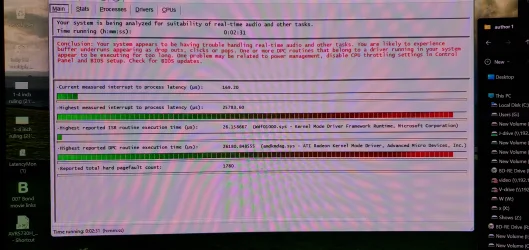
This is going to be a bit lengthy, but I’ve had issues since late August.
*In the beginning, I was using a Sennheiser GSX 1000 USB sound card, which allowed be to instantly switch between speakers and my headphones.
Other that one game via Steam, I had not really added anything new software wise, problems first started with sound only coming out of right speaker (Klipsch ProMedia 2.1 THX), and it was muffled. Spoke to Klipsch and was told something in the left probably went. I purchased a new pair of Creative T100 stereo speakers, I now had sound from both speakers, but I start having issues while viewing video files or watch videos from the web. The audio would cut in and out, sometimes so bad it would disappear totally. The Sennheiser card was old, so I ordered a new USB card, a G8 from Creative. While wait for it to arrive, I connected my new speakers to the back IO panel of my PC, the mobo uses Realtek audio, this was somewhat better but I would get some static and audio still cutting out just not as bad. Some games were worse than others, sometimes I got slight static when audio cut in and out, and I would drop a few FPS.
New G8 arrived, audio was not any better, sometimes I would lose all audio with my speakers, but still have it in my headphones. I went around and around with creative jumping through all kinds of hoops, a few months later they decided to RMA and sent me a new G8, this time I could not get any audio from headset or speakers for all audio sources with the new unit. Then I got Creative to swap the G8 for a new X4.
While I waited for it to arrive a few weeks went by because the USPS lost the package, and Creative and to ship another. I had no choice but to go back to audio via my mobo, light static while watching video files and YouTube. Gaming is the worst it’s ever been, currently playing SnowRunner, audio cutting in and out constantly which causes frame drops from 10 to 35, which causes freezing and sometimes the game will totally freeze for 30 - 45 seconds. New X4 arrived, same audio issues, everything is just as bad with the new USB unit.
I did everything, when creative units where removed, I would remove their software/drivers, empty all the temp folders for windows, empty recycle bin, and restart or cold boot my system. I did a complete uninstall of everything Realtek and reinstalled the latest Realtek drivers, none of this made any difference. AMD graphics drivers where updated a couple of times. I rechecked all my connections several times, everything is good. None of my games really tax my PC that bad, it’s fairly strong CPU and GPU wise and has plenty of RAM.
Sys Specs:
ASRock X870 PRO RS WiFi
AMD Ryzen 9 9950X3D
Memory - 64GB (32GBx2) - G.SKILL Trident Z5 Neo AMD EXPO Model F5-6000J3040G32GX2-TZ5NR
SSD - Crucial T700 Gen5 NVME M.2 SSD 2280 2TB PCI-Express 5.0
XFX Mercury AMD Radeon RX 9070XT OC
Corsair HX1200 1200 Watt Power Supply
NZXT Kraken Z73 360 Liquid CPU Cooler
Sound Blaster G8 USB sound - Mobo = 7.1 CH HD Audio (Realtek ALC1220 Audio Codec)
MSI MPG 321CURX QD-OLED 32" UHD 240Hz Curved Gaming Monitor
Case - Corsair 7000D Airflow
Win 11 Pro 64bit
*In the beginning, I was using a Sennheiser GSX 1000 USB sound card, which allowed be to instantly switch between speakers and my headphones.
Other that one game via Steam, I had not really added anything new software wise, problems first started with sound only coming out of right speaker (Klipsch ProMedia 2.1 THX), and it was muffled. Spoke to Klipsch and was told something in the left probably went. I purchased a new pair of Creative T100 stereo speakers, I now had sound from both speakers, but I start having issues while viewing video files or watch videos from the web. The audio would cut in and out, sometimes so bad it would disappear totally. The Sennheiser card was old, so I ordered a new USB card, a G8 from Creative. While wait for it to arrive, I connected my new speakers to the back IO panel of my PC, the mobo uses Realtek audio, this was somewhat better but I would get some static and audio still cutting out just not as bad. Some games were worse than others, sometimes I got slight static when audio cut in and out, and I would drop a few FPS.
New G8 arrived, audio was not any better, sometimes I would lose all audio with my speakers, but still have it in my headphones. I went around and around with creative jumping through all kinds of hoops, a few months later they decided to RMA and sent me a new G8, this time I could not get any audio from headset or speakers for all audio sources with the new unit. Then I got Creative to swap the G8 for a new X4.
While I waited for it to arrive a few weeks went by because the USPS lost the package, and Creative and to ship another. I had no choice but to go back to audio via my mobo, light static while watching video files and YouTube. Gaming is the worst it’s ever been, currently playing SnowRunner, audio cutting in and out constantly which causes frame drops from 10 to 35, which causes freezing and sometimes the game will totally freeze for 30 - 45 seconds. New X4 arrived, same audio issues, everything is just as bad with the new USB unit.
I did everything, when creative units where removed, I would remove their software/drivers, empty all the temp folders for windows, empty recycle bin, and restart or cold boot my system. I did a complete uninstall of everything Realtek and reinstalled the latest Realtek drivers, none of this made any difference. AMD graphics drivers where updated a couple of times. I rechecked all my connections several times, everything is good. None of my games really tax my PC that bad, it’s fairly strong CPU and GPU wise and has plenty of RAM.
Sys Specs:
ASRock X870 PRO RS WiFi
AMD Ryzen 9 9950X3D
Memory - 64GB (32GBx2) - G.SKILL Trident Z5 Neo AMD EXPO Model F5-6000J3040G32GX2-TZ5NR
SSD - Crucial T700 Gen5 NVME M.2 SSD 2280 2TB PCI-Express 5.0
XFX Mercury AMD Radeon RX 9070XT OC
Corsair HX1200 1200 Watt Power Supply
NZXT Kraken Z73 360 Liquid CPU Cooler
Sound Blaster G8 USB sound - Mobo = 7.1 CH HD Audio (Realtek ALC1220 Audio Codec)
MSI MPG 321CURX QD-OLED 32" UHD 240Hz Curved Gaming Monitor
Case - Corsair 7000D Airflow
Win 11 Pro 64bit
- Windows Build/Version
- 25H2 26200.7623
Attachments
My Computer
At a glance
Win 11 Pro 64 bitAMD Ryzen 9 7900X3DG.SKILL Trident Z5 Neo AMD EXPO 32GB (2 x 32G...Sapphire NITRO+ RX 7900 XTX Vapor-X
- OS
- Win 11 Pro 64 bit
- Computer type
- PC/Desktop
- Manufacturer/Model
- Custom
- CPU
- AMD Ryzen 9 7900X3D
- Motherboard
- ASRock X870 PRO RS WiFi
- Memory
- G.SKILL Trident Z5 Neo AMD EXPO 32GB (2 x 32GB) DDR5 6000 (PC5 48000) Memory Model F5-6000J3038F16GX2-TZ5NR
- Graphics Card(s)
- Sapphire NITRO+ RX 7900 XTX Vapor-X
- Sound Card
- Sound Blaster G8 USB sound
- Monitor(s) Displays
- Sound Blaster G8 USB sound
- Screen Resolution
- 2560 x 1440
- Hard Drives
- (Eternal) C-M.2 NVMe 2 TB - Crucial T700 Gen5, (2) WD gold 2TB, (1) SSD 1 TB. (External) 4TB, 14TB, 8TB and a 6TB
- PSU
- Corsair HX1200 1200 Watt
- Case
- Corsair 7000D Airflow
- Cooling
- NZXT Kraken Z73 360 Liquid CPU Cooler
- Keyboard
- Corsair K95 RGB
- Mouse
- Roccat Leadr
- Internet Speed
- Fiber 1GB symetrical
- Browser
- Brave, FF and Edge
- Antivirus
- Webroot, Malwarebytes