Solved Automatic video driver update driving me up the wall.


Subscriber43

Well-known member
Member
VIP
Local time
2:34 PM
Posts
317
OS
Windows 11 RP
I clean installed Win 11 Dev from the most recent ISO, and all went well. Windows started to download display driver from Microsoft. No way I could stop it, so I let it finish.
That's when the trouble started. I installed my Radeon drivers from AMD and rebooted. Then, I noticed Windows was downloading another display driver. No way I could stop this, too, so I let it finish.
At this point, I have three display drivers installed. No problem, I thought. I temporarily disabled updates, and used the AMD Cleanup Utility to remove all these drivers.
Then, I reinstalled my preferred driver. So far so good. I reinstalled all my software (Microsoft 365 etc.).

Used the computer for about an hour. Smooth sailing. Windows was performing quite nicely.
Then, I re-enabled Windows update. In horror, I watched helplessly as Windows downloaded the first driver again, then asked me to reboot, after which it downloaded the second (newer) driver again. So, I am back at square one.

These Windows drivers are dogs (no reflection on actual dogs). They perform poorly.
I have spent the last fer hours searching the web, but any solutions I tried do not help. These drivers are zombie-like in their ability to rise from the bit-bucket.

Any help would be seriously appreciated.
 

My Computer My Computer

At a glance

Windows 11 RPAMD Ryzen 5 Pro 3400GE @3.30 GHz (4.0 GHz Turbo)20 GB DDR4 2666 (1x16GB + 1x4GB)AMD Radeon Vega 11
OS
Windows 11 RP
Computer type
PC/Desktop
Manufacturer/Model
Lenovo ThinkCentre M75Q-1
CPU
AMD Ryzen 5 Pro 3400GE @3.30 GHz (4.0 GHz Turbo)
Motherboard
Lenovo 3151
Memory
20 GB DDR4 2666 (1x16GB + 1x4GB)
Graphics Card(s)
AMD Radeon Vega 11
Sound Card
Integrated
Monitor(s) Displays
AOC 2369
Screen Resolution
1920 x 1080
Hard Drives
WD 512 GB NVME + SPCC 240GB SATA SSD
PSU
External 65W
Case
Mini (1L)
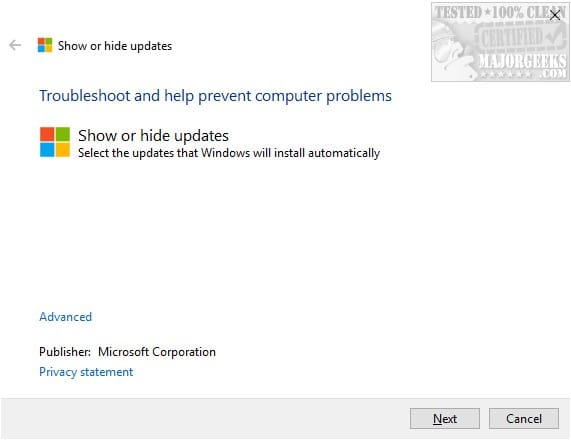
Uninstall all the drivers (again) and disable Windows Update for now. Go to the link at the bottom of this post and download the file. It's by Microsoft so it's good... run the file, click "Next", click "Hide Updates" and it should hopefully show the drivers listed. Select them if possible and continue following the app. If this works, you can re-enable Windows Update and reinstall the AMD Drivers without worry.


Screenshot 2022-03-27 231247.pngScreenshot 2022-03-27 231349.png
 

My Computers My Computers

  • At a glance

    Windows 11 Pro βIntel® Core™ i7-1165G732 GB DDR4-3200 SDRAMIntel® Iris® Xᵉ Graphics
    OS
    Windows 11 Pro β
    Computer type
    Laptop
    Manufacturer/Model
    HP Pavilion Laptop 15-eg0070wm
    CPU
    Intel® Core™ i7-1165G7
    Memory
    32 GB DDR4-3200 SDRAM
    Graphics Card(s)
    Intel® Iris® Xᵉ Graphics
    Screen Resolution
    1920x1080
    Hard Drives
    2TB PCIe® NVMe™ M.2 SSD
  • At a glance

    macOS Ventura3.4 GHz Quad-Core Intel Core i540 GB 2400 MHz DDR4Radeon Pro 570 4 GB
    Operating System
    macOS Ventura
    Computer type
    PC/Desktop
    Manufacturer/Model
    Apple iMac 27" 5K (2017)
    CPU
    3.4 GHz Quad-Core Intel Core i5
    Memory
    40 GB 2400 MHz DDR4
    Graphics card(s)
    Radeon Pro 570 4 GB
    Monitor(s) Displays
    27" 5K, 34" UW
    Screen Resolution
    Mon 1: 5120 × 2880 Mon 2: 2560 x 1080
    Hard Drives
    32GB NVME, 1TB SSD
Uninstall all the drivers (again) and disable Windows Update for now. Go to the link at the bottom of this post and download the file. It's by Microsoft so it's good... run the file, click "Next", click "Hide Updates" and it should hopefully show the drivers listed. Select them if possible and continue following the app. If this works, you can re-enable Windows Update and reinstall the AMD Drivers without worry.


View attachment 25571View attachment 25572
Okay, thanks. Trying this now.
 

My Computer My Computer

At a glance

Windows 11 RPAMD Ryzen 5 Pro 3400GE @3.30 GHz (4.0 GHz Turbo)20 GB DDR4 2666 (1x16GB + 1x4GB)AMD Radeon Vega 11
OS
Windows 11 RP
Computer type
PC/Desktop
Manufacturer/Model
Lenovo ThinkCentre M75Q-1
CPU
AMD Ryzen 5 Pro 3400GE @3.30 GHz (4.0 GHz Turbo)
Motherboard
Lenovo 3151
Memory
20 GB DDR4 2666 (1x16GB + 1x4GB)
Graphics Card(s)
AMD Radeon Vega 11
Sound Card
Integrated
Monitor(s) Displays
AOC 2369
Screen Resolution
1920 x 1080
Hard Drives
WD 512 GB NVME + SPCC 240GB SATA SSD
PSU
External 65W
Case
Mini (1L)
Okay, I uninstalled all the drivers, then disabled Windows Update.
Then I ran the wushowhide file, but it did not show any updates (possibly because update is off). I am going to re-enable and check for updates, then go from there.
 

My Computer My Computer

At a glance

Windows 11 RPAMD Ryzen 5 Pro 3400GE @3.30 GHz (4.0 GHz Turbo)20 GB DDR4 2666 (1x16GB + 1x4GB)AMD Radeon Vega 11
OS
Windows 11 RP
Computer type
PC/Desktop
Manufacturer/Model
Lenovo ThinkCentre M75Q-1
CPU
AMD Ryzen 5 Pro 3400GE @3.30 GHz (4.0 GHz Turbo)
Motherboard
Lenovo 3151
Memory
20 GB DDR4 2666 (1x16GB + 1x4GB)
Graphics Card(s)
AMD Radeon Vega 11
Sound Card
Integrated
Monitor(s) Displays
AOC 2369
Screen Resolution
1920 x 1080
Hard Drives
WD 512 GB NVME + SPCC 240GB SATA SSD
PSU
External 65W
Case
Mini (1L)
I didn't disable Windows Update when I ran it, so you're right, it may have blocked them... Turn it on and run that ASAP (before it gets the chance to download the bad driver).
 

My Computers My Computers

  • At a glance

    Windows 11 Pro βIntel® Core™ i7-1165G732 GB DDR4-3200 SDRAMIntel® Iris® Xᵉ Graphics
    OS
    Windows 11 Pro β
    Computer type
    Laptop
    Manufacturer/Model
    HP Pavilion Laptop 15-eg0070wm
    CPU
    Intel® Core™ i7-1165G7
    Memory
    32 GB DDR4-3200 SDRAM
    Graphics Card(s)
    Intel® Iris® Xᵉ Graphics
    Screen Resolution
    1920x1080
    Hard Drives
    2TB PCIe® NVMe™ M.2 SSD
  • At a glance

    macOS Ventura3.4 GHz Quad-Core Intel Core i540 GB 2400 MHz DDR4Radeon Pro 570 4 GB
    Operating System
    macOS Ventura
    Computer type
    PC/Desktop
    Manufacturer/Model
    Apple iMac 27" 5K (2017)
    CPU
    3.4 GHz Quad-Core Intel Core i5
    Memory
    40 GB 2400 MHz DDR4
    Graphics card(s)
    Radeon Pro 570 4 GB
    Monitor(s) Displays
    27" 5K, 34" UW
    Screen Resolution
    Mon 1: 5120 × 2880 Mon 2: 2560 x 1080
    Hard Drives
    32GB NVME, 1TB SSD
I didn't disable Windows Update when I ran it, so you're right, it may have blocked them... Turn it on and run that ASAP (before it gets the chance to download the bad driver).
Okay, I caught the first driver update. Not seeing the second. Maybe it's dependent on the first being installed?
Will keep at it. Nothing to lose (except time). Nifty little tool there, though. Thanks for pointing me to it.
 

My Computer My Computer

At a glance

Windows 11 RPAMD Ryzen 5 Pro 3400GE @3.30 GHz (4.0 GHz Turbo)20 GB DDR4 2666 (1x16GB + 1x4GB)AMD Radeon Vega 11
OS
Windows 11 RP
Computer type
PC/Desktop
Manufacturer/Model
Lenovo ThinkCentre M75Q-1
CPU
AMD Ryzen 5 Pro 3400GE @3.30 GHz (4.0 GHz Turbo)
Motherboard
Lenovo 3151
Memory
20 GB DDR4 2666 (1x16GB + 1x4GB)
Graphics Card(s)
AMD Radeon Vega 11
Sound Card
Integrated
Monitor(s) Displays
AOC 2369
Screen Resolution
1920 x 1080
Hard Drives
WD 512 GB NVME + SPCC 240GB SATA SSD
PSU
External 65W
Case
Mini (1L)
Based on the way you explained it, I assumed the second was dependent on the first so taking care of that one solves the second automatically.

If you've solved your problem, please scroll to just above the first post and mark it as solved to let others know. :D
 

My Computers My Computers

  • At a glance

    Windows 11 Pro βIntel® Core™ i7-1165G732 GB DDR4-3200 SDRAMIntel® Iris® Xᵉ Graphics
    OS
    Windows 11 Pro β
    Computer type
    Laptop
    Manufacturer/Model
    HP Pavilion Laptop 15-eg0070wm
    CPU
    Intel® Core™ i7-1165G7
    Memory
    32 GB DDR4-3200 SDRAM
    Graphics Card(s)
    Intel® Iris® Xᵉ Graphics
    Screen Resolution
    1920x1080
    Hard Drives
    2TB PCIe® NVMe™ M.2 SSD
  • At a glance

    macOS Ventura3.4 GHz Quad-Core Intel Core i540 GB 2400 MHz DDR4Radeon Pro 570 4 GB
    Operating System
    macOS Ventura
    Computer type
    PC/Desktop
    Manufacturer/Model
    Apple iMac 27" 5K (2017)
    CPU
    3.4 GHz Quad-Core Intel Core i5
    Memory
    40 GB 2400 MHz DDR4
    Graphics card(s)
    Radeon Pro 570 4 GB
    Monitor(s) Displays
    27" 5K, 34" UW
    Screen Resolution
    Mon 1: 5120 × 2880 Mon 2: 2560 x 1080
    Hard Drives
    32GB NVME, 1TB SSD
Based on the way you explained it, I assumed the second was dependent on the first so taking care of that one solves the second automatically.

If you've solved your problem, please scroll to just above the first post and mark it as solved to let others know. :D
Will do. Thanks again.
 

My Computer My Computer

At a glance

Windows 11 RPAMD Ryzen 5 Pro 3400GE @3.30 GHz (4.0 GHz Turbo)20 GB DDR4 2666 (1x16GB + 1x4GB)AMD Radeon Vega 11
OS
Windows 11 RP
Computer type
PC/Desktop
Manufacturer/Model
Lenovo ThinkCentre M75Q-1
CPU
AMD Ryzen 5 Pro 3400GE @3.30 GHz (4.0 GHz Turbo)
Motherboard
Lenovo 3151
Memory
20 GB DDR4 2666 (1x16GB + 1x4GB)
Graphics Card(s)
AMD Radeon Vega 11
Sound Card
Integrated
Monitor(s) Displays
AOC 2369
Screen Resolution
1920 x 1080
Hard Drives
WD 512 GB NVME + SPCC 240GB SATA SSD
PSU
External 65W
Case
Mini (1L)
You'll also find guidance on the tool & a better download link in
Hide or Show Windows Updates - TenForumsTutorials
This tutorial hasn't yet been copied across into ElevenForum but, when it is, it will be exactly the same.
The TenForumsTutorials direct download link for the tool wushowhide.diagcab still works and it currently provides a 2021 version of the tool. The MajorGeeks download is the original 2015 version.

MS have withdrawn their explanatory KBs on the subject [at some stage since late 2017].

Denis
 
Last edited:

My Computer My Computer

At a glance

Windows 11 Home x64 Version 25H2 Build 26200....
OS
Windows 11 Home x64 Version 25H2 Build 26200.8037
What version of Windows are you running. home or pro? If pro then you can disable driver updates with WU altogether in GPedit
 

My Computer My Computer

At a glance

Windows 11 Pro Beta, 11 Dev, W11 CanaryAMD Ryzen™ 9 5900HX32GBNVIDIA® GeForce RTX™ 3070 8GB GDDR6
OS
Windows 11 Pro Beta, 11 Dev, W11 Canary
Computer type
Laptop
Manufacturer/Model
Dell Alienware M15 Ryzen Edition R6
CPU
AMD Ryzen™ 9 5900HX
Memory
32GB
Graphics Card(s)
NVIDIA® GeForce RTX™ 3070 8GB GDDR6
Hard Drives
1 x Samsung 980 Pro 1TB
1 x Samsung 970 Evo Plus 1TB
You can disable driver updates with Winaero Tweaker also.


Image1.png
 

My Computers My Computers

  • At a glance

    Win 11 Home ♦♦♦26200.8655 ♦♦♦♦♦♦♦25H2AMD Ryzen 7 3700XG.Skill (F4-3200C14D-16GTZKW)EVGA RTX 2070 (08G-P4-2171-KR)
    OS
    Win 11 Home ♦♦♦26200.8655 ♦♦♦♦♦♦♦25H2
    Computer type
    PC/Desktop
    Manufacturer/Model
    Built by Ghot® [May 2020]
    CPU
    AMD Ryzen 7 3700X
    Motherboard
    Asus Pro WS X570-ACE (BIOS 5302)
    Memory
    G.Skill (F4-3200C14D-16GTZKW)
    Graphics Card(s)
    EVGA RTX 2070 (08G-P4-2171-KR)
    Sound Card
    Realtek ALC1220P / ALC S1220A
    Monitor(s) Displays
    Dell U3011 30"
    Screen Resolution
    2560 x 1600
    Hard Drives
    2x Samsung 860 EVO 500GB,
    WD 4TB Black FZBX - SATA III,
    WD 8TB Black FZBX - SATA III,
    DRW-24B1ST CD/DVD Burner
    PSU
    PC Power & Cooling 750W Quad EPS12V
    Case
    Cooler Master ATCS 840 Tower
    Cooling
    CM Hyper 212 EVO (push/pull)
    Keyboard
    Ducky DK9008 Shine II Blue LED
    Mouse
    Logitech Optical M-100
    Internet Speed
    300/300
    Browser
    Firefox (latest)
    Antivirus
    Bitdefender Total Security
    Other Info
    Speakers: Klipsch Pro Media 2.1
  • At a glance

    Windows XP Pro 32bit w/SP3AMD Athlon 64 X2 5000+ (OC'd @ 3.2Ghz)TWIN2X2048-6400C4DHX (2 x 1GB, DDR2 800)EVGA 256-P2-N758-TR GeForce 8600GT SSC
    Operating System
    Windows XP Pro 32bit w/SP3
    Computer type
    PC/Desktop
    Manufacturer/Model
    Built by Ghot® (not in use)
    CPU
    AMD Athlon 64 X2 5000+ (OC'd @ 3.2Ghz)
    Motherboard
    ASUS M2N32-SLI Deluxe Wireless Edition
    Memory
    TWIN2X2048-6400C4DHX (2 x 1GB, DDR2 800)
    Graphics card(s)
    EVGA 256-P2-N758-TR GeForce 8600GT SSC
    Sound Card
    Onboard
    Monitor(s) Displays
    ViewSonic G90FB Black 19" Professional (CRT)
    Screen Resolution
    up to 2048 x 1536
    Hard Drives
    WD 36GB 10,000rpm Raptor SATA
    Seagate 80GB 7200rpm SATA
    Lite-On LTR-52246S CD/RW
    Lite-On LH-18A1P CD/DVD Burner
    PSU
    PC Power & Cooling Silencer 750 Quad EPS12V
    Case
    Generic Beige case, 80mm fans
    Cooling
    ZALMAN 9500A 92mm CPU Cooler
    Keyboard
    Logitech Classic Keybooard 200
    Mouse
    Logitech Optical M-BT96a
    Internet Speed
    300/300
    Browser
    Firefox 3.x ??
    Antivirus
    Symantec (Norton)
    Other Info
    Still assembled, still runs. Haven't turned it on for 15 years?
You can disable driver updates with Winaero Tweaker also.
Ah, I don't use it but good to know for future reference
 

My Computer My Computer

At a glance

Windows 11 Pro Beta, 11 Dev, W11 CanaryAMD Ryzen™ 9 5900HX32GBNVIDIA® GeForce RTX™ 3070 8GB GDDR6
OS
Windows 11 Pro Beta, 11 Dev, W11 Canary
Computer type
Laptop
Manufacturer/Model
Dell Alienware M15 Ryzen Edition R6
CPU
AMD Ryzen™ 9 5900HX
Memory
32GB
Graphics Card(s)
NVIDIA® GeForce RTX™ 3070 8GB GDDR6
Hard Drives
1 x Samsung 980 Pro 1TB
1 x Samsung 970 Evo Plus 1TB
You'll also find guidance on the tool & a better download link in
Hide or Show Windows Updates - TenForumsTutorials
This tutorial hasn't yet been copied across into ElevenForum but, when it is, it will be exactly the same.
The TenForumsTutorials direct download link for the tool wushowhide.diagcab still works and it currently provides a 2021 version of the tool. The MajorGeeks download is the original 2015 version.

MS have withdrawn their explanatory KBs on the subject [at some stage since late 2017].

Denis
Thanks. Tool downloaded.
 

My Computer My Computer

At a glance

Windows 11 RPAMD Ryzen 5 Pro 3400GE @3.30 GHz (4.0 GHz Turbo)20 GB DDR4 2666 (1x16GB + 1x4GB)AMD Radeon Vega 11
OS
Windows 11 RP
Computer type
PC/Desktop
Manufacturer/Model
Lenovo ThinkCentre M75Q-1
CPU
AMD Ryzen 5 Pro 3400GE @3.30 GHz (4.0 GHz Turbo)
Motherboard
Lenovo 3151
Memory
20 GB DDR4 2666 (1x16GB + 1x4GB)
Graphics Card(s)
AMD Radeon Vega 11
Sound Card
Integrated
Monitor(s) Displays
AOC 2369
Screen Resolution
1920 x 1080
Hard Drives
WD 512 GB NVME + SPCC 240GB SATA SSD
PSU
External 65W
Case
Mini (1L)
What version of Windows are you running. home or pro? If pro then you can disable driver updates with WU altogether in GPedit
Home, but I don't want to disable all driver updates, just video drivers updates. Is that possible?
 

My Computer My Computer

At a glance

Windows 11 RPAMD Ryzen 5 Pro 3400GE @3.30 GHz (4.0 GHz Turbo)20 GB DDR4 2666 (1x16GB + 1x4GB)AMD Radeon Vega 11
OS
Windows 11 RP
Computer type
PC/Desktop
Manufacturer/Model
Lenovo ThinkCentre M75Q-1
CPU
AMD Ryzen 5 Pro 3400GE @3.30 GHz (4.0 GHz Turbo)
Motherboard
Lenovo 3151
Memory
20 GB DDR4 2666 (1x16GB + 1x4GB)
Graphics Card(s)
AMD Radeon Vega 11
Sound Card
Integrated
Monitor(s) Displays
AOC 2369
Screen Resolution
1920 x 1080
Hard Drives
WD 512 GB NVME + SPCC 240GB SATA SSD
PSU
External 65W
Case
Mini (1L)

My Computer My Computer

At a glance

Windows 11 RPAMD Ryzen 5 Pro 3400GE @3.30 GHz (4.0 GHz Turbo)20 GB DDR4 2666 (1x16GB + 1x4GB)AMD Radeon Vega 11
OS
Windows 11 RP
Computer type
PC/Desktop
Manufacturer/Model
Lenovo ThinkCentre M75Q-1
CPU
AMD Ryzen 5 Pro 3400GE @3.30 GHz (4.0 GHz Turbo)
Motherboard
Lenovo 3151
Memory
20 GB DDR4 2666 (1x16GB + 1x4GB)
Graphics Card(s)
AMD Radeon Vega 11
Sound Card
Integrated
Monitor(s) Displays
AOC 2369
Screen Resolution
1920 x 1080
Hard Drives
WD 512 GB NVME + SPCC 240GB SATA SSD
PSU
External 65W
Case
Mini (1L)
Home, but I don't want to disable all driver updates, just video drivers updates. Is that possible?
Probably not, there's only the 1 option.
 

My Computer My Computer

At a glance

Windows 11 Pro Beta, 11 Dev, W11 CanaryAMD Ryzen™ 9 5900HX32GBNVIDIA® GeForce RTX™ 3070 8GB GDDR6
OS
Windows 11 Pro Beta, 11 Dev, W11 Canary
Computer type
Laptop
Manufacturer/Model
Dell Alienware M15 Ryzen Edition R6
CPU
AMD Ryzen™ 9 5900HX
Memory
32GB
Graphics Card(s)
NVIDIA® GeForce RTX™ 3070 8GB GDDR6
Hard Drives
1 x Samsung 980 Pro 1TB
1 x Samsung 970 Evo Plus 1TB
I see. I guess I will have to use that show/hide tool if this happens again. Thanks again.
 

My Computer My Computer

At a glance

Windows 11 RPAMD Ryzen 5 Pro 3400GE @3.30 GHz (4.0 GHz Turbo)20 GB DDR4 2666 (1x16GB + 1x4GB)AMD Radeon Vega 11
OS
Windows 11 RP
Computer type
PC/Desktop
Manufacturer/Model
Lenovo ThinkCentre M75Q-1
CPU
AMD Ryzen 5 Pro 3400GE @3.30 GHz (4.0 GHz Turbo)
Motherboard
Lenovo 3151
Memory
20 GB DDR4 2666 (1x16GB + 1x4GB)
Graphics Card(s)
AMD Radeon Vega 11
Sound Card
Integrated
Monitor(s) Displays
AOC 2369
Screen Resolution
1920 x 1080
Hard Drives
WD 512 GB NVME + SPCC 240GB SATA SSD
PSU
External 65W
Case
Mini (1L)

My Computers My Computers

  • At a glance

    Windows 11 Pro βIntel® Core™ i7-1165G732 GB DDR4-3200 SDRAMIntel® Iris® Xᵉ Graphics
    OS
    Windows 11 Pro β
    Computer type
    Laptop
    Manufacturer/Model
    HP Pavilion Laptop 15-eg0070wm
    CPU
    Intel® Core™ i7-1165G7
    Memory
    32 GB DDR4-3200 SDRAM
    Graphics Card(s)
    Intel® Iris® Xᵉ Graphics
    Screen Resolution
    1920x1080
    Hard Drives
    2TB PCIe® NVMe™ M.2 SSD
  • At a glance

    macOS Ventura3.4 GHz Quad-Core Intel Core i540 GB 2400 MHz DDR4Radeon Pro 570 4 GB
    Operating System
    macOS Ventura
    Computer type
    PC/Desktop
    Manufacturer/Model
    Apple iMac 27" 5K (2017)
    CPU
    3.4 GHz Quad-Core Intel Core i5
    Memory
    40 GB 2400 MHz DDR4
    Graphics card(s)
    Radeon Pro 570 4 GB
    Monitor(s) Displays
    27" 5K, 34" UW
    Screen Resolution
    Mon 1: 5120 × 2880 Mon 2: 2560 x 1080
    Hard Drives
    32GB NVME, 1TB SSD
There's a much easier way to prevent Windows Update from installing drivers. It will still download them but they will be shown as optional updates and you can choose to install them or not. Here is the procedure.

Click on Start, Settings, System, About, Advanced System Settings. Then click on the Hardware tab and then Device Installation Settings. Select the NO button and save the changes. Ignore the warning. There are no adverse effects.
 

My Computers My Computers

  • At a glance

    Windows 11 HomeAMD Ryzen 5 5600X16 GB Corsair Vengeance LPX DDR4-3200PowerColor Red Devil Radeon RX 6600XT with 8G...
    OS
    Windows 11 Home
    Computer type
    PC/Desktop
    Manufacturer/Model
    Custom built
    CPU
    AMD Ryzen 5 5600X
    Motherboard
    MSI B550-A Pro
    Memory
    16 GB Corsair Vengeance LPX DDR4-3200
    Graphics Card(s)
    PowerColor Red Devil Radeon RX 6600XT with 8GB GDDR6
    Sound Card
    Realtek integrated
    Monitor(s) Displays
    Acer Nitro 24" RG241Y 144hz refresh rate
    Screen Resolution
    1920 X 1080
    Hard Drives
    Western Digital Black SN770 1 TB NVMe SSD
    Samsung 860 QVO 1 TB SATA SSD
    Seagate Barracuda 1 TB HDD
    PSU
    LEPA B650 650 watt
    Case
    Enermax Coenus
    Cooling
    Cooler Master Hyper T4 air
    Keyboard
    CM Storm Devastator
    Mouse
    E-Blue Cobra Jr.
    Internet Speed
    100mbs
    Browser
    Microsoft Edge Chromium
    Antivirus
    Microsoft Defender
    Other Info
    Optical Drives: LG DVD-RW and Pioneer BluRay/ DVD burner
  • At a glance

    Windows 11 HomeAMD Ryzen 9 6900HS16 GB Samsung DDR5-4800Integrated Radeon 680M and discrete Radeon RX...
    Operating System
    Windows 11 Home
    Computer type
    Laptop
    Manufacturer/Model
    Asus ROG Zephyrus G14
    CPU
    AMD Ryzen 9 6900HS
    Motherboard
    Asus board (GA402RK)
    Memory
    16 GB Samsung DDR5-4800
    Graphics card(s)
    Integrated Radeon 680M and discrete Radeon RX 6800S with 8GB GDDR6
    Sound Card
    Integrated Realtek with Dolby Atmos
    Monitor(s) Displays
    Laptop screen 14" WQXGA, IPS, 120hz refresh rate
    Screen Resolution
    2560 X 1600
    Hard Drives
    1TB PCIe Gen 4 SSD (WD Black SN850)
    PSU
    Battery power and Asus power brick/adapter. Also has USB-C charging
    Case
    Laptop
    Cooling
    Laptop fans in vapor chamber
    Keyboard
    Built in RGB backlit
    Mouse
    Touchpad and Omoton bluetooth mouse
    Internet Speed
    100mbps
    Browser
    Edge Chromium
    Antivirus
    Microsoft Defender

Latest Support Threads

Back
Top Bottom